1
optional power adapter. When using the optional power adapter, ensure that it is
connected to the mains and powering the LINDY CPU Switch Multiscreen before
you switch on the connected computers. Failure to switch the LINDY CPU Switch
Multiscreen and computers on in the correct order can lead to the mouse and/or
keyboard not being recognised by the computers when they are switched on.
2.4 ‘Interface powered’ operation without the optional power
adapter
The LINDY CPU Switch Multiscreen draws its power from the connected computers
via the keyboard cables. A single keyboard connection is normally sufficient to
power the LINDY CPU Switch Multiscreen provided that the cable is no longer than
5 metres. If more than one computer is connected then the power will be intelligently
drawn from all computers. Cables longer than 5 metres may be used provided that
the LINDY CPU Switch Multiscreen is already powered by another connected
computer or the optional power adapter. If you are cascading the LINDY CPU
Switch Multiscreen to another LINDY CPU Switch Multiscreen then a power adapter
must be connected to all LINDY CPU Switch Multiscreens.
2.5 Configuring your PCs
Configure your PC in the same way that you would if your keyboard, mouse and
monitor were all connected directly to your PC. LINDY CPU Switch Multiscreen
emulates Microsoft compatible serial, IntelliMouse, IntelliMouse Explorer and PS/2
mice, so ensure that your PC software is configured for a Microsoft mouse of the
correct type. Refer to the list of supported drivers in section 2.1.
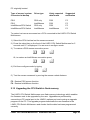
2.6 Configuring the LINDY CPU Switch Multiscreen
The LINDY CPU Switch Multiscreen is supplied pre-configured with factory defaults
which are suitable for most applications. There are a number of more advanced
options which can be set by the user. These are stored in the LINDY CPU Switch
Multiscreen’s EEPROM memory and are retained when the power is disconnected.
The options may be changed whilst the LINDY CPU Switch Multiscreen is in
configure mode. You may enter configure mode at initial power on or whilst the
LINDY CPU Switch Multiscreen is running:
LINDY CPU Switch Multiscreen Installation and Use
Page 14