1
5.
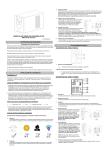
USB Port to PC
This port allows connection and
communication from the USB port
on the computer to the UPS unit. The
UPS communicates its status to the
®
PowerPanel Personal Edition
software. This interface is also
compatible with the UPS service
provided by Windows 98, Windows
ME, Windows NT, Windows 2000,
Windows XP, Windows Server
2003.
The unit is not providing
battery power.
Shutdown your computer and turn the
UPS off. Wait 10 seconds and turn the
UPS back on. This should reset the unit.
The serial cable is not the
cable that was provided with
the unit.
You must use the cable included with the
unit for the software.
TECHNICAL SPECIFICATIONS
NOTE: Only one of these two ports
can be used as communication and
control of the UPS unit at one time.
Functional Test
AC Mode
The UPS delivers power to the loads derived from the utility and maintains proper battery charge. It also
regulates the output voltage to within a narrow range.
On-Battery Mode
The UPS operates on battery when the line voltage or frequency has fallen outside the limits. Local
users are alerted to this mode of operation by visual and audible indicators. The UPS provides power to
the load from the battery and through its inverter and the output voltage and frequency of the UPS are
regulated within a narrow range
1.
Switch On
Press the power switch on the front panel then the green LED will light up.
2.
Switch Off
Press again the power switch, the LED on the front panel will go off.
3.
Cold Start / Start on Battery:
This UPS can be turned on even when AC is not present.
Press the power switch on the front panel then the green LED will light up and flashing.
ROUTINE MAINTENANCE AND STORAGE
ROUTINE MAINTENANCE
1.
Use dry soft clothes to clean the front panel and plastic parts. Do not use any detergent that
contains alcoholic ingredient.
2.
The expected lifetime of the battery is around 3 years. Improper operation and harsh environment
will reduce the actual lifetime.
3.
Unplug the UPS from power inlet if the UPS will not operate for long period of time.
STORAGE
1.
First turn off your UPS and disconnect its power cord from the wall outlet. Disconnect all cables
connected the UPS to avoid battery drain.
2.
The UPS should be stored in a cool dry location.
3.
Make sure the battery is fully charged before the UPS is stored.
4.
For extended storage in moderate climates, the battery should be charged for 12 hours every 3
months by plugging the power cord into the wall receptacle and turning on the main switch. Repeat
it every 2 months in high temperature locations.
Model
Capacity (VA)
Capacity (Watts)
Input
Input Voltage Range
Frequency Range
Output
On Battery Output
Voltage
On Battery Output
Frequency
Overload Protection
Physical
Total # of UPS
Receptacles
Maximum Dimensions
Weight
Battery
Sealed Maintenance
Free Lead Acid Battery
Typical Recharge Time
Warning Diagnostics
Indicators
Audible Alarms
Environmental
Operating Temperature
Operating Relative
Humidity
Communication
®
PowerPanel
Personal Edition
Software
Value 400E-GP
400VA
240W
Value 600E-GP
600VA
360W
Value 800E-GP
800VA
480W
165-270Vac
45~65 Hz (Auto Sensing)
Simulated Sine Wave at 230Vac +/-10%
50/60 Hz +/-1%
On Utility: Fuse, On Battery: Internal Current Limiting
(3) IEC 320 C13
4.2 Kgs / 9.3 Lbs
32cm(L)*10cm(W)*14cm(H)
5.3 Kgs / 11.7 Lbs
6.1 Kgs / 13.4 Lbs
12V / 4.5Ah x1
12V / 7Ah x1
12V / 9Ah x1
8 Hours
Power On / Using Battery
On Battery, Low Battery, Overload
+32°F to 95°F ( 0°C to 35°C )
0 to 95% NON-CONDENSING
Windows2000/NT/XP/Server 2003/Vista,Mac OS, Linux
Management
Auto-Charger
Auto-Restart
USB
Other Features
Green Power
Yes
Yes
Yes
Yes (Energy saving technology)
DEFINITIONS FOR ILLUMINATED LED INDICATORS
TROUBLE SHOOTING
Problem
The UPS does
not perform
expected
runtime.
The UPS will not
turn on.
Possible Cause
Recharge the battery by leaving the UPS
plugged in.
Battery is slightly worn out.
Contact CyberPower Systems at
[email protected]
The battery is worn out.
Mechanical problem.
Fuse is blown due to
overload
Outlets do not
provide power to
equipment
Turn the UPS off. Wait 10 seconds and
then turn the UPS on.
The unit must be connected to a
220-240V 50/60Hz outlet.
Contact CyberPower Systems at
[email protected]
Contact CyberPower Systems at
[email protected]
Turn the UPS off and unplug at least one
piece connected equipment. Unplug the
power cord of the UPS then remove the
fuse compartment beneath the power inlet
of the UPS and replace the blown fuse
with a spare one. Lock the compartment
back to the UPS. Connect power cord
then turn the UPS on. Make sure that your
spare fuse meets the specification.
Batteries are discharged
Allow the unit to recharge for at least 4
hours.
Unit has been damaged by
a surge or spike.
Contact CyberPower Systems at
[email protected]
The serial/USB cable is not
connected.
Connect the serial/USB cable to the UPS
unit and an open serial port on the back
of the computer. You must use the cable
that came with the unit.
The serial/USB cable is
connected to the wrong
port.
Try another serial/USB port of your
computer.
®
PowerPanel
Personal Edition
is inactive (all
icons are gray).
Alarm
Fuse
On
Off
Normal
Normal
Flash
Two
Beeps
Normal
Utility Failure - The UPS is providing battery power to outlets.
Flash
Rapid
Beeps
Normal
Utility Failure - The UPS is providing battery power. The
rapid beeps indicate the battery will run out of power shortly.
On/Flash
Long
Beep
Normal/
Blown
Overload - Occurs when connected equipment exceeds the
rating of the unit. Turn the UPS off and unplug at least one
piece of equipment from the UPS. Check the fuse and do the
replacement if necessary. Turn the UPS on.
Solution
Batteries are not fully
charged.
The on/off switch is
designed to prevent
damage by rapidly turning it
off and on.
The unit is not connected to
an AC outlet.
Condition
LED
For more information, visit eu.cyberpowersystems.com or contact
CyberPower Systems B.V.
Flight Forum 3545 5657DW Eindhoven The Netherlands
Tel: +31 40 2348170, E-MAIL: [email protected]
CyberPower Systems Inc. (USA) 4241 12th Avenue East Suite 400 Shakopee, MN 55379, U.S.A.
Tel: +1 952 4039500, Fax: +1 952 4030009, E-MAIL: [email protected]
Entire contents copyright ©2004 CyberPower Systems B.V., All rights reserved. Reproduction in whole
®
®
or in part without permission is prohibited. PowerPanel and PowerPanel Plus are trademarks of
CyberPower Systems (USA) Inc.
CyberPower warrants to you, the original purchaser, that CyberPower UPS will be free from defects in
design, assembly, materials and workmanship for two years ( battery is only one year) from the date of
original purchase.
Any warranty services, please contact your local dealers or distributors.