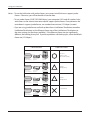
1
LinkStation User Manual
www.buffalotech.com
35011114 ver.01
Table of Contents
Chapter 1
Using your LinkStation..................................................... 4
LinkStation Configuration Utility............................................... 4
Adding shared folders.............................................................. 7
Access Restrictions......................................................................... 9
FTP Server...................................................................................... 15
Direct Copy..................................................................................... 18
Users/Groups........................................................................... 20
Adding Users.................................................................................. 20
Add users as shown below............................................................. 20
Adding Groups................................................................................ 22
Admin Password............................................................................. 23
Network.................................................................................... 24
Jumbo Frames................................................................................ 24
System Settings....................................................................... 26
Name, Date and Time..................................................................... 26
System-Storage....................................................................... 28
Check Disk...................................................................................... 28
Format a Drive................................................................................ 30
Adding Storage............................................................................... 32
Remove Disk................................................................................... 36
System-Backup........................................................................ 37
Time Machine................................................................................. 37
System-Backup............................................................................... 42
RAID Arrays............................................................................. 50
System-Maintenance............................................................... 55
E-mail Notification........................................................................... 55
System Power Management.................................................... 57
LinkStation User Manual
1
UPS Settings................................................................................... 57
Sleep Timer..................................................................................... 58
Restore Factory Defaults................................................................ 60
Format the LinkStation.................................................................... 62
Extensions................................................................................ 63
WebAccess..................................................................................... 63
Print Server..................................................................................... 71
BitTorrent Client.............................................................................. 78
Media Server................................................................................... 84
Using iTunes with the Media Server............................................... 95
Web/Database Server (LS-WXL, LS-WSXL only).................... 96
Chapter 2
NAS Navigator2.................................................................98
Chapter 3
Web Administration Tool.................................................. 103
Home........................................................................................ 103
Shared Folders......................................................................... 104
Users/Groups........................................................................... 107
Network.................................................................................... 110
System..................................................................................... 113
Extensions................................................................................ 126
Appendix
. .................................................................... 130
Default Configuration Settings................................................. 130
Mapping Additional Shares...................................................... 131
Windows......................................................................................... 131
LinkStation User Manual
2
Mac OS X........................................................................................ 132
File Sharing Security Level Change Tool................................. 133
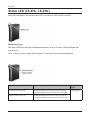
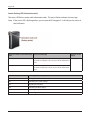
Status LED (LS-XHL, LS-CHL)................................................ 135
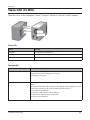
Status LED (LS-WXL).............................................................. 138
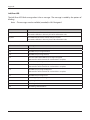
Status LED (LS-WSXL)............................................................ 142
Compliance Information........................................................... 145
Data Backup............................................................................. 146
GPL Information....................................................................... 146
LinkStation User Manual
3
Chapter 1
Using your LinkStation
LinkStation Configuration Utility
To configure your LinkStation, use the web-based configuration utility from a browser on a
computer connected to the same network.
1
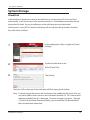
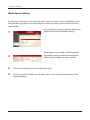
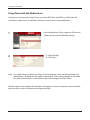
Launch NAS Navigator2. For Windows, click on the [BUFFALO NAS Navigator2] icon on your
desktop. For Mac OS X, double-click on the [NAS Navigator2] icon in the Dock.
2
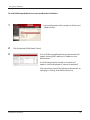
Right-click on the LinkStation icon (on Mac OS X,
click the icon while holding down the control key)
and select [Open Web Setting] from the menu.
Notes: If multiple LinkStations and TeraStations
are connected to the network, multiple
icons will be displayed. Click on the correct
LinkStation.
3
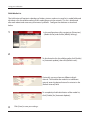
Record the LinkStation’s IP address from the
bottom right of the NAS Navigator2 window.
Enter your username and password, and click [Login].
Initially, use the default username and password:
Username: admin
Password: password
After you log in, change the password for security.
LinkStation User Manual
4
Using your LinkStation
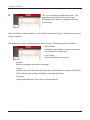
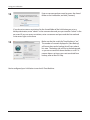
4
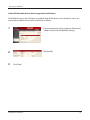
This is the LinkStation’s configuration utility. This
page displays the LinkStation’s current status,
including name, IP address, workgroup, and hard
drive settings.
Note: Use Firefox, Internet Explorer, or Safari with the configuration utility. Other browsers may not
display it correctly.
The configuration utility is organized by tabs across the top. The following tabs are available.
• Shared Folder
Add/delete shared folders, set access restrictions,
and configure for a direct copy.
• Users/Groups
Register and delete users/groups.
• Network
Register and delete a network or workgroup.
• System
Perform Name, time, disk check format, backup, mail notification settings, timer ON/OFF,
UPS synchronization settings, initialization, complete disk format.
• Extensions
Configure for WebAccess, Print Server, and Time Machine.
LinkStation User Manual
5
Using your LinkStation
To open the LinkStation’s configuration utility from a different computer, open a browser and type the
LinkStation’s IP address into the URL field. You recorded the LinkStation’s IP address in step 2 on page 3.
If you have a Mac, you can open the configuration utility from "Bonjour".
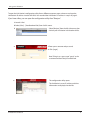
1 Launch Safari.
2 Select [View] - [View Bookmark Bar] from Safari’s menu.
3
4
Select [Bonjour] from the left-side menu, then
click on your LinkStation in the bookmark list.
1 Enter your username and password.
2 Click [Login].
Note:To log in as a guest, type "guest" as the
username and leave the password blank.
5
The configuration utility opens.
The LinkStation’s name, IP address and drive
information are displayed on the left.
LinkStation User Manual
6
Using your LinkStation
Adding shared folders
By default, the LinkStation includes one shared folder “share”. You may add additional folders as
follows.
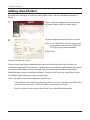
1
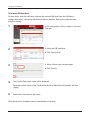
In the LinkStation configuration utility, navigate
to [Shared Folders] and click [Folder Setup].
2
1 Enter desired characteristics for the new share.
Note: If you would like to copy the settings of an
existing folder, select a source folder from
the [Copy Settings from] dropdown.
2 Click [Save].
You have created a new share.
To protect your data from accidental deletion, you may enable a Recycle Bin for the share (not
available for Apple and FTP connections). Deleted data in a shared folder will be temporarily moved
to the [Recycle Bin] folder. To recover deleted data, open the Recycle Bin folder and move files.
Read-Only shares cannot be modified or deleted. To make a Read-Only share, select [Read Only] in
the Shared Folder Configuration utility and click [Save].
Notes: • By default, shares are configured as [Read & Write].
•A shared folder set to Read Only cannot be written by any users or groups, even if they have
read and write permissions. Read-Only folders are read-only for all users.
•Read Only shares are described as (Read Only)] in the shared folder description.
LinkStation User Manual
7
Using your LinkStation
Notes:
• When using two-byte characters (such as Japanese), make folder or file names with 80 characters or less. You
may not be able to copy a folder or a file whose name length is more than 80 characters.
• You cannot set hidden or read-only attributes to sub-folders or files on the LinkStation.
• If non-Roman alphabetical folder names or workgroup names do not display properly, rename the folder or
workgroup with Roman alphabetical characters.
• Please don’t use any of the following words as the name of a shared folder. These words are reserved for
internal use by the LinkStation:
info, spool, usbdisk1, usbdisk2, usbdisk3, usbdisk4, lost+found, global, printers, homes, lp, auth, test, ram,
disk1, disk2, disk3, disk4, array1, array2, msdfs_root, mt-daapd
• The following characters are handled differently by Mac OS X and Windows. Avoid using these characters when sharing
data between Mac OS X and Windows:
• The following characters are not displayed correctly by Windows, or by a Mac connected to the LinkStation via SMB.
Avoid their use in file names that will be used with the LinkStation.
• Never turn off the LinkStation or unplug its network cable while data is being written. Doing so may result in an
incomplete file that cannot be opened or deleted. If this happens, restart the LinkStation, delete the file, then retry
copying the file.
• Your OS may update the date and timestamp stored on the LinkStation’s hard drive, or on a USB drive
connected to the LinkStation. This might result in inaccurate information for date-created or date-accessed
data on the LinkStation.
• In the LinkStation’s configuration utility, or from a Mac OS X 10.6 or later, drive size is displayed in gigabytes,
where 1 gigabyte = 1,000,000,000 bytes. This is also how drive capacity is expressed on your LinkStation’s
packaging. However, if you check the drive size from an older Mac, or from a Windows computer, it may
display the size of the drive in gibibytes, where 1 gibibyte = 1,073,741,824 bytes. Since a gibibyte is larger
than a gigabyte, the displayed drive capacity will be a smaller number than the actual drive size.
LinkStation User Manual
8
Using your LinkStation
Access Restrictions
There are several ways to restrict access to users of a LinkStation.
Access restrictions for locally registered users
The next page describes how to configure access restrictions for local users.
Access restrictions by using the Delegate Authority server feature
Follow the procedure on page 11 to configure.
Notes: •Permissions are assigned to shared folders. Child folders in a shared folder inherit their
permissions from the parent folder. If a file or folder is moved into a new shared folder
with different permissions from the folder it was originally in, it will now have the access
restrictions from the new shared folder.
•When accessing the LinkStation from Windows via SMB, changing permissions from the
folder’s security tab in the properties screen of a folder is not supported. Access restrictions
for shared folders on the LinkStation can only be configured from within the LinkStation’s
configuration utility.
LinkStation User Manual
9
Using your LinkStation
Restricting access for local users
You can set access restrictions for shared folders by username or group names for users that are
registered on the LinkStation.
1
Create a new user accounts and passwords in Windows, or record existing Windows
usernames and passwords. Each account on the LinkStation will have the same username
and password as the user’s Windows account.
2
Register users and groups on the LinkStation.
1 Add users as described on page 20.
2 Add groups as described on page 22.
3
Configure access restrictions for groups and/or users.
1
2
LinkStation User Manual
In the LinkStation configuration utility, navigate
to Shared Folders/Folder Setup.
Click a shared folder you want to set access
restrictions for.
10
Using your LinkStation
3
Check [Access Restrictions] to enable.
4
Click [Add].
Note: The procedure described here shows how to
set access restrictions for users. To set access
restrictions for a group of users, click [Local
Groups] - [Add].
5
1 Check the users (or groups) that you want to
permit to access the share.
.
2 Click [Add].
6
Select the level of access for the user or group you
added.
7 Click [Save].
You have assigned access restrictions.
• If you log on from a Microsoft Network Domain, you can set the access restrictions with the users
and/or groups which are registered on the domain.
• If both read-only and read-and-write permissions are given to a user, that user will have read-only
access.
LinkStation User Manual
11
Using your LinkStation
Access restrictions by using the Delegate Authority server feature
You may administer all user accounts and passwords centrally from a delegate server as described
below. This procedure is intended for network administrators only.
Notes: •You can set access restrictions on shared folders. You cannot set different restrictions on
folders in a shared folder. Child folders in a shared folder inherit their permissions from the
parent folder.
•When accessing the LinkStation from Windows via SMB, changing permissions from the
folder’s security tab in the properties screen of a folder is not supported. Access restrictions
for shared folders on the LinkStation can only be configured from within the LinkStation’s
configuration utility.
There are restrictions when administrating through a delegate authority server:.
• To access the LinkStation, you must be logged into Windows with the account registered to the
authentication server.
• If you use the Delegate Authority option, you cannot connect as a guest user via AFP.
• If you use the Delegate Authority option, you cannot connect anonymously via FTP.
Notes:
Windows Vista and Windows Server 2003/Server 2008 users need to change the security settings to
use the Delegate Authority to External SMB server feature to restrict access.
[Start] - [BUFFALO] - [File Sharing Security Level Change Tool] - [File Sharing Security Level Change
Tool], and then select [Change Security level] to change the security settings (Select "Recover
default security level" change it back to the previous setting).
For Windows Vista, the "File Security Tool" on the LinkNavigator CD will change this setting for you
automatically.
LinkStation User Manual
12
Using your LinkStation
1
1 In the configuration utility, navigate to
[Network] - [Workgroup].
2 Click [Modify Settings].
2
1 Double click "Workgroup" (even if you are in a
domain environment).
2 Enter the workgroup name. To use a Windows
Domain Controller as an external SMB
authentication server, enter its name for the
workgroup name.
3 Select [Delegate Authority to External SMB
Server].
3
1 Enter the name or IP address of an
authentication server.
Note: When connecting with AFP or FTP, an IP
address is recommended.
2 Check [Use Windows Domain Controller as
Authentication Server], [Automatic User
Registration] and [Enable Authentication
Shared Folder].
3 Enter the shared folder name for
authentication.
4 Click [Save].
LinkStation User Manual
13
Using your LinkStation
4
The shared folder for authentication should be created on the LinkStation
A user that has been registered to the specified authentication server will be automatically
registered as a user on the LinkStation when they open the shared folder for authentication (you can
also register users directly).
Configuration of the Authentication Server is complete.
Notes:
• A user who is automatically registered will belong to the "hdusers" group. They added to other
groups from within Group settings.
• You can restrict access to shared folders by username or group.
• The names of registered users are listed in [Users/Groups] - [External Users]. To delete an
automatically registered user, select that user and click [Delete].
• When connecting through AFP or FTP, always use an IP address. Using a server name may cause
problems with authentication.
• To specify a server from another subnet, enter its IP address.
• AFP and FTP connections don’t support delegating authority to an external SMB server.
LinkStation User Manual
14
Using your LinkStation
FTP Server
By default, the LinkStation’s shares are only accessible by users connected to the same network
or router as the LinkStation. The optional FTP server allows users to access the LinkStation from
outside of the local network. You may enable it as follows.
1
In the configuration utility, navigate to [Network]
- [Settings] - [Network Services] and click [FTP].
2
3
1 Select [Enable].
2 Click [Save].
Click [Shared Folders] - [Folder Setup].
4
Click the folder to enable remote FTP access on.
5
1 Select whether the shared folder is to be readonly or writable.
2 Check [FTP].
3 Click [Save].
The folder is now configured for FTP access. Don’t forget to give read (or write) permissions for the FTP share
to any users that will be accessing the share remotely. Folder permissions can only be changed from the
LinkStation’s configuration utility. Changing them remotely with FTP client software is not supported.
LinkStation User Manual
15
Using your LinkStation
To access to the LinkStation with an FTP client
Configure your FTP client software with the following settings:
• Host Name
IP address of the LinkStation.
• Username
Username registered on the LinkStation
• Password
Password registered to the LinkStation
• Port
21
Example ftp://192.168.11.150/
• You cannot write by FTP if the shared folder is set to read-only on the LinkStation.
• Access restrictions are applied based on the settings in the LinkStation. The restrictions
aren’t displayed for users without permissions for the share.
• To access your FTP share from outside of your network, you may need to configure your
router and firewall. Consult your router documentation for more information.
• Shared folders appear as follows when connected by FTP:
- disk1 share
- usbdisk1
- info
• The internal hard drive of the LinkStation is displayed as disk1, and a USB hard drive
(optional) will be displayed as usbdisk1.
• "usbdisk1" is not displayed when the USB hard drive is not connected, or if access is
restricted.
LinkStation User Manual
16
Using your LinkStation
Accessing the LinkStation with an Anonymous user:
To allow anonymous access to your FTP share, disable access restrictions on the FTP share.
Configure your FTP client as follows:
• Host Name
IP address of the LinkStation
• Username
anonymous
• Password
any set of characters
• Port
21
Example ftp://192.168.11.150/
• To make your FTP share available from outside your network, you will need to configure
your router and firewall. Consult your router’s documentation for information on how to
allow FTP traffic.
• If the LinkStation joins a domain, anonymous users cannot access it.
• Folders created or copied via an AFP connection may not be deleted from the AFP
connection. This is because an automatically generated ".AppleDouble" folder begins
with a dot. To delete these files, use an SMB connection.
• Do not exceed 250 characters for a file/folder name including directory path when you are
creating it by using an FTP connection. Otherwise, you cannot view or delete it in Explorer
or other applications.
LinkStation User Manual
17
Using your LinkStation
Direct Copy
DirectCopy automatically copies movie, music, and images directly to the LinkStation from a USB
device.
You can connect many types of USB devices to the LinkStation, including USB hard drives, USB flash
drives, single-card card readers, digital cameras, and USB printers. USB hubs, mice, keyboards, and
card readers that support 2 or more cards are not supported.
1
Connect to a USB device (USB flash/digital camera/hard disk/card reader) to the LinkStation.
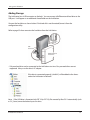
After the USB device is recognized, the function button is lit in
blue for 60 seconds. After the function button is lit in blue, you
can access the USB device.
USB
Connector
If an unsupported USB memory device is connected to the
LinkStation, then the function button will not light up in blue,
and the device will not be mounted.
Status LED
Function
Button
2
While the function button is blue, press it to automatically copy data from the USB device to
a shared folder on the LinkStation. The function button will flash blue during the copy. Push
the function button again to abort the copy.
LinkStation User Manual
18
Using your LinkStation
Files are copied to the folder:
<shared folder>/pictures/yyyymmdd
yyyy: year copied
mm: month copied
dd: date copied
You may change the destination shared folder for DirectCopy in [Shared Folders] - [Direct
Copy] - [Modify Settings] in the configuration utility. Subsequent DirectCopy folders are
created at:
<DirectCopy folder>/pictures/yyyymmdd/n
yyyy: year copied
mm: month copied
dd: date copied
n: 1st time n=0, 2nd time n=1, 3rd time=2 and so on.
For USB Mass Storage class USB devices, files with following extensions will be copied.
avi, divx, asf, mpg, mpe, m1v, vob, mts, m2ts, m2t, mpeg, mpeg2, vdr, spts, tp, ts, 3gp, mov,
m4v, wmv, dvr-ms, xvid, mp4, jpg, jpeg, gif, png, tif, tiff, yuv, bmp, mp3, mpa, wma, aac, apl,
ac3, lpcm, pcm, wav, m3u, m4a, m4b, aif, aiff, flac, ogg, mp2, mp1
For digital cameras that don’t follow the USB Mass Storage Class standard, all files on the
device will be copied.
3
When the access LED of the USB device goes off, the copy is finished. Dismount the USB
device before unplugging it.
To dismount the USB device if the LinkStation is on, hold in the function button for 3 seconds.
The blue LED will go out, and the USB device is dismounted. You may now unplug it safely.
If you turn off the LinkStation, the USB device is already dismounted, and you can remove it
safely.
LinkStation User Manual
19
Using your LinkStation
Users/Groups
Adding Users
Add users as shown below.
1
1 In the configuration utility, navigate to [Users/
Groups] - [Local Users].
2 Click [Create User].
2
1 Enter a name and description for the user.
2 Click [Save].
You have added a user.
Use the same username and password that the user logs into Windows with. If the username and
passwords are different, the user may not be able to access restricted shares.
LinkStation User Manual
20
Using your LinkStation
Notes: •When using access restrictions, you can register up to 300 users on the LinkStation.
•Please do not use any of the following words as a username or a group name:
root, bin, daemon, sys, adm, tty, disk, lp, sync, shutdown, halt, operator,
nobody, mail, news, uucp, ftp, kmem, utmp, shadow, users, nogroup, all,
none, hdusers, admin, guest, man, www, sshd, administrator, ftpuser, apache, mysql
•If you are using Mac OS 9 or earlier, do not use more than 9 alphanumeric characters for the
user password, the user will not be able to access shared folders on the LinkStation.
LinkStation User Manual
21
Using your LinkStation
Adding Groups
Add groups as shown below:
1
1 In the configuration utility, navigate to [Users/
Groups] - [Local Groups].
2 Click [Create Group].
2
1 Enter a name and description for the group.
2 Select users to include in the group.
3 Click [Add], then [Save].
You have added a group.
Please do not use any of the following words as a group name:
root, bin, daemon, sys, adm, tty, disk, lp, sync, shutdown, halt, operator,
nobody, mail, news, uucp, ftp, kmem, utmp, shadow, users, nogroup, all,
none, hdusers, admin, guest, man, www, sshd, administrator, ftpuser, apache, mysql
LinkStation User Manual
22
Using your LinkStation
Admin Password
You may change the admin password as follows.
1
In the configuration utility, navigate to [Users/
Groups - [Local Users].
2
Select [admin] and click [Edit User].
3
1 Enter a new password (twice).
2 Click [Save].
You have now changed the admin password.
Notes: • The administrator's username, "admin" cannot be changed.
•You cannot set access restrictions or use WebAccess with the admin account. Use the
admin account only to log in to the LinkStation configuration utility.
LinkStation User Manual
23
Using your LinkStation
Network
Jumbo Frames
If your other network devices support it, you may be able to increase network performance with
jumbo frames.
1
In the configuration utility, navigate to [Modify
Settings] in [Network] - [Settings] - [Ethernet
Frame Size].
2
1 Select Ethernet Frame Size.
2 Click [Save].
LinkStation User Manual
24
Using your LinkStation
Notes: •To use the LinkStation with jumbo frames, your router/switch/hub must support jumbo
frames. Otherwise, you will not be able to transfer data.
•To use jumbo frames (4102/7422/9694 bytes), your computer’s NICs and all switches, hubs,
and routers on the transmission route need to support jumbo frames. If any device on the
route doesn’t support jumbo frames, use standard transmission (1518 bytes) instead.
•If you are using jumbo frames and back up data from a LinkStation/TeraStation to another
LinkStation/TeraStation, set the Ethernet frame sizes of the LinkStations/TeraStations to
the same settings (or the closest available). If the Ethernet frame sizes are significantly
different, the backup job may fail. If you have problems with backup jobs, select the default
frame size (1518 bytes).
C o n n e ction
Transmission
Transmit
Jumbo Frame
( 410 2 / 7422 / 969 4 )
LinkStation
Jumbo Frame
( 410 2 / 742 2 / 969 4 )
Jumbo Frame
supported
Jumbo Frame
supported
Transmit
normally(1518)
LinkStation
Jumbo Frame
( 410 2 / 742 2 / 969 4 )
Jumbo Frame
Supported
Jumbo Frame
not supported
Transmit
normally(1518)
LinkStation
Jumbo Frame
( 410 2 / 742 2 / 969 4 )
Jumbo Frame
not supported
Jumbo Frame
not supported
No transmission
LinkStation
Jumbo Frame
( 410 2 / 742 2 / 969 4 )
LinkStation User Manual
Jumbo Frame
not supported
Jumbo Frame
supported
25
Using your LinkStation
System Settings
Name, Date and Time
Configure the LinkStation’s host name, date, or time as follows:
1
In the configuration utility, navigate to [Modify
Settings] in [System] - [Settings] - [Name].
2
Enter the LinkStation’s name and description,
then click [Save].
3
In the configuration utility, navigate to [Modify
Settings] in [System] - [Settings] - [Date and Time].
4
1 Enter the year, month, day, and time.
2 Click [Save].
LinkStation User Manual
26
Using your LinkStation
Click [Use Local Date/Time] to use your computer’s time settings for the LinkStation.
By default, the LinkStation adjust its clock automatically by using an NTP server.
NTP
NTP may not be usable in some networks.
The default NTP Server (ntp.jst.mfeed.ad.jp) belongs to Internet Multi Feed Inc. For more
information, please visit www.jst.mfeed.ad.jp.
Use NTP at your own risk. Buffalo Technology is not responsible for any loss or damage
caused by using of this service, stopping the service, or missing service.
You’ve completed hostname and time settings for the LinkStation.
Note: The LinkStation's internal clock may run at a slightly different speed from other clocks on you
network, and over a long period of time your network devices may show different times. If
clocks on your network vary by more than 5 minutes it may cause unexpected behavior. For
best results, keep all clocks on the network set to the same time by adjusting them regularly,
or use an NTP server to correct them all automatically.
LinkStation User Manual
27
Using your LinkStation
System-Storage
Check Disk
A disk check tests the data on a drive in the LinkStation or connected via USB. Errors are fixed
automatically. A disk check may run for more than ten hours. Shared folders cannot be accessed
during the disk check. Do not turn off power to the LinkStation during the disk check.
If Auto power is set to [AUTO], then the LinkStation will turn off when the disk check is finished.
Run a disk check as follows:
1
In the configuration utility, navigate to [System] [Storage].
2
1 Select the hard drive to test.
2 Click [Check Disk].
3
Click [Check].
The Status LED on the front of the LinkStation will flash during the disk check.
Note: If a power outage disconnects the LinkStation in the middle of a disk check, then you
may not be able to access shares on the LinkStation from Mac OS. This is because the
database created by Mac OS is damaged. To resolve, navigate to [System] - [Storage]
- [Check Disk] and check [Delete any hidden, non-essential Mac OS dedicated files].
Rerun the disk check when done.
LinkStation User Manual
28
Using your LinkStation
Note: If you access a shared folder from a Macintosh computer, information files for Macintosh may
be automatically generated. Do not delete these files from a Windows computer. Otherwise,
you may no longer be able to access folders from the Macintosh. If you cannot access them,
check [Delete any hidden, non-essential Mac OS dedicated files] in [System] - [Storage] [Check Disk].
LinkStation User Manual
29
Using your LinkStation
Format a Drive
• A format deletes all data from a hard drive. Be careful! Back up any important data on a drive
before formatting it. It will take several minutes to format a hard drive.
• Shared folders cannot be accessed during formatting.
• Do not turn off the power switch or disconnect power while formatting a hard drive.
• If Auto power is set to [AUTO], then the LinkStation will turn off when the format is finished.
• To erase all data on a disk, choose [Disk Management] - [Erase Disk].
1
In the configuration utility, navigate to [System] [Storage].
2
1 Select the drive to format.
2 Click [Format Disk].
3
Click [Format].
4
The [Confirm Operation] screen will be displayed. Type the displayed number into the
[Confirmation Number] field within 60 seconds, then click [Apply].
5
Follow the instructions displayed on the screen.
LinkStation User Manual
30
Using your LinkStation
Note: •The time needed to format a hard drive varies based on the hard drive's size and format
types (a few seconds to several minutes).
•The Info LED on the front of the LinkStation will flash during formatting. The LinkStation's
shared folders cannot be accessed until the disk format is complete.
•If the hard drive is connected to the USB connector, partitions will be recreated.
LinkStation User Manual
31
Using your LinkStation
Adding Storage
The LinkStation has a USB connector on the back. You can connect a Buffalo external hard drive to the
USB port. It will appear as an additional shared folder on the LinkStation.
Connect the hard drive as shown below. If the hard disk is not formatted, format it from the
configuration utility.
Refer to page 35 when removing the hard drive from the LinkStation.
Function
Button
USB
Connector
Buffalo External
Hard Drive
• Only one hard drive can be connected to the LinkStation at a time. Bus powered drives are not
supported. Always use the drive’s AC adapter.
If the drive is connected properly, [usbdisk1] will be added to the shares
under the LinkStation in Network.
Note: If the USB drive is formatted with FAT 32 (or FAT 16), files created by Mac OS X automatically (such
as .DS_Store) cannot be backed up to this drive.
LinkStation User Manual
32
Using your LinkStation
To format a USB hard drive
For best results with the LinkStation, reformat the external USB drive from the LinkStation’s
configuration utility. Formatting will delete all data on the drive. Back up any important data
before formatting.
1
In the configuration utility, navigate to [System] [Storage].
2
1 Select the USB hard drive.
2 Click [Format Disk].
3
1 Select a format type (see next page).
2 Click [Format].
4
The [Confirm Operation] screen will be displayed.
Enter the number shown in the [Confirmation Number] field within 60 seconds, and click
[Apply].
5
Follow the instructions on the screen.
When the format is complete, create a shared folder on the drive.
LinkStation User Manual
33
Using your LinkStation
Note:
Format type
FAT 32
Advantages
Disadvantages
• Read/Write support with
• Cannot copy or back up files
LinkStation, PCs, and Macs. larger than 4 GB.
Drives formatted with FAT
32 can be disconnected
• You can connect the hard • Cannot use some characters
from the LinkStation and
drive to a Windows PC or a from Mac OS X such as [:].
connected to a Windows or
Mac at any time and use it • It takes extra time to access
Mac computer directly. They normally.
from the LinkStation’s
work well with many devices,
configuration utility or NAS
but do not support large
Navigator2.
filesizes.
EXT3
• Supports both Reading/
• May take a while to format
Writing.
(a few minutes to several
This is recommended if you
minutes).
may have to reconnect to
• Supports Journaling File
and use other LinkStation/
TeraStation.
System.
• Also available when
connecting to other
LinkStation.
• Less space is available than
XFS after format.
•the more files in a folder, the
slower the access.
*You cannot read data by
directly connecting a PC.
Not supported by legacy
LinkStations such as HD-LAN,
HD-HLAN, HD-HGLAN Series.
XFS
• Supports both Reading/
This format is recommended Writing.
when you only use the
• Supports Journaling File
drive with a LinkStation or
System.
You cannot read data by
TeraStation.
• More space is available with directly connecting to a PC.
XFS after format.
NTFS
NTFS works well with
Windows PCs. Read-Only
from the LinkStation.
HFS+
HFS+ works well with
Macs. Read-Only from the
LinkStation.
LinkStation User Manual
• Access speed will not degrade
even though more files in 1
folder.
Can be used with Windows • Read-only from the
Vista/XP/2000, or Windows
LinkStation or a Mac.
Server2003/Server2008.
• Not suitable for backup
from the LinkStation.
Can be used to connect to
Mac OS X 10.3.9 or later.
• Read-only from the
LinkStation.
• Not suitable for use with
Windows PCs.
34
Using your LinkStation
To set access restrictions on an additional hard drive
You can set access restrictions for shares on an external USB hard drive. In the LinkStation’s
configuration utility, navigate to [Shared Folders] - [Folder Setup].
Note: Even if a shared folder is not visible, you can still format the drive, run a disk check, or back up
to the external USB hard drive.
About the USB connector on the LinkStation
• You can connect many types of USB devices to the LinkStation, including USB hard drives,
USB flash drives, single-card card readers, digital cameras, and USB printers. USB hubs, mice,
keyboards, and card readers that support 2 or more cards are not supported.
• One hard drive or other device may be connected to the LinkStation at a time. USB hubs are not
supported. Only Buffalo hard drives are supported.
• Hard drives with their power mode switch set to [Auto] may not be recognized by the LinkStation.
Set the power mode switch to [Manual] for use with the LinkStation.
• Bus-powered hard drives are not supported. Always use the AC adapter for a hard disk.
• Only the primary partition of USB hard drives can be recognized. Secondary or other partitions
will not be recognized.
• If the external USB drive is formatted as FAT32 or FAT 16, you may not be able to copy or back up
files or folders from Mac OS X to it. These files may include characters that are not supported by
FAT 32 or FAT 16.
• When you back up to a FAT 32 USB hard drive with Overwrite Backup (Differential) enabled, the
system may overwrite data even though there are no difference in data. If the second of the date
when the file created is an odd number, an overwrite backup is performed every time regardless
of differences in the data.
LinkStation User Manual
35
Using your LinkStation
Remove Disk
To remove the hard drive:
If the LinkStation is powered on, dismount the USB hard drive before unplugging it. Hold in the
function button for 3 seconds. The blue LED will go out, and the drive is dismounted. You may now
unplug it safely.
If the LinkStation is off, then the USB device is already dismounted, and you can remove it safely.
Status LED
Function
Button
LinkStation User Manual
36
Using your LinkStation
System-Backup
Time Machine
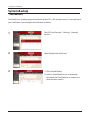
Time Machine is a backup program included with Mac OS X 10.5 and later version. It can back up to
your LinkStation if you configure the LinkStation as follows:
1
Click [AFP] on [Network] - [Settings] - [Network
Services].
2
Select [Enable] and click [Save].
3
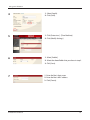
1 Click [Shared Folders].
2 Select a shared folder to use as the backup
destination for Time Machine, or create a new
share and then select it.
LinkStation User Manual
37
Using your LinkStation
4
1 Select [Apple].
2 Click [Save].
5
1 Click [Extensions] - [Time Machine].
2 Click [Modify Settings].
6
1 Select [Enable].
2 Select the shared folder that you chose in step 3.
3 Click [Save].
7
LinkStation User Manual
1 Enter the Mac’s host name.
2 Enter the Mac’s MAC address.
3 Click [Create].
38
Using your LinkStation
• You can find the Mac’s host name under [Computer Name] in [System Preferences] [Sharing].
e.g.) If it is displayed as "bbbbbbbbbb.local", enter
"bbbbbbbbbb" for the host name. If it is
displayed as "cccccccccc.eee-ee.local", enter
"cccccccccc" for the host name. If it is displayed
as "dddddddddd.fff-ff.jp", enter "dddddddddd"
for the host name.
• To verify the MAC address of the Mac:
1 Open [About This Mac] from the Apple menu and
click [More Info].
2 When the System Profiler is open, click [Network] on
the menu at the left of the screen.
3 Select the MAC address for the device whose BSD
Device Name is [en0] under [Active Services].
Normally this will be listed below under “Ethernet
MAC Address”. Copy and paste it to [Target MAC
address].
The folder <Macintosh host name>_<Macintosh MAC address>.sparsebundle will be created
in the selected folder of the LinkStation. Be aware that changing this folder name or deleting
this folder will prevent Time Machine from using it as a backup destination.
LinkStation User Manual
39
Using your LinkStation
8
Select [System Preferences] from the Apple menu of Mac OS X 10.5.
9
Click [Time Machine].
10
Click [Choose Backup Disk].
11
Select the folder on the LinkStation and click [Use for
Backup].
LinkStation User Manual
40
Using your LinkStation
12
Enter a username and password to access the shared
folder on the LinkStation, and click [Connect].
If you do not use access restrictions for the shared folder of the LinkStation you set as a
backup destination, enter "admin" in the username box and your password for "admin" in the
password. If you use access restrictions, enter a username and password that has read and
write access rights to the share.
13
Make sure that the switch for Time Machine is "on".
The number of seconds displayed in [Next Backup]
will count down and a backup job will start when it
hits zero. The backup job will run in the background,
so you can use and shut down the Mac as usual. To
recover data or set items you want to exclude from
backup, refer to Mac OS Help.
You’ve configured your LinkStation to work with Time Machine.
LinkStation User Manual
41
Using your LinkStation
System-Backup
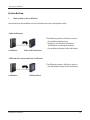
1
Back up data on the LinkStation
You can back up shared folders on the LinkStation from the configuration utility.
• Other LinkStation
LinkStation
Other Link/TeraStation
The following sections will discuss how to:
• [Set up Backup destination]
• [Setting to set the other LinkStation/
TeraStation as a backup destination]
• [Set up Backup Source of the LinkStation]
• USB hard drive connected to the LinkStation
The following sections will discuss how to:
• [Set up Backup Source of the LinkStation]
LinkStation
LinkStation User Manual
USB Hard Drive
42
Using your LinkStation
2
Setting up the backup destination folder on LinkStation # 1
You may configure a destination folder on a LinkStation for backup jobs from a TeraStation or
another LinkStation.
1
In the configuration utility, click on [Shared
Folders].
2
Click the shared folder you want to set as a
backup destination.
3
1 Check [Disk Backup].
Note: If you enter a backup password, users of
other LinkStations (and TeraStations) will
have to enter the password before using
this LinkStation as a backup destination.
2 Click [Save].
LinkStation User Manual
43
Using your LinkStation
3
Finding the backup destination folder from LinkStation # 2
If the password is set for the backup destination folder, you must enter the password to configure
the folder as the destination for a backup job.
1
2
In the configuration utility, navigate to [System] [Backup].
Click [Modify Settings] in [Search for Backup Destination by Password].
3
Enter the password for the folder that is the
backup destination.
The search will find backup-enabled folders on
the network that have the same password that
you are searching for, or that have no password
set.
LinkStation User Manual
44
Using your LinkStation
4
Configuring LinkStation # 2 to use LinkStation # 1 as a backup destination
1
In the configuration utility, navigate to [System] [Backup].
2
Click [View NAS Devices].
3
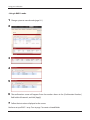
1 Check the IP address of the LinkStation you
want to specify as a backup destination from
[Local DEVICE_TYPEs].
2 Enter IP address of the LinkStation you want
to specify as a backup to [Off Subnet DEVICE_
TYPEs] and click [Add].
Notes:
If LinkStation # 2 (backing up) and LinkStation # 1 (with the destination folder) are on different
networks, you must create a VPN connection between the two networks before the LinkStations will
be able to see or back up to each other.
If you are using jumbo frames and back up data from one LinkStation or TeraStation to another
LinkStation or TeraStation, set the Ethernet frame sizes of the LinkStations/TeraStations to the same
settings (or the closest available). If the Ethernet frame sizes are significantly different, the backup
job may fail. If you have problems with backup jobs, select the default frame size (1518 bytes).
LinkStation User Manual
45
Using your LinkStation
5
Set up a backup job on LinkStation # 2
1
In the configuration utility, navigate to [System] [Backup] - [Backup Jobs Setup].
2
Click [Create New Job].
3
Select backup options.
LinkStation User Manual
46
Using your LinkStation
Backup operation modes
Three backup operation modes are available.
Normal Backup
All files in the source folder are backed up to the destination folder.
Overwrite Backup (Incremental Backup)
The first time the backup runs, it backs up all files in the source folder just like a normal backup.
If later, file A is added to the backup source and file B is deleted, the next backup will add file A,
but file B will not be deleted from the backup destination. This will use more space on the backup
destination because of the files that are not deleted.
Overwrite Backup (Differential Backup)
The first time the backup runs, it backs up all files in the source folder just like a normal backup.
If later, file A is added to the backup source and file B is removed, the next backup will add file A
and delete file B. This uses the same space on the backup destination as a normal backup.
LinkStation User Manual
47
Using your LinkStation
4
Click [Add] in the [Backup Folders].
5
Select the backup source and backup destination
folders, then click [Add].
6
Click [Apply].
The task added is displayed to the backup list.
You’ve now configured a backup job.
LinkStation User Manual
48
Using your LinkStation
Notes:
• You can register up to the second level of subfolders. However, folders with more than 80
characters in their names cannot be selected.
• The backup destination device must be configured as a backup destination in advance in order to
select it.
• For best results, USB hard drives connected to the LinkStation for backup should be formatted with
XFS or EXT3. If a hard disk connected to LinkStation is formatted in FAT 32 or FAT 16, the following
restrictions apply:
You cannot back up more than 2 GB of data per file in FAT 16 and more than 4 GB of data per file
in FAT 32.
Files created by Mac OS X cannot be backed up, since they contains character not allowed by
FAT 32 or FAT 16.
• You must change the backup settings for backup if you format the hard drive after setting up
backup. If there is no shared folder at the destination, an error message will be displayed.
LinkStation User Manual
49
Using your LinkStation
RAID Arrays
Several RAID modes are available for LS-WXL and LS-WSXL LinkStations. LinkStations with only one
hard drive do not support RAID modes.
Note:– All data is lost when the RAID mode is changed. Back up any important data before
changing RAID modes.
– In this document, “Recovery” means putting the LinkStation back to the state it was in
before the malfunction happened. It does not mean reading data from broken hard
drives.
– When the use mode of the hard disk is changed, all the data in the hard disk gets deleted. Please take back-up before changing use mode so that the important data will not
be lost.
• RAID 1 mode
Uses 2 hard drives in a mirrored array. One drive’s worth of space is usable. Identical data is written to
both drives. If one drive is damaged, data can be recovered by replacing the damaged drive.
• RAID 0 mode(LS-WXL, LS-WSXL Default Settings)
Multiple hard drives are combined into a single array. The total capacity of all drives is usable. This is
the fastest of the LinkStation’s RAID modes. If any drive is damaged, all data on the array is lost.
• Normal Mode
Each drive is accessible as a separate, individual drive. The total capacity of each drive is usable.
If any drive is damaged, all data on that drive is lost.
LinkStation User Manual
50
Using your LinkStation
• Using in RAID 1 mode
1
Change system to normal mode (page 54). ).
2
3
4
5
6
7
The confirmation screen will appear. Enter the number shown in the [Confirmation Number]
field within 60 seconds, and click [Apply].
Follow the instructions displayed on the screen.
You have set up a RAID 1 array. Turn to page 7 to create a shared folder.
LinkStation User Manual
51
Using your LinkStation
Note: –If power is turned off during a RAID rebuild, the RAID rebuild will continue when power
is restored. (Example: In LinkStation of 1TB when power supply is changed from OFF to
ON after lapse of 3 hours from construction of RAID then reconstruction of RAID should
start in remaining 3 hours).
Confirmation screen
When you perform any of the following tasks, a confirmation screen is
displayed . To continue, enter the displayed number within 60 seconds
and click [Apply].
• Change RAID array (Create/Delete)
• Delete Folder
• Restore Factory Defaults
• Format LinkStation
LinkStation User Manual
• Format Array or Disk
• Remove Disk
• Rebuild RAID array
52
Using your LinkStation
• Changing to RAID 0 mode
1
Change system to normal mode (page 54). ).
2
3
4
5
6
7
The confirmation screen will appear. Enter the number shown in the [Confirmation Number]
field within 60 seconds, and click [Apply].
Follow the instructions displayed on the screen.
You have set up a RAID 0 array. Turn to page 7 to create a shared folder.
LinkStation User Manual
53
Using your LinkStation
• Changing to Normal mode
1
2
3
Click [Create RAID Array].
4
When [Are you sure you want to change RAID mode?] is displayed, click [Apply].
5
6
The confirmation screen will appear. Enter the number shown in the [Confirmation Number]
field within 60 seconds, and click [Apply].
Follow the instructions displayed on the screen.
You have set up a Normal mode. Turn to page 7 to create a shared folder.
LinkStation User Manual
7 to create a shared folder.
54
Using your LinkStation
System-Maintenance
E-mail Notification
Your LinkStation can send you daily email reports. It can also send you an email when settings are
changed or an error occurs.
The following things will be sent via E-mail:
•The condition of the hard drive
•Notification of completed backup jobs
•Notification of fan errors
•Notification of hard drive errors
1
2
In the configuration utility, navigate to [System] [Maintenance].
Click [Modify Settings] in [E-mail Notification].
3
1 Click [Enable] in Notification.
2 Type the SMTP server address and SMTP port
number.
Note: If using pop before smtp, enter POP3
Server address and POP3 port number.
3 Select User verification method (Disabled/pop
before smtp/login(SMTP-AUTH)/cram-md5
(SMTP-AUTH)).
4 Enter a username.
LinkStation User Manual
55
Using your LinkStation
5 Enter a password that will be used to verify.
6 To use a secured connection, select SSL/TLS.
7 Enter the subject for notification e-mail. Click [Reset to Default] to reset the subject line to [LinkStation Status Report].
8 Enter a receiver's e-mail address. E-mail can be sent to up to 5 addresses.
9
Select conditions for emails to be sent.
• HDD Status Report
Sends status of hard drive periodically.
• Fan Trouble
Sends a message when a fan error occurs.
• Disk Error
Sends a message when a hard drive fails.
• Backup Complete
Sends a message when the backup is complete.
10 If you have selected [HDD Status Report] for sending condition, select time to send.
11 Click [Save].
4
LinkStation User Manual
Click [Send Test Message] to send a test message.
56
Using your LinkStation
System Power Management
UPS Settings
A UPS (uninterruptable power supply) can automatically shut down your LinkStation in case of a
power outage. To use the LinkStation with a UPS, configure the following settings:
1
Plug the power cable of UPS to a wall socket.
2
Connect the AC adapter of the LinkStation to the UPS.
3
Connect the UPS and the LinkStation with a USB cable.
4
Turn on the UPS, then the LinkStation.
5
In the LinkStation’s configuration utility,
navigate to [System] - [Power Management] [UPS Settings] and click [Modify Settings].
6
1 Check [Enable].
2 Configure settings.
3 Click [Save].
The LinkStation is now configured to work with the UPS.
Note: If the LinkStation shuts down automatically due to a power outage, make sure that the power
issue is resolved before turning it back on. If the LinkStation is turned back on while it’s still
running on the UPS battery, the UPS will not shut it down again, even if the battery runs low.
LinkStation User Manual
57
Using your LinkStation
Sleep Timer
To save energy, you can specify times to put the LinkStation into sleep mode, where the hard disk
and LED lights are turned off. The sleep timer only works when the LinkStation's power mode switch
is “ON”. This feature cannot be used when it is set to "AUTO" or "OFF".
1
1 In the LinkStation’s configuration utility, navigate
to [System] - [Power Management] - [Sleep Timer]
2 Click [Modify Settings].
2
1 Specify a timer interval, beginning time and
ending time.
2 Click [Save] at the bottom of the screen.
*You can set up to 3 timers.
*You can set ending time from 0:00 to 27:45.
You can set beginning time from 0:00 to 23:45.
(If the ending time is 24:00 or later, the beginning time can be set from 4:00 to 23:45.)
If 24:00 is equivalent to 0:00 of the next day, and 27:00 is equivalent to 3:00 of the next day.
*You can not set the ending time before or the same time as a beginning time.
• During processing disk check, disk format, and backup jobs or when a backup job is scheduled
before and after 5 minutes of the current time, the LinkStation will not be proceeded to Standby
mode even though the end time has reached.
• If time of the timers are duplicated, the longest interval time is used to operate.
LinkStation User Manual
58
Using your LinkStation
Examples of multiple timers:
(e.g.1)Currently the timer set on Wednesday 10:00 is working:
Timer 1 Everyday 12:00 - 24:00
Timer 2 not used
Timer 3 not used
-> Nothing happens at 12:00 and goes into sleep mode at 24:00
(e.g.2)Currently the timer set on Wednesday 10:00 is working:
Timer 1 Everyday 9:00 - 18:00
Timer 2 Day specified Wednesday 10:00 - 20:00
Timer 3 not used
-> Except on Wednesdays, the LS powers on at 9:00 and goes into sleep mode at 18:00.
On Wednesdays, it goes into sleep mode at 20:00.
(e.g.3)Currently the timer set on Wednesday 10:00 is working:
Timer 1 Everyday 9:00 - 18:00
Timer 2 Day specified Wednesday 10:00 - 25:00
Timer 3 not used
-> Except on Wednesdays, the LS powers on at 9:00 and goes into sleep mode at 18:00.
-> Except on Wednesdays, it goes into sleep mode at 1:00 of the next day.
(e.g.4)Currently the timer set on Wednesday 10:00 is working:
Timer 1 Everyday 9:00 - 18:00
Timer 2 Day specified Wednesday 07:30:00 - 22:00:00
Timer 3 not used
-> Except on Wednesdays, the LS goes into sleep mode at 18:00.
-> LS turns on Wednesday at 7:30, and goes into sleep mode at 22:00 of the next day.
In standby mode, pressing the LinkStation's function button or moving the power mode switch to
“AUTO” will turn the LinkStation on.
Sleep timer settings are now complete.
LinkStation User Manual
59
Using your LinkStation
Restore Factory Defaults
To restore the configuration of the LinkStation, follow the procedure below.
1
Move the power switch to the “OFF” position to shut down the LinkStation.
2
Move the power switch to the “ON” position while holding down the function button.
The function button will flash blue for 1 minute.
Function Button
3
While the function button is flashing blue, press it again.
The status LED will start flashing blue. It will start flashing amber when initialization begins (2
- 3 minutes).
Notes: •When the LinkStation is initialized, an IP address, an Ethernet frame size settings, and
an administrator (admin) password are initialized. If you choose not to initialize the
administrator's password on the configuration utility, only the IP address and Ethernet
frame size settings are initialized. You can initialize other items from the configuration
utility.
•If you do not want to initialize the admin password when you initialize the LinkStation,
select [Keep current admin password] in the [System] - [Restore/Format] - [Restore Factory
Defaults] screen, and click [Save].
•If you choose to not initialize the admin password from the function button, you can no
longer configure the LinkStation if you forget the password! Write your password down and
put it in a safe place.
LinkStation User Manual
60
Using your LinkStation
Initialization from the configuration utility
You can initialize the following settings from the configuration utility: LinkStation name,
Description, NTP settings, Workgroup settings, Shared service settings, the access restrictions of
the shared folder, User settings, User group, mail notification feature settings, UPS synchronization
settings, Backup Settings, Administrator's password, Print server function, WebAccess feature,
Language settings, Timer ON/OFF, HDD spin down, Media server, BitTorrent, and Time Machine.
1
In the LinkStation’s configuration utility, navigate
to [System] - [Restore/Format].
2
Click [Restore LinkStation].
3
The Confirm Communications Screen will appear. Enter the number shown in the
[Confirmation Number] field within 60 seconds, and click [Apply].
4
Follow the instructions displayed on the screen.
Your LinkStation has been initialized.
LinkStation User Manual
61
Using your LinkStation
Format the LinkStation
1
In the LinkStation’s configuration utility,
navigate to [System] - [Restore/Format].
2
Click [Format LinkStation].
3
The [Confirm Operation] screen will be displayed.
Enter the number from the [Confirmation Number] field within 60 seconds, and click [Apply].
4
Navigate to [System] - [Restore/Format] in configuration utility. Follow the instructions
displayed on the screen.
Warning: Formatting the LinkStation will erase all data on the drive! Back up any important data
before formatting.
After the format, the status of the LinkStation will be as follows:
Hard drives in the LinkStation: Not formatted
All settings of the LinkStation: Factory Default
LinkStation User Manual
62
Using your LinkStation
Extensions
WebAccess
WebAccess lets you access files on the LinkStation from outside you network. You can access the
LinkStation from anywhere with an Internet connection and play music, display pictures, and
download or upload data.
On the LinkStation, you can set access restrictions for each shared folder. These restrictions will
apply to users accessing the LinkStation via WebAccess as well as locally. LinkStation also supports
UPnP for configuring your router and redirects with buffalonas.com (similar to Dynamic DNS).
To Configure WebAccess:
1
1 Click [Extensions].
2
Choose the folder to be shared with WebAccess.
LinkStation User Manual
2 Click [WebAccess].
63
Using your LinkStation
3
1 Select what users will have access.
• Disabled: WebAccess is not allowed.
• Allow Anonymous: Anyone can access shared
folders.
• Allow All Groups / Users: All groups/users
that are registered on the LinkStation can
access with WebAccess.
• Use Inherited Folder Permissions: All users
have the same rights that they would
have locally. If access restrictions are not
configured, then this option is not displayed.
2 Click [Save].
4
LinkStation User Manual
Click [Modify Settings].
64
Using your LinkStation
5
1 Select [Enable].
2 Select [Enable] from [Use BuffaloNAS.com].
3 Enter the LinkStation name to be published in
[BuffaloNAS.com Name].
Note: This is the name to enter when accessing
BuffaloNAS.com. It does not have to be
the same name as the actual LinkStation.
4 Enter the password to save and use the name
in [BuffaloNAS.com Key].
5 Select [Enable] from [Auto-Configure Firewall
(UPnP)].
Note: This does not work unless the router has
UPnP enabled.
6 Click [Save].
Notes: •If you want to transmit data more securely by using SSL encryption, check [HTTPS/SSL
Encryption].
•To use the generic DNS service instead of using BuffaloNAS.com, enter the host name in
[Other DNS Hostname].
•If configuring manually without using UPnP, enter the external port of a router side.
By default, the external port on the router side is transferred to the port 9000 of the
LinkStation (The port on the LinkStation side is set to 9000).
•If the LinkStation is left unconnected from the Internet for a certain period of time, its name
registration will be deleted on the BuffaloNAS.com server.
You have set up WebAccess on the LinkStation.
LinkStation User Manual
65
Using your LinkStation
Accessing folders with WebAccess
1
Open the following URL in an Internet browser.
http://buffalonas.com
To access BuffaloNAS.com from iPhone/iPod touch:
1 Tap [Safari] from [Home] screen, and connect to the Internet.
2 Tap the address bar on top of the [Safari] screen.
3 Enter http://buffalonas.com in the address bar, and select [Go].
• The screens in step 2 and later are from a PC. They look different from what is displayed
on iPhone or iPod touch.
• You cannot play video files or music files for which DRM is set by using this feature.
• You cannot play video files or music files that were saved with access restrictions.
• You cannot save files from the LinkStation to the iPhone or iPod touch with WebAccess.
Video and music files are streamed, and picture files are displayed in the browser.
• Compatibility with video and music files depends on the versions of Safari and
Quicktime installed on the iPhone or iPod touch.
• To create a video file which is playable on the iPhone, use off-the-shelf software to
convert to playable formats for the iPhone or iPod touch.
• Uploading files, changing file names, and deleting files are not supported on the iPhone
or iPod touch.
• iPhone and iPod touch are trademarks of Apple Inc.
2
LinkStation User Manual
Enter your BuffaloNAS.com name and click
[Connect].
66
Using your LinkStation
3
From your browser, you can view folders and files
from the LinkStation.
To view without using BuffaloNAS.com, open the following URL on the Internet browser:
http://global IP address of the LinkStation:9000
For SSL, use https://global IP address of the LinkStation:9000
To verify the IP address of your LinkStation, use NAS Navigator2.
LinkStation User Manual
67
Using your LinkStation
What can you do with WebAccess?
You can perform the following operations from the WebAccess screen:
"open”, “rename”, “delete”, “Link to this file”, “mail link to this file”, “Create Folder” ,”Upload"
1 open
Open a file and folder.
Clicking [open] will open the specified file/folder.
You can save a file on the local drive by right-clicking.
2 rename
Change a file/folder name.
Clicking [rename] will display the following screen. Enter a file name or folder name in [File Name]
you want to change, and click [Change].
• Don’t use any of the following characters in a file name or folder name: ?????????????
• Folder and file names may contain up to 80 characters.
3 delete
Delete files/folders.
Clicking [delete] will display the following screen. Click [Yes] to delete the selected file.
LinkStation User Manual
68
Using your LinkStation
4 Link to this file
Link to a file or folder.
When you click a file or folder name, a white area will be displayed. Right-click on [Link to this file]
in the white area, and select [Copy Shortcut]. It will copy an address link that can be accessed to
that file directly from outside. Use this feature when you want to give out this address link. From
the right-click menu, select [Add to Favorites] to bookmark this directly accessible address link.
5 Mail link to this file
Send the address link by e-mail.
When you click a file or folder name, a white area will be displayed. Click [Mail link to this file] in
the white area, and your mail software will launch with a link address which is accessible from
outside to that file included in the mail body. Use this feature when you want to distribute this
address link by e-mail.
6 Create Folder
Create a folder.
Click [Create Folder], and then the following screen will be displayed. Enter a folder name to
create in [Folder Name], and click [Make]. The new folder will be created.
• You cannot include following characters in a file name/folder name: ????????????????
• You can use up to 80 characters for a folder name or file name.
7 Upload
Upload files.
Clicking [Upload] will display the following screen. Click [Browse] in the upload files area, and
select a file to be uploaded. Clicking [Upload] will start uploading the selected file.
LinkStation User Manual
69
Using your LinkStation
Clicking [Upload Files] will display the following screen.
Select the files you want to upload in [Append files], and click [Start upload].
Notes: Files may be up to 2 GB in file size.
You may select up to 100 files per upload.
You cannot upload a file if the same file name already exists at the destination.
Delete the file with the identical name in the destination before uploading the new file.
If a selected file is graphic data, the word [Preview] is displayed next to the file name. Clicking [Preview] will display a preview of the file in the browser.
Click
at the bottom of the image to finish displaying the preview.
Move the mouse cursor to the top right of the preview image, and
will be displayed (unless
there are no more graphics files). Clicking
will display the next graphic.
Move the mouse cursor to the left top of the preview image, and
will be displayed (unless
there is no previous graphic file). Clicking
will display the previous graphic.
LinkStation User Manual
70
Using your LinkStation
Print Server
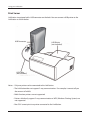
LinkStation is equipped with a USB connector on the back. You can connect a USB printer to the
LinkStation as shown below.
USB Connector
USB Printer
(not included)
USB Cable
(not included)
Notes: •Only one printer can be connected to the LinkStation.
•The LinkStation does not support 2-way communication. For example, it cannot tell you
the amount of ink left.
•Multi-function printers are not supported.
•Printers which only support 2-way communication or WPS (Windows Printing System) are
not supported.
•Mac OS X cannot print to a printer connected to the LinkStation.
LinkStation User Manual
71
Using your LinkStation
Setting up a printer on Windows Vista
1
In the LinkStation’s configuration utility, navigate
to [Extensions] - [PrintServer] and click [Modify
Settings].
2
Select [Enable] and click [Save].
3
Refer to your printer's manual installation instructions. You may need to install the printer
driver from a software disk.
4
Click [Start] - [Network].
5
Double-click on the LinkStation's server name.
6
Double-click on the LinkStation’s printer icon
(“LP”).
7
Click [OK].
LinkStation User Manual
72
Using your LinkStation
8
1 Select your printer. Choose the manufacturer
on the left and the model on the right. If
your printer is not listed, click [Have Disk] and
follow the printer manufacturer’s directions
for installation.
2 Click [OK].
You have added a printer.
LinkStation User Manual
73
Using your LinkStation
Setting up a printer on Windows XP
1
In the LinkStation’s configuration utility, navigate
to [Extensions] - [PrintServer] and click [Modify
Settings].
2
1 Choose [Enable] and click [Save].
3
Refer to your printer’s manual installation instructions. You may need to install the printer
driver from a software disk.
4
Click [Start] - [Control Panel].
5
Click [Network and Internet Connections] icon.
6
Double-click on [View workgroup computers] - (Name of the LinkStation Server name) in this
order.
7
8
Double-click on the LinkStation’s printer icon
(“lp”).
If "The printer driver to your computer will be automatically installed. Would you like to
continue?" is displayed, click [Yes].
LinkStation User Manual
74
Using your LinkStation
9
1 Select your printer. Choose the
manufacturer on the left and the model
on the right. If your printer is not listed,
click [Have Disk] and follow the printer
manufacturer’s directions for installation.
2 Click [OK].
You have added a printer.
LinkStation User Manual
75
Using your LinkStation
Setting up a printer on Windows 2000
1
In the LinkStation’s configuration utility, navigate
to [Extensions] - [PrintServer] and click [Modify
Settings]..
2
1 Click [Enable].
2 Click [Save].
3
Refer to your printer's manual to install the printer driver.
4
Double-click [My Network Places (*)] -[Entire Network] - (the LinkStation Server Name).
* On Windows NT 4.0 this is [Network].
5
Double-click on the LinkStation’s printer icon
(“lp”).
6
Click [Yes].
7
Click [OK].
LinkStation User Manual
76
Using your LinkStation
8
1 Select your printer. Choose the
manufacturer on the left and the model
on the right. If your printer is not listed,
click [Have Disk] and follow the printer
manufacturer’s directions for installation.
2 Click [OK].
You have added a printer.
LinkStation User Manual
77
Using your LinkStation
BitTorrent Client
BitTorrent is a protocol for sharing files. You can download files quickly since files are distributed
on the network and network traffic is not concentrated, even with a large file. It does not keep
anonymity, and it is easily known who publishes what files.
Warning: Do not download copyrighted files without permission from the owner.
See http://www.bittorrent.com/ for more information about BitTorrent.
Flow chart of downloading with BitTorrent:
1
Use a search engine to find the torrent for a file that you want. Download the torrent.
Notes: •Torrents are information files with a “.torrent” extension.
•Torrents can be downloaded from BitTorrent Inc.'s website or many other websites. Follow
the terms of use and copyright rules for each website.
2
Send torrent information to a server called "tracker" and receive information about a terminal
which has a file.
3
Start downloading based on the information received from the "tracker" server.
4
Download pieces of data from multiple terminals and make one file.
Use the following steps to download shared files to the LinkStation with BitTorrent.
LinkStation User Manual
78
Using your LinkStation
Enabling BitTorrent and selecting folders
1
1 In the LinkStation’s configuration utility,
navigate to [Extensions] - [BitTorrent].
2 Click [Modify Settings].
2
1 Click [Enable].
2 Select a folder for downloads from the folders
on the LinkStation.
3 Click [Save].
3
Click [Open Download Manager].
4
The Download Manager will open. There are
two methods for downloading: downloading by
adding torrent information from a URL or from a
file.
LinkStation User Manual
79
Using your LinkStation
How to download from a torrent by URL
1
Click [Add Torrent From URL].
2
1 Enter the URL with Torrent Information to the
frame at the left of [Add].
2 Click [Add].
3
When the message [Torrent URL has been sent.]
is displayed, click [OK]. Downloading to the destination folder will begin.
4
When progress reaches 100%, the download is
complete.
You have downloaded a file to the download folder from a torrent by URL.
LinkStation User Manual
80
Using your LinkStation
How to download from a torrent by adding it from a file
1
Click [Add Torrent From File].
2
1 Click [Browse...] and select the torrent file from
the LinkStation or your computer.
2 Click [Add].
3
Downloading to the destination folder will begin.
4
When progress reaches 100%, the download is
completed.
You have downloaded a file to the download folder from a torrent by adding it from a file.
LinkStation User Manual
81
Using your LinkStation
What you can do in the download screen
1
Click a queue name and click [Stop]; this stops downloading.
2
Click [Start] to resume downloading.
3
Click a queue name and click [Remove]; the file will be deleted.
4
Enter a phrase and click Search to search for torrents at www.bittorrent.com.
5
The order of the download queue can be changed by each item. The displayed order can be
switched by clicking any of the following items.
[Name] [Size] [Progress] [Download] [Upload] [ETA]
6
Click [Settings] to display the BitTorrent configuration utility.
LinkStation User Manual
82
Using your LinkStation
What you can do in the configuration utility
1 Port Settings
Changes the port used for BitTorrent communication. If UPnP is enabled, the LinkStation will
automatically update the connected router to match.
To set the port manually without using UPnP, enter the port number (the default setting is
[Standard Setting (6881)] on any port number on the LinkStation side.
2 Bandwidth Management
If this is set to [Automatic], transmission bandwidth of BitTorrent will be automatically set. If this
is set to [Manual], you can specify a maximum bandwidth for download, upload, and seeds. The
default setting is [Automatic].
3 Seeds
Set the seed period for a file which is finished downloading.
[Seed until removed] will continue to seed until the torrent is deleted.
[Stop seeding when ratio reaches] will stop seeding when the upload percentage (a
percentage of the number of byte downloaded against the number of byte uploaded)
achieves the pre-defined value in %.
[Stop seeding after] stops seeding automatically after the pre-defined time in minute has
passed.
The default setting is [Seed until removed].
LinkStation User Manual
83
Using your LinkStation
Media Server
The LinkStation is equipped with a DLNA Media Server. Videos, pictures and music saved on
the LinkStation can be displayed or played on TV, audio devices, game devices and other DLNA
compatible network devices.
DLNA (Digital Living Network Alliance) defines Home Network Device Interoperability Guidelines,
which are product design guidelines in the industry's standard technology in order to achieve the
interconnecting environment for digital devices (computers, home appliance, mobile devices and so
on).
To use DLNA on the LinkStation, begin by enabling it.
1
In the LinkStation’s configuration utility, navigate
to [Extensions] - [Media Server] and click [Modify
Settings].
2
If it is set to [Disable], click [Enable].
3
Click [Save] at the bottom of the configuration utility.
DLNA is now enabled on the LinkStation.
LinkStation User Manual
84
Using your LinkStation
Connecting to the LinkStation and playing the files
This example shows how to use DLNA compatible media players to play files on the LinkStation.
Screenshots are from a Buffalo LinkTheater LT-H90 media player.
1
Connect DLNA compatible devices to the network and turn them on.
Note: Refer to the devices’ manuals for how to connect them.
2
Select the DLNA server of the LinkStation from the screen to select DLNA compatible
devices
Select your LinkStation from the list of available
devices. By default, its name will be its model
number followed by the last 3 digits of its MAC
address. For example, a LS-XHL LinkStation Pro
whose MAC address ends in DBB will have the
name LS-XHLDBB.
3
Select the contents you want to play.
Select from [Videos], [Music], or [Photos].
LinkStation User Manual
85
Using your LinkStation
4
Select the file that you want to play, then play it.
LinkStation User Manual
86
Using your LinkStation
Play on PSP®(Play Station Potable) *LS-CHL, LS-XHL only
Your Sony PSP® can access the LinkStation if they’re connected to the same AP or wireless router.
The PSP® can play audio files through RSS and save them to a memory stick.
1
Access the following URL from the PSP®’s browser:
http://(IP address of the LinkStation):9050/rss
Consult the PSP’s documentation for instructions on using the PSP’s browser. You can get the
LinkStation’s IP address with NAS Navigator2 (included on your CD)..
NAS Navigator2
The LinkStation's IP address is displayed in the
bottom right corner of NAS Navigator2.
2
Audio files saved in the LinkStation's media folder
can be sorted by [Playlist], [Artist], [Genre], and
[Album], or click [Folder] to access all files.
3
Select the RSS link. RSS registration will begin.
LinkStation User Manual
87
Using your LinkStation
4
Close your browser and select the [RSS channel] from the [Network] menu. Choose the
channel you want to play.
5
A list of available audio files is displayed. Select the desired file to play.
Note: To save an audio file to a memory stick, push the [ △ ] button and select [Save}.
Notes: •To play music on the PSP®, use firmware version 2.70 or later.
•"PlayStation" and "PSP" are registered trademarks of Sony Computer Entertainment Inc.
•"Memory Stick", "Memory Stick PRO DuoTM" , "Memory Stick Pro-HG Duo TM", "Memory Stick
Micro (M2)TM", and "
" are trademarks of Sony Inc.
•The LinkStation is a product of Buffalo Technology and is not licensed or approved by Sony
Computer Entertainment Inc.
LinkStation User Manual
88
Using your LinkStation
Media Server Settings
By default, the LinkStation is set to allow all videos, pictures and music on the shared folder “share“
and subfolders to be played. You may configure it to only play videos, pictures and music from a
specific folder.
In the configuration utility, navigate to [Extensions]
- [Media Server] and click [Modify Settings].
1
Shared folders and subfolder will be displayed in
the pulldown menu of [Media Server published
folder]. Select the folder you want to publish.
2
3
Click [Save] at the bottom of the configuration utility.
4
Only files saved on the folder you selected in step 2 can be selected or played from DLNA
supported devices.
LinkStation User Manual
89
Using your LinkStation
To view DLNA compatible devices connected to the LinkStation:
1
2
In the configuration utility, navigate to [Extensions]
- [Media Server].
Click [Authorized DLNA Media Clients].
3
A list of DLNA compatible devices on the network will
appear, showing MAC addresses, IP addresses and
device names.
If a DLNA device doesn’t broadcast its name or IP
address, it will be displayed as [cannot be acquired].
After connecting a new DLNA device to the network, or
changing its settings, click [Refresh client list].
LinkStation User Manual
90
Using your LinkStation
DLNA Media List
The LinkStation will maintain a database of videos, pictures, and music saved in its media folder and
distribute a list of available media to DLNA media players on the network. This list is distributed
after each reboot and once every 60 minutes by default. Configure the database as described
below.
1
In the configuration utility, navigate to [Extensions]
- [Media Server] and click on [Modify Settings].
2
To distribute the list of available media, click [Enable]
in [Automatic update], then click [Refresh now].
Optionally, you may choose a different refresh
interval. To distribute the media list at a different
interval, enter the desired interval in minutes in the
[Refresh interval] field.
To completely disable distribution of the media list,
click [Disable] for [Automatic Update]..
3
Click [Save] to save your settings.
LinkStation User Manual
91
Using your LinkStation
If other DLNA media devices don’t recognize the LinkStation:
If the Media Server on the LinkStation is disabled, other DLNA devices won’t be able to see it. You
may enable the Media Server on the LinkStation as follows.
1
In the configuration utility, navigate to [Extensions]
- [Media Server] and click [Modify Settings].
2
Click [Enable].
3
Click [Save].
LinkStation User Manual
92
Using your LinkStation
To disable to play any files from DLNA compatible devices:
By default, the LinkStation will allow playback from any compatible media player on the same
network. To prohibit playback for a specific DLNA media player, follow the directions below.
1
2
In the configuration utility, navigate to [Extensions]
- [Media Server] and click [Modify Settings].
Click [Authorized DLNA Media Clients].
3
4
Select [Deny] for the DLNA media player(s) that
you want to block from accessing media on the
LinkStation. Media players that are allowed to access
media on the LinkStation should be set to [Allow].
Click [Save].
LinkStation User Manual
93
Using your LinkStation
Troubleshooting:
Problem: The DLNA media player can’t see media files on the LinkStation
If your DLNA media players can’t access the media files on the LinkStation, then the list of available
media files should be updated. Try the following:
1
In the configuration utility, navigate to [Extensions]
- [Media Server] and click [Modify Settings].
Select [Enable] for [Media Server] and [Automatic
Update]. Check [Refresh now] and [Initialize
database before refresh].
2
3
Click [Save].
If you cannot play certain files:
The LinkStation’s DLNA media server supports the following types of files. Only files of these types
will be available to DLNA media players on the network.
Types
File Extensions
Video files
.avi, .divx, .asf, .mpg, .mpe, .m1v, .vcb, .mts, .m2ts, .m2t, .mpeg, .mpeg2,
.vdr, .spts, .tp, .ts, .3gp, .mov, .m4v, .wmv, .dvr-ms, .xvid, .mp4, .m4v
Picture files
.jpg, .jpeg, .gif, .png, .tif, .tiff, .yuv, .bmp
Music files
.mp3, .mpa, .wma, .aac, .apl, .ac3, .lpcm, .pcm, .wav, .m3u, .m4a,
.mp4, .3gp, .m4b, .aif, .aiff, .flac, .ogg, .mp2, .mp1, .mp4
Your media player may not support all of these filetypes. Files that your media player doesn’t
support may not be visible from the media player. Check your media players documentation for a
list of the types of files that it can play.
LinkStation User Manual
94
Using your LinkStation
Using iTunes with the Media Server
Computers on the network running iTunes can access MP3, M4A, and M4P music files from the
LinkStation’s media server. Enable the LinkStation’s media server as described below.
1
2
In the configuration utility, navigate to [Extensions]
- [Media Server] and click [Modify Settings].
1 Select [Enable].
2 Click [Save].
Note: If you add, change, or delete music files on the LinkStation, iTunes may halt playback until
the database is updated and the media list distributed. After making changes to the media
files, refresh the media list as described on the previous page and restart iTunes.
With the media server enabled, the LinkStation will appear in iTunes on computers on the network,
and music files on the LinkStation can be played normally.
LinkStation User Manual
95
Using your LinkStation
Web/Database Server (LS-WXL, LS-WSXL only)
<Web server>
The LinkStation can be used as a Web server.
HTML, CGI scripts, images, and JavaScript are supported.
Note: – The LinkStation’s Web server is for advanced users only. Don’t enable it unless you know
what you’re doing.
1
2
Navigate to [Network] – [Web Server] in the Web Admin tool and click [Modify Settings].
[Enable] Web Server, choose an external port setting (81 is the default) and a Web server public
folder, and click [Save].
3
Edit the php.ini file to change the PHP language
interpreter settings,. Instructions are in the file.
The Web server is now configured.
LinkStation User Manual
96
Using your LinkStation
<MySQL server>
The LinkStation can be used as a MySQL server.
A MySQL database may be installed and linked with the web server.
Note: – The LinkStation’s MySQL server is for advanced users only.
– Don’t enable it unless you know what you’re doing.
1
Navigate to [Network] – [MySQL Server] in the Web Admin tool and click [Modify Settings].
2
[Enable] MySQL Server, choose a port and a data folder, and click [Save].
The MySQL server is now configured.
LinkStation User Manual
97
Chapter 2
NAS Navigator2
NAS Navigator2 is a utility program that makes it simple to display the LinkStation's configuration
utility, change its IP address or check its hard drive.
Windows Vista/XP/2000 and Windows Server2003/Server2008
If you set up the LinkStation with the LinkNavigator CD, NAS Navigator2 is installed and configured
to run automatically in the system tray at startup.
You can launch NAS Navigator2 in either of the following ways:
• Click the NAS Navigator icon on your Desktop.
• Click [Start] - [(All) Programs] - [BUFFALO] - [BUFFALO NAS Navigator2]-[BUFFALO NAS Navigator2].
Screen:
Clicking a LinkStation's icon will display its total capacity, capacity being used, IP address,
workgroup, subnet mask, default gateway, MAC address, and firmware version.
LinkStation User Manual
98
Chapter2 NAS Navigator 2
Name
Menu
Map remote default share to
drive letter (*)
Disconnect mapped drive letter
(*)
Map all remote shares to drive
letters
Create desktop shortcut for Tera/
LinkStation (*)
Launch NAS Navigator2 on
startup
Display the error information
Descriptions
Assigns the LinkStation's shared folder as a network drive.
Removes the network drive mapping.
Assigns all the LinkStation's shared folders as network
drives.
Creates a shortcut to the LinkStation's shared folder (share).
Menu
Launches NAS Navigator2 in the task tray when Windows
boots.
If an error occurs, an error message will pop up from the
NAS Navigator2 icon in the task tray.
Using a Default Browser
Uses Internet Explorer to display the LinkStation
configuration utility.
Properties (*)
Opens the selected LinkStation's Properties window.
Close
Closes NAS Navigator2.
View
[Icon]: Displays icon for ease.
[Details]: Displays Name, Product Name, Workgroup, IP
Address, Subnet Mask, and Default Gateway.
Sort by
Selects the sort order from following to display when
multiple LinkStations are found:
Host name, Product Name, Workgroup, IP Address,
Subnet Mask, Default Gateway
Browse(*)
Opens the LinkStation’s shared folder.
Refresh
Searches for NAS devices on the network again.
* not displayed unless the LinkStation's icon is clicked.
View
LinkStation User Manual
99
Chapter2 NAS Navigator 2
When NAS Navigator2 is minimized to the task tray, you have the following options from its icon.
Menu Item
LinkStation Name Open Web
Admin
Properties
Map remote
default share to
drive letter
Disconnect
mapped drive
letter
Create short cut
Descriptions
Opens the LinkStation’s configuration utility in a web browser.
Refresh
Refreshes list of NAS devices.
Browse Shares
Displays NAS Navigator2 window.
Exit
Exits NAS Navigator2.
LinkStation User Manual
Opens the LinkStation’s properties page.
Assigns the LinkStation’s default share as a network drive.
Unmaps the network drive.
Creates a shortcut to a LinkStation’s shared folder (share).
100
Chapter2 NAS Navigator 2
You can perform the following tasks from a LinkStation's properties window.
Menu Item
Web Admin
Descriptions
Opens a LinkStation's configuration utility.
IP Settings
If [Obtain an IP address automatically] is checked, the LinkStation will attempt to
get its IP address automatically from a DHCP server.
Alternately, you can manually enter the IP address, Subnet Mask, and Default
Gateway Address for the LinkStation.
LinkStation User Manual
101
Chapter2 NAS Navigator 2
Mac OS X 10.3.9 or later
If you installed the LinkStation with the LinkNavigator CD, NAS Navigator2 was installed
automatically. To launch it, click the NAS Navigator2 icon in the Dock.
Click on a LinkStation's icon to display its total capacity, used capacity, IP Address, Workgroup,
Subnet Mask, and Default Gateway Address. Double-click to open a share on the LinkStation.
Name
Open
Descriptions
Opens the default shared folder for a selected
LinkStation.
Rescan
Refreshes list of NAS devices.
Tool Menu
Open Web
Opens the selected LinkStation’s configuration
utility.
Configure
Opens the selected LinkStation’s configuration
utility.
Selects the color of the name displayed below
the icon.
Sets the orders of icon sizes, label positions, and
icons.
Color Label
Show View Options
LinkStation User Manual
102
Chapter 3
Web Administration Tool
Home
The following options can be configured from the Home screen.
Name
Descriptions
Name
Displays the name of the LinkStation.
Firmware version
Displays the firmware version of the LinkStation.
IP Address
Displays the IP address of the LinkStation.
Workgroup
Displays the LinkStation’s workgroup.
Storage
Displays the total capacity of the LinkStation’s hard drive, as well as the
amount used.
Shared Folders
Displays shared folders and disks on the LinkStation. If the [Users/Groups]
tab is selected, Users and Groups are displayed. If the [Network] tab is
selected, it shows if DHCP is Enabled or Disabled and displays the Ethernet
Frame Size.
Log out of the LinkStation configuration utility.
Logout
103 LinkStation User Manual
Chapter 3 Web Administration Tool
Shared Folders
The following options can be set from the Shared Folders screen.
Name
Descriptions
Shared Folders Click [Create Folder] to open the Adding a New Shared Folder screen.
Click a shared folder name to open the shared folder's settings screen.
Select the shared folder and click [Delete] to delete the shared folder.
Enter a letter in the [Find] field to display folders that begin with that letter. Click
a folder name from the list to select the folder.
The following tasks open the [Confirm Operation] screen.
Shared
Folders
• Delete Folder
• Restore Factory Defaults
• Format
Enter the number from the [Confirmation Number] field within 60 seconds, and
click [Apply].
Copy Settings Select the shared folder you want to copy settings from.
From
Shared
Name
Folders
>
New Folder
Click [Create Folder]
to view this
Description
option.
Enter a name for the share folder.
You can enter up to 12 alphanumeric characters, or 6 two-byte characters.
Alphanumeric characters, two-byte characters, hyphens, and underscores may
be used.
Do not use a number or symbol as the first letter of the name.
Enter a description for the shared folder.
You can enter up to 50 alphanumeric characters, or 25 two-byte characters.
Alphanumeric characters, two-byte characters, hyphens, and underscores may
be used.
LinkStation User Manual
104
Chapter 3 Web Administration Tool
Name
Volume
Description
Select the volume for the shared folder.
Shared Folder The shared folder may be read-only or writable.
Attributes
Recycle Bin
If enabled, deleted files are moved to a trashbox folder rather than actually
deleted.
You can enable recycle bin functionality for each shared folder on the LinkStation
as well as usbdisk1.
Shared
Folders
>
New Folder Support
Click [Create Folder]
to view this
option.
• To use Recycle Bin with usbdisk1, format it with EXT3, XFS, or FAT 32. NTFS and
HFS+ are not supported because files cannot be deleted with these formats.
• Recycle Bin is not supported while connecting via AFP or FTP.
Select which operating systems and features the share will support.
Shared Folder
Support
Description
Windows
(SMB)
Check to enable SMB support for connection to
Windows and Mac OS X.
Apple (AFP)
Check to enable AFP support for connection to
Mac OS. Also, navigate to [Network]-[Network
Settings]-[Network Services] and make sure that
AFP is enabled there as well.
Check to enable remote FTP access to the share.
Also, navigate to [Network]-[Network Settings][Network Services] and enable FTP there as well.
Check to allow other LinkStations to use this
share as a backup target.
FTP
Disk Backup
LinkStation User Manual
105
Chapter 3 Web Administration Tool
Name
Shared
Remote
Folders
backup
>
password
New Folder
Description
If another LinkStation will be backing up to this share, consider configuring
a password for remote backup. This will make it easy to configure the other
LinkStation to back up to the correct share and prevent other users from
mistakenly backing up to it.
Click [Create Folder]
from the
Shared
Folder
Configuration Screen
to view this
option.
Passwords may contain up to 8 alphanumeric, hyphen, and underscore
characters. Don’t use a hyphen as the first character.
Restrictions Access
Restrictions
Click [Access Restrictions]
from the
[Create
Shared
Folders]
screen to
view this
option.
Target
If using access restrictions, click [Add ] to add users or groups that will be
allowed to access the share.
You may delete users and groups from the access list with the [Delete] button.
With AFP and FTP connections, access restrictions can be set per user.
Choose the destination folder for DirectCopy.
DirectCopy
Click [Modify Settings]
to change
settings.
LinkStation User Manual
106
Chapter 3 Web Administration Tool
Users/Groups
The following options can be set from the Users/Groups screen.
Descriptions
Name
Local Users
Displays Username, User ID, Description, and Primary Group.
To create a new user, click [Create User].
To edit the user, select the user name and click [Edit User]. To delete the user,
select the user and click [Delete].
If [Delegate Authority to External SMB Server][Network] - [Workgroup/Domain]
is selected from [Network] - [Workgroup/Domain] for the authentication
settings, a user who are registered at the LinkStation can be converted to an
authorized user of the external SMB server by clicking [The selected user(s) will
be converted to external users].
Local Users
Enter a letter in the [Find] field to list users that begin with that letter.
The users [admin] and [guest] are built-in to the LinkStation. They cannot be
deleted.
Username
Description
Local Users
>
New User
If the LinkStation is a domain member, [Domain Users] will also be available. K
Usernames may contain up to 20 alphanumeric characters, two-byte characters,
hyphens, and underscores. Don’t use a hyphen or underscore as the first
character of the name.
Descriptions may contain up to 50 alphanumeric characters or 25 two-byte
characters. Letters, numbers, hyphens, underscores and spaces may be used.
Do not use a space as the first character in a description.
To display, Password
click [Cre- (within 20
ate a user]. characters)
Local Users
New users automatically belong to the [hdusers] group. You can change the
group the user belongs to in Group Settings.
Enter the user’s password. This should be the same password that the user uses
to log in to his computer.
Passwords may contain up to 20 alphanumeric characters. One-byte
alphanumeric characters, hyphens, and underscores are supported. Don’t use a
hyphen as the first character of a password.
If the user is using Mac OS, passwords must be limited to 9 or fewer characters.
Otherwise, the user will not be able to access shared folders on the LinkStation.
Confirm Pass- Enter the password again for confirmation.
word
LinkStation User Manual
107
Chapter 3 Web Administration Tool
Name
Descriptions
External SMB
External
Server Users
SMB Server
Users
Navigate to [Network] - [Workgroup/Domain] - [For Workgroup Authentication]
and select [Delegate Authority to External SMB Server] and [Automatic User Registration]. Users will be registered automatically and listed.
To delete automatically registered users, select each user and click [Delete External User].
LinkStation User Manual
108
Chapter 3 Web Administration Tool
Descriptions
Name
Local Groups
Displays Group Name, Group ID, and Description.
To create a new group, click [Create Group].
Local
Groups
Local
Groups
> New
Group
To edit a group, select it and click [Edit Group].
To delete a group, select it and click [Delete].
Group Name
Description
To display,
click [Create Group]
on the
Group
Screen.
Note: Enter a letter in the [Find] field and groups beginning with that letter are
displayed. Click on a group name in the list to select the group.
Group names may contain up to 12 alphanumeric characters, hyphens, or
underscores, or periods.
Don’t use a hyphen or period as the first character of a group name.
Group descriptions may contain up to 50 alphanumeric characters or 25 twobyte characters. You can use alphanumeric characters, two-byte characters,
hyphens, spaces, and underscores.
Don’t use a space as the first character in a description.
Local Users
To add a user to the group, select the user and click [Add].
Local Users/Group
Members Group
Members
Note: Domain Users from the Domain Controller cannot be added to groups
here.
Displays users who are registered to a group. To unregister a user, select the user
and click [Delete].
LinkStation User Manual
109
Chapter 3 Web Administration Tool
Network
The following options can be set from the Network screen.
Name
Descriptions
IP Address DHCP
Settings
IP Address
Subnet Mask
Click
Default Gateway
[Modify
Settings] Address
to change Primary DNS Server
settings.
Secondary DNS
Server
Ethernet
Ethernet Frame Size
Frame Size
If enabled, the LinkStation will attempt to get its IP address from a DHCP
server on the network.
Set IP address.
Set Subnet Mask.
Specify by IP address if Default Gateway Address exists.
Click
[Modify
Settings]
to change
settings.
Network Services
Network
Services
LinkStation User Manual
Specify an IP address of the DNS server which has priority.
Specify an IP address of an alternative DNS server.
Ethernet frame size is the maximum size of data that can be sent at a time.
If all devices on your network support jumbo frames, you may be able to
improve transmission efficiency by choosing a larger frame size than the
default.
• 518 bytes (Default) Factory default value is 1518 bytes.
• 4102 bytes (Jumbo Frame) Transfer at 4102 bytes.
• 7422 bytes (Jumbo Frame) Transfer at 7422 bytes.
• 9694 bytes (Jumbo Frame) Transfer at 9694 bytes.
Enable or disable AFP and FTP.
AFP must be enabled here for Mac OS computers to connect via AFP. Also,
enable AFP in the shared folder settings to use AFP.
FTP must be enabled here for remote users to access the LinkStation via
FTP. Also, enable FTP in the shared folder settings to use FTP.
110
Chapter 3 Web Administration Tool
Descriptions
Name
Workgroup Name
Workgroup/
Domain
Click
[Modify
Settings]
to change
WINS Server IP
settings.
Address
Authentication
Method
Enter the workgroup name to have the LinkStation join a Microsoft
network group.
Workgroup names may contain up to 15 alphanumeric characters or 7
two-byte characters. You can use one-byte alphanumeric characters, twobyte characters, hyphens, underscores, and periods.
Don’t use a hyphen, underscore, or period as the first character of a
workgroup name.
Enter the IP address of a WINS Server to use WINS Server.
Select the user authentication method here.
[Delegate Authority to LinkStation] (usually recommended)
Only registered users may access the LinkStation. Usernames and
passwords should be exactly the same as those used for Windows login.
[Delegate Authority to External SMB Server]
Users are authenticated by an external Authentication server. Microsoft
network knowledge required for setup. Consult your System Administrator
for details.
Workgroup/
Domain
[Use Windows Domain Controller as Authentication Server]
Select this option when you want to authenticate against Domain
Controller, but the LinkStation does not join the domain.
Note: The Windows Domain Controller has been assigned to be an
external authentication SMB Server. The workgroup name on the DEVICE_
TYPE must be identical to the Windows Domain Name.
[Automatic User Registration]
Select to automatically register users allowed by the Authentication Server
to the LinkStation's authenticated user list .
[Enable Authentication Shared Folder]
Use the folder as an authentication test folder which can be accessed by
users registered to Authentication Server.
LinkStation User Manual
111
Chapter 3 Web Administration Tool
Descriptions
Name
Authentication
Server Name or IP
Address
When [Delegate Authority to External SMB Server] is selected for the
authentication method, specify the external server which is used for the
user authentication by the server name or IP address of the server
Name
Note: • When connecting using AFP or FTP/FTPS, always use an IP address.
Authentication may fail if a server name is used.
• Enter the IP address rather than the server name anytime that the
server is not on the same subnet.
When [Delegate Authority to External SMB Server] , [Automatic User
Registration], and [Enable Authentication Shared Folder] are selected
for the authentication method, specify the shared folder name for the
authentication test. It can be registered as the users of the LinkStation
automatically who open the shared folder for the authentication test.
Workgroup/
Domain
LinkStation User Manual
Note: • You cannot create more than 2 shared folders for the
Authentication test .
• A user who is automatically registered will belong to the "hdusers"
group.
• You cannot use shared folder names which already exist as a
shared folder name for the authentication test.
• You can enter up to 12 alphanumeric characters or 6 two-byte
characters.
• You can use one-byte alphanumeric characters, two-byte
characters, hyphens, and underscores.
• Don’t use a number or symbol as the first character of the name.
• AFP and FTP/FTPS connection do not allow delegating authority
to external SMB server to obtain user information.
112
Chapter 3 Web Administration Tool
System
The following options can be set from the System tab.
Descriptions
Name
Settings
LinkStation Name Enter a name to identify the LinkStation on the network. Names may
contain up to 15 alphanumeric characters, hyphens, and underscores.
Name
Description
Click
[Modify
Settings]
to change
settings.
Don’t use a hyphen or underscore as the first character of a name.
Descriptions may contain up to 50 alphanumeric characters or 25
two-byte characters. You can use alphanumeric characters, two-byte
characters, spaces, hyphens, and underscores.
Don’t use a space as the first character in a description.
Descriptions are only displayed in Windows. They will not be displayed on
a Macintosh.
Date/Time Source Select [Automatic] to use an NTP to correct system time automatically.
Select [Manual] to set time manually.
Enter the DNS name or the IP address of an NTP server. You may user ntp.
Primary NTP IP
jst.mfeed.ad.jp or 192.168.11.123, for example.
Address
Date and
Time
NTP
Synchronization
Click
Frequency
[Modify Time Zone
Settings] Date
to change Time
settings.
Language
Display Language
Click
Windows Client
[Modify
Language
Settings]
to change
settings.
LinkStation User Manual
To specify ntp.jst.mfeed.ad.jp as the NTP server, select [Use the default NTP
server (ntp.jst.mfeed.ad.jp)].
You may have NPT correct your system time [Daily], [Weekly], or [Every 3
hours].
Specify Time Zone.
Displays year, month and date. Enter numbers to change these values.
Displays time. Enter numbers to change the value manually. Click [User
Local Date/Time] to obtain time and time zone from the internal clock of
your computer.
Note: If system clocks on your network get more than 5 minutes off from
each other, it may cause problems with your network. For best results, use
an NTP server to automatically set the system time for all of your network
devices, including the LinkStation.
Select the language to be displayed.
Select the language to be used in the Windows client.
113
Chapter 3 Web Administration Tool
Descriptions
Name
Storage
Check Disk
Disks
LinkStation User Manual
You may run a disk check on hard drives in or attached to the LinkStation
via USB. Depending on the size of the disk, a disk check may take many
hours to complete.
Notes: • You cannot run a disk check at the same time as a backup job.
• During the disk check, the file sharing service stops.
If the unit is disconnected abnormally from Mac OS, the database
created by Mac OS may be destroyed and you can no longer
connect to the unit. If this happens, select [Delete any hidden,
non-essential Mac OS dedicated files] and run a disk check. All of
the files listed below will be deleted, including sub directories..
• AppleDB
• AppleDesktop
• AppleDouble
• TheVolumeSettingsFolder
• Network Trash Folder
• Please make sure the LinkStation is not selected as a backup
destination of other LinkStation before you run the disk check. If
the LinkStation is selected as the backup destination, do not run
the disk check.
114
Chapter 3 Web Administration Tool
Descriptions
Name
Storage
Format Disk
You may format disks in or connected to the LinkStation. All data on the
disk will be deleted if the drive is formatted. Back up any important data
before formatting a disk.
You cannot format a drive if you’ve scheduled a backup job. Also,
don’t format the drive if it’s configured as the backup target of another
LinkStation.
The following tasks open a [Confirm communications] screen.
• Delete Folder
• LinkStation's Restore Factory Defaults
• Erase Disk of the LinkStation
Enter the number shown in the [Confirmation Number] field within 60
seconds, and click [Apply].
Disks
The LinkStation can format or recognize the following format types:
Format type
Descriptions
EXT3
EXT3 is recommended for external drives
(USB hard drive attached to the LinkStation.
only)
• You can perform both Read and Write.
• Supports Journaling File System.
• May take a while to format (a few minutes to a
hour).
• Less space is available than XFS after formatted.
• More files in 1 folder, slower the access space.
Note: An EXT3 Reader is included in this package
for reading EXT3 disks from a Windows PC.
LinkStation User Manual
115
Chapter 3 Web Administration Tool
Descriptions
Name
Storage
Format Disk
Format type
Descriptions
XFS
(USB Hard
Drive/LinkStation Internal
Hard Drive)
This format is recommended for the internal drive in the
TeraStation or LinkStation.
• Supports both Reading/Writing.
• Supports Journaling File System.
• More space is available than XFS after formatted.
• Access speed will not degrade even with many files in a
single folder.
XFS is not supported by legacy LinkStations such as HD-LAN,
HD-HLAN, or HD-HGLAN series.
You cannot read data on an XFS drive by directly connecting
to your PC.
FAT32
FAT32 is recommended if you’re going to connect the drive
(USB hard drive to Windows and Mac computers as will as the LinkStation. It
only)
works with most computers and devices.
• Supports both Reading/Writing.
• Cannot copy or backup data with more than 4 GB per file.
• Cannot use some characters which are used in Mac OS X
such as [:].
Disks
NTFS
Cannot format from the LinkStation configuration screen.
(USB hard drive This is Read Only for the LinkStation. It can be used read/
only)
write with Windows 7/Vista/XP/2000, or Windows Server2003/Server2008.
• Read Only (not writable for backup either).
HFS+
Cannot format from the LinkStation configuration screen.
(USB hard drive Read-Only.
only)
Can be used to connect to Mac OS X 10.3.9 or later.
• Read Only (not writable for backup either).
Remove Disk
Select the USB hard drive and click [Remove Disk] to safely remove the USB
hard drive.
Rediscover Disk Not used for this product
LinkStation User Manual
116
Chapter 3 Web Administration Tool
Name
Descriptions
Storage
Configure RAID array from this menu.
Disks
RAID 0 and RAID 1 mode are available for use. LinkStation will be used just as
the two hard drives if RAID setting is disabled.
RAID Array *1
Disk Structure:
*1: LS-WXL,
LS-WSXL only
Displays the hard drive configuring RAID. To configure a RAID array, check the
target drive, select RAID mode and click [Create Array]. To delete the RAID
array, select [Remove Array].
Changing RAID Array setting causes data loss. Back up any important data in
advance.
A RAID scan tests your RAID array for errors. If errors are found, they are fixed
automatically if possible. If you are using a RAID array, regular RAID scans are
recommended.
Recoverable errors found during standard file operations will be automatically
repaired regardless of performing RAID scanning or not.
Status
Recoverable errors
Unrecoverable errors
RAID Scanning *1
*1: LS-WXL,
LS-WSXL only
Descriptions
• Read error in the data area which are build in
RAID 1(including RAID 1 system area)
• Writing error / RAID management area error /
drive partition information area / Drive Detection
Failure
If many recoverable errors (bad cluster) are found in one of the hard
drives which builds RAID, that drive will be removed and the system will
automatically move to degrade mode.
Since the data is not protected in the degrade mode, it is strongly
recommended to replace the erroneous hard drive immediately.
When running RAID Scanning in the first time, it is strongly recommended to
backup data on the LinkStation in advance.
RAID Scanning:
Set whether using RAID Maintenance or not.
RAID Scanning Schedule:
Select the schedule to perform RAID Maintenance.
•Every Week [Sun-Sat]
• 1st [Sun-Sat]
• 2nd [Sun-Sat]
• 3rd [Sun-Sat]
LinkStation User Manual
117
Chapter 3 Web Administration Tool
Name
Storage
Descriptions
RAID Scanning
RAID Scanning Start Time:
• 4th [Sun-Sat]
• 1st, 3rd [Sun-Sat]
• 2nd, 4th [Sun-Sat]
• Every 1st day / month
Select [Begin Immediate RAID Scan]] and click [Save] to immediately run the
maintenance.
Select time to start RAID from 0 to 23 o’clock.
*Click [Abort RAID Scanning] to stop the operation.
*LS-WXL,
LS-WSXL only
RAID Array Error Detection Response:
When there is an error on RAID Array, the system will be automatically shut
down to protect data (This feature is only for RAID 1. This does not work under
normal mode or RAID 0 mode).
The default setting is [Shutdown].
Backup
Local
Displays LinkStations and TeraStations on the network with shares enabled for
LinkStation backup.
View NAS
Devices
Click [Refresh] to update the list.
Off Subnet You can add an off-subnet LinkStation or TeraStation to the list. Enter the IP
LinkStation address of the LinkStation/TeraStation and click [Add].
Note: Only devices with active backup shares can be registered.
LinkStation User Manual
118
Chapter 3 Web Administration Tool
Name
Backup
Descriptions
Password
to Search
Search for
Backup Destination by
Password
Click [Modify
Settings] to
change settings.
Enter a password to search for LinkStations and TeraStations with that
password for backup.
Example of Configuration
Configuration on the LinkStation (Backup Destination)
Name
share1
Remote backup password
111
Example of Configuration
Configuration on the LinkStation (Backup Source)
The shared folder as a backup destination displayed View
when "222" is set on "Search for Backup Destination
by Password" on the LinkStation as a backup source.
share_free
None
Not
View
Displayed
The shared folder as a backup destination displayed Not
View
when "222" is set on "Search for Backup Destination Displayed
by Password" on the LinkStation as a backup source.
A shared folder as a backup destination displayed
when the password is not set
LinkStation User Manual
share2
222
View
Not
Not
View
Displayed Displayed
119
Chapter 3 Web Administration Tool
Name
Backup
Descriptions
Password
to Search
Steps for Setup
1 In the configuration utility of the backup destination, set "Remote backup
password" for each shared folder.
2 When setting up the backup for the LinkStation which is the backup source,
set the same password of "Search for Backup Destination by Password" as
for "Remote backup password" which is set for the shared folder you want
to display as the backup destination.
Search for
Backup Destination by
Password
3 Set up the backup at the LinkStation which is the backup source.
Select the shared folders of the backup destination from the following.*
• Shared folders in the LinkStation which is the backup source.
• The USB hard drive connected to the LinkStation which is the backup
source.
• A shared folder for which "Remote backup password" is not set in the Link/
TeraStation which is the backup destination.
• A shared folder whose "Remote backup password" in the LinkStation/
TeraStation which is the backup source matches with "Search for Backup
Destination by Password".
* "Backup" must be enabled as a published destination when setting up the
shared folder.
Click [Modify
Settings] to
change settings.
Backup
Click [Create New Job] to set up to 8 backup timers.
Jobs Setup
Back up data saved on the LinkStation to the USB external hard drive or another
Link/TeraStation at the specified time.
Backup Jobs
Setup
LinkStation User Manual
Notes: • If you choose the USB hard drive in order to utilize this backup feature,
the USB drive must be formatted in FAT32, XFS or EXT3 The format type
for a USB hard drive can be displayed on the LinkStation configuration
utility, [System] - [Disk].
• If a USB drive is formatted in FAT32, the maximum file size that can be
backed up is 4 GB.
• Never unplug the LAN cable connected to the LinkStation or USB hard
drive during backup.
• Do not restore, run Check Disk, Backup Job setup and Folder Setup,
User/Group, Add, Edit, or Delete User during backup. Otherwise, the
backup may fail.
• If an error occurs during a regularly scheduled backup (Every day/Every
Week), the backup job will not be performed after that. You will need
to configure the backup job again. However, this does not apply when
"Ignore Errors and Proceed with Backup" option is selected.
120
Chapter 3 Web Administration Tool
Descriptions
Name
Backup
Backup
Jobs
Setup
Click [Create New
Job] to
display
this option in the
Backup
Configuration
Screen.
Job Name
Backup Job Schedule
Backup Date
Backup Operation
Mode
LinkStation User Manual
Enter the name you want for a backup task.
Select the schedule to run from [Not Scheduled], [Immediate], [Every Day],
or [Every Week].
Select the day or time to run the backup job.
Select the Backup Operation Mode from the following choice.
• Normal Backup
• Overwrite Backup (Append Backup)
• Overwrite Backup (Differential Backup)
Caution: If you select "Overwrite Backup (Differential Backup), any files
which do not exist in the source will be deleted without further warning or
notice.
All operation modes other than normal backup will overwrite all data at the
backup destination.
• Do not perform any file operations (such as rename or delete a file) in the
Backup Sources during the Backup. If you do so, the backup job may halt
with errors. In such a case, rerun the backup job.
121
Chapter 3 Web Administration Tool
Name
Descriptions
Backup
The following table shows behavior during each operation mode. Behaviors will
vary if [Create Target Folder for Backup] is selected or not in Backup Option.
Note: This example uses "/target" as the backup target.
If data is backed up to the USB hard drive, the "target" below, will be displayed as
"usbdisk*". and * will be 1 - 2 (number).
If data is backed up to the TeraStation, the "target" below,
the shared folder name of the backup source will be displayed.
Backup
Jobs
Setup
The Backup Log File is displayed under the following names in Backup Sources.
backuplog (backup task number_(backup starting time).txt
Example: If the date the backup is started on March 27, 2004, 19:55, "
Click
[Create
New Job]
Backup
to disOptions
play this
option
in the
Backup
Configuration
Screen
LinkStation User Manual
backuplog1_200403271955.txt" is created.
Normal
(Copy all files without overwriting previously backed up data every time)
Target Folder for
Backup Sources Backup Targets / Result
ReBackup
marks
Create (Forced)
/share
/target/(Date)*1/share
/share/folder
/target/(Date)*1/folder
Overwrite Backup (Append Backup)
(Only copy and overwrite the files with changes based on the file size and time
stamp*2)
Target Folder for
Backup Sources Backup Targets / Result
ReBackup
marks
Create
/share
/target/_backups/share
/share/folder
/target/_backups/share/folder
Do not create
/share
/target
/share/folder
/target/folder
122
Chapter 3 Web Administration Tool
Name
Descriptions
Maintenance
Notification
Select whether using E-mail notification feature or not. Following message is
sent by using E-mail Notification.
Note: Mail Server displays the list of "POP before SMTP (the method to give the
permission to use SMTP server by authenticating at specified POP server before
sending e-mail)". If this is set, this feature cannot be used.
SMTP Server Enter SMTP Server Address (Mail Server Address).
Address
SMTP Port No. Enter SMTP Port number.
AuthenticaE-mail No- tion Type
tification
POP3 Server
Click
Address
[Modify
POP3 Port No.
Settings]
to change
settings. SSL/TLS
Click [Send
Test Mes- Username
sage] to
send a test Password
e-mail to
the e-mail Subject
address
which has
been set. Recipient(s)
Report
Select Authentication Type from [POP before SMTP], [LOGIN(SMTP-AUTH)], and
[CRAM-MD5(SMTP-AUTH/CRAM-MD5)].
Enter the POP3 Server Address (E-mail server address).
Enter POP Port number.
When "LOGIN(SMTP-AUTH)" and "CRAM-MD5(SMTP-AUTH/CRAM-MD5)" are
selected for Authentication Type, specify either using "S" or "TLS".
Enter a user name that will be used for authentication.
Enter the password used to access with above user name.
Specify the subject of the e-mail to be sent. Use only one-byte characters, not
two-byte characters.
Enter the e-mail address of the receiver, and click [Add]. You can register up to 5
e-mail addresses as receivers.
Select the contents to send in the e-mail notification.
• HDD Status Report
Send the status other hard drive of the LinkStation on the specified time on [HDD Status Sending Time].
• Sent if a problem on the fan of the LinkStation.
• Sent when an error occurs on the drive.
• When the backup job is completed
Sent if the backup of the LinkStation is completed.
LinkStation User Manual
123
Chapter 3 Web Administration Tool
Name
Descriptions
Maintenance
Restart
Restart
LinkStation
Click [Restart the LinkStation] to reboot the LinkStation.
Power Management
UPS Status
This is the feature to shutdown the LinkStation automatically when the UPS runs
by battery due to power outage and such. If the UPS is connected, it shows the
status of the UPS.
Note: This setting must be done after connecting the UPS and the LinkStation
with a USB cable.
Synchronize
with UPS
Select [Enable] when using Synchronization with UPS feature.
UPS
Settings
Note: [USB Port / APC Style (OMRON Style)] can be only set when an APC USB
UPS is connected.
UPS
Click
Connection
[Modify
Type
Settings]
to change
settings. LinkStation
behavior
When Power
failure
Select a connection method with UPS.
Sleep
Timer
Note: [USB Port / APC Style (OMRON Style)] can be only set when UPS
manufactured by APC for USB connection is connected.
Allows you to set the time until shutdown when the power failure continues. Or,
it can shut down when it detects "Battery Low" from UPS.
Note: Shutting down by Battery Low can be used only when UPS for USB
connection is used.
UPS behavior Specify whether or not to shut down the UPS after shutting down the
after
LinkStation.
LinkStation
shutdown
Timer Interval Select Sleep Timer interval from [Disable], [Everyday], or [Specific day of the
week]. If selecting [specific day of the week], specify the day by clicking the
check box of the day. Timer can be set from 1 - 3.
Wake up at
Specify the restart time which recover from the Standby to the Normal state.
You can set time from 0:00 to 23:45.
Click
[Modify
Begin Sleep at Specify the ending time to move from Normal state to Standby State. You can
Settings]
set time from 0:00 to 27:45.
to change
settings.
Note: You can not set the ending time before or the same time as a beginning
time.
LinkStation User Manual
124
Chapter 3 Web Administration Tool
Name
Descriptions
Restore/Format
Upon restore Click [Modify Settings] and select whether or not Initialization will reset the
admin password.
Note: If [Keep current admin password] has been selected, you cannot
reconfigure the LinkStation without the password. Please write down the
password and keep it in a safe place!.
Restore
LinkStation
Restore
Factory
Defaults
The following settings are initialized by [Restore LinkStation].
LinkStation Name, Description, NTP Settings, Workgroup Settings, Shared
Service Settings, Access Restrictions for Shared Folders, User Settings, User
Group Settings, E-mail Notification, UPS Settings, Backup Jobs Setup, Admin
password
Note: The following tasks require a [Confirm communications] screen.
• Delete Folder
• Restore LinkStation
• Format LinkStation
• Erase Disk
Enter the number shown in the [Confirmation Number] field within 60 seconds,
and click [Apply].
Format
LinkStation
Format
LinkStation
LinkStation User Manual
Clicking [Format LinkStation] will erase data completely on the hard drive of the
LinkStation.
Note: • All data will be erased. There is no “undo” for this!
• While erasing, the settings for the LinkStation cannot be changed.
125
Chapter 3 Web Administration Tool
Extensions
The following options can be set from the Miscellaneous tab.
Name
WebAccess
Folders
Setup
Descriptions
Edit WebAccess Enable the WebAccess service first, then click a shared folder name to
Settings
display the [Edit] screen.
Folder information of the LinkStation to be published by WebAccess
Settings will be displayed on [Name] and [Description]
In [WebAccess Settings], the following Access Restrictions can be selected.
Disabled:
Does not publish shared folders.
Allow Anonymous:
Anyone can access (view) shared folders.
Allow All Groups / Users
Allow to access (or view) only groups or uses registered to the LinkStation.
Use Inherited Folder Permissions
Use same permissions as set on the Shared Folder Screen. If access restrictions are not set in the Shared Folder Screen, this option is not displayed.
LinkStation User Manual
126
Chapter 3 Web Administration Tool
Name
WebAccess
Descriptions
WebAccess
Service
WebAccess
Service
Click [Modify
Settings] to
change settings.
LinkStation User Manual
[Enabled/Disabled]
Configure whether or not to use WebAccess.
[HTTPS/SSL Encryption]
Set to use SSL encryption.
[Use BuffaloNAS.com]
Configure to use "BuffaloNAS.com" to access the LinkStation easily.
Files in the WebAccess Shared folder are not saved on "BuffaloNAS.com".
[BuffaloNAS.com Name]
Enter a nickname for the LinkStation to register to "BuffaloNAS.com" server.
Note: • This is the name to enter when accessing BuffaloNAS.com. It does
not have to be the same name as the actual LinkStation.
• If the LinkStation is left unconnected from the Internet a certain
period of time, its name registration will be deleted on the
BuffaloNAS.com server.
[BuffaloNAS.com Key]
Enter the key to save or use the nickname of the LinkStation to be
registered to "BuffaloNAS.com" server.
[DNS Host name]
Enter the host name if using the general DNS service instead of
utilizing "BuffaloNAS.com" server.
[Auto-Configure Firewall (UPnP)]
Select to use UPnP to automatically configure firewall settings. If a
router does not support UPnP or automatic setting does not work,
try manually.
[External Port]
If configuring manually without using UPnP, enter the external port
of a router side.
Forward the external port of the router side to the port 9000 of the
LinkStation.
127
Chapter 3 Web Administration Tool
Name
Descriptions
Media Server
Media Server Authorized DLNA Media Clients:
Displays MAC address, IP address, and device name of the DLNA compatible
device that is connected to the network. Click [Allow] item, select [Allow] from
[Allow/Deny], and click [Apply]. This will allow access from the devices being
Media
selected. Click [Refresh client list] to update the DLNA compatible devices
Server
information connected to the network.
Settings
Click [Restart Media Server] to restart the Media Server.
Enabled/Disabled: Select [Enabled] if using Media Server feature.
Click
Media Server Folder: Select a folder to be published as a Media Server. Click
[Modify
[Show folders on USB drives] to publish a folder from the media connected via
Settings]
USB connector.
to change
Automatic Update: Select to automatically update the DLNA database. Select
settings.
[Refresh Now] and click [Save] will start updating immediately. Click [Save] while
selecting [Initialize database before refresh] to initialize it and then update.
Refresh interval (Minutes): Automatic update interval can be set by minutes.
Restart Media Server: Restart the Media Server
Name
PrintServer
Print
PrintServer
Server
Descriptions
Select whether or not to use the PrintServer (Windows only).
Click [Delete Print Queue] to delete printer jobs.
Note: Some printers may not work with the PrintServer.
Click
[Modify
Settings]
to change
settings.
LinkStation User Manual
128
Chapter 3 Web Administration Tool
Name
Descriptions
BitTorrent
BitTorrent BitTorrent
Click
[Modify
Settings]
to change
settings.
Name
Time Machine
Time
Machine
Time
Machine
Enabled/Disabled: Select [Enable] to use Bit Torrent.
Download Folder: If using BitTorrent, select a download destination folder and click
[Save]. To display the download screen, click [Open Download Manager].
Descriptions
Select [Enable] when using to specify the LinkStation as a backup destination for
Time Machine on Mac OS X 10.5 or later. Select a shared folder as a backup destination in [Target Folder].
Click
[Modify
Settings]
to change
settings.
Mac
Information
Mac
Information
LinkStation User Manual
Enter [Target host name] and [target Mac address] of the Macintosh that will be
using Time Machine with the LinkStation.
129
Appendix
Default Configuration Settings
The following settings are factory defaults for the LinkStation.
Administrator's Name
admin (cannot be changed)
Password
password
Shared folders
By default, the folder “share” may be accessed from both Windows and
Macintosh computers. The recycle bin is [Enabled] on ‘share’ by default.
DHCP Client
Normally, the LinkStation will get its IP address automatically from a
DHCP server on the network. If no DHCP server is available, then an IP
address will be assigned as follows:
IP Address: 169.254.xxx.xxx where xxx are random numbers between 1
and 254.
Subnet Mask: 255.255.0.0
Registered Group
The LinkStation has 3 default groups: hdusers, admin and guest. You
cannot edit or delete these groups.
Microsoft Network
Group Setting
WORKGROUP
Note: If you installed the LinkStation from the LinkNavigator installation
CD, then the LinkStation's workgroup is set to the same workgroup as the
computer you used for setup.
Ethernet
1518 bytes
Frame Size
AFP
Disabled
FTP Server
Disabled
NTP
Enabled
Print Server
Use
WebAccess
Disabled
Media Server
Use
(DLNA/iTunes)
BitTorrent
Disabled
Note: The installation program on the LinkNavigator CD can only configure a LinkStation once. To
automatically install a LinkStation a second time, use the Init button to initialize the LinkStation’s
configuration first.
LinkStation User Manual
130
Appendix
Mapping Additional Shares
When you installed the LinkStation, a share was mapped as a network drive on the computer that
was used for installation. You can map additional shares, or map shares to different computers.
Windows
With Windows 7/Vista/XP/2000 or Windows Server2003/Server2008, use NAS Navigator2 to map a
driveletter to a shared folder on the LinkStation.
1
Click on the [Buffalo NAS Navigator2] icon on your Desktop. NAS Navigator2 will launch.
2
3
Right click on the LinkStation's icon and choose
[Map Network Drive].
An icon for the mapped share will appear in [Computer] or [My
Computer] . You can use this network drive just like other hard drives.
You’ve now mapped a driveletter to the network share. If the LinkStation is disconnected or off
when your computer is booted, the message "The network path could not be found. The connection
was not established" will be displayed.
LinkStation User Manual
131
Appendix
Mac OS X
With Mac OS X 10.3 or later, use NAS Navigator2 to mount a share from the LinkStation as a drive on
the Mac.
1
Click on the [NAS Navigator2] icon in the Dock.
NAS Navigator2 will launch.
2
Hold the control key, click on your LinkStation’s
icon, then choose [Open Folder].
3
Select the folder that you want to mount and
click [OK].
4
A drive icon will appear on the desktop. The shared folder is now mounted as
a network drive. To dismount the share, drag and drop the share icon to the
Trash.
LinkStation User Manual
132
Appendix
File Sharing Security Level Change Tool
To use the LinkStation with Windows Vista, Windows Server2003, Windows Server2008, or Windows 7,
you must change some security settings in Windows. The File Security Tool will make these changes
for you automatically.
During initial setup, the message "Changing the security level. Are you sure?" will be displayed.
Click [Yes], follow the instructions on the screen, and restart your PC .
1
Click [Start] - [Buffalo] - [File Security Tool] - [File Security Tool].
The File Security Tool will launch. If "A program needs your permission to continue" is
displayed, click [Continue].
2
1 When the [Change File Sharing Security
Level] window opens, select [Change
security level].
2 Click [Add].
3
The message, "Security level changed" is displayed. Click [OK].
4
The message, "Would you like to restart Windows now?" is displayed. Click [Yes].
Your PC should reboot.
You have changed the security level.
LinkStation User Manual
133
Appendix
You can reset the security settings to their Windows defaults with the following procedure.
1 Click [Start] - [Buffalo] - [File Security Tool] - [File Security Tool]. If "A program needs your
permission to continue" is displayed, click [Continue].
2 When the [Change File Sharing Security Level] window opens, select [Change back the file
security level].
3 Click [Add].
The setting is now changed back.
LinkStation User Manual
134
Appendix
Status LED (LS-XHL, LS-CHL)
When the LinkStation is on, the blue Status LED is on. When it is off, the LED is also off.
Red flashing (Error)
The status LED flashes red if the LinkStation experiences an error. The way it flashes indicates the
type of error.
Note: If there is an error, open NAS Navigator2. It may have an error message displayed.
Place of an error code
The status of the light
Example of the
display
Tens place of an error code
The LED illuminates for 1.0 seconds every 0.3 seconds.
The number of flashes is the tens place of an error code.
Displaying E22
Ones place of an error code
The LED illuminates for 0.5 seconds every 0.3 seconds.
The number of flashes is the ones place of an error code.
LinkStation User Manual
135
Appendix
Error code
Error Details
E01
Problems in DRAM DATA LINE. Contact a Buffalo service center for repair.
E02
Problems in DRAM ADDRESS LINE. Contact a Buffalo service center for repair.
E03
Problems in RTC CHIP. Contact a Buffalo service center for repair.
E04
Fail to extract Kernel. Contact a Buffalo service center for repair.
E06
The firmware is corrupted. Contact a Buffalo service center for repair. Wait for 5
minutes to show "E04" and turn off, or turn the power switch off.
E07
Hard disks are not detected. If the hard disks are connected, Contact a Buffalo service
center for repair.
E10
UPS error. Operating from UPS battery. System will be safely shut down based on
the configuration conditions. After the LinkStation shuts down, ensure that power is
supplied to the UPS. If there is no problem, briefly press the function switch on the
LinkStation (pressing and holding down the switch will not work).
E11
Fan Error. The fan is spinning too slowly or has stopped. Move the unit to a cool place
with good airflow and no objects blocking the fan. If the LED remains lit, replace the
fan with part OP-FAN/LS, sold separately.
E15
Hard disk IO error. Contact a Buffalo service center for repair.
E16
The hard disk is not connected or is malfunctioning. Contact a Buffalo service center
for repair.
E17
Internal controller error. Contact a Buffalo service center for repair.
E20
The circuit board may be damaged. Disconnect and then reconnect power. Reboot
the LinkStation. If the error persists, Contact a Buffalo service center for repair.
E21
Internal controller error. Contact a Buffalo service center for repair.
E22
Mount error. Contact a Buffalo service center for repair.
E23
The hard disk may be damaged. Contact a Buffalo service center for repair.
LinkStation User Manual
136
Appendix
Amber flashing LED (Information code)
The status LED flashes amber with information codes. The way it flashes indicates the message.
Note: If the status LED is flashing amber, you can open NAS Navigator2. It will tell you the status of
the LinkStation.
Place of numbers of the information The status of the light
code
Example of the
display
Tens place of the information code
The LED illuminates for 1.0 seconds every 0.3 seconds.
Displaying I23
The number of flashes is the tens place of the information
code.
Ones place of the information code
The LED illuminates for 0.5 seconds every 0.3 seconds.
The number of flashes is the ones place of the information
code.
Information codes
Meanings of the message
I19
Erasing disk (fills disk with zeros).
I23
Initializing the system settings.
I25
Updating the firmware.
I26
Initializing the Web settings.
I27
Checking a USB hard disk.
I28
Formatting a USB hard disk.
LinkStation User Manual
137
Appendix
Status LED (LS-WXL)
There are 5 LEDs on the LinkStation: “Power”, “Function”, “Info/Error”, “Link/Act”, and “AC adaptor”.
Power LED
Function LED
Info/Error LED
Link/Act LED
AC adaptor LED
Power LED
Status
Meaning
Solid Blue
The LinkStation is powered on.
Blinking Blue
The LinkStation is starting up or shutting down.
LED is off
The LinkStation is off.
Function LED
Status
Meaning
Solid Blue
DirectCopy is ready (lights for 1 minute).
USB device is dismounted (lights for 5 seconds).
Initialization is in progress.
Blinking Blue
DirectCopy is in use.
Notes:
The function LED (blue) and the info/error LED (Orange) blink together if an error
occurs during DirectCopy. Please do the following if this happens:.
1. Shut down the LinkStation .
2. Detach the USB device from the LinkStation.
3. Reattach the USB device to the LinkStation.
4. Power on the LinkStation.
LinkStation User Manual
138
Appendix
Info/Error LED
The Info/Error LED blinks orange when it has a message. The message is coded by the pattern of
blinking.
Note: – The messages are also available (uncoded) in NAS Navigator2.
Place
Status
10’s place
The LED illuminates for 1 second every 0.3 seconds.
The number of flashes is the ten’s place of the information code.
1’s place
The LED illuminates for 0.5 seconds every 0.3 seconds.
The number of flashes is the one’s place of the information code.
Information code
Message contents
I11
Many defective sectors have been found.
I13
The RAID array is being formatted.
I14
The RAID array is being checked.
I15
The error status of the RAID array is being investigated.
Data transfers will be slower than usual until this is complete.
I16
The RAID array is being created.
I17
The RAID array is being resynchronized.
Data transfers will be slower than usual until this is complete.
I18
The RAID array is being reconfigured.
Data transfers will be slower than usual until this is complete.
I19
The RAID array is being erased.
I23
Initializing the system settings
I25
Updating the firmware
I27
Checking a USB drive
I28
Formatting a USB hard drive
LinkStation User Manual
139
Appendix
The Info/Error LED blinks red to indicate an error.
The error may be identified by the pattern of blinking.
Note: – The error may also be viewed from NAS Navigator2.
Place
Status
10’s place
The LED illuminates for 1 second every 0.3 seconds.
The number of flashes is the ten’s place of the error code.
1’s place
The LED illuminates for 0.5 seconds every 0.3 seconds.
The number of flashes is the one’s place of the error code.
Error code
Error details
E00
MPU is abnormal; no power.
E01
DRAM data line is abnormal.
E02
DRAM address line is abnormal.
E03
RTC chip is abnormal.
E04
Kernel failure.
E14
The RAID array cannot be mounted. Turn off power, then turn power on again.
If the same error is displayed, re-configure RAID.
E15
I/O error of hard drive.
E16
The hard drive is not connected, or data transfer has failed.
E17
Controller error.
E21
Controller error.
E23
The hard drive has crashed.
LinkStation User Manual
140
Appendix
Link/Act LED
Status
Meaning
Solid green
Linking.
Blinking green
Accessing.
AC adaptor LED
Status
Meaning
Green
Power is connected.
Off
Power is not connected.
LinkStation User Manual
141
Appendix
Status LED (LS-WSXL)
There are 4 LEDs on the LinkStation: “Function”, “Info/Error”, “Link/Act”, and “Power”.
Function LED
Link/Act LED
Info/Error LED
Power LED
Function LED
Status
Meaning
Solid Blue
DirectCopy is ready (lights for 1 minute).
USB device is dismounted (lights for 5 seconds).
Lights during initialization.
Blinking Blue
DirectCopy is in use.
Notes:
The function LED (blue) and the info/error LED (Orange) blink together if an error
occurs during DirectCopy. Please do the following if this happens:.
1. Shut down the LinkStation .
2. Detach the USB device from the LinkStation.
3. Reattach the USB device to the LinkStation.
4. Power on the LinkStation.
Link/Act LED
Status
Meaning
Solid green
Linking.
Blinking green
Accessing.
LinkStation User Manual
142
Appendix
Info/Error LED
The Info/Error LED blinks orange when it has a message.
The message is coded by the pattern of blinking.
Note: – The messages are also available (uncoded) in NAS Navigator2.
Place
Status
10’s place
The LED illuminates for 1 second every 0.3 seconds.
The number of flashes is the ten’s place of the information code.
1’s place
The LED illuminates for 0.5 seconds every 0.3 seconds.
The number of flashes is the one’s place of the information code.
Information code
Message contents
I11
Many defective sectors have been found.
I13
The RAID array is being formatted.
I14
The RAID array is being checked.
I15
The error status of the RAID array is being investigated.
Data transfers will be slower than usual until this is complete.
I16
The RAID array is being created.
I17
The RAID array is being resynchronized.
Data transfers will be slower than usual until this is complete.
I18
The RAID array is being reconfigured.
Data transfers will be slower than usual until this is complete.
I19
The RAID array is being erased.
I23
Initializing the system settings
I25
Updating the firmware
I27
Checking a USB drive
I28
Formatting a USB hard drive
LinkStation User Manual
143
Appendix
The Info/Error LED blinks red to indicate an error.
The error may be identified by the pattern of blinking.
Note: – The error may also be viewed from NAS Navigator2.
Place
Status
10’s place
The LED illuminates for 1 second every 0.3 seconds.
The number of flashes is the ten’s place of the error code.
1’s place
The LED illuminates for 0.5 seconds every 0.3 seconds.
The number of flashes is the one’s place of the error code.
Error code
Error details
E00
MPU is abnormal; no power.
E01
DRAM data line is abnormal.
E02
DRAM address line is abnormal.
E03
RTC chip is abnormal.
E04
Kernel failure.
E14
The RAID array cannot be mounted. Turn off power, then turn power on again.
If the same error is displayed, re-configure RAID.
E15
I/O error of hard drive.
E16
The hard drive is not connected, or data transfer has failed.
E17
Controller error.
E21
Controller error.
E23
The hard drive has crashed.
Power LED
Status
Meaning
Solid Blue
The LinkStation is powered on.
Blinking blue
The LinkStation is starting up or shutting down.
Off
The LinkStation is off.
LinkStation User Manual
144
Appendix
Compliance Information
FCC Information
This equipment has been tested and found to comply with the limits for a Class B digital device,
pursuant to Part 15 of the FCC Rules. These limits are designed to provide reasonable protection
against harmful interference in a residential installation. This equipment generates, uses and can
radiate radio frequency energy and, if not installed and used in accordance with the instructions,
may cause harmful interference to radio communications. However, there is no guarantee that
interference will not occur in a particular installation. If this equipment does cause harmful interference to radio or television reception, which can be determined by turning the equipment off
and on, the user is encouraged to try to correct the interference by one or more of the following
measures:
-- Reorient or relocate the receiving antenna.
-- Increase the separation between the equipment and receiver.
-- Connect the equipment into an outlet on a circuit different form that to which the receiver is connected.
-- Consult the dealer or an experienced radio/TV technician for help.
CE Mark Warning
This is a Class B product. In a domestic environment, this product may cause radio interference,
in which case the user may be required to take adequate measures.
Environmental Information
• The equipment that you have purchased required the extraction and use of natural resources
for its production.
• The equipment may contain hazardous substances that could impact health and the environment.
• In order to avoid the dissemination of those substances in our environment and to diminish
the load on natural resources, we encourage you to use the appropriate take-back systems.
• The take-back systems will reuse or recycle most of the materials of your end of life equipment
appropriately.
• The crossed-out wheeled bin symbol invites you to use those systems.
• If you need more information on the collection, reuse and recycling systems, please contact
your local or regional waste administration.
LinkStation User Manual
145
Appendix
Data Backup
While using the LinkStation, you may lose your important data due to sudden accidents, hard disk failure, or accidental
misoperation. It is important to back up your data to recover data or minimize losses in such a case.
Use Mass Storage class hard disk manufactured by BUFFALO (such as TeraStation/LinkStation and a USB external hard
disk) as Backup Targets.
GPL Information
The source code for Buffalo products that use GPL code is available at http://opensource.buffalo.jp/ .
LinkStation User Manual
146