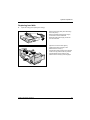
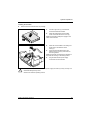
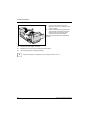
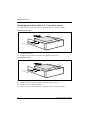
1
Operating Manual
ESPRIMO E5635 / E5730
ESPRIMO E5731 / E7935
ESPRIMO E7936 / E9900
System
Are there ...
... any technical problems or other questions which you would like to be clarified?
Please contact:
●
our Hotline/Service Desk
(see the included Service Desk list or go to:
http://ts.fujitsu.com/support/servicedesk.html)
●
your sales partner
●
your sales outlet
Further information can be found in the "Safety" and "Warranty" manuals.
The latest information on our products, tips, updates, etc., can be found on the internet under:
http://ts.fujitsu.com
Copyright
© Fujitsu Technology Solutions 2009
2009/11
Published by
Fujitsu Technology Solutions GmbH
Mies-van-der-Rohe-Straße 8
80807 München, Germany
Contact
http://ts.fujitsu.com/support
All rights reserved, including intellectual property rights. Technical data subject to modifications and delivery subject to availability. Any
liability that the data and illustrations are complete, actual or correct is excluded. Designations may be trademarks and/or copyrights of
the respective manufacturer, the use of which by third parties for their own purposes may infringe the rights of such owner. For further
information see http://ts.fujitsu.com/terms_of_use.html
Order-No. Fujitsu Technology Solutions: A26361-K691-Z220-1-7619, Edition 3
Introduction
Important notes
ESPRIMO E5635
ESPRIMO E5730
ESPRIMO E5731
ESPRIMO E7935
ESPRIMO E7936
ESPRIMO E9900
Preparing for use
Operation
Troubleshooting and tips
System expansions
Technical data
Operating Manual
Index
November 2009 edition
ESPRIMO is a registered trademark of Fujitsu Technology Solutions GmbH.
Windows XP, Windows Vista and Windows 7 are registered trademarks of the
Microsoft Corporation.
PS/2 is a registered trademark of International Business Machines, Inc.
Pentium is a registered trademark of Intel Corporation, USA.
Kensington Lock and MicroSaver are registered trademarks of ACCO World Corporation.
All other trademarks referenced are trademarks or registered trademarks of their respective
owners, whose protected rights are acknowledged.
Copyright © Fujitsu Technology Solutions GmbH 2009
All rights, including rights of translation, reproduction by printing, copying or similar methods,
in part or in whole, are reserved.
Offenders will be liable for damages.
All rights, including rights created by patent grant or registration of a utility model or design,
are reserved.
Delivery subject to availability. Right of technical modification reserved.
Contents
Your ESPRIMO E... ............................................................................................................................. 1
Notational conventions ......................................................................................................................... 2
Important notes .................................................................................................................................. 3
Safety notes.......................................................................................................................................... 3
Transporting the device ........................................................................................................................ 3
Cleaning the device .............................................................................................................................. 3
Energy saving, disposal and recycling ................................................................................................. 4
CE marking........................................................................................................................................... 4
FCC Class B Compliance Statement ................................................................................................... 5
Preparing for use................................................................................................................................ 7
Unpacking and checking the delivery ................................................................................................... 7
Steps for initial setup ............................................................................................................................ 7
Setting up the device ............................................................................................................................ 8
Connecting external devices .............................................................................................................. 10
Ports provided by the device ...................................................................................................... 11
Connecting the monitor .............................................................................................................. 12
Connecting the mouse ............................................................................................................... 13
Connecting a keyboard............................................................................................................... 13
Connecting external devices to the parallel or serial port........................................................... 14
Connecting external devices to the USB ports........................................................................... 14
Connecting the device to the mains voltage....................................................................................... 15
Indicators provided by the device ....................................................................................................... 16
Initial switch-on: Software will be installed.......................................................................................... 18
Switching on the monitor and device.......................................................................................... 19
Installing the software................................................................................................................. 21
Operation........................................................................................................................................... 23
Switching the device on...................................................................................................................... 23
Switching on a device when the lithium battery is discharged (0-Watt devices) ................................ 23
Switching off the device...................................................................................................................... 24
Keyboard ............................................................................................................................................ 25
Important keys and key combinations ........................................................................................ 25
Working with floppy disks ................................................................................................................... 27
Settings in BIOS Setup....................................................................................................................... 28
Property and data protection .............................................................................................................. 28
Mechanical casing lock (optional) .............................................................................................. 28
Anti-theft protection and lead-sealing......................................................................................... 29
BIOS setup security functions .................................................................................................... 29
Access authorisation via SmartCard .......................................................................................... 30
Access protection with SystemLock ........................................................................................... 30
Troubleshooting and tips................................................................................................................. 31
Help if problems occur................................................................................................................ 31
Installing new software ....................................................................................................................... 31
Power-on indicator remains unlit after you have switched on your device ......................................... 32
The device cannot be switched off with the ON/OFF switch .............................................................. 32
The device cannot be switched on with the ON/OFF switch (0-Watt devices) ................................... 32
The screen stays blank....................................................................................................................... 33
No mouse pointer displayed on the screen ........................................................................................ 35
The floppy disk cannot be read or written........................................................................................... 35
Time and/or date is not correct........................................................................................................... 35
Fujitsu Technology Solutions
Contents
Error messages on the screen ............................................................................................................35
Restoring the hard disk contents ........................................................................................................36
Tips 36
System expansions...........................................................................................................................37
Information about boards ............................................................................................................37
Opening the casing .............................................................................................................................38
Closing the casing...............................................................................................................................39
Installing and removing the cross-piece..............................................................................................40
Replacing rear panel ...........................................................................................................................41
Installing and removing a board ..........................................................................................................43
Installing board in low-profile slot................................................................................................43
Removing board from low-profile slot .........................................................................................44
Installing and removing board with bracket.................................................................................45
Low-Profile boards with adapter .................................................................................................50
Installing and removing optional ports ................................................................................................51
Installing an additional serial port................................................................................................51
Removing an optional port ..........................................................................................................52
Installing and removing the graphics card ..........................................................................................53
Installing the graphics card .........................................................................................................53
Removing the graphics card .......................................................................................................54
Installing and removing drives ............................................................................................................55
Installing and removing plastic drive covers ...............................................................................56
Replacing drive in 5 ¼ inch bay ..................................................................................................58
Folding up and down the drive cage ...........................................................................................60
Replacing the floppy disk drive ...................................................................................................61
Replacing hard disk ....................................................................................................................63
Replacing second hard disk in 3 ½ inch drive cage....................................................................67
Replacing second hard disk in 5 ¼ inch drive carrier .................................................................68
Installing/removing a SmartCard reader and/or WLAN module (optional) ..........................................69
Installing SmartCard reader and/or WLAN module.....................................................................71
Removing SmartCard reader and/or WLAN module...................................................................72
Extensions to the mainboard...............................................................................................................73
Upgrading main memory.............................................................................................................73
Replacing the processor .............................................................................................................73
Replacing lithium battery.............................................................................................................75
Technical data ...................................................................................................................................77
Index...................................................................................................................................................79
Fujitsu Technology Solutions
Your ESPRIMO E...
...is available with various configuration levels with different hardware and software. In addition, you
can install accessible drives (e.g. DVD drive), hard disks and other boards.
This manual tells you how to put your device into operation and how to operate it in daily use. This
manual applies for all configuration levels. Depending on the configuration level chosen some of the
hardware components described may not be available on your PC. Please observe the notes on your
operating system.
Depending on the configuration selected, the operating system is preinstalled on your hard disk (e.g.
Windows Vista).
DeskUpdate allows you under some operating systems to easily and quickly install the latest drivers
and operating system extensions with a few mouse clicks. DeskUpdate is contained on the
"Drivers & Utilities" CD.
Further information on this device is provided:
●
●
●
●
●
●
●
in the "Safety" manual
in the "Warranty" manual
in the operating manual for the monitor
in the manual for the mainboard
in the "BIOS Setup" manual
in your operating system documentation
in the information files (e.g. *.TXT, *.DOC, *.CHM, *.HLP, *.PDF, *.HTML)
i
You will find an electronic version of some of the listed manuals on the "User
Documentation" or "Drivers & Utilities" CD.
You can access and view the required information using the Acrobat Reader program,
which is also on the CD. If necessary, you can also make a print version of the manual.
Fujitsu Technology Solutions
1
Introduction
Notational conventions
The following symbols are used in this manual:
!
i
indicates information which is important for your health or for preventing
physical damage.
indicates important information which is required to use the system properly.
►
Text which follows this symbol describes activities that must be performed in
the order shown.
This font
indicates programme names, commands, or menu items.
"Quotation marks"
indicate names of chapters, data carriers, and terms that are being
emphasised.
2
Fujitsu Technology Solutions
Important notes
In this chapter you will find information regarding safety which it is essential to take note of when
working with your device.
Safety notes
!
Pay attention to the information provided in the "Safety" manual and in the following safety
notes.
During installation and before operating the device, please observe the instructions on
environmental conditions in the "Technical data" chapter as well as the instructions in the
"Preparing for use" chapter.
You may only operate the device, if the rated voltage for the device is set to the local
mains voltage. Check the rated voltage set for this device (see the "Preparing for use"
chapter).
The ON/OFF switch does not disconnect the device from the mains voltage. To completely
disconnect the mains voltage, remove the power plug from the grounded mains outlet.
Replace the lithium battery on the mainboard in accordance with the instructions in the
"Extensions to the mainboard" - " Replacing lithium battery" chapter.
Caution, components in the system can get very hot.
Transporting the device
!
Transport all parts separately in their original packaging or in a packaging which protects
them from knocks and jolts, to the new site. Do not unpack them until all transportation
manoeuvres are completed.
Cleaning the device
!
Turn off all power and equipment switches and remove the power plug from the mains
supply.
Do not clean any interior parts yourself, leave this job to a service technician.
Do not use any cleaning agents that contain abrasives or may corrode plastic.
Ensure that no liquid enters the system.
Wipe the casing with a dry cloth. If particularly dirty, use a cloth that has been moistened in mild
domestic detergent and then carefully wrung out. Use disinfectant wipes to clean the keyboard and
the mouse.
Fujitsu Technology Solutions
3
Important notes
Energy saving, disposal and recycling
Information on these topics can be found on the "Drivers & Utilities" CD or on our website
http://ts.fujitsu.com.
CE marking
The shipped version of this device complies with the requirements of the EC
Guidelines 2004/108/EC "Electromagnetic compatibility" and 2006/95/EC "Low
voltage directive".
CE marking for devices with radio component
This equipment complies with the requirements of Directive 1999/5/EC of the
European Parliament and Commission from 9 March, 1999 governing Radio and
Telecommunications Equipment and mutual recognition of conformity.
This equipment can be used in the following countries:
Belgium
Finland
Ireland
Liechtenstein
Netherlands
Portugal
Slovenia
Hungary
Denmark
France
Iceland
Lithuania
Norway
Sweden
Spain
Cyprus
Germany
Greece
Italy
Luxemburg
Austria
Switzerland
Czech Republic
Bulgaria
Estonia
UK
Latvia
Malta
Poland
Slovakia
Rumania
Contact the corresponding government office of the respective country for
current information on possible operating restrictions. If your country is not
included in the list, then please contact the corresponding supervisory authority
as to whether the use of this product is permitted in your country.
4
Fujitsu Technology Solutions
Important notes
FCC Class B Compliance Statement
The following statement applies to the products covered in this manual, unless otherwise specified
herein. The statement for other products will appear in the accompanying documentation.
NOTE:
This equipment has been tested and found to comply with the limits for a "Class B" digital device,
pursuant to Part 15 of the FCC rules and meets all requirements of the Canadian InterferenceCausing Equipment Standard ICES-003 for digital apparatus. These limits are designed to provide
reasonable protection against harmful interference in a residential installation. This equipment
generates, uses and can radiate radio frequency energy and, if not installed and used in strict
accordance with the instructions, may cause harmful interference to radio communications. However,
there is no guarantee that interference will not occur in a particular installation. If this equipment does
cause harmful interference to radio or television reception, which can be determined by turning the
equipment off and on, the user is encouraged to try to correct the interference by one or more of the
following measures:
●
●
●
●
Reorient or relocate the receiving antenna.
Increase the separation between equipment and the receiver.
Connect the equipment into an outlet on a circuit different from that to which the receiver is
connected.
Consult the dealer or an experienced radio/TV technician for help.
Fujitsu Technology Solutions GmbH is not responsible for any radio or television interference caused
by unauthorised modifications of this equipment or the substitution or attachment of connecting
cables and equipment other than those specified by Fujitsu Technology Solutions GmbH. The
correction of interferences caused by such unauthorised modification, substitution or attachment will
be the responsibility of the user.
The use of shielded I/O cables is required when connecting this equipment to any and all optional
peripheral or host devices. Failure to do so may violate FCC and ICES rules.
Fujitsu Technology Solutions
5
Important notes
6
Fujitsu Technology Solutions
Preparing for use
!
Please take note of the safety information in the "Important notes" chapter.
Unpacking and checking the delivery
It is recommended not to throw away the original packaging material! It may be required for
reshipment at some later date.
►
Unpack all the individual parts.
►
Check the delivery for damage incurred during transportation.
►
Check whether the delivery agrees with the details in the delivery note.
Should you discover that the delivery does not correspond to the delivery note, notify your local sales
outlet immediately.
Steps for initial setup
Only a few steps are necessary to put your new device into operation for the first time:
●
Select location for device and set up device
●
Connect the monitor, mouse and keyboard
●
Check the voltage at the mains outlet and connect the device to an electrical outlet
●
Switching the device on
You will learn more about the individual steps in the following sections.
i
Drives and boards
If you have received drives or boards with your device, please do not install them until
after first-time setup. How to install drives and boards is described in the "System
expansions" chapter.
Fujitsu Technology Solutions
7
Preparing for use
Setting up the device
!
When installing your device, give consideration to the safety notes in the "Safety" manual.
Only install the device in the operating positions for which it is intended.
We recommend that you place your device on a surface with good anti-slip qualities. In
view of the multitude of different finishes and varnishes used on furniture, it is possible that
the rubber / plastic feet will mark the surface they stand on.
Do not expose the device to extreme environmental conditions (see "Technical data").
Protect the device from dust, humidity, and heat.
When installing the workstation, provide sufficient clearance around the device, as
indicated in the "Technical data" chapter to ensure adequate ventilation. In order to avoid
overheating, do not cover the ventilation area of the monitor or the device.
Do not stack several devices on top of each other.
If you place a monitor on the device, it may weigh a maximum of 25 kg. Make sure that
you do not block any ventilation slots on the device.
Depending on the location of your device, bothersome vibrations and noises may occur.
To prevent this, a distance of at least 10 mm should be maintained from other devices on
casing sides without ventilation surfaces.
The device can operate in either a vertical or horizontal position.
!
8
The horizontal operating position is only permitted with the rubber/plastic feet (due to heat
produced on the underside).
Fujitsu Technology Solutions
Preparing for use
Vertical operating position
Proceed as follows to operate the device in the vertical operating position:
►
If necessary, disconnect the cables.
►
Position the casing vertically so that the ON/OFF switch is located at the bottom.
►
Pull off the foil from the rubber / plastic feet that you will find in the accessories package.
37 mm
57 mm
6 mm
1
1
1
1
►
Glue the rubber/plastic feet (1) on the casing wall.
In order to ensure that the device is stable, the position of the rubber/plastic feet must
correspond to the given dimensions.
►
Place the unit on the rubber / plastic feet and reconnect any cables disconnected previously.
!
The set-up direction is specified. The ON/OFF switch must be at the top to ensure
sufficient ventilation.
Fujitsu Technology Solutions
9
Preparing for use
Connecting external devices
!
Read the documentation on the external device before connecting it.
With the exception of USB devices, always remove all power plugs before connecting
external devices!
Do not connect or disconnect cables during a thunderstorm.
Always take hold of the actual plug. Never unplug a cable by pulling the cable itself.
Connect and disconnect the cables in the order described below.
Connecting cables
►
Turn off all power and equipment switches.
►
Remove all power plugs from the grounded mains outlets.
►
Plug all cables into the device and peripherals. You must observe the information provided in
the "Important notes" chapter.
►
Plug all data communication cables into the utility sockets.
►
Plug all power cables into the grounded mains outlets.
Disconnecting cables
►
Turn off all power and equipment switches.
►
Remove all power plugs from the grounded mains outlets.
►
Unplug all data communication cables from the utility sockets.
►
Unplug all cables from the device and peripherals.
i
USB devices are hot-pluggable. This means you can connect and disconnect devices
while your operating system is running.
Additional information can be found in the "Connecting external devices to the parallel or
serial port" section and in the documentation for the USB devices.
10
Fujitsu Technology Solutions
Preparing for use
Ports provided by the device
The connections are located on the front and back of the device. The ports available on your device
depend on the configuration level you have selected. The standard ports are marked with the
symbols shown below (or similar). Exact details of the position of the ports are supplied in the
manuals for the boards.
Keyboard port, purple
PS/2 mouse port, green
2
1
Serial port 1, teal or turquoise
Serial port 2, teal or turquoise
Monitor port, blue
Parallel port/Printer, burgundy
Headphones port, orange or light
Microphone jack (mono), pink
green
Audio output (Line out), light green
Audio input (Line in), light blue
USB - Universal Serial Bus, black
SCSI port
DisplayPort
+
+
LAN
LAN port
DVI-I port
i
Some of the connected devices require special drivers (see the documentation for the
connected device).
Fujitsu Technology Solutions
11
Preparing for use
Connecting the monitor
i
Depending on the device configuration level, the monitor ports of the mainboard (1) may
be covered and without function. In this case, only use the external monitor ports of the
display adapters in one of the module slots (2).
4
1
3
2
1=
►
Monitor ports of the mainboard
2=
External monitor ports of the display
adapter
Follow the instructions contained in the monitor manual to prepare the monitor for operation
(e.g. connecting cables).
►
Connect the data cable to a suitable monitor port of the device (VGA, DVI-I, DisplayPort).
►
Depending on your device configuration level and connector, plug the monitor power cable into
either the monitor socket of the device (3) or an earthed mains outlet (4).
i
!
12
When you connect the monitor to the monitor socket of the device, it automatically
switches off as soon as the device switches off.
The monitor power cable may only be connected to the monitor socket of the device if the
monitor current consumption is smaller than 1.5 A with 230 V or 3 A with 115 V. The
values for the monitor current consumption can be found in the technical data on the
monitor or in the operating manual for the monitor.
Fujitsu Technology Solutions
Preparing for use
Connecting the mouse
Depending on the equipment level selected, your device will be supplied with a PS/2 mouse or a
USB mouse.
Connecting a PS/2 mouse
►
Connect the PS/2 mouse to the PS/2 mouse port
of the device.
Connecting USB mouse
►
Connect the USB mouse to the USB port
of the device.
Connecting a keyboard
Depending on the equipment level selected, your device will be supplied with a standard keyboard or
a USB keyboard.
Connecting standard keyboard
Use the supplied keyboard cable only.
►
Plug the rectangular connector of the keyboard cable into the rectangular socket on the
underside or on the rear of the keyboard.
►
Plug the round plug of the keyboard cable into the keyboard port
on the device.
Connecting USB keyboard
Use the supplied keyboard cable only.
►
Plug the rectangular connector of the keyboard cable into the socket on the underside or on the
rear of the keyboard.
►
Insert the flat rectangular USB plug of the keyboard cable into a USB port
Fujitsu Technology Solutions
of the device.
13
Preparing for use
Connecting external devices to the parallel or serial port
If your device has parallel and serial ports, you can connect external devices to these ports (such as
a printer or modem).
►
Connect the data cable to the external device.
►
Depending on the device, connect the data cable to the parallel port
or the serial port
.
For an exact description of how to connect external devices to the corresponding port, please see
the external device documentation.
i
Port settings
You can change the port settings (e.g. address, interrupt) in the BIOS Setup.
Device drivers
The devices connected to the parallel or serial port require drivers. Your operating system
already includes many drivers. If the required drive is missing, install it. Current drivers are
usually available on the Internet or will be supplied on a data carrier.
Connecting external devices to the USB ports
You can connect a wide range of external devices to the USB port (e.g. printer, scanner, modem or
keyboard).
i
USB devices are hot-pluggable. This means you can connect and disconnect devices
while your operating system is running.
Additional information can be found in the documentation for the USB devices.
►
Connect the data cable to the external device.
►
Connect the data cable to a USB port
i
14
.
Device drivers
The devices you connect to the USB ports usually require no driver of their own, as the
required software is already included in the operating system. However, if the USB device
requires its own software, please install it from the data carrier provided with the USB
device.
Fujitsu Technology Solutions
Preparing for use
Connecting the device to the mains voltage
2
1
►
Connect the power cable to the device (1).
►
Plug the power plug into a grounded mains outlet (2).
Fujitsu Technology Solutions
15
Preparing for use
Indicators provided by the device
The indicators are on the front of the casing. Which indicators are available on your device depends
on the configuration level you have selected.
;;;;;;;;;;;;;;;;;;;
QQQQQQQQQQQQQQQQQQQ
;;;;;;;;;;;;;;;;;;;
QQQQQQQQQQQQQQQQQQQ
;;;;;;;;;;;;;;;;;;;
QQQQQQQQQQQQQQQQQQQ
;;;;;;;;;;;;;;;;;;;
QQQQQQQQQQQQQQQQQQQ
;;;;;;;;;;;;;;;;;;;
QQQQQQQQQQQQQQQQQQQ
;;;;;;;;;;;;;;;;;;;
QQQQQQQQQQQQQQQQQQQ
;;;;;;;;;;;;;;;;;;;
QQQQQQQQQQQQQQQQQQQ
;;;;;;;;;;;;;;;;;;;
QQQQQQQQQQQQQQQQQQQ
;;;;;;;;;;;;;;;;;;;
QQQQQQQQQQQQQQQQQQQ
;;;;;;;;;;;;;;;;;;;
QQQQQQQQQQQQQQQQQQQ
;;;;;;;;;;;;;;;;;;;
QQQQQQQQQQQQQQQQQQQ
;;;;;;;;;;;;;;;;;;;
QQQQQQQQQQQQQQQQQQQ
;;;;;;;;;;;;;;;;;;;
QQQQQQQQQQQQQQQQQQQ
;;;;;;;;;;;;;;;;;;;
QQQQQQQQQQQQQQQQQQQ
;;;;;;;;;;;;;;;;;;;
QQQQQQQQQQQQQQQQQQQ
;;;;;;;;;;;;;;;;;;;
QQQQQQQQQQQQQQQQQQQ
;;;;;;;;;;;;;;;;;;;
QQQQQQQQQQQQQQQQQQQ
;;;;;;;;;;;;;;;;;;;
QQQQQQQQQQQQQQQQQQQ
;;;;;;;;;;;;;;;;;;;
QQQQQQQQQQQQQQQQQQQ
;;;;;;;;;;;;;;;;;;;
QQQQQQQQQQQQQQQQQQQ
;;;;;;;;;;;;;;;;;;;
QQQQQQQQQQQQQQQQQQQ
;;;;;;;;;;;;;;;;;;;
QQQQQQQQQQQQQQQQQQQ
;;;;;;;;;;;;;;;;;;;
QQQQQQQQQQQQQQQQQQQ
;;;;;;;;;;;;;;;;;;;
QQQQQQQQQQQQQQQQQQQ
;;;;;;;;;;;;;;;;;;;
QQQQQQQQQQQQQQQQQQQ
;;;;;;;;;;;;;;;;;;;
QQQQQQQQQQQQQQQQQQQ
;;;;;;;;;;;;;;;;;;;
QQQQQQQQQQQQQQQQQQQ
2
4
3
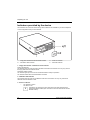
1
1 = Floppy disk indicator/SmartCard reader indicator
2 = CD-ROM or DVD indicator
3 = Power-on indicator
4 = Hard disk indicator
1 - Floppy disk indicator or SmartCard reader indicator
Floppy disk indicator:
The indicator lights up when the floppy disk drive of the device is accessed. You may only remove
the floppy disk when the indicator is unlit.
SmartCard reader indicator:
The indicator lights up as soon as the SmartCard reader is ready for operation.
The indicator flashes when the SmartCard is accessed.
2 - CD-ROM or DVD indicator
The indicator lights up when the CD-ROM or DVD drive is accessed. You may only remove the
CD/DVD when the indicator is dark.
3 - Power-on indicator
–
The indicator is green:
The device is on.
i
16
The display can also light up green if the device has been switched off by
holding the ON/OFF switch (see "The device cannot be switched off with the
ON/OFF switch").
Fujitsu Technology Solutions
Preparing for use
–
The indicator lights up orange or flashes green:
The device is ready-to-operate or in energy-saving mode. After being switched on with
the power button, the device switches on or returns to the state it was in before the
energy-saving mode.
!
–
In the energy-saving mode the device may not be disconnected from the mains
supply, as this may otherwise result in data loss.
The indicator does not light up:
The device is disconnected from the power supply or is ready for operation. If your device
is ready-to-operate it can be enabled with the ON/OFF switch.
4 - Hard disk indicator
The indicator lights up when the hard disk of the device is accessed.
Fujitsu Technology Solutions
17
Preparing for use
Initial switch-on: Software will be installed
If the device is integrated into a network, the user and server details as well as the network protocol
are required during the software installation. Contact your network administrator if you have any
questions about these settings.
When you switch on the device for the first time, the supplied software is installed and configured.
Plan a reasonable amount of time for this, as this process must not be interrupted.
!
Once the installation has been started the device must not be switched off, unless the
installation has been completed.
During installation, the device may only be rebooted when you are requested to do so!
The installation will otherwise not be carried out correctly and the contents of the hard disk
must be completely restored.
You may need the licence number for Windows during the installation. The licence number is located
on a sticker on your device.
18
Fujitsu Technology Solutions
Preparing for use
Switching on the monitor and device
►
Switch on the monitor (refer to the operating manual for the monitor).
►
Switch the device on. To do this, follow the instructions below.
i
Depending on the version, the device may be equipped with a main power switch on the
back of the device in addition to the ON/OFF button on the front. As a result, there are
different ways to switch on the two variants.
Consequently, the illustrations shown below may differ slightly from your actual model.
Switching on the device (with the main power switch)
I
1
0
0 = device is switched off
►
I = device is ready
Switch on the device via the main power switch (1) on the back of the device.
Fujitsu Technology Solutions
19
Preparing for use
;;;;;;;;;;;;;;;;;;;
QQQQQQQQQQQQQQQQQQQ
;;;;;;;;;;;;;;;;;;;
QQQQQQQQQQQQQQQQQQQ
;;;;;;;;;;;;;;;;;;;
QQQQQQQQQQQQQQQQQQQ
;;;;;;;;;;;;;;;;;;;
QQQQQQQQQQQQQQQQQQQ
;;;;;;;;;;;;;;;;;;;
QQQQQQQQQQQQQQQQQQQ
;;;;;;;;;;;;;;;;;;;
QQQQQQQQQQQQQQQQQQQ
;;;;;;;;;;;;;;;;;;;
QQQQQQQQQQQQQQQQQQQ
;;;;;;;;;;;;;;;;;;;
QQQQQQQQQQQQQQQQQQQ
;;;;;;;;;;;;;;;;;;;
QQQQQQQQQQQQQQQQQQQ
;;;;;;;;;;;;;;;;;;;
QQQQQQQQQQQQQQQQQQQ
;;;;;;;;;;;;;;;;;;;
QQQQQQQQQQQQQQQQQQQ
;;;;;;;;;;;;;;;;;;;
QQQQQQQQQQQQQQQQQQQ
;;;;;;;;;;;;;;;;;;;
QQQQQQQQQQQQQQQQQQQ
;;;;;;;;;;;;;;;;;;;
QQQQQQQQQQQQQQQQQQQ
;;;;;;;;;;;;;;;;;;;
QQQQQQQQQQQQQQQQQQQ
;;;;;;;;;;;;;;;;;;;
QQQQQQQQQQQQQQQQQQQ
;;;;;;;;;;;;;;;;;;;
QQQQQQQQQQQQQQQQQQQ
;;;;;;;;;;;;;;;;;;;
QQQQQQQQQQQQQQQQQQQ
;;;;;;;;;;;;;;;;;;;
QQQQQQQQQQQQQQQQQQQ
;;;;;;;;;;;;;;;;;;;
QQQQQQQQQQQQQQQQQQQ
;;;;;;;;;;;;;;;;;;;
QQQQQQQQQQQQQQQQQQQ
;;;;;;;;;;;;;;;;;;;
QQQQQQQQQQQQQQQQQQQ
;;;;;;;;;;;;;;;;;;;
QQQQQQQQQQQQQQQQQQQ
;;;;;;;;;;;;;;;;;;;
QQQQQQQQQQQQQQQQQQQ
;;;;;;;;;;;;;;;;;;;
QQQQQQQQQQQQQQQQQQQ
;;;;;;;;;;;;;;;;;;;
QQQQQQQQQQQQQQQQQQQ
;;;;;;;;;;;;;;;;;;;
QQQQQQQQQQQQQQQQQQQ
2
►
Press the ON/OFF switch (2) on the front of the device.
The power-on indicator lights green and the device starts up.
20
Fujitsu Technology Solutions
Preparing for use
Switching on the device (without the main power switch)
;;;;;;;;;;;;;;;;;;;
QQQQQQQQQQQQQQQQQQQ
;;;;;;;;;;;;;;;;;;;
QQQQQQQQQQQQQQQQQQQ
;;;;;;;;;;;;;;;;;;;
QQQQQQQQQQQQQQQQQQQ
;;;;;;;;;;;;;;;;;;;
QQQQQQQQQQQQQQQQQQQ
;;;;;;;;;;;;;;;;;;;
QQQQQQQQQQQQQQQQQQQ
;;;;;;;;;;;;;;;;;;;
QQQQQQQQQQQQQQQQQQQ
;;;;;;;;;;;;;;;;;;;
QQQQQQQQQQQQQQQQQQQ
;;;;;;;;;;;;;;;;;;;
QQQQQQQQQQQQQQQQQQQ
;;;;;;;;;;;;;;;;;;;
QQQQQQQQQQQQQQQQQQQ
;;;;;;;;;;;;;;;;;;;
QQQQQQQQQQQQQQQQQQQ
;;;;;;;;;;;;;;;;;;;
QQQQQQQQQQQQQQQQQQQ
;;;;;;;;;;;;;;;;;;;
QQQQQQQQQQQQQQQQQQQ
;;;;;;;;;;;;;;;;;;;
QQQQQQQQQQQQQQQQQQQ
;;;;;;;;;;;;;;;;;;;
QQQQQQQQQQQQQQQQQQQ
;;;;;;;;;;;;;;;;;;;
QQQQQQQQQQQQQQQQQQQ
;;;;;;;;;;;;;;;;;;;
QQQQQQQQQQQQQQQQQQQ
;;;;;;;;;;;;;;;;;;;
QQQQQQQQQQQQQQQQQQQ
;;;;;;;;;;;;;;;;;;;
QQQQQQQQQQQQQQQQQQQ
;;;;;;;;;;;;;;;;;;;
QQQQQQQQQQQQQQQQQQQ
;;;;;;;;;;;;;;;;;;;
QQQQQQQQQQQQQQQQQQQ
;;;;;;;;;;;;;;;;;;;
QQQQQQQQQQQQQQQQQQQ
;;;;;;;;;;;;;;;;;;;
QQQQQQQQQQQQQQQQQQQ
;;;;;;;;;;;;;;;;;;;
QQQQQQQQQQQQQQQQQQQ
;;;;;;;;;;;;;;;;;;;
QQQQQQQQQQQQQQQQQQQ
;;;;;;;;;;;;;;;;;;;
QQQQQQQQQQQQQQQQQQQ
;;;;;;;;;;;;;;;;;;;
QQQQQQQQQQQQQQQQQQQ
;;;;;;;;;;;;;;;;;;;
QQQQQQQQQQQQQQQQQQQ
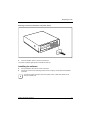
►
Press the ON/OFF switch on the front of the device.
The power-on indicator lights green and the device starts up.
Installing the software
►
During installation, follow the on-screen instructions.
►
Consult the manual for the operating system if there is anything unclear about the requested
input data.
i
You will find further information about the system, drivers, utilities and updates on the
"Drivers & Utilities" CD.
Fujitsu Technology Solutions
21
Preparing for use
22
Fujitsu Technology Solutions
Operation
Switching the device on
►
If necessary, switch the monitor on (see the operating manual for the monitor).
►
Press the ON/OFF switch on the front of the device.
The power-on indicator lights green and the device is started.
Switching on a device when the lithium battery is
discharged (0-Watt devices)
A 0-Watt device consumes no current when it is switched off and in the quiescent state.
Your 0-Watt device is equipped with an emergency on button (primary resume button) which can be
used if it can no longer be started, for instance because the lithium battery is discharged.
After the emergency on button (1) has been pressed for a short time, the device can be switched on
again using the ON/OFF switch at the front of the device.
1
►
Press the emergency on button (1) to start the device.
Fujitsu Technology Solutions
23
Operation
Switching off the device
►
Shut down the operating system properly. For Windows: select Shut Down from the Start menu.
►
If the operating system does not automatically switch the device into an energy-saving mode or
switch it off, press the ON/OFF switch.
The device then consumes a minimum amount of energy.
!
►
24
The ON/OFF switch does not disconnect the device from the mains voltage. To completely
disconnect the mains voltage, remove the power plug from the socket.
If necessary, switch the monitor off (see the operating manual for the monitor).
Fujitsu Technology Solutions
Operation
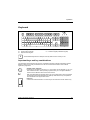
Keyboard
1
2
3
1 = Function keys
2 = Power button (optional)
3 = Alphanumeric keypad
i
4
5
4 = Cursor keys
5 = Numeric keypad (calculator keypad)
The illustrated keyboard is an example and may differ from the model you use.
Important keys and key combinations
The description of the following keys and key combinations applies to Microsoft operating systems.
Details of other keys and key combinations can be found in the documentation of the relevant
application programme.
ON/OFF switch (optional)
Depending on the setting in the BIOS Setup, the system can be switched on, off, or on
and off with this button. Some operating systems allow you to configure additional
functions of the ON/OFF switch in the Control Panel.
With some keyboards the ON/OFF switch can only be used with an ACPI (Advanced
Configuration and Power Management Interface). Otherwise the key is inoperative.
The mainboard must support this function.
Enter key
confirms the marked selection. The enter key is also referred to as the "Return" key.
Fujitsu Technology Solutions
25
Operation
Start key
calls up the Windows Start menu.
Menu key
invokes the menu for the marked item (Windows).
Shift key
enables upper-case letters and the upper key symbols to be used.
Alt Gr
Num
Lock
Ctrl
Ctrl
26
Alt Gr (e.g. German keyboard)
produces a character shown on the right-hand side of a key (e.g. the character @ on
the key Q ).
Num Lock key
by pressing the Num Lock key you switch between the Numeric keypad cursor
control functions and digit or comma functions.
When the Num Lock indicator is lit the digit and comma keys are active.
When the Num Lock indicator is not lit the cursor control functions are active in the
Numeric keypad.
Ctrl key
starts key combination actions. The Ctrl key is also called "Control" or "Control
key".
Alt
Del
Windows security / Task Manager
This key combination starts the Windows security / Task
Manager window.
Fujitsu Technology Solutions
Operation
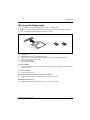
Working with floppy disks
i
Follow the instructions supplied by the vendor of the floppy disks.
Do not clean the floppy disk drive with cleaning floppy disks. Any attempt would destroy
the read/write head in the disk drive within 20 seconds.
5
4
6
7
1
2
3
1=
2=
3=
4=
5=
6=
7=
Insertion direction
Label area
Write protection tab for a 1.44 Mbyte floppy disk
Identification of a 1.44 MB floppy disk or write protect switch on a 120 MB floppy disk
Eject button for inserted floppy disks
Disk is write-protected
Disk is not write-protected
To insert a diskette
►
Push the floppy disk into the drive in the insertion direction (1) until it engages. The label should
be facing upward.
To remove a diskette
►
Push the eject button (5).
Protect the floppy disk against being overwritten or erased
►
Slide the write-protect slider into position (6). The hole is now visible.
Deactivate write protection
►
Slide the write-protect slider into position (7). The hole is now covered.
Fujitsu Technology Solutions
27
Operation
Settings in BIOS Setup
In BIOS Setup you can set the system functions and the hardware configuration of the device. When
the PC is delivered, the default entries are valid (see "BIOS Setup" manual and if necessary manual
for the mainboard). You may customise these settings to your requirements in the BIOS Setup.
Property and data protection
Software functions and mechanical locking offer a broad range of functions for protecting your device
and your personal data from unauthorised access. You can also combine these functions.
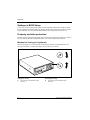
Mechanical casing lock (optional)
With the casing lock you can mechanically lock the casing to prohibit unauthorised persons from
opening it. On delivery, you will find the keys on the rear panel of your device.
1
2
Locking the casing
Unlocking the casing
►
►
28
Turn the key in the direction of the
arrow (1).
Turn the key in the direction of the
arrow (2).
Fujitsu Technology Solutions
Operation
Anti-theft protection and lead-sealing
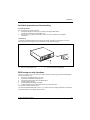
Anti-theft protection
You can protect your device from theft.
●
●
with the Kensington Lock device (1) and with a Kensington MicroSaver.
Consult the manual for your Kensington Lock.
with the eye (2), a padlock and a chain, which you have connected to a fixed object
beforehand.
Lead-sealing
To prevent unauthorised persons from opening the casing, the casing can be sealed. To do this,
feed a sealing chain through the eye (2) and seal the chain with the lead seal.
2
1
1 = Device for "Kensington Lock"
2 = Eye for lead seal and (pad)lock
BIOS setup security functions
The Security menu in BIOS Setup offers you various options for protecting your personal data against
unauthorised access, e.g.:
●
●
●
●
●
●
Preventing unauthorised BIOS Setup entry
Preventing unauthorised system access
Preventing system booting from the diskette drive
Activating virus warnings
Protecting BIOS from being overwritten
Protecting the device from being switched on by an external device
You can also combine these functions.
You will find a detailed description of the Security menus and how to assign passwords in the manual
for the mainboard or in the "BIOS Setup" manual.
Fujitsu Technology Solutions
29
Operation
Access authorisation via SmartCard
In systems equipped with a SmartCard reader, access can be restricted to those users who have a
corresponding SmartCard.
Access protection with SystemLock
With SystemLock you can protect your system from unauthorised booting. Then a system can only be
booted when the user inserts a valid SmartCard in the SmartCard reader and enters his/her personal
code number (PIN). To use SystemLock you require the following components:
●
●
●
External or internal SmartCard reader
SystemLock installed (see "BIOS Setup" manual)
SmartCard
SystemLock controls access to your device. When a SmartCard is initialised, permissions are
assigned for system access (system, setup, system+setup, admin). You can configure several
SmartCards for one system and initialise them with different permissions. In addition you can protect
access to your hard disk.
In this way users can be divided into user groups. Users of a user group use SmartCards with the
same permissions.
More information on SystemLock
If you also want to use other security software in addition to SystemLock (e.g.
SMARTY), please read the documentation on your security software beforehand.
i
SystemLock permissions
You can initialise a SmartCard with one of the following permissions:
System
The system starts following entry of the user PIN. You can change the user PIN.
Setup
You can open and change the BIOS Setup and change the user PIN.
System+Setup
The system starts following entry of the user PIN. You can open and change the
BIOS Setup and change the user PIN.
Admin
The system starts following entry of the user PIN. You can change the user PIN an
the administrator PIN, unlock locked SmartCards, open and change the BIOS Setup
and generate additional SmartCards for this system.
For instructions on how to install and operate SystemLock, and how to initialise SmartCards, see the
"BIOS Setup" manual.
Operating the SmartCard reader
●
Operating the internal SmartCard reader
If the SmartCard reader is ready-to-use, the SmartCard reader indicator on the front of the
device lights green.
●
Operating the external SmartCard reader
After the device is switched on, you will be prompted to insert your SmartCard.
30
Fujitsu Technology Solutions
Troubleshooting and tips
!
Take note of the safety notes in the "Safety" manual and in the "Preparing for use"
chapter, when you connect or disconnect cables.
If a fault occurs, try to correct it as described in the following places:
●
●
●
●
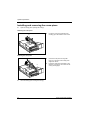
in this chapter
in the documentation of the connected devices
in the help systems of the software used
in the documentation of your operating system
Help if problems occur
Should you ever have a problem with your computer that you cannot solve yourself, in many cases
you can solve it quickly using the SystemDiagnostics program pre-installed on your computer.
►
To start the SystemDiagnostics program, click Start - Programs - Fujitsu - SystemDiagnostics.
If a problem is detected during the test run, the SystemDiagnostics program outputs a code
(e.g. DIFS code YXXX123456789123).
►
Take a note of this DIFS code and the ID number of your device. The ID number can be found
on the type rating plate on the back of the casing.
►
If you still need assistance resolving the problem, contact the relevant Service Desk for your
country (see the Service Desk List or go to http://ts.fujitsu.com/support). Have the ID/serial No. of
your system and the DIFS code ready.
Installing new software
When installing programmes or drivers, important files may be overwritten and modified. To be able
to access the original data in the event of any problems following installation, you should backup
your hard disk prior to installation.
Fujitsu Technology Solutions
31
Troubleshooting and tips
Power-on indicator remains unlit after you have
switched on your device
This may be due to the following:
The mains voltage supply is faulty
►
Check whether the power cable is plugged properly into the device and a grounded mains
outlet.
►
Switch the device on.
Internal power supply overloaded
►
Pull the power plug of the device out of the mains outlet.
►
Wait for a moment.
►
Plug the power plug into a properly grounded mains outlet again.
►
Switch the device on.
The device cannot be switched off with the ON/OFF
switch
Cause: The device has not been switched on with the ON/OFF switch.
►
Press the ON/OFF switch again.
Cause: System crash
►
Press the ON/OFF switch for at least 4 seconds, until the device switches off.
i
The operating system is not shut-down properly in the process. Error messages are
therefore possible the next time the system is booted.
The device cannot be switched on with the ON/OFF
switch (0-Watt devices)
The lithium battery is empty
►
32
Press the emergency on button at the rear of the device, see chapter "Switching on a device
when the lithium battery is discharged (0-Watt devices)".
Fujitsu Technology Solutions
Troubleshooting and tips
The screen stays blank
If your screen remains blank this may be due to the following:
Monitor is switched off
►
Switch your monitor on.
Power saving has been activated (screen is blank)
►
Press any key on the keyboard.
or
►
Deactivate the screen saver. If necessary, enter the appropriate password.
Brightness control is set to dark
►
Adjust the brightness control. For detailed information, please refer to the operating manual
supplied with your monitor.
Power cable not connected
►
Switch off the monitor and the device.
►
Check that the monitor power cable is properly connected to the monitor and to a grounded
mains outlet or to the monitor socket of the device.
►
Check that the device power cable is properly plugged into the device and a grounded mains
outlet.
►
Switch on the monitor and the device.
Monitor cable not connected
►
Switch off the monitor and the device.
►
Check that the monitor cable is properly connected to the device and monitor.
►
Switch on the monitor and the device.
Fujitsu Technology Solutions
33
Troubleshooting and tips
Wrong monitor has been set under Window XP
►
Restart the device.
►
Press F8 while the system is booting.
Either the Windows Advanced Start Options menu or the menu for selecting the operating system
appears.
►
If the menu for selecting the operating system appears, press F8 .
►
Select Safe Mode or Safe Mode with Network.
►
Set the correct values for the attached monitor as described in the operating manual of the
monitor by selecting Start - Settings - Control Panel - Display and then the Appearance, Themes,
Settings tabs.
Wrong setting for the monitor under Windows Vista
►
Restart the device.
►
Press F8 while the system is booting.
Either the Windows Advanced Start Options menu or the menu for selecting the operating system
appears.
►
If the menu for selecting the operating system appears, press F8 .
►
Select Safe Mode or Safe Mode with Network.
►
Set the correct values for the connected monitor, as described in the operating manual of the
monitor, by selecting Start (Settings) - Control Panel - Display – Settings
Wrong monitor has been set under Window 7
►
Restart the device.
►
Press F8 while the system is booting.
Either the Windows Advanced Start Options menu or the menu for selecting the operating system
appears.
►
If the menu for selecting the operating system appears, press F8 .
►
Select Safe Mode or Safe Mode with Network.
►
Select Start – Control Panel – Appearance and Themes – Display to set the correct values for the
connected monitor, as explained in the monitor instructions.
The wrong RAM modules have been inserted
See the manual for the mainboard for information on which memory modules can be used.
34
Fujitsu Technology Solutions
Troubleshooting and tips
No mouse pointer displayed on the screen
►
Shut down the operating system properly.
►
Switch off the device.
►
Check that the mouse cable is properly connected to the system unit.
If you use an adapter or extension lead with the mouse cable, check the connections.
►
Make sure that only one mouse is connected.
►
Switch the device on.
The floppy disk cannot be read or written
►
Check that the write protection of the floppy disk or the floppy disk drive is activated (refer to
the "BIOS Setup" manual and if necessary to the manual for the mainboard).
►
Check the relevant entries for floppy disk drive in the Main menu of the BIOS Setup.
►
Check that the floppy disk drive controller is enabled (refer also to the manual for the
mainboard or in the "BIOS Setup" manual).
►
Check that the cables of the floppy disk drive are properly connected (see "Replacing the
floppy disk drive").
Time and/or date is not correct
You can set the time and date in the BIOS Setup or in the operating system.
►
Set the time and date.
i
If the time and date are repeatedly wrong when you switch on your PC, the on-board
battery is flat. Change the lithium battery as described in the "Extensions to the
mainboard"-"Replacing lithium battery".
Error messages on the screen
Error messages and their explanation are contained:
●
●
●
in the manual for the mainboard
in the "BIOS Setup" manual
in the documentation for the programmes used
Fujitsu Technology Solutions
35
Troubleshooting and tips
Restoring the hard disk contents
Should you need to restore your hard disk, the instructions are provided on the case of the
"Recovery CD" (delivered with your system).
Tips
Out of system resources
If you have too many applications running at once, you may experience problems due to a lack of
system resources.
►
Close unnecessary applications.
Or
►
Run the applications in a different order.
Other manuals
Additional manuals are provided as PDF files on the "User Documentation" or "Drivers & Utilities"
CD.
36
Fujitsu Technology Solutions
System expansions
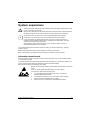
!
i
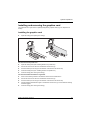
The device must be switched off when installing/removing the system expansions and may
not be in the energy-saving mode.
Remove the power plug from the wall socket before opening the device. Otherwise there is
the danger of electric shock or body and limbs becoming trapped in the rotating fan.
As the device has to be shut down in order to install/deinstall system hardware
components, it is a good idea to print out the relevant sections of this chapter.
It may be necessary to update the BIOS when carrying out a system expansion or
hardware upgrade. Additional information is contained in the "BIOS Setup" manual or
possibly in the manual for the mainboard.
When installing components that become very hot, make sure that the maximum
permissible temperature is not exceeded.
This chapter describes all the activities required to modify your device hardware (e.g. installing
boards or drives).
Read the supplied documentation before installing new drives and/or boards.
Refer to the manual for the mainboard before making any extensions to the mainboard.
Information about boards
Take care with the locking mechanisms (catches and centring pins) when you are replacing boards
or components on boards.
To prevent damage to the board or the components and conductors on it, please take care when you
insert or remove boards. Make sure expansion boards are inserted straightly.
Never use sharp objects (screwdrivers) for leverage.
Boards with electrostatic sensitive devices (ESD) are identifiable by the label
shown.
When you handle boards fitted with ESDs, you must, under all
circumstances, observe the following points:
●
You must always discharge static build up (e.g. by touching a
grounded object) before working.
●
The equipment and tools you use must be free of static charges.
●
Always hold boards with ESDs by their edges.
●
Never touch pins or conductors on boards fitted with ESDs.
Fujitsu Technology Solutions
37
System expansions
Opening the casing
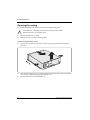
►
Switch off the device. The device must not be in the energy-saving mode!
!
Please take note of the safety information in the "Important notes" chapter.
Pull the power plug out of the mains outlet!
►
Remove all cables from the casing.
►
Place the casing in a convenient working position.
On devices with main power switch
►
Turn the key in the direction of the arrow to unlock the casing (see "Mechanical casing lock
(optional)“).
2
3
1
a
1
►
Press the two locking catches (1), hold them pressed and slide the upper casing in the direction
of the arrow (2) until the spacing (a) is approximately 2 cm.
►
Lift off the top cover in an upward direction (3).
38
Fujitsu Technology Solutions
System expansions
Closing the casing
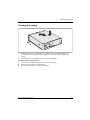
22
1
3
a
1
►
Place the top cover on the casing base (1) so that the distance (a) is approximately 2 cm.
Ensure that the top cover of the casing engages in the guide rails in the lower part of the
casing.
►
Push the top cover in the direction of the arrow (2) until it engages.
On devices with main power switch
►
Turn the key in the direction of the arrow to lock the casing again.
►
Return the system unit to its original position.
►
Reconnect the cables that you disconnected before.
Fujitsu Technology Solutions
39
System expansions
Installing and removing the cross-piece
►
Open the casing (see "Opening the casing").
Removing the cross-piece
a
►
Lift off the cross-piece upward at the
marking (a) in the direction of the arrow.
►
Insert the cross-piece into its guide
lugs (a) on the front of the casing at an
angle from above.
►
Press the cross-piece downward in the
direction of the arrow until it rests on the
casing and engages.
Installing the cross-piece
a
►
40
Close the casing (see "Closing the casing").
Fujitsu Technology Solutions
System expansions
Replacing rear panel
►
Open the casing (see "Opening the casing").
►
Remove the cross-piece (see "Removing the cross-piece").
►
If necessary, remove the board bracket (see "Removing board bracket").
3
2
1
a
►
Disconnect the power supply connector (1) from the mainboard and the drives.
►
Tilt the power supply forward in the direction of the arrow (2) so that the lug (a) unhooks.
►
Carefully lift the power supply out of the casing in the direction of the arrow (3) and lay it next to
the device.
B
A
2
1
2
1
A = Rear panel for low-profile boards
1
B = Rear panel for long boards
►
Remove the four screws (1).
►
Pull the rear panel from the casing in the direction of the arrow (2).
Fujitsu Technology Solutions
1
41
System expansions
B
A
2
1
1
2
2
2
A = Rear panel for low-profile boards
B = Rear panel for long boards
►
Place the new rear panel on the casing in the direction of the arrow (1).
►
Fasten the new rear panel with the four screws (2).
2
3
►
1
a
Place the power supply in the casing at a slight angle in the direction of the arrow (1).
Make sure that the side lug (a) of the power supply hooks into the notch on the casing panel
provided for it.
►
Fold the power supply downward in the direction of the arrow (2).
►
Connect the power supply connector (3) to the connections on the mainboard and the drives.
►
If necessary, install the board bracket (see "Installing board bracket").
►
Replace the cross piece (see "Installing the cross-piece").
►
Close the casing (see "Closing the casing").
42
Fujitsu Technology Solutions
System expansions
Installing and removing a board
!
Please take note of the section "Information about boards".
There is a corresponding rear panel for both low-profile boards and long boards.
The number, position and arrangement of the board slots on the mainboard can be found in the
manual for the mainboard. Boards may already be installed when the device is shipped.
You can fix boards in two ways:
●
●
with the lock (low-profile boards only)
with the bracket
Installing board in low-profile slot
►
Open the casing (see "Opening the casing").
5
2
1
3
4
►
Press on the locking lever in the direction of the arrow (1), unhook it and swing it up in the
direction of the arrow (2).
►
Remove the rear slot cover plate from the slot (3).
!
Do not dispose of the cover plate. For cooling, protection against fire and in order to
comply with EMC regulations, you must refit the cover plate if you remove the board.
►
Make the required settings for the board.
►
Push the board up to its slot (4) as far as the stop.
►
Press the board into the slot so that it engages.
►
Fold the lock closed in the direction of the arrow (5) and allow it to engage.
►
If necessary, connect the cables.
►
Close the casing (see "Closing the casing").
i
If you have installed or removed a PCI board, please check the relevant PCI slot settings
in the BIOS Setup. If necessary, change the settings. Further information is provided in the
PCI board documentation.
Fujitsu Technology Solutions
43
System expansions
Removing board from low-profile slot
►
Open the casing (see "Opening the casing").
►
Disconnect the cables connected to the board.
1
5
2
3
4
►
Press on the locking lever in the direction of the arrow (1), unhook it and swing it up in the
direction of the arrow (2).
►
Pull the board out of the slot (3).
!
For cooling, protection against fire, and in order to comply with EMC (electromagnetic
compatibility) regulations, you must refit the cover plate.
►
Push the rear slot cover plate into the slot (4). Ensure that the point of the cover engages on
the outside of the casing.
►
Fold the lock closed in the direction of the arrow (5) and allow it to engage.
►
Close the casing (see "Closing the casing").
i
44
If you have installed or removed a PCI board, please check the relevant PCI slot settings
in the BIOS Setup. If necessary, change the settings. Further information is provided in the
PCI board documentation.
Fujitsu Technology Solutions
System expansions
Installing and removing board with bracket
You can install both low-profile boards and long boards in the board bracket.
Removing board bracket
►
Open the casing (see "Opening the casing").
►
Remove the cross-piece (see "Removing the cross-piece”).
►
Pull the board bracket out of the casing in
the direction of the arrow.
►
Insert the board bracket into the casing in
the direction of the arrow until it clicks into
position.
►
Replace the cross piece (see "Installing
the cross-piece").
►
Close the casing (see "Closing the
casing").
Installing board bracket
Fujitsu Technology Solutions
45
System expansions
Installing board in bracket
►
Make the required settings for the board.
!
46
Do not dispose of the slot cover. For cooling, protection against fire and in order to comply
with EMC regulations, you must refit the slot cover if you remove the board.
►
Press on the retaining bracket in the
direction of the arrow and fold it down.
►
Pull the slot cover out of the slot in the
direction of the arrow.
Fujitsu Technology Solutions
System expansions
i
►
Push the board up to its slot in the
direction of the arrow as far as the stop.
►
Press the board into the slot so that it
engages.
►
Fold up the retaining bracket so that it
engages.
►
If necessary, connect the cables.
►
Reinstall the board bracket in reverse
order as described above.
►
Replace the cross piece (see "Installing
the cross-piece").
►
Close the casing (see "Closing the
casing").
If you have installed or removed a PCI board, check the relevant PCI slot settings in the
BIOS Setup. If necessary, change the settings. Further information is provided in the PCI
board documentation.
The upper slot is suitable for low-profile cards with an adapter.
Fujitsu Technology Solutions
47
System expansions
Removing board from bracket
►
48
Disconnect the cables connected to the board.
►
Press on the retaining bracket in the
direction of the arrow and fold it down.
►
Pull the board out of the slot of the board
bracket in the direction of the arrow.
Fujitsu Technology Solutions
System expansions
!
i
►
Push the slot cover into the slot in the
direction of the arrow. Ensure that the
point of the slot cover engages on the
outside of the board bracket.
►
Fold up the retaining bracket so that it
engages.
For cooling, protection against fire, and in order to comply with EMC (electromagnetic
compatibility) regulations, you must refit the slot cover.
If you have installed or removed a PCI board, check the relevant PCI slot settings in the
BIOS Setup. If necessary, change the settings. Further information is provided in the PCI
board documentation.
The upper slot is suitable for low-profile cards with an adapter.
Fujitsu Technology Solutions
49
System expansions
Low-Profile boards with adapter
To also install low-profile boards in long board slots, you must mount a corresponding slot adapter
beforehand The slot adapter is located on the slot cover of the upper slot.
►
Unscrew the screw that connects the slot adapter to the slot cover.
Mounting slot adapter
►
1
Fit the slot adapter in the direction of the
arrow (1) on the slot cover of the low-profile
board and screw it on (2).
Now you can install the low-profile board in a
suitable slot like a normal board (see "Installing
board in bracket").
2
Removing slot adapter
2
►
Unscrew the screw (1) and remove the slot
adapter in the direction of the arrow (2).
1
50
Fujitsu Technology Solutions
System expansions
Installing and removing optional ports
An additional port (serial or parallel) can be installed in a rear slot cover plate like a board. For an
exact description of how to connect external devices to ports, refer to the documentation for the
external device.
Installing an additional serial port
►
Open the casing (see "Opening the casing").
5
4
2
1
3
►
Press on the locking lever in the direction of the arrow (1), unhook it and swing it up in the
direction of the arrow (2).
►
Remove the rear slot cover plate from the slot (3).
!
Do not dispose of the cover plate. For cooling, protection against fire and in order to
comply with EMC regulations, you must refit the cover plate if you later remove the port.
►
Push the port into the slot (4) as far as it will go.
►
Press the port into the slot until you feel it engage.
►
Fold the lock closed in the direction of the arrow (5) and allow it to engage.
►
Connect the cable of the additional port to the connector on the mainboard.
►
Close the casing (see "Closing the casing").
Fujitsu Technology Solutions
51
System expansions
Removing an optional port
►
Open the casing (see "Opening the casing").
►
Disconnect the cable from the connector on the mainboard.
5
2
1
4
3
►
Press on the locking lever in the direction of the arrow (1), unhook it and swing it up in the
direction of the arrow (2).
►
Remove the port from the slot (3).
!
For cooling, protection against fire, and in order to comply with EMC (electromagnetic
compatibility) regulations, you must refit the cover plate.
►
Push the rear slot cover plate into the slot (4). Ensure that the point of the cover engages on
the outside of the casing.
►
Fold the lock closed in the direction of the arrow (5) and allow it to engage.
►
Close the casing (see "Closing the casing").
52
Fujitsu Technology Solutions
System expansions
Installing and removing the graphics card
The outermost slot in your device is specially designed for graphics cards (e.g. PCI Express Low
Profile).
Installing the graphics card
►
Open the casing (see "Opening the casing").
4
1
2
3
For devices with low-profile slots
►
Open the locking lever (see "Installing board in low-profile slot").
►
Pull the slot cover out of the slot in the direction of the arrow (2).
►
Push the board up to its slot (3) in the direction of the arrow as far as the stop.
►
Close the locking lever (see "Installing board in low-profile slot").
►
Close the casing (see "Closing the casing").
For devices with board bracket for long boards
►
Press on the retaining bracket in the direction of the arrow and fold it down.
►
Pull the slot cover out of the slot in the direction of the arrow (2).
►
Push the board up to its slot (3) in the direction of the arrow as far as the stop.
►
Fold the retaining bracket down again in the direction of the arrow (4). Ensure that the retaining
bracket engages.
►
Close the casing (see "Closing the casing").
Fujitsu Technology Solutions
53
System expansions
Removing the graphics card
►
Open the casing (see "Opening the casing").
5
1
3
4
2
For devices with low-profile slots
►
Open the locking lever (see "Installing board in low-profile slot").
►
Press against the ledge of the slot (2) to release the graphics card from the slot.
►
Pull the graphics card out of the slot in the direction of the arrow (3).
►
Push the slot cover into the slot in the direction of the arrow (1). Make sure that the tip of the
slot cover engages in the notch in the casing bottom.
►
Close the locking lever (see "Installing board in low-profile slot").
►
Close the casing (see "Closing the casing").
For devices with board bracket for long boards
►
Press on the retaining bracket in the direction of the arrow and fold it down.
►
Press against the ledge of the slot (2) to release the graphics card from the slot.
►
Pull the graphics card out of the slot in the direction of the arrow (3).
►
Push the slot cover into the slot in the direction of the arrow (4). Make sure that the tip of the
slot cover engages in the notch in the casing bottom.
►
Fold the retaining bracket down again in the direction of the arrow (5). Ensure that the retaining
bracket engages.
►
Close the casing (see "Closing the casing").
54
Fujitsu Technology Solutions
System expansions
Installing and removing drives
In the standard model the device may be equipped with the following drives:
●
one accessible 3 ½ inch drive (floppy drive)
●
one non-accessible 3 1/2 inch drive (hard disk)
●
one accessible 5 ¼ inch drive (e.g. DVD or CD ROM drive)
or:
●
two non-accessible 3 ½ inch drive (hard disk)
●
one accessible 5 ¼ inch drive (e.g. DVD or CD ROM drive)
"Accessible drives" are e.g. DVD or CD ROM drives, into which a data carrier can be inserted from
outside. Non-accessible drives are e.g. hard disks.
IDE drives and serial ATA drives
By default IDE drives and serial ATA drives are supported (also see the manual for the mainboard).
Fujitsu Technology Solutions
55
System expansions
Installing and removing plastic drive covers
Removing plastic drive cover
If you install an accessible drive in the 3 ½ inch installation bay and this bay was previously empty or
contained the second hard disk, you must first remove the plastic drive cover.
►
Open the casing (see "Opening the casing").
►
Lay the casing cover accessibly on a non-slide surface.
►
!
Press the plastic drive cover from the inside
out of the front panel in the direction of the
arrow.
With some types of device you can reinstall the cover. With other types of device, the
cover is broken off and cannot be reused. However, you can purchase another cover as an
accessory, and reinstall it.
Do not throw away the safety covers. If you remove the drive again later, you must reinstall
the covers (cooling, fire protection or EMC regulations to be complied with).
56
Fujitsu Technology Solutions
System expansions
Installing plastic drive cover
Depending on the drive, you must reinstall the plastic drive cover. Depending on the type of device,
this is either included with the equipment or can be purchased as an accessory.
Fujitsu Technology Solutions
►
Press the plastic drive cover from the inside
into the front panel in the direction of the
arrow until you feel it latch into place.
►
Close the casing (see "Closing the casing").
57
System expansions
Replacing drive in 5 ¼ inch bay
►
Open the casing (see "Opening the casing").
Removing a drive
►
Pull the data and the power supply connectors from the desired drive.
►
Press the EasyChange rails (1) together
and pull the drive out of the casing (2).
►
Remove the EasyChange rails from the
drive.
1
1
i
58
2
If your device is equipped with a drive carrier instead of the drive, you can remove and
install the carrier in the same way.
Fujitsu Technology Solutions
System expansions
Installing a drive
►
Take the new drive out of its packaging.
►
Adjust the required settings on the drive (if necessary, on already-installed drives as well).
►
Press the EasyChange rails into the provided holes.
►
Push the accessible drive into the casing
until the EasyChange rails engage.
►
Plug the data and the power supply
connectors into the drive.
Make sure the polarity is correct.
i
►
It may be necessary to modify the entry for the drive in the BIOS Setup.
Close the casing (see "Closing the casing").
Fujitsu Technology Solutions
59
System expansions
Folding up and down the drive cage
►
Open the casing (see "Opening the casing").
►
Remove the cross-piece (see "Removing the cross-piece”).
i
Also observe the sticker on the drive cage.
Folding up the drive cage
►
Open the lock of the drive cage by
pressing the catch (a) lightly in the
direction of the arrow (1).
►
Fold the drive cage upward in the
direction of the arrow (2) until it clicks into
position.
►
Press on the locking lug (1) of the drive
cage and then fold the drive cage with
light pressure in the direction of the
arrow (2) until the lever engages.
2
1
Folding down the drive cage
Make sure that the cables are not kinked or
pinched.
2
1
►
Replace the cross piece (see "Installing the cross-piece").
►
Close the casing (see "Closing the casing").
60
Fujitsu Technology Solutions
System expansions
Replacing the floppy disk drive
►
Open the casing (see "Opening the casing").
►
Remove the cross-piece (see "Removing the cross-piece”).
►
Fold up the drive cage (see "Folding up and down the drive cage").
Removing the floppy disk drive
1
1
►
Remove the screws (1).
►
Disconnect the cables from the floppy disk drive.
►
Fold down the drive cage (see "Folding down the drive cage").
►
Pull the drive out of the casing in the direction of the arrow (2).
Fujitsu Technology Solutions
2
61
System expansions
Installing the floppy disk drive
2
2
1
►
Push the drive into the casing in the direction of the arrow (1).
►
Fold up the drive cage (see "Folding up the drive cage").
►
Fasten the floppy disk drive with the screws (2).
►
Connect the cables.
►
Fold down the drive cage (see "Folding down the drive cage").
►
Replace the cross piece (see "Installing the cross-piece").
►
Close the casing (see "Closing the casing").
i
62
It may be necessary to modify the entry for the drive in the BIOS Setup.
Fujitsu Technology Solutions
System expansions
Replacing hard disk
►
Open the casing (see "Opening the casing").
1
3
2
►
Remove the cross-piece (see "Removing
the cross-piece”).
►
Remove the data and the power supply
connectors from the mainboard.
►
Disconnect the power supply connector
from the hard disk.
►
Open the lock of the drive cage by
pressing the catch (a) lightly in the
direction of the arrow (1).
►
Fold the drive cage upward in the direction
of the arrow (2) until it clicks into position.
►
Fold the power supply upward in the
direction of the arrow (3) until it engages.
1
Fujitsu Technology Solutions
63
System expansions
Removing the hard disk
►
Remove all connected cables (1) from the
hard disk.
►
Press the lever of the hard disk carrier in
direction of the arrow (2).
►
Remove the hard disk with the bracket out
of the device in the direction of the arrow
(2).
►
Pull the support rail (1) of the bracket
somewhat toward the outside.
►
Remove the hard disk from the bracket in
the direction of the arrow (2).
1
2
3
2
1
i
64
It may be necessary to modify the entry for the drive in the BIOS Setup.
Fujitsu Technology Solutions
System expansions
Installing the hard disk
►
Remove the new hard disk from the package.
2
►
Pull the support rail (1) of the bracket
somewhat toward the outside.
►
Place the hard disk into the hard disk
carrier in the direction of the arrow (2).
Make sure that the bracket pins engage in the
holes of the hard disk.
1
►
Place the new hard disk in the casing at a
slight angle in the direction of the
arrow (1).
►
Press the hard disk downward in the
direction of the arrow (2) until it rests on
the casing bottom.
3
2
1
Make sure that the rear edge of the hard disk is
flush with the marking on the casing bottom.
►
!
Plug the data and the power supply
connectors into the hard disk.
Even if your serial-ATA hard disk has two power supply connectors you may use only one.
Otherwise damages may result.
Observe the vendors operating manual.
Fujitsu Technology Solutions
65
System expansions
1
3
►
Fold down the power supply in the
direction of the arrow (1) until the power
supply engages.
►
Press on the locking lug (2) of the drive
cage and then fold the drive cage with
light pressure in the direction of the
arrow (3) until the lever engages.
Make sure that the cables are not kinked or
pinched.
2
►
Connect the power supply connector.
►
Replace the cross piece (see "Installing the cross-piece").
►
Close the casing (see "Closing the casing").
i
66
It may be necessary to modify the entry for the drive in the BIOS Setup.
Fujitsu Technology Solutions
System expansions
Replacing second hard disk in 3 ½ inch drive cage
►
Open the casing (see "Opening the casing").
►
Remove the cross-piece (see "Removing the cross-piece”).
►
Fold up the drive cage (see "Folding up the drive cage").
Removing second hard disk
1
►
Remove the screw (1).
►
Disconnect the cables from the hard
disk.
►
Remove the drive the direction of the
arrow out of the casing.
►
Slide the drive into the casing in the
direction of the arrow.
►
Secure the hard disk with the
screws (1).
►
Connect the cables.
►
Fold down the drive cage (see "Folding
down the drive cage").
1
Installing second hard disk
1
1
►
If necessary, mount the plastic drive cover (see "Installing plastic drive cover").
►
Replace the cross piece (see "Installing the cross-piece").
►
Close the casing (see "Closing the casing").
i
It may be necessary to modify the entry for the drive in the BIOS Setup.
Fujitsu Technology Solutions
67
System expansions
Replacing second hard disk in 5 ¼ inch drive carrier
►
Remove the drive carrier as described in "Replacing drive in 5 ¼ inch bay" chapter.
Removing the hard disk
2
1
1
1
1
►
Remove the screws (1).
►
Pull the hard disk out of the drive carrier in the direction of the arrow (2).
Installing the hard disk
1
2
2
2
2
►
Remove the new hard disk from the package.
►
Slide the hard disk into the drive carrier in the direction of the arrow (1).
►
Secure the hard disk with the screws (2).
►
Remove the drive carrier as described in "Replacing drive in 5 ¼ inch bay" chapter.
68
Fujitsu Technology Solutions
System expansions
Installing/removing a SmartCard reader and/or WLAN
module (optional)
You can also install a SmartCard reader and/or a WLAN module for wireless LAN (Local Area
Network) in place of the drive in the installation bay of the floppy disk drive.
i
The SmartCard reader and WLAN module can be installed together in the carrier.
However, you can also install only one of the two boards. The WLAN module is installed in
the lower slot of the carrier and the SmartCard reader in the upper slot of the carrier. If you
want to install the SmartCard reader and the WLAN module together, first install the WLAN
module. Removal is carried out in the reverse order.
Screwing WLAN module onto carrier
2
2
1
a
►
Push the WLAN module - with the
component side facing downwards - in the
direction of the arrow (1) into the guide (a).
►
Fasten the WLAN module with the
screws (2).
►
Push the SmartCard reader - with the
component side facing downwards - in the
direction of the arrow (1) into the guide (a).
►
Fasten the SmartCard reader with the
screws (2).
a
Screwing SmartCard reader onto carrier
2
2
a
a
1
Fujitsu Technology Solutions
69
System expansions
Removing SmartCard reader from carrier
1
1
►
Loosen the screws (1).
►
Pull the SmartCard reader out of the
carrier in the direction of the arrow (2).
►
Loosen the screws (1).
►
Pull the WLAN module out of the holder in
the direction of the arrow.
Removing WLAN module from carrier
1
1
70
Fujitsu Technology Solutions
System expansions
Installing SmartCard reader and/or WLAN module
►
Open the casing (see "Opening the casing").
►
Remove the cover from the upper casing top cover if necessary (see "Removing plastic drive
cover").
►
Remove the cross-piece (see "Removing the cross-piece").
1
1
►
Slide the carrier into the casing in the direction of the arrow.
►
Fold up the drive cage (see "Folding up the drive cage").
►
Fasten the holder with the screws (1).
►
Fold down the drive cage (see "Folding down the drive cage").
►
Connect the cables.
►
Replace the cross piece (see "Installing the cross-piece").
►
Close the casing (see "Closing the casing").
Fujitsu Technology Solutions
71
System expansions
Removing SmartCard reader and/or WLAN module
►
Open the casing (see "Opening the casing").
►
Remove the cross-piece (see "Removing the cross-piece”).
►
Fold up the drive cage (see "Folding up the drive cage").
1
1
►
Remove the screws (1).
►
Disconnect the cables.
►
Fold down the drive cage (see "Folding down the drive cage").
►
Pull the holder out of the casing in direction of the arrow.
►
Replace the cross piece (see "Installing the cross-piece").
!
If you remove the SmartCard reader and/or the WLAN module without replacing it with a
floppy drive, you must reinstall the bay cover for reasons of cooling and fire protection and
to comply with the prevailing EMC (electromagnetic compatibility) regulations.
►
Mount the cover in the casing top cover if necessary (see "Installing plastic drive cover").
►
Close the casing (see "Closing the casing").
i
72
More detailed information on the use of Wireless LAN can be found in the "Wireless LAN"
manual. This manual is provided as PDF file on the "User Documentation" or
"Drivers & Utilities" CD.
Fujitsu Technology Solutions
System expansions
Extensions to the mainboard
The description of how to upgrade the main memory and/or processor is contained in the manual for
the mainboard.
►
Open the casing (see "Opening the casing").
►
Fold up the drive cage (see "Folding up the drive cage").
Upgrading main memory
►
Upgrade the memory according to the description in the manual for the mainboard.
►
Fold down the drive cage (see "Folding down the drive cage").
►
Close the casing (see "Closing the casing").
Replacing the processor
Before you can replace the processor, you need to folding up the ventilation duct (if equipped).
Folding up the ventilation duct
Fujitsu Technology Solutions
►
Grasp the ventilation duct from above and
fold it up.
►
Disconnect the power supply cable of the
processor fan from the mainboard (refer
to the manual for the mainboard).
►
Replace the processor as described in the
manual for the mainboard.
73
System expansions
Folding down the ventilation duct
74
►
Connect the power supply cable to the
processor fan (refer to the manual for the
mainboard).
►
Fold down the ventilation duct.
►
Connect all cables which were previously
disconnected or removed.
►
Close the casing (see "Closing the
casing").
Fujitsu Technology Solutions
System expansions
Replacing lithium battery
In order to permanently save the system information, a lithium battery is installed to provide the
CMOS-memory with a current. A corresponding error message notifies the user when the charge is
too low or the battery is empty. The lithium battery must then be replaced.
For 0-Watt devices: As an interim solution, the device can be started using the emergency on button
at the rear, see chapter "Switching on a device when the lithium battery is discharged (0-Watt
devices)”.
!
Incorrect replacement of the lithium battery may lead to a risk of explosion!
The lithium battery may be replaced only with an identical battery or with a type
recommended by the manufacturer.
Do not throw lithium batteries into the household waste. They must be disposed of in
accordance with local regulations concerning special waste.
Make sure that you insert the battery the right way round: The plus pole must be on the
top!
The lithium battery holder exists in different designs that function in the same way.
3
2
2
3
1
►
Press the catch in the direction of the arrow (1).
The battery jumps out of the holder slightly.
►
Remove the battery (2).
►
Push the new lithium battery of the identical type into the holder and press it downward until it
engages.
Fujitsu Technology Solutions
75
System expansions
76
Fujitsu Technology Solutions
Technical data
Electrical data
Regulations complied with:
IEC60950/EN60950, UL60950,
CSA22.2 No.60950
Protection class:
I
Rated voltage range:
100 V -240 V
Frequency:
50 Hz - 60 Hz
Maximum rated current (device-dependent)
●
Device with monitor socket:
100 V - 127 V
200 V - 240 V
7.0 A
3.5 A
●
Device without monitor socket:
100 V - 127 V
200 V - 240 V
4.0 A
2.0 A
●
Optional monitor socket (output):
100 V - 127 V
200 V - 240 V
3.0 A
1.5 A
Dimensions
Width/depth/height:
350 mm/383 mm/95 mm
Weight
With the basic configuration
approx. 9.7 kg
Environmental conditions
Environment class (3K2)
Environment class (2K2)
DIN IEC 721 part 3-3
DIN IEC 721 part 3-2
Temperature:
●
Operating (3K2)
●
Transport (2K2)
15 °C .... 35 °C
-25 °C .... 60 °C
Condensation in operating must be avoided.
Clearance required to ensure adequate ventilation:
●
●
Without air vents
With air vents
i
min. 10 mm
min. 200 mm
The data sheet of the device contains further technical data. You will find the data sheet
on the internet at http://ts.fujitsu.com/
Fujitsu Technology Solutions
77
Technical data
78
Fujitsu Technology Solutions
Index
3
3 1/2-inch drive 61
5
5 1/4-inch drive 61
A
Access permission, SmartCard 34
Additional serial port, installing 57, 58
Anti-theft protection 32
ATA drive, serial 61
Audio input 11
Audio output 11
B
Battery 82
BIOS Setup 30
security functions 32
system settings 30
Board 43
installing 49, 52
installing in low-profile slot 49
removing 49, 54
removing from low-profile slot 50
with a locking device
installing 49
removing 50
Board bracket
installing 51
removing 51
Button
ON/OFF switch 25
C
Cable
connecting 10
disconnecting 10
Carrier
installing 46
removing 46
Casing
closing 45
lead-sealing 32
locking 31
locking mechanically 30
opening 44
unlocking 31
Casing lock 30
CD-ROM
Fujitsu Technology Solutions
indicator 16
CE certificate 4
CE marking 4
Chain 32
Changing
Lithium battery 82
Changing, lithium battery 82
Class B Compliance Statement 5
Clearance 85
Configuration, BIOS Setup 30
Connecting
keyboard 13
mouse 13
PS/2 mouse 13
standard keyboard 13
USB keyboard 13
Contents of delivery 7
Ctrl+Alt+Del 27
Cursor keys 25
D
Data
dimensions 85
environmental 85
weight 85
Data protection 30
Date
not correct 41
Device
Anti-theft protection 32
cannot be switched on 38
cannot boot 38
checking rated voltage 15
cleaning 3
closing 45
connecting 10, 14, 15
connecting devices 10
Extensions 43
indicators 16
lead-sealing 32
locking 31
locking mechanically 30
opening 44
ports 11
setting up 8
switching off 23, 24
switching on 19, 23
transporting 3
unlocking 31
Device drivers
parallel port 14
79
Index
serial port 14
USB 14
Dimensions 85
Disposal 4
Drive 61
accessible 61
changing 64
installing 61
non-accessible drive 61
removing 61
Drive cage 66
fold down 66
fold up 66
DVD indicator 16
E
Electromagnetic compatibility 4
Energy saving 4
Environmental conditions 85
Environmental data 85
Ergonomic, video workstation 8
Error
date 41
Device 38
message 41
mouse 41
screen 39
time 41
ESD 43
Extensions
Device 43
mainboard 80
External devices
connecting 10, 14
ports 11
F
FCC statement 5
Floppy disk
inserting 28
removing 28
working with 28
write-protection 28
write-protection, disabling 29
Floppy disk drive
changing 67
indicator 16
installing 68
removing 67
Function keys 25
G
Graphics card
installing 59
80
removing 60
H
Hard disk
changing 69, 73
installing 69, 71, 73, 75
removing 69, 70, 73, 75
Hard disk contents, restoring 42
Hard disk indicator 17
Headphones 11
I
IDE drive 61
Important notes 3
Indicator
CD-ROM 16
device 16
DVD 16
floppy disk 16
hard disk 16, 17
SmartCard reader 16
Installation
Software 21
switching on for the first time 18
Installing
additional serial port 57
software 18
Installing plastic drive cover 63
Interfaces 11
K
Kensington Lock 32
Key
Alt Gr 27
Control 27
Ctrl 27
Enter 26
enter key 26
Num 27
Return 26
Shift 27
Key combination 25, 27
Keyboard 25
connecting 13
port 11, 13
Keypad
alphanumeric 25
Keys 25
Ctrl key 27
Ctrl+Alt+Del 27
Menu key 27
Shift key 27
Start key 27
Fujitsu Technology Solutions
Index
L
LAN port 11
Lead-sealing 32
Line in 11
Line out 11
Lithium battery 80
replacing 82
Lock 30
Low voltage directive 4
Low-profile boards 56
mounting slot adapter 56
removing slot adapter 56
M
Main memory 80
upgrading 80
Mainboard, extensions 80
Manuals, further 42
Memory
insufficient 42
not enough 42
Microphone jack 11
Monitor
connecting 12
remains blank 39
switching off 24
switching on 19, 23
transporting 3
Monitor port 11
Monitor screen
no screen display 39
Mouse
connecting 13
error 41
Mouse pointer 41
Mouse port 11
N
New installation, software 37
New software, installing 37
Notational conventions 2
Note
boards 43
Notes
CE certificate 4
disposal 4
energy saving 4
important 3
recycling 4
safety 3
Numeric keypad 25
O
ON/OFF switch 23, 25
Fujitsu Technology Solutions
Operating position
horizontal 8
vertical 8
Operation 23
Other manuals 42
P
Packing material 7
unpacking 7
Parallel port 11, 14
connecting devices 14
settings 14
Plastic drive cover
removing 62
Port
SCSI 11
Power-on indicator 16, 21, 23
dark 38
fails to light 16, 38
flashes 16
lights green 16
lights orange 16
Preparing for first use, overview 7
Preparing for use 7
overview 7
Printer 11
Processor 80
replacing 80
Property protection 30
Protection
property and data 30
PS/2 mouse
connecting 13
port 11
R
Ready 21
Ready-to-operate 23
Recycling 4
Replacement
Lithium battery 82
Replacing rear panel 47
Retransportation 3
S
Safety 3
SCSI port 11
Security functions
BIOS Setup 32
SmartCard 34
SmartLock 34
serial ATA drive 61
Serial port 11, 14
connecting devices 14
81
Index
installing 57
settings 14
Setup, see BIOS Setup
Signs and symbols 2
Slot adapter 56
SmartCard reader 76
indicator 16
installing 76, 78
operating 34
removing 76, 79
Software
Installation 21
installing 18
new installation 37
Standard keyboard, connecting 13
Summer time 41
Surface 85
System board see mainboard
System expansion 43
System password 23
System settings, BIOS Setup 30
Troubleshooting 37
T
Technical data 85
Time
daylight savings 41
not correct 41
Tips 37, 42
Transport 3
Trouble
Device 38
mouse 41
screen 39
W
Warm boot 27
Weight 85
Wireless LAN module
installing 76, 78
removing 79
WLAN module
installing 76, 78
removing 79
Write protection, floppy disk 28, 29
82
U
USB
Universal Serial Bus 11
USB devices
connecting 14
software 14
USB port 13, 14
connecting devices 14
connecting keyboard 13
connecting mouse 13
V
Ventilation area 8
Ventilation duct
folding down 81
folding up 80
Vertical operating position 9
Video workstation 8
Fujitsu Technology Solutions