1
APPLICATION NOTE - Quickstart Guide for Branch SRX Series Services Gateways
Introduction
The purpose of this application note is to walk the reader through the steps necessary to configure Juniper
Networks® SRX Series Services Gateways out of the box to provide secure connectivity to the Internet and remote
sites. The example configurations can be leveraged to build more complicated configurations that will meet the
security requirements of modern branch and remote offices.
After reading this document, you should be able to configure branch SRX Series Services Gateways to pass traffic
and provide several common security services.
Scope
This paper introduces the Juniper Networks JUNOS® Software CLI and will help the reader configure SRX Series
Services Gateways for the first time and provide a building block for more advanced configurations. It does not
include advanced security configuration examples or network design guidelines. Additional Juniper Networks
documentation is available for readers at www.juniper.net/techpubs/software/junos/index.html#srx.
Design Considerations
Hardware Requirements
Juniper Networks SRX Series Services Gateways (Certain features described in this document are not available
across the entire SRX Series product line. Readers should consult Juniper Networks product-specific literature for
more details.)
Software Requirements
JUNOS Release 9.5 or later for all branch SRX Series Services Gateways
Description and Deployment Scenario
The included examples are not intended to be Juniper recommended configurations as they only meet the security
requirements of the simplest deployments such as a small home office. However, with some modification, they can
be used to connect and secure larger remote and branch offices to a larger central site.
The approach of this document is to begin with an SRX Series as it ships from the factory and progressively work
through the steps necessary to build a usable base configuration.
Default Firewall Configuration
The first configuration is often associated with default firewall behavior. All outbound traffic from a private network is
allowed and uses source NAT, while inbound traffic from the Internet not matching an established session is blocked.
The first time that branch SRX Series Services Gateways are powered on, they will boot using the factory default
configuration as follows:
• A trust and untrust zone will be created.
• Interface ge-0/0/0 will be assigned the IP address 192.168.1.1 and will be bound to the trust zone.
• A DHCP server instance will be enabled on interface ge-0/0/0.
• Three security policies, one inter-zone and two intra-zone, will be created:
-- trust zone to trust zone (intra-zone)—default permit policy
-- trust zone to untrust zone (inter-zone)—default permit policy
-- untrust zone to trust zone (inter-zone)—default deny policy
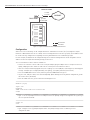
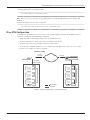
To illustrate a common default firewall configuration, a Juniper Networks SRX210 Services Gateway will be used and
the following design assumptions will be made:
• The protected network is connected to interface ge-0/0/0 in the trust zone.
• Connectivity to the Internet is through interface fe-0/0/7 in the untrust zone.
• The IP address of interface fe-0/0/7 is either statically configured or assigned via DHCP.
Copyright © 2009, Juniper Networks, Inc.
1