1
Register your product and get support at
www.philips.com/welcome
ID965
EN User manual
IFU_ID965_05_EU_EN.indd
1
2009-11-20
14:02:26
IFU_ID965_05_EU_EN.indd
2
2009-11-20
14:02:26
1 Important
Safety instructions
6 Text and numbers
5
5
2 Your ID965
8
8
9
10
10
3 Get started
11
11
11
11
12
12
12
13
13
13
13
4 Calls
14
14
15
15
15
15
15
15
16
16
16
What is in the box
Overview of the phone
Overview of the base station
Display icons
Connect the base station
Connect the charger
Install the handset
Check the battery level
Set the country
Set the date and time
Set the date and time format
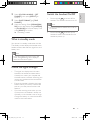
What is standby mode
Check the signal strength
Switch the handset On/Off
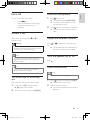
Make a call
End a call
Answer a call
Mute the microphone
Adjust the earpiece volume
Turn the speaker on or off
Make a second call
Answer a second call
Toggle between two calls
Make a conference call
5 Intercom and conference calls
Make a call to another handset
Transfer a call
Make a conference call
17
17
17
17
19
19
Enter text and numbers
Switch between uppercase and
lowercase
19
7 Call log
20
20
20
20
20
20
8 Phonebook
21
21
21
21
21
21
22
22
22
22
View the call records
Return a call
Delete a call record
Delete all call records
Save a call record to the phonebook
View the phonebook
Search a record
Access the phonebook during a call
Call from the phonebook
Add a record
Set the melody
Edit a record
Delete a record
Delete all records
9 Redial list
23
View the redial records
23
Redial a call
23
Save a redial record to the phonebook 23
Delete a redial record
23
Delete all redial records
23
10 Self-defined settings
24
24
24
25
11 Call features
26
26
26
26
26
Personalize the phone display
Personalize the sounds
Standby clock
Auto hang up
Auto conference
Dial mode
Select the recall duration
EN
IFU_ID965_05_EU_EN.indd
3
English
Contents
2009-11-20
3
14:02:26
Carrier code
Manage the area code
Network type
Auto prefix
First ring
ECO mode
Light ring
27
27
27
28
28
28
29
12 Network services
30
30
30
31
31
13 Extra features
32
32
32
32
33
14 Advanced settings
34
34
34
34
15 Telephone answering machine
35
35
35
35
36
36
37
16 Default settings
40
40
17 Technical data
41
18 Frequently asked questions
42
Call forward
Call return
Call back service
ID withheld
Alarm clock
Auto clock
Keypad lock
Locate the handset
Register the handsets
Unregister the handsets
Restore default settings
Turn on the answering machine
Turn off the answering machine
Set the answering machine language
Set the answer mode
Outgoing messages (OGM)
Incoming messages (ICM)
Answering machine default settings
4
EN
IFU_ID965_05_EU_EN.indd
4
2009-11-20
14:02:26
•• Do not expose the phone to excessive heat
caused by heating equipment or direct sunlight.
•• Do not drop your phone or allow objects to
Safety instructions
Power requirements
• This product requires an electrical supply
of 100-240 volts AC. In case of power
failure, the communication can be lost.
• The voltage on the network is classified
as TNV-3 (Telecommunication Network
Voltages), as defined in the standard EN
60950.
Warning
•• The Electrical network is classified as
hazardous. The only way to power down the
charger is to unplug the power supply from
the electrical outlet. Ensure that the electrical
outlet is always easily accessible.
To avoid damage or malfunction
Caution
•• Use only the supplied batteries and adaptor
•• Do not allow the charging contacts or the
battery to come into contact with metal
objects.
•• Do not open the handset, base station or
charger as you could be exposed to high
voltages.
•• Do not allow the charger to come into contact
with liquids.
•• Risk of explosion if battery is replaced by an
incorrect type.
•• Dispose of used batteries according to the
instructions.
•• Always use the cables provided with the
product.
•• For pluggable equipment, the socket-outlet
shall be installed near the equipment and shall
be easily accessible.
•• Handsfree activation could suddenly increase the
volume in the earpiece to a very high level: make
sure the handset is not too close to your ear.
•• This equipment is not designed to make
emergency calls when the power fails. An
alternative has to be made available to allow
emergency calls.
fall on your phone.
•• Do not use any cleaning agents containing
alcohol, ammonia, benzene, or abrasives as
these may harm the set.
•• Do not use the product in places where there
are explosive hazards.
•• Do not let small metal objects come into
contact with the product. This can deteriorate
audio quality and damage the product.
•• Active mobile phones in the vicinity may cause
interference.
•• Metallic objects may be retained if placed near
or on the handset receiver.
About operating and storage temperatures
• Operate in a place where temperature is
always between 0°C to +35°C (32°F to
95°F).
• Store in a place where temperature is
always between -20°C and +45°C (-4° F
to 113° F).
• Battery life may be shortened in low
temperature conditions.
Declaration of conformity
Hereby Philips Consumer Lifestyle, P&A,
declares that the ID965 is in compliance with
the essential requirements and other relevant
provisions of Directive 1999/5/EC. You can
find the Declaration of Conformity on www.
p4c.philips.com.
This product has been designed, tested and
manufactured according the European R&TTE
directive 1999/5/EC. Following this directive,
this product can be brought into service in the
following countries:
EN
IFU_ID965_05_EU_EN.indd
5
English
1 Important
2009-11-20
5
14:02:26
Use GAP standard compliance
The GAP standard guarantees that all
DECT™ GAP handsets and base stations
comply with a minimum operating standard
irrespective of their make. The handset
and base station are GAP compliant, which
means they guarantee the minimum functions:
register a handset, take the line, make a call
and receive a call. The advanced features may
not be available if you use them with other
makes. To register and use this handset with
a GAP compliant base station of different
make, first follow the procedure described in
the manufacturer’s instructions, then follow
the procedure described in this manual for
registering a handset. To register a handset
from different make to the base station, put
the base station in registration mode, then
follow the procedure described in the handset
manufacturer’s instructions.
Compliance with EMF
Koninklijke Philips Electronics N.V.
manufactures and sells many products
targeted at consumers, which, like any
electronic apparatus, in general have the
ability to emit and receive electromagnetic
signals.
One of Philips’ leading Business Principles is to
take all necessary health and safety measures
for our products, to comply with all applicable
legal requirements and to stay well within
the EMF standards applicable at the time of
producing the products.
Philips is committed to develop, produce and
market products that cause no adverse health
effects. Philips confirms that if its products are
handled properly for their intended use, they
are safe to use according to scientific evidence
available today.
Philips plays an active role in the development
of international EMF and safety standards,
enabling Philips to anticipate further
developments in standardization for early
integration in its products.
6
Disposal of your old product and
batteries
Your product is designed and manufactured
with high quality materials and components,
which can be recycled and reused.
When this crossed-out wheeled bin symbol
is attached to a product it means that the
product is covered by the European Directive
2002/96/EC. Please inform yourself about the
local separate collection system for electrical
and electronic products.
Please act according to your local rules and
do not dispose of your old products with your
normal household waste.
Correct disposal of your old product helps to
prevent potential negative consequences for
the environment and human health.
Your product contains batteries covered by
the European Directive 2006/66/EC, which
cannot be disposed with normal household
waste.
Please inform yourself about the local rules
on separate collection of batteries because
correct disposal helps to prevent negative
consequences for the environmental and
human health.
When this logo is attached to a product,
it means a financial contribution has been
paid to the associated national recovery and
recycling system.
EN
IFU_ID965_05_EU_EN.indd
6
2009-11-20
14:02:27
Environmental information
English
All unnecessary packaging has been omitted.
We have tried to make the packaging easy to
separate into three materials: cardboard (box),
polystyrene foam (buffer) and polyethylene
(bags, protective foam sheet.)
Your system consists of materials which can
be recycled and reused if disassembled by
a specialized company. Please observe the
local regulations regarding the disposal of
packaging materials, exhausted batteries and
old equipment.
Your product contains batteries covered by
the European Directive 2006/66/EC, which
cannot be disposed of with normal household
waste.
Please inform yourself about the local rules on
separate collection of batteries. The correct
disposal of batteries helps prevent potentially
negative consequences on the environment
and human health.
EN
IFU_ID965_05_EU_EN.indd
7
2009-11-20
7
14:02:27
2 Your ID965
Congratulations on your purchase and welcome
to Philips!
To fully benefit from the support that Philips
offers, register your product at www.philips.
com/welcome.
Power supply for handset charger
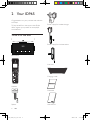
What is in the box
Power supply for the base station
Base station
Line cord
Charging cradle
Handset
Guarantee
Splitter
8
User Manual
EN
IFU_ID965_05_EU_EN.indd
8
2009-11-20
14:02:29
Quick start guide
Key
Name
1
2
Earpiece
Right soft
key
Note
•• In some countries, you have to connect the
line adaptor to the line cord, then plug the line
cord to the line socket.
3
Note
•• In multi-handset packs, there are additional
handsets and chargers with power supply
units.
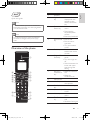
Overview of the phone
a
o
b
n
m
c
d
l
k
e
4
5
6
7
8
9
10
11
j
f
i
g
h
12
13
Descriptions
• Select the function
displayed on the
handset screen
directly above the
key.
Phonebook/ • Scroll down on the
Down key
menu
• Decrease the
earpiece/speaker
volume
• Enter the phonebook
End /On/Off • End the call
key
• Exit the menu/
operation
• Turn the handset
on/off
Redial key • Enter redial list
and dial the recent
number
Ringer Off/ • Press to enter a
Pause key
pause
• Turn the ringer on/
off
• Switch between the
lower and upper
case during text
editing
• Make the intercom
Intercom/
call
Conference
key
• Make the
conference call
Microphone
Mute key
• Mute/unmute the
microphone
Star/Keylock • Lock/unlock keypad
key
Speaker key • Turn the speaker
on/off
Menu key
• Access the main
menu
Talk/Recall • Make and receive
key
calls
• Send the flash signal
EN
IFU_ID965_05_EU_EN.indd
9
2009-11-20
English
EN
9
14:02:30
Key
Name
14
Call Log/Up • Scroll up on the
key
menu
• Increase the
earpiece/speaker
volume
• Enter the call log
Left soft key • Select the function displayed on
the handset screen
directly above the
key.
15
Descriptions
Display icons
In standby mode, the icons shown on the main
screen tell you what features are available on
your handset.
Icon
The battery is fully charged,
the talk time can go up to
14 hours.
The battery is empty.
It indicates if your phone is
linked to a base.
The call is in progress.
Overview of the base station
The alarm is activated.
The speaker is on.
a
i
Descriptions
The ringer is off.
Call log
Answering machine
ECO
There is an unheard voice
message.
The ECO mode is
activated.
bc d e f g h
Key
1
Name
Descriptions
Paging key • Find handset(s)
• Enter registration
mode
Volume
• Decrease the
down key
speaker volume
Volume up • Increase the speaker
key
volume
Backward • Skip backward during
key
playback
Play/Stop • Play messages
key
• Stop message playback
Forward
• Skip forward during
key
playback
Delete key • Delete messages
On/Off key • Turn the answering
machine on/off
Light ring
2
3
4
5
6
7
8
9
10
EN
IFU_ID965_05_EU_EN.indd
10
2009-11-20
14:02:32
English
3 Get started
Caution
•• Ensure you have read the safety instructions in
the “Important” section before you connect
and install your handset.
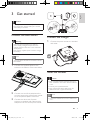
Connect the base station
Warning
•• Risk of product damage! Ensure that the
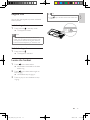
Connect the charger
1
Connect the power socket to a standard
wall outlet.
power supply voltage corresponds to the
voltage printed on the back or the underside
of the phone.
•• Use only the supplied power socket to charge
the battery.
Note
•• The type plate is located on the bottom of the
base station.
1
Connect the supplied splitter to the
socket on the bottom of the base station.
Install the handset
Caution
•• Risk of explosion! Keep batteries away from
heat, sunshine or fire. Never discard batteries
in fire.
•• Use only the supplied batteries.
•• Risk of decreased battery life! Never mix
different brands or types of batteries.
2
3
Connect one end of the telephone line
cord and output plug of the power socket
to the respective splitter connectors.
Connect the other end of power
socket to a standard wall outlet and the
telephone line cord to the phone socket.
Note
•• Charge the batteries for 24 hours before first
use.
EN
IFU_ID965_05_EU_EN.indd
11
11
2009-11-20
14:02:32
Warning
The battery is full, the talk time
can go up to 14 hours.
The battery is empty. Charge it.
•• Check the battery polarity when inserting in
the battery compartment. Incorrect polarity
may damage the product.
a The batteries are pre-installed in the
handset. Follow the direction of the
arrow printed on the battery tape and
pull it off from the battery door before
charging.
The handsets turn off if the battery is empty. If
you are on the phone, you hear warning tones
when the battery is almost empty. The call gets
disconnected after the warning.
Set the country
To make the phone work, select your country.
b Place the handset on the charging cradle
to charge the handset.
1
2
When you see the welcome message,
press [OK], select your country, press
[SELECT] to confirm.
»» The country setting is saved.
Set the date and time.
»» The phone is now ready to use.
»» To set the date and time later, press
[BACK] to skip this setting.
Set the date and time
1
2
3
Note
•• If the handset becomes warm when the
4
batteries are being charged, it is normal.
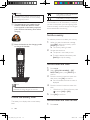
Check the battery level
The battery icon displays the current battery
level.
12
5
Press menu.
Select [CLOCK & ALARM] > [SET
DATE/TIME], then press [SELECT] to
confirm.
Press the numeric buttons to enter the
date, then press [OK] to confirm.
»» On the handset, the time set menu is
displayed.
Press the numeric buttons to enter the
time.
• If the time is in 12-hour format, press
to select [AM] or [PM].
Press [OK] to confirm.
Set the date and time format
1
Press menu.
EN
IFU_ID965_05_EU_EN.indd
12
2009-11-20
14:02:33
3
4
Select [CLOCK & ALARM] > [SET
FORMAT], then press [SELECT] to
confirm.
Select [DATE FORMAT] or [TIME
FORMAT].
Select the setting. Select [DD/MM][MM/
DD] as the date display and [12 HOURS]
or [24 HOURS] as the time display. Then
press [SELECT] to confirm.
»» The setting is saved.
What is standby mode
Switch the handset On/Off
•
English
2
Press and hold
to switch off the
handset. The handset’s screen turns off.
Note
•• When the handset is switched off, no call can
be received.
•
Press and hold
to switch on the
handset. It takes a few seconds for the
handset to power up.
Your phone is in standby mode when it is idle.
The standby screen displays the handset name,
handset number, date and time, signal icon, and
battery icon.
Note
•• If you set to display the screen saver in idle
mode, the digital/analog clock is displayed
when the screen saver appears.
Check the signal strength
•
•
•
The signal icon displays the link status
between the handset and base station.
A steady icon means your handset and
the base station are linked. A flashing icon
means your handset and the base station
are not linked.
Ensure the handset is linked to the base
station before you make or receive calls
and carry out the phone functions and
features.
If you hear warning tones when you are
on the phone, the handset is almost out
of battery or the handset is out of range.
Charge the battery or move the handset
nearer to the base station.
EN
IFU_ID965_05_EU_EN.indd
13
13
2009-11-20
14:02:33
4 Calls
Note
•• When the power fails, the phone cannot
access emergency services.
Redial the most recent number
1
2
3
Press
.
Press redial.
Press [SELECT].
»» The most recent number is then dialed
out.
Call from the redial list
Tip
•• Check the signal strength before you make
a call or when you are in a call. For more
information, see “Check the signal strength” in
the Get started section.
You can make a call from the redial list.
Tip
•• For more information, see “Redial a call” in the
Redial list section.
Make a call
You can make a call in these ways:
• Quick call
• Dial before you call
• Redial the most recent number
• Call from the redial list.
• Call from the phonebook list
• Call from the call log
Press
You can make a call from the phonebook list.
Tip
•• For more information, see “Call from the
phonebook” in the Phonebook section.
Call from the call log
You can return a call from the outgoing,
received or missed call log.
Quick call
1
2
Call from the phonebook
.
Dial the phone number.
»» The number is dialed out.
»» The duration of your current call is
displayed.
Tip
•• For more information, see “Return a call” in
the Call log section.
Note
Dial before you call
1
2
14
Dial the phone number
• To erase a digit, press [CLEAR].
• To enter a pause, press and hold .
Press
to dial out the call.
•• The call timer displays the talk time of your
current call.
Note
•• If you hear warning tones, the handset is
almost out of battery or the handset is out
of range. Charge the battery or move the
handset nearer to the base station.
EN
IFU_ID965_05_EU_EN.indd
14
2009-11-20
14:02:34
End a call
You can end a call in these ways:
• Press
; or
• Place the handset to the charging
cradle if the auto hang up is
activated.
1
2
Answer a call
When the phone rings. Press
answer the call.
or
to
Warning
•• When the handset rings or when the
handsfree is activated, keep the handset away
from your ear to avoid ear damage.
Note
•• The caller ID service is available if you have
registered to the caller ID service with your
service provider.
Tip
•• When there is a missed call, the handset
English
Mute the microphone
Press during a call.
»» The handset displays [MUTE ON].
»» The caller cannot hear you, but you
can still hear his voice.
Press again to unmute the microphone.
»» You can now communicate with the
caller.
Adjust the earpiece volume
Press
or
to adjust the volume during a
call.
»» The earpiece volume is adjusted and
the phone is back to the call screen.
Turn the speaker on or off
Press .
Make a second call
displays a notification message.
Note
Turn off the ringer for all incoming
calls
There are two ways to turn off the ringer:
1
2
Press and hold in standby mode.
»» displays on the screen.
When the phone rings, press [SILENT].
•• This service is network dependent.
1
2
Press
during a call, then press [OK].
»» The first call is put on hold.
Dial the second number.
»» The number displayed on the screen is
dialed out.
EN
IFU_ID965_05_EU_EN.indd
15
15
2009-11-20
14:02:35
Answer a second call
Note
•• This is a country dependent setting.
When there is a periodical beep to notify you
of an incoming call, you can answer the call in
these ways:
1
2
Press
and
to answer the call.
»» The first call is put on hold, and you
are now connected to the second call.
Press
and
to end the current call
and answer the first call.
Toggle between two calls
You can toggle your calls in these ways:
1
2
Press
and
; or
Press [OK] and select [SWITCH
CALLS], then press [OK] again to
confirm.
»» The current call is put on hold, and you
are now connected to the other call.
Make a conference call
Note
•• This service is network dependent. Check with
the service provider for additional charges.
When you are connected to two calls, press
[OK], select [CONFERENCE] and then press
[SELECT] again to confirm.
»» The two calls are combined and a
conference call is established.
16
EN
IFU_ID965_05_EU_EN.indd
16
2009-11-20
14:02:35
An intercom call is a call to another handset
that shares the same base station. A conference
call involves a conversation among you, another
handset user and the outside callers.
Make a call to another
handset
Toggle between calls
English
5 Intercom and
conference calls
Press int to switch between the outside call
and the intercom call.
Transfer a call
1
2
3
Press int during a call.
Select or enter the handset number, then
press [SELECT] to confirm.
Press
when the other side answers
your call.
»» The call is now transferred to the
selected handset.
Note
•• If the base station only has 2 registered
handsets, press int to make a call to another
handset.
1
2
3
Press int. The handsets available for
intercom are displayed.
Select or enter a handset number, then
press [SELECT] to confirm.
»» The selected handset rings.
»» The intercom is established.
Press
call.
to cancel or end the intercom
Note
•• If the selected handset is occupied in a call, you
Make a conference call
A 3-way conference call is a call between you,
another handset user and the outside callers. It
requires two handsets to share the same base
station.
During an external call
1
2
hear a busy tone.
While you are on the phone
3
You can go from one handset to another
during a call:
1
2
Press int.
»» The current caller is put on hold.
4
Press int to initiate an internal call.
»» The handsets available for intercom are
displayed.
»» The external caller is put on hold.
Select or enter a handset number, then
press [SELECT] to confirm.
»» The selected handset rings.
»» The intercom is established.
Press and hold int on your handset.
»» You are now on a 3-way conference
call with the external call and the
selected handset.
Press
to end the conference call.
Select or enter a handset number, then
press [SELECT] to confirm.
»» Wait for the other side to answer your
call.
EN
IFU_ID965_05_EU_EN.indd
17
17
2009-11-20
14:02:35
Note
•• Press
to join an ongoing conference with
another handset if [ADVANCED SET] >
[CONFERENCE] is set to [ON].
During the conference call
1
2
3
Press int to put the external call on hold
and go back to the internal call.
»» The external call is put on hold.
Press int to toggle between the external
and internal call.
Press and hold int to establish the
conference call again.
Note
•• If a handset hangs up during the conference
call, the other handset remains connected to
the external call.
18
EN
IFU_ID965_05_EU_EN.indd
18
2009-11-20
14:02:35
You can enter text and numbers for handset
name, phonebook records, and other menu
items.
Enter text and numbers
1
2
Press once or several times on the
alphanumeric key to enter the selected
character.
Press [CLEAR] to delete the character.
Press
/
move the cursor left and
right.
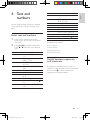
Key
Characters (Upper case)
0
.0,/:;“‘!¡?¿*+-%\^
~|
[Sp] 1 @ _ # = < > ( ) & € £
$ ¥ [ ] { } ¤ § ...
ABC2ÀÂÆÁÃĂÄÅ
ĄÇĆČ
DEF3ĎÐĖĚÈÉÊËĘ
ΔΦ
GHI4ĞÍÌÎÏİΓ
JKL5ΛŁĹĽ
MNO6ÑŇŃÓÔÕ
ÖŐ
PQRS7ŘŞŠŚβΠΘΣ
TUV8ŢŤÙÚÛÜŮ
Űμ
WXYZ9ÝŽŹŻſØΩ
ΞΨ
1
2
3
4
5
6
7
8
9
Key
0
1
2
3
4
5
6
7
8
9
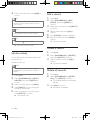
Characters (Lower case)
.0,/:;“‘!¡?¿*+-%\^
~|
[Sp] 1 @ _ # = < > ( ) & € £
$¥[]{}¤§…
abc2àâÆáãâäåąçćč
def3ďđėĕèéêëęΔΦ
ghi4ğíìîïlΓ
jkl5Λłĺľ
mno6ñňńóôõöő
pqrs7řşšśβΠΘΣ
tuv8ţťùúûüů űμ
wxyz9ýžźżƒøΩΞΨ
Example to write “Paul”
Press 7 once: P
Press 2 once: a
Press 8 two times: u
Press 5 three times: l
Switch between uppercase
and lowercase
By default, the first letter of each word in a
sentence is uppercase and the rest is lowercase.
Press and hold to switch between the
uppercase and lowercase letters.
EN
IFU_ID965_05_EU_EN.indd
19
English
6 Text and
numbers
19
2009-11-20
14:02:36
7 Call log
The call log stores the call history of all
outgoing, missed or received calls. The incoming
call history includes the name and number
of the caller, call time and date. This feature is
available if you have registered to the caller ID
service with your service provider.
Your phone can store up to 50 call records. The
call log icon on the handset flashes to remind
you of any unanswered calls. If the caller allows
the display of his identity, you can view his
name or number. The call records are displayed
in chronological order with the most recent
received call at the top of the list.
Note
•• Ensure the number in the call list is valid before
you can call back directly from the call list.
View the call records
1
2
3
Press
Delete a call record
1
2
3
4
1
2
3
4
5
Select [CALL LIST].
Select a record, then press [OK] to
confirm.
Select [DELETE], then press [SELECT]
to confirm
»» The record is deleted.
Press
.
Select [CALL LIST].
Press [OPTION] to enter the options
menu.
Select [DELETE ALL], then press
[SELECT] to confirm
»» The handset displays a confirmation
requests.
Press [OK] to confirm.
»» All records are deleted.
.
Select [CALL LIST], then press [SELECT]
to confirm.
»» The incoming call log is displayed.
Save a call record to the
phonebook
Press /
to select a record on the list,
then press [OPTION] for more available
information.
1
2
3
4
1
2
5
20
.
Delete all call records
Return a call
3
4
Press
Press
.
Select [CALL LIST], then press
[OPTION].
Select a record on the list.
Press
to make the call.
6
Press
.
Select [CALL LIST].
Select a record, then press [OPTION] to
confirm.
Select [SAVE NUMBER], then press
[SELECT] to confirm.
Enter and edit the name, then press [OK]
to confirm.
Enter and edit the number, then press
[SAVE] to confirm.
»» The record is saved.
EN
IFU_ID965_05_EU_EN.indd
20
2009-11-20
14:02:36
This phone has a phonebook that stores up
to 200 records. You can access the phonebook
from the handset. Each record can have a name
up to 14 characters long and a number up to
24 digits long.
There are 2 direct access memories (keys
and ). Depending on your country, keys
are preset to the voice mail number
and
and information service number of your service
provider respectively. When you press and hold
on the key in standby mode , the saved phone
number is dialed automatically.
View the phonebook
Enter the first character of a contact
1
2
3
Access the phonebook menu.
English
8 Phonebook
Select [LIST].
Press the alphanumerical key that
corresponds to the character.
»» The first record that starts with this
character is displayed.
Access the phonebook during
a call
1
2
3
Press [OPTION], select [PHONEBOOK]
then press [SELECT] again to confirm.
Select the contact, then press [SELECT]
to confirm.
»» The number can be viewed.
Press [SELECT] again to dial out the
number.
Note
•• You can view the phonebook on one handset
only each time.
1
2
Press
.
Select a contact and view the available
information.
Search a record
You can search the phonebook records in these
ways:
• Scroll the contacts list.
• Enter the first character of the contact.
Scroll the contact list
Access the phonebook menu, then press
and
to scroll through the phonebook
entries.
Call from the phonebook
1
2
3
Press
to access the phonebook.
Select a contact in the phonebook list.
Press
to make the call.
Add a record
Note
•• If your phonebook memory is full, the handset
displays a notification message. Delete some
records to add new ones.
1
2
3
Press menu.
Select [PHONEBOOK] > [NEW
ENTRY], then press [SELECT] to
confirm.
Enter the name then press [OK] to
confirm.
EN
IFU_ID965_05_EU_EN.indd
21
21
2009-11-20
14:02:37
4
Enter the number, then press [SAVE] to
confirm.
Tip
•• For more information on how to edit the
name and number, see the section on Text
and numbers.
Note
•• The phonebook only saves new number.
Tip
Edit a record
1
2
3
4
5
6
•• Press and hold to insert a pause.
»» Your new record is saved.
Set the melody
You can personalize the melody played when
someone in the
Press menu.
Select [PHONEBOOK] > [EDIT
ENTRY], then press [SELECT] to
confirm.
Select the contact, then press [SELECT]
to confirm.
Edit the name, then press [OK] to
confirm.
Press [CLEAR] to delete a character.
Edit the number, then press [SAVE] to
confirm.
»» The record is saved.
Delete a record
1
2
3
phonebook calls you.
Press menu.
Select [PHONEBOOK] > [DELETE],
then press [SELECT] to confirm.
Select a contact, then press [OK] to
confirm
»» The record is deleted.
Note
•• Ensure you have subscribed the caller line
identification service before you have this
feature.
1
2
3
4
5
22
Press menu.
Select [PHONEBOOK] > [SELECT
MELODY], then press [SELECT] to
confirm.
Select a contact, then press [VIEW].
Press [SELECT] to set or change the
melody for the contact.
Delete all records
1
2
3
Press menu.
Select [PHONEBOOK] > [DELETE
ALL], press [SELECT] to confirm.
»» The handset displays a confirmation
request.
Press [OK] to confirm.
»» All records are deleted.
Select a melody for the contact, then
press [SELECT] to confirm.
»» The melody is set.
EN
IFU_ID965_05_EU_EN.indd
22
2009-11-20
14:02:37
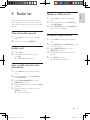
The redial list stores the call history of dialed
calls. It includes the names and/or numbers you
have called. This phone can store up to 10 redial
records.
View the redial records
1
2
Press redial to enter the list of dialed
calls.
Select a record, press [SELECT].
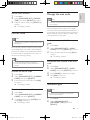
Delete a redial record
1
2
3
1
2
3
1
2
4
Select the record you want to call.
Press .
»» The number is dialed out.
Press redial to enter the list of dialed
calls.
Select a record, then Press [SELECT]
then [OPTION].
Select [DELETE], then press [SELECT].
»» The record is deleted.
Delete all redial records
Redial a call
Press redial.
English
9 Redial list
5
Press redial to enter the list of dialed
calls.
Press [SELECT] then [OPTION] to enter
the options menu.
Select [DELETE ALL], then press
[SELECT] to confirm.
The handset displays a confirmation
request.
Press [OK] to confirm.
»» All records are deleted.
Save a redial record to the
phonebook
1
2
3
4
5
Press redial to enter the list of dialed
calls.
Select a record, then Press [SELECT]
then [OPTION].
Select [SAVE NUMBER], then press
[SELECT] to confirm.
Enter and edit the name, then press [OK]
to confirm.
Enter and edit the number, then press
[SAVE] to confirm.
»» The record is saved.
EN
IFU_ID965_05_EU_EN.indd
23
23
2009-11-20
14:02:37
10Self-defined
settings
Personalize the sounds
Set the handset’s ringtone
You can select from 20 ringtones.
Customize the settings to make it your own
phone.
1
2
Personalize the phone display
3
Name the handset
The name of the handset can be up to 14
characters. It is displayed on the handset
screen in standby mode.
1
2
3
4
Press menu.
Select [PERSONAL SET] > [HANDSET
NAME], then press [SELECT] to confirm.
Enter or edit the name. To erase a
character, press [CLEAR].
Press [OK] to confirm.
»» The setting is saved.
Press menu.
Select [PERSONAL SET] > [HANDSET
TONES] > [RING TONES], then press
[SELECT] to confirm.
Select a ringtone, then press [SELECT]
to confirm.
»» The setting is saved.
Set the handset’s ringtone volume
You can select among 5 ringtone volume
levels, [PROGRESSIVE] or [OFF].
1
2
3
Set the display language
Press menu.
Select [PERSONAL SET] > [HANDSET
TONES] > [RING VOLUME], then press
[SELECT] to confirm.
Select a volume level, then press
[SELECT] to confirm.
»» The setting is saved.
Tip
•• To turn off the ringtone, press and hold in
Note
standby mode. Then
•• This feature only applies to models with
displays on the screen.
multiple-language support.
•• Languages available for selection vary with
different countries.
1
2
3
24
Press menu.
Select [PERSONAL SET] >
[LANGUAGE], then press [SELECT] to
confirm.
Select a language, then press [SELECT]
to confirm.
»» The setting is saved.
Set the key tone
Key tone is the sound made when you press a
key on the handset.
1
2
3
Press menu .
Select [PERSONAL SET] > [HANDSET
TONES] > [KEY BEEP], then press
[SELECT] to confirm.
Select [ON]/[OFF], then press [SELECT]
to confirm.
»» The setting is saved.
EN
IFU_ID965_05_EU_EN.indd
24
2009-11-20
14:02:37
Enhance the audio quality
English
XHD (Extreme High Definition) sound
mode is an exclusive feature which transmits
high fidelity signals to the handset. It makes
the phone conversations sound like real-life
conversations.
When you are in standby mode,
1
2
3
Press menu.
Select [ADVANCED SET] > [XHD
SOUND], then press [SELECT] to
confirm.
Select the new setting, then press
[SELECT] to confirm.
»» The setting is saved.
When you are in a call,
1
2
3
Press [OPTION] to enter the options
menu.
Change the XHD setting.
Press [SELECT] to confirm
»» The setting is saved.
Standby clock
You can set your clock to display the time in
digital/analog clock format in standby mode.
1
2
3
Press menu .
Select [PERSONAL SET] > [STANDBY
CLOCK] , then press [SELECT] to
confirm.
Select [DIGITAL]/[ANALOG]/[OFF],
then press [SELECT] to confirm.
»» The setting is saved.
EN
IFU_ID965_05_EU_EN.indd
25
25
2009-11-20
14:02:37
11Call features
The phone supports a number of call-related
features that help you handle and manage the
calls.
Auto hang up
To end a call, simply place the headset on the
base station or charge cradle.
Activate/Deactivate auto hang up
1
2
3
Press menu.
Select [PERSONAL SET] > [AUTO
HANG-UP], then press [SELECT] to
confirm.
Select [ON]/[OFF], then press [SELECT]
to confirm.
»» The setting is saved.
Dial mode
Note
•• This feature only applies to models that
support both tone and pulse dial.
Dial mode is the telephone signal used in your
country. The phone supports tone (DTMF) and
pulse (rotary) dial. Consult the service provider
for detailed information.
Set the dial mode
1
2
3
Press menu.
Select [ADVANCED SET] > [DIAL
MODE], then press [SELECT] to confirm.
Select a dial mode, then press [SELECT]
to confirm.
»» The setting is saved.
Note
•• If your phone is in pulse dial mode, press
Note
•• When the auto hang up is off, the speaker is
during a call for temporary tone mode. ‘d’
displays. Digits entered for this call are then
sent out as tone signals.
on automatically.
Auto conference
To join an external call with another handset,
press
.
Activate/Deactivate auto conference
1
2
3
26
Press menu.
Select [ADVANCED SET] >
[CONFERENCE], then press [SELECT]
to confirm.
Select the recall duration
Ensure that the recall time is set correctly
before you can answer a second call. In normal
case, the phone is already preset for the recall
duration. You can select among 3 options:
[SHORT], [MEDIUM] and [LONG]. The
number of available options varies with different
countries. For details, consult your service
provider.
Select [ON]/[OFF], then press [SELECT]
to confirm.
»» The setting is saved.
EN
IFU_ID965_05_EU_EN.indd
26
2009-11-20
14:02:37
1
2
3
Press menu.
Select [ADVANCED SET] > [RECALL
TIME], then press [SELECT] to confirm.
Select an option, then press [SELECT] to
confirm.
»» The setting is saved.
Carrier code
Note
•• This feature only applies to models with carrier
code support.
Some service providers require a carrier code
to be added when you make a call outside the
local area. This feature can decide automatically
if a carrier code is needed when you return a
call from the incoming call log.
Tip
•• The carrier code contains 2 or 3 digits.
For more information, contact the service
provider.
Activate the carrier code
1
2
3
Manage the area code
Press menu.
Select [ADVANCED SET] > [CARRIER
CODE], then press [SELECT].
Enter the carrier code, then press [OK]
to confirm.
»» The setting is saved.
Note
•• This feature only applies to models with area
code support.
You can define an area code (up to 5 digits).
This area code is automatically removed from
an incoming call if it matches with the code you
define. Then the phone number is saved in the
call log without an area code.
Activate auto removal of the area
code
1
2
3
3
Press menu.
Select [ADVANCED SET] > [CARRIER
CODE], then press [SELECT].
To delete all digits, press [CLEAR], then
press [OK] to confirm.
»» The setting is saved.
Press menu.
Select [ADVANCED SET] > [AREA
CODE], then press [SELECT] to confirm.
Enter the area code, then press [OK] to
confirm.
»» The setting is saved.
Deactivate auto removal of the area
code
1
2
3
4
Press menu.
Select [ADVANCED SET] > [AREA
CODE], then press [SELECT] to confirm.
Press [CLEAR] to delete all the digits.
Press [OK] to confirm.
»» The setting is saved.
Network type
Deactivate the carrier code
1
2
English
Set the recall duration
Note
•• This feature only applies to models with
network type support.
1
2
Press menu.
Select [ADVANCED SET] >
[NETWORK TYPE], then press
[SELECT].
EN
IFU_ID965_05_EU_EN.indd
27
27
2009-11-20
14:02:37
3
Select a network type, then press
[SELECT].
»» The setting is saved.
Auto prefix
This feature checks and formats your outgoing
call number before it is dialed out. The prefix
number can replace the detect number you
set in the menu. For example, you set 604 as
the detect number and 1250 as the prefix.
When you have dialed out a number such as
6043338888, your phone changes the number
to 12503338888 when it dials out.
Note
•• The maximum length of a detect number is 5
digits. The maximum length of an auto prefix
number is 10 digits.
Set auto prefix
1
2
3
4
Press menu.
•• The feature is unavailable if the dialed number
starts with * and #.
First ring
If you have subscribed for caller ID service with
your service provider, your phone can suppress
the first ring before the caller ID displays on
the screen. After the phone is reset, it can
detect automatically if the caller ID service
is subscribed and start to suppress the first
ring. You can change this setting to suit your
preference. This feature only applies to models
with first ring support.
Turn the first ring on/off
1
2
3
Select [ADVANCED SET] > [AUTO
PREFIX], then press [SELECT] to
confirm.
Enter the detect number, then press
[OK] to confirm.
Enter the prefix number, then press [OK]
to confirm.
»» The setting is saved.
Press menu.
Select [ADVANCED SET] > [FIRST
RING], then press [SELECT] to confirm.
Select [ON]/[OFF], press [OK] to
confirm.
»» The setting is saved.
Note
•• To reset the first ring status, go to the reset
menu.
ECO mode
Note
•• To enter a pause, press and hold .
Note
•• If the prefix number is set and the detect
number is left empty, the prefix number is
added to all outgoing calls.
28
Note
The [ECO] mode reduces the transmission
power of the handset and base station.
1
2
Press menu.
Select [ADVANCED SET] > [ECO], then
press [SELECT] to confirm.
EN
IFU_ID965_05_EU_EN.indd
28
2009-11-20
14:02:38
Select the new setting, then press
[SELECT] to confirm.
»» The setting is saved.
English
3
»» [ECO] is displayed instead of in
standby mode
Note
•• When the [ECO] mode is activated, the
connection range between the handset and
the base station can be reduced.
Light ring
When this feature is activated, the light ring
on the base station flashes when there is an
incoming call.
1
2
3
Press menu.
Select [ADVANCED SET] > [LIGHT
RING], then press [SELECT].
Select [ON]/[OFF], then press [SELECT].
»» The setting is saved.
EN
IFU_ID965_05_EU_EN.indd
29
29
2009-11-20
14:02:38
12Network
services
The network services are network and country
dependent. Contact your service provider for
more information.
Note
•• For the network services to work properly,
ensure that the activation and/or deactivation
codes are correctly entered.
Call forward
You can divert your calls to another phone
number. You can select among 3 options:
• [CALL FORWARD]: divert all incoming
calls to another number.
• [CALL FWD BUSY]: divert calls when
the line is busy.
• [CALL FWD UNANS]: divert calls when
no one answers.
Activate call forward
1
2
3
4
5
3
4
Select a [CALL FORWARD] option, then
press [SELECT] to confirm.
Select [DEACTIVATE], then press
[SELECT] to confirm.
»» The setting is saved.
Edit the activation/deactivation code
You can edit the prefix and suffix to the call
forward codes.
1
2
3
4
5
•
•
1
Press menu.
Select [NETW. SERVICES], then press
[SELECT] to confirm.
Select a [CALL FORWARD] option, then
press [SELECT] to confirm.
Select [CHANGE CODE], then press
[SELECT].
Then you can either
Select [ACTIVATION] >
[PREFIX]/[SUFFIX], then press
[SELECT] to confirm; or
Select [DEACTIVATION], then press
[SELECT] to confirm.
Enter or edit the code, then press [OK]
to confirm.
»» The setting is saved.
Press menu.
Call return
Select [NETW. SERVICES], then press
[SELECT] to confirm.
You can check the most recent unanswered call.
Select a [CALL FORWARD] option, then
press [SELECT] to confirm.
Select [ACTIVATE], then press [SELECT]
to confirm.
Enter the number to which you forward
you calls, then press [OK] to confirm.
»» The setting is saved.
Call the call return service center
1
2
Press menu.
Select [NETW. SERVICES] > [CALL
RETURN] > [CALL], then press
[SELECT] to confirm.
»» Your call is made to the service center.
Deactivate call forward
1
2
30
Press menu.
Select [NETW. SERVICES], then press
[SELECT] to confirm.
EN
IFU_ID965_05_EU_EN.indd
30
2009-11-20
14:02:38
1
2
3
Press menu.
Select [NETW. SERVICES] > [CALL
RETURN] > [SETTINGS], then press
[SELECT] to confirm.
Enter or edit the number, then press
[OK] to confirm.
»» The setting is saved.
ID withheld
You can hide your identity from the caller.
Activate ID withheld
1
2
Call back service
The call back service notifies you when a party
you have tried to call becomes available. You
can select to cancel this service from the menu
after you have activated it from the service
provider.
Cancel the call back service
1
2
Press menu.
English
Edit the call return service center
number
Press menu.
Select [NETW. SERVICES] >
[WITHHOLD ID] > [ACTIVATE], then
press [SELECT] to confirm.
»» When you make a call to your contact,
your ID is withheld.
Edit the ID withheld code
1
2
3
Press menu.
Select [NETW. SERVICES] >
[WITHHOLD ID] > [SETTINGS], then
press [SELECT] to confirm.
Enter or edit the number, then press
[OK] to confirm.
»» The setting is saved.
Select [NETW. SERVICES] > [CANCEL
CALL BK] > [SETTINGS], then press
[SELECT] to confirm.
»» A call is made to the service center to
cancel the call back option.
Edit the cancel call back service
number
1
2
3
Press menu.
Select [NETW. SERVICES] > [CANCEL
CALL BK] > [SETTINGS], then press
[SELECT] to confirm.
Enter or edit the number, then press
[OK] to confirm.
»» The setting is saved.
EN
IFU_ID965_05_EU_EN.indd
31
31
2009-11-20
14:02:38
13Extra features
Your phone offers you extra features which
keep you organized and informed while on the
move.
Set the alarm melody
1
2
3
Alarm clock
Set the alarm
3
4
5
Press menu.
Select [CLOCK & ALARM] > [ALARM],
then press [SELECT] to confirm.
Select [ON ONCE] or [ON DAILY],
then press [SELECT] to confirm.
Press [OK] to confirm.
»» The alarm is set and
the screen.
•• Press
to switch between [AM]/[PM]
When the alarm rings
Press any key can turn off the alarm.
Before the alarm rings
3
32
•• The alarm volume is set to the same level as
the ringer volume. If the ringer is off, the alarm
volume is set to level 1.
Auto clock
Note
•• This service is network dependent.
Note
is displayed on
Turn off the alarm
1
2
Select a new melody, then press
[SELECT] to confirm.
»» The setting is saved.
Enter an alarm time.
Note
1
Select [CLOCK & ALARM] > [ALARM
TONE], then press [SELECT] to confirm.
Note
Your phone has a built-in alarm clock. Check the
information below to set your alarm clock.
1
2
Press menu.
•• Ensure you have the caller ID service before
you have this feature.
It synchronizes the date and time on your
phone with the public switched telephone
network (PSTN) automatically. For the date to
be synchronized, ensure the current year is set.
1
2
3
Press menu.
Select [CLOCK & ALARM] > [AUTO
CLOCK], then press [SELECT] to
confirm.
Select [ON]/[OFF]. Press [SELECT].
»» The setting is saved. .
Press menu.
Select [CLOCK & ALARM] > [ALARM],
then press [SELECT] to confirm.
Select [OFF], then press [SELECT] to
confirm.
»» The setting is saved.
EN
IFU_ID965_05_EU_EN.indd
32
2009-11-20
14:02:38
You can lock the keypad to prevent accidental
button presses.
Tip
•• The
station.
key is located at the back of the base
English
Keypad lock
Lock the keypad
1
Press and hold in standby mode.
»» The keypad is locked.
Note
•• When the keypad is locked, no call can be
made. You can still answer the incoming calls.
The keypad is unlocked during the call but is
locked automatically after you finish the call.
Unlock the keypad
1
Press and hold .
»» The keypad is unlocked.
Locate the handset
1
2
3
Press
on the base station.
»» All handsets connected to this base
station ring.
Press
on the base station again to
stop ringing.
»» All handsets stop ringing; or
Press any key on one handset to stop
ringing.
EN
IFU_ID965_05_EU_EN.indd
33
33
2009-11-20
14:02:39
14Advanced
settings
Register the handsets
You can register additional handsets to the base
station. The base station can register up to 5
handsets.
Manual registration
Register your handset manually to the base
station.
1
2
3
4
5
Press menu on the handset.
Select [ADVANCED SET] >
[REGISTER], then press [SELECT] to
confirm.
Press and hold
on the base station for
5 seconds until you hear a confirmation
beep.
Enter the system PIN. Press [CLEAR] to
make corrections.
Press [OK] to confirm the PIN.
»» Registration is completed in less than 2
minutes. The base automatically assigns
a handset number to the handset.
Note
Unregister the handsets
1
2
3
4
5
6
•• The preset PIN is 0000. No change can be
made on it.
34
Enter the system PIN. (The preset PIN
is 0000). Press [CLEAR] to remove the
number.
Select the handset number to be
unregistered.
Press [OK] to confirm.
»» The handset is unregistered.
•• The handset number displays beside the
handset name in standby mode.
Restore default settings
You can reset your phone settings to the
original factory settings.
1
2
3
Press menu.
Select [ADVANCED SET] > [RESET],
then press [SELECT] to confirm.
»» The handset displays a confirmation
request.
Press [OK] to confirm.
»» All settings are reset.
Tip
•• For more information about the default
settings, see the section on Default settings.
Tip
station.
Select [ADVANCED SET] >
[UNREGISTER], then press [SELECT] to
confirm.
»» The welcome screen displays.
Note
•• The
Press menu.
Tip
•• If the PIN is incorrect or no base is found
within a certain period, your handset displays
a notification message. Repeat the above
procedure if registration fails.
If two handsets share the same base
stations, you can unregister a handset
with another handset.
key is located at the back of the base
EN
IFU_ID965_05_EU_EN.indd
34
2009-11-20
14:02:39
Your phone includes a telephone answering
machine that records unanswered calls when
it is on. By default, the answering machine is
set to the [ANSWER & REC.] mode. You can
also access the answering machine remotely
and change the settings through the answering
machine menu on the handset.
The key on the base station light up when
the answer machine is on.
Turn on the answering
machine
You can turn on the answering machine
through the base station or the handset.
Note
••
stays on only when the telephone answering
machine is on.
English
15Telephone
answering
machine
Turn off the answering machine
You can turn off the answering machine through
the base unit or the handset.
Through the handset
1
2
3
Press menu.
Select [ANSWER MACHINE] >
[ANSWER ON/OFF], then press
[SELECT] to confirm.
Select [OFF], then press [SELECT] to
confirm.
»» The setting is saved.
Through the base
1
Press to turn off the answering
machine in standby mode.
Through the handset
1
2
3
Press menu.
Select [ANSWER MACHINE] >
[ANSWER ON/OFF], then press
[SELECT] to confirm.
Select [ON], then press [SELECT] to
confirm.
»» The setting is saved.
Through the base
1
Press to turn on the answering
machine in standby mode.
Note
•• When the answering machine is switched on, it
answers incoming calls after a certain number
of rings based on the ring delay setting.
Set the answering machine
language
Note
•• This feature only applies to models with
multiple-language support.
The answering machine language is the language
for the outgoing messages.
1
2
3
Press menu.
Select [ANSWER MACHINE] >
[SETTINGS] > [VOICE LANGUAGE],
then press [SELECT] to confirm.
Select a language, then press [SELECT]
to confirm.
»» The setting is saved.
EN
IFU_ID965_05_EU_EN.indd
35
35
2009-11-20
14:02:39
Set the answer mode
5
6
You can set the answering machine and
select if the callers can leave messages. Select
[ANSWER & REC.] if you allow the callers to
leave messages. Select [ANSWER ONLY] if you
forbid the callers to leave messages.
1
2
3
Note
message, delete your current outgoing
message.
Select [ANSWER MACHINE] >
[ANSWER MODE], then press
[SELECT] to confirm.
Select an answer mode, then press
[SELECT] to confirm.
»» The setting is saved.
•• If the memory is full, the answering machine
switches to [ANSWER ONLY] mode
automatically.
Listen to the current outgoing
message
1
2
3
4
Outgoing messages (OGM)
The outgoing message is the message your
caller hears when the answering machine picks
up the call. The answering machine has 2 prerecorded outgoing messages: the [ANSWER &
REC.] mode and [ANSWER ONLY] mode.
Record an outgoing message
The maximum length of the outgoing message
you can record is 3 minutes. The newly
recorded outgoing message automatically
replaces the old one.
3
4
36
Press [OK] to stop recording or the
recording stops after 3 minutes.
»» The recorded outgoing message plays
back automatically for your review.
•• To restore the pre-recorded outgoing
Press menu.
Note
1
2
Recording starts after the beep.
Press menu.
Select [ANSWER MACHINE] >
[RECORD OGM], then press [SELECT]
to confirm.
Select [ANSWER & REC.] or [ANSWER
ONLY], then press [SELECT] to confirm.
Press menu.
Select [ANSWER MACHINE] >
[RECORD OGM], then press [SELECT]
to confirm.
Select [ANSWER & REC.] or [ANSWER
ONLY]. Press [SELECT] to confirm.
Select [PLAY], then press [SELECT] to
confirm.
»» The handset plays the current outgoing
message.
Delete an outgoing message
1
2
3
4
5
Press menu.
Select [ANSWER MACHINE]
>[RECORD OGM], then press
[SELECT] to confirm.
Select [ANSWER & REC.] or [ANSWER
ONLY], then press [SELECT] to confirm.
Select [DELETE], then press [SELECT]
to confirm.
The pre-recorded outgoing message is
restored.
Note
•• No pre-recorded outgoing message can be
deleted.
Select [RECORD OGM], then press
[SELECT] to confirm.
EN
IFU_ID965_05_EU_EN.indd
36
2009-11-20
14:02:40
Each message can be up to 3 minutes long.
When you receive new messages, the new
message indicator flashes on the answering
machine and the handset displays a notification
message.
Note
•• If you pick up the phone when the caller leaves
a message, the recording stops and you can
talk to the caller directly.
•• If the memory is full, the answering machine
switches to [ANSWER ONLY] automatically.
Delete old messages to receive new ones.
Listen to the incoming messages
Incoming messages are played back in the
sequence they are recorded.
From the base
•
•
1
2
•
•
•
Press menu.
Select [ANSWER MACHINE] > [PLAY],
then press [SELECT] to confirm.
»» New messages start playing. Old
messages start playing if there is no
new message.
Press [BACK] to stop the playback.
Press
to enter the options menu.
Press
/ to increase/decrease the
volume.
Delete an incoming message
Note
•
•
•
From the handset
Start/Stop playback: Press .
Adjust the volume: Press / .
Skip backward:
-D
uring message playback, press to
play the message from the beginning.
-D
uring the first second of the current
message, press to play the previous
message.
Skip forward: Press to skip to the next
message.
Delete the current message: Press .
Note
•• No deleted messages can be recovered.
From the base
1
Press during message playback.
»» The current message is deleted.
From the handset
1
2
Press during message playback to enter
the options menu.
Select [DELETE], then press [SELECT]
to confirm.
»» The current message is deleted.
Delete all old incoming messages
From the base
1
Press and hold in standby mode.
»» All old messages are permanently
deleted.
From the handset
1
2
Press menu on the handset.
Select [ANSWER MACHINE] >
[DELETE ALL], then press [SELECT] to
confirm.
»» The handset displays a confirmation
request.
EN
IFU_ID965_05_EU_EN.indd
English
Incoming messages (ICM)
37
37
2009-11-20
14:02:40
3
Press [OK] to confirm.
»» All old messages are permanently
deleted.
Tip
•• When you access the answering machine
remotely, you are recommended to set the
ring delay to [ECONOMY] mode. This is a
cost effective way to manage your messages.
When there are new messages, the answering
machine picks up the call after 3 rings; When
there is no messages, it picks up the call after
5 rings.
Note
•• You can delete the read messages only. No
deleted messages can be recovered.
Call screening
You can hear the caller while he is leaving a
message. Then you can decide whether or not
to talk to the caller directly.
From the base
Press / to adjust the speaker volume
during call screening. The lowest volume level
turns off the call screening.
Set the ring delay
You can set the number of times the phone
rings before the answering machine picks up
the call.
1
2
3
Press menu.
Select [ANSWER MACHINE] >
[SETTINGS] > [RING DELAY], then
press [SELECT] to confirm.
Select a new setting, then press
[SELECT] to confirm.
»» The setting is saved.
Note
•• Ensure that the answering machine is switched
on before this feature can be applied.
Remote access
You can operate your answering machine
when you are away from home. Simply make
a call to your phone with a touch tone phone
and enter your 4-digit PIN code.
Note
•• The remote access PIN code is the same as
your system PIN. The preset PIN is 0000.
Activate/deactivate the remote access
You can allow or block remote access to the
answering machine.
1
2
3
Select [ANSWER MACHINE] >
[SETTINGS] > [REMOTE ACCESS] ,
then press [SELECT] to confirm.
Select a new setting, then press
[SELECT] to confirm.
»» The setting is saved.
Access the answering machine
remotely
1
2
3
38
Press menu.
Make a call to your home number with a
touch tone phone.
Press # when the outgoing message
starts playing.
Enter your PIN code.
»» You now have access to your
answering machine, and the new
messages start playing.
EN
IFU_ID965_05_EU_EN.indd
38
2009-11-20
14:02:40
•• You have 2 chances to enter the correct PIN
code before your phone hangs up.
4
Press a key to carry out a function. See
the Remote access commands table
below for a list of available functions.
Note
Behavior of the light ring and LED
keys on the base station
The light ring is on when you approach the
base station, or when there is a new call or
new/unread message. The table below shows
you the current status with different light ring
flashing and LED keys behavior on the base
station.
•• When no message plays, the phone hangs up
automatically if no key is pressed for 8 seconds.
Remote access commands
Key
Function
1
Repeat current or play
previous message.
Play messages.
Skip to next message.
Delete current message.
Switch answering machine on
(not available during playback).
Stop message playback
Switch answering machine off
(not available during playback).
2
3
6
7
8
9
Set the sound quality of the message
You can adjust the sound quality of the
messages received from the answering
machine.
1
2
3
Press menu.
Select [ANSWER MACHINE] >
[SETTINGS] > [MSG QUALITY], then
press [SELECT] to confirm.
Select the new setting, then press
[SELECT] to confirm.
»» The setting is saved.
Incoming call
Recording
message from
the missing call
During a call
New message
from the
answering
machine
When you
approach the
base station in
standby mode
Light ring on
the base
LED keys on the
base
Flashing
quickly
Flashing
quickly
Off
Off
Flashing
slowly
Off
Off
Fades in
and stays
on, then
fades out at
the end of
interaction
When you play The on key
the message
stays on until
from the base the message
station
finishes
playing, then
stay on and
fades out
Keys activation Off
on the base
station.
Off
Fades in and
stays on, then
fades out at
the end of
interaction
The on key
stays on until
the message
finishes
playing, then
stay on and
fades out
Flashes twice
quickly and
emits a
confirmation
tone.
EN
IFU_ID965_05_EU_EN.indd
39
English
Note
39
2009-11-20
14:02:41
16Default settings
Language
Handset name
Date
Date format
Time
Time format
Auto clock
Clock in standy
mode
Alarm
Phonebook list
Auto hang up
Recall time
Area code
Carrier code
Network type
Country dependent
PHILIPS
01/01/09
DD/MM
00:00
24-hour
On
Digital
Off
Unchanged
On
Country dependent
[Empty]
[Empty]
PSTN (DECT phone
for connection to
the public switched
telephone network)
First ring
Country dependent
Conference
Off
Handset ring melody Melody 1
Alarm tone
Melody 1
Receiver volume
Volume 3
Handset speaker
Level 3
volume
Handset ring volume Level 3
Handset key beep
On
XHD sound
On
Incoming call log
[Empty]
Redial list
[Empty]
Dial mode*
Tone
Auto prefix
[Empty]
40
Answering machine default
settings
Answering Machine
Ans machine status
Ans machine mode
Base call screening
Outgoing message
memory
Incoming message
memory
Remote access
PIN code
Voice language
Light ring
Ring delay
Base speaker volume
Message quality
On
Answer & Rec
On
Pre-recorded
OGM
[Empty]
Off
0000
Countrydependent
On
5 rings
Level 3
High
Note
•• *Country dependent features
EN
IFU_ID965_05_EU_EN.indd
40
2009-11-20
14:02:41
English
17Technical data
Display
• Progressive LCD backlight
General telephone features
•
•
•
•
Dual mode caller name & number
identification
15 polyphonic ringer melodies and 5
standard ringer melodies
Conference call and voicemails
Intercom
Phonebook list, Redial list and Call log
•
•
•
Phonebook list with 200 entries
Redial list with 10 entries
Call log with 50 entries
Battery
•
2 x AAA Ni-MH 1.2V Rechargeable
750mAh batteries
Adaptor
•
Base: Input 100-240V 50/60Hz 0.1A,
Output: 6V 500mA
Charger: Input 100-240V 50/60Hz 0.2A,
Output: 6V 150mA
Power consumption
•
•
Power consumption at standby mode:
around 0.95W
Weight and dimensions
•
•
•
•
•
•
Handset: 117.5 grams
174.3 x 36.3 x 48.3 mm (H x D x W)
Base: 158 grams
162.8 x 84 x 23.5 mm (H x D x W)
Charger: 50 grams
82.6 x 82.6 x 23.5 mm (H x D x W)
Temperature range
•
•
Operation: 0°C to +35°C (32°F to 95°F)
Storage: -20°C to +45°C (-4°F to 113°F)
Relative humidity
•
•
Operation: Up to 95% at 40°C
Storage: Up to 95% at 40°C
EN
IFU_ID965_05_EU_EN.indd
41
41
2009-11-20
14:02:41
18Frequently
asked questions
The signal icon flashes.
•• The handset is out of range. Move it
closer to the base station.
•• If the handset displays [UNREGISTERED],
register the handset.
Tip
•• For more information, see “Register the
handsets” on the Advanced settings section.
IF I fail to register the additional handsets to
the base station, what do I do?
Your base memory is full. Unregister the unused
handsets and try again.
No dialing tone
•• Check your phone connections.
•• The handset is out of range. Move it
closer to the base station.
No parking tone
•• The handset is not placed properly on the
cradle.
•• The charging contacts are dirty.
Disconnect the power supply first and
clean the contacts with a damp cloth.
I cannot change the settings of my voice mail,
what do I do?
The voice mail service is managed by your
service provider but not the phone itself.
Contact your service provider to change the
settings.
The handset on the charger does not charge.
•• Ensure the batteries are inserted
correctly.
•• Ensure the handset is placed properly on
the charger. The battery icon animates
when charging.
•• Batteries are defective. Purchase new
ones from your dealer.
No display
•• Ensure the batteries are charged.
•• Ensure there are power and phone
connections.
42
Bad audio (crackles, echo, etc.)
•• The handset is nearly out of range. Move
it closer to the base station.
•• The phone receives interference from
the nearby electrical appliances. Move the
base station away from them.
•• The phone is at a location with thick
walls. Move the base away from them.
The handset does not ring.
Ensure the handset ringtone is turned on.
When I see “Waiting...” on the screen, what is
happening with the phone?
The phone is recalling the memory of the
phonebook and call log. Both information are
stored in the base station. Then the handset
retrieves the data from the base station after
a few seconds. When you press
/
the
call log/phonebook information is displayed on
the handset.
The caller ID does not display.
•• The service is not activated. Check with
your service provider.
•• The caller’s information is withheld or
unavailable.
The handset loses connection with the base
or the sound is distorted during a call.
Check if the ECO mode is activated. Turn it
off to increase the handset range and enjoy
the optimal call conditions.
How can I return a missed call?
See “Return a call” on the Call log section.
How can I delete an incoming message?
See “Delete an incoming message” on the
Telephone answering machine section.
How can I register the new extra handset to
my phone?
See “Manual registration” on the Advanced
settings section.
How can I switch between the upper case and
lower case when I insert the new entries in
the phonebook?
See “Switch between upper case and lower
case” on the Text and numbers section.
Note
•• If the above solutions do not help, disconnect
the power supply from both the handset and
base station. Try again after 1 minute.
EN
IFU_ID965_05_EU_EN.indd
42
2009-11-20
14:02:41
ANNEX 1
English
Hereby, Philips Consumer Lifestyle, BU P&A, declares that this [type of equipment] is in
compliance with the essential requirements and other relevant provisions of Directive
1999/5/EC.
Finnish
Philips Consumer Lifestyle, BU P&A vakuuttaa täten että [type of equipment) tyyppinen
laite on direktiivin 1999/5/EY oleellisten vaatimusten ja sitä koskevien direktiivin muiden
ehtojen mukainen.
Dutch
Hierbij verklaart, Philips Consumer Lifestyle, BU P&A dat het toestel [type of
equipment] in overeenstemming is met de essentiële eisen en de andere relevante
bepalingen van richtlijn 1999/5/EG.
French
Par la présente, Philips Consumer Lifestyle, BU P&A, déclare que l’appareil [type
of equipment] est conforme aux exigences essentielles et aux autres dispositions
pertinentes de la directive 1999/5/CE
Swedish
Härmed intygar, Philips Consumer Lifestyle, BU P&A, att denna (type of equipment]
står I överensstämmelse med de väsentliga egenskapskrav och övriga relevanta
bestämmelser som framgår av direktiv 1999/5/EG.
Danish
Undertegnede Philips Consumer Lifestyle, BU P&A erklærer herved, at følgende udstyr
[type of equipment] overholder de væsentlige krav og øvrige relevante krav i direktiv
1999/5/EF
German
Hiermit erklärt Philips Consumer Lifestyle, BU P&A die Übereinstimmung des Gerätes
[Type of equipment] mit den grundlegenden Anforderungen und den anderen
relevanten Festlegungen der Richtlinie 1999/5/EG.
Greek
ΜΕ ΤΗΝ ΠΑΡΟΥΣΑ Philips Consumer Lifestyle, BU P&A ΔΗΛΩΝΕΙ ΟΤΙ [type of
equipment] ΣΥΜΜΟΡΦΩΝΕΤΑΙ ΠΡΟΣ ΤΙΣ ΟΥΣΙΩΔΕΙΣ ΑΠΑΙΤΗΣΕΙΣ ΚΑΙ ΤΙΣ
ΛΟΙΠΕΣ ΣΧΕΤΙΚΕΣ ΔΙΑΤΑΞΕΙΣ ΤΗΣ ΟΔΗΓΙΑΣ 1999/5/ΕΚ
Italian
Con la presente Philips Consumer Lifestyle, BU P&A dichiara che questo (type of
equipment) è conforme ai requisiti essenziali ed alle altre disposizioni pertinenti stabilite
dalla direttiva 1999/5/CE.
Spanish
Por medio de la presente, Philips Consumer Lifestyle, BU P&A, declara que el (type
of equipment) cumple con los requisitos esenciales y cualesquiera otras disposiciones
aplicables o exigibles de la Directiva 1999/5/CE
Portuguese
Philips Consumer Lifestyle, BU P&A declara que este [type of equipment] está
conforme com os requisitos essenciais e outras disposições da Directiva 1999/5/CE.
Property of Philips Consumer Lifestyle
IFU_ID965_05_EU_EN.indd
43
2009-11-20
14:02:41
0168
© 2009 Koninklijke Philips Electronics N.V.
All rights reserved.
IFU_ID965_05_EU_EN.indd
Printed in China
44
ID965_05_EN_UM_V5.0
2009-11-20
14:02:42