1
Targus wireless keypad and opitcal mouse combo
Operating System
• Windows® 2000/XP
• Windows Vista™
Installing the Batteries
Optical Mouse
Removing the battery cover
1 Insert the supplied batteries , making sure that the positive
(+) and negative (-) ends of each battery match the polarity
indicators inside the battery housing.
WARNINGS: WHEN REPLACING THE BATTERIES, YOU MAY USE ALKALINE OR
OTHER HEAVY-DUTY NIMH BATTERIES. NEVER COMBINE AN ALKALINE WITH
A NIMH BATTERY IN A DEVICE. AVOID MIXING NEW AND USED BATTERIES IN
A DEVICE.
2 Slide the battery cover back in to position until it “clicks”
firmly into place.
3 Turn on the mouse by sliding the on/off switch on the bottom
of the mouse to the “on” position.
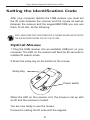
The optical sensor, located on the bottom of the mouse, glows
red.
2