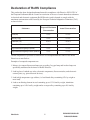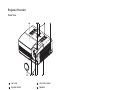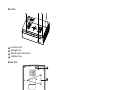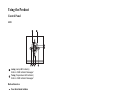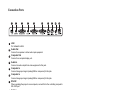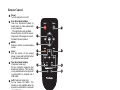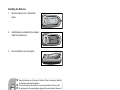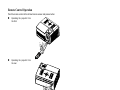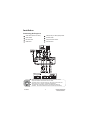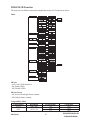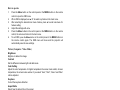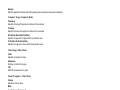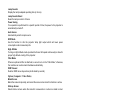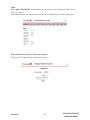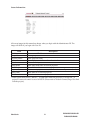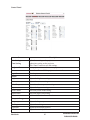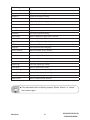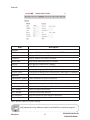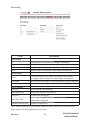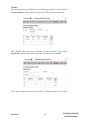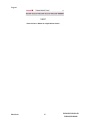
1
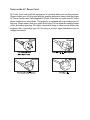
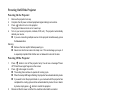
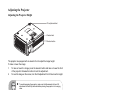
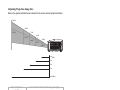
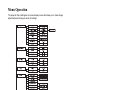
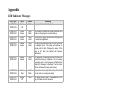
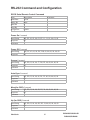
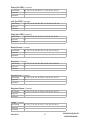
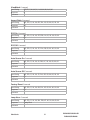
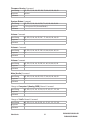
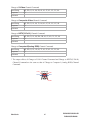
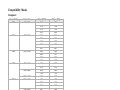
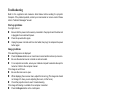
® ViewSonic DLP Projector PJD6220 PJD6220-3D PJD6230 PJD6240 - User Guide - Guide de l’utilisateur - Bedienungsanleitung - Guía del usuario - Guida dell’utente - Guia do usuário - Användarhandbok - Käyttöopas Ɋɭɤɨɜɨɞɫɬɜɨɩɨɥɶɡɨɜɚɬɟɥɹ - ٺҢЙыġĩᖅᡝĪ IMPORTANT: Please read this User Guide to obtain important information on - ሢ၊࿁ġĩ⇷␅Ī installing and using your product in a safe manner, as well as registering your product for future service. Warranty information contained in this User Guide will describe your limited coverage from ViewSonic Corporation, which is also found RQRXUZHEVLWHDWKWWSZZZYLHZVRQLFFRPLQ(QJOLVKRULQVSHFL¿FODQJXDJHV using the Regional selection box in the upper right corner of our website. “Antes de operar su equipo lea cuidadosamente las instrucciones en este manual” Model No. : VS11949 VS11986 VS11990 Notes on the AC Power Cord AC Power Cord must meet the requirement of countries where you use this projector. Please confirm your AC plug type with the graphics below and ensure that the proper AC Power Cord is used. If the supplied AC Power Cord does not match your AC outlet, please contact your sales dealer. This projector is equipped with a grounding type AC line plug. Please ensure that your outlet fits the plug. Do not defeat the safety purpose of this grounding type plug. We highly recommend using a video source device also equipped with a grounding type AC line plug to prevent signal interference due to voltage fluctuations. Ground CONTENTS Introduction ................................................................................... 1 Projector Features........................................................................................................ 1 Package Contents........................................................................................................ 2 Projector Overview....................................................................................................... 3 Using the Product.......................................................................... 5 Control Panel ............................................................................................................... 5 Connection Ports.......................................................................................................... 6 Remote Control ............................................................................................................7 Installing the Batteries.................................................................................................. 8 Remote Control Operation ........................................................................................... 9 Installation ................................................................................... 10 Connecting the Projector............................................................................................10 Powering On/Off the Projector ................................................................................... 11 Adjusting the Projector ............................................................................................... 12 Menu Operation .......................................................................... 14 Network Control.......................................................................... 20 Maintenance................................................................................. 31 Cleaning the Lens ...................................................................................................... 31 Cleaning the Projector Housing ................................................................................. 31 Replacing the Lamp ...................................................................................................32 Specifications ............................................................................... 34 Appendix ...................................................................................... 35 LED Indicator Messages ............................................................................................35 RS-232 Command and Configuration ........................................................................ 36 Compatibility Modes ...................................................................................................41 Troubleshooting ......................................................................................................... 42 Compliance Information FCC Statement This device complies with part 15 of FCC Rules. Operation is subject to the following two conditions: (1) this device may not cause harmful interference, and (2) this device must accept any interference received, including interference that may cause undesired operation. This equipment has been tested and found to comply with the limits for a Class B digital device, pursuant to part 15 of the FCC Rules. These limits are designed to provide reasonable protection against harmful interference in a residential installation. This equipment generates, uses, and can radiate radio frequency energy, and if not installed and used in accordance with the instructions, may cause harmful interference to radio communications. However, there is no guarantee that interference will not occur in a particular installation. If this equipment does cause harmful interference to radio or television reception, which can be determined by turning the equipment off and on, the user is encouraged to try to correct the interference by one or more of the following measures: • Reorient or relocate the receiving antenna. • Increase the separation between the equipment and receiver. • Connect the equipment into an outlet on a circuit different from that to which the receiver is connected. • Consult the dealer or an experienced radio/TV technician for help. Warning: <RXDUHFDXWLRQHGWKDWFKDQJHVRUPRGL¿FDWLRQVQRWH[SUHVVO\DSSURYHGE\WKHSDUW\ responsible for compliance could void your authority to operate the equipment. For Canada • • This Class B digital apparatus complies with Canadian ICES-003. Cet appareil numérique de la classe B est conforme à la norme NMB-003 du Canada. CE Conformity for European Countries The device complies with the EMC Directive 2004/108/EC and Low Voltage Directive 2006/95/EC. Following information is only for EU-member states: The mark is in compliance with the Waste Electrical and Electronic Equipment Directive 2002/96/EC (WEEE). The mark indicates the requirement NOT to dispose the equipment including any spent or discarded batteries or accumulators as unsorted municipal waste, but use the return and collection systems available. If the batteries, accumulators and button cells included with this equipment, display the chemical symbol Hg, Cd, or Pb, then it means that the battery has a heavy metal content of more than 0.0005% Mercury or more than, 0.002% Cadmium, or more than 0.004% Lead. ViewSonic i PJD6220/PJD6220-3D PJD6230/PJD6240 Important Safety Instructions 1. Read these instructions. 2. Keep these instructions. 3. Heed all warnings. 4. Follow all instructions. 5. Do not use this unit near water. 6. Clean with a soft, dry cloth. If still not clean, see “Cleaning the Display” in this guide for further instructions. 7. Do not block any ventilation openings. Install the unit in accordance with the manufacturer’s instructions. 8. Do not install near any heat sources such as radiators, heat registers, stoves, or other GHYLFHVLQFOXGLQJDPSOL¿HUVWKDWSURGXFHKHDW 9. Do not defeat the safety purpose of the polarized or grounding-type plug. A polarized plug has two blades with one wider than the other. A grounding type plug has two blades and a third grounding prong. The wide blade and the third prong are provided for your safety. If WKHSURYLGHGSOXJGRHVQRW¿WLQWR\RXURXWOHWFRQVXOWDQHOHFWULFLDQIRUUHSODFHPHQWRIWKH obsolete outlet. 10. Protect the power cord from being walked on or pinched particularly at plugs. Convenience receptacles and the point where they exit from the unit. Be sure that the power outlet is located near the unit so that it is easily accessible. 2QO\XVHDWWDFKPHQWVDFFHVVRULHVVSHFL¿HGE\WKHPDQXIDFWXUHU 8VHRQO\ZLWKWKHFDUWVWDQGWULSRGEUDFNHWRUWDEOHVSHFL¿HGE\WKH manufacturer, or sold with the unit. When a cart is used, use caution when moving the cart/unit combination to avoid injury from tipping over. 12. 13. Unplug this unit when unused for long periods of time. 5 HIHUDOOVHUYLFLQJWRTXDOL¿HGVHUYLFHSHUVRQQHO6HUYLFLQJLVUHTXLUHGZKHQWKHXQLWKDV been damaged in any way, such as: if the power-supply cord or plug is damaged, if liquid is spilled onto or objects fall into the unit, if the unit is exposed to rain or moisture, or if the unit does not operate normally or has been dropped. ViewSonic ii PJD6220/PJD6220-3D PJD6230/PJD6240 Declaration of RoHS Compliance This product has been designed and manufactured in compliance with Directive 2002/95/EC of the European Parliament and the Council on restriction of the use of certain hazardous substances in electrical and electronic equipment (RoHS Directive) and is deemed to comply with the maximum concentration values issued by the European Technical Adaptation Committee (TAC) as shown below: Substance Proposed Maximum Concentration Actual Concentration 0.1% < 0.1% Lead (Pb) Mercury (Hg) 0.1% < 0.1% Cadmium (Cd) 0.01% < 0.01% Hexavalent Chromium (Cr6+) 0.1% < 0.1% Polybrominated biphenyls (PBB) 0.1% < 0.1% Polybrominated diphenyl ethers (PBDE) 0.1% < 0.1% Certain components of products as stated above are exempted under the Annex of the RoHS Directives as noted below: Examples of exempted components are: 0HUFXU\LQFRPSDFWÀXRUHVFHQWODPSVQRWH[FHHGLQJPJSHUODPSDQGLQRWKHUODPSVQRW VSHFL¿FDOO\PHQWLRQHGLQWKH$QQH[RI5R+6'LUHFWLYH /HDGLQJODVVRIFDWKRGHUD\WXEHVHOHFWURQLFFRPSRQHQWVÀXRUHVFHQWWXEHVDQGHOHFWURQLF ceramic parts (e.g. piezoelectronic devices). 3. Lead in high temperature type solders (i.e. lead-based alloys containing 85% by weight or more lead). 4. Lead as an allotting element in steel containing up to 0.35% lead by weight, aluminium containing up to 0.4% lead by weight and as a cooper alloy containing up to 4% lead by weight. ViewSonic iii PJD6220/PJD6220-3D PJD6230/PJD6240 Copyright Information © © Copyright ViewSonic Corporation, 2009. All rights reserved. Macintosh and Power Macintosh are registered trademarks of Apple Inc. Microsoft, Windows, Windows NT, and the Windows logo are registered trademarks of Microsoft Corporation in the United States and other countries. ViewSonic, the three birds logo, OnView, ViewMatch, and ViewMeter are registered trademarks of ViewSonic Corporation. VESA is a registered trademark of the Video Electronics Standards Association. DPMS and DDC are trademarks of VESA. PS/2, VGA and XGA are registered trademarks of International Business Machines Corporation. Disclaimer: ViewSonic Corporation shall not be liable for technical or editorial errors or omissions contained herein; nor for incidental or consequential damages resulting from furnishing this material, or the performance or use of this product. In the interest of continuing product improvement, ViewSonic Corporation reserves the right to FKDQJHSURGXFWVSHFL¿FDWLRQVZLWKRXWQRWLFH,QIRUPDWLRQLQWKLVGRFXPHQWPD\FKDQJHZLWKRXW notice. No part of this document may be copied, reproduced, or transmitted by any means, for any purpose without prior written permission from ViewSonic Corporation. Product Registration To meet your future needs, and to receive any additional product information as it becomes available, please register your product on the Internet at: www.viewsonic.com. The ViewSonic® Wizard CD-ROM also provides an opportunity for you to print the registration form, which you may mail or fax to ViewSonic. For Your Records Product Name: PJD6220/PJD6220-3D/PJD6230/PJD6240 ViewSonic DLP Projector Model Number: VS11949/VS11986/VS11990 Document Number: PJD6220_PJD6220-3D_PJD6230_PJD6240_UG_ENG Rev. 1B 03-05-09 Serial Number: ___________________________________________________________ Purchase Date: ___________________________________________________________ The lamp in this product contains mercury. Please dispose of in accordance with local, state or federal laws. ViewSonic iv PJD6220/PJD6220-3D PJD6230/PJD6240 Introduction Projector Features The projector integrates high-performance optical engine projection and a user - friendly design to deliver high reliability and ease of use. The projector offers the following features: Single chip 0.55" Texas Instruments DLP® technology XGA (1024 x 768 pixels) Auto image re-sizing (Auto-Sync.) to 1024 x 768 full screen with scaling compression compatibility for VGA, SVGA, XGA and SXGA* Compatibility with Macintosh® computers Compatibility with NTSC, PAL, SECAM and HDTV D-Sub 15-pin terminal for analog video connectivity User-friendly, multi-language on-screen display Advanced electronic keystone correction Network function for remote management Closed Captioning included * means compressed. ViewSonic 1 PJD6220/PJD6220-3D PJD6230/PJD6240 Package Contents When you unpack the projector, make sure you have all these components: Projector with Lens Cap AC Power Cord VGA Cable (D-SUB to D-SUB) Composite Video Cable S-Video Cable Remote Control (IR) AAA size batteries for remote control User’s Manual Quick Start Guide Projector Carrying Case VGA Component Adapter ViewSonic Save the original shipping carton and packing material; they will comein handy if you ever to ship your unit. For maximum protection, repack your unit as it was originally packed at the factory. Accessories and components may vary by retailer and region. 2 PJD6220/PJD6220-3D PJD6230/PJD6240 Projector Overview Front View 12 1 11 10 9 2 3 4 5 8 7 6 1 Lens cap 7 AC power socket 2 Elevator button 8 Speaker 3 Lens cap strap 9 Control panel 4 Projection lens 10 Zoom ring 5 Front IR remote control sensor 11 Focus ring 6 Ventilation holes 12 Lamp cover ViewSonic 3 PJD6220/PJD6220-3D PJD6230/PJD6240 Rear View 2 1 1 2 3 4 3 4 Connection ports Kensington lock Rear IR remote control sensor Ventilation holes Bottom View 1 2 3 1 2 3 Elevator foot Ceiling mount (M4 x L7.5mm) Tilt-adjustment foot ViewSonic This projector can be used with a ceiling mount for support. The ceiling mount is not included in the package. 4 PJD6220/PJD6220-3D PJD6230/PJD6240 Using the Product Control Panel LED 1 2 3 4 8 1 2 7 6 5 Lamp (Lamp LED indicator) Refer to “LED Indicator Messages”. Temp (Temperature LED indicator) Refer to “LED Indicator Messages”. Button Function 3 4 5 6 7 8 Four directional buttons Use four directional buttons to select items or make adjustments to your selection. Enter Enter to sub-menu and confirm the menu selection. Activate in Color Setting, Lamp Counter Reset and Factory Default menu operations. Resync Resynchronize the projector to the input signal from a computer. Power Turn the projector on or off. Menu Display or exit the on-screen display menus. Source Manually select an input source. ViewSonic 5 PJD6220/PJD6220-3D PJD6230/PJD6240 Connection Ports 1 2 3 1 2 LAN For network control. Audio Out 3 2 Computer Out 3 4 Audio In 5 4 Computer In 6 5 Computer In 7 6 RS-232 1 8 7 9 8 10 9 4 5 6 7 8 9 10 Connect to a speaker or other audio input equipment. Connect to a computer display, etc. Connect an audio output from video equipment to this jack. Connect image input signal (analog RGB or component) to this jack. Connect image input signal (analog RGB or component) to this jack. When operating the projector via a computer, connect this to the controlling computer's RS-232C port. S-Video Connect S-Video output from video equipment to this jack. Video Connect composite video output from video equipment to this jack. SERVICE This connector is for firmware update. ViewSonic 6 PJD6220/PJD6220-3D PJD6230/PJD6240 Remote Control 1 2 3 4 5 6 7 8 9 10 11 Power Turn the projector on or off. Four directional buttons -Use four directional buttons to select items or make adjustments to your selection. - The right button acts as Blank Screen function. Cut off the screen temporarily. Press again to cancel the Blank Screen function. 1 11 2 MENU Display or exit the on-screen display menus. 3 Laser Aim the remote at the viewing screen, press and hold this button to activate the laser pointer. Four directional buttons (Computer mode only) Act as computer keyboard (four directional buttons). This function is only available when the projector is connected to a computer via a USB cable. 4 5 10 6 9 7 8 Left (Computer mode only) Act as mouse left button. This function is only available when the projector is connected to a computer via a USB cable. ViewMatch Switch in between high brightness performance or Accuracy color performance. Source Manually select an input source. Right (Computer mode only) Act as mouse right button. This function is only available when the projector is connected to a computer via a USB cable. Enter Confirm the selection. Freeze Press "Freeze" to pause the screen image. Press again to cancel the Freeze function. ViewSonic 7 PJD6220/PJD6220-3D PJD6230/PJD6240 Installing the Batteries 1. Open the battery cover in the direction shown. 2. Install batteries as indicated by the diagram Inside the compartment. 3. Close the battery cover into position. ViewSonic Keep the batteries out of the reach of children. There is a danger of death by accidentally swallowing the batteries. Do not recharge the used batteries or expose the batteries to fire or water. Do not dispose of the used batteries along with household waste. Dispose of used batteries according to local regulations. Danger of explosion may happen if batteries are incorrectly replaced. Replace only with the same type recommended by the manufacturer. 8 PJD6220/PJD6220-3D PJD6230/PJD6240 Remote Control Operation Point the remote control at the infrared remote sensor and press a button. Operating the projector from the front 10 15 5m 5m 7m Operating the projector from the rear 10 15 5m 7m 5m ViewSonic Do not point the laser pointer directly to the people's eyes (especiallyn small children). There is a danger of injuiry to the eyes. The remote control may not operate when there is sunlight or other strong light such as a fluorescent lamp shining on the remote sensor. Operate the remote control from a position where the remote sensor is visible. Do not drop the remote control or jolt it. Keep the remote control out of locations with excessively high temperature or humidity. Do not get water on the remote control or place wet objects on it. Do not disassemble the remote control. 9 PJD6220/PJD6220-3D PJD6230/PJD6240 Installation Connecting the Projector 1 VGA Cable (D-Sub to D-Sub) 5 VGA (D-Sub) to HDTV (RCA) Cable 2 Audio Cable 6 S-Video Cable 3 RS-232 Cable 7 Composite Video Cable 4 USB Cable 8 Internet Cable Laptop type 8 2 1 2 ViewSonic Desktop type 1 1 5 3 5 4 6 7 When connecting cable, power cords of both a projector and external equipment should be disconnected from AC outlet. The figure above is a sample connection. This does not mean that all of these devices can or must be connected simultaneously. The cables that come with the projector may differ from the above illustration. The included cables are based on actual shipment delivery. 10 PJD6220/PJD6220-3D PJD6230/PJD6240 Powering On/Off the Projector Powering On the Projector: 1. 2. 3. Remove the projector lens cap. Complete the AC power cord and peripheral signal cable(s) connections. Press button to turn on the projector. The projector takes a minute or so to warm up. 4. Turn on your source (computer, notebook, DVD, etc.). The projector automatically detects your source. If you are connecting multiple sources to the projector simultaneously, press the Source button. Warning: Remove the lens cap first before powering on. Never look into the lens when the lamp is on. This can damage your eyes. It is especially important that children are not allowed to look into the lens. Powering Off the Projector: 1. 2. 3. 4. Press button to turn off the projector lamp. You will see a message "Power off? Press Power again" appear on the screen. Press button again to confirm. The cooling fans continue to operate for cooling cycle. When the Lamp LED begins flashing, the projector has entered stand-by mode. If you want to turn the projector back on, you must wait until the projector has completed the cooling cycle and has entered stand-by mode. Once in standby mode, simply press button to restart the projector. Disconnect the AC power cord from the electrical outlet and the projector. Do not turn on the projector immediately following a power off procedure. ViewSonic 11 PJD6220/PJD6220-3D PJD6230/PJD6240 Adjusting the Projector Adjusting the Projector Height Tilt-adjustment foot Elevator foot Elevator button The projector is equipped with an elevator foot to adjust the image height. To raise or lower the image: 1. 2. To raise or lower the image, press the elevator button and raise or lower the front of the projector. Release the button to lock the adjustment. To level the image on the screen, turn the tilt-adjustment foot to fine-tune the height. To avoid damaging the projector, make sure that the elevator foot and tiltadjustment foot are fully retracted before placing the projector in its carrying case. Adjusting the Projector Zoom and Focus Zoom ring Focus ring 1. 2. Focus the image by rotating the focus ring. A still image is recommended for focusing. Adjust the image by sliding the zoom ring. ViewSonic 12 PJD6220/PJD6220-3D PJD6230/PJD6240 Adjusting Projection Image Size Refer to the graphic and table below to determine the screen size and projection distance. 249.80 124.90 74.94 227.83 49.96 113.92 30.08 68.35 45.57 27.34 1.2m (Min.) 2.0m 3.0m 5.0m 10.0m (Max.) Projection Distance (meters) Wide (inches) Tele (inches) 1.2 30.08 27.34 2 49.96 45.57 3 74.94 68.35 5 124.90 113.92 10 249.80 227.83 ViewSonic Screen Size (for 4:3 aspect ratio diagonal length) Position the projector in a horizontal position; other positions can cause heat build-up and damage to the projector. Make sure the heat ventilation holes are not blocked. Do not use the projector in a smoky environment. Smoke residue may cause build-up on critical parts (i.e. DMD, lens assembly, etc.) 13 PJD6220/PJD6220-3D PJD6230/PJD6240 Menu Operation The projector has multilingual on-screen display menus that allow you to make image adjustments and change a variety of settings. ViewSonic 14 PJD6220/PJD6220-3D PJD6230/PJD6240 PJD6220-3D Function The projector has different menu and compatibility modes for 3D function as below. Menu 3D Sync - Auto: Auto 120Hz detection. - On: Enable120Hz - Off: Disable 120Hz 3D Sync Invert - On: Invert left and right frame contents. - Off: Default frame contents. Compatibility Mode Compatibility SVGA Resolution 800 x 600 XGA 1024 x 768 ViewSonic H-Sync[KHz] 76.3 98.9 97.5 15 V-Sync[Hz] 119.9 119.8 119.9 PJD6220/PJD6220-3D PJD6230/PJD6240 How to operate 1. 2. 3. 4. 5. 6. Press the Menu button on the control panel or the MENU button on the remote control to open the OSD menu. When OSD is displayed, use S / T to select any feature in the main menu. After selecting the desired main menu feature, press X to enter sub-menu for feature setting. Adjust the settings with W / X. Press the Menu buttonon the control panel or the MENU button on the remote control, the screen will return to the main menu. To exit OSD, press the Menu button on the control panel or the MENU button on the remote control again. The OSD menu will close and the projector will automatically save the new settings. Picture (Computer / Video Mode) Brightness Brighten or darken the image. Contrast Set the difference between light and dark areas. Color Setting Adjust the color temperature. At higher temperature the screen looks colder; at lower temperature, the screen looks warmer. If you select “User”, “Red”, “Green” and “Blue” cab be adjusted. Keystone Correct the keystone distortion. Aspect Ratio Select how the picture fits on the screen: 4:3 : The input source will be scaled to fit the projection screen. 16:9 : The input source will be scaled to fit the width of the screen. Image There are many factory presets optimized for various types of images. PC : For computer or notebook. Movie : For home theater. sRGB : For PC standard color. User : Memorize user’s settings. Screen Type Select the projection screen type. White Intensity Increase the brightness of white areas. ViewSonic 16 PJD6220/PJD6220-3D PJD6230/PJD6240 Gamma Effect the represent of dark scenery. With greater gamma value, dark scenery will look brighter. Computer Image (Computer Mode) Frequency Adjust the timing of the projector relative to the computer. Tracking Adjust the phase of the projector relative to the computer. H Position (Horizontal Position) Adjust the image left or right within the projection area. V Position (Vertical Position) Adjust the image up or down within the projection area. Video Image (Video Mode) Color Adjust the intensity of colors. Sharpness Sharpen or soften the image. Tint Shift colors toward red or green. Sound (Computer / Video Mode) Volume Adjust the volume level. Mute Cut off the sound temporarily. Setting (Computer / Video Mode) Menu Position Choose the menu location on the display screen. Projection Adjust the picture to match the orientation of the projector: upright or upside-down, in front of or behind the screen. Invert or reverse the image accordingly. Signal Type Specify the source to the Computer In terminal that you wish to project. Auto : Automatically choose the most suitable chroma subsampling scheme. Recommended!! YPbPr : For component 480p,576p,720p,1080i signals. RGB : For RGB video format. No subsampling. All information is accurately transmitted. YCbCr : For component 480i,576i signals. ViewSonic 17 PJD6220/PJD6220-3D PJD6230/PJD6240 Lamp Counter Display the lamp’s elapsed operating time (in hours). Lamp Counter Reset Reset the lamp counter to 0 hours. Power Saving If no operation is performed for a specific period of time, the power to the projector is automatically turned off. Auto Source Automatically scan the input source. ECO Mode Use this function to dim the projector lamp light output which will lower power consumption and increase lamp life. High Altitude Turning on High Altitude mode operates the fans at full speed continuously to allow for proper high altitude cooling of the projector. Filter Mode When an optional air filter is attached, be sure to turn on the “Filter Mode”; otherwise, the machine can overheat and shutdown automatically. OSD Timeout Duration OSD menu stays active (at idle state by second). Option (Computer / Video Mode) Blank Screen Blank the screen temporarily, and select the screen color when this function is active. Start-up Screen Select start-up screen when the projector is powered on or when no signal is input. "User" is the screen that you captured. Screen Capture Capture the current projection screen as a start-up screen. Password Set or change the password. When the password function is added, image projection requires an entry of the preset password at power-on. DCR (Dynamic Contrast Ratio) Enable DCR will further enhance contrast ratio by darkening the black scenes. Disable DCR will resume to normal contrast performance. DCR will impact lamp life and system noise performance. Closed Caption (Video and S-Video sources only) Enable or Disable closed captions by selecting CC1 (closed caption 1, the most common channel), CC2 or OFF. ViewSonic 18 PJD6220/PJD6220-3D PJD6230/PJD6240 Network Control Select either RS232 or LAN for network control. If RS232 is selected, user will not able to control the projector via LAN network and vice versa. Network Config DHCP Enable: Assign an IP address to the projector from the DHCP server automatically. Disable: Assign an IP address manually. IP Address Select an IP address. Subnet Mask Select subnet mask number. Gateway Select the default gateway of the network connected to the projector. Language (Computer / Video Mode) Select the language used by the on-screen menu. Factory Default (Computer / Video Mode) Restore all menu settings to factory default settings. ViewSonic 19 PJD6220/PJD6220-3D PJD6230/PJD6240 Network Control This feature provides the ability to remotely control and manage the projector through the network. Note: 1024x768 viewing resolution is recommended. Preparation: 1. Connect one end of the internet cable to the LAN connector on projector. 2. Connect the other end of the internet cable to an available LAN connector on the RJ45 outlet. 3. Make sure the PC/NB is also connected to the internet. 4. Turn on the projector and computer. There are two ways to connect to the network control: A. Auto IP address setting (DHCP): (QDEOH'+&3IURPWKHSURMHFWRU26'XQGHU1HWZRUN&RQ¿J 2. Please wait for the PC server to release IP address to the projector. DHCP icon will pop up on the bottom right corner, once the IP address is received by the projector. (It will take approx. 15 ~ 20 seconds). 3. Enter “Given IP address (For example http://10.0.50.100/)” into the address bar of the web browser and press “Enter” key or click “Go” button. B. Manual IP address setting: 1. From your computer, go to Start > Control Panel > Network Connection and right click to select Properties. ViewSonic 20 PJD6220/PJD6220-3D PJD6230/PJD6240 2. Select “Intel Protocol (TCP/IP)” and click “Properties”. 3. Set your IP address on your computer, and click OK. Ɣ &OLFN“Use the following IP address” Ɣ IP address: 10.0.50.105, (set the last number different to the projector IP address). Ɣ Subnet mask: 255.255.0.0 ViewSonic 21 PJD6220/PJD6220-3D PJD6230/PJD6240 4. Enter “http://10.0.50.100/” into the address bar of the web browser and press “Enter” key or click “Go” button. 5. After the connection is completed, the control screen will be as below Authority on the network control of Administrator & User: Item Status Date & Time Setting Control Panel Network Alert Setting Schedule ViewSonic Description Show current projector status and network FRQ¿JXUDWLRQVHWWLQJV Date & Time setting by user. Control the projector via network. 1HWZRUNFRQ¿JXUDWLRQ3DVVZRUGVHWXS 6KRZDQGVHWXS$OHUWFRQ¿JXUDWLRQV 6KRZDQGVHWXS6FKHGXOLQJFRQ¿JXUDWLRQV 22 Administrator User ¥ ¥ ¥ ¥ ¥ ¥ ¥ × ¥ × × × PJD6220/PJD6220-3D PJD6230/PJD6240 Login Enter “http://10.0.50.100/” into the address bar of the web browser and press “Enter” key or click “Go” button. If the administrative and user password is disabled, it will directly go into the Status page. If the Administrative & User password is enabled Select your User Name and enter password to login. ViewSonic 23 PJD6220/PJD6220-3D PJD6230/PJD6240 Status Information: All screen images in this manual are shown when you login with the Administrator ID. The image will differ if you login with User ID. Item IP Address Group Name Projector Name System Status Input Source Lamp Hours Filter Hours Projector Status Date(y/m/d) Time Description Show current IP address. Show group name. Show projector name. Show if projector is Power On or Inactive *. Show current input source. Show lamp used hours on current projector. 6KRZ¿OWHUXVHGKRXUVRQFXUUHQWSURMHFWRU Show current projector status, either function normally or error found. Show date set on current projector. Show time set on current projector. * when system status shows “Inactive”, it could either mean the projector is “Power Off”, or projector’s network control is set to be RS232 (Please refer to Network Control, Page 18 to link with the project). ViewSonic 24 PJD6220/PJD6220-3D PJD6230/PJD6240 Control Panel Item Description Projector Name Update date setting on the projector. Update time setting on the projector. Click “Enter” button to save the settings. Show projector name on the current projector. Power Power On or Power Off the projector via network. Input Source Select input source. Date Setting Time Setting Picture Brightness Adjusts the brightness setting. Contrast Adjusts the contrast setting. Color Temperature Selects the color temperature setting. Keystone Adjusts the keystone setting. Picture Mode Selects the picture mode setting. Aspect Ratio Selects the aspect ratio setting. Freeze Enable or disable the freeze function. Computer Image Frequency Adjusts the frequency. Tracking Adjusts the tracking. H Position Adjusts the horizontal position. V Position Adjusts the vertical position. ViewSonic 25 PJD6220/PJD6220-3D PJD6230/PJD6240 Video Image Color Adjusts the color setting. Tint Adjusts the tint setting. Sharpness Adjusts the sharpness setting. Audio Volume Adjusts the volume setting. Mute Enable or disable the mute function. Setting Menu Position Adjusts the menu position. Projection Selects the projection setting. Auto Source Enable or disable the auto source function. ECO mode Enable or disable the ECO function. High Altitude Enable or disable the high altitude function. OSD Timeout Selects the OSD timeout setting. Language Selects preferred OSD language. Factory Default Enable or Disable factory default. Option ViewMatch Enable or disable ViewMatch. White Intensity Selects the white intensity setting. Gamma Selects the Gamma setting. Signal Type Selects the signal type setting. Filter Mode (QDEOHRUGLVDEOH¿OWHUPRGH Power Saving Selects the power saving setting. Start-up Screen Selects the start-up screen setting. Closed Caption Selects the closed caption setting. Blank screen Enable or disable blank function. Ŷ,IWKHDGMXVWPHQWGLGQRWGLVSOD\SURSHUO\3OHDVH³UHIUHVK´RU³UHORDG´ WKHEURZVHUDJDLQ ViewSonic 26 PJD6220/PJD6220-3D PJD6230/PJD6240 Network Item Description Network DHCP Assign an IP address to the projector from the DHCP server automatically. Manual Assign an IP address manually. IP Address Setup IP address when DHCP is disable. Subnet Mask Setup subnet mask when DHCP is disable. Gateway Setup gateway when DHCP is disable. DNS Server Setup DNS server address when DHCP is disable. Group Name Create projector group. (Max length: 6 characters) Projector Name Create projector naming of the current projector. (Max length: 16 characters) Password Administrator -Enable Enable administrative password function. Administrator -Disable Disable administrative password function. New Password Setup administrative password. (Max length: 4 characters) &RQ¿UP3DVVZRUG Re-enter administrative password. User - Enable Enable user password function. User - Disable Disable user password function. New Password Setup user password. (Max length: 4 characters) &RQ¿UP3DVVZRUG Re-enter user password. Click “Submit” button to save the settings. Ŷ,ISDVVZRUGLVORVWSOHDVHFRQWDFWORFDO9LHZ6RQLFFXVWRPHUVXSSRUW ViewSonic 27 PJD6220/PJD6220-3D PJD6230/PJD6240 Alert Setting Description Item Email Setting To Setup the mail alert attendee. (Max length: 40 characters) Cc Setup the backup mail alert attendee. (Max length: 40 characters) Subject Setup the subject of the alert e-mail. (Max length: 30 characters) From Setup the sender e-mail address. (Max length: 40 characters) SMTP Setting Server To enter the SMTP server (Mail server) name of the company. For example: mail.viewsonic.com (Max length: 30 characters) User Name Enter user name of the sender’s e-mail account. (Max length: 20 characters) Password Enter password of the sender’s e-mail account. (Max length: 14 characters) Alert Condition Fan Lock The cooling fan is not operating. Over Temperature The projector internal is over heated. Lamp Fail The lamp does not light up. Lamp Time Alert Lamp is approaching the end of its useful life in full power operation. Replacement is suggested. Schedule Excution Error Schedule Excution Error. Click “Submit” button to save the settings, then click “Issue Test Mail” to send a test mail to check whether all settings and functions are correct. ViewSonic 28 PJD6220/PJD6220-3D PJD6230/PJD6240 Schedule The schedule function is divided into two scheduling categories, as shown below: Weekly Schedule:GH¿QHVWKHGDWHRIHDFKZHHNZLOOH[HFXWHWKHFRPPDQG Click “Submit” button to create new schedule. To delete schedule, click “Cancel”. 6SHFL¿F'D\GH¿QHVWKHPRQWKDQGGD\WKDWZLOOH[HFXWHWKHFRPPDQG Click “Submit” button to create new schedule. To delete schedule, click “Cancel”. ViewSonic 29 PJD6220/PJD6220-3D PJD6230/PJD6240 Logout: ViewSonic 30 PJD6220/PJD6220-3D PJD6230/PJD6240 Maintenance The projector needs proper maintenance. You should keep the lens clean as dust, dirt or spots will project on the screen and diminish image quality. If any other parts need replacing, contact your dealer or qualified service personnel. When cleaning any part of the projector, always switch off and unplug the projector first. Warning: Never open any of the covers on the projector. Dangerous electrical voltages inside the projector can cause severe injury. Do not attempt to service this product yourself. Refer all servicing to qualified service personnel. Cleaning the Lens Gently wipe the lens with lens cleaning paper. Do not touch the lens with your hands. Cleaning the Projector Housing Gently wipe with a soft cloth. If dirt and stains are not easily removed, use a soft cloth damped with water, or water and neutral detergent, and wipe dry with a soft, dry cloth. ViewSonic Turn off the projector and remove the AC power cord from the power outlet before beginning maintenance work. Make sure the lens is cool before cleaning. Do not use detergents or chemicals other than those noted above. Do not use benzene or thinners. Do not use chemical sprays. Use a soft cloth or lens paper only. 31 PJD6220/PJD6220-3D PJD6230/PJD6240 Replacing the Lamp As the projector operates over time, the brightness of the projector lamp gradually decreases and the lamp becomes more susceptible to breakage. We recommend replacing the lamp if a warning message is displayed. Do not attempt to replace the lamp yourself. Contact the qualified service personnel for replacement. ViewSonic The lamp becomes high temperature after turning off the projector with the power button. If you touch the lamp, you may scald your finger. When you replace the lamp, wait for at least 45 minutes for the lamp to cool down. Do not touch the lamp glass at any time. The lamp may explode due to improper handling, including the touching of the lamp glass. Lamp lifetime may differ from lamp to lamp and according to the environment of use. There is no guarantee of the same lifetime for each lamp. Some lamps may fail or terminate their lifetime in a shorter period of time than other similar lamps. A lamp may explode as a result of vibration, shock or degradation as a result of hours of use as its lifetime draws to an end. Risk of explosion may differ according to the environment or conditions in which the projector and lamp are being used. Wear protective gloves and eyeglasses when fixing or detaching the lamp. Faster on-off-cycles will damage the lamp and reduce lamp life. Wait at least for 5 minutes to turn off the projector after powering on. Do not operate the lamp in proximity to paper, cloth, or other combustible material nor cover it with such materials. Otherwise it could cause a fire. Do not operate the lamp in an atmosphere containing an inflammable substance, such as thinner. Otherwise it could cause a fire or explosion. Thoroughly ventilate the area or the room when operating the lamp in an oxygen atmosphere (in the air). If ozone is inhaled, it could cause headaches, nausea, dizziness, etc. The inorganic mercury is involved in the lamp. If the lamp bursts, the mercury inside the lamp will go out of the projector. Leave the area immediately if the lamp shatters while being operated and ventilate the area for at least 30 minutes in order to avoid the inhalation of mercury fumes. Otherwise it could be harmful to user’s health. 32 PJD6220/PJD6220-3D PJD6230/PJD6240 1. 2. 3. 4. 5. 6. 7. 8. 9. Turn off the projector. If the projector is installed in a ceiling mount, remove it from the mount. Unplug the power cord. Loosen the screw in the side of the lamp cover and remove the cover. Remove the screws from the lamp module, raise the handle, and lift out the module. Insert the new lamp module into the projector and tighten the screws. Replace the lamp cover and tighten the screw. Turn on the projector. If the lamp does not turn on after the warm-up period, try reinstalling the lamp. Reset the lamp hour. Refer to the “Setting” menu. ViewSonic Dispose of the used lamp according to local regulations. Ensure that screws are tightened properly. Screws not tightened fully may result in injury or accidents. Since the lamp is made of glass, do not drop the unit and do not scratch the glass. Do not reuse the old lamp. This could cause the lamp to explode. Be sure to turn off the projector and unplug the AC power cord before replacing the lamp. Do not use the projector with the lamp cover removed. 33 PJD6220/PJD6220-3D PJD6230/PJD6240 Specifications Display Type Resolution (Pixels) Lens Screen Size Lamp Input / Output Source Speaker Video Compatibility Single 0.55" DLP panel XGA (1024 × 768) Manual Zoom (1.1x) 30” – 250” PJD6220: 180W; PJD6230: 200W; PJD6240: 260W D-Sub 15 pin, S-video, composite video, USB, RS-232, Audio In, Audio Out, LAN (RJ-45 connector) 10 W (5W x 2) NTSC 3.58, NTSC4.43 PAL-60, M, N SECAM, HDTV (480i/p, 576i/p, 720p, 1080i) Scanning Frequency Horizontal Freq. Vertical Freq. Environment 31 - 79 KHz 50 - 85 Hz Operating: Temperature: 5°C to 35°C Humidity: 30%-85% Storage: Temperature: -20°C to 60°C Humidity: 30%-85% Power Requirement AC 100 - 240 V, 50 - 60 Hz Dimension 271 x 223 x 110 mm Weight 2.9 kg (6.4lb) Note: Design and Specifications are subject to change without prior notice. ViewSonic 34 PJD6220/PJD6220-3D PJD6230/PJD6240 Appendix LED Indicator Messages LED Type Color Status LAMP LED TEMP LED Green Off Flash - The projector is in standby mode. LAMP LED TEMP LED Green Green Solid Flash The projector system has some problems with its fan, so the projector cannot start up. LAMP LED TEMP LED Green Green Solid Solid The lamp is in good condition and is projecting at maximum brightness. LAMP LED TEMP LED Amber Green Solid Solid The lamp has reached its end of life and must be changed soon. The lamp will continue to operate until it fails. Change the lamp. If the lamp is off, then the ballast will become malfunction. LAMP LED TEMP LED Amber Amber Solid Solid The projector is shutting and the fan motor is cooling the lamp for shutdown. Do not unplug the power cord or turn the power off before the Lamp LED changes to flashing. The fan motor will turn off when the lamp has cooled. LAMP LED TEMP LED Green Red Solid Flash Temperature is too high. The lamp will turn off. The fan motor is cooling the lamp. LAMP LED TEMP LED Amber Off Solid - The lamp ignition failed. If temperature is too high, the fans will cool the lamp. ViewSonic Meaning 35 PJD6220/PJD6220-3D PJD6230/PJD6240 56&RPPDQGDQG&RQ¿JXUDWLRQ RS232 Serial Remote Control Command Item Description Baud Rate 19200 Parity Bit none Data Bit 8 Stop Bit 1 Assign Port COM1 Comment Power On Command Send String BE, EF, 10, 05, 00, C6, FF, 11, 11, 01, 00, 01, 00 Response 06 Comment Power Off Command Send String BE, EF, 03, 06, 00, DC, DB, 69, 00, 00, 00, 00, 00 Response 06 Source Command Send String BE, EF, 02, 06, 00, 57, D0, 2E, 00, 00, 00, 00, 00 Response 06 Comment Auto-Sync Command Send String BE, EF, 02, 06, 00, 86, D1, 2F, 00, 00, 00, 00, 00 Response 06 Comment Menu(for OSD) Command Send String BE, EF, 02, 06, 00, E9, D3, 30, 00, 00, 00, 00, 00 Response 06 Comment Up (for OSD) Command Send String BE, EF, 02, 06, 00, 6D, D2, 34, 00, 00, 00, 00, 00 Response 06 Comment ViewSonic 36 PJD6220/PJD6220-3D PJD6230/PJD6240 Down (for OSD) Command Send String BE, EF, 02, 06, 00, 0B, D2, 32, 00, 00, 00, 00, 00 Response 06 Comment Left (for OSD) Command Send String BE, EF, 02, 06, 00, DA, D3, 33, 00, 00, 00, 00, 00 Response 06 Comment Right (for OSD) Command Send String BE, EF, 02, 06, 00, 38, D2, 31, 00, 00, 00, 00, 00 Response 06 Comment Blank Screen Command Send String BE, EF, 02, 06, 00, DF, DF, 66, 00, 00, 00, 00, 00 Response 06 Comment Keystone Command Send String BE, EF, 02, 06, 00, 3D, DE, 64, 00, 00, 00, 00, 00 Response 06 Comment Keystone Up Command Send String BE, EF, 03, 06, 00, 10, DB, 65, 00, 00, 00, 00, 00 Response 06 Comment Keystone Down Command Send String BE, EF, 03, 06, 00, 23, DB, 66, 00, 00, 00, 00, 00 Response 06 Comment Image Command Send String BE, EF, 03, 06, 00, F2, DA, 67, 00, 00, 00, 00, 00 Response 6 Comment ViewSonic 37 PJD6220/PJD6220-3D PJD6230/PJD6240 ViewMatch Command BE,EF,03,06,00,38,5A,88,00,00,00,00,00 Send String Response 6 Comment Aspect Ratio Command Send String BE, EF, 03, 06, 00, 0D, DA, 68, 00, 00, 00, 00, 00 Response 06 Comment ECO On Command Send String BE, EF, 03, 06, 00, EF, DB, 6A, 00, 00, 00, 00, 00 Response 06 Comment ECO Off Command Send String BE, EF, 03, 06, 00, 3E, DA, 6B, 00, 00, 00, 00, 00 Response 06 Comment Auto Source On Command Send String BE, EF, 03, 06, 00, 89, DB, 6C, 00, 00, 00, 00, 00 Response 06 Comment Auto Source Off Command Send String BE, EF, 03, 06, 00, 58, DA, 6D, 00, 00, 00, 00, 00 Response 06 Comment Factory Reset Command Send String BE, EF, 03, 06, 00, 6B, DA, 6E, 00, 00, 00, 00, 00 Response 06 Comment Lamp Hour Command Send String BE, EF, 03, 06, 00, BA, DB, 6F, 00, 00, 00, 00, 00 Response Lamp Hour Comment ViewSonic 38 PJD6220/PJD6220-3D PJD6230/PJD6240 Firmware Version Command Send String BE, EF, 03, 06, 00, D5, D9, 70, 00, 00, 00, 00, 00 Response Version Comment System Status Command Send String BE, EF, 03, 06, 00, 04, D8, 71, 00, 00, 00, 00, 00 Response 03 :Projector ON (Normal Mode) Comment Volume Command Send String BE, EF, 02, 06, 00, F8, DC, 71, 00, 00, 00, 00, 00 Response 06 Comment Volume+ Command Send String BE, EF, 02, 06, 00, F1, DE, 68, 00, 00, 00, 00, 00 Response 06 Comment Volume-Command Send String BE, EF, 02, 06, 00, 20, DF, 69, 00, 00, 00, 00, 00 Response 06 Comment Mute (Audio) Command Send String BE, EF, 02, 06, 00, 0E, DE, 67, 00, 00, 00, 00, 00 Response 06 Comment Change to Computer1 (Analog RGB) Channel Command Send String BE, EF, 03, 19, 00, 19, 29, 01, 47, 02, CC, CC, 00 Response 06 Comment Change to YcbCr Channel Command Send String BE, EF, 03, 19, 00, 89, E8, 01, 47, 02, CC, CC, 00 Response 06 Comment ViewSonic 39 PJD6220/PJD6220-3D PJD6230/PJD6240 Change to S-Video Channel Command Send String BE, EF, 03, 19, 00, E8, 69, 01, 47, 02, CC, CC, 00 Response 06 Comment Change to Composite Video Channel Command Send String BE, EF, 03, 19, 00, 78, A8, 01, 47, 02, CC, CC, 00 Response 06 Comment Change to HDTV(Y-Pb-Pr) Channel Command Send String BE, EF, 03, 19, 00, DA, 2B, 01, 47, 02, CC, CC, 00 Response 06 Comment Change to Computer2(Analog RGB) Channel Command Send String BE, EF, 03, 19, 1E, 90, 72, 01, 47, 02, CC, CC, 00 Response 06 Comment * The output effects of Change to YcbCr Channel Command and Change to HDTV(Y-Pb-Pr) Channel Command are the same as that of Change to Computer1 (Analog RGB) Channel Command. CTSZ TXD RSTZ RXD GND ViewSonic 40 PJD6220/PJD6220-3D PJD6230/PJD6240 Compatibility Modes Computer: Compatibility VGA Resolution 640 x 480 SVGA 800 x 600 XGA 1024 x 768 SXGA 1152 x 864 H-Sync [KHz] 31.5 37.9 37.5 43.3 35.2 37.9 48.1 46.9 53.7 48.4 56.5 60.0 68.7 64.0 67.5 60.0 75.0 64.0 47.8 60.3 68.6 49.7 62.8 1280 x 960 WXGA 1280 x 1024 1280 x 768 1280 x 800 V-Sync [Hz] 59.9 72.8 75.0 85.0 56.3 60.3 72.2 75.0 85.1 60.0 70.1 75.0 85.0 70.0 75.0 60.0 75.0 60.0 60.0 74.9 84.8 59.8 74.9 Video: Signal Horizontal Frequency (kHz) 480i 15.8 kHz Vertical Frequency (Hz) 60 Hz 480p 31.5 kHz 60 Hz 576i 15.6 kHz 50 Hz 576p 31.3 kHz 50 Hz 720p 45.0 kHz 60 Hz 720p 37.5 kHz 50 Hz 1080i 33.8 kHz 60 Hz 1080i 28.1 kHz 50 Hz ViewSonic 41 PJD6220/PJD6220-3D PJD6230/PJD6240 Troubleshooting Refer to the symptoms and measures listed below before sending the projector forrepairs. If the problem persists, contact your local reseller or service center. Please refer to "Indicator Messages" as well. Start-up problems If no lights turn on: Be sure that the power cord is securely connected to the projector and the other end is plugged into an outlet with power. Press the power button again. Unplug the power cord and wait for a short while, then plug it in and press the power button again. Image problems If the searching source is displayed: Press the Source button one or more times to select another active input source. Be sure the external source is turned on and connected. For a computer connection, ensure your notebook computer’s external video port is turned on. Refer to the computer manual. If the image is out of focus: Be sure the lens cover is open. While displaying the on-screen menu, adjust the focus ring. (The image size should not change; if it does, you are adjusting the zoom, not the focus.) Check the projection lens to see if it needs cleaning. If the image is flickering or unstable for a computer connection: Press the Resync button on the control panel. Press the Menu button on the control panel or the MENU button on the remote control, go to Computer Image and adjust Frequency or Tracking. Remote control problems If the remote control does not operate: Be sure nothing is blocking the remote control receiver on the front or back of the projector. Use the remote control within the effective range. Aim the remote control at the screen or at the front or back of the projector. Move the remote control so it is more directly in front of or behind the projector and not as far to the side. ViewSonic 42 PJD6220/PJD6220-3D PJD6230/PJD6240 Customer Support For technical support or product service, see the table below or contact your reseller. Note : You will need the product serial number. Country/Region Web Site Australia/New Zealand www.viewsonic.com.au T=Telephone F=Fax AUS=1800 880 818 NZ=0800 008 822 E-mail [email protected] Canada www.viewsonic.com T (Toll-Free)= 1-866-463-4775 T (Toll)= 1-424-233-2533 F= 1-909-468-1202 Europe/Middle East/Baltic countries/North Africa www.viewsoniceurope.com Contact your reseller Hong Kong www.hk.viewsonic.com T= 852 3102 2900 [email protected] India www.in.viewsonic.com T= 1800 11 9999 [email protected] Korea www.kr.viewsonic.com T= 080 265 9080 [email protected] Latin America (Argentina) www.viewsonic.com/la/ T= 0800 666 0194 [email protected] Latin America (Brazil) www.viewsonic.com/la/ T= 0800 891 6984 [email protected] Latin America (Chile) www.viewsonic.com/la/ T= 800 440 303 [email protected] Latin America (Columbia) www.viewsonic.com/la/ T= 01 800 915 6588 [email protected] Latin America (Mexico) www.viewsonic.com/la/ T= 001 800 514 6518 [email protected] [email protected] Renta y Datos, 29 SUR 721, COL. LA PAZ, 72160 PUEBLA, PUE. Tel: 01.222.891.55.77 CON 10 LINEAS Electroser, Av Reforma No. 403Gx39 y 41, 97000 Merida, Yucatan. Tel: 01.999.925.19.16 Other places please refer to http://www.viewsonic.com/la/soporte/index.htm#Mexico Latin America (Peru) www.viewsonic.com/la/ T= 0800 53458 [email protected] Macau www.hk.viewsonic.com T= 853 700 303 [email protected] Puerto Rico & Virgin Islands www.viewsonic.com T= 1-800-688-6688 (English) T= 1-866-379-1304 (Spanish) F= 1-909-468-1202 [email protected] Singapore/Malaysia/Thailand www.ap.viewsonic.com T= 65 6461 6044 [email protected] South Africa www.viewsoniceurope.com www.viewsoniceurope.com/uk/Support/Calldesk.htm United Kingdom www.viewsoniceurope.com/uk/ www.viewsoniceurope.com/uk/Support/Calldesk.htm www.viewsonic.com T (Toll-Free)= 1-800-688-6688 T (Toll)= 1-424-233-2530 F= 1-909-468-1202 United States ViewSonic 43 [email protected] [email protected] PJD6220/PJD6220-3D PJD6230/PJD6240 Limited Warranty VIEWSONIC® PROJECTOR What the warranty covers: ViewSonic warrants its products to be free from defects in material and workmanship, under normal use, during the warranty period. If a product proves to be defective in material or workmanship during the warranty period, ViewSonic will, at its sole option, repair or replace the product with a like product. Replacement product or parts may include remanufactured or refurbished parts or components. How long the warranty is effective: North and South America: 3 years for all parts excluding the lamp, 3 years for labor, 1 year for WKHRULJLQDOODPSIURPWKHGDWHRIWKH¿UVWFRQVXPHUSXUFKDVH Europe: 3 years for all parts excluding the lamp, 3 years for labor, 1 year for the original lamp IURPWKHGDWHRIWKH¿UVWFRQVXPHUSXUFKDVH Other regions or countries:3OHDVHFKHFNZLWK\RXUORFDOGHDOHURUORFDO9LHZ6RQLFRI¿FHIRUWKH warranty information. /DPSZDUUDQW\VXEMHFWWRWHUPVDQGFRQGLWLRQVYHUL¿FDWLRQDQGDSSURYDO$SSOLHVWR manufacturer’s installed lamp only. All accessory lamps purchased separately are warranted for 90 days. Who the warranty protects: 7KLVZDUUDQW\LVYDOLGRQO\IRUWKH¿UVWFRQVXPHUSXUFKDVHU What the warranty does not cover: 1. $Q\SURGXFWRQZKLFKWKHVHULDOQXPEHUKDVEHHQGHIDFHGPRGL¿HGRUUHPRYHG 2. Damage, deterioration or malfunction resulting from: a. $FFLGHQWPLVXVHQHJOHFW¿UHZDWHUOLJKWQLQJRURWKHUDFWVRIQDWXUHXQDXWKRUL]HG SURGXFWPRGL¿FDWLRQRUIDLOXUHWRIROORZLQVWUXFWLRQVVXSSOLHGZLWKWKHSURGXFW b. Repair or attempted repair by anyone not authorized by ViewSonic. c. Any damage of the product due to shipment. d. Removal or installation of the product. e. &DXVHVH[WHUQDOWRWKHSURGXFWVXFKDVHOHFWULFSRZHUÀXFWXDWLRQVRUIDLOXUH f. 8VHRIVXSSOLHVRUSDUWVQRWPHHWLQJ9LHZ6RQLF¶VVSHFL¿FDWLRQV g. Normal wear and tear. h. Any other cause which does not relate to a product defect. 3. Any product exhibiting a condition commonly known as “image burn-in” which results when a static image is displayed on the product for an extended period of time. 4. Removal, installation, and set-up service charges. How to get service: 1. For information about receiving service under warranty, contact ViewSonic Customer Support (please refer to “Customer Support” page). You will need to provide your product’s serial number. 2. To obtain warranted service, you will be required to provide (a) the original dated sales slip, (b) your name, (c) your address, (d) a description of the problem, and (e) the serial number of the product. 3. Take or ship the product freight prepaid in the original container to an authorized ViewSonic service center or ViewSonic. 4. For additional information or the name of the nearest ViewSonic service center, contact ViewSonic. Limitation of implied warranties: There are no warranties, express or implied, which extend beyond the description contained KHUHLQLQFOXGLQJWKHLPSOLHGZDUUDQW\RIPHUFKDQWDELOLW\DQG¿WQHVVIRUDSDUWLFXODUSXUSRVH Exclusion of damages: ViewSonic’s liability is limited to the cost of repair or replacement of the product. ViewSonic shall not be liable for: 1. Damage to other property caused by any defects in the product, damages based upon LQFRQYHQLHQFHORVVRIXVHRIWKHSURGXFWORVVRIWLPHORVVRISUR¿WVORVVRIEXVLQHVV opportunity, loss of goodwill, interference with business relationships, or other commercial loss, even if advised of the possibility of such damages. 2. Any other damages, whether incidental, consequential or otherwise. 3. Any claim against the customer by any other party. Effect of state law: 7KLVZDUUDQW\JLYHV\RXVSHFL¿FOHJDOULJKWVDQG\RXPD\DOVRKDYHRWKHUULJKWVZKLFKYDU\IURP state to state. Some states do not allow limitations on implied warranties and/or do not allow the exclusion of incidental or consequential damages, so the above limitations and exclusions may not apply to you. Sales outside the U.S.A. and Canada: For warranty information and service on ViewSonic products sold outside of the U.S.A. and Canada, contact ViewSonic or your local ViewSonic dealer. The warranty period for this product in mainland China (Hong Kong, Macao and Taiwan Excluded) is subject to the terms and conditions of the Maintenance Guarantee Card. For users in Europe and Russia, full details of warranty provided can be found in www. viewsoniceurope.com under Support/Warranty Information. 4.3: Projector Warranty PRJ_LW01 Rev. 1h 06-25-07 Mexico Limited Warranty ® VIEWSONIC PROJECTOR What the warranty covers: ViewSonic warrants its products to be free from defects in material and workmanship, under normal use, during the warranty period. If a product proves to be defective in material or workmanship during the warranty period, ViewSonic will, at its sole option, repair or replace the product with a like product. Replacement product or parts may include remanufactured or refurbished parts or components & accessories. How long the warranty is effective: \HDUVIRUDOOSDUWVH[FOXGLQJWKHODPS\HDUVIRUODERU\HDUIRUWKHRULJLQDOODPSIURPWKHGDWHRIWKH¿UVWFRQVXPHU purchase. /DPSZDUUDQW\VXEMHFWWRWHUPVDQGFRQGLWLRQVYHUL¿FDWLRQDQGDSSURYDO$SSOLHVWRPDQXIDFWXUHU¶VLQVWDOOHGODPSRQO\ All accessory lamps purchased separately are warranted for 90 days. Who the warranty protects: 7KLVZDUUDQW\LVYDOLGRQO\IRUWKH¿UVWFRQVXPHUSXUFKDVHU What the warranty does not cover: $Q\SURGXFWRQZKLFKWKHVHULDOQXPEHUKDVEHHQGHIDFHGPRGL¿HGRUUHPRYHG 2. Damage, deterioration or malfunction resulting from: D $FFLGHQWPLVXVHQHJOHFW¿UHZDWHUOLJKWQLQJRURWKHUDFWVRIQDWXUHXQDXWKRUL]HGSURGXFW PRGL¿FDWLRQXQDXWKRUL]HGDWWHPSWHGUHSDLURUIDLOXUHWRIROORZLQVWUXFWLRQVVXSSOLHGZLWKWKHSURGXFW b. Any damage of the product due to shipment. F &DXVHVH[WHUQDOWRWKHSURGXFWVXFKDVHOHFWULFDOSRZHUÀXFWXDWLRQVRUIDLOXUH G8VHRIVXSSOLHVRUSDUWVQRWPHHWLQJ9LHZ6RQLF¶VVSHFL¿FDWLRQV e. Normal wear and tear. f. Any other cause which does not relate to a product defect. 3. Any product exhibiting a condition commonly known as “image burn-in” which results when a static image is displayed on the product for an extended period of time. 4. Removal, installation, insurance, and set-up service charges. How to get service: For information about receiving service under warranty, contact ViewSonic Customer Support (Please refer to the attached Customer Support page). You will need to provide your product’s serial number, so please record the product information in the space provided below on your purchase for your future use. Please retain your receipt of proof of purchase to support your warranty claim. For Your Records Product Name: ________________________ Model Number: __________________________ Document Number: ____________________ Serial Number: ___________________________ Purchase Date: ________________________ Extended Warranty Purchase? _______________(Y/N) If so, what date does warranty expire? _________ 1. To obtain warranty service, you will be required to provide (a) the original dated sales slip, (b) your name, (c) your address, (d) a description of the problem, and (e) the serial number of the product. 2. Take or ship the product in the original container packaging to an authorized ViewSonic service center. 3. Round trip transportation costs for in-warranty products will be paid by ViewSonic. Limitation of implied warranties: There are no warranties, express or implied, which extend beyond the description contained herein including WKHLPSOLHGZDUUDQW\RIPHUFKDQWDELOLW\DQG¿WQHVVIRUDSDUWLFXODUSXUSRVH Exclusion of damages: ViewSonic’s liability is limited to the cost of repair or replacement of the product. ViewSonic shall not be liable for: 1. Damage to other property caused by any defects in the product, damages based upon inconvenience, ORVVRIXVHRIWKHSURGXFWORVVRIWLPHORVVRISUR¿WVORVVRIEXVLQHVVRSSRUWXQLW\ORVVRIJRRGZLOO interference with business relationships, or other commercial loss, even if advised of the possibility of such damages. 2. Any other damages, whether incidental, consequential or otherwise. 3. Any claim against the customer by any other party. 4. Repair or attempted repair by anyone not authorized by ViewSonic. Contact Information for Sales & Authorized Service (Centro Autorizado de Servicio) within Mexico: Name, address, of manufacturer and importers: México, Av. de la Palma #8 Piso 2 Despacho 203, Corporativo Interpalmas, Col. San Fernando Huixquilucan, Estado de México Tel: (55) 3605-1099 http://www.viewsonic.com/la/soporte/index.htm NÚMERO GRATIS DE ASISTENCIA TÉCNICA PARA TODO MÉXICO: 001.866.823.2004 Hermosillo: Distribuciones y Servicios Computacionales SA de CV. Calle Juarez 284 local 2 Col. Bugambilias C.P: 83140 Tel: 01-66-22-14-9005 E-Mail: [email protected] Puebla, Pue. (Matriz): RENTA Y DATOS, S.A. DE C.V. Domicilio: 29 SUR 721 COL. LA PAZ 72160 PUEBLA, PUE. Tel: 01(52).222.891.55.77 CON 10 LINEAS E-Mail: [email protected] Chihuahua Soluciones Globales en Computación C. Magisterio # 3321 Col. Magisterial Chihuahua, Chih. Tel: 4136954 E-Mail: [email protected] Distrito Federal: QPLUS, S.A. de C.V. Av. Coyoacán 931 Col. Del Valle 03100, México, D.F. Tel: 01(52)55-50-00-27-35 E-Mail : [email protected] Guerrero Acapulco GS Computación (Grupo Sesicomp) Progreso #6-A, Colo Centro 39300 Acapulco, Guerrero Tel: 744-48-32627 MERIDA: ELECTROSER Av Reforma No. 403Gx39 y 41 Mérida, Yucatán, México CP97000 Tel: (52) 999-925-1916 E-Mail: [email protected] Tijuana: STD Av Ferrocarril Sonora #3780 L-C Col 20 de Noviembre Tijuana, Mexico 4.3: ViewSonic Mexico Limited Warranty Villahermosa: Compumantenimietnos Garantizados, S.A. de C.V. AV. GREGORIO MENDEZ #1504 COL, FLORIDA C.P. 86040 Tel: 01 (993) 3 52 00 47 / 3522074 / 3 52 20 09 E-Mail: [email protected] Veracruz, Ver.: CONEXION Y DESARROLLO, S.A DE C.V. Av. Americas # 419 ENTRE PINZÓN Y ALVARADO Fracc. Reforma C.P. 91919 Tel: 01-22-91-00-31-67 E-Mail: [email protected] Cuernavaca Compusupport de Cuernavaca SA de CV Francisco Leyva # 178 Col. Miguel Hidalgo C.P. 62040, Cuernavaca Morelos Tel: 01 777 3180579 / 01 777 3124014 E-Mail: [email protected] Guadalajara, Jal.: SERVICRECE, S.A. de C.V. Av. Niños Héroes # 2281 Col. Arcos Sur, Sector Juárez 44170, Guadalajara, Jalisco Tel: 01(52)33-36-15-15-43 E-Mail: [email protected] Monterrey: Global Product Services Mar Caribe # 1987, Esquina con Golfo Pérsico Fracc. Bernardo Reyes, CP 64280 Monterrey N.L. México Tel: 8129-5103 E-Mail: [email protected] Oaxaca, Oax.: CENTRO DE DISTRIBUCION Y SERVICIO, S.A. de C.V. Murguía # 708 P.A., Col. Centro, 68000, Oaxaca Tel: 01(52)95-15-15-22-22 Fax: 01(52)95-15-13-67-00 E-Mail. [email protected] FOR USA SUPPORT: ViewSonic Corporation 381 Brea Canyon Road, Walnut, CA. 91789 USA Tel: 800-688-6688 (English); 866-323-8056 (Spanish); Fax: 1-800-685-7276 E-Mail: http://www.viewsonic.com PRJ_LW03 Rev. 1A 06-25-07