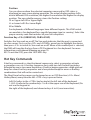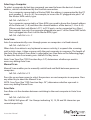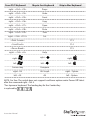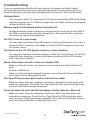
1
OSD menu is not in the proper position.
The OSD menu has a fixed resolution and its size varies depending on the
monitor. Use <F4> More/Position (from the OSD menu) to move the OSD menu
to a different location.
Cannot select a computer connected to a Slave.
Make sure that the Slave’s Console port is connected to one of the Master’s PC
ports. Only ports PC1 to PC8 can be connected to Slaves, even if the Master KVM
has 16 PC ports. Only one level of Slave KVMs is allowed.
Keyboard strokes are shifted.
Press both Shift keys.
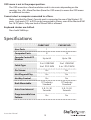
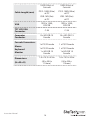
Specifications
CAB831HD
CAB1631HD
User Ports
1
1
Computer Ports
8
16
Up to 64
Up to 136
Cascade Control PC
Number
2-in1 USB KVM
2-in1 USB KVM
3-in1 PS/2 KVM
3-in-1 PS/2 KVM
On-Screen
Yes
Yes
Hot Plug and Play
Yes
Yes
Hot Key Control
Yes
Yes
Rack Mountable
19” Industry
Standard
19” Industry
Standard
3, 8, 15, 30
Seconds
3, 8, 15, 30
Seconds
Yes
Yes
Cable Type
Auto Scan Interval
Programmable Scan
Pattern
Instruction Manual
13