1
SMCWCB-G2
User Guide
¾
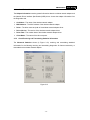
Link Status - Shows if the station is associated to the wireless network.
¾
Wireless Mode - Displays the wireless mode. Configure the wireless mode on the
Advanced tab of Profile Management.
¾
Network Type - The type of network and the station currently connected. The options
include:
•
Infrastructure (access point)
•
Ad Hoc
Configure the network type on the Advanced tab of Profile Management.
¾
IP Address - Displays the computer’s IP address.
¾
Current Channel - Shows the currently connected channel.
¾
Data Encryption - Displays the encryption type the driver is using. Configure the
encryption type on the Security tab of Profile Management.
¾
Server Based Authentication - Shows if server based authentication is used.
¾
Signal Strength - Shows the strength of the signal.
Click Advanced to see advanced information about the program and its operations. For more
information, please refer to the help file of the utility.
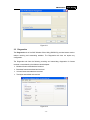
3.2 Profile Management
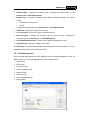
Click the Profile Management tab of the SMCWCU and the Profile Management screen will
appear, Figure 3-2. The Profile Management screen provides tools to:
¾
Add a profile
¾
Edit a profile
¾
Remove a profile
¾
Switch to another Profile
¾
Import a Profile
¾
Export a Profile
¾
Scan Available Networks
¾
Order profiles
-7-