1
Duration of press
Tap
Press briefly and let go
Press
Approx 2 seconds
Press and hold
Approx 5 seconds
english
Instruction
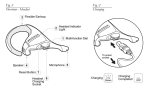
Exchanging the battery
A. To put the battery into the headset, slide the lid on the backside off, place the battery in the headset, and slide the lid back
on. Ensure correct position of the battery.
B.Note: The headset will warn you with 2 alternating tones when
there is 25 minutes talk time left on your battery.
Turning your headset on and off
Press the answer/end button until you see a burst of blue flashes
to turn on your headset
Press and hold the answer/end button until you see a burst of
blue flashes to turn off your headset.
Please note that the LED indicator light turns off after 1 minute to
save battery. To check if the headset is still on and connected, tap
the answer/end button once. The indicator light should flash back
with two single flashes if it is still on and connected.
Pairing the headset with your mobile phone
Headsets are connected to mobile phones using a procedure
called ‘pairing’. By following a few simple steps, a phone can be
paired with a headset in a matter of minutes.
Jabra BT2040 Bluetooth headset
4