1
Answer a call
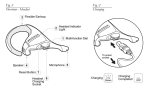
• Tap the answer/end button on your headset to answer a call.
End a call
• Tap the answer/end button to end an active call.
english
How to...
Make a call
• When you make a call from your mobile phone, the call will
(subject to phone settings) automatically transfer to your
headset. If your phone does not support this feature, tap on
the Jabra BT2040 answer/end button to transfer the call to the
headset.
Reject a call*
• Press the answer/end button when the phone rings to reject an
in-coming call. Depending on your phone settings, the person
who called you will either be forwarded to your voice mail or
hear a busy signal.
Adjust volume
• To adjust the volume, adjust the volume on your mobile phone.
Activate voice dialing*
• Press the answer/end button. For best results, record the voicedialling tag through your headset. Please consult your phone’s
user manual for more information about using this feature.
Redial last number*
• Double tap the answer/end button to redial last number
Call waiting and placing a call on hold*
This lets you put a call on hold during a conversation and answer
a waiting call.
• Press the answer/end button once to put the active call on hold
and answer the waiting call.
• Press the answer/end button to switch between the two calls.
• Tap the answer/end button to end the active conversation.
* Functions marked with * are dependent on your phone supporting these features. Check your phone’s user manual for
further information.
Jabra BT2040 Bluetooth headset
6