1
ENGLISH
4. The Remote Control
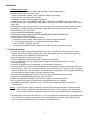
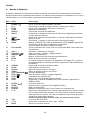
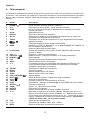
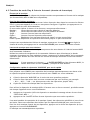
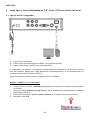
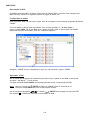
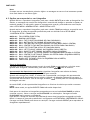
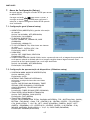
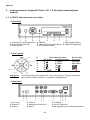
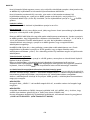
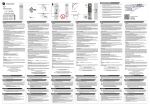
The remote control is used to control the unit. On the inside cover of this manual you will find a
picture of the remote control. The numbers of the buttons correspond with the table below, to
explain each function of the remote control.
Nr
Button
Description
1
2
3
4
5
6
7
8
9
10
POWER (
R/L
SLIDE
SLOW
REPEAT
DELAY
TRANS
, , ,
AUDIO
MENU
11
12
13
24
15
16
17
PLAY/PAUSE
VOL + / PREVIOUS (
)
REWIND ( )
FILE
MUSIC
0–9
18
19
20
21
22
23
24
25
26
27
28
29
30
31
OUTPUT
SETUP
PHOTO
VIDEO
FAST FORWARD (
)
NEXT (
STOP ( )
FUNC
SUB-T
ENTER (
)
ZOOM
ROTATE
DISPLAY
A–B
32
33
34
TOP
P/N
MUTE
)
)
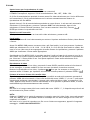
Enter or exit Standby mode. (ON/OFF)
Select the audio output: right, left and stereo.
Enter Music-slide-show mode or step-play.
Play back slowly.
Select a repeat mode.
Select slide show (include music-slide-show) interval time.
Select a mode of transition or a type of music equalizer.
Move cursor.
Select / Change audio stream (DVD Playback).
how DEVICE LIST or FILE LIBRARY (if there is only 1 device connected).
Return to the DVD Menu (DVD Playback).
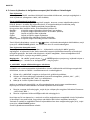
Start the playback of a file or DVD-Folder, pause a playback.
Increase / decrease volume level.
Switch to previous file / chapter or page up.
Fast Rewind.
Show the Directory Structure of the device.
Direct Access button to music.
Music can be played without a display device (TV, monitor) by presetting the music folders (explained further in the manual).
Select the Video Output Signal.
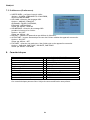
Function setup.
Direct Access button to photos.
Direct Access button to videos.
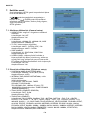
Fast forward.
Switch to next file / chapter or page down.
Stop playing.
Show file operations menu.
Select / Change movie Subtitle (MPEG4 & DVD Playback).
Confirm selection.
Zoom in / out (Photos & DVD Playback).
Rotate photos.
Show file information during playback.
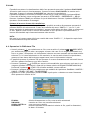
Play a selected interval repeatedly. Press the button once to select the
beginning <A> Point; Press the button again to select the ending <B>
Point; A-B interval will be repeated; Press the button again to cancel.
Only valid for video mode not music mode.
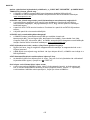
Go to the top of directory.
Select video system. (PAL / NTSC)
Mute or cancel mute.
23