1
Table of Contents
Introduction
1.1
1.2
1.3
Case Specifications………………...……………......…………… 2
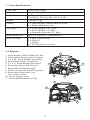
Diagram……………………………………………....…......……… 2
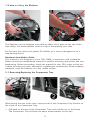
How to Carry the Skeleton…………………………….…......…. 3
Hardware Installation Guide
2.1
2.2
2.3
2.4
2.5
2.6
2.7
2.8
2.9
Removing/Replacing the Component Tray…………......……..
Removing the Motherboard Tray …………………......….…….
Motherboard Installation……………………………….......…….
Removing the Frame Side Screen Panels…………………..…..
Power Supply Installation…………………………….…......…...
5.25” Quick Release Device Installation……………….……….
3.5” Quick Release Device Installation………………………….
3.5” Device Frame-Mounted Installation………….……………
PCI Card Mounting Bar Installation……….................………..
Connecting the Front I/O Ports
3.1
3.2
3.3
3.4
3.5
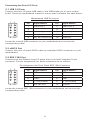
USB 2.0 Ports……………………………...……........……………
eSATA Port………………………………...……......…..…………
IEEE 1394 Port…………………………….......………….…........
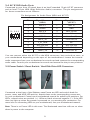
AC’97 / HD Audio Ports......……………….................……….
Power Switch / Reset Switch /
Hard Disk Drive LED Connectors.........………….………………
Cooling System
4.1
4.2
4.3
3
4
4
5
5
6
6
7
7
8
8
8
9
9
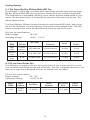
The Super Big Boy 250mm Multi-LED Fan.…….........……….. 10
92 mm Hard Drive Fan……………….....……………..........….. 10
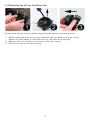
Removing the 92mm Hard Drive Fan…….....………………….. 11