1
Please read the safety instructions booklet before setting up
the projector.
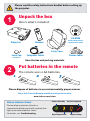
Unpack the box
1
Here's what's included:
Registration / Reference guide / Online resources
Register to activate your warranty to ensure eligibilty
for service and support, and get special offers and
notifications about free product updates.
Reference
guide
languages:
Svenska
Inscription / Guide de
référence / Ressources en ligne
Activez votre garantie pour avoir
droit aux réparations et à
l’assistance et obtenir les
notifications d’offres spéciales et
les avis sur les mises à niveau
gratuites des produits.
Registro / Manual de referencia
/ Recursos en línea
Active la garantía para asegurarse
los beneficios del servicio y soporte
técnico. Reciba ofertas especiales
y notificaciones sobre las
actualizaciones gratuitas de
nuestros productos.
Registrierung /Referenzanleitung
/ Online-Ressourcen
Aktivieren Sie Ihre Garantie,
sodass Sie für Service und
Unterstützung berechtigt
sind. Sie erhalten
Sonderangebote und
Benachrichtigungen
über kostenlose
Aktualisierungen.
CD-ROM
Projector
Product Registration
and Reference Guide
Remote
Carry Case
Lens Cap
and Tether
Computer Cable
Power Cable
Save the box and packing materials.
Put batteries in the remote
2
The remote uses 2 AA batteries.
1
2
+
-
+
3
Please dispose of batteries in an environmentally proper manner.
Buy a Full-Featured Remote and Other Custom Accessories
www.infocus.com/store
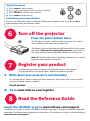
Status Indicator Panel
Power/Standby
Service Required
The top of your projector includes a
convenient indicator panel with symbols that
light up to show important status.
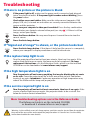
For details, see Troubleshooting.
High Temperature
Replace Lamp