1
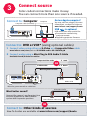
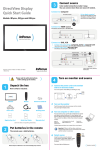
3 Connect source Color-coded connections make it easy. You can connect more than one source if needed. Connect to: Computer Got an Apple computer? Computer You may need an adapter. For more information, see How-To Guides at www.infocus.com/support/howto Computer Cable (included) USB is optional USB connection only needed for: Presentation control using projector remote Upgrading projector firmware OR Connect to: DVD or VCR* (using optional cables) 1 Connect video using either an S-Video or a Composite Video cable 2 Connect audio using a Mini-Plug to RCA Audio Y-Cable www.infocus.com/store part no. SP-SVIDEO-10M or SP-CPSTVID-5M Available from A/V dealer or retailer Good Composite Video Cable OR S-Video Cable Better Mini-Plug Audio Y-Cable L R Audio Out Video Out DVD or VCR *Also for game console or cable box. RCA Audio Cable Want better sound? Connect the source's audio output to a receiver/amplifier or home theater system with separate speakers. To Projector or L R Audio In Home Theater or Receiver L R Audio Out Video Out DVD or VCR OR Connect to: Other kinds of sources How-To Guides are available at www.infocus.com/support/howto