1
Q u i c k
-
R e f e r e n c e
The red laser turns off.
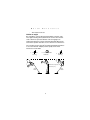
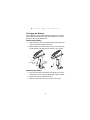
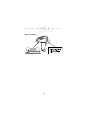
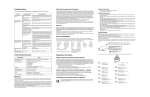
Hold at an angle
Do not hold the scanner directly perpendicular to the bar code.
Laser light reflecting directly back into the scanner from the bar
code is known as specular reflection. This strong light can
temporarily “blind” the scanner and make decoding difficult. The
area where specular reflection occurs is known as a “dead zone”.
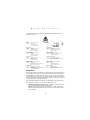
You can tilt the scanner up to 65° forward or backward and achieve
a successful decode. Simple practice quickly shows what
tolerances to work within.
1. Successful
Scanning
2. Possible Specular
Reflection
3. Successful
Scanning
65°
65°
Shaded area represents
dead zone (+-2°)
Scan
Beam
Scan
Beam
Bar Code
Bar Code
3
Bar Code