1
Set Up
Connecting to a Host - 1D Scanning
With some terminal types, the LS 400Xi is unable to answer host terminal polls until the
appropriate host type is selected. If the appropriate host type is not selected, the connected
host may generate an error message. To correct this situation, select the proper parameter set
and initialize the host terminal. See Chapter 5 for more information.
RS-232C (LS 4004i)
Direct RS-232
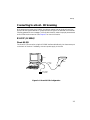
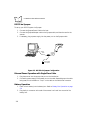
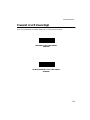
For direct RS-232 connection, plug the LS 4004i interface cable directly into the scanner port
on the back of the host. If necessary, connect a power supply to the host.
Host
LS 4004i
Interface
Cable
Power Supply
(as required)
Figure 2-4. Direct RS-232 Configuration
2-5