1
Walk Through Setup and Configuration
5.4
Configure Storage and Features
Now that the storage devices have been optimized it’s time to concentrate pooling
them together.
1. Open a web browser and navigate to the NexentaStor* appliance.
2. Navigate to the Data Management tab, and select Data Sets.
3. Navigate to the Volumes field and select Create.
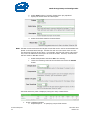
4. Create a ZPOOL.
a. Select 6 disks under Available Disks.
b. Select RAID-Z1 (single parity) from the Redundancy Type.
c. Click the Add to Pool >> Button.
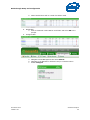
d. Select the remaining 6 disks under Available Disks.
e. Select RAID-Z1 (single parity) from the Redundancy Type.
f. Click the Add to Pool >> button.
November 2013
329591-001
Solutions Blueprint
21