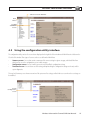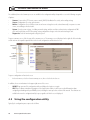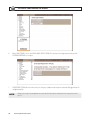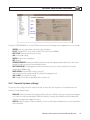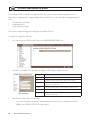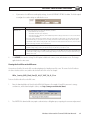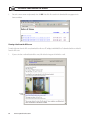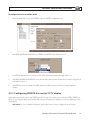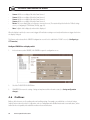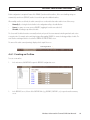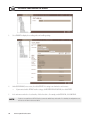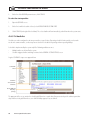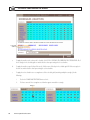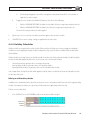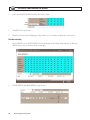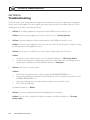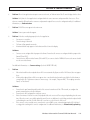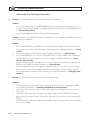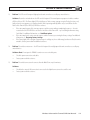
1
Wireless Advanced 4-Channel Digital Video Recorder User Manual Product: DVRM6 Please read this manual before using your camera, and always follow the instructions for safety and proper use. Save this manual for future reference. DVRM6_RM CAUTION Operate this device only in environments where the temperature or humidity is within the recommended range. Operation in extreme temperatures or humidity levels may cause electric shock and shorten the life of the product. LEGAL NOTICE Supercircuits products are designed to meet safety and performance standards with the use of specific Supercircuits authorized accessories. Supercircuits disclaims liability associated with the use of non-Supercircuits authorized accessories. The recording, transmission, or broadcast of any person’s voice without their consent or a court order is strictly prohibited by law. Supercircuits makes no representations concerning the legality of certain product applications such as the making, transmission, or recording of video and/or audio signals of others without their knowledge and/or consent. We encourage you to check and comply with all applicable local, state, and federal laws and regulations before engaging in any form of surveillance or any transmission of radio frequencies. Other trademarks and trade names may be used in this document to refer to either the entities claiming the marks and names or their products. Supercircuits, Inc. disclaims any proprietary interest in trademarks and trade names other than its own. No part of this document may be reproduced or distributed in any form or by any means without the express written permission of Supercircuits, Inc. © 2011 Supercircuits, Inc. All rights reserved. 11000 N. Mopac Expressway, Building 300, Austin, TX 78759 Sales/Support: 1.800.335.9777 | Fax: 1.866.267.9777 ii www.supercircuits.com Table of Contents SECTION 1 SECTION 2 SECTION 3 SECTION 4 Features. . . . . . . . . . . . . . . . . . . . . . . . . . . . . . . . . . . . . . . . . . . . . . . . . . . . . . . . . . . . . . . . . . . . . . . . . . . . 1 1.1 Controls and connectors. . . . . . . . . . . . . . . . . . . . . . . . . . . . . . . . . . . . . . . . . . . . . . . . . . . . . . . . . . . . . . . 1 1.2 What’s in the box . . . . . . . . . . . . . . . . . . . . . . . . . . . . . . . . . . . . . . . . . . . . . . . . . . . . . . . . . . . . . . . . . . . . 2 1.3 Additional Equipment . . . . . . . . . . . . . . . . . . . . . . . . . . . . . . . . . . . . . . . . . . . . . . . . . . . . . . . . . . . . . . . . 4 Installing the System. . . . . . . . . . . . . . . . . . . . . . . . . . . . . . . . . . . . . . . . . . . . . . . . . . . . . . . . . . . . . . . . . 5 2.1 Installing the DVRM6 unit. . . . . . . . . . . . . . . . . . . . . . . . . . . . . . . . . . . . . . . . . . . . . . . . . . . . . . . . . . . . . 6 2.2 Connecting devices the DVRM6 unit . . . . . . . . . . . . . . . . . . . . . . . . . . . . . . . . . . . . . . . . . . . . . . . . . . . . 6 2.2.1 Connecting cameras . . . . . . . . . . . . . . . . . . . . . . . . . . . . . . . . . . . . . . . . . . . . . . . . . . . . . . . . . . . . . 7 2.2.2 Connecting PTZ controllers. . . . . . . . . . . . . . . . . . . . . . . . . . . . . . . . . . . . . . . . . . . . . . . . . . . . . . . . 7 2.2.3 Connecting sensors. . . . . . . . . . . . . . . . . . . . . . . . . . . . . . . . . . . . . . . . . . . . . . . . . . . . . . . . . . . . . . 9 2.2.4 Connecting Activators. . . . . . . . . . . . . . . . . . . . . . . . . . . . . . . . . . . . . . . . . . . . . . . . . . . . . . . . . . . 10 2.2.5 Connecting Microphones . . . . . . . . . . . . . . . . . . . . . . . . . . . . . . . . . . . . . . . . . . . . . . . . . . . . . . . . 11 2.2.6 Connecting a Speaker or Headphones. . . . . . . . . . . . . . . . . . . . . . . . . . . . . . . . . . . . . . . . . . . . . . 11 2.2.7 Connecting a CCTV monitor . . . . . . . . . . . . . . . . . . . . . . . . . . . . . . . . . . . . . . . . . . . . . . . . . . . . . . 12 2.3 Setting Up Network Connections. . . . . . . . . . . . . . . . . . . . . . . . . . . . . . . . . . . . . . . . . . . . . . . . . . . . . . 12 2.3.1 Connecting the DVRM6 to an external network. . . . . . . . . . . . . . . . . . . . . . . . . . . . . . . . . . . . . .13 2.3.2 Connecting devices to the DVRM6 internal network. . . . . . . . . . . . . . . . . . . . . . . . . . . . . . . . . . 14 2.4 Connecting the GPS antenna. . . . . . . . . . . . . . . . . . . . . . . . . . . . . . . . . . . . . . . . . . . . . . . . . . . . . . . . . . 15 2.5 Connecting the DVRM6 to a power source. . . . . . . . . . . . . . . . . . . . . . . . . . . . . . . . . . . . . . . . . . . . . . .15 2.5.1 Connecting the DVRM6 to the vehicle battery. . . . . . . . . . . . . . . . . . . . . . . . . . . . . . . . . . . . . . . 15 2.5.2 Connecting the DVRM6 to an electrical outlet. . . . . . . . . . . . . . . . . . . . . . . . . . . . . . . . . . . . . . . 18 Installing the MultiClient Software. . . . . . . . . . . . . . . . . . . . . . . . . . . . . . . . . . . . . . . . . . . . . . . . . . . . 20 3.1 Connecting to the DVRM6. . . . . . . . . . . . . . . . . . . . . . . . . . . . . . . . . . . . . . . . . . . . . . . . . . . . . . . . . . . . 22 Configuring the DVRM6. . . . . . . . . . . . . . . . . . . . . . . . . . . . . . . . . . . . . . . . . . . . . . . . . . . . . . . . . . . . . . 24 4.1 Opening the Configuration Utility . . . . . . . . . . . . . . . . . . . . . . . . . . . . . . . . . . . . . . . . . . . . . . . . . . . . . 25 4.2 Using the configuration utility interface. . . . . . . . . . . . . . . . . . . . . . . . . . . . . . . . . . . . . . . . . . . . . . . . 27 4.3 Using the configuration utility. . . . . . . . . . . . . . . . . . . . . . . . . . . . . . . . . . . . . . . . . . . . . . . . . . . . . . . . 28 4.3.1 Opening the configuration utility remotely. . . . . . . . . . . . . . . . . . . . . . . . . . . . . . . . . . . . . . . . . 31 4.3.2 Opening the configuration utility manually. . . . . . . . . . . . . . . . . . . . . . . . . . . . . . . . . . . . . . . . . 31 4.4 System Settings . . . . . . . . . . . . . . . . . . . . . . . . . . . . . . . . . . . . . . . . . . . . . . . . . . . . . . . . . . . . . . . . . . . . 32 4.4.1 General system settings. . . . . . . . . . . . . . . . . . . . . . . . . . . . . . . . . . . . . . . . . . . . . . . . . . . . . . . . . 33 4.4.2 Configuring Microphone and Speaker Volume. . . . . . . . . . . . . . . . . . . . . . . . . . . . . . . . . . . . . . . 36 4.4.3 Configuring a CCTV monitor (TV-Out). . . . . . . . . . . . . . . . . . . . . . . . . . . . . . . . . . . . . . . . . . . . . . 38 Wireless Advanced 4-Channel DVR User Manual iii TABLE OF CONTENTS SECTION 5 SECTION 6 SECTION 7 iv 4.4.4 Setting the clock . . . . . . . . . . . . . . . . . . . . . . . . . . . . . . . . . . . . . . . . . . . . . . . . . . . . . . . . . . . . . . . 41 4.4.5 LAN Settings. . . . . . . . . . . . . . . . . . . . . . . . . . . . . . . . . . . . . . . . . . . . . . . . . . . . . . . . . . . . . . . . . . . 45 4.4.6 Modem configuration. . . . . . . . . . . . . . . . . . . . . . . . . . . . . . . . . . . . . . . . . . . . . . . . . . . . . . . . . . . 47 4.4.7 WIFI configuration. . . . . . . . . . . . . . . . . . . . . . . . . . . . . . . . . . . . . . . . . . . . . . . . . . . . . . . . . . . . . . 49 4.4.8 Network Priorities. . . . . . . . . . . . . . . . . . . . . . . . . . . . . . . . . . . . . . . . . . . . . . . . . . . . . . . . . . . . . . 49 4.4.9 Port Forwarding. . . . . . . . . . . . . . . . . . . . . . . . . . . . . . . . . . . . . . . . . . . . . . . . . . . . . . . . . . . . . . . . 50 4.4.10 PROXY and DDNS settings. . . . . . . . . . . . . . . . . . . . . . . . . . . . . . . . . . . . . . . . . . . . . . . . . . . . . . . . 51 4.4.11 Authentication. . . . . . . . . . . . . . . . . . . . . . . . . . . . . . . . . . . . . . . . . . . . . . . . . . . . . . . . . . . . . . . . . 53 4.4.12 SMS and E-mail Notifications. . . . . . . . . . . . . . . . . . . . . . . . . . . . . . . . . . . . . . . . . . . . . . . . . . . . . 54 4.4.13 SMS message templates. . . . . . . . . . . . . . . . . . . . . . . . . . . . . . . . . . . . . . . . . . . . . . . . . . . . . . . . . 57 4.4.14 Testing notification settings. . . . . . . . . . . . . . . . . . . . . . . . . . . . . . . . . . . . . . . . . . . . . . . . . . . . . . 58 4.4.15 AVV, Alarm Video Verification server setup. . . . . . . . . . . . . . . . . . . . . . . . . . . . . . . . . . . . . . . . . . 58 4.4.16 Camera Settings. . . . . . . . . . . . . . . . . . . . . . . . . . . . . . . . . . . . . . . . . . . . . . . . . . . . . . . . . . . . . . . . 64 4.4.17 Video Motion Detection (VMD) . . . . . . . . . . . . . . . . . . . . . . . . . . . . . . . . . . . . . . . . . . . . . . . . . . . 67 4.4.18 Configuring video loss response. . . . . . . . . . . . . . . . . . . . . . . . . . . . . . . . . . . . . . . . . . . . . . . . . . . 72 4.4.19 Video recording settings. . . . . . . . . . . . . . . . . . . . . . . . . . . . . . . . . . . . . . . . . . . . . . . . . . . . . . . . . 73 4.5 Sensor and Activator Settings. . . . . . . . . . . . . . . . . . . . . . . . . . . . . . . . . . . . . . . . . . . . . . . . . . . . . . . . . 77 4.5.1 Configuring Sensor 1 to Switch Outlines. . . . . . . . . . . . . . . . . . . . . . . . . . . . . . . . . . . . . . . . . . . . 80 4.5.2 Configuring SENSOR 4 to control CCTV display. . . . . . . . . . . . . . . . . . . . . . . . . . . . . . . . . . . . . . . 81 4.6 Outlines. . . . . . . . . . . . . . . . . . . . . . . . . . . . . . . . . . . . . . . . . . . . . . . . . . . . . . . . . . . . . . . . . . . . . . . . . . . 82 4.6.1 Creating an Outline. . . . . . . . . . . . . . . . . . . . . . . . . . . . . . . . . . . . . . . . . . . . . . . . . . . . . . . . . . . . . 83 4.6.2 Activating Outlines Manually. . . . . . . . . . . . . . . . . . . . . . . . . . . . . . . . . . . . . . . . . . . . . . . . . . . . . 85 4.6.3 Schedules. . . . . . . . . . . . . . . . . . . . . . . . . . . . . . . . . . . . . . . . . . . . . . . . . . . . . . . . . . . . . . . . . . . . . 86 4.6.4 Holiday Schedules. . . . . . . . . . . . . . . . . . . . . . . . . . . . . . . . . . . . . . . . . . . . . . . . . . . . . . . . . . . . . . 89 4.6.5 Saving configuration changes. . . . . . . . . . . . . . . . . . . . . . . . . . . . . . . . . . . . . . . . . . . . . . . . . . . . 92 4.6.6 Discarding changes. . . . . . . . . . . . . . . . . . . . . . . . . . . . . . . . . . . . . . . . . . . . . . . . . . . . . . . . . . . . . 93 4.6.7 Restoring default settings . . . . . . . . . . . . . . . . . . . . . . . . . . . . . . . . . . . . . . . . . . . . . . . . . . . . . . . 94 Viewing Snapshots in a Browser. . . . . . . . . . . . . . . . . . . . . . . . . . . . . . . . . . . . . . . . . . . . . . . . . . . . . . . 96 Viewing Video on a Monitor (TV-OUT). . . . . . . . . . . . . . . . . . . . . . . . . . . . . . . . . . . . . . . . . . . . . . . . . . 98 Resetting the Unit . . . . . . . . . . . . . . . . . . . . . . . . . . . . . . . . . . . . . . . . . . . . . . . . . . . . . . . . . . . . . . . . . 100 7.1 Resetting the system with the configuration utility . . . . . . . . . . . . . . . . . . . . . . . . . . . . . . . . . . . . . 100 7.2 Restoring Factory Settings. . . . . . . . . . . . . . . . . . . . . . . . . . . . . . . . . . . . . . . . . . . . . . . . . . . . . . . . . . . 101 7.3 Erasing Recorded Video. . . . . . . . . . . . . . . . . . . . . . . . . . . . . . . . . . . . . . . . . . . . . . . . . . . . . . . . . . . . . 102 7.3.1 Erasing all recorded video from one camera . . . . . . . . . . . . . . . . . . . . . . . . . . . . . . . . . . . . . . . 103 7.3.2 Erasing all recorded video from the hard drive . . . . . . . . . . . . . . . . . . . . . . . . . . . . . . . . . . . . . 104 www.supercircuits.com TABLE OF CONTENTS SECTION 8 SECTION 9 SECTION 10 7.4 Restoring the default disk allocation. . . . . . . . . . . . . . . . . . . . . . . . . . . . . . . . . . . . . . . . . . . . . . . . . . 104 Upgrading the Firmware. . . . . . . . . . . . . . . . . . . . . . . . . . . . . . . . . . . . . . . . . . . . . . . . . . . . . . . . . . . . 107 8.1 Upgrading video gateway firmware. . . . . . . . . . . . . . . . . . . . . . . . . . . . . . . . . . . . . . . . . . . . . . . . . . . 107 8.2 Upgrading router firmware. . . . . . . . . . . . . . . . . . . . . . . . . . . . . . . . . . . . . . . . . . . . . . . . . . . . . . . . . . 108 System Diagnostics. . . . . . . . . . . . . . . . . . . . . . . . . . . . . . . . . . . . . . . . . . . . . . . . . . . . . . . . . . . . . . . . . 110 9.1 System Statistics. . . . . . . . . . . . . . . . . . . . . . . . . . . . . . . . . . . . . . . . . . . . . . . . . . . . . . . . . . . . . . . . . . . 110 9.2 Testing Remote Connections. . . . . . . . . . . . . . . . . . . . . . . . . . . . . . . . . . . . . . . . . . . . . . . . . . . . . . . . . 111 9.2.1 ping. . . . . . . . . . . . . . . . . . . . . . . . . . . . . . . . . . . . . . . . . . . . . . . . . . . . . . . . . . . . . . . . . . . . . . . . . 111 9.2.2 traceroute. . . . . . . . . . . . . . . . . . . . . . . . . . . . . . . . . . . . . . . . . . . . . . . . . . . . . . . . . . . . . . . . . . . . 114 Troubleshooting. . . . . . . . . . . . . . . . . . . . . . . . . . . . . . . . . . . . . . . . . . . . . . . . . . . . . . . . . . . . . . . . . . . 118 Wireless Advanced 4-Channel DVR User Manual v vi www.supercircuits.com SECTION 1: FEATURES SECTION 1 Features The DVRM6 is a compact video gateway that provides state-of-the-art security functionality for vehicles and other moving platforms. Its broad range of features include live video streaming, video recording and playback, motion detection, sensor management, real-time event notification, vehicle tracking via GPS, and device activation. All of these features can be accessed remotely via PC, PDA, or cellular telephone. The DVRM6 contains two interconnected hardware components: • • A video gateway that handles the unit’s security functionality A router for remote access to the unit through a standard internet connection or cellular network 1.1 Controls and connectors All controls and connectors are located on the backpanel of the the DVRM6. Audio In 2, Ain2 Audio Out (Aout) Audio In 1, Ain1 TV Out Video In Vin1 - Vin4 Power Reset Ethernet Cable Outputs (Activators) Out1, Out2 RS232/RS485 Port 12 VDC Power Out GPS Antenna Connector USB Ports Ethernet (Out) Inputs (Sensors), In1 - In4 Uplink Connector/Control Description Reset Use a pin to press the button when it is necessary to manually reset the unit. Configuration settings are not changed during a reset. Power Connector for the power supply and, if required, for the ignition connection Audio Out Connector for an external speaker or headphones Wireless Advanced 4-Channel DVR User Manual 1 SECTION 1: FEATURES Connector/Control Description Audio In1 (Ain1)) Audio In2 (Ain2) Connectors for an active microphones. Ain1 is a passive input (for non-powered microphones). Ain2 is an active input (for powered microphones, such as Supercircuits PA-3. Audio inputs are mono 1/8” or 3.5 mm plugs. An adapter may be required for connection of a microphone. TV Out Connector for a CCTV monitor Video In (Vin1–Vin4) Connectors for video cameras Ethernet Cable Cable connecting the video gateway component to the internal router. Do not disconnect. RS232/RS485 port Serial (COM) port for PTZ controllers and/or technicians’ use. 12 VDC Power Out Supplies power to external devices (cameras, sensors, etc.). The unit can supply up to 500 mA @12 VDC to an external device(s). USB Ports Connectors for cellular modems with USB adaptors Inputs (In1 – In4) Sensor connectors Ethernet (out) 10/100 Base-T LAN connector for connecting the unit to an external network Uplink Three 10/100 Base-T LAN connectors for connecting other devices to the internal network managed by the router GPS antenna connector -- Outputs (Out1, Out2) Activator connectors Power LED Internal Speaker 1.2 What’s in the box 2 Item Description DVRM6 unit Video gateway www.supercircuits.com Illustration SECTION 1: FEATURES Item Description Power supply and cables Connects DVRM6 unit to a power source Illustration Power cord Connects the unit to the vehicle battery via the cigarette lighter Ethernet (LAN) cable Connects the unit to a PC (or a cable-based local network) RS232/485 serial adapter Connects PTZ controllers to the unit GPS antenna Enables the built-in GPS receiver to connect to satellites Wireless Advanced 4-Channel DVR User Manual 3 SECTION 1: FEATURES Item Description Supports (2) Used to install the unit in the vehicle Screws, washers Used to attach the supports to the unit Illustration 1.3 Additional Equipment Up to four video cameras can be connected to the DVRM6. You must acquire the cameras you require; they are not included in the DVRM6 package. For information about camera compatibility and about connecting the cameras to the unit, see Connecting Cameras, page 15, or consult your vendor. In addition to the cameras, you may wish to incorporate some or all of the optional equipment listed below into your security system. For additional information about these items and the cables required to connect them, please refer to the installation instructions for each type of device. NOTE • • • • • • • • 4 This equipment is not included in the DVRM6 package. At this time, the following cellular cards in the USA are supported: Sprint: u727, u250, u301, u760. Supercircuits STRONGLY recommend obtaining a static IP address for your aircard. This will ensure the most reliable connection. Also, when obtaining a static IP address, ensure that your card is ‘un-restricted’ or not blocked or limited in any way. The DVRM6 uses ports 9988, 9999 and 10000 for connectivity. Up to 20 dry-contact sensors. Note: Up to four dry-contact sensors can be connected directly to the DVRM6 unit. Up to two dry-contact activators (alarms or other devices that are turned on or off in response to the activation of a sensor. To connect each activator to the unit, you need: 16 AWG red and black cable Up to two microphones Speaker or headphones CCTV monitor for closed-circuit video display A push-button switch to change the display in a connected CCTV monitor A toggle (on-off) switch to change the active outline. www.supercircuits.com SECTION 2: INSTALLING THE SYSTEM SECTION 2 Installing the System Typically, installation of the DVRM6 system includes the following steps. Details are provided later in this chapter. 1. Install the DVRM6 unit in its desired location using the supplied supports. 2. Install the video cameras in their desired locations. 3. Install up to 4 sensors. 4. Install a toggle switch to change the active outline (optional). 5. Install up to two activators in their desired locations (optional). 6. Install a CCTV monitor in its desired location (optional). 7. Install a push-button switch to change the display on the CCTV monitor, if one is connected to the unit (optional). 8. Connect the cameras, sensors, activators, monitor, and switches to the DVRM6, as required. 9. Install the MultiClient software on a PC in order to connect to the unit’s configuration utility. 10. Connect the DVRM6 unit to the PC 11. Connect the DVRM6 unit to a power source. 12. Install the MultiClient software on any other PC from which you want to connect to the DVRM6 as required. 13. Configure the DVRM6 system. 14. Connect to the DVRM6 through the MultiClient in order to check the configuration and make sure the system is working properly. 15. Install cellular phone client applications on your cellular telephone, if needed. For additional information, see the client user guides or contact your vendor. The client applications, as well as the user guides, can be downloaded from the Supercircuits website (http://www.Supercircuits.com). NOTE The unit, the devices connected to it, and the cables used to connect them, must all be securely fastened to the vehicle to ensure they do not become detached from their locations when the vehicle is in motion. NOTE Installing the unit and its peripheral equipment in a vehicle is a complex process. It is highly recommended that it be performed by a trained specialist in vehicle installations. Wireless Advanced 4-Channel DVR User Manual 5 SECTION 2: INSTALLING THE SYSTEM 2.1 Installing the DVRM6 unit Location The unit should be installed in a cool and ventilated location, protected from direct sunlight and water. It should be firmly secured to ensure it does not shift when the vehicle is in motion; if the unit is dislodged from its location in the vehicle, it may be damaged, hit people in the vehicle, or harm other items with which it comes into contact. Ensure the unit has at least a few centimeters (1–2 inches) of space above it and on all sides for ventilation. Also, the unit must be accessible for connection to power, cameras, sensors, a PC, etc. NOTE 1. To install the unit in the vehicle, you will need screws to secure the unit to its anchoring surface (not supplied; see step 2 below). Connect the two side support brackets to either side of the bottom of the DVRM6, using two screws and two washers for each support. (The screws and washers are included with the DVRM6.) Screw and Washer Support Bracket DVRM6 Unit 2. Place the unit in the desired location and attach it securely by connecting the side supports to the anchoring surface with two or three screws on each side. (These screws are not included with the DVRM6.) The unit can be placed horizontally or vertically. If placed vertically,either side may face up. 2.2 Connecting devices the DVRM6 unit NOTE 6 Make sure that all installed devices are designed to function properly under mobile conditions (temperature range, vibrations, power supply, etc), that they are all installed in accordance with their manufacturer’s requirements, and that the devices and all cables are properly installed and firmly fastened so that they will not become loose. Consult vehicle experts before installing external devices. www.supercircuits.com SECTION 2: INSTALLING THE SYSTEM 2.2.1 Connecting cameras Up to four cameras can be connected to the DVRM6. If the cameras have PTZ controls for remote aiming and zooming, and the PTZ protocols they use are supported, the control cables can also be connected to the unit. Any PAL or NTSC video camera with a composite video output can be connected to the unit. The video inputs of the DVRM6 unit may require either a BNC or a Mini-DIN connector, depending on the options selected when the unit was purchased. A cable with a composite video connector on one end, and a compatible male connector (BNC or Mini-DIN) on the other, should be used to connect each camera to the DVRM6. NOTE A cable with a male RCA connector can be connected to a female BNC connector by using an RCA-to-BNC adaptor (Supercircuits SKU CON-4). Cameras that are connected to the DVRM6 can receive their power from the vehicle battery via the DVRM6 unit. Cameras that use Mini-DIN connectors receive their power via the same cable through which they transmit their video output to the unit (through the Video-In connectors on the rear panel of the unit). Other cameras require an independent power supply. These cameras can receive power via the 12 VDC connector on the rear panel of the unit. However, bear in mind that the unit can supply a maximum of 500 mA of power. If the devices connected to the unit require more than this amount of power, you must power some or all of them independently. For additional information, please refer to the camera documentation. To connect a camera: 1. Install the camera in its desired location. 2. Connect the output of the camera to one of the Video-In connectors on the rear panel of the unit. 3. If the camera requires an independent power supply, connect its power connector to a power source. If the DVRM6 can supply enough power for the cameras connected to it, you can connect the camera to the 12 VDC connector on the rear panel of the unit. Otherwise, you must use an external power source. NOTE You can connect multiple cameras to the 12 VDC connector as long as they do not collectively draw more than 500 mA @ 12 VDC. 2.2.2 Connecting PTZ controllers If a camera has remote PTZ control features (pan, tilt, zoom, and/or focus), and uses a supported PTZ protocol, you can connect the control cable to the unit. Both RS232 and RS485 PTZ connection types are supported. Consult the camera documentation for information about which connection type to use. Wireless Advanced 4-Channel DVR User Manual 7 SECTION 2: INSTALLING THE SYSTEM If you want to connect the PTZ controllers of multiple cameras to the unit, only one of the controllers can use an RS232 connector – the others must all use RS485 connectors. PTZ controllers for more than one RS232 camera cannot be connected to the unit simultaneously. If you connect multiple RS485 PTZ camera controllers, they should be daisy-chained to the RS232/485 connector as described below. In this case, each camera in the chain must be given a different ID number. Refer to your camera’s documentation for information about configuring its ID number. Additionally, you can only create an RS485 daisy chain if every link on the chain (i.e., every camera) uses the same PTZ protocol. Attempting to connect cameras that use different protocols will prevent all of the cameras from working properly. To connect an RS232 PTZ controller: 1. Acquire an RS232 controller cable with a female 9-pin RS232 connector. 2. Attach the cable to the DVRM6. —— —— If you are only connecting the RS232 PTZ controller to the unit, and are not connecting any RS485 PTZ controllers, plug the 9-pin RS232 connector directly into the RS232/485 connector on the rear panel of the unit. If you are also connecting one or more RS485 PTZ controllers to the unit, plug the 9-pin RS232 connector into the RS232/485 adapter supplied with the unit. To connect an RS485 PTZ controller: 1. Use a wire connector to connect the wires to the RS485 connection wires of the adapter. Be sure to match the positive (+) wire of the controller cable to the positive (+ red) wire of the adapter, and the negative (-) wire of the controller cable to the negative (- grey) wire of the adapter. Plug into RS232/485 Serial Port Connector RS485 Connection Wires ) Negative (-) for RS485 Connector (grey) 8 www.supercircuits.com Positive (+) for RS485 Connector (Red) SECTION 2: INSTALLING THE SYSTEM To connect multiple RS485 controllers to the adapter, insert the positive (+) wires of all of the controllers into one slot in the wire connector, and the negative (-) wires of all of the controllers into the other slot of the wire connector. 2. If multiple PTZ cameras are connected to the unit, configure each camera to use a different ID. For information about how to do this, refer to the camera documentation. 3. Connect the RS232/485 adapter to the RS232/485 serial port connector on the rear panel of the unit. 2.2.3 Connecting sensors Sensors are devices that detect events such as a door being opened, brakes being pressed, or high G-force pressure. Up to four drycontact input sensors can be connected directly to the unit. Sensor 1 and Sensor 4 can be used as switches instead of sensors. The switches can be used to activate outlines and to change the display on a CCTV monitor. The unit has four Input connectors (In1 – In4). You can use these connectors to connect up to four dry-contact input sensors directly to the unit. Alternatively, In1 and In4 can be used to connect switches as follows: • In1: If you are defining more than one outline (alternate sets of recording and event handling settings), you can connect a toggle (on-off) switch to In1 instead of a sensor. The switch can then be used to change the active outline. For additional information. NOTE • Some alarm panels can also be connected to In1. When they are, they can function as automatic outline toggle switches. For additional information, please consult the alarm panel vendor. In4: If a CCTV monitor will be connected to the unit, you can connect a push-button switch to In4 instead of a sensor. The button can then be used to change the display on the monitor. Wireless Advanced 4-Channel DVR User Manual 9 SECTION 2: INSTALLING THE SYSTEM To connect a sensor or switch directly to the unit: 1. Install the sensor or switch in its desired location in accordance with the manufacturer’s instructions. If the sensor requires an external power supply, you can connect it to the 12 VDC connector on the rear panel of the unit if all devices powered by that connector do not draw more than 500 mA. If the devices connected to the unit require more than this amount of power, you must power some or all of them independently. 2. Connect the two wire contacts of the sensor or switch to the Sensors terminal block on the rear panel of the DVRM6. Insert the wires into the connectors and tighten the screws below each connector to hold the wires in place. The wires must be connected to two adjacent contacts in the same group (e.g. the two contacts of “In1”), but the polarity does not matter. Backpanel Sensor Terminal Block 2.2.4 Connecting Activators Activators are external devices such as alarms and lights that can be turned on by the system in response to an event. Essentially, the unit functions as an on/off switch for these devices. The unit activates an activator by closing the circuit of its power supply. Up to two activators can be connected to the unit. In addition to the activators themselves, you will need the 16 AWG red and black cables to connect each activator to the unit. To connect an activator: 1. Install the activator in its desired location in accordance with the manufacturer’s instructions. NOTE 2. 10 If an activator requires an external power supply, you may be able to connect it to the 12 VDC connector on the rear panel of the unit. However, the DVRM6 unit can supply a maximum of 500 mA of power. If the devices connected to the unit require more than 500 mA, you must power some or all of them independently. Connect the two contacts of the activator to the Activators terminal block on the rear panel of the DVRM6. The wires must be connected to two adjacent contacts in the same group (e.g. the two contacts of “Out1”). These contacts are polarity independent. www.supercircuits.com SECTION 2: INSTALLING THE SYSTEM Activator DVRM6 Rear Panel Activator Terminal Block 2.2.5 Connecting Microphones Up to two microphones can be connected to the unit, one active and one passive. When one or two microphones are connected, you can hear and record sound along with video images. The sound from a microphone can be associated with any or all of the cameras. Passive microphones, which require external amplification, must be connected to Ain1. Active (self-amplifying) microphones, such as Supercircuits PA-3, must be connected to Ain2. Microphones with an output voltage of 1 Vrms or 1.41 Peak are supported. To connect a microphone: 1. Install the microphone in the desired location. 2. Plug the microphone connector into the desired Audio In connector (Ain1 for passive microphones, or Ain2 for active microphones). 2.2.6 Connecting a Speaker or Headphones The DVRM6 unit contains a built-in, 1-watt, internal speaker on the right side of the unit. You can also connect an external speaker or headphones to the unit. The speakers (and headphones) allow you to hear audio that is transmitted from one of the client applications. The external speaker or headphones can be used in addition to the internal speaker or instead of it. To connect an external speaker or headphones: 1. Install the speaker in its desired location, if necessary. 2. Plug the speaker or headphone connector into the Audio Out connector (Aout). Wireless Advanced 4-Channel DVR User Manual 11 SECTION 2: INSTALLING THE SYSTEM 2.2.7 Connecting a CCTV monitor You can connect a CCTV monitor to the unit. The monitor offers an alternative way to view live video from the DVRM6. It is primarily useful if you want to view video when the user is near the unit. For example, if the DVRM6 is set up in a bus, the driver can use a CCTV monitor to keep tabs on parts of the bus that cannot been seen from the driver’s seat. The following types of monitors can be used: • • • Surveillance monitors: Monitors that are designed to be plugged directly into surveillance cameras. Entertainment monitors: Monitors that are intended to be plugged into portable DVD players in vehicles. Standard television sets with AV connectors To connect the monitor to the DVRM6, you will need a cable with the following connectors: • • An appropriate connector (BNC or RCA) for the Video-In connector of the monitor. (Consult the monitor documentation or your vendor to find out which kind of connector is required for the particular monitor you are using.) A BNC male connector to connect to the TV-Out connector of the DVRM6. (A cable with an RCA connector can be used by attaching a BNC-to-RCA adaptor to the connector.) To connect a CCTV monitor: 1. Install the monitor. 2. Cable the Video In connector of the monitor to the TV-Out connector of the DVRM6. If you are using a standard television set as a monitor, use the television’s AV connector as the Video Input connector. Connecting a switch You can connect a switch to the unit to change the display on the monitor. The switch must be connected to the SENSOR 4 (In4) connector. Connecting multiple monitors You can connect multiple CCTV monitors to the DVRM6. To connect multiple monitors, you must use video splitters to split the connection, which may degrade image quality of one or both of the monitors. To correct this problem, use a video amplifier (booster) for each monitor. To ensure you have the correct equipment, consult a video equipment supplier. 2.3 Setting Up Network Connections The DVRM6 has a built-in router. This router manages a local network (LAN) that can include up to four devices – the video gateway itself and up to three other devices. For example, you could connect a PC and an IP-based cash box to the router, and they would all be part of the DVRM6’s LAN. 12 www.supercircuits.com SECTION 2: INSTALLING THE SYSTEM The built-in router is also used to connect the internal local network to other, external, networks, such as the internet or a cellular network. This makes it possible to access the DVRM6 and the other devices connected to the router remotely. In addition, if a PC is connected to the DVRM6’s router, it can access the DVRM6 directly, even when no external network connection is available. The router can connect to more than one external network at a time. Because the router is part of both the internal LAN and one or more external networks, it has two types of IP addresses: • • Local IP: An IP address on the internal LAN. This IP address identifies the router within the network that it manages. It is static (fixed) and is 172.20.233.1. External IP: An IP on each external network to which it is connected (cabled LAN and/or cellular). These are the IP addresses of the DVRM6 unit itself. Optimally, these addresses should also be static. If they are not, various solutions are available to make it possible to connect the unit to the internet, and to connect to the unit remotely via the internet, as explained below 2.3.1 Connecting the DVRM6 to an external network The following types of external network connections are supported: • • Ethernet cable Cellular The DVRM6 has a distinct IP address on each of the external networks to which it is connected. For example, if it is connected to a LAN via Ethernet cable and to a cellular network via cellular modem, it will have two external IP addresses, one on each network. Each of the external IP addresses of the unit can be static – fixed within the network, or dynamic – assigned by the network on the fly. Dynamic IP addresses can change at any time. This makes it difficult to connect to the unit remotely, because the address to use to access it is may be changed. Therefore, it is preferred that the unit has static external IP addresses when possible. The system administrator of each network is responsible for deciding whether static or dynamic IP addresses are assigned to devices in the network. The public IP address of the DVRM6 is the address through which it is actually connected to the internet. This address is assigned to the unit by the ISP or cellular provider, and may be either static or dynamic. If the service provider assigns a static IP address to the unit, client applications can easily be configured to connect to it. If the unit is assigned a dynamic IP address, the address may be different each time the unit connects to the internet, requiring use of a dynamic DNS (DDNS) service to facilitate internet connections to the unit. NOTE To determine whether your DVRM6 has a static or dynamic IP address, contact your ISP or cellular provider. Wireless Advanced 4-Channel DVR User Manual 13 SECTION 2: INSTALLING THE SYSTEM NOTE Some devices connect to the internet even though they do not have public IP addresses (IP addresses that are recognized on the internet) assigned to them. In this case, they connect to a LAN that is managed by the service provider, and that LAN connects to the internet by means of a public IP address. To determine whether your unit has a public IP address, contact your service provider. You may have to specifically request a public IP address from your provider. If your unit cannot be allocated a public IP address, remote access to your DVRM6 via the internet can only be established through a proxy server. To connect the DVRM6 unit to an external network using an Ethernet cable: Connect the Uplink connector on the rear panel of the DVRM6 unit to a LAN connection point (a hub, wall socket, or any other connection point) using the supplied Ethernet (network) cable. • To connect the DVRM6 unit to an external cellular network: Connect a supported cellular modem with a USB adaptor to one of the USB ports on the rear of the unit. In most cases, remote client devices cannot connect directly to the DVRM6 local network over a cellular network. If you want to use a cellular network to connect to the DVRM6, use a proxy server. • 2.3.2 Connecting devices to the DVRM6 internal network Up to three IP-based devices can be connected to the DVRM6’s local network. The DVRM6 router contains a DHCP server that can automatically assign IP addresses to devices that are connected to its Ethernet ports. If you don’t need to access a connected device remotely, you can configure the device to acquire its IP address from this DHCP server. In this case, the device will be able to connect to the external network, but remote devices will not have access to it. If you want to access the device remotely, manually configure its IP address and other network settings, as described below, and set up port forwarding for the device as described in the section on Port Forwarding. NOTE The video gateway component of the DVRM6 automatically connects to the router component when the unit starts up. The router’s DHCP server assigns an IP address to the video gateway component and port forwarding is automatically configured. To connect a device to the DVRM6’s local network: Connect the network connector of the device to one of the Ethernet (Out) connectors on the rear panel of the DVRM6. • If you are configuring the device for remote access, set its network settings as follows. (For information about how to configure the network settings of the device, consult the device’s documentation.) Setting Value IP Address Assign a static IP address to the device. The IP must be in the range 172.20.233.2 through 172.20.233.99. Mask 255.255.255.0 Gateway 172.20.233.1 DNS 172.20.233.1 14 www.supercircuits.com SECTION 2: INSTALLING THE SYSTEM 2.4 Connecting the GPS antenna A GPS receiver is built into the unit. When the GPS antenna is connected to the unit, this receiver can be used to track the location of the vehicle in which the DVRM6 is installed. To connect the GPS antenna: 1. Connect the supplied GPS antenna cable to the GPS connector on the rear of the unit. 2. Place the other end of the antenna as high up as possible in the vehicle, such that there are no obstructions between it and the sky. The end of the antenna contains a magnet with which you may be able to attach it to the roof of the vehicle. Alternatively, you can attach it to its intended location with double-sided tape. Ensure the antenna is attached securely to the vehicle so that it will not come loose when the vehicle moves. 2.5 Connecting the DVRM6 to a power source The power connector of the DVRM6 can be connected either to the vehicle battery or to a standard electrical outlet. Once it is connected, the unit starts automatically. During the start-up process, the LEDs on the front of the unit flash at various intervals. When the start-up process completes successfully, the Power LED should be either solid orange and blink green, or solid green and then blink orange, depending on the configuration settings. NOTE When the start-up process complete, if the Power LED does not flash, i.e. it displays as a solid green or orange, the start-up process was not successful. In this case, disconnect the unit from the power supply and then reconnect it. It is recommended that only vehicle installation specialist connect the unit to the battery. 2.5.1 Connecting the DVRM6 to the vehicle battery Normally, the unit is connected to the vehicle battery and to the ignition using 16 AWG cable (not supplied). This can be done in one of two ways: • • Connecting the unit directly to the battery and the ignition Connecting the unit to a power source in the vehicle that is only active when the ignition is on When the unit is connected to the battery and ignition in one of these ways, it automatically powers up when the ignition is switched on. If the unit is connected directly to the battery, it can be configured to operate only when the vehicle ignition is on or to shut down automatically soon after the ignition is turned off. Otherwise, it will shut down automatically when the ignition is turned off. For testing and evaluation purposes, the unit can also be powered by connecting it to the vehicle’s cigarette lighter. This method connects the unit to the battery and the ignition quickly and easily, but it is not normally suitable for permanent connection. The DVRM6 can be connected directly to the battery alone, without connecting it through the ignition. In this case, the unit runs continuously, whether the ignition is on or not, as long as the battery can supply power to it. Because of the drain on the battery, connecting the unit in this way is not recommended for permanent installations. Wireless Advanced 4-Channel DVR User Manual 15 SECTION 2: INSTALLING THE SYSTEM NOTE The ignition connector (IGN) of the Power connector MUST be connected. If it is not, the unit will not start. If you wish to use the vehicle’s ignition connection, connect it to this connector. Otherwise, shunt this connection to the power (+) connector. NOTE To connect the unit only to the battery, 16 AWG red and black cable (not supplied) is required. To connect the DVRM6 to the vehicle battery: 1. Remove the wire connector from the end of the supplied power cord. WIre Connector 2. Plug the wire connector into the Power connector on the rear panel of the unit and tighten the screws to secure it. 3. Using 16 AWG red cable, connect the unit to the vehicle battery as follows: 4. a. Connect one end of the red wire to the positive (+) connector of the Power wire connector (the middle connector in the block). b. Connect the other end of the red wire to the positive (+) connector of the vehicle battery or power source. Using 16 AWG black cable, connect the unit to the vehicle battery as follows: a. 16 Connect one end of the black wire to the negative (-) connector of the Power wire connector (the right connector in the block). www.supercircuits.com SECTION 2: INSTALLING THE SYSTEM b. 5. Connect the other end of the black wire to the negative (-) connector of the vehicle battery or power source If you need to connect the unit to the ignition, use 16 AWG black cable to connect the IGN connector to the ignition. If you do not need to connect the unit to the ignition, use 16 AWG black cable to connect the IGN connector to the positive (+) connector of the Power connector block (the middle connector in the block). Connect to positive (+) battery connector Connect to ignition Connect to negative (-) battery connector IGN connector (-) connector (+) connector Connecting the DVRM6 to battery and ignition Wireless Advanced 4-Channel DVR User Manual 17 SECTION 2: INSTALLING THE SYSTEM Connect to positive (+) battery connector Connect to negative (-) battery connector Wire connecting IGN to (+) IGN connector (-) connector (+) connector Connecting the DVRM6 to battery without connection to ignition To connect the DVRM6 to the vehicle’s cigarette lighter: • Use the supplied power cord to connect the Power connector on the rear panel of the unit to the vehicle’s cigarette lighter. 2.5.2 Connecting the DVRM6 to an electrical outlet If a standard electrical outlet is available, the unit can be connected to it. The power supply cable has a built-in switch. The switch mimics the ignition switch of a vehicle: when the switch is in the ON position, the “ignition” is on, and when it is in the OFF position, the “ignition” is off. ! WARNING Only the power supply cable that came with the unit should be used to connect the unit to an electrical outlet. Use of a power supply other then the one provided in the package may cause irreparable damage to the unit. To connect the DVRM6 to a standard electrical outlet: 1. 18 Use the supplied power supply cable to connect the Power connector to the outlet. www.supercircuits.com SECTION 2: INSTALLING THE SYSTEM Connect to electrical outlet Connect to DVRM6 Power Terminals Switch 2. Push the switch on the cable to the ON position. The “ignition” is on. Wireless Advanced 4-Channel DVR User Manual 19 SECTION 3: INSTALLING THE MULTICLIENT SOFTWARE SECTION 3 Installing the MultiClient Software The MultiClient software application is a PC-based client application that works in conjunction with the DVRM6. It enables you to access your DVRM6 system through the LAN or remotely, so that you can monitor events in real-time, view and download recorded video streams, and control the cameras and other devices connected to the system. This chapter explains how to get started with the MultiClient software running on a PC that is on the same LAN as the DVRM6. In this configuration, you can configure the system and make sure it is working properly. Before you can use the MultiClient for these purposes, you must configure the DVRM6 so that it can interact with the devices connected to it and can be accessed remotely by a client. Configuration is performed using a browser-based configuration utility, as described below. After the unit is configured, you can check the installation and configuration using the MultiClient software you installed on the PC. If this is successful, then install the MultiClient software on a remote computer and connect to the DVRM6 via the internet. NOTE For complete information about connecting to the MultiClient, locally or remotely, and using the MultiClient to view video, monitor events, and control devices, see the MultiClient User Guide. To install the MultiClient software application: 1. Download the latest version of the MultiClient software application: a. Go to the Supercircuits website (http://www.supercircuits.net). b. Find the DVRM6 product page, then open the PRODUCT RESOURCES tab. c. Click the MultiCLient Software entry to download the software. The file is named Setup-MultiClientSuperCircuits-1.0.1.77.zip. (The software version is indicated by“1.0.1.77”. A newer versions may be provided.) 2. Unzip the file to extract the Setup-MultiClient-SuperCircuits-1.0.1.77.exe installation file. 3. Double-click the installation file. The setup program starts. If a Microsoft Windows Security Warning dialog box is displayed, click Run. 4. Follow the on-screen instructions to load the software. When the installation is completed, a Supercircuits MultiClient icon is placed on your desktop. 5. If MultiClient did not start automatically after installation, double click the SuperCircuits MultiClient icon to start the application. The initial MyWorkSpace-SuperCircuitsMultiClient screen will appear. 20 www.supercircuits.com SECTION 3: INSTALLING THE MULTICLIENT SOFTWARE GPS Application 6. Left click the GPS Application icon open the GPS Maps feature. A screen similar to that shown below will open. Wireless Advanced 4-Channel DVR User Manual 21 SECTION 3: INSTALLING THE MULTICLIENT SOFTWARE 3.1 Connecting to the DVRM6 To connect to the DVRM6: 1. Connect your PC with MultiClient to the same LAN (subnet) where your DVRM6 is connected. 2. Open MultiClient. 3. Click the Search icon at the bottom of the Connection Panel. If a Microsoft® Windows® security alert dialog box is displayed, click Unblock. Search icon The Find Gateway dialog box opens, displaying a list of all DVRM6 systems it found on the LAN. This operation may take a few minutes. 4. 22 Select the DVRM6 you want to connect to, then click Connect. After MutiClient connects to your DVRM6, an entry will appear in the Connection Panel. www.supercircuits.com SECTION 3: INSTALLING THE MULTICLIENT SOFTWARE 5. For the unit you connected to, click the the group. icon in front of the ID of your DVRM6 to expand the list of element contained in 6. Drag a camera from the Connection Panel to one of the camera panes in the Viewing area to display live video from the camera. Camera Pane Camera in the Connection Pane Wireless Advanced 4-Channel DVR User Manual 23 SECTION 4: CONFIGURING THE DVRM6 SECTION 4 Configuring the DVRM6 This section explains how to configure the DVRM6 unit for your installation environment and tune the system for best performance. This chapter explains how to work with the configuration utility – how to open it, access its main menu, and navigate to the various configuration screens. The menu options and their settings are described in detail in the following chapters. Before You Begin Before the DVRM6 unit can be configured, the hardware must be set up as follows: • • • The DVRM6 unit must be installed. All the cameras, sensors, activators, and optional devices should be connected to the DVRM6 unit. A PC must be on the same LAN as the DVRM6. There are two ways that you can connect a PC to the same LAN as the DVRM6: • • Using the supplied Ethernet (network) cable, connect the network connector of the PC to one of the Ethernet (Out) connectors on the rear panel of the DVRM6. The PC will then be included in the network managed by the DVRM6’s router as described under Connecting Devices to the DVRM6’s Internal Network. (It is preferable to use this method before the DVRM6 is configured.) Using the Ethernet cable provided, connect the Uplink connector on the rear panel of the DVRM6 to a LAN connection point, as described under Connecting the DVRM6 to an External Network. Connect the PC to the same LAN through a different connection point. NOTE Do not connect a LAN connection point to one of the Ethernet (Out) connectors; if you do, the system will not function properly and will reset itself continuously The configuration process is normally initiated through the MultiClient application because this application assists in locating the unit on the network. Therefore, the MultiClient should be installed on the PC before you begin the configuration process. If the MultiClient is not installed on the PC, install it as described under Installing the MultiClient Software. About the Configuration Utility The configuration utility is a browser-based interface, compatible with Internet Explorer and Mozilla Firefox. When you open it for the first time, the DVRM6 unit and the computer that is used for configuration must be on the same network. No internet connection is required to configure the DVRM6. After the network settings of the unit are configured (i.e., the unit can be accessed remotely via the internet), the configuration utility can also be accessed remotely. For additional information, see Opening the Configuration Remotely. 24 www.supercircuits.com SECTION 4: CONFIGURING THE DVRM6 The easiest way to open the configuration utility is through the MultiClient, as described below. Nevertheless, in many cases, the configuration utility can also be opened manually in a browser, without using the MultiClient. It is not advisable to use this method the first time you open the utility, before the network settings are configured. For additional information, see Opening the Configuration Manually. 4.1 Opening the Configuration Utility When you first open the configuration utility of the DVRM6 unit, you should open it through the MultiClient, as explained in this section. The PC on which the MultiClient is running must either be on the same network or be connected to one another by a network cable. This method of opening the configuration utility is recommended whenever the PC on which the MultiClient is running is on the same network as the DVRM6. To open the configuration utility: 1. Open the MultiClient. 2. In the MultiClient, at the bottom of the Connection Panel, click the Search button. The Find Gateway dialog box will open, displaying a list of all the DVRM6 systems connected to the network. Connection Panel Search Button It may take a few minutes to complete the Find Gateway discovery process. Wireless Advanced 4-Channel DVR User Manual 25 SECTION 4: CONFIGURING THE DVRM6 3. Select the DVRM6, then click Configure. A browser window opens and displays the configuration Login screen. 4. Enter in the USER NAME and PASWORD for the DVRM6 in the appropriate fields, then click LOGIN. The default USER NAME and PASSWORD are svuser and servconf, respectively. After you login, the SYSTEM SUMMARY screen will open. 26 www.supercircuits.com SECTION 4: CONFIGURING THE DVRM6 Software Version Number Main Menu SYSTEM SUMMARY Screen 4.2 Using the configuration utility interface The configuration utility consists of screens that are displayed on the right side of the window and a Main Menu in a sidebar on the left side of the window. Three types of screens can be accessed from the Main Menu: • • • Summary screens: Screens that contain a summary of the current settings in a given category, and include links from which you can access the configuration screens in that category Configuration screens: Screens in which you can view and modify the configuration settings Functional screens: Screens that are used for saving and implementing the configuration settings on the unit, and for system diagnostics The top-level Summary screen shows an overview of the system and its settings, and has links to screens where these settings can be modified. Link to configuration screen Wireless Advanced 4-Channel DVR User Manual 27 SECTION 4: CONFIGURING THE DVRM6 Five additional, lower-level summary screens are available in the configuration utility that provide access to the following categories of options: Cameras: Camera video, PTZ (remote camera control), VMD (Video Motion Detection), and recording settings Sensors: Configuration of sensors and activators Outline: Configuration of sets of different camera and sensor settings that can be activated manually, in response to sensor events, or according to a fixed schedule. System: General system settings – including network settings, unit date and time, authentication, configuration of SMS and e-mail notifications, and TV-Out settings; saving configuration changes on the unit and restarting the unit Diagnostics: Tools for monitoring and testing the system • • • • • To open a summary screen, click the name of the summary screen. The summary screen is displayed on the right side of the window, and the main menu expands to provide links to the relevant configuration and functional screens: Summary screen name Links to other functional screens To open a configuration or functional screen: • In the main menu, select the relevant summary screen, then select the desired screen. In addition, there are two buttons in the upper-right corner of the screen: • • LOGOUT: Logs you out of the configuration utility and displays the Login screen again HELP: Opens a browser window and navigates to the Supercircuits website, in which you can find information about configuring and working with your DVRM6 system, including the most up-to-date version of this manual. These buttons are available whenever the configuration utility is open, regardless of which screen is displayed. 4.3 Using the configuration utility Typically, the configuration process proceeds as follows: 28 www.supercircuits.com SECTION 4: CONFIGURING THE DVRM6 To configure the DVRM6 unit: 1. In the main menu, click one of the links or tabs to open the desired summary screen, e.g., Cameras, Sensors, etc. The configuration summary screen opens. 2. Click a link in the main menu or in the summary screen to open the desired configuration screen. The configuration screen opens. 3. Modify the settings in the configuration screen as necessary, and then click UPDATE to store them on the unit. The changes are saved in a temporary cache on the unit and an Update Confirmation message appears at the lower left of the screen below the main menu. NOTE If the update confirmation message does not appear, or an error message appears, all changes made since the last successful update of the page are discarded. 4. To modify additional settings, navigate to the relevant screen and make the changes as necessary. Click UPDATE in each screen when you are finished modifying its settings before you navigate to a different screen. 5. After updating all the settings as necessary, do one of the following: —— —— In the Update Confirmation (ATTENTION) message below the main menu, click “CLICK HERE TO GO TO SAVE SETTINGS PAGE” In the main menu under SYSTEM, click SAVE SETTINGS. The Save Settings screen opens: Wireless Advanced 4-Channel DVR User Manual 29 SECTION 4: CONFIGURING THE DVRM6 6. On the SAVE SETTINGS screen, click SAVE CHANGES TO THE SYSTEM. The unit stores the changes permanently, and the SYSTEM RESTART PAGE screen opens: 7. Click RESTART SYSTEM. When the unit restarts, the changes are implemented and you are automatically logged out of the configuration utility. NOTE 30 Changes to the settings in the configuration screens only take effect after they are saved and the unit is restarted, as describe in steps 5–7. www.supercircuits.com SECTION 4: CONFIGURING THE DVRM6 NOTE If the configuration utility is open with no user activity (pages loaded) for more than 15 minutes, the session times out and you must login again to continue configuring the DVRM6 unit. Configuration changes that were made during the timed-out session are not discarded, as long as UPDATE was clicked in the relevant screen before the time-out occurred. 4.3.1 Opening the configuration utility remotely Once the unit has been configured so that it can be accessed via the internet, the configuration utility can be accessed remotely in one of the following ways: • • Through the MultiClient: Connect to the DVRM6 and use the MultiClient to access the configuration utility, as explained below. Through a browser: Enter the address and port in the Address field of a browser window, as described in Opening the configuration utility manually. NOTE You cannot access the configuration utility remotely through a proxy connection, such as via a cellular modem. To access the configuration utility remotely through the MultiClient: 1. Connect to the DVRM6 through the MultiClient. NOTE The MultiClient’s search function does not work through an the internet connection. Therefore, you will have to manually add and configure the connection to the DVRM6. 2. In the CONNECTION PANEL (left panel) of the MultiClient, select the DVRM6. 3. At the bottom of the Connection Panel, click the Config icon. A new browser window will open and automatically connects to the configuration utility login page for the DVRM6. NOTE If you cannot connect remotely through port 10000, the login page will not appear and the browser will display an error message. Change the port number in the Address field of the browser from 10000 to the port that is set in the router’s port forwarding settings (see General system settings), and press Enter to reload the page. The login page should then appear. For additional information, see Opening the configuration utility manually. If more than one DVRM6 video gateway is connected to the internet through the same router, each of them must use a different port. When you click Config in the MultiClient, the browser automatically connects to port 10000. As a result, the MultiClient may initially connect you to the wrong video gateway unit. In this case, you should manually correct the port number in the Address field of the browser. 4.3.2 Opening the configuration utility manually The configuration utility can be opened manually in a browser using the IP address and port number of the unit. This is particularly useful in situations where you either do not have MultiClient or cannot connect to the unit through port 10000. Wireless Advanced 4-Channel DVR User Manual 31 SECTION 4: CONFIGURING THE DVRM6 To open the configuration utility manually, you must know the network address (IP address or hostname) of the DVRM6 and the port allowing access to the configuration utility. The required network address depends on whether you are accessing the configuration utility through a local connection (through the same LAN) or a remote connection (through the internet): • • Local connection: The network address is the private IP address of the DVRM6 on the local network. This can be either its dynamic IP, or, if it has one, its static IP. The port is 10000. Remote connection: The network address is the public IP or hostname of the router through which the DVRM6 connects to the internet. The port is the port that allows access to the configuration utility via port forwarding. NOTE You cannot access the configuration utility remotely through a proxy connection, such as via a cellular modem. To open the configuration utility manually: 1. Open a web browser. 2. In the Address field of the browser, enter the IP address and system port number of the DVRM6, in the following format: http://IP:port. For example, if the DVRM6’s IP address is 192.168.1.210 and you are connecting on port 10000, enter http://192.168.1.210:10000: 3. Press Enter. The configuration utility Login screen opens. 4. Log into the configuration utility. 4.4 System Settings System settings include basic settings, such as the name of the unit, the time zone in which it is located, the current date and time, network settings, usernames and passwords for accessing and configuring the unit, GPS settings, SMS and e-mail notification settings, schedules, and AVV and TV-Out configuration. The SYSTEM SUMMARY screen summarizes the current system settings and provides links to the configuration screens where the settings can be modified. It also includes information about the DVRM6 unit and the network, and features with which you can test the e-mail and SMS notification settings. 32 www.supercircuits.com SECTION 4: CONFIGURING THE DVRM6 To open the SYSTEM SUMMARY screen, click SYSTEM in the main menu. The following system configuration screens are available: • • • • • • • • • • • • GENERAL: Unit name, port number, and activation of certain options TV-OUT: Configuration of a closed-circuit monitor (CCTV) connected to the DVRM6) DATE & TIME: Automatic and manual time setting LAN: Local network settings MODEM: Cellular modem configuration WIFI: Not used. NETWORK PRIORITIES: Ranking the available network connections for outgoing communication from the unit to other networks, to indicate which connections should be tried first PORT FORWARDING: Configuring ports that allow external devices to connect to devices within the local network managed by the DVRM6’s router PROXY & DDNS: Proxy and DDNS settings (see page 76) Authentication: Usernames and passwords for accessing and configuring the unit SMS & E-MAIL: Event notification settings AVV: Configuration of automatic uploading of video to an ftp server 4.4.1 General system settings The general system settings are the basic settings for the unit: the name of the unit, the port it uses for communication, and activation of certain optional features: • • AUDIO OUT: Enables internal and external speakers. When speakers are enabled, remote users can speak into a microphone on a client device and be heard through the DVRN6 unit’s speakers. (Currently, only the MultiClient and the Symbian S60 cell-phone client applications support this feature.) AUDIO IN: Enables microphones. When microphones are connected and enabled, audio from the site can be heard with live and recorded video. Wireless Advanced 4-Channel DVR User Manual 33 SECTION 4: CONFIGURING THE DVRM6 • • • • • • • • • GPS: Enables tracking the location of a vehicle using the built-in GPS receiver. For information about viewing the vehicle location on a map, and tracking the route taken by the vehicle with the MultiClient GPS map feature. IGNITION: Defines whether the unit should automatically shut down when the vehicle ignition is turned off and, if so, how long the unit should continue operating after the ignition is turned off before it shuts down. STOP RECORDING ON DOWNLOAD: Stops all video recording when video is being downloaded from the DVRM6. This option increases the download speed, because it allocates more of the unit’s resources to the download task. However, there may be gaps in the recorded video at the times that the video is downloaded. ACCEPT NEW CONNECTIONS WHILE DOWNLOADING: Enables streaming of new live or recorded video streams to a client application while downloading recorded video. When this option is selected, the process of downloading may take somewhat longer to complete. In addition, the video displayed may be slightly distorted at times while the download is in progress. When this option is not selected, transmission of new live or recorded video streams to client applications does not take place while downloading is underway. VIDEO AUTHENTICATION: Adds a digital signature to each frame of video captured by the system. This signature makes it possible to identify frames that have been tampered with. When a client application plays video that has a digital signature and discovers a frame that has been changed from its original state, the status of the steam indicates that the stream was modified. OUTLINE SWITCHING: Defines what type of automatic trigger will cause the system to activate different outlines. Outline switching can be triggered automatically in response to sensor events (from Sensor 1) or according to a schedule. LAN OPTIMIZATION: Speeds the transmission of live video from the DVRM6 to PCs on the same LAN. This feature is not recommended for use with other types of client connections – Internet, cellular, etc. SMS ON SYSTEM START: Sends SMS notifications to all SMS recipients whenever the DVRM6 starts. ADAM SENSORS: Enables the activation of sensors that are connected to the DVRM6 unit through an ADAM module. ADAM modules may not be available at this time. Refer to your product vendor for more information. About Ports The unit has two access ports: • • Port 10000, which is intended for configuration and is always open for incoming connections. System port, a configurable port used for client connections. The default number of this port appears on the sticker on the underside of the unit. (It is usually 9988.) Configure this port as necessary for your network. NOTE If port forwarding in your network cannot be set up for port 10000, you can use the system port for remote configuration in addition to client connections. Configuring General System Settings To adjust the general system settings: 1. 34 In the main menu, under SYSTEM, click GENERAL. The GENERAL SYSTEM SETTINGS screen opens: www.supercircuits.com SECTION 4: CONFIGURING THE DVRM6 2. Configure parameters using the following table: Field Description System Name Assign a name to the DVRM6 unit (up to 20 Unicode (UTF-8) characters). This name is used to identify the unit in client applications such as the MultiClient, in SMS and e-mail notifications, in AVV file names, and on the proxy. Spaces characters in the name may cause problems with various network features, such as e-mail notifications, proxy, and DDNS. Therefore, it is recommended not to include spaces in the name. System Port Enter the client access port of the DVRM6 unit. If you want to access the unit remotely and cannot set up port forwarding for port 10000 in your network, you can also access the configuration utility using this port. Speaker This field controls the way speakers play sound transmitted from a client device. Even if one or both of the speakers is disabled here, they can still be used to play audio when a CCTV is connected to the DVRM6. Under Speaker, select one of the following: • NONE: Disable both speakers. • INTERNAL: Enable the internal speaker. (If an external speaker is connected to Aout, it is disabled.) • EXTERNAL: Enable the external speaker. (The internal speaker is disabled.) • BOTH: Enable both the internal speaker and the external speaker. The same audio stream will be played on both speakers at the same time. Internal Speaker Volume Set the output volume for the unit’s built-in speaker. Wireless Advanced 4-Channel DVR User Manual 35 SECTION 4: CONFIGURING THE DVRM6 Field Description Input Volume Ch 1 / Input Volume Ch 2 Set the input volume for microphones connected to the unit. See Configuring microphone and speaker volume. If the Which input to use? field appears, the unit only supports one microphone. From the drop-down list, select the audio channel to which the microphone is connected, then set the input volume for that microphone as described below. GPS Select this option to enable tracking of the vehicle location by means of GPS. GPS Frequency Specify how often the unit records its location, in seconds. The recommended value is 5. Because GPS location recording requires system resources, it is not recommended to increase the frequency. While one check every five seconds is not sufficient for navigation via GPS, it provides ample information for tracking purposes. GPS Recording Select this option to record the results of each GPS location check. Clearing this option does not free disk space for other uses. Ignition Select this option to power on the unit when the ignition is switched on, and power off the unit when the ignition is switched off. If you do not select this option, the unit operates continuously as long as it is powered. This setting only affects the unit if the unit is connected to both the battery and the ignition. See Connecting the DVRM6 to the vehicle battery above. Ignition Countdown Select the time, in seconds, that the unit will continue operating after the vehicle ignition is turned off. This setting only affects the unit if the unit is connected both directly to the battery and to the ignition. Otherwise, the unit operates continuously as long as it is powered. This field only appears if the Ignition checkbox is selected. Stop Recording on Download Select this option to stop all video recording when video is being downloaded from the DVRM6. Accept New Connections while Downloading Select this option to enable the streaming of new live or recorded video streams to a client application while downloading recorded video. Video Authentication Select this option to include a digital signature in each video frame streamed and/or recorded by the unit. The signature can be used to identify streams that were tampered with. This option increases the load on the system resources. Use it only if it is required. Outline Switching Select one of the following types of triggers for activating different outlines: • NONE: No automatic outline switching – outlines can only be switched manually using in the configuration utility. • SENSOR: Makes it possible to use Sensor 1 events as triggers for outline switching (see Sensor and activator settings) • SCHEDULE: Makes it possible to schedule outline switching LAN Optimization If video from the DVRM6 is viewed primarily or exclusively on PCs that are on the same LAN, select this option to minimize the delay between the time a frame of live video is captured and the time it is transmitted to the MultiClient on the PC. When this option is selected, live video will be played as close to real time as possible. Clear this option if live video will be viewed remotely via the Internet or a modem connection. SMS on System Start Select this option to send an SMS notifications when it starts. ADAM Sensors This option is not used. 3. Click UPDATE, then save the settings. Changes will be implemented when the gateway is restarted. 4.4.2 Configuring Microphone and Speaker Volume The volume of attached microphones and of the internal speaker can be increased or decreased by the DVRM6. Microphone volume can be modified to optimize the sound level of audio played by client software. Internal speaker volume can be adjusted to suit the location of the DVRM6 unit. You can choose from 11 levels of amplification. Level 5 means the volume is not modified. Levels 0 through 4 cause the volume to be reduced (the smaller the number, the greater the reduction). Level 5 means the volume is not modified. Levels 6 through 10 36 www.supercircuits.com SECTION 4: CONFIGURING THE DVRM6 cause it to be amplified (the greater the number, the greater the amplification). Level 6 is generally optimal for the internal speaker, level 9 for passive microphones (Ain 1 – channel 1), and level 5 for active microphones (Ain2 – channel 2). Decrease volume Increase volume You can test the volume settings as you configure them by connecting to the DVRM6 using a client application. Volume levels can be adjusted for testing purposes without resetting the DVRM6 unit. To configure the volume of the internal speaker: 1. Listen to the sound from the DVRM6 to listen the speaker. 2. Using a client application that can transmit audio to a video gateway (the MultiClient and the Symbian S60 cell-phone client applications), connect to the DVRM6. 3. Speak into the microphone of the client device and listen to the sound level from the speaker. 4. In the GENERAL SYSTEM SETTINGS screen under INTERNAL SPEAKER VOLUME, adjust the settings until the levels are satisfactory. 5. Click UPDATE NOW. The volume settings are implemented immediately; other settings on the page are saved but not implemented after the unit restarts (see Saving configuration changes). If you modify the volume settings and click the UPDATE button in the lower-right corner of the screen, the volume settings are not implemented until the unit is restarted. UPDATE NOW Button 6. Repeat steps 3 – 5 as necessary until the optimal volume setting is set. Wireless Advanced 4-Channel DVR User Manual 37 SECTION 4: CONFIGURING THE DVRM6 To configure the volume of a microphone: 1. Open the client application for which you want to optimize the settings (e.g., MultiClient), connect to a live video stream that is linked to the microphone, and listen to the sound. 2. In the GENERAL SYSTEM SETTINGS screen under AUDIO IN, select a volume setting for the relevant microphone (“CH 1” for Ain1; “CH 2” for Ain2). UPDATE NOW Button 3. Click UPDATE NOW. The volume settings are implemented immediately; other settings on the page are saved but not implemented after the unit restarts (see Saving configuration changes). If you modify the volume settings and click the UPDATE button in the lower-right corner of the screen, the volume settings are not implemented until the unit is restarted. 4. In the client application, listen to the audio from the video stream that is linked to the microphone. 5. Repeat steps 2 – 4 until the optimal volume setting is set. 4.4.3 Configuring a CCTV monitor (TV-Out) If you connect a video monitor to your DVRM6, you must activate and configure it before you can see video on it. For additional information about setting up a CCTV monitor and viewing video on it, see Connecting a CCTV monitor, ; Viewing video on a CCTV monitor (TV-Out). To enable and configure a CCTV monitor: 1. 38 In the main menu, under SYSTEM, click TV-OUT. The TV-OUT SETTINGS screen opens: www.supercircuits.com SECTION 4: CONFIGURING THE DVRM6 2. Select ENABLED. The fields required to configure the monitor display are added to the screen: 3. Configure parameters using the following table: Field Description Video mode Select the video format used by the monitor. Some SECAM monitors are compatible with the system. If they are, they should work when the PAL video mode is selected. Display type Select the desired layout for the video display on the monitor: • SPLIT SCREEN: Divides the screen so that video from all the cameras is visible all the time • FULL SCREEN – CAMERA #: Displays video from the specified camera in full-screen mode • FULL SCREEN – ROTATE: Loops through all of the cameras, displaying each in full-screen mode for the number of seconds specified under ROTATE delay Wireless Advanced 4-Channel DVR User Manual 39 SECTION 4: CONFIGURING THE DVRM6 Field Description Rotate delay If you selected the FULL SCREEN – ROTATE display type, specify the number of seconds (dwell time) you want the video from each camera to be displayed before it is replaced with video from the next camera. Display Switch Via Sensor Select this option if Sensor 4 is a switch you want to use to cycle through the various display types. This option is activated only if it is selected here and configured in the Sensor 4 configuration screen. Cameras Select the cameras that will be accessible and appear in the monitor. Video from cameras not selected cannot be viewed on the monitor and the cameras cannot be configured. Display Camera Name in Live Video Select this option if you want the name of the camera displayed in the camera pane when video is played on the monitor. Displaying names on the monitor requires additional system resources and may impact performance. If both this option and Display Camera Number (see below) are selected, the index of the camera (1, 2, 3, or 4) is displayed instead of its name. Display Camera Name in Playback [Not used.] Display Timestamp in Playback [Not used.] Display Camera Number If you display the camera name for live and/or recorded video, select this option to display the camera number instead of its name. This option is useful if the name contains non-English characters that do not displayed properly on the monitor. This option has no effect if Display Camera Name in Live Video is not selected. 4. Under DISPLAY COLOR, open the drop-down list and select the color in which on-screen text should be displayed. You can choose one of five preset colors, or select any color you wish by specifying its RGB hexadecimal code as follows: —— —— To select one of the preset colors, from the dropdown list, select Yellow, Orange, Black, Blue, or Red. Skip to step 6. To specify a hexadecimal code: from the dropdown list, select Other. The fields required are added to the screen. The hexadecimal code field displays the hexadecimal code of the currently selected color. The code consists of three two-digit hexadecimal numbers, for the red, green, and blue components of the color, respectively. The current color is displayed as the background to the Test Color button. Hexadecimal Field Code 5. Enter the preferred hexadecimal color code in the field. To see what the color looks like, click TEST COLOR. NOTE 6. For more information about RGB hexadecimal codes, click the link below the fields. Click UPDATE, and then save the settings. New settings are implemented after the unit restarts. NOTE 40 Test color button The Audio Playback option is not currently not available. www.supercircuits.com SECTION 4: CONFIGURING THE DVRM6 4.4.4 Setting the clock The unit has a battery-operated clock that maintains the date and time even when the unit is off. The clock must be set accurately to ensure that the timestamps used to identify recordings are reflective of the actual time the recording occurred. An inaccurate clock can be misleading when searching for or playing recorded video. Moreover, the unit will not record if the time setting is invalid. Setting the DVRM6 clock requires three steps that should be performed in this order: 1. Setup the daylight savings time (DST) option. The DST option can be configured be set manually, automatically (when DST is in effect on a regular schedule), or automatically-floating (when the DST may change from year to year). 2. Specify the time zone. The time zone must be set before setting the unit clock. 3. Set the clock. The clock can be set by manually synchronizing its time with the time on the PC on which the configuration utility is running, or set and updated automatically using an NTP time server, if one is available. The system stores time in GMT. Because of this, the time zone and daylight savings time settings must be identical on the PC and the DVRM6. For example, if the PC is located in New York, the system should be set to use GMT-5:00 (Eastern Time). If daylight savings time is in effect in New York at the time, daylight savings time must be activated on the DVRM6 or the GMT conversion will not be accurate and the time entered on the unit will not be correct. To set the general time settings: 1. In the main menu under SYSTEM, click DATE & TIME The DATE & TIME SETTINGS screen opens: NOTE The current date and time recorded on the clock of the DVRM6 unit appear in the System Time field. Wireless Advanced 4-Channel DVR User Manual 41 SECTION 4: CONFIGURING THE DVRM6 2. Under DST CONTROL TYPE, select one of the following options: Option Description Manual Select this option to activate and deactivate daylight savings time manually. With this option, the ENABLE checkbox appears below the DST Control Type field. Check this box when daylight savings time begins, and clear it when daylight savings time ends. Automatic Select this option to define a rule for the automatic activation and deactivation of daylight savings time. For example, you can specify that daylight savings time should be activated on the last Sunday of March. With this option, the Start and End lines appear below the DST Control Type field. In the START line, specify the start date of daylight savings time; in the END line, specify the end date. Automatic floating Select this option to specify the start and end dates of daylight savings time. With this option, four pairs of START DATE and END DATE fields appear below the DST Control Type field. Use them to define up to four daylight-savings-time periods (covering the next four years). NOTE When daylight savings time is activated, the time on the unit clock is set one hour ahead of the time in the selected time zone. When daylight savings time is activated or deactivated automatically (AUTOMATIC or AUTOMATIC FLOATING options), the change is implemented at midnight of the beginning of the selected day. For example, if you select Saturday, it is implemented at midnight between Friday and Saturday. 3. Under TIME ZONE, select the time zone in which the DVRM6 is located. 4. Click UPDATE, and then save the settings. These changes will be implemented when the unit is restarted 42 www.supercircuits.com SECTION 4: CONFIGURING THE DVRM6 Updating the date and time manually You should set the unit date and time manually when you first set up the DVRM6 for the first time, and when the DVRM6 has not been used for a while. If an NTP time server is not available, you should update the time manually whenever the date and time are not correct. You can see the current date and time settings of the DVRM6 unit and of the PC in the DATE & TIME SETTINGS screen; the time on the DVRM6 unit is shown in the SYSTEM time field and the time on your computer is shown in the PC time field. Before you manually set the date and time on the DVRM6 unit, make sure the date and time on the PC are correct. Because time setting must be performed immediately to be accurate, the unit is automatically updated as soon as the SYNC TIME WITH PC button is clicked. (The unit should still be reset manually to fully implement the new time setting.) If other configuration changes were made – including daylight savings time and time zone settings – be sure to save the changes before using the sync feature (it is not necessary to restart the system). Changes that were not saved before the sync operation are lost when the sync is implemented. Resetting the time may make it impossible to view some recorded video, including video recorded after the time is set. To update the time on the DVRM6 unit manually: 1. Verify that the date, time, and time zone on the PC are set correctly. NOTE 2. If you have made other changes to the configuration, save them before continuing. In the DATE & TIME SETTING screen, click the SYNC TIME WITH PC button. The date and time on the DVRM6 unit are set to match the date and time on the PC, a confirmation message appears at the top of the screen, and the SYSTEM RESTART PAGE is displayed with a confirmation message on the lower left of the screen. Wireless Advanced 4-Channel DVR User Manual 43 SECTION 4: CONFIGURING THE DVRM6 Sync Time Confirmation Message NOTE If the unit clock was set ahead more than about 15 minutes, the DVRM6 may display a message indicating that your configuration session has expired instead of the SYSTEM RESTART page. This does not mean that the time was not reset correctly. However, you should still restart the unit to fully implement the update. To do this: • Log into the configuration utility again. • If you made changes to other configuration settings before you updated the time and did not save them (i.e., you clicked UPDATE in one or more of the screens, but did not yet save the changes on the SAVE SETTINGS page), navigate to the SAVE SETTINGS page, click SAVE CHANGES TO SYSTEM, and then click RESTART SYSTEM on the SYSTEM RESTART page. • Navigate to the SYSTEM RESTART page, then click RESTART SYSTEM. 3. 44 Click RESTART SYSTEM. After the unit restarts, the time is fully updated and you are automatically logged out of the configuration utility. A confirmation message will appear. www.supercircuits.com SECTION 4: CONFIGURING THE DVRM6 Configuring automatic time setting The DVRM6 default configuration includes several internet time servers to which the DVRM6 can connect automatically update its clock. The unit automatically attempts to connect to a time server at specified intervals. Each time it attempts to connect, it begins with the first server listed. If it fails to connect to that server, it tries the next on the list, and so on. If you wish, you can replace any or all of the time servers on the list with other time servers, or add additional time servers, to a maximum of ten servers. If the DVRM6 unit is not connected to the internet and no alternative local time server is accessible, this feature cannot be used to update the clock. To enable or disable automatic date and time setting: 1. In the DATE & TIME SETTINGS screen UPDATE FREQUENCY option, select the interval between time checks, in hours. To disable automatic time setting, select DISABLE. 2. Click UPDATE, then save the settings. They will be implemented when the unit restarts. To specify other time servers: 1. In the DATE & TIME SETTINGS screen TIME SERVERS list, add to the list or replace the IP addresses or hostnames of the time servers you want to use. NOTE 2. Most time servers use port 123. If the time server uses a different port, you must specify the port after the IP address or hostname. (Separate the address and the port with a colon (:). For example: 192.168.1.15:345.) Click UPDATE, then save the settings. They will be implemented when the unit restarts. 4.4.5 LAN Settings The LAN settings define how the DVRM6 connects to an external LAN. The DVRM6 must be cabled to the LAN through the Uplink connector on the back of the unit. The LAN SETTINGS screen is used to select a connection method when connecting to a cabled LAN. If a static IP specified, you must have the appropriate network settings before you begin: This information is usually provided by a network administrator. To adjust the LAN settings: 1. In the main menu under SYSTEM, click LAN. The LAN SETTINGS screen opens: Wireless Advanced 4-Channel DVR User Manual 45 SECTION 4: CONFIGURING THE DVRM6 2. Click the router ENABLE checkbox to select it. (This option is selected by default.) 3. If you want a dynamic IP address to be assigned to the unit by a DHCP server on the LAN, select the ENABLE DYNAMIC IP (DHCP) checkbox. If this field is selected, you may not be able to access the unit remotely. The IP address, Subnet mask, Default Gateway, and DNS Server fields are not relevant and are hidden. 4. If the unit will have a static IP address, clear the Enable Dynamic IP (DHCP) checkbox. The fields required to configure the LAN settings are added to the screen. 5. 46 Field Description IP Address Specify the static IP address of the unit on the LAN. The address must conform to the standards of the LAN. Subnet Mask Modify the LAN subnet mask as necessary. The subnet mask must be compatible with the LAN. Default Gateway Fill in the IP address of the gateway through which the LAN connects to the internet. If you do not know the IP address of the gateway, consult the network administrator or your ISP. If this field is set incorrectly, external network services will not be available through this network. These services include accessing the unit remotely (through proxy and DDNS services), SMS, and e-mail notifications. DNS In the DNS field, enter the IP address of the DNS server. A DNS server enables you to enter names instead of IP addresses for the proxy and DDNS servers. The DNS server may be operated by your internet service provider (ISP) or on your network. If you do not know the IP address of the DNS server, consult the network administrator or your ISP. If this field is not filled in correctly, you will not be able to specify IP addresses as host names. For example, the address of the SMTP e-mail server will have to be defined as IP numbers. In addition, DDNS will not perform updates if there is no valid DNS address. Click UPDATE and then save the settings. Settings are implemented when the unit restarts. www.supercircuits.com SECTION 4: CONFIGURING THE DVRM6 4.4.6 Modem configuration Modem settings configure the system to use a cellular modem (see Connecting the DVRM6 to an external network). When the modem is correctly configured, the DVRM6 will automatically establishes a connection to a cellular network. Before you configure the modem, ask your cellular service provider for the preferred settings. NOTE If you use a cellular modem to make the DVRM6 accessible remotely, you must use a proxy server to connect to the unit. For additional information, see Proxy and DDNS settings. When the unit is connected to a cellular network, the modem status displayed on the SYSTEM SUMMARY screen is CONNECTED and the IP address of the DVRM6 on the cellular network is displayed shown. Cellular status IP address in the cellular network After the modem connection is setup, the DVRM6 can be configured to periodically test it for a network connection. To do this, the unit uses a network feature called LCP to send a test ping command to the network. If the connection is functioning properly, the network returns a corresponding ping command. If the gateway receives no response from the network, it assumes the connection is not functional and attempts to reconnect to it. In most configurations, this feature should be enabled. This feature is not available on some cellular networks; contact your cellular provider for more information. The DVRM6 does not have to be restarted to establish a cellular connection. However, you must save the settings once they are correctly configured. Otherwise, your settings will be erased when the unit is next restarted. NOTE • It is not necessary to restart the system after the modem settings are saved. • Only one modem should be used at any given time. Using two modems simultaneously can cause unpredictable results. Wireless Advanced 4-Channel DVR User Manual 47 SECTION 4: CONFIGURING THE DVRM6 To configure a cellular modem connected to the unit: 1. In the main menu under SYSTEM, click MODEM. The Modem Configuration screen opens: 2. If the modem connects to a CDMA network, select CDMA ENABLED. If the modem connects to a GSM network, select GSM ENABLED. The fields required to configure the modem appear under the selected checkbox. Enter the required parameters into these fields. CDMA Settings GSM Settings Field Description Username If the cellular supplier requires a username, enter it here. Password If the cellular supplier requires a password, enter it here. LCP Echo Select ENABLED if you want the system to periodically test the network connection after it is established. Field Description APN Enter the APN of the cellular network here. Username If the cellular supplier requires a username, enter it here. Password If the cellular supplier requires a password, enter it here. PIN Code If the SIM card of the modem requires a PIN to establish a connection, select USE. Enter the PIN Code in the field that appears on the screen. Dial Number The phone number that the modem should dial to connect to the internet via the GSM cellular network. This number is normally *99#. LCP Echo Select ENABLED if you want the system to periodically test the network connection after it is established. 3. Click UPDATE. The settings are applied immediately. If a modem is connected to the DVRM6 and the configuration settings are correct, the DVRM6 will connect to the cellular network through the modem. 4. Save the settings to implement them permanently. 48 www.supercircuits.com SECTION 4: CONFIGURING THE DVRM6 4.4.7 WIFI configuration The DVRM6 does not support access to WIFI networks. 4.4.8 Network Priorities If your system is configured to connect to more than one network, it can use any available network for outgoing connections, such as connecting to a proxy server or sending an e-mail notification. You can rank the available networks to indicate the priority of use for outgoing communications. For example, if the DVRM6 can connect to both a LAN and a cellular network, you may want to give the LAN network priority over the cellular network. The unit does not have to be restarted before changes to the Network Priorities settings are implemented. However, you must save the settings to retain them after the unit is restarted. To prioritize the network connections: 1. In the main menu under SYSTEM, click NETWORK PRIORITIES to open the NETWORK PRIORITIES screen and display the priority ranking in their current order of priority (the top network is ranked highest). 2. To change the position of a network in the ranking, select a network type and then click UP or DOWN. 3. Click UPDATE. The settings are immediately applied to the unit. 4. Save the settings to retain them after the DVRM6 is restarted. Wireless Advanced 4-Channel DVR User Manual 49 SECTION 4: CONFIGURING THE DVRM6 4.4.9 Port Forwarding Port forwarding makes it possible for remote devices to access devices within the DVRM6 local network. Each device accessible to incoming connections is linked with a specific port of the router. To connect to the device remotely, use the external IP address of the router (the IP address of the DVRM6 on the external network), and the assigned port number. You must establish a static IP address for the device before configuring the port forwarding to it. To configure port forwarding for a device connected to the unit’s router: 1. In the main menu under SYSTEM, click PORT FORWARDING to open the PORT FORWARDING screen and display the list of the ports that are open for remote access, and the internal IP address of devices to which they provide access. The system and configuration ports of the unit (see About Ports, page 48) are defined automatically by the system and cannot be modified. 2. In the next available row in the table, enter the fields as follows: 3. 50 Field Description Port The port number to assign to the device. You can choose any number in the range 1 .. 65535 that is not already in use. IP The internal IP address of the device Click UPDATE, then save the settings. They will be applied implemented when the unit restarts. www.supercircuits.com SECTION 4: CONFIGURING THE DVRM6 4.4.10 PROXY and DDNS settings Proxy and dynamic DNS (DDNS) services make it possible for clients to connect to routers that cannot be accessed directly. A proxy server is used to enable client applications to connect to video gateway units like the DVRM6 when the connection cannot be directly initiated by the client. Typically, this occurs when the DVRM6 connects to the internet through a cellular network. It may also occur if the DVRM6 does not have a public IP address. The proxy server functions as an intermediary that relays requests and data between the DVRM6 and clients. When a proxy service is used, the DVRM6 initiates a connection with the proxy server and registers with it. Clients can then connect to the DVRM6 indirectly by connecting to the proxy server. When the DVRM6 is configured to work with proxy services, it automatically registers with the proxy server each time it connects to a network. For additional information about proxy services and proxy servers that are available for use, contact your vendor. DDNS facilitates internet connections to systems that use dynamic public IP addresses (see Connecting the DVRM6 to an external network). When a DDNS is used, the DVRM6 is assigned a name. The DVRM6 registers with the DDNS service each time it connects to the internet, and relays its current public IP address to the service. Client applications connect to the DVRM6 by using its name rather than its public IP address. The DDNS service ensures that the correct public IP address is linked to the name at all times. The DVRM6 supports three DDNS services: SV-DDNS (SerVision DDNS service), No-IP, and DynDNS. For information about the SVDDNS service, consult your vendor. For information about the No-IP and DynDNS DDNS services, consult their websites (www.noip. com and www.dyndns.com). To adjust the Proxy and DDNS settings: 1. In the main menu, under SYSTEM, click PROXY & DDNS to open the PROXY and DDNS settings screen: 2. If you are using a PROXY server for remote access, under PROXY select ENABLED. The fields required to configure the proxy settings are added to the screen. Wireless Advanced 4-Channel DVR User Manual 51 SECTION 4: CONFIGURING THE DVRM6 Field Description Use Select the network connection to use to connect to the proxy server: • Any: The unit can use any available network connection; it will connect using the highest priority connection available (see Network Priorities). • LAN: The unit should only use a LAN connection. If none is available, the unit will not connect to the proxy server. • WIFI: The DVRM6 does not support a WiFi connection. • Modem: The unit should only use a Modem connection. If none is available, the unit will not connect to the proxy server. Host/IP Enter the IP address or hostname of the proxy server. Port Enter the access port of the proxy server. Proxy menu 3. If you are using a DDNS service, under DDNS select ENABLED. The fields required to configure the DDNS settings are added to the screen. Field Description Use Select the network connection to use to connect to the proxy server: • Any: The unit can use any available network connection; it will connect using the highest priority connection available (see Network Priorities). • LAN: The unit should only use a LAN connection. If none is available, the unit will not connect to the proxy server. • WIFI: The DVRM6 does not support a WiFi connection. • Modem: The unit should only use a Modem connection. If none is available, the unit will not connect to the proxy server. Type Select the type of DDNS service. If you select No-IP or DynDNS, the Username, Password, and Confirm Password fields are added to the screen, and the Advanced field is removed from the screen. Hostname Enter the hostname of the DDNS server. If you are using either No-IP or DynDNS, the hostname is supplied to you when you set up your account. If you are using the SV-DDNS service, the default hostname is the DVRM6 default system name. You can modify this name as you wish. The name you choose should not include any spaces and be unique. Ex. Include your name in the hostname. The complete hostname on the SV-DDNS server is composed of the name you type appended with .TVG.CC. For example, if you enter “JaneSte,” the hostname on the server is JaneSte.TVG.CC. After DDNS is set up, changes to the server name have no effect on the DDNS settings. DDNS menu 4. If you are using either the No-IP or the DynDNS DDNS service, enter the Username and Password. The username and password are usually provided by No-IP or DynDNS when you set up your account. Under Confirm Password, enter the password again. 5. If you are using the SV-DDNS service and you want to change the address of the DDNS server, select ADVANCED. The fields required to specify the server are added to the screen. 52 www.supercircuits.com SECTION 4: CONFIGURING THE DVRM6 SV-DDNS Advanced menu 6. Field Description Hostname Name you choose for your server, appended with .TVG.CC. DDNS SERVER Enter the IP address or hostname of the SV-DDNS server. DDNS PORT Enter the access port of the SV-DDNS server. Click UPDATE, then save the settings. Your settings are activated when the unit restarts. 4.4.11 Authentication Access to the configuration utility is controlled by username-password authentication. By default, the username is svuser and the password is servconf. Change these values to improve the security of your system. Client access to the unit via PC, PDA, or cellular telephone for video viewing and downloading, device control, etc., is also controlled by username/password authentication. By default, the client access username/password is anonymous/guest. Change these values also. To modify usernames and passwords: 1. In the main menu under SYSTEM, click AUTHENTICATION to open the AUTHENTICATION screen. 2. To change the username and password for access to the configuration utility, enter the USERNAME, PASSWORD and CONFIRM PASSWORD fields with the new credentials. 3. To change the username and password for access to the client access privileges, clear the Enable Anonymous Authentication checkbox. In the submenu that opens, enter the new credentials in the appropriate fields. Wireless Advanced 4-Channel DVR User Manual 53 SECTION 4: CONFIGURING THE DVRM6 4. Click UPDATE, then save the settings. Your settings are activated when the unit restarts. 4.4.12 SMS and E-mail Notifications You configure the unit to send an SMS or an e-mail to a predefined list of people whenever specified events occur. To use the SMS functionality, you must set up an account with Clickatell (http://www.clickatell.com). To send e-mails, you must have a valid SMTP e-mail account that can be used as the “sender” of the e-mail messages. NOTE Web-based e-mail does not always support SMTP settings. The DVRM6 issues e-mail notifications with standard messages that contain the following information: • • • • Name of the DVRM6 unit Name of the device that triggered the event Type of the event Date and time of the event Depending on the notification settings of each device, e-mail notifications cans include snapshots of the first frame of an event. If VGA recording is activated (see Advanced recorder settings), you can send e-mail notifications with standard-sized SIF images, or large VGA images. If AVV is activated (see Automatically uploading video to an AVV server), an image and a link to the uploaded video are always included. You can specify the text of SMS messages that are sent by defining a message template. The template can contain any text you wish. It can also contain variables that will be replaced by the system with relevant values in the actual message. For example, the message can include the name of the recipient, the time, and the name of the device that triggered the event. 54 www.supercircuits.com SECTION 4: CONFIGURING THE DVRM6 After you configure the notification settings, you can test them by sending a sample notification. For additional information, see Testing notification settings. Messages are sent when a device triggering an event (camera, sensor, or activator) is configured to send notifications of events. For information on configuring a device to send notifications of events, see the sections about configuring that type of device: • • • Video Motion Detection (VMD) Configuring Video Lost Sensor and Activator Settings To configure SMS and e-mail notification settings: 1. In the main menu under SYSTEM, click SMS & E-MAIL to open the SMS AND E-MAIL screen: 2. In the SMS MESSAGE TEMPLATE section of the screen shown above, modify the text of the message that should be sent to the SMS recipients on the list. The message can contain up to 45 characters, including spaces. It should not include quotation marks (“, ‘, or `). NOTE Message text can contain variables that are replaced by the system with relevant values when the message is sent. For example, the message can include the name of the device that triggered the event. For additional information, see SMS message templates. Wireless Advanced 4-Channel DVR User Manual 55 SECTION 4: CONFIGURING THE DVRM6 The default message includes the recipient name, the name of the DVRM6 unit, the name of the device that triggered the event, and the time at which the event was triggered. If the message format was changed and you want to return to the default format, click RESTORE DEFAULT TEMPLATE. 3. To add recipients to the SMS or e-mail message distribution list, under RECIPIENTS click ADD. To send both SMS and e-mail messages to the same person, list the person twice in the list of recipients; fill in the SMS phone number in one of the listings, and the e-mail address in the other listing. Recipient menu 4. Field Description Name The name of the person who will receive an SMS or e-mail message (up to 20 characters). E-MAIL / PHONE NUMBER Enter the phone number or e-mail address of the recipient. SMS: Enter the phone number in the international format, with no spaces (country code, area code, phone number) Ex. for US phone number 212-555-1212, enter +12125551212. E-mail: Enter the e-mail address. Ex. [email protected] Select the IMAGE SIZE of the JPEG file that will be attached to e-mail notifications (SIF or VGA). Image Size Options 5. If you want to send SMS notifications, under SMS CONNECTION INFORMATION, enter the fields as indicated below. Field Description Use Select the network connection to use to send the SMS message:: • Any: The unit can use any available network connection; it will connect using the highest priority connection available (see Network Priorities). • LAN: The unit should only use a LAN connection. If none is available, the unit will not send the SMS message. • WIFI: The DVRM6 does not support a WiFi connection. • Modem: The unit should only use a Modem connection. If none is available, the unit will not send the SMS message. Username Enter the username of your Clickatell account. Password Enter the username of your Clickatell account. API Enter the API ID of your Clickatell account. SMS CONNECTION INFORMATION menu NOTE 56 You can create a Clickatell account at http://www.clickatell.com. www.supercircuits.com SECTION 4: CONFIGURING THE DVRM6 6. If you want to send e-mail notifications, under E-MAIL CONNECTION INFORMATION, enter the fields as indicated below. Field Description Use Select the network connection to use to send the e-mail message: • Any: The unit can use any available network connection; it will connect using the highest priority connection available (see Network Priorities). • LAN: The unit should only use a LAN connection. If none is available, the unit will not send the e-mail message. • WIFI: The DVRM6 does not support a WiFi connection. • Modem: The unit should only use a Modem connection. If none is available, the unit will not send the e-mail message. SMTP Server Enter the SMTP server of your e-mail account as they appear in your e-mail software configuration. SMTP Authentication If the SMTP server requires authentication, select Enabled. The Username and Password fields are added to the screen. Username Enter the username of your e-mail account as it appears in your e-mail software configuration. Password Enter the password of your e-mail account. E-MAIL CONNECTION INFORMATION menu 7. Click UPDATE, then save the settings. Your settings are activated when the unit restarts. 4.4.13 SMS message templates SMS messages can include the codes shown in the following table. These codes are replaced by the actual data when the message is composed by the DVRM6. Code Description Example &N The recipient’s name Johns &S The name of the sensor or VMD that triggered the event Front Door &U The name of the DVRM6 unit Bus-5478 &T The time of the event 22 Feb 07 00:17:16 Examples If the default message template is &N, &S activated on &U at &T and the Front Door is triggered, Johns will receive the SMS message: Johns, Sensor (Front Door) ON activated on Bus-5478 at 22 Feb 07 00:17:16 The recipient name is set in each message to match the name of the recipient as it appears in the Recipient list below the message template. Wireless Advanced 4-Channel DVR User Manual 57 SECTION 4: CONFIGURING THE DVRM6 You can modify the default message. For example, you could enter the following message: An event was detected: &S at &T When the Front Door sensor is triggered, all the SMS recipients will receive the following message: An event was detected: Sensor (Front Door) ON at 22 Feb 07 00:17:16 4.4.14 Testing notification settings After the event notification settings are configured and the settings are activated on the unit (i.e., settings were saved and the unit was reset), you can test the SMS and e-mail settings to verify that notification functions properly. To send a test message to the notification recipients: • In the System Summary screen, under SMS AND E-MAIL, click the TEST E-MAIL and/or the TEST SMS button(s). A test message is sent to all recipients of the notification type. NOTE If no recipients are defined for the notification type, the test button notification type is not shown. Test messages sent are formatted as defined by the active notification template. Changes to the template are activated after they are saved and the DVRM6 is restarted. 4.4.15 AVV, Alarm Video Verification server setup You can configure the DVRM6 to automatically upload recorded video to an Alarm Video Verification (AVV) web server. After the video is uploaded, you can access the server through the Internet to watch the video. If e-mail connection information is configured (see SMS and e-mail notifications), e-mail notifications are sent to the recipients when the DVRM6 begins uploading video to the AVV server and when the system successfully completes the upload. The first e-mail notification includes a picture of the first recorded frame of the event and a link to the relevant video on the AVV server. The second e-mail is a text message that also includes a link to the video on the AVV server. To access the video, click the link in the e-mail. You can also access the video on the AVV server by navigating to the download site. 58 www.supercircuits.com SECTION 4: CONFIGURING THE DVRM6 E-mail at the start of video upload E-mail at the end of video upload Both video files and e-mail notifications are sent using the highest-priority network connection available. Wireless Advanced 4-Channel DVR User Manual 59 SECTION 4: CONFIGURING THE DVRM6 Video is uploaded if AVV is activated in the configuration of the device (camera, sensor, or activator) triggering an event. For information on configuring a device to trigger and upload video to an AVV server, see the sections about configuring that type of device: • • • Video motion detection (VMD) Configuring video lost Sensor and activator settings A list of devices configured to trigger AVV is displayed at the top of the AVV screen. To configure the settings of the AVV server: 1. In the main menu under SYSTEM, click AVV to open the ALARM VIDEO VERIFICATIONS screen. 2. Under AVV, select ENABLED. The fields required to configure the AVV settings are added to the screen. AVV server menu 3. Description Server Enter the IP address or hostname of the AVV server. Port Enter the port used for ftp connections to the AVV server (usually 21). Upload path Enter the path of the ftp directory on the AVV server. The DVRM6 will upload the video files to this directory. Username Enter the username required to access the ftp directory on the AVV server. Password Enter the password required to access the ftp directory on the AVV server. Download path Enter the path of the http directory on the AVV server. Download video files to your PC from this directory. Under Recorder Settings, do one of the following: —— 60 Field To use the recorder quality settings for the downloaded video that are used for the recorded video stored on the DVRM6, select USE DEFAULT SETTINGS. Then skip to step 4. www.supercircuits.com SECTION 4: CONFIGURING THE DVRM6 —— 4. If you want to select different recorder quality settings, clear the USE DEFAULT SETTINGS checkbox. The fields required to configure the recorder settings are added to the screen. Field Description Maximum Size Select the desired frame size for the downloaded video, as follows: • QSIF: Small frame (160 x 120 pixels) • SIF: Medium-sized frame (320 x 240 pixels) • VGA: Large frame (640 x 480 pixels). VGA is available only if VGA recording is activated for one or more of the cameras connected to the DVRM6. If you select a frame size that is larger than the frame size of the default recording setting of a camera, the default setting is used and the value you specify is not used. For example, if VGA is selected here and recording for the camera is SIF, the uploaded video will be SIF. This setting only affects the resolution of the video uploaded to the AVV server; it does not affect the size of the image attached to the e-mail notification. FPS Enter the required frames per second for the recordings. If you specify an fps value that is larger than the fps value of the default recording setting of a camera, the default setting is used; the value you specify is not used. KBPS Enter the required kilobits per second (KBPS) for the recordings. If you specify a KBPS value that is larger than the KBPS value of the default recording setting of a camera, default quality settings are used; the values you specify for maximum size, fps, and kbps are not used. Click UPDATE, then save the settings. The AVV option is added to the camera, sensor, and activator screens. The changes applied when the unit restarts. Viewing the list of files on the AVV server You can view a list of the files on the AVV server by navigating to the http directory of the server. The name of each file indicates the device that detected the event, and the date and start time of the event. For example: Office_Security_VMD_(Back_Door)(2)_09_07_2007_20_43_51.svr To view a list of the video files on the AVV server: 1. Enter the download address of the video in the URL field of a browser. For example, if your AVV server name is storage. servdemo.net, and the download path is /demo, enter http://storage.servdemo.net/demo/ 2. Press ENTER. If the download directory requires authentication, a dialog box opens, requesting the username and password. Wireless Advanced 4-Channel DVR User Manual 61 SECTION 4: CONFIGURING THE DVRM6 3. Enter the server username and password, then click OK. A list of the files stored in the download directory appears in the browser window. Viewing video from the AVV server To watch video stored on the AVV server, download the video to a PC and play it with MultiClient. To download and view a video file from the AVV server: 1. If you received an e-mail notification of the event, click either the image or the link in the e-mail. Video Link 62 www.supercircuits.com SECTION 4: CONFIGURING THE DVRM6 Or, navigate to the download site though the browser as described above, then click the file of interest in the list. If the site requires authentication, enter the username and password, click OK. 2. A dialog box opens and asks what to do with the video file. 3. Select SAVE. A location selector dialog box opens. 4. Navigate to the location on your PC where you want to save the file, and then click SAVE. Wait for the save operation to complete. 5. Open the MultiClient. 6. Play the video clip file in the MultiClient in one of the following ways: —— —— Drag the downloaded file to a camera pane in the MultiClient. In the Tools menu, select Play Downloaded Video. Navigate to the file, select it, and then click in a camera pane. The video clip is played in the camera pane. Disabling AVV To disable AVV uploading: 1. Disable AVV for all cameras and sensors connected to the DVRM6 unit. 2. In the main menu under SYSTEM, click AVV to open the ALARM VIDEO VERIFICATION screen. 3. Clear the AVV ENABLED checkbox. Note: This checkbox is disabled if AVV is enabled in any VMD or video lost settings, or in the settings of any sensor or activator. 4. Click UPDATE, then save the settings. The changes are activated when the unit restarts. Wireless Advanced 4-Channel DVR User Manual 63 SECTION 4: CONFIGURING THE DVRM6 4.4.16 Camera Settings The Camera screens are used to configure the cameras connected to the DVRM6 unit. Settings include the name of the camera, brightness, contrast, video format, pan-tilt-zoom (PTZ) settings, video-motion-detection (VMD) settings, video-lost settings, and recording settings. Brightness and Contrast Settings Brightness and contrast settings adjustments made in the client affect all live and recorded video from cameras being viewed. Also, video from the camera recorded after the adjustments are made is also affected. These adjustments are in effect until the DVRM6 unit is reset. To retain the settings, use the configuration utility to save them in each camera. The brightness and contrast settings optimal for a particular monitor may not display as well on other monitors. Consideration of these variations should be made when changing the settings of a camera. Configuring Video Cameras The CAMERA SUMMARY screen shows the current settings of each camera in the system, and provides links to each camera’s configuration screen. To open the CAMERA SUMMARY screen, click CAMERAS in the main menu. The camera plugged into Video Input 1 is called “Camera 1,” and is configured in the Camera 1 configuration screen, and the camera plugged into Video Input 2 is called “Camera 2,” and is configured in the Camera 2 configuration screen. The camera configuration screens are accessed from the Camera Summary screen. To configure a camera: 1. 64 In the main menu under CAMERA, click the camera number (e.g., Camera 1 is plugged into Video Input 1) you want to configure: www.supercircuits.com SECTION 4: CONFIGURING THE DVRM6 2. Select the ENABLED checkbox. When a camera is enabled, it can be recorded and will appear in the client menu. Fields in the camera GENERAL configuration are defined below. Field Description Description Enter a name for the camera (up to 20 characters). Each camera must have a different name. The camera name identifies the camera in client applications. If the DVRM6 is using an SVBackup server, use only English characters in the name. Video type Select either PAL or NTSC. If multiple cameras are connected to the DVRM6, all cameras must be configured for the same video type. Brightness Adjust the default brightness of the camera. Range: 1–100. These values are used when the DVRM6 unit is restarted. You can also adjust the brightness in the client as you view the video stream Contrast Adjust the default contrast of the camera. Range: 1–100. These values are used when the DVRM6 unit is restarted. You can also adjust the contrast in the client as you view the video stream Saturation Adjust the default saturation of the camera. Range: 1–100. Higher saturation levels produce brighter colors. Wireless Advanced 4-Channel DVR User Manual 65 SECTION 4: CONFIGURING THE DVRM6 Changes to brightness, contrast, and saturation are implemented when UPDATE is clicked. Click SAVE to retain them after the unit restarts. 3. If the camera has PTZ features, check the ENABLED box for PTZ, then follow the instructions provided. 4. Under AUDIO, select one of the following: —— —— —— None: Do not link audio to the video from this camera. Channel 1: Link the audio from the microphone connected to Audio In1 (Ain1) to the video from this camera. Channel 2: Link the audio from the microphone connected to Audio In2 (Ain2) to the video from this camera. If you selected None, skip to step 6. 5. If you selected either Channel 1 or Channel 2, audio from the selected microphone is provided when you view live video in a client application. Also, the fields required to configure audio recording with video recording are added to the screen, and a message appears confirming that audio recording is enabled. a. If you do not want audio from the AUDIO INPUT CHANNEL to be combined with video when recording, clear the AUDIO RECORDING ENABLED checkbox. Currently the DVRM6 supports only MEDIUM audio quality. 6. To use the DVRM6 VMD features to detect and respond to motion in the camera’s field of view, click the check the ENABLED box for MOTION DETECTION (VMD). Then follow the instructions below. NOTE For PTZ-controlled cameras, each change of the camera position is interpreted by the VMD system as an event. 7. Configure the DVRM6 response to interruptions in the video signal from the camera as described below (see Configuring video lost). 8. Configure the camera recorder as described below (Video recording settings). 9. Click UPDATE. Changes to brightness, contrast, and saturation are implemented immediately. SAVE the settings, then restart the DVRM6 to retain the settings. 66 www.supercircuits.com SECTION 4: CONFIGURING THE DVRM6 Configuring PTZ cameras After configuring the PTZ controls (for PTZ enabled cameras only), the camera can be aimed and zoomed remotely using client applications. To configure PTZ cameras that support these features: 1. In the CAMERA configuration screen, check the PTZ ENABLED box. The fields required to configure the PTZ settings are added to the screen: Fields in the camera PTZ menu are defined below. Field Description Protocol Select the communication protocol used by the camera for PTZ control. Refer to documentation provided with your camera for supported protocols. Baud Rate Select the baud rate used by the camera for PTZ control. Refer to documentation provided with your camera for supported communication options. By default, the DVRM6 uses: one start bit, one stop bit, no parity, and 8-bit. If the camera requires different parameters, contact your vendor. Connection Type Select either RS232 or RS485 for PTZ control. Refer to documentation provided with your camera for supported communication options. If multiple PTZ cameras that use the RS485 connection type are connected to the DVRM6 unit, they must all use the same connection type. Camera ID If the camera is connected using RS485, specify its ID number. This number must correspond to the camera ID that is set in the camera. Refer to documentation provided with your camera setting the PTZ ID number. If multiple PTZ cameras using the RS485 connection are connected to the DVRM6, each must have a different camera ID number. 4.4.17 Video Motion Detection (VMD) When Video Motion Detection (VMD) is enabled, the DVRM6 checks the camera’s field of view (FOV) for changes. When changes are detected, the DVRM6 triggers a VMD event. You can configure the VMD event and the notifications issued when the event occurs. VMD regions To efficiently implement VMD, the camera FOV is divided into regions, each of which can be configured for VMD sensitivity. For example, if a computer monitor in the FOV causes motion detection events to be triggered, you can choose to mark the region of the monitor for low or no sensitivity to motion, while the rest of the FOV could have high sensitivity. Wireless Advanced 4-Channel DVR User Manual 67 SECTION 4: CONFIGURING THE DVRM6 If the camera is connected to the DVRM6 and regions are enabled, the camera configuration screen shows the current FOV. Regions configured with sensitivity to motion are marked with a colored x, as follows: NOTE Sensitivity level Color No motion detection None Low Blue Medium Green High Red If VMD is enabled but regions are not, middle sensitivity is applied to the entire FOV. If the camera is not connected to the DVRM6, a blank tan FOV is displayed. Select the regions for inclusion in VMD only when you can see an image from the camera. VMD event setup A VMD event starts when motion is first detected and ends when there is no motion. In many cases, what is seen by the human eye as one event might be interpreted by the DVRM6 as a series of motions with idle periods, dividing the event into a series of multiple short ones. Also, a motion event can be long, such as a full day in a busy place, that could be managed better if the video clips were shorter. To solve these two problems, VMD event detection can be configured to control the length of recordings using the following parameters: • • Debounce: The interval between the end of motion as detected by the unit and the time when the event is defined as ending Maximum length: The maximum length of a single event Separate events are defined when motion is not detected for a specified debounce interval. For example, if the interval is 15 seconds, an event ends when motion is not detected for 15 seconds; the next event begins if motion is detected again after more than 15 seconds have elapsed. If less than 15 seconds pass at the end of an event before additional motion is detected, the event is extended to include the additional motion. Separate events are also defined when the maximum event length is reached. For example, if the maximum length of an event is 30 minutes, new events can be generated every 30 minutes, even if motion was detected without interruption during the entire period. Consider, for example, a camera set up in a train station. During peak hours, there is usually constant motion. During off hours, lengthy intervals between motion events are common. The debounce interval is 30 seconds, and the maximum event length is 1800 seconds (30 minutes). During peak hours, event-triggered recording generates continuous recording because VMD events are constantly detected. However, the video is divided into 30-minute events, making it easy to check the video to see what happened during a particular time range. During off-peak hours, events are typically much shorter, and recording is not continuous. 68 www.supercircuits.com SECTION 4: CONFIGURING THE DVRM6 Responses to VMD events You can configure the unit to respond to VMD events in any or all of the following ways: • • • • Upload video of the event to an AVV server on the internet (see Automatically uploading Video to an AVV server). If e-mail notification recipients are defined in the SMS AND E-MAIL screen, an e-mail message is sent to all recipients when the VMD event begins, and after the video is successfully uploaded and available for downloading. The e-mail notification includes a link to the video file on the server and a picture of the event. File transfer can start at the end of the VMD event to ensure that it encompasses the entirety of the event. Send VMD event notifications to the SMS and/or e-mail recipients. E-mail notifications can optionally include a picture of the event, and if AVV is activated, a link to video of the event. Turn an activator on or off. Move a PTZ camera connected that supports presets to the preset location. These actions can be implemented when the event begins, when it ends, or both. Configuring VMD settings To configure video motion detection (VMD): 1. In the Camera configuration screen, under Motion Detection (VMD), select Enabled. The fields required to configure the VMD settings are added to the screen: 2. To set the VMD sensitivity level in each region of the FOV individually, select ENABLED under REGIONS. The fields required to define sensitivity levels and regions are added to the screen. If the camera is connected to the unit, the current FOV snapshot is displayed. Otherwise, skip to step 6. Wireless Advanced 4-Channel DVR User Manual 69 SECTION 4: CONFIGURING THE DVRM6 3. Click the sensitivity level you want to apply to a region or regions of the FOV. The level selected appears in the CURRENT frame. In the figure above, HIGH SENSITIVITY is selected. —— —— 70 If you want to set the entire FOV to the specified sensitivity level, click SET ALL REGIONS. If you want to apply the current sensitivity level to a rectangular area of the FOV (containing multiple region markers), do the following: i. Check the CHANGE MULTIPLE TIMES box. ii. Click one corner of the rectangular area. A border appears around the region. iii. Click the diagonally opposite corner of the rectangular area. The CURRENT sensitivity level is applied to the entire rectangle. www.supercircuits.com SECTION 4: CONFIGURING THE DVRM6 4. If you want to apply the CURRENT sensitivity level to individual regions, do one of the following: —— —— With the CHANGE MULTIPLE TIMES checkbox selected, double-click the region. With the CHANGE MULTIPLE TIMES checkbox cleared, click the region. An X (or no X) indicating the color of the CURRENT sensitivity level will appear in the region. 5. Repeat steps 3–6 as needed to configure the sensitivity level of each region. 6. Under DEBOUNCE, specify the minimum interval between events, in seconds. Range: 3– 30 seconds. When motion is detected and then ends, the VMD event is closed if no motion is detected for the DEBBOUNCE interval. Example: Motion is detected at 3:15:05 and continues until 3:15:45. After this, motion is not detected again until 3:16:10, 25 seconds after it was last detected. If the debounce interval is 15 seconds, two separate VMD events are triggered. If the DEBOUNCE interval is 30 seconds, only one VMD event is triggered, beginning at 3:15:05 and continuing past 3:16:10. Tip: If a lot of motion is detected by the camera, it is best to specify a relatively long DEBOUNCE interval, so that the system does not generate a very long list of short events. 7. Under MAXIMUM EVENT LENGTH, specify the maximum length of a VMD event, in seconds. Range: 60–86400 seconds (1 minute – 1 day). If motion is detected continuously for longer than this period of time, a new event is automatically generated at the end of this interval. 8. Under ON MOTION DETECTED, select the actions that the DVRM6 should perform if motion is detected, as follows: Field Description AVV Select this option to send recorded video of the VMD events to an AVV server. The video is uploaded to the site defined on the AVV screen (see Automatically uploading Video to an AVV server), and e-mail notifications are sent to all e-mail recipients (see SMS and e-mail notifications). This option only appears if AVV is activated for the DVRM6. Wireless Advanced 4-Channel DVR User Manual 71 SECTION 4: CONFIGURING THE DVRM6 9. Field Description SMS Select this option to have the DVRM6 send SMS notifications when a motion event is detected. Messages are sent to the recipients specified in the SMS AND E-MAIL screen, in the format defined there (see SMS and e-mail notifications). E-mail Select a type of e-mail notification: • None: Do not send e-mail notifications when a motion event is detected. • Text only: When a motion event is detected, send an e-mail text-only message. • Text & image: When a motion event is detected, send e-mail notifications with text message and a picture of the first frame of the event. (See SMS and e-mail notifications) Note: E-mail messages are sent to the recipients specified in the SMS AND E-MAIL screen. Note: If AVV is selected, Text & image is selected for this field and cannot be changed. Note: If AVV was selected and later cleared, Text & image remains selected for this field. If it is not changed, AVV is not activated, but notifications with snapshots are sent at the beginning of each event. Activator 1 Activator 2 Select the action that each activator should perform when a motion detection event begins: • Turn on: Set the activator line to “high.” • Turn off: Set the activator line to “low.” • None: Do not change the activator’s setting. See Sensor and activator settings for more information. Go To Preset PTZ cameras connected to the DVRM6 that support presets are listed below this heading. To configure a cameras to automatically aim at a preset location when a motion detection event begins, include the preset number next to the name of the camera. Preset locations are defined and assigned numbers using a client application such as the MultiClient. If no PTZ cameras are connected to the unit, this field does not appear. Under ON MOTION ENDED, select the actions the DVRM6 will perform when a motion detection event ends. These actions are described above. 4.4.18 Configuring video loss response The DVRM6 monitors the camera connections for video signal loss. Video loss can result from a power loss, disconnection, camera malfunction, etc. In either event, the DVRM6 can respond in any or all of the following ways: • • • • Upload video of the event to an ftp server on the internet (see Automatically uploading video to an AVV server). Send event notifications to the SMS and/or e-mail recipients defined for the system (see SMS and e-mail notifications). Turn an activator on or off. Move a PTZ camera that supports presets to a preset location. These actions can be implemented when the event begins, when it ends, or both. To configure video lost detection: 1. 72 In the camera configuration screen under VIDEO LOST, select the actions that the DVRM6 should perform if video reception from the camera is interrupted. These actions are described below. www.supercircuits.com SECTION 4: CONFIGURING THE DVRM6 Field Description AVV Select this option to have the DVRM6 send video of the seconds preceding the video-lost event to an AVV server. The video is uploaded to the site defined on the AVV screen (see Automatically uploading Video to an AVV server), and e-mail notifications are sent to all e-mail recipients (see SMS and e-mail notifications). Recording (either event-triggered or continuous) must be activated for the camera (see Video recording settings). For video-restored events, a few seconds of video following the restoration of the video connection are recorded. This option only appears if AVV is activated for the DVRM6. SMS Select this option to have the DVRM6 send SMS notifications when a when a video-lost event is detected. Messages are sent to the recipients specified in the SMS AND E-MAIL screen, in the format defined there (see SMS and e-mail notifications). E-mail Select a type of e-mail notification: • None: Do not send e-mail notifications when a video loss event is detected. • Text only: When a video loss event is detected, send an e-mail text-only message. • Text & image: When a video loss event is detected, send e-mail notifications with text message and a picture of the first frame of the event. (See SMS and e-mail notifications) Note: E-mail messages are sent to the recipients specified in the SMS AND E-MAIL screen. Note: If AVV is selected, Text & image is selected for this field and cannot be changed. Note: If AVV was selected and later cleared, Text & image remains selected for this field. If it is not changed, AVV is not activated, but notifications with snapshots are sent at the beginning of each event. Activator 1 Activator 2 Select the action that each activator should perform when a video loss event begins: • Turn on: Set the activator line to “high.” • Turn off: Set the activator line to “low.” • None: Do not change the activator’s setting. See Sensor and activator settings for more information. Go To Preset PTZ cameras connected to the DVRM6 that support presets are listed below this heading. To configure a cameras to automatically aim at a preset location when a motion detection event begins, include the preset number next to the name of the camera. Preset locations are defined and assigned numbers using a client application such as the MultiClient. If no PTZ cameras are connected to the unit, this field does not appear. 4.4.19 Video recording settings The DVRM6 can record a video stream from each camera connected to it. Each stream is called a “recorder.” Creating a recorder allocates space on internal hard drive for the video stream that is to be recorded. Recorded video can be downloaded from the hard drive by client software for storage and viewing. Wireless Advanced 4-Channel DVR User Manual 73 SECTION 4: CONFIGURING THE DVRM6 The space available on the hard drive limits how much disk space can be allocated for each recorder. When the disk space allocated for a recorder is used up, the DVRM6 will either continue recording by overwriting the oldest recording, or stop recording until space becomes available through manual deletions, per its configuration setup. Video can be recorded continuously or recorded only when triggered by events. Event-triggered recording can minimize disk usage, so that more time can elapse before the recorder space is used up. For example, one second of high-quality recording might require about 16 KB of disk space. For a full day of high-quality video recording, this translates into 1.3 GB of disk space. By contrast, if there are 25 events in a day, and the recorder records 20 seconds for each event, only 8 MB of disk space are needed for the day. VMD, sensor and activator events can function as triggers for event-triggered recording. Each recorder can be configured to respond to VMD events detected by the camera from which the recorder records, or from any of the sensors connected to the DVRM6. Event-triggered recording can be configured to record a set number of seconds before and after each event (“pre-alarm” and “post-alarm”). The DVRM6 always records the specified number of pre-alarm seconds, and then discards this data if no events are detected. For example, if the pre-alarm option is five seconds, the system always stores the last five seconds of video. If an event is detected, this video is saved as the pre-alarm recording; otherwise, it is deleted. The total recording time for each event is the sum of the pre-alarm time, the time of the event itself, and the post-alarm time. Another way to control disk usage is through the recording quality settings. The system supports three standard quality levels, high, medium, and low. The lower the quality setting, the less disk space is required for each second of recording. All three standard quality settings produce recordings in SIF resolution (320 x 240 pixels). High quality is the optimal recording configuration, and is recommended for use whenever possible. Configuring video recording To set up video recording for a camera: 1. In the camera configuration screen under RECORDING TYPE, select the desired type of recording, as follows: —— —— —— Continuous: The video stream is continuously recorded. By Event: Recording occurs only when an event occurs None: Recording is not activated for the camera If you select By Event, the fields required to configure the event-triggered recording are added to the screen: 74 www.supercircuits.com SECTION 4: CONFIGURING THE DVRM6 2. Under RECORDING QUALITY, select the recording quality as follows: • • High: 128 kbps / 10 fps (default setting) Medium: 48 kbps / 7 fps Low: 24 kbps / 4 fps 3. If the recorder is event-triggered, select the triggers that will cause the recording to start: • —— —— —— VMD: If VMD is enabled for the camera (see Video motion detection (VMD)), select this option for VMD events to trigger event recording. VMD is not automatically selected when it is enabled. If no sensor or activator is selected and the VMD is not selected, no recording will occur. S1 – S4: For sensor events to trigger event recording, select the sensors you want to function as triggers. A1 – A2: For activator events to trigger event recording, select the activators you want to function as triggers. NOTE 4. VMD is not automatically selected when it is enabled. If no sensor or activator is selected and the VMD is not selected, no recording will occur If the recorder is event-triggered,enter the pre-record and post-record values as follows: —— —— Pre-record: The number of seconds before each event that will prefix in the recording of the event. Range: 1–9 seconds. Post-record: The number of seconds following each event that will suffix the recording of the event. CAUTION If you update the quality or size values on this screen, all recorded video from this camera is deleted from the hard drive. Advanced Recorder Settings Advanced settings allow you to customize the recorder’s video quality settings, the allocation of disk space among all the recorders connected to the DVRM6 unit, and whether or not recordings are automatically erased to make room for new recordings. The following table summarizes the recommended settings and the approximate disk usage at each setting: Window resolution High quality Medium quality Low quality QSIF (small frame) 10 fps* 32 kbps** 320 MB/day*** 6 fps 16 kbps 160 MB/day 4 fps 8 kbps 80 MB/day SIF (medium-sized frame) 10 fps 128 kbps 1.4 GB/day 7 fps 48 kbps 480 MB/day 4 fps 24 kbps 240 MB/day VGA (large frame) 7 fps 256 kbps 2.65 GB/day**** 5 fps 128 kbps 133 GB/day 4 fps 64 kbps 670 MB/day * fps = Frames per Second ** kbps = Kilo bits per second *** MB/day = Megabytes per day. **** GB/day = Gigabytes per day. Wireless Advanced 4-Channel DVR User Manual 75 SECTION 4: CONFIGURING THE DVRM6 NOTE Although teal-time demands on system resources may overload the DVR, it regulates itself to ensure the best use of available resources. When necessary, it may temporarily lower the framerate of a stream to accommodate immediate processing requirements without affecting the quality of individual frames in the stream. By default, each recorder is allocated an equal shares of the available disk space. If can, however allocate disk space differently. For example, if three recorders are event triggered, and the fourth records continuously, you may prefer to allocate 20% of the disk space to each event-triggered recorder, and 75% to the continuous recorder. Supercircuits recommends that 5% of the disk space be unassigned for use by system management. This allocation would maximize the recording time available for continuous recording without significantly limiting the disk space available for the recording of events. CAUTION When you update a recorder’s disk allocation or size settings, all recorded video stored on the hard drive is deleted. When the disk space for a recorder becomes full, the recorder can either stop recording, or be configured to automatically overwrite the oldest recordings with the newest ones (i.e. FIFO, first-in, first out). With the former method, disk space must be manually cleared (recordings erased) before the recorder will continue. To set advanced recorder settings for a camera: 1. In the CAMERA configuration screen RECORDER frame, select ENABLE ADVANCED SETTINGS. 2. To modify the disk allocation for this recording stream, under SIZE ON DISK, specify the percentage of the disk space to allocate for the stream. The percentage allocated for the cameras is indicated above the field. The total percentage of disk space allocated to all recorders cannot exceed 98%. To modify the allocation of the other recorders, navigate to the Camera configuration screen of each recorder and modify the value in the Size on Disk field there. To reset all disk allocations to their default values, in the CAMERA SUMMARY screen, click SET RECORDING DISK SIZE TO DEFAULT. 76 www.supercircuits.com SECTION 4: CONFIGURING THE DVRM6 3. To modify the video quality settings, adjust the values in the following fields as necessary. See the table below. Field Description Write Protect Select this option stop recording when the disk space allocated to the recorder becomes full. If this option is not selected, recording follows the FIFO model: when the disk allocation is full, the oldest recordings from this recorder are erased open space for new recordings. Recording size Select either: • VGA: Large picture (640 x 480 pixels) • SIF: Medium-sized picture (320 x 240 pixels) • QSIF: Small picture (160 x 120 pixels) Framerate Enter the recorded frames per second rate. Bitrate Enter the recorded number of bits per second rate. NOTE NOTE If you select custom video quality settings that match a standard setting, the standard setting is selected. For example, if you select recording size SIF, framerate 10, and bitrate 128, the value of the RECORDING QUALITY field is set to HIGH, and advanced settings are hidden. The quality settings you select become the default settings for downloading live video. For example, if you select QSIF with a framerate of 8 and a bitrate of 24, these settings become the “HIGH quality setting for all QSIF streams that are downloaded to client applications. 4.5 Sensor and Activator Settings Sensors are devices that detect events such as a door being opened or a light being turned on. Activators are external devices such as alarms and lights that can be turned on when a sensor is activated. Up to four sensors and two activators can be connected directly to the DVRM6. These devices are not supplied with the DVRM6. The DVRM6 can be configured to perform any or all of the following actions when a sensor detects an event: • • • • • • • Record a camera video stream Upload video of the event to an ftp server on the Internet. If E-MAIL notification recipients are defined on the SMS AND E-MAIL screen, an e-mail message is sent to all the recipients when the event begins and and when the upload completes. The e-mail notification includes a link to the video file on the server and a picture of the event. Send SENSOR event notifications to the SMS AND E-MAIL recipients. E-mail notifications can include a picture of the event, and, if AVV is activated, a link to video of the event. Turn an activator ON or OFF (sensor events only) Move a PTZ camera connected to the DVRM6 that supports presets to a preset location (sensor events only) Switch to a different outline (SENSOR 1 only) Change the display on a CCTV monitor (SENSOR 4 only) Wireless Advanced 4-Channel DVR User Manual 77 SECTION 4: CONFIGURING THE DVRM6 Configuring Sensors and Activators The SENSOR SUMMARY screen shows the current settings of each sensor and activator in the system and provides links to the sensor and activator configuration screens where these settings can be modified. The sensor plugged into sensor Input 1 (In1) is called “SENSOR 1,” and is configured on the SENSOR #1 configuration screen, etc. To open the SENSOR SUMMARY screen, click SENSORS in the main menu: To configure a sensor or activator: 1. In the main menu under SENSORS, click the sensor or activator you want to configure. 2. Select the ENABLED checkbox to use the sensor as an event trigger and open the configuration menu screen. NOTE 78 Sensors that are ENABLED but not physically connected to the DVRM6 may cause false alarms. www.supercircuits.com SECTION 4: CONFIGURING THE DVRM6 3. 4. In the sensor configuration menu, enter the fields as described in the table below. Field Description Sensor Name / Activator Name Assign a name to the device (up to 20 characters). Each device must have a unique name. The names are used to identify the sensor when you view the video with a remote client, such as the MultiClient, and receive SMS or e-mail notifications. Polarity (Sensors only) Select REVERSE if the normal, inactive state of the sensor is closed. Sensors are either designed to activate from “off to on” (normally open, or standard polarity) or from “on to off” (normally closed, or “reverse polarity”) when an event occurs. Consult the sensor’s manual to determine its normal state. This field is equivalent to the “Normal Status” field for activators. Normal status (Activators only) Select the normal, inactive state of the activator. Activators are either designed to activate from “off to on” (normally open) or from “on to off” (normally closed) when an event occurs. Consult the activator’s manual to determine its normal state. This field is equivalent to the “Polarity” field for sensors. Attach cameras Select the cameras to which the device should be linked. Selecting a camera has the following effects: • If you receive e-mail notifications of events that were triggered by this device, and the notifications contain images, an e-mail with an image will be sent for each selected camera. • If you activate AVV for the device, video of events from each selected camera is uploaded to the AVV server. If the camera records by event, make sure to define the device as one of the recorder triggers in the camera configuration. Otherwise, the DVRM6 may not record the event, and therefore it will not be possible to upload it to the AVV server. • Events from the device will appear in the client interface under the selected camera and under the device. This makes it possible to play back video of the event by dragging and dropping it into a camera pane in the MultiClient. In the Notifications screen under WHEN SENSOR ON or on ACTIVATOR ACTIVATED, specify the actions that should be performed when the device triggers an event as described in the table below: Wireless Advanced 4-Channel DVR User Manual 79 SECTION 4: CONFIGURING THE DVRM6 Field Description AVV Select this option to send video of the event to an AVV server for downloading. The video is downloaded to the site defined in the AVV screen, in the format defined there and e-mail notifications are sent to all e-mail recipients Note: This option only appears if AVV is activated for the DVRM6 (see Automatically uploading video to an AVV server). E-MAIL Select the desired type of e-mail notification, as follows: • NONE: Do not send e-mail notifications when an event is detected. • TEXT ONLY: When an event is detected, send e-mail notifications. Include a text message in the e-mail, but do not attach any images to the message. E-mail is sent to the recipients specified in the SMS AND E-MAIL screen. • TEXT & IMAGE: When an event is detected, send e-mail notifications that include both a text message and a picture of the first frame of the event. If multiple cameras are attached to the device, a separate e-mail is sent for each camera. E-mail is sent to the recipients specified in the SMS AND E-MAIL screen. If no cameras are attached to the device, no e-mails are sent. If AVV is selected, TEXT & E-MAIL is automatically selected. If AVV was once selected and later cleared, TEXT & IMAGE remains selected for this field until the selection is changed manually. If it is not changed, AVV is not activated, but notifications with snapshots are sent at the beginning of each event. Activator 1 Activator 2 (Sensors only) For each sensor, specify the action that each activator should perform when the sensor triggers an event. Options are: • TURN ON: Set the activator line to “high.” • TURN OFF: Set the activator line to “low.” • NONE: Do not change the activator’s status. These settings are not available for activators. Load Outline (SENSOR 1 only) If SENSOR 1 is a toggle switch used to switch outlines, select ENABLED then follow the instructions under CONFIGURING SENSOR 1 to switch outlines. This option only appears if Outline Switching is set to SENSOR in the GENERAL SET. TV-Out Display Switch (SENSOR 4 only) If SENSOR 4 is a push-button switch used to change the display on a CCTV monitor connected to the unit, select this option. For additional information, see Configuring SENSOR 4 to control CCTV display. This option only appears if DISPLAY SWITCH VIA SENSOR is enabled (see the TV-OUT screen). Presets (Sensors only) All PTZ cameras connected to the DVRM6 that support presets are listed below this heading. To configure a cameras to automatically aim at a preset location number when a sensor event begins, select the preset number from the drop-down list. Preset numbers are defined and assigned using a client application such as the MultiClient. For additional information about setting preset locations, refer to the client application guide. 5. Under Notifications under WHEN SENSOR OFF or ACTIVATOR DEACTIVATED, specify the actions that should be performed when an event ends, as described above. 6. Click UPDATE, then save the settings. Changes are implemented when the unit restarts (see Saving configuration changes). 4.5.1 Configuring Sensor 1 to Switch Outlines A toggle switch can be connected to SENSOR 1 and used for switching between two outlines. For example, when the bus is parked in the lot, a “Parked” outline, which could activate sensors, notifications, and event-triggered recording, is loaded. When the bus is in transit, the driver can toggle the switch to load the “Driving” outline, in which recording is continuous and sensors and notifications are deactivated. An alarm panel with a switching output could replace a manually toggled switch in this example. This SENSOR 1 feature must be enabled on the GENERAL SYSTEM SETTINGS screen before it can be activated on the SENSOR 1 configuration screen. 80 www.supercircuits.com SECTION 4: CONFIGURING THE DVRM6 To configure Sensor 1 as an outline switch 1. In the main menu under Sensors, click SENSOR 1 to open the SENSOR 1 configuration screen: 2. Under WHEN SENSOR ON/LOAD OUTLINE, select ENABLE. The OUTLINE field is added to the screen. 3. In the OUTLINE dropdown list, select the name of the outline you want to load when the toggle switch is on. 4. Under WHEN SENSOR OFF/LOAD OUTLINE, select the name of the outline you want to load when the switch is changed to off, as described in steps 2–3. 5. Click UPDATE, then save the settings. They will be implemented after the unit is restarted (see Saving Configuration Changes). 4.5.2 Configuring SENSOR 4 to control CCTV display A push-button switch can be connected to SENSOR 4 instead of a sensor to. If a monitor is connected to the DVRM6, SENSOR 4 can then be used to change the display on the monitor. With each press of the button, the display cycles to the next display type, in the following order: • Split screen: The screen is divided into four parts, and live video from each camera is displayed in one of the parts. Wireless Advanced 4-Channel DVR User Manual 81 SECTION 4: CONFIGURING THE DVRM6 • • • • • • Camera 1: Full-screen display of live video from Camera 1. Camera 2: Full-screen display of live video from Camera 2. Camera 3: Full-screen display of live video from Camera 3. Camera 4: Full-screen display of live video from Camera 4. Rotate: Full-screen display that cycles from one camera to the next. (The rotation delay is defined in the TV-Out Settings screen; see Configuring a CCTV Monitor (TV-Out), page 54.) None: A digital clock is displayed, and no video is displayed. When the display is switched, a sensor event is triggered. If notification settings are activated, notifications are triggered each time the display is changed. This feature can be activated in the SENSOR 4 configuration screen after it is enabled in the TV-OUT screen (see Configuring a CCTV monitor). Configure SENSOR 4 as a display switch 1. In the main menu, under SENSORS, click SENSOR 4 to open the configuration screen. 2. Check the TV-OUT DISPLAY SWITCH box. 3. Click UPDATE, then save the settings. Settings are implemented when the unit restarts (see Saving configuration changes). 4.6 Outlines Outlines define alternate sets of recording and event-handling settings. For example, you could define a selection of settings (outline) for times when the vehicle is in operation, such as a configuration with disabled motion and sensor notifications, and an outline for when it is parked, with enabled the motion and sensor notifications. 82 www.supercircuits.com SECTION 4: CONFIGURING THE DVRM6 Outline configuration is an optional feature of the DVRM6. If you do not define outlines, all the event-handling settings are automatically stored in one (DEFAULT) outline. You can define up to five additional outlines. When multiple outlines are defined, the outline currently in use can be switched to another outline in one of three ways: • • • Manually: By selecting the desired outline in the configuration utility, as described below Sensor: In response to sensor events on SENSOR 1 (toggling of a switch connected to In1) Schedule: According to a predefined schedule The Sensor and Schedule alternatives are mutually exclusive; only one of these two automatic switching methods can be active at any given time. For example, when switching is triggered by toggling SENSOR 1, it cannot also be triggered by a schedule. The active outline-switching method is selected in the GENERAL SYSTEM SETTINGS screen. The name of the outline currently running is displayed at the top of the screen. Running Outline 4.6.1 Creating an Outline To create a new outline: 1. In the main menu, click OUTLINES to open the OUTLINES configuration screen: 2. In the OUTLINES screen, click one of the OUTLINES links (e.g., OUTLINE 1, OUTLINE 2, etc.) to open the outline summary screen: Wireless Advanced 4-Channel DVR User Manual 83 SECTION 4: CONFIGURING THE DVRM6 3. Select ENABLED to display the recording and event-handling settings. 4. Under OUTLINE NAME, enter a name, then click UPDATE. This setting is saved when the unit is restarts. —— 5. In the main menu under the selected outline, click the first device. For example, under OUTLINE #1, click CAMERA #1. NOTE 84 If you want to load the DEFAULT outline settings, click RESTORE DEFAULT OUTLINE, then click UPDATE. If a device is not enabled in the DEFAULT outline, it cannot be enabled in any other outline. If it is disabled, the configuration screen of the device will show the device as disabled. www.supercircuits.com SECTION 4: CONFIGURING THE DVRM6 6. In the CAMERA 1 screen, change the settings as needed for the current outline. —— When recording is by event, sensors and activators can only be selected as triggers if they are enabled in the current outline. For example, if you want to select SENSOR 1 as a trigger for the CAMERA 1 recorder, you must first enable SENSOR 1 in its configuration screen, then select it in the CAMERA 1 configuration screen. 7. Click UPDATE. 8. Repeat steps 5–7 for each camera, sensor and activator connected to the DVRM6. 9. Save the changes. The settings are implemented when the unit restarts. 4.6.2 Activating Outlines Manually If more than one outline is defined, you can select the outline you want to run manually. You can also specify that the selected outline be active when the unit starts. In this case, the selected outline replaces the DEFAULT outline as the system default. Sensor and schedule-based outline switching override manual outline selection and the start-up outline. For example, if SENSOR 1 is configured to switch the outline, and the DAYTIME outline is selected for activation when SENSOR 1 is off, the DAYTIME outline will load when the outline switch is OFF. If the DEFAULT outline is selected for start-up, it is immediately replaced after startup by the DAYTIME outline. To manually switch the running outline 1. Open the OUTLINES screen. Wireless Advanced 4-Channel DVR User Manual 85 SECTION 4: CONFIGURING THE DVRM6 2. On the line of the OUTLINE you want to use, click ACTIVATE. To select the start-up outline 1. Open the OUTLINES screen. 2. On the line in which the outline is listed, select LOAD OUTLINE ON SYSTEM START. 3. Click ACTIVATE (to the right of the checkbox). The selected outline will run immediately, and will run when the system starts. 4.6.3 Schedules Schedules are used to configure the unit to run an outline at a specific time. Repeating schedules for time periods, such as work weeks or the summer months, can be setup. You can also define schedules for repeating and non-repeating holidays. A schedule is implemented by the system only if the following conditions are met: Multiple outlines are defined for the system Schedule-triggered outline switching is activated in the GENERAL SYSTEM SETTINGS screen • • A typical SCHEDULES setup screen appears below. Schedule Grid Outline attachment controls User-defined holidays (if any) The upper part of the screen contains the schedule grid. Below it are controls that allow you to attach specific outlines to particular days and times in the grid. Below these, user-defined holidays appear, if any are defined. 86 www.supercircuits.com SECTION 4: CONFIGURING THE DVRM6 The schedule grid contains a row for each day of the week and a column for each hour of the day. Each cell represents an hour of a day and contains two marks, the left for the first half of the hour, and the right for the second half. The color of a mark indicates the outline it represents. The color key for the outlines appears below the grid. In the figure below, the DEFAULT outline is represented in the grid by a red rectangle, the Parking Lot outline by a blue rectangle, the OUT OF SERVICE outline by a green rectangle, and the OFFICE CLOSED outline by a gray rectangle. Using the example grid above, the DEFAULT outline will run from midnight to 12:30 AM, and the OUT OF SERVICE outline will run from 12:30 AM to 1:00 AM. Cell representing one hour Key to color coding Create and configure a weekly schedule 1. In the GENERAL SYSTEM SETTINGS screen: a. Open the OUTLINE SWITCHING drop-down list and select SCHEDULE b. Click UPDATE. 2. In the main menu under SYSTEM, click SCHEDULES to open the SCHEDULES screen. 3. Select ENABLED to open the schedule grid and outline attachment controls. 4. In the color-coding key, click the name of the outline you want to assign to one or more time slots in the schedule grid. A colored rectangle representing the selected outline is displayed under SELECTED OUTLINE, and the name of the outline is displayed below. For example, in the figure below, the selected outline is DEFAULT, represented by the red rectangle. Wireless Advanced 4-Channel DVR User Manual 87 SECTION 4: CONFIGURING THE DVRM6 Selected outline a. To apply the outline to the entire week’s schedule, click SET ALL SCHEDULES TO CURRENTLY SELECTED OUTLINE. All of the rectangles in the schedule grid are switched to the color representing the selected outline. b. To apply the outline to specific day of the week, click the name of the day in the schedule grid. All of the rectangles in the row are switched to the color representing the selected outline. c. To apply the selected outline to a rectangular area of the schedule grid (containing multiple rectangles), do the following: i. Check the CHANGE MULTIPLE TIMES box to select it. ii. Click one corner of the rectangular area. A border appears around the rectangle. Border 88 www.supercircuits.com SECTION 4: CONFIGURING THE DVRM6 iii. d. Click the diagonally opposite corner of the rectangular area that you want to mark. The selected outline is applied to the entire rectangle. To apply the selected outline to individual half-hour time slots, do one of the following: i. With the CHANGE MULTIPLE TIMES checkbox selected, double-click the rectangle representing the time slot. ii. With the CHANGE MULTIPLE TIMES checkbox cleared, click the rectangle representing the time slot. The color of the rectangle indicates the outline applied. 5. Repeat steps 1–4 as necessary for each outline you want to apply to a time slot in the schedule. 6. Click UPDATE, then save the settings. Settings are applied when the unit restarts. 4.6.4 Holiday Schedules Holiday schedules are exceptions to the weekly schedule. When you define a holiday, you can choose to apply an existing day’s schedule to it, such as applying the Sunday schedule to Independence day, or you can define an additional day schedule and use that for holidays. Holiday schedules can overlap. If you create a holiday schedule for the first week of July, and another holiday schedule for July 4th, the two schedules both apply to July 4th. In this case, the system creates a hierarchy of schedules: • • • Shorter time periods are given precedence over longer time periods. Non-repeating schedules are given precedence over repeating schedules. Repeating holiday schedules are given precedence over the standard weekly schedule. In the example above, the July 4th schedule will be applied on July 4th, and the schedule for the first week of July will be used on the other days of the week. Defining an additional day schedule In addition to the standard rows for the days of the week, you can create a custom day schedule for use instead of a regular weekday schedule. For example, you could create a special day schedule (row) that is applied only on New Years Day. To define a new schedule (row): 1. In the SCHEDULES screen, click ADD ROW to add a new row (day schedule) to the grid. New row Add row button Wireless Advanced 4-Channel DVR User Manual 89 SECTION 4: CONFIGURING THE DVRM6 2. In the text field for NEW SCHEDULE to enter a name for the schedule. New name 3. Click UPDATE to change the name. 4. Follow the instructions under Configuring a weekly schedule to select the outlines to implement in each time slot. To define a holiday: 1. On the SCHEDULES screen, click EDIT HOLIDAYS. The unit will display a list of holidays already defined, if any. When the HOLIDAYS frame is in use, you cannot edit the schedule grid. 2. Click ADD HOLIDAY. A blank NEW HOLIDAY section will open. 90 www.supercircuits.com SECTION 4: CONFIGURING THE DVRM6 3. Enter the appropriate information as follows: a. NAME: The name of the holiday, e.g., New Years Day b. START DATE: The first day of the holiday. c. END DATE: The last day of the holiday. If the holiday only lasts one day, the start date and end date are the same. d. REPEATING: If the holiday occurs every year on the same date(s), select this checkbox. If the holiday occurs on different dates every year, or is only taking place once, clear this checkbox. e. VALID ON: The days of the week on which the holiday schedule can occur. For example, if a Jazz festival is scheduled for all Sundays in July, select Sunday. The holiday schedule would be applied only on the Sundays in the month of July. f. DAY: Select the name of the row in the schedule grid to implement on the holiday. For example, in the Jazz festival scenario, if you select Saturday, the Saturday schedule would be applied on all Sundays in July. If you added a row and created a schedule for that holiday, you select that day (row). 4. Click UPDATE, then save your changes. The new settings are activated when the unit restarts. 5. In the main menu, click SCHEDULES. Verify that holiday you defined appears in the list of holidays at the bottom of the screen. Holiday added to schedule Wireless Advanced 4-Channel DVR User Manual 91 SECTION 4: CONFIGURING THE DVRM6 4.6.5 Saving configuration changes As you make changes in each screen, click the UPDATE to save the changes. To complete the save operation and update the DVRM6, follow the steps described below. NOTE 1. To save all changes, do one of the following: —— —— 2. 92 Changes to MODEM, and camera brightness, contrast, and saturation settings are applied when you click the UPDATE button. To save them permanently, the changes must be saved, but restarting the unit is not necessary. All other configuration changes are implemented only after they are saved and the system is restarted. In the orange Update Confirmation message below the main menu, click CLICK HERE TO GO TO THE SAVE SETTINGS PAGE. In the main menu under SYSTEM, click SAVE SETTINGS. Click SAVE CHANGES TO THE SYSTEM. The unit stores the changes permanently and opens the SYSTEM RESTART PAGE: www.supercircuits.com SECTION 4: CONFIGURING THE DVRM6 3. Click RESTART SYSTEM. When the system restarts, you are automatically logged out of the configuration utility and a confirmation message appears: NOTE 4. If you do not restart the unit at this time, changes are saved but are not activated. The next time the unit is restarted, the changes are activated. To continue configuring the unit, click the link and log into the configuration utility again. 4.6.6 Discarding changes After saving new configuration changes and before restarting the unit, the new changes can be discarded through the SAVE SETTINGS screen. If the unit is restarted after saving configuration changes, the changes are implemented. To discard all configuration changes that were saved and not implemented (with a unit restart): 1. In the main menu under SYSTEM, click SAVE SETTINGS. 2. In the SAVE SETTINGS screen, click DISCARD CHANGES. The changes are canceled, and the CHANGES DISCARDED screen opens: Wireless Advanced 4-Channel DVR User Manual 93 SECTION 4: CONFIGURING THE DVRM6 4.6.7 Restoring default settings Restoring default settings returns the DVRM6 to its factory configuration settings. If recent configuration changes made it impossible to access the unit through the local network, the factory settings can be restored as described under Restoring factory settings. To restore the default settings: 1. In the main menu under SYSTEM, click SAVE SETTINGS. 2. In the SAVE SETTINGS screen, click RESTORE DEFAULT SETTINGS. The CONFIRM RESTORE screen opens. 3. Check the box for ARE YOU SURE YOU WANT TO RESTORE FACTORY DEFAULTS?. 4. If you want to save the recorded video stored on the unit, select ATTEMPT TO SAVE RECORDINGS?. Before restoring the factory settings, the system will attempt to save the recorded video on the hard drive. If it succeeds, the video will be available on the unit after the factory settings are restored. The names of the unit and of the cameras recording the video will be lost, however; cameras will be identified as CAMERA 1, CAMERA 2, etc. NOTE 5. 94 Video can be saved if two conditions are met: (1) The recordings were all in SIF resolution. (2) The disk space allotted to each camera for storing video recordings matched the default allotment (24% for each camera) Click CONFIRM. The default factory settings of the unit are restored, and the SYSTEM RESTART PAGE screen opens. www.supercircuits.com SECTION 4: CONFIGURING THE DVRM6 6. Click RESTART SYSTEM. The unit restarts, and the factory default settings are implemented. You are automatically logged out of the configuration utility, and a confirmation message appears. To reconnect to the system after a factory reset, do one of the following: • • If the primary IP address of the unit before you restored the default settings was the default, factory-configured IP address, click the link in the confirmation message to log into the configuration utility. If the primary IP address of the unit before you restored the default settings was different from the default, factoryconfigured IP address, use the MultiClient to search for the unit on the network, then open the unit’s configuration utility from the MultiClient. Wireless Advanced 4-Channel DVR User Manual 95 SECTION 5: VIEWING SNAPSHOTS IN A BROWSER SECTION 5 Viewing Snapshots in a Browser The Snapshot feature enables you to view live images from cameras through a web browser. Snapshots are transmitted from the DVRM6 to the browser as .JPG files. You can specify the desired image quality during the Snapshot session. Video is not supported by this feature, but snapshots can be updated at frequent intervals for viewing. To connect to the unit through the internet, you must know the public IP address and port number of the unit. The unit port is configured in the PORT field of the General System Settings configuration screen. To view snapshots in a web browser: 1. Open a web browser. 2. In the Address field of the browser, enter the address in the following format: http://IP:port/snapshot.cgi where the IP is the public IP address of the unit, and port is the port number of the unit. For example, if the unit’s public IP address is 245.118.69.165 and you are connecting on port 9988, enter: http://245.118.69.165:9988/snapshot.cgi: A successful connection opens the DVRM6 authentication and image selection screen. 3. In the AUTHENTICATION section, enter your username and password for client access to the DVRM6 unit. If client authentication is anonymous, the username is anonymous and the password is guest. 4. In the IMAGE INFORMATION section, enter the QUALITY and CAMERA fields as described in the following table: 96 www.supercircuits.com SECTION 5: VIEWING SNAPSHOTS IN A BROWSER 5. Field Description Quality Enter the preferred snapshot image quality, as a value from 1 through 100. The higher the quality, the larger the file that is created, and the longer it takes to download. A quality setting of 60 is recommended; this settings is equivalent to the quality of the images you receive when viewing a video stream at 10 fps / 128 kbs. Camera Select the camera from which you want to view snapshots. You can switch to other cameras during the session. Click LOGIN. The snapshot viewer opens in the browser, with the current field of view of the selected camera displayed. In the snapshot viewer screen, you can change the QUALITY, CAMERA, and/or REFRESH RATE (the frequency, in seconds, at which the image is updated. After changing any of these parameters, click CHANGE SETTINGS. To refresh the image manually, click REFRESH IMAGE. Wireless Advanced 4-Channel DVR User Manual 97 SECTION 6: VIEWING VIDEO ON A MONITOR (TV-OUT) SECTION 6 Viewing Video on a Monitor (TV-OUT) If a monitor is connected to your DVRM6, you can view live video with it. Live video can be displayed on the monitor in one of the following ways: • • • Full-screen display of live video from one of the cameras Full-screen display of live video that loops from one camera to the next at specified intervals Split-screen display of live video from all of the cameras Live video split screen Live video single camera 98 www.supercircuits.com SECTION 6: VIEWING VIDEO ON A MONITOR (TV-OUT) To use a (CCTV) monitor, TV-OUT must be activated in the DVRM6 configuration menu. Also, the default display is defined in the DVRM6 configuration. If a switch is connected to the Sensor 4 terminals, you can use the switch to cycle through the various available display types (see Sensor and activator settings). Otherwise, the default display is always used. When the DVRM6 unit starts up, the monitor displays a startup screen containing the name of the unit, the IP address 0.0.0.0, the subnet mask, the firmware version, and a video pane displaying live video from one of the cameras connected to the unit. After a few seconds, this display is replaced by the default video display. Startup screen NOTE The IP address 0.0.0.0 is displayed because the unit’s internal DHCP server has not yet assigned an IP address to the unit. This address is the IP address of the video gateway component of the unit in the local network managed by the unit’s router. You can see the correct IP address on the Port Forwarding page of the configuration utility. If the unit is configured to connect to an external LAN using DHCP, [DHCP] appears after the 0.0.0.0 in the IP address field. Wireless Advanced 4-Channel DVR User Manual 99 SECTION 7: RESETTING THE UNIT SECTION 7 Resetting the Unit You can reset the DVRM6 at any time. If changes were made to the configuration settings of the unit and then saved, for most setting the unit must be reset to implement the changes. The unit can be reset in one of three ways: • • • Software: Selecting Restart in the configuration utility Reset button: Pressing the Reset button located on the back of the unit Power Reset: Powering the unit off, then on 7.1 Resetting the system with the configuration utility To reset the unit using the configuration utility: 1. Log into the configuration utility (see Opening the Configuration Utility, page 37). 2. In the main menu under SYSTEM, click RESTART. 3. Click RESTART SYSTEM. While the system restarts, you are logged out of the configuration utility and a confirmation message appears: 100 www.supercircuits.com SECTION 7: RESETTING THE UNIT 7.2 Restoring Factory Settings If certain configuration settings are set incorrectly, or you forget the username and password, it may be impossible to connect to the DVRM6 unit. For these situations, you can force all the configuration settings to their default values. When you do this, the unit’s IP address and port are reset to the IP address and port that appear on the label on the underside of the unit, the username and password are reset to svuser and servconf respectively, and all other settings are revert to their original values. In addition, all recorded video on the DVRM6 unit is erased. Restoring the factory settings is performed by shorting together two of the pins of the RS232/485 serial port connector using a jumper. Jumpers are available at any electronics supply store (see below). To reset the configuration settings to their factory values: 1. Power off the DVRM6. 2. If anything is attached to the RS232/485 connector, disconnect it. 3. Place a jumper on pins 2 and 3 of the RS232/485 connector. Wireless Advanced 4-Channel DVR User Manual 101 SECTION 7: RESETTING THE UNIT RS232/ RS485 Connector Jumper Pin 2 Pin 3 4. Power on the DVRM6. When the startup process completes, the Power LED on the front of the unit flashes at frequent intervals and the default factory settings are restored. 5. Power off the DVRM6. 6. Remove the jumper from the RS232/485 connector. 7. If you disconnected a cable from the RS232/485 connector, reconnect it. 8. Power on the DVRM6 and allow the startup process to complete before continuing. 7.3 Erasing Recorded Video Recorded video is stored on the hard drive until one of the following occurs: • • The video is over-written by newer video. You change the recording size or disk allocation settings of one of the cameras. You can also erase all recorded video from the hard drive manually in one of the following ways: • • • 102 Erase all recorded video from a selected camera Erase all recorded video from all cameras but leave the current disk allocation unchanged Erase all recorded video from all cameras and reset the disk allocation to its default settings www.supercircuits.com SECTION 7: RESETTING THE UNIT 7.3.1 Erasing all recorded video from one camera You can erase all the recorded video stored on the unit’s hard drive by one camera. This is useful if you write protect in the camera’s recorded data and the disk space allocated to the camera is full. To erase all recorded video from one camera: 1. In the CAMERA SUMMARY screen, click the ERASE button for the camera who’s recordings you want to erase. ERASE button for CAMERA #3 2. When the confirmation window opens, click OK. 3. Click OK. The recordings are erased, and a confirmation message appears below the main menu. Wireless Advanced 4-Channel DVR User Manual 103 SECTION 7: RESETTING THE UNIT 4. Restart the DVRM6 to allow the camera to continue recording 7.3.2 Erasing all recorded video from the hard drive To erase all recorded video from the unit’s hard drive without changing the disk space allocated to each recorder. 1. In the CAMERA SUMMARY screen (see above), click ERASE RECORDINGS. 2. Select CONFIRM ERASE, then click ERASE to erase the contents of the hard drive. 3. On the SYSTEM RESTART PAGE, click RESTART SYSTEM. Allow the system to fully restart before continuing. 7.4 Restoring the default disk allocation To erase all recorded video from the DVRM6 hard drive and restore the disk space allocation to its default settings: 1. 104 In the CAMERA SUMMARY screen, click SET RECORDING DISK SIZE TO DEFAULT. www.supercircuits.com SECTION 7: RESETTING THE UNIT Set hard disk to default camera allocation Click OK in the confirmation screen. 2. An ATTENTION message will appears below the main menu. Click the link CLICK HERE TO GO TO SAVE SETTINGS PAGE. 3. In the warnings screen, click SAVE CHANGES TO THE SYSTEM to save the new settings. After saving changes to the system, all video recordings become inaccessible and no additional recording can occur until the DVRM6 is restarted. Wireless Advanced 4-Channel DVR User Manual 105 SECTION 7: RESETTING THE UNIT 4. On the SYSTEM RESTART PAGE, click RESTART SYSTEM to implement the change. 5. Allow the system to fully restart before continuing. 106 www.supercircuits.com SECTION 8: UPGRADING THE FIRMWARE SECTION 8 Upgrading the Firmware The DVRM6 includes two different firmware components: the video gateway component and the router component. The upgrade procedure for each is included below. 8.1 Upgrading video gateway firmware Video gateway firmware is installed from a TVG Upload Server using the configuration utility. Upgrading the firmware does not change any of the unit’s settings. CAUTION If the download process is interrupted in any way before it is completed, or if an incompatible firmware version is loaded, it may be impossible to connect to the unit in the normal way. Make sure that you know in advance that you are loading the right firmware, and DO NOT INTERRUPT THE DOWNLOAD PROCESS once it is started. If it becomes impossible to connect to the unit after an attempt to upgrade the firmware, contact technical support for assistance. . Upgrading Firmware via a TVG Upload Server Before you begin, ask your distributor for the IP address or hostname of the server, and its port number. 1. In the main menu, click DIAGNOSTICS, then click UPGRADE SOFTWARE to open the SYSTEM UPGRADE screen: 2. Enter the fields as follows: —— —— 3. IP/HOST: The IP address or hostname of the TVG Upload Server PORT: The port of the TVG Upload Server Click UPDATE. After connecting to the server, the DVRM6 will receives a list of available firmware versions. Wireless Advanced 4-Channel DVR User Manual 107 SECTION 8: UPGRADING THE FIRMWARE Open drop-down list to see available versions 4. Select the required version from the list, then click UPDATE. The update process will begins and a progress log is displayed. When the process is complete, you are logged out of the configuration utility. Log in again to continue configuring the unit. 8.2 Upgrading router firmware Router firmware is upgraded through the configuration utility and connection to a website. However, do not upgrade the router firmware unless recommended told to do so by your technical support staff. Before upgrading router firmware: • • • Save all configuration changes Restart the DVRM6 to implement all configuration changes Ask your distributor for the address (URL) of the download site. To upgrade the router firmware: 1. 108 In the main menu, click DIAGNOSTICS, then click UPGRADE ROUTER to open the ROUTER UPGRADE screen: www.supercircuits.com SECTION 8: UPGRADING THE FIRMWARE 2. Enter the location of the firmware server site provided by your distributor or technical support staff in the UPGRADE URL field. 3. Click UPDATE. The new firmware is downloaded into the unit and then installed. Allow the process to complete before continuing; after the file is downloaded, the installation process lasts about 3 minutes. When the installation is complete, the SYSTEM SUMMARY screen is displayed. CAUTION NOTE Interrupting the upgrade process before it is completed may cause the router to become completely inoperable. If this happens, contact your technical support staff. If the SYSTEM SUMMARY screen is not displayed within six minutes of the end of the file download, and you cannot connect to the unit with a client application or through the configuration utility, restart the unit by disconnecting it from the power supply, then reconnecting it. If you are using a cellular connection to upgrade the router firmware, it may take longer for the unit to reestablish a connection to the network. Wireless Advanced 4-Channel DVR User Manual 109 SECTION 9: SYSTEM DIAGNOSTICS SECTION 9 System Diagnostics The configuration utility contains various tools that can be used to monitor system functioning and to help solve connection and other system problems. SYSTEM DIAGNOSTICS displays the current system statistics and access to tools for testing the current connection and e-mail notification settings. Some of these tools can also be accessed from the Diagnostics submenu. The following system information and diagnostic tools are available: • • • • • • • System Statistics: Provides information about the unit’s hardware, firmware, and time settings Ping: Tests remote connections from the DVRM6 to another device) Traceroute: Traces the path used to connect remotely from the DVRM6 to another device Notifications: Sends an e-mail message to all of the recipients of e-mail notifications. This option is also available in the System Summary screen. For additional information notifications, see SMS and e-mail notifications. For information about testing e-mail notifications, see Testing notification settings. Power Log: Lists every time the DVRM6 resets, and indicates what caused the reset and what type of reset it was; lists the system temperature when the temperature approaches a level that can cause damage to the unit Error Log: Lists recording errors reported by the DVRM6. This information may help the technical support staff diagnose problems you are having with your system. Connections: Lists various network connections that are in place. This information may help technical support staff diagnose problems you are having with your system. To open the SYSTEM DIAGNOSTICS screen, click DIAGNOSTICS in the main menu. 9.1 System Statistics The SYSTEM STATISTICS frame shows useful data about the physical system. The data is defined in the table below. 110 www.supercircuits.com SECTION 9: SYSTEM DIAGNOSTICS Statistic Description CPU Temperature The current temperature of the DVRM6 CPU. If the temperature is too high, it is displayed in red. System Clock The status of the system clock; can be one of the following: • OK: Indicates the clock is set and functioning properly. The current date and time appear after the “OK” status. • ERROR: Indicates the clock is either not set or not functioning properly. Try resetting the clock manually (see Setting the time). Memory The RAM capacity DSP The speed of the unit’s digital signal processor HD Size The capacity of the hard drive HD Model The model number of the hard drive Chipset The chipset identifier. 9.2 Testing Remote Connections The DVRM6 provides two networking tools, ping and traceroute, for testing the connection to remote IP addresses. ping and traceroute can also be used to test the connection from remote devices to the DVRM6. NOTE Some devices are configured not to respond to ping requests. Similarly, since traceroute uses ping, the information returned by traceroute may not be complete. Both ping and traceroute are available in the Microsoft Windows CMD (cmd.esxe) utility. 9.2.1 ping ping sends a message to a remote IP address and waits for a reply. If a reply is received, the remote device can receive and transmit data to the DVRM6. Using ping, you can verify that the DVRM6 unit is running and can be accessed remotely. To test connections to the DVRM6 unit using ping from a PC: 1. On the Windows PC, open the start menu, click Run, then enter cmd in the Open field. Wireless Advanced 4-Channel DVR User Manual 111 SECTION 9: SYSTEM DIAGNOSTICS Click OK to open the Command (prompt) window. 2. In the Command window, type ping <IP>, where <IP> is the IP address of the DVRM6. For example, type: ping 192.168.3.60 3. Press Enter. The PC will broadcast a ping command to the DVRM6 by sending four test messages to it. The ping command returns responses from the DVRM6 for each message that was successfully sent, as shown in the figure below. If a target device does not respond to a message, the ping command returns a “Request timed out” message. ping - successful connection to the remote device 112 www.supercircuits.com SECTION 9: SYSTEM DIAGNOSTICS ping - no response from the remote device To test a remote connection from the DVRM6 unit to a host device using ping: 1. In the PING section of the SYSTEM DIAGNOSTICS screen, enter the target IP address or URL field provided. You can also access the DVRM6 ping utility from the main menu DIAGNOSTICS submenu. 2. Click START to execute the command. Data reported from the ping command appears in the window. In this example, the ping command was successful in connecting to IP address 64.233.183.147 ping - successful connection to the remote device If the target device did not respond, an error code is displayed: Wireless Advanced 4-Channel DVR User Manual 113 SECTION 9: SYSTEM DIAGNOSTICS ping - no response from the remote device 9.2.2 traceroute traceroute sends the message to a remote IP address and reports the path (routing) to the destination. This may help you identify routing problems or firewalls that interfere with remote connections to your DVRM6. traceroute can be executed from a Microsoft Windows Command window, and from the DVRM6 configuration utility. Using traceroute from a remote PC, you can check the route from the PC to your DVRM6 unit. You can also check the routes of remote connections from the DVRM6 unit to other devices by running traceroute from the DVRM6. Sites that block ping requests may return incomplete data from traceroute, since traceroute uses ping. To check the route from a PC to the DVRM6 unit using traceroute: 1. On the Windows PC, open the start menu, click Run, then enter cmd in the Open field. Click OK to open the Command (prompt) window. 114 www.supercircuits.com SECTION 9: SYSTEM DIAGNOSTICS 2. In the Command Window, type tracert <IP>, where <IP> is the IP address of the DVRM6. For example, type: tracert 216.10.244.11 3. Press Enter. traceroute sends three packets, and follows their route for up to 30 steps from the sender to the target. For each step in the route, the time it took for each packet to arrive from the previous machine, and the IP of the current machine, are displayed. traceroute - successful connection to the remote device If the target device is not reached after 30 steps, traceroute times out. Wireless Advanced 4-Channel DVR User Manual 115 SECTION 9: SYSTEM DIAGNOSTICS traceroute - with time outs To test a remote connection from the DVRM6 unit to a host device using traceroute: 1. In the TRACEROUTE section of the SYSTEM DIAGNOSTICS screen, enter the target IP address or URL field provided. You can also access the DVRM6 traceroute utility from the main menu DIAGNOSTICS submenu. 2. Click START to execute the command. Data reported from the traceroute command appears in the window. In this example, the traceroute command will report up to 30 steps (hops) to the destination. If the target device is not reached within 30 steps, traceroute times out. 116 www.supercircuits.com SECTION 9: SYSTEM DIAGNOSTICS Wireless Advanced 4-Channel DVR User Manual 117 SECTION 10: TROUBLESHOOTING SECTION 10 Troubleshooting This section contains a list of common problems and suggestions for resolution. If you cannot solve a problem you are having with the unit, contact technical support. The technical support representative may ask you for the serial number of your unit. The serial number appears on the sticker on the underside of the unit. 1. Problem: After modifying configuration settings and restarting the DVRM6, the unit cannot be accessed. Solution: Disconnect the power supply from the unit, then reconnect it. Also, see: Resetting the unit. 2. Problem: The firmware update process did not complete properly, and the DVRM6 unit cannot be accessed. Solution: Disconnect the power supply from the unit, then reconnect it. If the LED on the front panel is solid green or orange (not flashing), contact technical support for assistance. 3. Problem: The unit can be accessed by PCs that are connected to the LAN, but not by remote client devices. Solution: —— —— 4. Check that the relevant network settings are correct. For additional information, see: LAN settings; Modem Check the firewall settings of the network gateways; ensure that the required port is open for incoming connections and that the port is forwarded correctly. For additional information, see: About ports Problem: Cannot connect to a cellular network. Solutions: —— —— —— —— Ensure that all connection parameters are defined correctly in the MODEM CONFIGURATION screen. If you are using a GSM modem, find out if the SIM card is PIN-protected. If it is, verify that the correct PIN is entered in the MODEM CONFIGURATION screen. Contact your cellular provider to ensure that the modem settings are correct and the line is active. If LCP is enabled, try disabling it. For additional information, see: Modem 5. Problem: The username and/or password required for configuring the unit are not known. Solution: Restore the factory settings to the unit and then reconfigure it. For additional information, see: Restoring factory settings 118 www.supercircuits.com SECTION 10: TROUBLESHOOTING 6. Problem: When client applications attempt to connect to the unit, an “Authentication failed” error is displayed in the client. Solution: Verify that the client application is configured with the correct username and password for client access. These values are normally different from the username and password required for access to the configuration utility. For additional information, see: Authentication 7. Problem: TV-OUT does not appear in the main menu. Solution: Contact your vendor for support. 8. Problem: Video does not display properly in the client application: —— —— —— —— You cannot see any video. The video image is distorted. The frames flow upwards constantly. A horizontal black stripe appears near the bottom of the client video display. Solutions: —— —— Cameras are not configured for the proper video format. Ensure that all cameras are configured with the proper video format (PAL or NTSC). Cameras that use different video formats (PAL and NTSC) are connected to the DVRM6. All connected cameras should use the same video format. For additional information, see: Camera settings (check the VIDEO TYPE field). 9. Problem: —— —— Video that should have been uploaded to an AVV server automatically (by means of the AVV feature) does not appear there. A link to video uploaded to an AVV server appears in an e-mail notification, but when you click the link, the browser cannot find the file. The browser returns an error message – for example, “http error 404,” “The webpage cannot be found,” or “Not Found.” Solutions: —— —— —— —— Ensure that the port forwarding and firewalls of the external networks and of the FTP network, are configured to permit communication on the specified port. Ensure that the AVV configuration settings are correct. Wait a few minutes. Video of an event is only uploaded after the event ends. Processing and uploading also take some time. When the event is successfully uploaded, you will receive an additional e-mail telling you that the upload ended and including the same link. Click the link in this e-mail to access the file on the AVV server. If the camera is set to record by event, ensure that the sensor (VMD, sensor, activator) triggering the AVV is defined as a trigger for recording in the camera’s configuration. For additional information, see: Automatically uploading Wireless Advanced 4-Channel DVR User Manual 119 SECTION 10: TROUBLESHOOTING video to an AVV server; Configuring video recording 10. Problem: The standard video quality settings do not work well with a client application. Solutions: —— —— 11. In the video recording settings, select ENABLE ADVANCED SETTINGS, and customize the bitrate and framerate. The customized settings will now be available in client applications for live and recorded video. For additional information, see : Video recording settings Contact technical support for information about customizing stream properties. Problem: The unit does not record video even though it is configured to do so, or video that was recorded by the unit cannot be accessed by the client application. Solutions: —— —— —— —— —— In the SYSTEM DIAGNOSTICS or the SYSTEM screen, check the HD SIZE and HD MODEL. If the size is 0 or the model is incorrect, there may be an internal hard-drive problem. Contact your vendor. For additional information, see: System statistics Ensure that the unit time and the time zone are correct. For additional information, see: Setting the time In the SYSTEM DIAGNOSTICS screen, check the SYSTEM CLOCK status. If the status is “ERROR,” try resetting the clock manually. If that does not solve the problem, contact technical support. For additional information, see: System statistics; Setting the time Ensure that daylight savings time is configured in the same way on both the PC from which you are connecting to the DVRM6, and on the DVRM6. For additional information, see: Setting the time If you have configured the unit for event-triggered recording, ensure that at least one sensor is selected as a trigger, that the selected sensors are functioning properly, and that one or more of the sensors detected events during the time period from which you attempted to view recorded video. For additional information, see: Configuring video recording 12. Problem: The unit is connected to a LAN but cannot be accessed through the LAN. Solutions: —— —— —— —— 120 Verify that the Ethernet (network) cable is fully inserted into the Uplink connector on the rear panel of the DVRM6 unit. For additional information, see: Connecting the DVRM6 to an external network Verify that the LEDs on the rear panel of the unit (in the upper-right corner) are blinking. If they are not, replace the Ethernet cable. Verify that the short Ethernet cable connecting the video gateway component of the DVRM6 to the unit’s router is properly installed (the top-most Ethernet connector on the right and the connector Ethernet connector immediately below it). If both Ethernet cables are functional and properly installed but the LEDs on the rear panel of the unit are not blinking, contact technical support. www.supercircuits.com SECTION 10: TROUBLESHOOTING 13. Problem: The LEDs on the front panel light up, but the unit cannot be accessed by any external devices. Solutions: Restart the unit and observe the LEDs on the front panel. The normal power-up sequence includes a number of flashes of these LEDs: The Power (right) LED is initially green, flashes orange, turns green again, flashes five times, and, finally, when the start-up process is completed and the unit is operating normally, blinks every second. Before the five flashes of the Power LED, the HDD (left) LED flashes red once. —— —— —— If the unit completes part of the start-up sequence and then restarts without completing the process – the unit restarts before the HDD LED flashes or after the five flashes of the Power LED – try reinstalling the firmware using Catch Boot. For additional information, see: Catch Boot option If the unit completes the entire start-up sequence and then restarts, try restoring the factory settings. For additional information, see: Restoring factory settings If the Power (right) LED is solid green at power-up, or is solid green, then a solid orange, but does not flash, the unit is unusable. Contact your vendor for additional assistance. 14. Problem: The unit does not turn on – the LEDs on the front panel do not light up and the unit cannot be accessed by any external devices. Solutions: Note: Do not open the DVRM6. It contains no user-serviceable parts. —— —— Check the power connections and cables. Contact your vendor for assistance. 15. Problem: The unit disconnects and reconnects from the MultiClient every few minutes. Solutions: —— —— Check that the external LAN connection is connected to the Uplink connector on the rear of the unit. Contact your vendor for assistance. Wireless Advanced 4-Channel DVR User Manual 121