1
Register the System
Locate the serial number for your system on the customer information sheet on the shipping carton. Go to this
website to register your system: http://www.sun.com/service/warranty/index.xml#reg
Connection Options
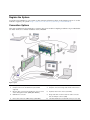
This section summarizes five methods to connect to the server module. Complete procedures are provided in the
Sun Blade T6340 Server Module Installation Guide, 820-3900.
Figure Legend
1
Server (local or remote)
6
Computer connected to CMM RJ-45 serial connector
2
Computer connected to RJ-45 Ethernet (remote KVM
supported)
7
Computer connected to dongle cable RJ-45 serial connector
3
Ethernet cable connected to RJ-45 Ethernet connector on the
chassis management module (CMM) (NET MGMT 0)
8
Keyboard, video monitor, mouse (local KVM)
4
CMM with two connectors
9
Dongle cable with one RJ-45 serial, two USB 2 connectors
and one HD15-pin connector (VGA)
5
RJ-45 cable connected to CMM serial port (SER MGT)
10
Sun Blade T6340 server module with service processor (SP)