1
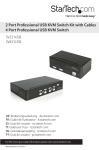
USB KVM Switch
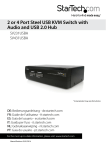
2 Port USB Desktop KVM Switch with Audio Switching
4 Port USB Desktop KVM Switch with Audio Switching
SV231USBA
SV431USBA
Instruction Manual
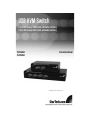
Actual product may vary from photo
FCC Compliance Statement
This equipment has been tested and found to comply with the limits for a Class B digital
device, pursuant to part 15 of the FCC Rules. These limits are designed to provide
reasonable protection against harmful interference in a residential installation. This
equipment generates, uses and can radiate radio frequency energy and, if not installed
and used in accordance with the instructions, may cause harmful interference to radio
communications. However, there is no guarantee that interference will not occur in a
particular installation. If this equipment does cause harmful interference to radio or
television reception, which can be determined by turning the equipment off and on, the
user is encouraged to try to correct the interference by one or more of the following
measures:
• Reorient or relocate the receiving antenna.
• Increase the separation between the equipment and receiver.
• Connect the equipment into an outlet on a circuit different from that to which the
receiver is connected.
• Consult the dealer or an experienced radio/TV technician for help.
Use of Trademarks, Registered Trademarks, and other Protected Names and
Symbols
This manual may make reference to trademarks, registered trademarks, and other
protected names and/or symbols of third-party companies not related in any way to
StarTech.com. Where they occur these references are for illustrative purposes only and
do not represent an endorsement of a product or service by StarTech.com, or an
endorsement of the product(s) to which this manual applies by the third-party company in
question. Regardless of any direct acknowledgement elsewhere in the body of this
document, StarTech.com hereby acknowledges that all trademarks, registered
trademarks, service marks, and other protected names and/or symbols contained in this
manual and related documents are the property of their respective holders.
Instruction Manual
Table of Contents
Introduction . . . . . . . . . . . . . . . . . . . . . . . . . . . . . . . . . . . . . . . . . . . . . .1
Features . . . . . . . . . . . . . . . . . . . . . . . . . . . . . . . . . . . . . . . . . . . . . . . .1
Before You Begin . . . . . . . . . . . . . . . . . . . . . . . . . . . . . . . . . . . . . . . . . .1
System Requirements . . . . . . . . . . . . . . . . . . . . . . . . . . . . . . . . . . . .1
Additional cables required . . . . . . . . . . . . . . . . . . . . . . . . . . . . . . . . .1
Contents . . . . . . . . . . . . . . . . . . . . . . . . . . . . . . . . . . . . . . . . . . . . . . .1
Installation . . . . . . . . . . . . . . . . . . . . . . . . . . . . . . . . . . . . . . . . . . . . . . .2
Installing the KVM Switch . . . . . . . . . . . . . . . . . . . . . . . . . . . . . . . . . .2
Connecting computers to the KVM Switch . . . . . . . . . . . . . . . . . . . . .2
Using the KVM Switch . . . . . . . . . . . . . . . . . . . . . . . . . . . . . . . . . . . . . .3
Keyboard Hotkey Command Reference Chart . . . . . . . . . . . . . . . . . .4
Binding/Unbinding control . . . . . . . . . . . . . . . . . . . . . . . . . . . . . . . . . .4
Valid Hotkey sequences . . . . . . . . . . . . . . . . . . . . . . . . . . . . . . . . . . .4
Programmable Autoscan delay time . . . . . . . . . . . . . . . . . . . . . . . . . .5
Accessory Products from StarTech.com . . . . . . . . . . . . . . . . . . . . . . .6
Technical Support . . . . . . . . . . . . . . . . . . . . . . . . . . . . . . . . . . . . . . . . .7
Warranty Information . . . . . . . . . . . . . . . . . . . . . . . . . . . . . . . . . . . . . . .7
i
Instruction Manual
Introduction
Thank you for purchasing a StarTech.com USB desktop KVM switch with audio
switching. This product allows you to switch 2 or 4 computers (depending on the model
purchased) including the audio signal. Designed for today’s cutting edge systems, it
features native support for USB input devices and VGA video. You can save space and
improve productivity by sharing one console among multiple computers without
sacrificing the quality of your video signal by using converters and adapters.
Features
• Natively supports USB peripherals and VGA video
• Also switches audio for a complete multimedia sharing solution
• Choice of configurable hotkey command sequence or front panel buttons for
control
Before You Begin
System Requirements
• Console: USB keyboard (1), USB mouse (1), VGA monitor (1), speakers (optional),
microphone (optional)
• Controlled systems: USB support, VGA video out, speaker out (optional),
microphone out (optional)
Additional cables required (not included): Each controlled computer will require a
USB Type A to Type B cable (1) and VGA switchbox cable (1) or StarTech.com 2-in-1
USB KVM cable (1), optional 3.5 mm phono male-to-male sound cable for speakers and
microphone (2). See page 5 for StarTech.com part numbers for all required cables.
Contents
This package should contain:
• USB Desktop KVM Switch (1)
• Power Adapter (1)
• Instruction Manual (1)
1
Instruction Manual
Installation
This section details how to connect your computers to the KVM switch. For best results,
ensure that all the computers to be controlled are located as close as possible to the
KVM switch and console peripherals (monitor, keyboard, mouse). This will reduce the
length of cabling required and reduces the chance of interference.
Installing the KVM Switch
1. Place the KVM switch in close proximity to the keyboard, mouse, and monitor you
wish to use as the console controls.
2. Connect the monitor to the VGA port under CONSOLE.
3. Connect a USB keyboard to the Type A connector under CONSOLE, marked with a
keyboard icon.
4. Connect a USB mouse to the Type A connector under CONSOLE, marked with a
mouse icon.
5. Connect speakers to the green 3.5mm phono connector under CONSOLE (optional).
6. Connect a microphone to the pink 3.5mm phono connector under CONSOLE
(optional).
7. Connect up to 2 other USB devices to the ports marked USB HUB (optional).
8. Plug the power adapter into a wall outlet or other suitable power source. Connect the
opposite end to the port marked DC 9V on the KVM switch.
Connecting computers to the KVM Switch
This section describes how to connect a computer you wish to control to the KVM switch.
Repeat these steps for each computer you wish to connect.
1. Remove any existing keyboards, mice, monitors, speakers, and microphones from the
computer.
2. Using a KVM switchbox cable, connect one end to the video out connector on the
computer. (This will be the same connector from which you disconnected the monitor
in step 1, if applicable.) Connect the opposite end to the video connector on the KVM
switch that corresponds to the computer number you wish to use for that system
2
Instruction Manual
(marked PC 1 ~ PC 2 or PC 1 ~ PC 4 as applicable).
3. Using a USB Type A to Type B cable, connect the “A” (flat) end to an available USB
port on the computer. Connect the opposite end to the “B” (D-shaped) USB
connector on the KVM switch that corresponds to the computer number you wish to
use for that system (directly under the monitor connection in step 2). This will provide
both keyboard and mouse access to that system.
4. Optional: You can use 3.5mm male-to-male phono speaker cable to connect the
speaker and/or microphone outputs on the computer to the corresponding connectors
on the KVM switch, located under the monitor connector that corresponds to that
computer on the KVM. Most computers have sound and microphone connectors that
are color-coded to the standard used on the KVM switch: green for speakers, pink for
microphone. See the documentation for the computer for assistance, if needed.
Using the KVM Switch
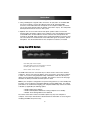
*SV431USBA shown
Green LED (solid) = Active Computer
Green LED (flashing) = No Powered Computer on that Port
Red LED (solid) = Active Control of USB Hub
Button = Switch control to that port
The KVM switch offers two convenient ways to switch console control of the attached
computers. The first is by using the buttons on the front panel to select which computer
is active. The second is using keyboard hotkey combinations, which also allow you to
adjust several configuration options on the KVM. The reference chart on the next page
describes the hotkey commands and their options in detail.
Note: If your computer is configured to use power-saving features (i.e. auto-standby after
inactivity), you may experience intermittent difficulty using the KVM switch. For optimal
performance we recommend configuring your computer’s BIOS setup software to enable
or disable (as applicable) the following options:
• Enable “USB Legacy Support”
• Enable “USB Keyboard and Mouse to bring computer out of standby”
• Disable “Power Saving Mode” for the USB hub
The names and location of these and similar options may vary from computer to
computer. Consult your manufacturer’s documentation for information on accessing and
modifying the BIOS setup if necessary.
3
Instruction Manual
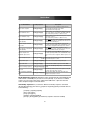
Keyboard Hotkey Command Reference Chart
Command Name
Hotkey Sequence
Select active computer
[ScrLk]+[ScrLk]+[x]
Select USB hub control
[ScrLk]+[ScrLk]+[Fx]
Select Audio/Mic output
[ScrLk]+[ScrLk]+[Fy]
Bind computer and USB hub
control (default)
[ScrLk]+[ScrLk]+[Z]
Unbind computer and USB
hub control
[ScrLk]+[ScrLk]+[X]
Bind computer and Audio/Mic
[ScrLk]+[ScrLk]+[Q]
control (default)
Description
Switches access to the computer connected to the
corresponding port number on the KVM.
([x]= a number on the keyboard)
Switches which corresponding port number has access
to the to the devices connected to the KVM’s USB hub.
([Fx] = Function key: F1=Port 1, F2=Port 2, etc.)
Switches which port’s speaker and microphone output is
active at the console.
([Fy] = Function key: F5=Port 1, F6=Port 2, etc.)
When either the select active computer or select USB
hub control commands are executed, both functions are
switched to the selected port.
The computer control and USB hub control can be
executed separately; KVM control and USB hub control
control can be assigned to different ports at one time.
When either the select active computer or select
audio/mic output control commands are executed, both
functions are switched to the selected port.
The computer control and USB hub control can be
executed separately; KVM control and Audio/Mic output
control control can be assigned to different ports at one
time.
Unbind computer and
Audio/Mic output control
[ScrLk]+[ScrLk]+[W]
Select next/previous port
Ç, È]
[ScrLk]+[ScrLk]+[Ç
Select previous port
[ScrLk]+[ScrLk]+[BkSp] Selects the most recent previously active port.
Beep sound on/off
[ScrLk]+[ScrLk]+[B]
Enables/disables audible responses from the KVM.
Define new hotkey sequence
[ScrLk]+[ScrLk]+[H]+[y]
Change the standard [ScrLk] hotkey to a new value (see
below).
Autoscan
[ScrLk]+[ScrLk]+[S]
Automatically switch active ports in sequence every 10
seconds. (Press any key to cancel.)
Autoscan with programmable
delay
[ScrLk]+[ScrLk]+[S]+[z]
Autoscan with a delay other than 10 seconds (see
below). Press any key to cancel.
Selects the next (up arrow key) or previous (down arrow
key) numbered port for control.
Binding/Unbinding control: By default the switch will automatically switch USB hub and
audio control to the KVM port you select to control (bound). If you choose to “unbind”
control, you can assign control of the audio and/or USB hub to a port other than the
active computer using the commands above.
Valid hotkey sequences: If you enter the “Define new hotkey sequence” command
([ScrLk]+[ScrLk]+[H]+[y] the value of [y] replaces the [ScrLk]+[ScrLk] command with one
of the following:
[CapsLk] = [CapsLk]+[CapsLk]
[Esc] = [Esc]+[Esc]
[F12] = [F12]+[F12]
[NumLk] = [NumLk]+[NumLk]
[ScrLk] = [ScrLk]+[ScrLk] (if another key sequence has been enabled)
4
Instruction Manual
Programmable Autoscan delay time: [z] can be any one of the following values:
1=10 sec., 2=20 sec. through 9=90 sec., 0=100 sec.
Note: Apple computers will need to be programmed using an IBM-compatible keyboard
that has a Scroll Lock key.
5
Instruction Manual
Accessory Products from StarTech.com
Contact your local StarTech.com dealer or visit www.startech.com for cables or other
accessories that will help you get the best performance out of your new product.
SVUSB2N1_6
6 ft. USB+VGA 2-in-1 KVM Switch Cable
SVUSB2N1_10
10 ft. USB+VGA 2-in-1 KVM Switch Cable
SVUSB2N1_15
15 ft. USB+VGA 2-in-1 KVM Switch Cable
MU6MM
6 ft. Stereo Patch Cable 3.5mm Male to 3.5mm Male
Please Note: Gender changer GC15HSM is required when using this product with
SVUSB2N1 series 2-in-1 USB KVM cables
6
Instruction Manual
Technical Support
StarTech.com’s lifetime technical support is an integral part of our commitment to provide
industry-leading solutions. If you ever need help with your product, visit
www.startech.com/support and access our comprehensive selection of online tools,
documentation, and downloads.
Warranty Information
This product is backed by a one-year warranty. In addition, StarTech.com warrants its
products against defects in materials and workmanship for the periods noted, following
the initial date of purchase. During this period, the products may be returned for repair, or
replacement with equivalent products at our discretion. The warranty covers parts and
labor costs only. StarTech.com does not warrant its products from defects or damages
arising from misuse, abuse, alteration, or normal wear and tear.
Limitation of Liability
In no event shall the liability of StarTech.com Ltd. and StarTech.com USA LLP (or their
officers, directors, employees or agents) for any damages (whether direct or indirect,
special, punitive, incidental, consequential, or otherwise), loss of profits, loss of business,
or any pecuniary loss, arising out of or related to the use of the product exceed the
actual price paid for the product.
Some states do not allow the exclusion or limitation of incidental or consequential
damages. If such laws apply, the limitations or exclusions contained in this statement
may not apply to you.
7
About StarTech.com
StarTech.com is “The Professionals’ Source for Hard-to-Find Computer
Parts”. Since 1985, we have been providing IT professionals with the
quality products they need to complete their solutions. We offer an
unmatched selection of computer parts, cables, server management
solutions and A/V products and serve a worldwide market through our
locations in the United States, Canada, the United Kingdom and Taiwan.
Visit www.startech.com for complete information about all our products
and to access exclusive interactive tools such as the Parts Finder and the
KVM Reference Guide. StarTech.com makes it easy to complete almost
any IT solution. Find out for yourself why our products lead the industry in
performance, support, and value.
Revised: 18 April 2007 (Rev. A)