1
Hardware Installation
1. Install Transmitter Unit
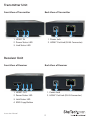
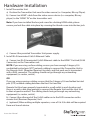
a) Position the Transmitter Unit near the video source (i.e. Computer, Blu-ray Player).
b) Connect an HDMI® cable from the video source device (i.e. computer, Blu-ray
player) to the “HDMI® IN” on the transmitter unit.
Note: If you have installed the hex jack screw for a locking HDMI cable, please
ensure you lock the cable into place by screwing the thumb screw into the hex jack.
c) Connect the provided Transmitter Unit power supply.
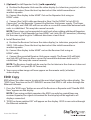
2. Install RJ-45 terminated Cat5/6 Ethernet Cable
a) Connect an RJ-45 terminated Cat5/6 Ethernet cable to the HDMI® Out Link (RJ-45
Connector) on the Transmitter unit.
NOTE: If you are using surface cabling, ensure you have enough Category 5/6
unshielded twisted pair (UTP) network cabling to connect the Transmitter Unit to
the Remote Unit’s (Repeater/Receiver) location, and that each end is terminated
with a RJ45 connector. The cabling should not go through any networking
equipment (i.e. router, switch).
OR
If you are using premises cabling, ensure that the Category 5/6 unshielded twisted
pair (UTP) network cabling between the Host Unit and the
Remote Unit has been properly terminated in a wall outlet in each location and
there is a patch cable long enough to connect the Remote Unit and the Host Unit
to their respective outlets. The cabling should not go through any networking
equipment (i.e. router, switch).
b) Connect the other end of the Cat5/6 cable run to the RJ45 connector on the
remote Unit (Receiver/Repeater) Unit.
c) (optional) When adding multiple repeaters, a run of Cat 5/6 cable will be required
from and to each device.
Instruction Manual
5