1
3-067-100-E1 (1) GB
Video Cassette
Recorder
Operating Instructions
PAL
SLV-X9D/E
© 2001 Sony Corporation
WARNING
To prevent fire or shock hazard, do not expose the
unit to rain or moisture.
To avoid electrical shock, do not open the cabinet.
Refer servicing to qualified personnel only.
Mains lead must only be changed at a qualified
service shop.
Precautions
Safety
• This unit operates on 220 – 240 V AC, 50 Hz.
Check that the unit’s operating voltage is
identical with your local power supply.
• If anything falls into the cabinet, unplug the unit
and have it checked by qualified personnel before
operating it any further.
• The unit is not disconnected from the mains as
long as it is connected to the mains, even if the
unit itself has been turned off.
• Unplug the unit from the wall outlet if you do not
intend to use it for an extended period of time. To
disconnect the cord, pull it out by the plug, never
by the cord.
Installing
• Allow adequate air circulation to prevent internal
heat buildup.
• Do not place the unit on surfaces (rugs, blankets,
etc.) or near materials (curtains, draperies) that
may block the ventilation slots.
• Do not install the unit near heat sources such as
radiators or air ducts, or in a place subject to
direct sunlight, excessive dust, mechanical
vibration or shock.
• Do not install the unit in an inclined position. It is
designed to be operated in a horizontal position
only.
• Keep the unit and cassettes away from equipment
with strong magnets, such as microwave ovens or
large loudspeakers.
• Do not place heavy objects on the unit.
• If the unit is brought directly from a cold to a
warm location, moisture may condense inside the
VCR and cause damage to the video head and
tape. When you first install the unit, or when you
move it from a cold to a warm location, wait for
about three hours before operating the unit.
Caution
Television programmes, films, video tapes and other
materials may be copyrighted. Unauthorized
recording of such material may be contrary to the
provisions of the copyright laws. Also, use of this
recorder with cable television transmission may
require authorization from the cable television
transmitter and/or programme owner.
2 WARNING
Compatible colour systems
This VCR is designed to record using the PAL (B/
G) colour system and play back using the PAL (B/
G) colour system. Recording of video sources based
on other colour systems cannot be guaranteed.
SHOWVIEW is a registered trademark of Gemstar
Development Corporation. The SHOWVIEW system
is manufactured under license from Gemstar
Development Corporation.
Power consumption during standby:
• Power consumption during standby at
“FULL” of Power save mode 1.2 W
Reduction and phase-out of
halogenated flame retardant:
• Halogenated flame retardant not used in
print wired boards of main portions.
• Halogenated flame retardant not used in
Front panel and Rear panel.
Complete abolition of polystyrene
foam:
• Cushion materials formed by corrugated
board used in packaging materials.
is included as an indication of Sony’s
consideration toward the environment.
Getting Started
4 Index to parts and controls
9 Step 1 : Unpacking
10 Step 2 : Setting up the remote
commander
14 Step 3 : Connecting the VCR
20 Step 4 : Tuning your TV to the
VCR
23 Step 5 : Setting up the VCR with
the Auto Set Up function
26 Step 6 : Setting the clock
30 Step 7 : Setting the Set-Top Box
37 Selecting a language
38 Presetting channels
41 Changing/disabling programme
positions
46 Setting the PAY-TV/Canal Plus
decoder
Additional Operations
68
70
71
73
75
77
79
84
85
87
88
Playing/searching at various speeds
Setting the recording duration time
Synchronized Recording
Checking/changing/cancelling
timer settings
Recording stereo and bilingual
programmes
Searching using the Smart Search
function
Storing, searching and deleting
programme information (Smart
Search Plus)
Searching using the index function
Adjusting the picture
Reducing the VCR’s power
consumption
Changing menu options
Getting Started
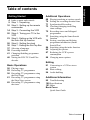
Table of contents
Editing
Basic Operations
50 Playing a tape
52 Recording TV programmes
56 Recording TV programmes using
the Dial Timer
61 Recording TV programmes using
the ShowView system
65 Recording TV programmes using
the timer
91 Connecting to a VCR or stereo
system
93 Basic editing
94 Audio dubbing
Additional Information
95 Troubleshooting
100 Specifications
101 Index
Back Cover
Quick Start Guide
Table of contents
3
Getting Started
Index to parts and controls
Refer to the pages indicated in parentheses ( ) for details.
Front panel
A ?/1 (on/standby) switch (20)
M
B Tape compartment
N PROGRAM +/– buttons (23) (69)
(85)
C Remote sensor (10)
D A (eject) button (50)
E Shuttle ring (68)
F H (play) button (50) (68)
G JOG button (69)
H REC z (record) button (93)
I X (pause) button (50) (93)
J x (stop) button (50) (93)
K M (fast-forward) button (50) (68)
L m (rewind) button (50) (68)
4 Index to parts and controls
DIAL TIMER (56)
O AUDIO DUB button (94)
P AUTO SET UP/RF (Radio
Frequency) CHANNEL button (20)
(23)
Q SYNCHRO REC (Synchronized
Recording) button (72)
R t LINE-2 L (left) o R (right)
jacks (covered) (91) (92)
How to open the jack cover
1 Press the bottom of the cover.
2 Hook your finger on the top edge of the
cover and pull it open.
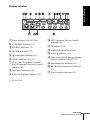
Display window
VPS SPLP OPC
PDC EP STB
TV
Getting Started
STEREO NICAM VIDEO
SYNCHRO
RR
A Timer indicator (58) (63) (66)
B SYNCHRO indicator (71)
C STEREO indicator (75)
D NICAM indicator* (75)
E
(smartlink) indicator (16)
F VIDEO indicator (15) (53)
G VPS (Video Programme System)/
PDC (Programme Delivery Control)
indicator (63)
H Tape speed indicators (52)
I STB (Set-Top Box) indicator (52)
J OPC (Optimum Picture Control)
indicator (86)
K TV indicator (54)
L Audio dubbing indicator (94)
M Tracking indicator (85)
N Time counter/clock/line/programme
position indicator (50) (52) (93)
O Remaining time indicator (53)
P RR (Reality Regenerator) indicator
(85)
Q Tape/recording indicator (53)
* SLV-X9E only
continued
Index to parts and controls
5
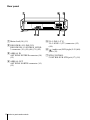
Rear panel
A Mains lead (14) (15)
B DECODER/t LINE-3 IN
DECODEUR/t ENTREE LIGNE3 connector (18) (19) (46) (71) (92)
C AERIAL IN
ANTENNE ENTREE connector (14)
(15)
D AERIAL OUT
ANTENNE SORTIE connector (14)
(15)
6 Index to parts and controls
E i LINE-1 (TV)
i LIGNE-1 (TV) connector (15)
(46)
F
(audio out) R/D (right) L/G (left)
jacks (19)
G STB CONTROL
CONTROLEUR STB jack (17) (18)
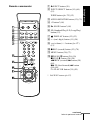
A Z EJECT button (50)
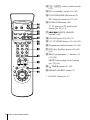
Remote commander
WIDE button (for TV) (12)
C AUDIO MONITOR button (12) (75)
D ×2 button* (68)
Getting Started
B INPUT SELECT button (54) (66)
(93)
E y SLOW button* (68)
F SP (Standard Play)/LP (Long Play)
button (52)
G
DISPLAY button (12) (53)
H - (ten’s digit) button (11) (54)
1
2
3
I 2 (volume) +/– buttons (for TV)
(12)
4
5
6
J z REC (record) button (53) (70)
7
8
9
K MENU button (26) (73)
0
L X PAUSE/M button (26) (50)
x STOP/m button (26) (50)
m REW (rewind)/< button (50)
(68)
M FF (fast-forward)/, button
(50) (68)
H PLAY/OK button (26) (50)
* FASTEXT buttons (for TV)
continued
Index to parts and controls
7
M [TV] / [VIDEO] remote control switch
(10)
N ?/1 (on/standby) switch (11) (63)
O COUNTER/REMAIN button (53)
/ (Teletext) button (for TV) (12)
P AUDIO DUB button (94)
a TV power on/TV mode select
button (for TV) (12)
Q ./> INDEX SEARCH
buttons* (84)
R CLEAR button (50) (62) (73)
S t TV/VIDEO button (11) (15) (53)
1
2
3
T Programme number buttons (11) (54)
4
5
6
7
8
9
U STB (Set-Top Box) button (52) (62)
(66)
0
V PROG (programme) +/– buttons (11)
(39) (52)
c/C Teletext page access buttons
(for TV) (12)
W
TIMER button (61) (65)
X SMART SEARCH button (77)
* FASTEXT buttons (for TV)
8 Index to parts and controls
Getting Started
Step 1 : Unpacking
Check that you have received the following items with the VCR:
• Remote commander
• Aerial cable
• R6 (size AA) batteries
• Set-Top Box controller
Unpacking
9
Step 2 : Setting up the remote commander
Inserting the batteries
Insert two R6 (size AA)
batteries by matching the + and
– on the batteries to the
diagram inside the battery
compartment.
Insert the negative (–) end first,
then push in and down until the
positive (+) end clicks into
position.
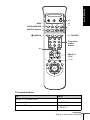
Using the remote
commander
Remote sensor
You can use this remote
commander to operate this
VCR and a Sony TV. Buttons
on the remote commander
marked with a dot (•) can be
used to operate your Sony TV.
If the TV does not have the
symbol near the remote sensor,
this remote commander will
not operate the TV.
[TV] /
[VIDEO]
1
2
3
4
5
6
7
8
9
0
To operate
Set [TV] / [VIDEO] to
the VCR
[VIDEO] and point at the remote sensor at the VCR
a Sony TV
[TV] and point at the remote sensor at the TV
10 Setting up the remote commander
/
AUDIO MONITOR
a
Getting Started
?/1
WIDE
FASTEXT buttons
t TV/VIDEO
DISPLAY
-
1
2
3
4
5
6
7
8
9
Programme
number
buttons
0
PROG +/–/
c/C
2 +/–
TV control buttons
To
Press
Set the TV to standby mode
?/1
Select an input source: aerial in or line in
t TV/VIDEO
Select the TV’s programme position
Programme number buttons,
-, PROG +/–
continued
Setting up the remote commander
11
To
Press
Adjust the volume of the TV
2 +/–
Switch to TV (Teletext off)
a (TV)
Switch to Teletext
/ (Teletext)
Select the sound
AUDIO MONITOR
Use FASTEXT
FASTEXT buttons
Call up the on-screen display
DISPLAY
Change the Teletext page
c/C
Switch to/from wide mode of a Sony wide TV (For
other manufactures’ wide TVs, see “Controlling
other TVs with the remote commander” below.)
WIDE
Notes
• With normal use, the batteries should last about three to six months.
• If you do not use the remote commander for an extended period of time, remove
the batteries to avoid possible damage from battery leakage.
• Do not use a new battery together with an old one.
• Do not use different types of batteries together.
• Some buttons may not work with certain Sony TVs.
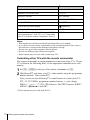
Controlling other TVs with the remote commander
The remote commander is preprogrammed to control non-Sony TVs. If your
TV is listed in the following table, set the appropriate manufacturer’s code
number.
1 Set [TV] / [VIDEO] at the top of the remote commander to [TV].
down ?/1, and enter your TV’s code number using the programme
2 Hold
number buttons. Then release ?/1.
Now you can use the following TV control buttons to control your TV:
?/1, t TV/VIDEO, programme number buttons, - (ten’s digit),
PROG +/–, 2 +/–, a (TV), / (Teletext), FASTEXT buttons, WIDE*,
MENU*, M/m/</,*, and OK*.
* These buttons may not work with all TVs.
12 Setting up the remote commander
To switch to wide mode, see the footnotes below this table for the applicable
code numbers.
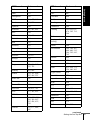
Manufacturer
Code number
Manufacturer
Code number
Sony
01*1,
Nokia
15, 16, 69*3
Akai
68
Panasonic
17*1, 49
Ferguson
52
Philips
06*1, 07*1, 08*1
Grundig
10*1, 11*1
Saba
12, 13
Hitachi
24
Samsung
22, 23
JVC
33
Sanyo
25
Loewe
45
Sharp
29
Mivar
09, 70
Telefunken
36
NEC
66
Thomson
43*2
Toshiba
38
02
Getting Started
Code numbers of controllable TVs
If more than one code number is listed, try entering them one at a time until
you find the one that works with your TV.
*1 Press WIDE to switch the wide picture mode on or off.
*2 Press WIDE, then press 2 +/– to select the wide picture mode you want.
*3 Press WIDE. The menu appears on the TV screen. Then, press M/m/</, to
select the wide picture you want and press OK.
Tip
• When you set your TV’s code number correctly while the TV is turned on, the TV
turns off automatically.
Notes
• If you enter a new code number, the code number previously entered will be
erased.
• If the TV uses a different remote control system from the one programmed to work
with the VCR, you cannot control your TV with the remote commander.
• When you replace the batteries of the remote commander, the code number may
change. Set the appropriate code number every time you replace the batteries.
Setting up the remote commander
13
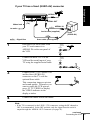
Step 3 : Connecting the VCR
If your TV has a Scart (EURO-AV) connector, see page 15.
• Connection to your TV with an aerial cable only, see this page.
• Connection to your TV and Set-Top Box, see page 17.
• Connection to your TV and decoder, see page 46.
If your TV does not have a Scart (EURO-AV) connector
AERIAL IN
AERIAL OUT
Mains lead
AERIAL IN
to mains
Aerial cable (supplied)
: Signal flow
1
Disconnect the aerial cable from
your TV and connect it to
AERIAL IN on the rear panel of
the VCR.
2
Connect AERIAL OUT of the
VCR and the aerial input of your
TV using the supplied aerial cable.
AERIAL
ANTENNE
IN
ENTREE
OUT
SORTIE
AERIAL
ANTENNE
IN
ENTREE
OUT
SORTIE
3
Connect the mains lead to the mains.
Note
• When you connect the VCR and your TV only with an aerial cable, you have to
tune your TV to the VCR (see page 20).
14 Connecting the VCR
If your TV has a Scart (EURO-AV) connector
Getting Started
AERIAL IN
i LINE-1
(TV)
Mains lead
AERIAL OUT
AERIAL IN
to mains
Aerial cable (supplied)
: Signal flow
1
2
Scart
(EURO-AV)
Scart cable (not supplied)
Disconnect the aerial cable from
your TV and connect it to
AERIAL IN on the rear panel of
the VCR.
Connect AERIAL OUT of the
VCR and the aerial input of your
TV using the supplied aerial cable.
AERIAL
ANTENNE
IN
ENTREE
OUT
SORTIE
AERIAL
ANTENNE
IN
ENTREE
OUT
SORTIE
3
Connect LINE-1 (TV) on the VCR
and the Scart (EURO-AV)
connector on the TV with the
optional Scart cable.
This connection improves picture
and sound quality. Whenever you
want to watch the VCR picture,
press t TV/VIDEO to display
the VIDEO indicator in the
display window.
4
Connect the mains lead to the mains.
Note
• If the TV is connected to the LINE-1 (TV) connector, setting the RF channel to
OFF is recommended. In the OFF position, only the signal from the aerial is
output through the AERIAL OUT connector (see page 22).
continued
Connecting the VCR
15
About the SMARTLINK features
If the connected TV complies with
SMARTLINK, MEGALOGIC*1,
EASYLINK*2, Q-Link*3, EURO
VIEW LINK*4, or T-V LINK*5, this
VCR automatically runs the
SMARTLINK function after you complete the steps on the previous page
(the
indicator appears in the VCR’s display window when you turn on the
TV). You can enjoy the following SMARTLINK features.
• Preset Download
You can download your TV tuner preset data to this VCR and tune the
VCR according to that data in Auto Set Up. This greatly simplifies the
Auto Set Up procedure. Be careful not to disconnect the cables or exit the
Auto Set Up function during the procedure.
See “Setting up the VCR with the Auto Set Up function” on page 23.
• TV Direct Rec
You can easily record what you are watching on the TV. For details, see
“Recording what you are watching on the TV (TV Direct Rec)” on page
54.
• One Touch Play
With One Touch Play, you can start playback automatically without turning
on the TV. For details, see “Starting playback automatically with one
button (One Touch Play)” on page 51.
• One Touch Menu
You can turn on the VCR and TV, set the TV to the video channel, and
display the VCR’s on-screen display automatically by pressing MENU on
the remote commander.
• One Touch Timer
You can turn on the VCR and TV, set the TV to the video channel, and
display the timer recording menu (the TIMER METHOD menu, the
TIMER menu, or the SHOWVIEW menu) automatically by pressing
TIMER on the remote commander.
You can set which timer recording menu is displayed using TIMER
OPTIONS in the OPTIONS-2 menu (see page 89).
• Automatic Power Off
You can have the VCR turn off automatically, if the VCR is not used after
you turn off the TV.
*1 “MEGALOGIC” is a registered trademark of Grundig Corporation.
*2 “EASYLINK” is a trademark of Philips Corporation.
*3 “Q-Link” is a trademark of Panasonic Corporation.
*4 “EURO VIEW LINK” is a trademark of Toshiba Corporation.
*5 “T-V LINK” is a trademark of JVC Corporation.
Note
• Not all TVs respond to the functions above.
16 Connecting the VCR
Connection to your TV and Set-Top Box (STB)
Getting Started
Set-Top Box (STB) refers to a satellite or digital tuner.
If your STB has a Scart (EURO-AV) connector, see page 18.
If your STB does not have a Scart (EURO-AV) connector
Set the STB CONNECTION setting to RF (see page 31).
Aerial cable (not supplied)
STB
STB
CONTROL
AERIAL IN
STB controller’s
side view
(supplied)
i LINE-1
(TV)
AERIAL OUT
AERIAL IN
Aerial cable (supplied)
Scart
(EURO-AV)
: Signal flow
Scart cable* (not supplied)
* If your TV does not have a Scart (EURO-AV) connector, the Scart cable connected
to the VCR is not required.
continued
Connecting the VCR
17
If your STB has a Scart (EURO-AV) connector
The illustration below shows an example of connecting the STB to DECODER/LINE3 IN. In this case, set the STB CONNECTION setting to LINE3 (see page 31).
Scart cable (supplied with
the STB)
STB
STB controller’s
side view
(supplied)
STB
CONTROL
DECODER/
t LINE-3 IN
AERIAL IN
i LINE-1
(TV)
AERIAL OUT
AERIAL IN
Aerial cable
(supplied)
: Signal flow
Scart
(EURO-AV)
Scart cable (not supplied)
You can watch programmes from the Set-Top Box connected to this VCR on your TV
even when the VCR is turned off using the Line Through function. When you turn on
the STB, this VCR automatically sends the signal from the STB to the TV without
turning itself on.
1 Set DECODER/LINE3 to LINE3 in the OPTIONS-2 menu.
2 Set POWER SAVE to OFF or PARTIAL in the OPTIONS-2 menu.
3 Turn off the VCR.
To watch a programme from the STB, turn on the STB and the TV.
For details, see page 30.
Note
• You cannot watch programmes from your STB on the TV while recording unless
you record a programme from your STB.
18 Connecting the VCR
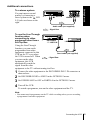
Additional connections
R/D L/G
LINE IN
Getting Started
To a stereo system
You can improve sound
quality by connecting a
stereo system to the
R/D
L/G jacks as shown on the
right.
Audio cable (not supplied)
: Signal flow
To use the Line Through
function when
connecting to video
DECODER/
equipment other than a
LINE OUT
t LINE-3 IN
Set-Top Box
Using the Line Through
function, you can watch
programmes from other
equipment connected to this
Scart cable (not supplied)
VCR on the TV even when
the VCR is turned off. When
: Signal flow
you turn on the other
equipment, this VCR
automatically sends the
signal from the other
equipment to the TV without turning itself on.
the other equipment to the DECODER/LINE-3 IN connector as
1 Connect
shown above.
2 Set DECODER/LINE3 to LINE3 in the OPTIONS-2 menu.
3 Set POWER SAVE to OFF or PARTIAL in the OPTIONS-2 menu.
4 Turn off the VCR.
To watch a programme, turn on the other equipment and the TV.
Note
• You cannot watch programmes on the TV while recording unless you are recording
a programme from other equipment.
Connecting the VCR
19
Step 4 : Tuning your TV to the VCR
If your TV has a Scart (EURO-AV) connector, see page 21.
If your TV does not have a Scart (EURO-AV) connector
Follow the steps below so that your TV will properly receive the video
signals from your VCR.
?/1
RF CHANNEL
PROGRAM +/–
1
2
Press ?/1 (on/standby) to turn on the VCR.
AUTO
SET UP
Press RF CHANNEL on the VCR lightly.
The currently set RF channel appears in the display window.
The VCR signal is output through this channel to the TV.
RF CHANNEL
3
Turn on your TV and select a programme position for the VCR
picture.
This programme position will now be referred to as the video
channel.
20 Tuning your TV to the VCR
Tune the TV to the same channel
shown in the VCR display window so
that the picture on the right appears
clearly on the TV screen.
SONY VIDEO CASSETTE RECORDER
Refer to your TV manual for TV
tuning instructions.
If the picture does not appear clearly,
see “To obtain a clear picture from the
VCR” below.
5
AUTO
SET UP
Getting Started
4
Press RF CHANNEL.
You have now tuned your TV to the VCR. Whenever you want to
play a tape, set the TV to the video channel.
RF CHANNEL
To check to see if the TV tuning is correct
Set the TV to the video channel and press PROGRAM +/– on the VCR. If
the TV screen changes to a different programme each time you press
PROGRAM +/–, the TV tuning is correct.
To obtain a clear picture from the VCR
If the screen does not appear clearly in step 4 above, press PROGRAM +/–
so that another RF channel appears. Then tune the TV to the new RF
channel so that a clear picture appears.
If your TV has a Scart (EURO-AV) connector
?/1
RF CHANNEL
PROGRAM +/–
1
Press ?/1 (on/standby) to turn on the VCR.
continued
Tuning your TV to the VCR
21
2
AUTO
SET UP
The currently set RF channel appears in the display window.
RF CHANNEL
3
Press RF CHANNEL on the VCR lightly.
PROGRAM
The VCR signal is output through this channel to the TV.
Press PROGRAM +/– to set the RF channel to OFF, and press RF
CHANNEL again.
AUTO
SET UP
RF channel set up is complete.
RF CHANNEL
22 Tuning your TV to the VCR
Before using the VCR for the first time, set up the VCR using the Auto Set
Up function. With this function, you can set the language for the on-screen
display, TV channels, guide channels for the ShowView system, and VCR
clock automatically.
?/1
Getting Started
Step 5 : Setting up the VCR with the Auto
Set Up function
AUTO SET UP
PROGRAM +/–
1
AUTO
SET UP
RF CHANNEL
2
PROGRAM
Hold down AUTO SET UP on the VCR for more than three
seconds.
The VCR automatically turns on, and the country abbreviation
appears in the display window.
Press PROGRAM +/– to select the abbreviation of your country
from the table on page 24.
For some countries, there is a selection of languages to choose from.
If your country does not appear, select ELSE.
continued
Setting up the VCR with the Auto Set Up function
23
3
AUTO
SET UP
Press AUTO SET UP lightly.
The VCR starts searching for all of the receivable channels and
presets them (in the appropriate order for your local area).
RF CHANNEL
If you want to change the order of the channels or disable unwanted
programme positions, see “Changing/disabling programme
positions” on page 41.
If you use the SMARTLINK connection, the Preset Download
function starts and the
indicator flashes in the display window
during download.
After the search or download is complete, the current time appears
in the display window for any stations that transmit a time signal.
The abbreviations of the countries and languages are as follows:
Abbreviation Country
Language
Abbreviation Country
Language
A
Austria
German
I
Italy
Italian
B-D
Belgium
German
L-D
Luxembourg German
B-F
Belgium
French
L-F
Luxembourg French
B-N
Belgium
Dutch
N
Norway
CH-D
Switzerland
German
NL
Netherlands Dutch
CH-F
Switzerland
French
P
Portugal
Portuguese
CH-I
Switzerland
Italian
S
Sweden
Swedish
D
Germany
German
SF
Finland
Finnish
DK
Denmark
Danish
ELSE
English
E
Spain
Spanish
Other
countries
GR
Greece
Greek
Danish
To cancel the Auto Set Up function
Press AUTO SET UP.
Tip
• If you want to change the language for the on-screen display from the one preset in
the Auto Set Up function, see page 37.
24 Setting up the VCR with the Auto Set Up function
Setting up the VCR with the Auto Set Up function
Getting Started
Notes
• If you stop the Auto Set Up function during step 3, you must repeat set up from
step 1.
• Whenever you operate the Auto Set Up function, some of the settings (ShowView,
timer, etc.) will be reset. If this happens, you have to set them again.
25
Step 6 : Setting the clock
You must set the time and date on the VCR to use the timer features properly.
The Auto Clock Set function works only if a station in your area is broadcasting a
time signal. If the Auto Set Up function did not set the clock correctly for your local
area, try another station for the Auto Clock Set function.
Setting the clock manually
Before you start…
• Turn on the VCR and the TV.
• Set the TV to the video channel.
• Refer to “Index to parts and controls” for button locations.
1
MENU
Press MENU, then press M/m to
highlight SETTINGS and press OK.
SETTINGS
SET-TOP BOX
TUNER
CLOCK
LANGUAGE
RETURN
PLAY
SELECT :
SET
: OK
OK
EXIT : MENU
2
Press M/m to highlight CLOCK, then
press OK.
CLOCK
AUTO ADJUST
CLOCK PROGRAM
MANUAL ADJUST
1 . 1 . 2001
PLAY
OK
OFF
MON
0 : 00
SELECT :
SET
: OK
EXIT : MENU
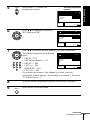
3
Press M/m to highlight MANUAL
ADJUST, then press OK.
PLAY
OK
CLOCK
AUTO ADJUST
CLOCK PROGRAM
MANUAL ADJUST
1 . 1 . 2001
OFF
MON
0 : 00
SELECT
:
SET
:
CONFIRM : OK
EXIT : MENU
26 Setting the clock
Press M/m to set the day.
CLOCK
AUTO ADJUST
CLOCK PROGRAM
MANUAL ADJUST
28 . 1 . 2001
PLAY
OK
OFF
SUN
0 : 00
SELECT
:
SET
:
CONFIRM : OK
EXIT : MENU
5
PLAY
Press , to highlight the month and
set the month pressing M/m.
OK
Getting Started
4
CLOCK
AUTO ADJUST
CLOCK PROGRAM
MANUAL ADJUST
28 . 9 . 2001
OFF
FRI
0 : 00
SELECT
:
SET
:
CONFIRM : OK
EXIT : MENU
6
PLAY
OK
Set the year, hour, and minutes in
sequence, pressing , to highlight the
item to be set, and press M/m to select
the digits.
The day of the week is set
automatically.
CLOCK
AUTO ADJUST
CLOCK PROGRAM
MANUAL ADJUST
28 . 9 . 2001
OFF
FRI
18 : 00
SELECT
:
SET
:
CONFIRM : OK
EXIT : MENU
7
Press OK to start the clock.
CLOCK
AUTO ADJUST
CLOCK PROGRAM
MANUAL ADJUST
28 . 9 . 2001
PLAY
OK
OFF
FRI
18 : 00
SELECT :
SET
: OK
EXIT : MENU
8
MENU
Press MENU to exit the menu.
Tips
• To change the digits while setting, press < to return to the item to be changed, and
select the digits by pressing M/m.
• If you want to return to the previous menu, highlight RETURN and press OK.
Note
• The menu disappears automatically if you do not proceed for more than a few
minutes.
continued
Setting the clock
27
Changing the station for the Auto Clock Set function
Before you start…
• Turn on the VCR and the TV.
• Set the TV to the video channel.
• Refer to “Index to parts and controls” for button locations.
1
MENU
Press MENU, then press M/m to
highlight SETTINGS and press OK.
SETTINGS
SET-TOP BOX
TUNER
CLOCK
LANGUAGE
RETURN
PLAY
SELECT :
SET
: OK
OK
2
EXIT : MENU
Press M/m to highlight CLOCK, then
press OK.
PLAY
OK
AUTO ADJUST is highlighted.
CLOCK
AUTO ADJUST
CLOCK PROGRAM
MANUAL ADJUST
28 . 9 . 2001
ON
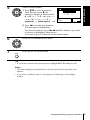
1
FRI
AAB
18 : 00
SELECT :
SET
: OK
EXIT : MENU
3
Press OK.
CLOCK
AUTO ADJUST
CLOCK PROGRAM
MANUAL ADJUST
28 . 9 . 2001
PLAY
OK
ON
OFF
FRI
18 : 00
SELECT
:
CONFIRM : OK
EXIT : MENU
4
Press M/m to highlight ON, then press
OK.
PLAY
OK
CLOCK
AUTO ADJUST
CLOCK PROGRAM
MANUAL ADJUST
28 . 9 . 2001
ON
1
FRI
AAB
18 : 00
SELECT :
SET
: OK
EXIT : MENU
28 Setting the clock
Press m to highlight CLOCK
PROGRAM, then press OK.
PLAY
OK
CLOCK
AUTO ADJUST
CLOCK PROGRAM
MANUAL ADJUST
28 . 9 . 2001
1
FRI
AAB
18 : 00
SELECT
:
CONFIRM : OK
EXIT : MENU
6
PLAY
Press M/m repeatedly until the
programme position of the station that
carries a time signal appears.
OK
If the VCR does not receive a time
signal from any station, AUTO
ADJUST returns to OFF
automatically.
7
Getting Started
5
CLOCK
AUTO ADJUST
CLOCK PROGRAM
MANUAL ADJUST
28 . 9 . 2001
2
FRI
CDE
18 : 00
SELECT
:
CONFIRM : OK
EXIT : MENU
Press MENU to exit the menu.
MENU
Tips
• If you set AUTO ADJUST to ON, the Auto Clock Set function is activated
whenever the VCR is turned off. The time is adjusted automatically by making
reference to the time signal from the station whose programme position is
displayed in the “CLOCK PROGRAM” row. If you do not need the Auto Clock
Set, select OFF.
• If you want to return to the previous menu, highlight RETURN and press OK.
Note
• The menu disappears automatically if you do not proceed for more than a few
minutes.
Setting the clock
29
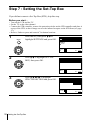
Step 7 : Setting the Set-Top Box
If you did not connect a Set-Top Box (STB), skip this step.
Before you start…
• Turn on the VCR and the TV.
• Set the TV to the video channel.
• Connect the STB controller, remove the protection sticker on the STB controller and place it
on top of the STB, so that it hangs out over the infrared receptor on the STB front (see page
17).
• Refer to “Index to parts and controls” for button locations.
1
MENU
Press MENU, then press M/m to
highlight SETTINGS and press OK.
SETTINGS
SET-TOP BOX
TUNER
CLOCK
LANGUAGE
RETURN
PLAY
SELECT :
SET
: OK
EXIT : MENU
OK
2
Press M/m to highlight SET-TOP
BOX, then press OK.
SET-TOP BOX
STB CONNECTION
RETURN
PLAY
OFF
OK
SELECT :
SET
: OK
EXIT : MENU
3
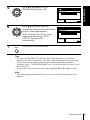
Press M/m/</, to highlight
STB CONNECTION and press OK.
PLAY
SET-TOP BOX
STB CONNECTION
RETURN
OFF
RF
LINE3
OK
SELECT :
CONFIRM : OK
EXIT : MENU
30 Setting the Set-Top Box
• If you connect the STB using the
aerial cable:
Press M/m/, to select RF and
press OK.
Press M/m to highlight
PROGRAMME NO. and press
OK. Enter the appropriate number
using M/m and press OK.
PLAY
OK
• If you connect the STB using the
Scart (EURO-AV) cable:
Press M/m/, to select LINE3 and
press OK.
SET-TOP BOX
STB CONNECTION
STB BRAND NO.
PROGRAMME NO.
RETURN
RF
--06
SELECT :
SET
: OK
EXIT : MENU
Getting Started
4
SET-TOP BOX
STB CONNECTION
STB BRAND NO.
RETURN
LINE3
---
SELECT :
SET
: OK
EXIT : MENU
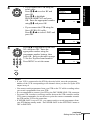
5
1
2
3
Press M/m to highlight STB BRAND
NO. and press OK. Enter the
appropriate number using the
programme number buttons, then
press OK. Refer to the table on page
32 for Set-Top Box brand number.
4
5
6
Press MENU to exit the menu.
7
8
9
PLAY
OK
SET-TOP BOX
STB CONNECTION
STB BRAND NO.
PROGRAMME NO.
RETURN
RF
123
06
SELECT :
SET
: OK
EXIT : MENU
0
MENU
Notes
• If your VCR is connected to the STB by the aerial cable, enter the programme
number of the VCR corresponding to the channel where you have set up the STB
output in step 4.
• You cannot watch programmes from your STB on the TV while recording unless
you record a programme from your STB.
• It is recommended to connect your STB to the DECODER/LINE-3 IN connector.
• For some STB, in order to avoid any conflict between the STB controller and the
VCR remote commander, be careful not to point the remote commander towards
the STB and the VCR at the same time.
• If POWER SAVE is set to FULL, you cannot watch or record programmes from
your STB during standby mode. Set POWER SAVE in the OPTIONS-2 menu to
OFF or PARTIAL.
continued
Setting the Set-Top Box
31
Set-Top Box brand number
To control the STB, enter the appropriate number corresponding to your
STB brand.
Some STBs may not operate at all with this VCR.
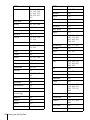
STB brand
Code numbers
STB brand
Code numbers
ABC
025, 028
Blaupunkt
184
ABsat
134, 843
Boca
254, 524, 840
Akai
526
Brain Wave
343
Alba
102, 265, 373,
432, 466, 526,
624
British Sky
Broadcasting
858
Brunor
420
Allantide
344
Bush
078, 102, 265
Amstrad
091, 224, 263,
349, 472, 520,
686, 700
BT
526, 679, 721
Cabletime
172, 282, 388,
459
Andover
555
Ankaro
228, 231, 380,
530
Cambridge
267, 355, 526
Camundosat
104
Anttron
194, 432
Canal+
864
Arcon
283, 379
Canal Satellite
864
Armstrong
254
Channel Master
373
Asat
384
CityCom
829
AST
332, 361, 362
Clyde
097
Astra
119, 384, 529
CME
Astro
184, 369, 531,
559, 595
091, 119, 184,
211
CNT
531
Audio Ton
375
Comtec
277
Avalon
407
Connexions
104, 407, 469
Axis
377, 380
Conrad
618
Birmingham
Cable
Communications
287
Contec
377
Cryptovision
611
British Telecom
014, 116
Crown
254
Barcom
228
Cyrus
211
Best
228, 380
Daewoo
384
32 Setting the Set-Top Box
Code numbers
STB brand
Code numbers
D-box
734
Galaxisat
332
DDC
373
GEC
097
Diskxpress
228
Gold Box
864
DNT
211, 407, 469
Goldstar
346
Drake
279, 470
Gooding
582
Dynasat
690
Grothusen
346
Echostar
181, 407, 465
Grundig
EEC
344
151,184, 339,
474, 582, 761,
540
EIF
428, 685
G-Sat
194
Einhell
344
375
Harting und
Helling
344
Elta
Emanon
432
Hinari
194
Emme Esse
708
Hirschmann
Engel
461
Eurodec
535, 537
184, 344, 407,
408, 409, 513,
584, 592, 683,
762
Europa
708
Hitachi
466
Fenner
728
Houston
679
Ferguson
078, 194, 347,
625, 722
Humax
059
Huth
231, 254, 375,
528, 600, 805
Fidelity
263, 686
Finlux
119, 355, 408,
425, 466, 525
HyperVision
630
Ikusi Allsat
379
Fraba Sat
596
Imperial
265, 496
Fracarro
060
IRTE
620
France Telecom
462
ITS
632
Freecom
346, 432, 745
ITT
119, 183
FTE
277, 342, 422
Jerrold
014, 025, 287
FTE Humax
874
Johansson
343
Fuba
183, 228, 308,
309, 380, 407,
425, 428, 432,
720
JOK
721
JSR
375
JVC
526, 582
Galaxis
Getting Started
STB brand
375, 377, 844,
845
continued
Setting the Set-Top Box
33
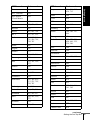
STB brand
Code numbers
STB brand
Code numbers
Kathrein
103, 134, 184,
211, 342, 369,
453, 491, 515,
564, 592, 633,
636
Multistar
342, 475
Muratto
346
Navex
343
NEC
189
Neusat
703, 845
Newhaus
231
Next-Wave
743
Nikko
371
Nokia
692, 034, 119,
183, 339, 408,
425, 466, 584,
734, 832
Key West
805
König
103, 183, 184
Kosmos
342, 346
Kreiselmeyer
184
Kyostar
432
La Sat
435, 475, 524,
531, 618
Lasat
833
Lenco
346, 384, 422,
432, 461
Nordmende
283, 373, 625
Oceanic
597
Lion
364
Orbit
361, 362
Lupus
380
Orbitec
596
Luxor
119, 183, 584
Oxford
355
Macab
535, 597
Pace
Magnavox
043
078, 194, 339,
347, 466, 802,
806, 858
Manhattan
466, 531
Pal
848
Maranz
211
Palcom
308, 309
Maspro
103, 339, 347,
761
Palladium
582
Matsui
355, 582
Panasonic
225
MediaSat
864
Panda
466
Mediamarkt
254
Philips
Memphis
377
Micro
Technology
344
630, 144, 211,
339, 466, 474,
582, 721, 761,
864
Phoenix
377
Minerva
582
Phonotrend
799
Mintec
589
Pioneer
MNet
030
155, 271, 544,
864
Morgan’s
254, 524, 840
ProVision
595
Promax
466
34 Setting the Set-Top Box
Code numbers
STB brand
Code numbers
Prosat
496
Sony
PTT Telecom
224
286, 289, 293,
650, 715
PVP Stereo
Visual Matrix
014
Stella
104
STVI
428
Pyxis
842
STS
167
Quadral
373, 530, 639
Sunstar
524, 805
Radiola
211
Tandberg
742
Radix
407, 893, 764
Tantec
RFT
211, 231, 552
308, 309, 347,
466
Saba
265, 347, 364,
531, 586, 701,
720, 745
Tatung
156
TechniSat
272, 273, 331,
420, 469, 552,
559, 596
Teco
384
Telecom
104
Telefunken
432
Teleka
254, 624, 683
Telemax
435
Teleservice
292
Sabre
466
Sagem
831
Sakura
377
Salora
119, 183, 210
Samsung
283
SAT
332, 361, 362,
472
Satbox
386
Televes
596
Satcom
224
Tensai
632
Satec
194, 339
Thomson
466, 864
Satmaster
283
Thorens
597
SatPartner
343, 346, 432,
513, 531, 703,
720, 745
Tonna
679
TPS
831
Schwaiger
194, 515
Triad
332, 344, 346,
361, 362
Scientific Atlanta
019, 028, 288
Triasat
425
Seemann
407, 589, 637
Tristar
277
SEG
380, 432, 529,
753
Tudi
297
Siemens
184
Uniden
205, 803, 842
Skymaster
530, 639
Unisat
377
United Cable
014
continued
Setting the Set-Top Box
Getting Started
STB brand
35
STB brand
Code numbers
STB brand
Code numbers
Unitor
228, 343
Winersat
343
Universum
184, 525, 582
Wisi
Vector
344, 364, 529
Ventana
211
184, 332, 362,
383, 407, 417,
418, 426, 466,
647, 649, 701
Videoway
261
Wolsey Gene
555
VisiCable+
492
XSat
134, 900
Vortec
432
900
VTech
332, 473, 771
Xcom
Multimedia
Vtech
362, 701
Zehnder
332, 342, 531,
829
Westminster
116
Zenith
011, 536
Wevasat
344
Zwergnase
805
Note
• To check if the brand number is entered correctly or not, press STB repeatedly to
display “STB” in the display window then enter a three digit STB channel number
with the programme number buttons. If the STB responds, you have enterred the
correct brand number.
36 Setting the Set-Top Box
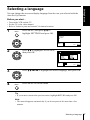
You can change the on-screen display language from the one you selected with the
Auto Set Up function.
Before you start…
• Turn on the VCR and the TV.
• Set the TV to the video channel.
• Refer to “Index to parts and controls” for button locations.
1
MENU
Press MENU, then press M/m to
highlight SETTINGS and press OK.
Getting Started
Selecting a language
SETTINGS
SET-TOP BOX
TUNER
CLOCK
LANGUAGE
RETURN
PLAY
SELECT :
SET
: OK
OK
2
EXIT : MENU
Press M/m to highlight LANGUAGE,
then press OK.
PLAY
OK
LANGUAGE
ENGLISH
DEUTSCH
FRANÇAIS
ITALIANO
ESPAÑOL
PORTUGUÊS
NEDERLANDS
DANSK / NORSK
SVENSKA
SUOMI
SELECT :
SET
: OK
EXIT : MENU
3
Press M/m/</, to highlight the desired language, then press OK.
PLAY
OK
4
Press MENU to exit the menu.
MENU
Tip
• If you want to return to the previous menu, highlight RETURN and press OK.
Note
• The menu disappears automatically if you do not proceed for more than a few
minutes.
Selecting a language
37
Presetting channels
If some channels could not be preset using the Auto Set Up function, you can preset
them manually.
Before you start…
• Turn on the VCR and the TV.
• Set the TV to the video channel.
• Refer to “Index to parts and controls” for button locations.
1
MENU
Press MENU, then press M/m to
highlight SETTINGS and press OK.
SETTINGS
SET-TOP BOX
TUNER
CLOCK
LANGUAGE
RETURN
PLAY
SELECT :
SET
: OK
OK
2
EXIT : MENU
Press M/m to highlight TUNER, then
press OK.
PLAY
OK
TUNER
PROG.
NORMAL / CATV
CHANNEL SET
PAY - TV / CANAL+
AFT
FINE TUNING
RETURN
1
NORMAL
C1 2
AAB
OFF
ON
SELECT :
SET
: OK
EXIT : MENU
3
Press M/m to highlight NORMAL/
CATV, then press OK.
PLAY
OK
TUNER
PROG.
NORMAL / CATV
CHANNEL SET
PAY - TV / CANAL+
AFT
FINE TUNING
RETURN
1
NORMAL
CATV
ON
SELECT
:
CONFIRM : OK
EXIT : MENU
4
Press M/m to highlight NORMAL,
then press OK.
PLAY
OK
To preset CATV (Cable Television)
channels, select CATV.
TUNER
PROG.
NORMAL / CATV
CHANNEL SET
PAY - TV / CANAL+
AFT
FINE TUNING
RETURN
1
NORMAL
C1 2
AAB
OFF
ON
SELECT :
SET
: OK
EXIT : MENU
38 Presetting channels
Press PROG +/– to select the
programme position.
• PROG
Selected programme
position
TUNER
PROG.
NORMAL / CATV
CHANNEL SET
PAY - TV / CANAL+
AFT
FINE TUNING
RETURN
4
NORMAL
C1 2
AAB
OFF
ON
Getting Started
5
SELECT :
SET
: OK
EXIT : MENU
6
Press M/m to highlight CHANNEL
SET, then press OK.
PLAY
OK
TUNER
PROG.
NORMAL / CATV
CHANNEL SET
PAY - TV / CANAL+
AFT
FINE TUNING
RETURN
C1 2
4
AAB
ON
SELECT
:
CONFIRM : OK
EXIT : MENU
7
Press M/m repeatedly until the channel you want is displayed.
The channels appear in the following
order:
PLAY
OK
1
2
3
4
5
6
7
8
9
0
8
9
TUNER
PROG.
NORMAL / CATV
CHANNEL SET
PAY - TV / CANAL+
AFT
FINE TUNING
RETURN
4
C2 7
• VHF E2 – E12
ON
• VHF Italian channel A – H
• UHF E21 – E69
SELECT
:
• CATV S1 – S20
CONFIRM : OK
EXIT : MENU
• HYPER S21 – S41
• CATV S01 – S05
If you know the number of the channel you want, press the
programme number buttons. For example, for channel 5, first press
“0” and then press “5.”
To preset another programme position, repeat steps 5 through 7.
Press MENU to exit the menu.
MENU
continued
Presetting channels
39
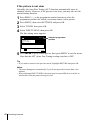
If the picture is not clear
Normally, the Auto Fine Tuning (AFT) function automatically tunes in
channels clearly. However, if the picture is not clear, you may also use the
manual tuning function.
PROG +/– or the programme number buttons to select the
1 Press
programme position for which you cannot obtain a clear picture.
2 Press MENU, then select SETTINGS and press OK.
3 Select TUNER, then press OK.
4 Select FINE TUNING, then press OK.
The fine tuning meter appears.
TUNER
PROG.
NORMAL / CATV
CHANNEL SET
PAY - TV / CANAL+
AFT
FINE TUNING
RETURN
4
NORMAL
C2 7
OFF
Selected programme
position
SET :
EXIT : MENU
5 Press </, to get a clearer picture, then press MENU to exit the menu.
Note that the AFT (Auto Fine Tuning) setting switches to OFF.
Tip
• If you want to return to the previous menu, highlight RETURN and press OK.
Notes
• The menu disappears automatically if you do not proceed for more than a few
minutes.
• When adjusting FINE TUNING, the menu may become difficult to read due to
interference from the picture being received.
40 Presetting channels
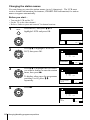
After setting the channels, you can change the programme positions as you like. If
any programme positions are unused or contain unwanted channels, you can disable
them.
You can also change the station names. If the station names are not displayed, you can
enter them manually.
Getting Started
Changing/disabling programme positions
Changing programme positions
Before you start…
• Turn on the VCR and the TV.
• Set the TV to the video channel.
• Refer to “Index to parts and controls” for button locations.
1
MENU
Press MENU, then press M/m to
highlight LISTS and press OK.
LISTS
CHANNEL LIST
TIMER LIST
RETURN
PLAY
SELECT :
SET
: OK
OK
2
EXIT : MENU
Press M/m to highlight CHANNEL
LIST, then press OK.
PLAY
OK
CHANNEL LIST
PROG
1
2
3
4
5
SELECT
MOVE PROGRAM
ERASE PROGRAM
NAME
AAB
CDE
CH
C1 2
C0 3
C5 6
C2 7
C0 9
FGH
:
:
: CLEAR
EXIT : MENU
3
PLAY
Press M/m to highlight the row which
you want to change the programme
position, then press ,.
OK
To display other pages for programme
positions 6 to 60, press M/m
repeatedly.
CHANNEL LIST
PROG
1
2
3
4
5
SELECT
SET STATION NAME
CONFIRM
NAME
AAB
CDE
CH
C1 2
C0 3
C5 6
C2 7
C0 9
FGH
:
:
: OK
EXIT : MENU
continued
Changing/disabling programme positions
41
4
PLAY
Press M/m until the selected channel
row moves to the desired programme
position.
OK
The selected channel is inserted at the
new programme position and the
intermediate channels are displaced to
fill the gap.
5
CHANNEL LIST
PROG
1
2
3
4
5
SELECT
SET STATION NAME
CONFIRM
NAME
CDE
CH
C0 3
C5 6
C1 2
C2 7
C0 9
AAB
FGH
:
:
: OK
EXIT : MENU
Press OK to confirm the setting.
PLAY
OK
6
7
To change the programme position of another station, repeat steps 3
through 5.
Press MENU to exit the menu.
MENU
Tip
• If you want to return to the previous menu, highlight RETURN and press OK.
Note
• The menu disappears automatically if you do not proceed for more than a few
minutes.
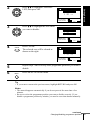
Disabling unwanted programme positions
After presetting channels, you can disable unused programme positions. The disabled
positions will be skipped later when you press the PROG +/– buttons.
Before you start…
• Turn on the VCR and the TV.
• Set the TV to the video channel.
• Refer to “Index to parts and controls” for button locations.
1
MENU
Press MENU, then press M/m to
highlight LISTS, and press OK.
LISTS
CHANNEL LIST
TIMER LIST
RETURN
PLAY
OK
42 Changing/disabling programme positions
SELECT :
SET
: OK
EXIT : MENU
Press M/m to highlight CHANNEL
LIST, then press OK.
PLAY
OK
CHANNEL LIST
PROG
1
2
3
4
5
SELECT
MOVE PROGRAM
ERASE PROGRAM
CH
C1 2
C0 3
C5 6
C2 7
C0 9
NAME
AAB
CDE
FGH
:
:
: CLEAR
EXIT : MENU
3
Press M/m to highlight the row which
you want to disable.
PLAY
OK
Getting Started
2
CHANNEL LIST
PROG
1
2
3
4
5
SELECT
MOVE PROGRAM
ERASE PROGRAM
CH
C1 2
C0 3
C5 6
C2 7
C0 9
NAME
AAB
CDE
FGH
:
:
: CLEAR
EXIT : MENU
4
CLEAR
Press CLEAR.
CHANNEL LIST
The selected row will be cleared as
shown on the right.
PROG
1
2
3
4
5
SELECT
MOVE PROGRAM
ERASE PROGRAM
CH
C1 2
C0 3
NAME
AAB
CDE
C2 7
C0 9
FGH
:
:
: CLEAR
EXIT : MENU
5
6
Repeat steps 3 and 4 for any other programme positions you want to
disable.
Press MENU to exit the menu.
MENU
Tip
• If you want to return to the previous menu, highlight RETURN and press OK.
Notes
• The menu disappears automatically if you do not proceed for more than a few
minutes.
• Be sure to select the programme position you want to disable correctly. If you
disable a programme position by mistake, you need to reset that channel manually.
continued
Changing/disabling programme positions
43
Changing the station names
You can change or enter the station names (up to 5 characters). The VCR must
receive channel information (for instance, SMARTLINK information) for station
names to appear automatically.
Before you start…
• Turn on the VCR and the TV.
• Set the TV to the video channel.
• Refer to “Index to parts and controls” for button locations.
1
MENU
Press MENU, then press M/m to
highlight LISTS and press OK.
LISTS
CHANNEL LIST
TIMER LIST
RETURN
PLAY
SELECT :
SET
: OK
OK
2
EXIT : MENU
Press M/m to highlight CHANNEL
LIST, then press OK.
PLAY
OK
CHANNEL LIST
PROG
1
2
3
4
5
SELECT
MOVE PROGRAM
ERASE PROGRAM
NAME
AAB
CDE
CH
C1 2
C0 3
C5 6
C2 7
C0 9
FGH
:
:
: CLEAR
EXIT : MENU
3
PLAY
Press M/m to highlight the row which
you want to change or enter the station
name, then press ,.
OK
To display other pages for programme
positions 6 to 60, press M/m
repeatedly.
CHANNEL LIST
PROG
1
2
3
4
5
NAME
AAB
CDE
CH
C1 2
C0 3
C5 6
C2 7
C0 9
SELECT
SET STATION NAME
CONFIRM
FGH
:
:
: OK
EXIT : MENU
4
Press ,.
PLAY
OK
CHANNEL LIST
PROG
1
2
3
4
5
CH
C1 2
C0 3
C5 6
C2 7
C0 9
SELECT A CHARACTER
NEXT
CONFIRM
NAME
AAB
CDE
FGH
:
:
: OK
EXIT : MENU
44 Changing/disabling programme positions
Enter the station name.
PLAY
OK
CHANNEL LIST
1 Press M/m to select a character.
Each time you press M, the
character changes as shown below.
AtBt…tZtatbt…
tzt0t1t…t 9t
(symbols) t (blank space) t A
PROG
1
2
3
4
5
CH
C1 2
C0 3
C5 6
C2 7
C0 9
SELECT A CHARACTER
NEXT
CONFIRM
NAME
CAB
CDE
FGH
:
:
: OK
EXIT : MENU
Getting Started
5
2 Press , to set the next character.
The next space is highlighted.
To correct a character, press </, until the character you want
to correct is highlighted, then reset it.
You can set up to 5 characters for the station name.
6
Press OK to confirm the new name.
PLAY
OK
7
Press MENU to exit the menu.
MENU
Tip
• If you want to return to the previous menu, highlight RETURN and press OK.
Notes
• The menu disappears automatically if you do not proceed for more than a few
minutes.
• If you enter a symbol in step 5, it will appear as a blank space in the display
window.
Changing/disabling programme positions
45
Setting the PAY-TV/Canal Plus decoder
You can watch or record PAY-TV/Canal Plus programmes if you connect a
decoder (not supplied) to the VCR.
Connecting a decoder
PAY-TV/Canal Plus
decoder
Scart cable
(not supplied)
Scart
(EURO-AV)
DECODER/t LINE-3 IN
i LINE-1 (TV)
AERIAL OUT
Aerial cable
(supplied)
AERIAL IN
Scart
(EURO-AV)
Scart cable (not supplied)
: Signal flow
Setting PAY-TV/Canal Plus channels
To watch or record PAY-TV/Canal Plus programmes, set your VCR to receive the
channels using the on-screen display.
In order to set the channels correctly, be sure to follow all of the steps below.
Before you start…
• Turn on the VCR, the TV, and the decoder.
• Set the TV to the video channel.
• Refer to “Index to parts and controls” for button locations.
1
MENU
Press MENU, then press M/m to
highlight OPTIONS and press OK.
OPTIONS
OPTIONS - 1
OPTIONS - 2
RETURN
PLAY
OK
SELECT :
SET
: OK
EXIT : MENU
46 Setting the PAY-TV/Canal Plus decoder
Press M/m to highlight OPTIONS-2,
then press OK.
OPTIONS - 2
DECODER / LINE3
TIMER OPTIONS
POWER SAVE
TV DIRECT REC
RR
RETURN
PLAY
OK
DECODER
VARIABLE
OFF
ON
NORMAL
SELECT :
SET
: OK
EXIT : MENU
3
Press M/m to highlight DECODER/
LINE3, then press OK.
Getting Started
2
OPTIONS - 2
DECODER / LINE3
TIMER OPTIONS
POWER SAVE
TV DIRECT REC
RR
RETURN
PLAY
OK
DECODER
LINE3
ON
NORMAL
SELECT
:
CONFIRM : OK
EXIT : MENU
4
Press M/m to highlight DECODER,
then press OK.
OPTIONS - 2
DECODER / LINE3
TIMER OPTIONS
POWER SAVE
TV DIRECT REC
RR
RETURN
PLAY
OK
DECODER
VARIABLE
OFF
ON
NORMAL
SELECT :
SET
: OK
EXIT : MENU
5
MENU
6
MENU
Press MENU to exit the menu.
The menu disappears from the TV screen.
Press MENU again. Then press M/m
to highlight SETTINGS and press OK.
SETTINGS
SET-TOP BOX
TUNER
CLOCK
LANGUAGE
RETURN
PLAY
OK
SELECT :
SET
: OK
EXIT : MENU
continued
Setting the PAY-TV/Canal Plus decoder
47
7
Press M/m to highlight TUNER, then
press OK.
PLAY
OK
TUNER
PROG.
NORMAL / CATV
CHANNEL SET
PAY - TV / CANAL+
AFT
FINE TUNING
RETURN
1
NORMAL
C1 2
AAB
OFF
ON
SELECT :
SET
: OK
EXIT : MENU
8
Press M/m to highlight NORMAL/
CATV, then press OK.
PLAY
OK
TUNER
PROG.
NORMAL / CATV
CHANNEL SET
PAY - TV / CANAL+
AFT
FINE TUNING
RETURN
1
NORMAL
CATV
ON
SELECT
:
CONFIRM : OK
EXIT : MENU
9
Press M/m to highlight NORMAL,
then press OK.
PLAY
OK
To preset CATV (Cable Television)
channels, select CATV.
TUNER
PROG.
NORMAL / CATV
CHANNEL SET
PAY - TV / CANAL+
AFT
FINE TUNING
RETURN
1
NORMAL
C1 2
AAB
OFF
ON
SELECT :
SET
: OK
EXIT : MENU
10
• PROG
Press PROG +/– to select the desired
programme position.
Selected programme
position
TUNER
PROG. 1 5
NORMAL / CATV
CHANNEL SET
PAY - TV / CANAL+
AFT
FINE TUNING
RETURN
NORMAL
C1 2
AAB
OFF
ON
SELECT :
SET
: OK
EXIT : MENU
11
Press M/m to highlight CHANNEL
SET, then press OK.
PLAY
OK
TUNER
PROG. 1 5
NORMAL / CATV
CHANNEL SET
PAY - TV / CANAL+
AFT
FINE TUNING
RETURN
C1 2
AAB
ON
SELECT
:
CONFIRM : OK
EXIT : MENU
48 Setting the PAY-TV/Canal Plus decoder
Press M/m to select the PAY-TV/Canal
Plus channels, then press OK.
PLAY
OK
TUNER
PROG. 1 5
NORMAL / CATV
CHANNEL SET
PAY - TV / CANAL+
AFT
FINE TUNING
RETURN
NORMAL
C0 2
LMN
OFF
ON
SELECT :
SET
: OK
EXIT : MENU
13
Press M/m to highlight PAY-TV/
CANAL+, then press OK.
Getting Started
12
TUNER
PROG. 1 5
NORMAL / CATV
CHANNEL SET
PAY - TV / CANAL+
AFT
FINE TUNING
RETURN
PLAY
OK
NORMAL
ON
OFF
SELECT
:
CONFIRM : OK
EXIT : MENU
14
Press M/m to highlight ON, then press
OK.
PLAY
OK
TUNER
PROG. 1 5
NORMAL / CATV
CHANNEL SET
PAY - TV / CANAL+
AFT
FINE TUNING
RETURN
NORMAL
C0 2
LMN
ON
ON
SELECT :
SET
: OK
EXIT : MENU
15
Press MENU to exit the menu.
MENU
Tip
• If you want to return to the previous menu, highlight RETURN and press OK.
Notes
• The menu disappears automatically if you do not proceed for more than a few
minutes.
• To superimpose subtitles while watching PAY-TV/Canal Plus programmes, make
both decoder-VCR and VCR-TV connections using 21-pin Scart cables that are
compatible with the RGB signals. You cannot record subtitles on the VCR.
• When you watch PAY-TV/Canal Plus programmes through the RFU input of the
TV, press t TV/VIDEO so that the VIDEO indicator appears in the display
window.
• If POWER SAVE is set to FULL, you cannot watch or record PAY-TV/Canal Plus
programmes during standby mode. Set POWER SAVE in the OPTIONS-2 menu
to OFF or PARTIAL.
• If STB CONNECTION is not set to OFF at the SET-TOP BOX screen, you cannot
select DECODER for DECODER/LINE3. In this case, set the Set-Top Box setting
to OFF and then make the DECODER/LINE3 selection.
Setting the PAY-TV/Canal Plus decoder
49
Basic Operations
Playing a tape
Before you start...
• Refer to “Index to parts and controls” for button locations.
1
Turn on your TV and set it to the video channel.
2
Insert a tape.
3
Press H PLAY.
The VCR turns on and starts playing
automatically if you insert a tape with
its safety tab removed.
PLAY
When the tape reaches the end, it will rewind automatically.
OK
Additional tasks
To
Press
Stop play
x STOP
Pause play
X PAUSE
Resume play after pause
X PAUSE or H PLAY
Fast-forward the tape
M FF during stop
Rewind the tape
m REW during stop
Eject the tape
Z EJECT
To use the time counter
Press CLEAR at the point on the tape that you want to find later. The
counter in the display window resets to “0:00:00.” Search for the point
afterwards by referring to the counter.
VIDEO
SP
OPC
To display the counter on the TV screen, press
50 Playing a tape
DISPLAY.
Starting playback automatically with one button (One
Touch Play)
Basic Operations
Notes
• The counter resets to “0:00:00” whenever a tape is reinserted.
• The counter stops counting when it comes to a portion with no recording.
• The time counter does not appear on the TV screen when using an NTSC-recorded
tape.
• Depending on your TV, the following may occur while playing an NTSC-recorded
tape:
– The picture becomes black and white.
– The picture shakes.
– No picture appears on the TV screen.
– Black streaks appear horizontally on the TV screen.
– The colour density increases or decreases.
• If you play back a tape in LP or EP mode with the NTSC system, the sound
becomes monaural.
• While setting the menu on the TV screen, buttons for playback on the remote
commander do not function.
If you use the SMARTLINK connection, you can turn on the VCR and the
TV, set the TV to the video channel, and start playback automatically with
one button.
1 Insert a tape.
The VCR automatically turns on.
2
If you insert a tape with its safety tab removed, the TV turns on and
switches to the video channel. Playback starts automatically.
Press H PLAY.
The TV turns on and switches to the video channel automatically.
Playback starts.
Tip
• When there already is a tape in the VCR, the VCR and the TV turn on, the TV is
set to the video channel, and playback starts automatically in one sequence when
you press H PLAY.
Note
• When you use the One Touch Play function, leave the TV on or in the standby
mode.
Playing a tape
51
Recording TV programmes
Before you start...
• Refer to “Index to parts and controls” for button locations.
1
Turn on your TV and set it to the video channel.
2
Insert a tape with its safety tab in place.
To record from a decoder, turn it on.
3
• To record a normal channel, press PROG +/– until the programme
position number you want appears in the display window.
• PROG
VIDEO
SP
OPC
INPUT SELECT
• To record from a decoder or other source connected to one or
more of the LINE inputs, press INPUT SELECT until the
connected line appears in the display window.
STB
VIDEO
1
2
3
4
5
6
7
8
9
0
SP / LP
OPC
• To record from the Set-Top Box, press STB. The STB indicator
lights up in the display window. Then enter a three digit STB
channel number with the programme number buttons.
VIDEO
4
SP
SP
OPC
STB
Press SP/LP to select the tape speed, SP or LP.
LP (Long Play) provides recording time twice as long as SP.
However, SP (Standard Play) produces better picture and audio
quality.
VIDEO
52 Recording TV programmes
LP OPC
5
REC
Press z REC to start recording.
The recording indicator lights up red in the display window.
Recording indicator
VIDEO
LP OPC
To stop recording
Press x STOP.
SP
0 : 00 : 22
Basic Operations
To check the remaining time
Press
DISPLAY. With the display on, press COUNTER/REMAIN to
check the remaining time. Each time you press COUNTER/REMAIN, the
time counter and the remaining time appear alternately. The
indicator
indicates the remaining time.
1 : 46
Time counter
Remaining time
In order to get an accurate remaining time indication, be sure TAPE
LENGTH in the OPTIONS-1 menu is set according to the tape type you use
(see page 89).
To watch another TV programme while recording
Press t TV/VIDEO to turn off the VIDEO indicator in the display
1 window.
2 Select another programme position on the TV.
To save a recording
To prevent accidental erasure, break off the
safety tab as illustrated. To record on the
same tape again, cover the tab hole with
adhesive tape.
Safety tab
continued
Recording TV programmes
53
Tips
• To select a programme position, you can use the programme number buttons on the
remote commander. For two-digit numbers, press the - (ten’s digit) button
followed by the programme number buttons.
• If you connect additional equipment to a LINE connector or jack, you can select
the input signal using the INPUT SELECT or PROG +/– buttons.
• The
DISPLAY information appears on the TV screen indicating information
about the tape, but the information will not be recorded on the tape.
• If you do not want to watch TV while recording, you can turn off the TV. When
using a decoder, make sure to leave it on.
Notes
• The
DISPLAY information does not appear during still (pause) mode or slowmotion playback.
• The
DISPLAY information will not appear while playing an NTSC-recorded
tape.
• If a tape has portions recorded in both PAL and NTSC systems, the time counter
reading will not be correct. This discrepancy is due to the difference between the
counting cycles of the two video systems.
• You cannot watch a PAY-TV/Canal Plus programme while recording another PAYTV/Canal Plus programme.
• When you insert a non-standard commercially available tape, the remaining time
may not be correct.
• The remaining time is intended for rough measurement only.
• About 30 seconds after the tape begins playback, the tape remaining time will be
displayed.
• The station name may not appear if the VCR does not receive station name
information signals.
Recording what you are watching on the TV (TV Direct
Rec)
If you use the SMARTLINK connection, you can easily record what you are
watching on the TV (other than tapes being played on the VCR).
1 Insert a tape with its safety tab in place.
z REC while you are watching a TV programme or external
2 Press
source.
The VCR automatically turns on, then the TV indicator lights up and the
VCR starts recording what you are watching on the TV.
54 Recording TV programmes
Tips
• The TV indicator appears in the display window after you press z REC in some
situations such as:
– when you are watching a source connected to the TV’s line input, or
– when the TV tuner preset data for the programme position is different from the
data in the VCR tuner preset.
• If there is a tape with its safety tab in place in the VCR, the VCR automatically
turns on and starts recording what you are watching on the TV when you press
z REC.
• You can turn the TV Direct Rec function ON and OFF in the OPTIONS-2 menu
(see page 89).
Recording TV programmes
Basic Operations
Notes
• You cannot record what you are watching using this method when the VCR is in
the following modes; pause, timer standby, tuner preset, Auto Set Up, and
recording.
• When the TV indicator is lit in the display window, do not turn off the TV nor
change the TV programme position. When the TV indicator is not lit, the VCR
continues recording the programme even if you change the TV programme
position on the TV.
55
Recording TV programmes using the Dial
Timer
The Dial Timer function allows you to
make timer recordings of programmes
without turning on your TV. Set the
recording timer to record up to eight
programmes, including settings made
with other timer methods, that will be
broadcast within the next month. The
recording start time and recording stop
time can be set at one minute intervals.
?/1
DIAL TIMER
PROGRAM +/–
x
X
Before you start...
• Insert a tape with its safety tab in place.
Make sure the tape is longer than the total
recording time.
• To record from a decoder, turn it on.
• Refer to “Index to parts and controls” for
button locations.
1
DIAL TIMER
Press
DIAL TIMER.
“DATE” and “TODAY” appear alternately in the display window.
If the date and time are not set, “DAY” will appear. See step 2 in the
following section, “To set the clock” to set the date and time.
2
DIAL TIMER
Turn
VIDEO
SP
OPC
VIDEO
SP
OPC
SP
OPC
DIAL TIMER to set the recording date.
VIDEO
56 Recording TV programmes using the Dial Timer
3
Press
DIAL TIMER.
“START” and the current time appear alternately in the display
window.
DIAL TIMER
Turn
6
SP
OPC
VIDEO
SP
OPC
DIAL TIMER to set the recording start time.
You can set the recording start time in 15 minute intervals or adjust
the time in one minute intervals by pressing the PROGRAM +/–
buttons.
PROGRAM
5
VIDEO
DIAL TIMER
VIDEO
Press
SP
Basic Operations
4
DIAL TIMER
OPC
DIAL TIMER.
“STOP” and the recording stop time appear alternately in the
display window.
DIAL TIMER
Turn
VIDEO
SP
OPC
VIDEO
SP
OPC
DIAL TIMER to set the recording stop time.
You can set the recording stop time in 15 minute intervals or adjust
the time in one minute intervals by pressing the PROGRAM +/–
buttons.
PROGRAM
VIDEO
SP
OPC
continued
Recording TV programmes using the Dial Timer
57
7
DIAL TIMER
Press
DIAL TIMER.
The programme position or station name appears in the display
window.
VIDEO
8
DIAL TIMER
PROGRAM
DIAL TIMER
OPC
DIAL TIMER to set the programme position.
VIDEO
INPUT SELECT
9
Turn
SP
SP
OPC
To record from a decoder or other source connected to one or more
of the LINE inputs, turn DIAL TIMER or press INPUT SELECT
to display the connected line in the display window.
To record from the Set-Top Box, turn
DIAL TIMER or press
PROGRAM +/– until the STB channel number you want appears in
the display window. You can change the channel one channel at a
time by turning
DIAL TIMER, or 100 channels at a time by
pressing PROGRAM +/–.
Press
DIAL TIMER to complete the setting.
“OK” appears in the display window for about five seconds.
The
indicator appears in the display window and the VCR stands
by for recording.
To record from a decoder or other source, leave the connected
equipment switched on.
To return to the previous step
To return to the previous step, press the PROGRAM + and – buttons on the
VCR at the same time during any of the Dial Timer settings.
To stop recording
To stop the VCR while recording, press x STOP.
58 Recording TV programmes using the Dial Timer
To use the VCR after setting the timer
To use the VCR before a recording begins, just press ?/1. The
indicator
turns off and the VCR switches on. Remember to press ?/1 to reset the VCR
to recording standby after using the VCR.
You can also do the following tasks while the VCR is recording:
•
•
•
•
Reset the counter (page 50).
Display tape information on the TV screen (page 53).
Check the timer settings (page 73).
Watch another TV programme (page 53).
1 Turn DIAL TIMER so that “CLOCK” appears in the display window.
DIAL TIMER.
2 Press
“DAY” appears in the display window.
3 Turn DIAL TIMER to set the day.
DIAL TIMER.
4 Press
“MONTH” appears in the display window.
and press
DIAL TIMER to set the month, and then the year.
5 Turn
After you set the year, “CLOCK” appears in the display window again.
6 Turn and press DIAL TIMER to set the hour and minute.
you have finished setting the time, press
DIAL TIMER to start
7 When
the clock.
Basic Operations
To set the clock
Tips
• To cancel a Dial Timer setting, press x (stop) on the VCR while you are making
the setting.
• The programme is recorded in the current tape speed mode. To change the tape
speed, press SP/LP before you complete the setting in step 9.
• When you are recording a programme in the SP mode and the remaining tape
becomes shorter than the recording time, the tape speed is automatically changed
to the LP mode. Note that some interference will appear on the picture at the point
the tape speed is changed. If you want to keep the same tape speed, set AUTO
LONG PLAY to OFF in the OPTIONS-1 menu (see page 89).
• To check, change, or cancel the programme setting, see “Checking/changing/
cancelling timer settings” on page 73.
continued
Recording TV programmes using the Dial Timer
59
Notes
• If eight programmes have already been set using the ShowView system or the
TIMER menu, “FULL” appears in the display window for about five seconds.
• The
indicator flashes in the display window when you complete the setting in
step 9 with no tape inserted.
• If you set the clock using the Auto Clock Set function and AUTO ADJUST is set to
ON, the clock will adjust itself to the incoming time signal regardless of
adjustments made with the Dial Timer. Be sure you have set the Auto Clock Set
correctly.
• The station name may not appear if the VCR does not receive station name
information signals.
About the Demonstration Mode
The Dial Timer function has a Demonstration Mode that allows the user, such as a
salesperson, to enter more than eight examples of timer settings when demonstrating
the use of the Dial Timer. It cancels the FULL notice which appears if eight
programmes have already been set. Do not use the Demonstration Mode for making
timer recordings. Doing so may cause the settings to be inaccurate.
To activate the Demonstration Mode
Press X (pause) on the VCR while turning the
DIAL TIMER. “DEMO”
appears in the display window for a few seconds.
To cancel the Demonstration Mode
Turn the power off and unplug the mains lead. Although the Demonstration
Mode is cancelled, the timer settings entered while using the Demonstration
Mode will remain. Be sure to manually cancel the timer settings before you
use the Dial Timer or any other timer method after reconnecting the mains
lead (see page 73).
60 Recording TV programmes using the Dial Timer
Recording TV programmes using the
ShowView system
The ShowView system is the feature that simplifies programming the VCR to make
timer recordings. Just enter the ShowView number listed in the TV programme guide.
The date, times, and programme position of that programme are set automatically.
You can preset a total of eight programmes, including settings made with other timer
methods.
• Check that the VCR clock is set to the correct time and date.
• Insert a tape with its safety tab in place. Make sure the tape is longer than the total recording
time.
• To record from a decoder, turn it on.
• Turn on your TV and set it to the video channel.
• Set TIMER OPTIONS to SHOWVIEW or VARIABLE in the OPTIONS-2 menu (see page
89).
• Refer to “Index to parts and controls” for button locations.
1
TIMER
PLAY
OK
Press
Basic Operations
Before you start…
TIMER.
• When you set TIMER OPTIONS
to VARIABLE:
The TIMER METHOD menu
appears on the TV screen. Press
M/m to select SHOWVIEW, then
press OK.
TIMER METHOD
STANDARD
SHOWVIEW
SELECT :
SET
: OK
EXIT : MENU
• When you set TIMER OPTIONS
to SHOWVIEW:
The SHOWVIEW menu appears
on the TV screen.
SHOWVIEW
2 8 . 9 FRI
SHOWVIEW NO.
–––––––––
SET : 0–9
EXIT : MENU
continued
Recording TV programmes using the ShowView system
61
2
1
2
3
4
5
6
8
9
7
Press the programme number
buttons to enter the ShowView
number.
If you make a mistake, press
CLEAR and re-enter the correct
number.
0
CLEAR
SHOWVIEW
2 8 . 9 FRI
SHOWVIEW NO.
1246–––––
SET
: 0–9
CONFIRM : OK
CANCEL : CLEAR
EXIT : MENU
3
Press OK.
The date, start and stop times,
programme position or station name,
tape speed, and VPS/PDC setting
appear on the TV screen.
PLAY
OK
INPUT SELECT
STB
1
2
3
4
5
6
7
8
9
0
CLEAR
TIMER
2 8 . 9 FRI
DATE
TODAY
SP / LP
TIME
19 : 00 20 : 00
SP
VPS / PDC
PROG.
35
OFF
LIST
SELECT :
SET
:
• If “– –” appears in the “PROG.”
CANCEL : CLEAR
EXIT : MENU
(programme) column (this may
happen for local broadcasts), you
have to set the appropriate programme position manually.
Press M/m to select the desired programme position.
• To record from a decoder or other source connected to one or
more of the LINE inputs, press INPUT SELECT to display the
connected line in the “PROG.” position.
• To record from the Set-Top Box, press STB to display “STB---” in
the “PROG.” position. Then, enter a three digit STB channel
number with the programme number buttons.
You will only have to do this operation once for the referred
channel. The VCR will then store your setting.
When you have selected A (Austria), CH (Switzerland), or D
(Germany) with the country selection in the Auto Set Up procedure,
the VPS/PDC function is automatically set to ON.
For details about the VPS/PDC function, see “Timer recording with
VPS/PDC signals” on page 63.
If the information is incorrect, press CLEAR to cancel the setting.
62 Recording TV programmes using the ShowView system
4
If you want to change the date, tape
speed, and the VPS/PDC setting:
TIMER
2 8 . 9 FRI
DATE
TODAY
PLAY
OK
1 Press </, to highlight the item
you want to change.
2 Press M/m to reset it.
SP / LP
TIME
19 : 00 20 : 00
SP
ON
SELECT :
SET
:
EXIT : MENU
Press MENU to exit the menu.
MENU
Press ?/1 to turn off the VCR.
The indicator appears in the display window and the VCR stands
by for recording.
Basic Operations
6
VPS / PDC
LIST
CANCEL : CLEAR
• To record the same programme
every day or the same day every
week, see “Daily/weekly
recording” below.
• To use the VPS/PDC function, set VPS/PDC to ON.
5
PROG.
35
To record from a decoder or other source, leave the connected
equipment switched on.
To stop recording
To stop the VCR while recording, press x STOP.
Daily/weekly recording
In step 4 above, press m to select the recording pattern. Each time you press
m, the indication changes as shown below. Press M to change the indication
in reverse order.
TODAY t SUN-SAT (Sunday to Saturday) t MON-SAT (Monday to
Saturday) t MON-FRI (Monday to Friday) t SAT (every Saturday) .....
t MON (every Monday) t SUN (every Sunday) t 1 month later t
(dates count down) t TOMORROW t TODAY
Timer recording with VPS/PDC signals
Some broadcast systems transmit VPS (Video Programme System) or PDC
(Programme Delivery Control) signals with their TV programmes. These
signals ensure that your timer recordings are made regardless of broadcast
delays, early starts, or broadcast interruptions (when the VPS or PDC
indicator in the display window is lit).
To use the VPS/PDC function, set VPS/PDC to ON in step 4 above. You can
also use the VPS/PDC function for a source connected to one or more of the
LINE inputs.
continued
Recording TV programmes using the ShowView system
63
To use the VCR after setting the timer
To use the VCR before a recording begins, just press ?/1. The indicator
turns off and the VCR switches on. Remember to press ?/1 to reset the VCR
to recording standby after using the VCR.
You can also do the following tasks while the VCR is recording:
•
•
•
•
Reset the counter (page 50).
Display tape information on the TV screen (page 53).
Check the timer settings (page 73).
Watch another TV programme (page 53).
Tips
• To set the programme position, you can also use the PROG +/– or programme
number buttons.
• To set the programme position with a two digit number, press - (ten’s digit)
button followed by the programme number buttons.
• To set the line input video source, you can also use the PROG +/– buttons.
• To set the tape speed, you can also use the SP/LP button.
• When you are recording a programme in the SP mode and the remaining tape
becomes shorter than the recording time, the tape speed is automatically changed
to the LP mode. Note that some interference will appear on the picture at the point
the tape speed is changed. If you want to keep the same tape speed, set AUTO
LONG PLAY to OFF in the OPTIONS-1 menu (see page 89).
• To check, change, or cancel the programme setting, press </, to choose LIST,
then press OK in step 4. For details, see step 3 in “Checking/changing/cancelling
timer settings” on page 73.
Notes
• If the VPS/PDC signal is too weak or the broadcasting station failed to transmit
VPS/PDC signals, the VCR will start recording at the set time without using the
VPS/PDC function.
• The
indicator flashes in the display window when you press ?/1 with no tape
inserted.
• When you set TIMER OPTIONS to STANDARD in the OPTIONS-2 menu, the
SHOWVIEW menu does not appear on the TV screen. Select SHOWVIEW or
VARIABLE.
• The VPS/PDC function is automatically set to OFF for the timer recording of a
programme from your Set-Top Box.
• The station name may not appear if the VCR does not receive station name
information signals.
64 Recording TV programmes using the ShowView system
Recording TV programmes using the timer
You can preset a total of eight programmes, including settings made with other timer
methods.
Before you start…
1
TIMER
PLAY
OK
Press
TIMER.
• When you set TIMER OPTIONS
to VARIABLE:
The TIMER METHOD menu
appears on the TV screen. Press
M/m to select STANDARD, then
press OK.
TIMER METHOD
Basic Operations
• Check that the VCR clock is set to the correct time and date.
• Insert a tape with its safety tab in place. Make sure the tape is longer than the total recording
time.
• To record from a decoder, turn it on.
• Turn on your TV and set it to the video channel.
• Set TIMER OPTIONS to STANDARD or VARIABLE in the OPTIONS-2 menu (see page
89).
• Refer to “Index to parts and controls” for button locations.
STANDARD
SHOWVIEW
SELECT :
SET
: OK
EXIT : MENU
TIMER
2 8 . 9 FRI
• When you set TIMER OPTIONS
to STANDARD:
The TIMER menu appears on the
TV screen.
DATE
TODAY
SP / LP
TIME
–– : –– –– : ––
SP
PROG.
––
VPS / PDC
OFF
LIST
SELECT :
SET
:
CANCEL : CLEAR
EXIT : MENU
continued
Recording TV programmes using the timer
65
2
Set the date, start and stop times,
programme position or station name,
tape speed, and VPS/PDC function:
PLAY
1 Press , to highlight each item in
turn.
INPUT SELECT
STB
3
4
2 8 . 9 FRI
SP / LP
OK
1
2
3
4
5
6
7
8
9
0
TIMER
DATE
TODAY
2 Press M/m to set each item.
To correct a setting, press < to
return to that setting and reset.
TIME
19 : 00 20 : 00
SP
PROG.
35
VPS / PDC
OFF
LIST
SELECT :
SET
:
CANCEL : CLEAR
EXIT : MENU
• To record the same programme every day or the same day every
week, see “Daily/weekly recording” below.
• To use the VPS/PDC function, set VPS/PDC to ON. For details
about the VPS/PDC function, see “Timer recording with VPS/
PDC signals” on page 63.
• To record from a decoder or other source connected to one or
more of the LINE inputs, press INPUT SELECT to display the
connected line in the “PROG.” position.
• To record from the Set-Top Box, press STB to display “STB---” in
the “PROG.” position. Then, enter a three digit STB channel
number with the programme number buttons.
Press MENU to exit the menu.
MENU
Press ?/1 to turn off the VCR.
The indicator appears in the display window and the VCR stands
by for recording.
To record from a decoder or other source, leave the connected
equipment switched on.
To stop recording
To stop the VCR while recording, press x STOP.
Daily/weekly recording
In step 2 above, press m to select the recording pattern. Each time you press
m, the indication changes as shown below. Press M to change the indication
in reverse order.
TODAY t SUN-SAT (Sunday to Saturday) t MON-SAT (Monday to
Saturday) t MON-FRI (Monday to Friday) t SAT (every Saturday) .....
t MON (every Monday) t SUN (every Sunday) t 1 month later t
(dates count down) t TOMORROW t TODAY
66 Recording TV programmes using the timer
To use the VCR after setting the timer
To use the VCR before a recording begins, just press ?/1. The indicator
turns off and the VCR switches on. Remember to press ?/1 to reset the VCR
to recording standby after using the VCR.
You can also do the following tasks while the VCR is recording:
•
•
•
•
Reset the counter (page 50).
Display tape information on the TV screen (page 53).
Check the timer settings (page 73).
Watch another TV programme (page 53).
Basic Operations
Tips
• To set the programme position, you can also use the PROG +/– or programme
number buttons.
• To set the programme position with a two digit number, press - (ten’s digit)
button followed by the programme number buttons.
• To set the line input video source, you can also use the PROG +/– buttons.
• To set the tape speed, you can also use the SP/LP button.
• When you are recording a programme in the SP mode and the remaining tape
becomes shorter than the recording time, the tape speed is automatically changed
to the LP mode. Note that some interference will appear on the picture at the point
the tape speed is changed. If you want to keep the same tape speed, set AUTO
LONG PLAY to OFF in the OPTIONS-1 menu (see page 89).
• Even if you set TIMER OPTIONS to SHOWVIEW in the OPTIONS-2 menu, you
can set the timer manually. Press MENU to select TIMER, then go to step 2.
• To check, change, or cancel the programme setting, press </, to choose LIST,
then press OK in step 2. For details, see step 3 in “Checking/changing/cancelling
timer settings” on page 73.
Notes
• When setting the timer with VPS/PDC signals, enter the start and stop times
exactly as indicated in the TV programme guide. Otherwise, the VPS/PDC
function will not work.
• If the VPS/PDC signal is too weak or the broadcasting station failed to transmit
VPS/PDC signals, the VCR will start recording at the set time without using the
VPS/PDC function.
• The
indicator flashes in the display window when you press ?/1 with no tape
inserted.
• The VPS/PDC function is automatically set to OFF for the timer recording of a
programme from your Set-Top Box.
• The station name may not appear if the VCR does not receive station name
information signals.
Recording TV programmes using the timer
67
Additional Operations
Playing/searching at various speeds
Before you start…
• Refer to “Index to parts and controls” for button locations.
Playback options
Operation
View the picture during
fast-forward or rewind
During fast-forward, hold down M FF/M. During rewind,
hold down m REW/m.
Play at high speed
• During playback, press M FF or m REW on the remote
commander.
• During playback, hold down M FF/M or m REW/m.
When you release the button, normal playback resumes.
Play at twice the normal
speed
During playback, press ×2.
Play in slow motion
During playback, press y SLOW.
Play frame by frame
During pause, press M FF or m REW on the remote
commander. Hold down M FF or m REW to play one
frame each second.
Rewind and start play
During stop, press H (play) on the VCR while holding down
m on the VCR.
To resume normal playback
Press H PLAY.
Using the shuttle ring
With the shuttle ring, you can
operate a variety of playback
options. There are two ways for
using the shuttle ring, normal mode
and jog mode.
68 Playing/searching at various speeds
JOG
Shuttle ring
To use the shuttle ring in normal mode
During playback or pause, turn the shuttle ring clockwise or anticlockwise.
Each change in the shuttle ring position changes the playback mode in the
following way.
Pause
Slow motion
in reverse
Slow motion
Normal speed
in reverse
High speed in
reverse
Additional Operations
Double speed
in reverse
Normal speed
(Initial speed)
Double speed
High speed
To use the shuttle ring in jog mode
Use this mode for frame-by-frame playback.
Press JOG to enter the jog mode. The JOG button lights up. If you change
to the jog mode during any playback mode, playback pauses so you can see a
still picture. Each change in the shuttle ring position shifts the picture one
frame. To shift frames in reverse, turn the shuttle ring anticlockwise. The
frame shift speed depends on the speed you turn the shuttle ring.
To resume normal mode, press JOG again. The JOG button turns off.
Tip
• Adjust the picture using the PROGRAM +/– buttons on the VCR if:
– Streaks appear while playing in slow motion.
– Bands appear at the top or bottom while pausing.
– The picture shakes while pausing.
To set tracking to the centre position, press both buttons (+/–) at the same time.
Notes
• The sound is muted during these operations.
• In the LP mode, noise may appear or there may be no colour.
• If the playback mode mark does not appear on the TV screen, press
DISPLAY.
Playing/searching at various speeds
69
Setting the recording duration time
After you have started recording in the normal way, you can have the VCR stop
recording automatically after a specified duration.
Before you start…
• Refer to “Index to parts and controls” for button locations.
1 While recording, press z REC.
The
indicator appears in the display window.
VIDEO
SP
OPC
2 Press z REC repeatedly to set the duration time.
Each press advances the time in increments of 30 minutes.
0:30
1:00
5:30
6:00
Normal recording
The tape counter decreases minute by minute to 0:00, then the VCR stops
recording and turns off automatically.
To extend the duration
Press z REC repeatedly to set a new duration time.
To cancel the duration
Press z REC repeatedly until the indicator disappears and the VCR
returns to the normal recording mode.
To stop recording
To stop the VCR while recording, press x STOP.
Note
• You cannot display the current tape time in the display window when setting the
recording duration time.
70 Setting the recording duration time
Synchronized Recording
You can set the VCR to automatically record programmes from equipment
such as a satellite tuner by connecting the equipment to the DECODER/
LINE-3 IN connector. The connected equipment must have a timer function
for this feature to work.
When the connected equipment turns on, the VCR also automatically turns
on and starts recording a programme from DECODER/LINE-3 IN.
How to connect for Synchronized Recording
Scart cable (not supplied)
Satellite tuner, etc.
TV Scart
connector
DECODER/t LINE-3 IN
Additional Operations
Connect the DECODER/LINE-3 IN connector of the VCR to the TV Scart
connector of the satellite tuner. Then connect the LINE-1 (TV) connector to
the TV.
i LINE-1 (TV)
Scart cable (not supplied)
Scart (EURO-AV)
: Signal flow
Recording programmes using
the Synchronized Recording
function
SYNCHRO REC
Before you start...
• Insert a tape with its safety tab in place.
Make sure the tape is longer than the total
recording time.
• Set DECODER/LINE3 to LINE3 in the
OPTIONS-2 menu (see page 89).
• Refer to “Index to parts and controls” for
button locations.
continued
Synchronized Recording
71
Press INPUT SELECT or PROG +/– to display “L3” in the display
1 window.
the timer on the connected equipment to the time of the programme
2 Set
you want to record, then turn it off.
3 Press SP/LP to select the tape speed.
4 Hold down SYNCHRO REC for more than two seconds.
The SYNCHRO indicator appears in the display window and the VCR
stands by for recording.
The VCR automatically turns on and starts recording when it receives an
input signal from the connected equipment.
The VCR automatically stops recording when the tape reaches the end or
when the connected equipment stops transmitting an input signal.
To cancel the Synchronized Recording function
Press SYNCHRO REC. The SYNCHRO indicator disappears.
To stop recording
Press x STOP while recording.
Notes
• This function may not work with some types of satellite tuners.
• Some TVs or other equipment with timer functions will automatically turn off if no
operation is performed within a certain amount of time. In this case, the
Synchronized Recording also stops automatically.
• When the connected equipment turns on while the SYNCHRO indicator is
appeared, recording starts automatically.
• If the settings for timer recording and Synchronized Recording overlap, the
programme that starts first has priority and the second programme starts recording
only after the first programme has finished.
• The Auto Clock Set function does not work while the VCR stands by for
Synchronized Recording.
72 Synchronized Recording
Checking/changing/cancelling timer
settings
Before you start…
• Turn on your TV and set it to the video channel.
• Refer to “Index to parts and controls” for button locations.
1 Press ?/1 to turn on the VCR.
2 Press MENU, then press M/m to highlight LISTS and press OK.
Press M/m to highlight TIMER LIST,
3 then
press OK:
TIMER LIST
• If you do not need to change or cancel
the settings, press MENU, then turn off
the VCR to return to recording standby.
M/m to select the setting you want
4 toPress
change or cancel, then press OK.
The selected setting appears in the
TIMER menu.
19
20
10
14
6
–
TIME
: 00 20
: 00 21
: 00 11
: 00 15
: 30
7
: ––
–
: 00
: 00
: 30
: 00
: 00
: ––
2 8 . 9 FRI
VPS
PDC
PROG.
35
SP
AAB
LP
VPS
CDE
LP PDC
FGH
LP
IJK
SP
––
–
RETURN
SELECT :
SET
: OK
CANCEL : CLEAR
EXIT : MENU
TIMER
2 8 . 9 FRI
DATE
2 . 10
SP / LP
TIME
10 : 00 11 : 30
LP
PROG.
CDE
VPS / PDC
Additional Operations
• If you want to change or cancel a
setting, go on to the next step.
DATE
TODAY
30 . 9
2 . 10
MON – FRI
SUN
–– . ––
ON
LIST
SELECT :
SET
:
CANCEL : CLEAR
EXIT : MENU
change the setting, press </, to highlight the item you want to
5 • To
change, then press M/m to reset it.
6
• To cancel the setting, press CLEAR.
Press MENU to exit the menu.
If any settings remain, turn off the VCR to return to recording standby.
continued
Checking/changing/cancelling timer settings
73
When the timer settings overlap
The programme that starts first has priority and the second programme starts
recording only after the first programme has finished. If the programmes
start at the same time, the programme listed first in the menu has priority.
Programme 1
about 20 seconds
Programme 2
will be cut off
Programme 1
Programme 2
about 20 seconds will be cut off
Tip
• In step 6 above, you can check the TIMER LIST by selecting LIST and pressing
OK. Press MENU to exit the TIMER LIST.
74 Checking/changing/cancelling timer settings
Recording stereo and bilingual
programmes
In ZWEITON (German stereo) system
This VCR automatically receives and records stereo and bilingual
programmes based on the ZWEITON system. When a stereo or bilingual
programme is received, the STEREO indicator appears in the display
window.
To select bilingual sound while recording
Press AUDIO MONITOR to select the sound you want.
On-screen display
Display window
Main
MAIN
STEREO
Sub
SUB
STEREO
Main and sub
MAIN/SUB
STEREO
In NICAM system (SLV-X9E only)
Additional Operations
To listen to
This VCR receives and records stereo and bilingual programmes based on
the NICAM system (The NICAM indicator appears). When a stereo or
bilingual programme is received, the STEREO indicator appears in the
display window.
To record a NICAM programme, HIFI AUDIO in the OPTIONS-1 menu
should be set to NICAM (initial setting). To check the menu setting, see
page 89 for details.
To select the sound while recording
Press AUDIO MONITOR to select the sound you want.
Stereo programmes
To listen to
On-screen display
Display window
Stereo
STEREO
STEREO
Standard sound*
No indicator
No indicator
* Usually the mixed sound of left and right channels (monaural)
continued
Recording stereo and bilingual programmes
75
Bilingual programmes
To listen to
On-screen display
Display window
Main
MAIN
STEREO
Sub
SUB
STEREO
Main and sub
MAIN/SUB
STEREO
Standard sound*
No indicator
No indicator
* Usually the main sound (monaural)
Selecting the sound during playback
Press AUDIO MONITOR to select the sound you want.
To listen to
On-screen display
Display window
Stereo/main and sub
(left and right channels)
STEREO
STEREO
Left channel/main
LCH
STEREO
Right channel/sub
RCH
STEREO
Standard sound
No indicator
No indicator
How sound is recorded on a video tape
The VCR records sound onto two separate tracks. Hi-fi audio is recorded
onto the main track along with the picture. Monaural sound is recorded onto
the normal audio track along the edge of the tape.
Normal audio track
(monaural)
Stereo
Usually mixed
left/right channels
Bilingual
Usually main sound
Hi-fi audio track
(main track)
Stereo sound
(left/right channels)
Main (left channel)
Sub (right channel)
Notes
• To listen to playback sounds in stereo, you must use the Scart or AUDIO OUT
connections.
• When you play a tape recorded in monaural, the sound is heard in monaural
regardless of the AUDIO MONITOR setting.
• If the AUDIO MONITOR button does not function, check that AUDIO MIX in the
OPTIONS-1 menu is set to OFF (see page 88).
• If HIFI AUDIO* is set to STANDARD, the standard sound will be recorded on
both the hi-fi and normal audio tracks. Pressing AUDIO MONITOR will not
change the sound.
* SLV-X9E only
76 Recording stereo and bilingual programmes
Searching using the Smart Search
function
If you record multiple programmes on a tape, you can use the Smart Search function
to see what has been recorded on your tape. You can see information such as date,
time, and programme position of the programmes recorded. You can also start
playback directly from the selected programme using the SMART SEARCH screen.
All programmes are listed on the screen, regardless of how the programme was
recorded.
Before you start…
• Turn on your TV and set it to the video channel.
• Refer to “Index to parts and controls” for button locations.
recording, press ?/1 to turn on the
1 After
VCR.
2 Press SMART SEARCH.
Press M/m/</, to select the programme
3 you
want to start viewing.
SMART SEARCH
DATE
28 . 9
29 . 9
30 . 9
1 . 10
19
14
20
6
TIME
: 00 20
: 00 15
: 00 21
: 30
7
: 00
: 00
: 00
: 00
Additional Operations
To store programme information, see “Storing the programme information” on page
79. If you eject the tape before storing the information, the information will be
cleared.
1 8 0 MIN.
PROG.
35
FGH
AAB
IJK
BLANK TIME
3 0 MIN.
SELECT :
SET
: OK
SAVE : SMART SEARCH
4 Press OK.
The VCR starts searching, and playback
starts automatically from the beginning of
the selected programme.
SMART SEARCH
1 8 0 MIN.
NOW SEARCHING
To stop searching
Press x STOP.
To exit the SMART SEARCH screen
Press MENU.
continued
Searching using the Smart Search function
77
To record in a blank space
Blank space on the tape will appear as a blank
row in the SMART SEARCH screen. Select
the last blank row in step 3, then press OK.
The VCR rewinds/fast-forwards the tape to
the beginning of the blank space, then stops.
Start recording. Note that “BLANK TIME”
and the remaining time indication only refers
to the length of the last blank space.
SMART SEARCH
DATE
29 . 9
30 . 9
1 . 10
TIME
14 : 00 15 : 00
20 : 00 21 : 00
6 : 30
7 : 00
1 8 0 MIN.
PROG.
FGH
AAB
IJK
BLANK TIME
3 0 MIN.
SELECT :
SET
: OK
SAVE : SMART SEARCH
Tips
• You can store information for up to 24 programmes on a single list.
• While recording, you can display the SMART SEARCH screen using the SMART
SEARCH button. If you decide to stop recording, press MENU to make the
SMART SEARCH screen disappear first. Then press x STOP.
• You can have the player recall the data of the last cassette used to record
programmes even after you eject the tape (see page 82).
Notes
• You cannot use this function unless the clock is set.
• Depending on the tape, the total or remaining time may not appear correctly.
• If many short programmes are recorded on a tape, multiple programmes may be
included in a single block. In this case, only the latest programme information will
appear in the SMART SEARCH screen.
• Blank time is measured from the end of the last recorded programme to the end of
the tape. However, if you eject the tape and then make a new recording on the
same tape, the original recorded programme(s) is displayed as a blank space.
• The station name may not appear if the VCR does not receive station name
information signals.
• If you start recording a programme “D” from the middle of a previously recorded
programme “A” and into another previously recorded programme “B,” the Smart
Search information for the second programme “B,” which is recorded over, is
deleted.
Originally recorded programmes
A
B
C
Recording the programme “D” over the programme “A” and “B”
A
D
78 Searching using the Smart Search function
C
Storing, searching and deleting
programme information (Smart Search
Plus)
You can store programme information, such as the recording date and time, and
programme position, for a maximum of four tapes. You can select a programme and
start playback, by recalling the information directly from the Smart Search Plus
screen.
Storing the programme information
The unit will not memorize the memory bank number for each cassette. Note the
number you assigned to each cassette.
Before you start...
• Turn on your TV and set it to the video channel.
• Refer to “Index to parts and controls” for button locations.
Additional Operations
You can store programme information for a maximum of four tapes. Before recording
a programme, select a memory bank number from the list on the SMART SEARCH
screen.
1 Insert a cassette for recording.
2
The VCR automatically turns on.
Press SMART SEARCH.
The SMART SEARCH -RECALLscreen appears.
RECALL is highlighted and the data for
the last cassette used to record
programmes appears.
SMART SEARCH -RECALLRECALL
1
DATE
29 . 9
30 . 9
1 . 10
TIME
14 : 00 15 : 00
20 : 00 21 : 00
6 : 30
7 : 00
2
3
4
PROG.
FGH
AAB
IJK
SELECT :
SET
: OK
EXIT : SMART SEARCH
Press </, to select a memory bank
3 number.
Note the memory bank number on the
cassette.
To cancel the process, press SMART
SEARCH.
SMART SEARCH -RECALLRECALL
DATE
1
2
TIME
3
4
PROG.
NO DATA
SELECT :
SET
: OK
EXIT : SMART SEARCH
4 Press OK.
5 Start recording.
The information about the recorded programme will be stored on the
selected memory number.
continued
Storing, searching and deleting programme information (Smart Search Plus)
79
Note
• The SMART SEARCH screen will not appear before recording starts and
programme information is stored, even if you press SMART SEARCH.
To assign a memory number after recording
After recording a programme, you can store the programme information as a new
memory before ejecting the cassette. However, you cannot add the memory on the
existed memory bank number. To store the memory as additional, select the memory
bank number before.
1 Press ?/1 to turn on the VCR.
2 Press SMART SEARCH.
SMART SEARCH
DATE
29 . 9
30 . 9
1 . 10
TIME
14 : 00 15 : 00
20 : 00 21 : 00
6 : 30
7 : 00
1 8 0 MIN.
PROG.
FGH
AAB
IJK
BLANK TIME
3 0 MIN.
SELECT :
SET
: OK
SAVE : SMART SEARCH
3 Press SMART SEARCH again.
The SMART SEARCH -SAVE- screen
appears.
SMART SEARCH -SAVECANCEL
1
DATE
29 . 9
30 . 9
1 . 10
TIME
14 : 00 15 : 00
20 : 00 21 : 00
6 : 30
7 : 00
2
3
4
PROG.
FGH
AAB
IJK
SELECT :
SET
: OK
EXIT : SMART SEARCH
</, to select a memory bank
4 Press
number.
Select the memory bank number with no
information or the memory bank number
to be deleted.
To cancel the process, select CANCEL.
SMART SEARCH -SAVECANCEL
1
DATE
29 . 9
30 . 9
1 . 10
TIME
14 : 00 15 : 00
20 : 00 21 : 00
6 : 30
7 : 00
2
3
4
PROG.
FGH
AAB
IJK
SELECT :
SET
: OK
EXIT : SMART SEARCH
5 Press OK.
To exit the SMART SEARCH screen
Press SMART SEARCH.
Note
• If you select a number that is already contains programmes, the old programme
information is cleared and the new programme information is stored.
80 Storing, searching and deleting programme information (Smart Search Plus)
Searching for programme information stored on the memory bank
number
You can start playback of the recorded programme after calling the programme
information from the four memory bank numbers.
Before you start...
• Turn on your TV and set it to the video channel.
1 Insert the cassette for which you want to use the memory bank number.
2
The VCR automatically turns on.
Press SMART SEARCH.
The SMART SEARCH -RECALLscreen appears.
SMART SEARCH -RECALLRECALL
1
2
3
TIME
18 : 00 19 : 00
21 : 30 23 : 00
4
PROG.
CDE
IJK
SELECT :
SET
: OK
EXIT : SMART SEARCH
Press </, to select the memory bank
3 number
for the inserted cassette.
The programme information contained in
the selected memory bank number
appears.
4
When you selected wrong memory bank
number, eject the cassette and repeat steps
from step 1.
Press OK.
The selected memory bank number
appears on the SMART SEARCH screen.
SMART SEARCH -RECALLRECALL
1
DATE
29 . 9
30 . 9
1 . 10
TIME
14 : 00 15 : 00
20 : 00 21 : 00
6 : 30
7 : 00
2
3
4
PROG.
FGH
AAB
IJK
Additional Operations
DATE
2 . 10
4 . 10
SELECT :
SET
: OK
ERASE : CLEAR
EXIT : SMART SEARCH
Memory bank number
SMART SEARCH
DATE
29 . 9
30 . 9
1 . 10
TIME
14 : 00 15 : 00
20 : 00 21 : 00
6 : 30
7 : 00
1 8 0 MIN. 2
PROG.
FGH
AAB
IJK
BLANK TIME
3 0 MIN.
SELECT :
SET
: OK
EXIT : SMART SEARCH
5 Press M/m/</, to select the programme you want to start viewing.
6 Press OK.
The VCR starts searching, and playback starts automatically from the
beginning of the selected programme.
To stop searching
Press x STOP.
continued
Storing, searching and deleting programme information (Smart Search Plus)
81
To exit the SMART SEARCH screen
Press SMART SEARCH.
Recalling the most recent programme information
Programme information that is not saved in one of the memory bank
numbers is erased when the cassette is ejected. The RECALL memory bank
will temporarily memorize the programme information of the last tape used
for recording in case that it is accidentally ejected.
If you re-insert the cassette in step 1 that you accidentally ejected and then
select RECALL in step 3, the data for the last tape used to record
programmes appears. Press OK and the latest information will appear on the
SMART SEARCH screen. You can then add new information to this
programme list. For an explanation about viewing programme information
without using one of the memory banks, see page 77.
If you want to erase the latest information in the RECALL memory bank,
press the SMART SEARCH button instead of the OK button in step 3 and
then close the SMART SEARCH screen. The new information will replace
all of the current information in the RECALL memory bank.
Notes
• When you insert the cassette whose information does not exist on the memory
bank number, you can not search the recorded programme.
• If you exit the SMART SEARCH screen with a memory bank number that does not
contain programme information selected, the SMART SEARCH screen will not
appear even if you press SMART SEARCH.
Deleting the programme information
You can delete the programme information stored in a memory number.
Before you start...
• Turn on your TV and the VCR.
• Set the TV to the video channel.
1 Press SMART SEARCH.
The SMART SEARCH -RECALLscreen appears.
SMART SEARCH -RECALLRECALL
DATE
2 . 10
4 . 10
1
2
3
TIME
18 : 00 19 : 00
21 : 30 23 : 00
4
PROG.
CDE
IJK
SELECT :
SET
: OK
EXIT : SMART SEARCH
82 Storing, searching and deleting programme information (Smart Search Plus)
Press </, to select the memory bank
2 number
to delete.
The programme information on the
selected memory bank number appears.
Check the information that you want to
delete.
SMART SEARCH -RECALLRECALL
1
DATE
29 . 9
30 . 9
1 . 10
TIME
14 : 00 15 : 00
20 : 00 21 : 00
6 : 30
7 : 00
2
3
4
PROG.
FGH
AAB
IJK
SELECT :
SET
: OK
ERASE : CLEAR
EXIT : SMART SEARCH
3 Press CLEAR.
The programme information is deleted.
SMART SEARCH -RECALLRECALL
DATE
1
2
TIME
3
4
PROG.
NO DATA
SELECT :
SET
: OK
4 Press SMART SEARCH.
The SMART SEARCH screen disappears.
Note
• You cannot use or return the deleted information.
About the Demonstration Mode
Additional Operations
EXIT : SMART SEARCH
The Smart Search Plus function has a Demonstration Mode that allows the user, such
as a salesperson, to automatically display the Smart Search Plus screens.
To activate the Demonstration Mode
While the VCR is turned on, press and hold the both x (stop) and A (eject)
buttons on the VCR for a few seconds. The demonstration will start and the
four kinds of Smart Search Plus screens will be displayed repeatedly. If you
operate the VCR, the Demonstration Mode temporarily stops. After about
five minutes, the demonstration will restart.
To cancel the Demonstration Mode
While the VCR is turned off, press and hold the both x (stop) and A (eject)
buttons on the VCR for a few seconds. You can also cancel the
Demonstration Mode if you turn the power off and unplug the mains lead.
Storing, searching and deleting programme information (Smart Search Plus)
83
Searching using the index function
The VCR automatically marks the tape with an index signal at the point where each
recording begins. Use these signals as references to find a specific recording.
1 Insert an indexed tape into the VCR.
2 Press ./> INDEX SEARCH.
• To search ahead, press > INDEX
SEARCH.
INDEX
SEARCH
• To search backwards, press .
INDEX SEARCH.
The VCR starts searching, and playback
starts automatically from that point.
To stop searching
Press x STOP.
Notes
• No index signal will be added when recording starts from recording pause.
However, an index signal will be marked if you change the programme position
during recording pause.
• When you press . INDEX SEARCH, if there is nothing recorded before the
selected index signal, playback may not start exactly at the index signal.
84 Searching using the index function
Adjusting the picture
Adjusting the tracking
Although the VCR automatically adjusts the
tracking when playing a tape (the
indicator flashes in the display window, then
turns off), distortion may occur if the
recording is in poor condition. In this case,
manually adjust the tracking.
TRACKING
About the Reality Regenerator (Reality Regenerator)
function
The Reality Regenerator function automatically restores the picture to its
original quality during playback.
To use the Reality Regenerator (RR) function
1 Press MENU, then select OPTIONS and press OK.
2 Press M/m to highlight OPTIONS-2 then press OK.
Press M/m to highlight RR, then press
3 OK.
Additional Operations
During playback, press PROGRAM +/– on
the VCR to display the tracking meter. The
Tracking meter
distortion should disappear as you press one
of the two buttons (the indicator lights up).
To resume automatic tracking adjustments, eject the tape and re-insert it.
OPTIONS - 2
DECODER / LINE3
TIMER OPTIONS
POWER SAVE
TV DIRECT REC
RR
RETURN
DECODER
VARIABLE
OFF
NORMAL
HIGH
OFF
SELECT
:
CONFIRM : OK
EXIT : MENU
4 Press M/m to set RR to NORMAL or HIGH, then press OK.
5
The RR indicator lights up in the display window.
Press MENU to return to the original screen.
To turn it off, select OFF in step 3. The RR indicator turns off in the display
window.
continued
Adjusting the picture
85
About the Optimum Picture Control (OPC) function
The Optimum Picture Control (OPC)
function automatically improves recording
and playback quality by adjusting the VCR to
the condition of the video heads and tape. To
maintain better picture quality, we
recommend that you set OPC to ON in the
OPTIONS-1 menu (the OPC indicator lights
up in the display window). For details, see
page 88.
OPTIONS - 1
OPC
EDIT
AUDIO MIX
HIFI AUDIO
AUTO LONG PLAY
TAPE LENGTH
RETURN
ON
OFF
OFF
NICAM
OFF
E1 8 0
SELECT :
SET
: OK
EXIT : MENU
OPC playback
The OPC function automatically works on all types of tapes, including rental
tapes and tapes that were not recorded with OPC.
OPC recording
Whenever you insert a tape and start recording for the first time, the VCR
adjusts to the tape using the OPC function (the OPC indicator flashes
rapidly). This adjustment is retained until the tape is ejected.
To deactivate the OPC function
Set OPC to OFF in the OPTIONS-1 menu. The OPC indicator in the display
window turns off.
Tip
• To set tracking to the centre position, press the PROGRAM + and – buttons on the
VCR at the same time.
Notes
• You can adjust the tracking for an NTSC-recorded tape but the tracking meter will
not be displayed.
• With the Auto Long Play function on, the OPC function will work only in SP
mode. If the tape speed automatically switches from SP to LP, the OPC function
turns off. If, however, the entire programme is recorded in LP mode, the OPC
function will work.
• There is a delay of about ten seconds before the VCR actually starts recording
while the VCR analyses the tape. To avoid the delay, first set the VCR to recording
pause (the OPC indicator flashes slowly) and press z REC to have the VCR
analyse the tape (the OPC indicator flashes rapidly) and return to recording pause.
After the OPC indicator stops flashing, press X PAUSE to start recording
immediately.
If you want to start recording quickly without using the OPC function, first set the
VCR to recording pause (the OPC indicator flashes slowly) and press X PAUSE
again to start recording.
86 Adjusting the picture
Reducing the VCR’s power consumption
You can turn off the indicators in the display window when the VCR is off (standby
mode) to reduce the VCR’s power consumption.
1 Press MENU, then select OPTIONS and press OK.
2 Press M/m to highlight OPTIONS-2, then press OK.
Press M/m to select POWER SAVE, then
3 press
OK.
OPTIONS - 2
DECODER / LINE3
TIMER OPTIONS
POWER SAVE
TV DIRECT REC
RR
RETURN
DECODER
FULL
PARTIAL
OFF
EXIT : MENU
4 Press M/m to highlight the option, then press OK.
5
• FULL to reduce the power consumption to a minimum
• PARTIAL to reduce the power consumption
Press MENU to return to the original screen.
Additional Operations
SELECT
:
CONFIRM : OK
To turn on the indicators in the display window
Set POWER SAVE to OFF in step 4.
Notes
• When the VCR stands by for recording, the indicators in the display window
remain lit even when POWER SAVE is set to FULL or PARTIAL.
• If POWER SAVE is set to FULL, you cannot watch or record programmes from
your PAY-TV/Canal Plus decoder or Set-Top Box during standby mode (see page
89).
Reducing the VCR’s power consumption
87
Changing menu options
MENU, then select OPTIONS and
1 Press
press OK.
OPTIONS
OPTIONS - 1
OPTIONS - 2
RETURN
SELECT :
SET
: OK
EXIT : MENU
2 Press M/m to highlight OPTIONS-1 or OPTIONS-2, then press OK.
OPTIONS - 1
OPC
EDIT
AUDIO MIX
HIFI AUDIO
AUTO LONG PLAY
TAPE LENGTH
RETURN
OPTIONS - 2
ON
OFF
OFF
NICAM
OFF
E1 8 0
SELECT :
SET
: OK
DECODER / LINE3
TIMER OPTIONS
POWER SAVE
TV DIRECT REC
RR
RETURN
DECODER
VARIABLE
OFF
ON
NORMAL
SELECT :
SET
: OK
EXIT : MENU
EXIT : MENU
3 Press M/m to select the option, then press OK.
4 Press M/m to change the setting, then press OK.
5 Press MENU to return to the original screen.
Menu choices
Initial settings are indicated in bold print.
OPTIONS-1
Menu option
Set this option to
OPC
• ON to switch on the OPC (Optimum Picture Control)
function and improve picture quality.
• OFF to switch off OPC.
EDIT
• ON to minimize picture deterioration when editing.
• OFF to turn off EDIT.
AUDIO MIX
• ON to listen to the hi-fi and normal audio tracks at the
same time. The AUDIO MONITOR button will not
function.
• OFF to listen to the hi-fi and normal audio tracks
separately. Select the sound using the AUDIO
MONITOR button.
If you press Z EJECT, AUDIO MIX will be reset to OFF.
For details, see page 76.
88 Changing menu options
Menu option
Set this option to
HIFI AUDIO*
• NICAM to record NICAM broadcasts on the hi-fi audio
track.
• STANDARD to record standard sound on the hi-fi audio
track.
For details, see page 75.
AUTO LONG PLAY • ON to change the timer recording tape speed
automatically to the LP mode when the remaining tape
length becomes shorter than the recording time. Note
that for AUTO LONG PLAY to work correctly, the
TAPE LENGTH setting must be accurate.
• OFF to keep the set tape speed.
TAPE LENGTH
E180 to use an E-180 or shorter type tape.
E195 to use an E-195 type tape.
E240 to use an E-240 type tape.
E300 to use an E-300 type tape.
OPTIONS-2
Menu option
Set this option to
DECODER/LINE3
• DECODER to use the DECODER/LINE-3 IN
connector as the PAY-TV/Canal Plus decoder connector.
• LINE3 to use the DECODER/LINE-3 IN connector as
the line input connector.
TIMER OPTIONS
• VARIABLE to display the TIMER METHOD menu for
selecting STANDARD or SHOWVIEW when pressing
the
TIMER button.
• STANDARD to display the TIMER menu when pressing
the
TIMER button.
• SHOWVIEW to display the SHOWVIEW menu when
pressing the
TIMER button.
For details, see page 61 and 65.
POWER SAVE
• FULL to turn off the indicators in the display window
during standby mode to reduce the VCR’s power
consumption to a minimum. For using the STB (page
17), the Line Through function (page 19) or the decoder
(page 46), select PARTIAL or OFF.
• PARTIAL to turn off the indicators in the display
window to conserve the VCR’s power.
• OFF to turn on the indicators in the display window
while the VCR is standing by.
TV DIRECT REC
• ON to activate the TV Direct Rec function.
• OFF to deactivate it.
continued
Changing menu options
Additional Operations
•
•
•
•
89
Menu option
Set this option to
RR
• NORMAL for normal everyday use.
• HIGH for well-used video tapes such as rented tapes.
Select this option when NORMAL does not improve the
picture quality.
• OFF to switch off the RR function.
Notes
• When the VCR stands by for recording, the indicators in the display window
remain lit even when POWER SAVE is set to FULL or PARTIAL.
• With the EDIT option ON, the OPC function does not work.
* SLV-X9E only
90 Changing menu options
Editing
Connecting to a VCR or stereo system
How to connect to record on this VCR
Connect the line outputs of the other VCR to the LINE IN connector or jacks
of this VCR. Refer to the examples A through C and choose the connection
that best suits your VCR.
Example A
Your VCR (Recorder)
TV
Other VCR (Player)
Editing
i LINE-1 (TV)
Scart
(EURO-AV)
VMC-2121HG Scart cable (not supplied)
: Signal flow
Example B
TV
Your VCR (Recorder)
t LINE-2 L o R
(open cover to connect)
LINE OUT
VMC-820HG audio/video cable (not supplied)
Other VCR (Player)
: Signal flow
continued
Connecting to a VCR or stereo system
91
Example C
Your VCR (Recorder)
TV
DECODER/
t LINE-3 IN
Other VCR (Player)
Scart
(EURO-AV)
VMC-2121HG Scart cable (not supplied)
: Signal flow
How to connect to a stereo system
Connect the t LINE-2 L o R jacks on this VCR to the audio output jacks
on the stereo system, using the RK-C510HG audio cable (not supplied).
Notes
• Make sure you connect the plugs to jacks of the same colour.
• If the other VCR is a monaural type, leave the red plugs unconnected.
• If you connect this VCR to both the LINE IN and LINE OUT jacks of the other
VCR, select the input correctly to prevent a humming noise.
• If the other VCR does not have a Scart (EURO-AV) connector, use the VMC2106HG cable instead and connect the cable to the line out jacks of the other VCR.
• When you connect another VCR to the DECODER/LINE-3 IN connector, set
DECODER/LINE3 to LINE3 in the OPTIONS-2 menu.
92 Connecting to a VCR or stereo system
Basic editing
When recording on this VCR
Before you start editing
• Turn on your TV and set it to the video
channel.
• Press INPUT SELECT to display the
connected line in the display window.
• Press SP/LP to select the tape speed, SP or LP.
• On this VCR, set EDIT to ON in the
OPTIONS-1 menu. If the other VCR has a
similar function, turn it on as well.
REC z
X
playback pause.
Press REC z on this VCR to set it to recording pause.
3
To start editing, press the X (pause) buttons on both VCRs at the same
4 time.
Editing
a source tape with its safety tab removed into the other (playback)
1 Insert
VCR. Search for the point to start playback and set it to playback pause.
a tape with its safety tab in place into this (recording) VCR.
2 Insert
Search for the point to start recording and press X (pause) to set it to
To stop editing
Press the x (stop) buttons on both VCRs.
Tip
• To cut out unwanted scenes while editing, press X (pause) on this VCR when an
unwanted scene begins. When it ends, press X (pause) again to resume recording.
Note
• If you start editing following the procedure above, the VCR will not start recording
with the OPC function. To record a tape with the OPC function, press REC z
again during recording pause in step 3 so the VCR analyses the tape. Then, press
X (pause) after the OPC indicator stops flashing to start recording. If you press X
(pause) before the OPC indicator stops flashing, the OPC function is cancelled.
Basic editing
93
Audio dubbing
This feature lets you record over the
normal audio track. The monaural
sound previously recorded is replaced
while the original hi-fi sound remains
unchanged. Use this feature to add
commentary to a tape that you have
recorded with a camcorder.
AUDIO DUB
t LINE-2 L o R
X
Before you start...
• Open the t LINE-2 L o R jacks cover
on the front panel and connect a playback
source.
• Turn on the TV and set it to the video
channel.
a source tape into your stereo system (or the playback VCR).
1 Insert
Search for the point to start playback and set it to playback pause.
a prerecorded tape with its safety tab in place into this (recording)
2 Insert
VCR. Search for the start of the section to be replaced and press
X (pause).
3
4
The VCR enters pause mode.
Press AUDIO DUB.
The programme position changes to “L2,” and the indicator appears in
the display window.
To start editing, press the X (pause) buttons on this VCR and the stereo
system (or other VCR) at the same time.
After you use this feature, the audio in playback mode is automatically
set to monaural.
To stop editing
Press x (stop) on this VCR and the stereo system (or other VCR).
To listen to both the hi-fi and normal audio
Set AUDIO MIX to ON in the OPTIONS-1 menu (see page 88). Use this
feature to listen to dubbed audio over the original hi-fi audio. When AUDIO
MIX is set to ON, the AUDIO MONITOR button does not function.
Remember to reset AUDIO MIX to OFF after playing the tape.
Note
• If you eject the tape or turn the VCR off, AUDIO MIX is automatically set to OFF.
94 Audio dubbing
Additional Information
Troubleshooting
If you have any questions or problems not covered below, please consult your nearest
Sony service facility.
Symptom
Remedy
• Moisture condensation has occurred. Turn the power off,
unplug the mains lead and leave the VCR to dry for over
three hours.
The VCR is plugged in
but the display window
remains dark.
• Set POWER SAVE in the OPTIONS-2 menu to OFF (see
page 89).
The clock has stopped
and “–:– –” appears in
the display window.
• The clock stops if the VCR is disconnected from the mains
for more than one hour. Reset the clock (and timer).
The playback picture
does not appear on the
TV screen.
• Make sure the TV is set to the video channel. If you are
using a monitor, set it to video input.
• If the VCR is connected to the TV with the Scart cable,
make sure the VIDEO indicator is lit in the display
window. Use the t TV/VIDEO button on the remote
commander to light up the VIDEO indicator.
The picture is not clear.
• If your TV is connected to the VCR with both Scart and
aerial cables, make sure the RF channel is set to OFF (see
page 22).
• Existing broadcasts may interfere with the VCR. Reset the
RF channel output of your VCR.
• Adjust the tracking with the PROGRAM +/– buttons on the
VCR.
• The video heads are dirty (see the last page of
Troubleshooting). Clean the video heads using the Sony T25CLD, E-25CLDR, or T-25CLW video head cleaning
cassette. If these cleaning cassettes are not available in
your area, have the heads cleaned at your nearest Sony
service facility (a standard service charge will be required).
Do not use a commercially available liquid type cleaning
cassette other than Sony’s, as it may damage the video
heads.
• The video heads may have to be replaced. Consult your
local Sony service facility for more information.
The picture rolls
vertically during picture
search.
• Adjust the vertical hold control on the TV or monitor.
continued
Troubleshooting
Additional Information
The power is turned on
but the VCR does not
operate.
Playback
Clock
Power
The ?/1 (on/standby)
• Connect the mains lead to the mains securely.
switch does not function.
95
Playback
Recording
Remedy
The picture has no
sound.
• The tape is defective.
• If you made A/V connections, check the audio cable
connection.
The sound is unstable or
has an echo.
• When you play a tape with the same sound recorded on
both the hi-fi and normal audio tracks, make sure AUDIO
MIX in the OPTIONS-1 menu is set to OFF (see page 88).
The sound from a tape
recorded with the VCR is
not in stereo or the
STEREO indicator in the
display window is
flashing.
• Adjust the tracking.
• The video heads are dirty. Clean the video heads using the
Sony T-25CLD, E-25CLDR, or T-25CLW video head
cleaning cassette as explained above.
No TV programme
appears on the TV
screen.
• Make sure the TV is set to the video channel. If you are
using a monitor, set it to video input.
• If your TV is connected to the VCR with both Scart and
aerial cables, make sure the RF channel is set to OFF (see
page 22).
• Existing broadcasts may interfere with the VCR. Reset the
RF channel output of your VCR.
• Select the correct source with the INPUT SELECT button.
Select a programme position when recording TV
programmes; select a line input when recording from other
equipment.
TV reception is poor.
• Make sure the aerial cable is connected securely.
• Adjust the TV aerial.
The tape starts playing as
soon as it is inserted.
• The safety tab has been removed. To record on this tape,
cover the tab hole (see page 53).
The tape is ejected when
you press z REC.
• The safety tab has been removed. To record on this tape,
cover the tab hole (see page 53).
Nothing happens when
you press z REC.
• Make sure the tape is not at its end.
The timer does not
operate.
•
•
•
•
•
•
•
•
•
Timer recording
Symptom
96 Troubleshooting
Check that the clock is set.
Make sure a tape has been inserted.
Check that the safety tab has not been removed.
Make sure the tape is not at its end.
Make sure a programme has been set for timer recording.
Make sure your timer settings are past the current time.
Check that the decoder is turned on.
Check that Set-Top Box is turned on.
The clock stops if the VCR is disconnected from the mains
for more than one hour. Reset the clock and timer.
• Turn the power off and unplug the mains lead.
Timer recording
Synchronized Recording
PAY-TV/Canal Plus
Remedy
The SHOWVIEW menu
or the TIMER menu does
not appear.
• Check that TIMER OPTIONS in the OPTIONS-2 menu is
set correctly (see page 89).
The VPS/PDC function
does not operate
properly.
• Check that the clock and the date are set correctly.
• Check that the VPS/PDC time you set is the correct one
(there might be a mistake in the TV programme guide). If
the broadcast you wanted to record did not send the good
VPS/PDC information, the VCR will not start recording.
• If the reception is poor, the VPS/PDC signal might be
altered and the VCR might not start recording.
The SYNCHRO REC
button turns off while
recording or does not go
back to recording
standby mode.
• The tape has reached its end. Insert a new tape and press
SYNCHRO REC again.
The Synchronized
Recording function does
not work.
• The connected equipment was not turned off.
Turn off the connected equipment and press SYNCHRO
REC again.
• There was a power failure. Press SYNCHRO REC again.
The programme recorded
with the Synchronized
Recording function is
incomplete.
• If the settings for timer recordings and Synchronized
Recording overlap, the programme that starts first has
priority and the second programme starts recording only
after the first programme has finished.
• There was a power failure. Press SYNCHRO REC again.
You cannot set channels
as PAY-TV/Canal Plus in
the TUNER menu.
• Check that DECODER/LINE3 in the OPTIONS-2 menu is
set to DECODER (see page 89).
Additional Information
Symptom
You cannot watch PAY• Check that DECODER/LINE3 in the OPTIONS-2 menu is
TV/Canal Plus
set to DECODER (see page 89).
programmes when the
• Make sure the PAY-TV/Canal Plus Scart cable is plugged
VCR is in standby mode.
securely.
• Check that POWER SAVE in the OPTIONS-2 menu is set
to PARTIAL or OFF (see page 89).
A PAY-TV/Canal Plus
programme is always
recorded scrambled.
• Make sure the PAY-TV/Canal Plus Scart cable is plugged
securely.
• Check that DECODER/LINE3 in the OPTIONS-2 menu is
set to DECODER (see page 89).
• Check that this channel is set as PAY-TV/Canal Plus in the
TUNER menu (see page 46).
continued
Troubleshooting
97
Set-Top Box control
Remedy
The Set-Top Box control
function does not work
properly.
• Make sure you are pointing the remote commander only at
the remote sensor on the VCR and not at the STB sensor.
• Make sure you are pointing the STB controller at the
remote sensor on the Set-Top Box.
• Make sure the STB controller is connected securely.
• The STB tuner brand number may be deleted if you
disconnect it from the VCR. Re-enter the brand code
number corresponding to your Set-Top Box (see page 32).
You cannot watch the
STB picture when the
VCR is in standby mode
or recording standby
mode.
• Check that POWER SAVE in the OPTIONS-2 menu is set
to PARTIAL or OFF (see page 89).
• Check that DECODER/LINE3 in the OPTIONS-2 menu is
set to LINE3 (see page 89).
A tape cannot be
inserted.
• Check that a tape is not already in the tape compartment.
The remote commander
does not function.
• Make sure you are pointing the remote commander at the
remote sensor on the VCR.
• Replace all the batteries in the remote commander with
new ones if they are weak.
• Make sure the [TV] / [VIDEO] remote control switch is set
correctly.
The selected input line
connector number does
not appear in the display
window.
• Check that DECODER/LINE3 in the OPTIONS-2 menu is
set to LINE3 (see page 89).
The SMARTLINK
function does not work.
• Check that your TV complies with SMARTLINK,
MEGALOGIC, EASYLINK, Q-Link, EURO VIEW
LINK, or T-V LINK.
• Make sure you use the Scart cable to connect the VCR and
your TV.
• Make sure the Scart cable is connected securely.
The tracking meter does
not appear on the TV
screen.
• The recording condition of the tape is very poor and
tracking cannot be adjusted.
• The tracking meter does not appear when playing back an
NTSC-recorded tape.
You cannot control other
TVs.
• Set your TV’s code number. The code number may change
when you replace the batteries of the remote commander.
The display window
becomes dim.
• The display window automatically becomes dim when the
VCR is in standby or timer recording mode.
The VCR needs to be
cleaned.
• Clean the cabinet, panel and controls with a dry, soft cloth,
or a soft cloth slightly moistened with a mild detergent
solution. Do not use any type of solvent, such as alcohol or
benzine.
Others
Symptom
98 Troubleshooting
Symptoms caused by contaminated video heads
• Normal picture
• Rough picture
initial
contamination
• Unclear picture
• No picture (or
black & white
screen appears)
terminal
Additional Information
Troubleshooting
99
Specifications
System
Channel coverage
PAL (B/G)
VHF E2 to E12
VHF Italian channel A to H
UHF E21 to E69
CATV S01 to S05, S1 to S20
HYPER S21 to S41
RF output signal
UHF channels 21 to 69
Aerial out
75-ohm asymmetrical aerial socket
Tape speed
SP: PAL 23.39 mm/s (recording/
playback)
NTSC 33.35 mm/s (playback only)
LP: PAL 11.70 mm/s (recording/
playback)
NTSC 16.67 mm/s (playback only)
EP: NTSC 11.12 mm/s (playback only)
Maximum recording/playback time
10 hrs. in LP mode (with E300 tape)
Fast-forward and rewind time
Approx. 1 min. (with E180 tape)
Inputs and outputs
i LINE-1 (TV)
21-pin
Video input: pin 20
Audio input: pins 2 and 6
Video output: pin 19
Audio output: pins 1 and 3
DECODER/t LINE-3 IN
21-pin
Video input: pin 20
Audio input: pins 2 and 6
t LINE-2 IN L o R
VIDEO IN, phono jack (1)
Input signal: 1 Vp-p, 75 ohms,
unbalanced, sync negative
AUDIO IN, phono jack (2)
Input level: 327 mVrms
Input impedance: more than 47 kilohms
R/D L/G
Phono jack (2)
Rated output level: 327 mVrms
Load impedance: 47 kilohms
Output impedance: less than 10 kilohms
STB CONTROL
Stereo mini jack (plug in power) (1)
General
Power requirements
220 – 240 V AC, 50 Hz
Power consumption
20 W
1.2 W (POWER SAVE is set to FULL,
minimum)
Operating temperature
5GC to 40GC
Storage temperature
–20GC to 60GC
Dimensions including projecting parts and
controls
Approx. 430 × 110 × 285 mm (w/h/d)
Mass
Approx. 4.3 kg
Supplied accessories
Remote commander (1)
R6 (size AA) batteries (2)
Aerial cable (1)
Set-Top Box controller (1)
Design and specifications are subject to
change without notice.
100 Specifications
Index
A
L
S
Adjusting
picture 40, 85
tracking 85
Aerial hookup 14
AFT (Auto Fine Tuning) 40
Audio dubbing 94
Audio track 76
Auto Clock Set 28
Auto Long Play 89
Auto Set Up 23
Language selecting 37
LP mode 52
C
NICAM broadcasts 75
Normal audio track 76
Safety tab 53
Scart connection 15
Searching
at various speeds 68
using the index function 84
using the Smart Search
function 77
Set-Top Box
connecting 17, 18
controller 17, 18
setting 30
ShowView
recording 61
Smart Search 77
SMARTLINK
Automatic Power Off 16
One Touch Menu 16
One Touch Play 16, 51
One Touch Timer 16
Preset Download 16
TV Direct Rec 16, 54
SP mode 52
Stereo 75
Synchronized Recording 71
Canal Plus 46
Changing the programme
position 41
Changing the station name 44
Cleaning the video heads 95
Clock setting 26
Colour system
compatible colour systems
2
Connecting
the VCR and your TV 14,
15
to a Set-Top Box 17, 18
to a stereo system 19
to a TV with a Scart
(EURO-AV) connector 15
Counter 50
D
Demonstration 60, 83
Dial Timer 56
Disabling the programme
positions 42
Dubbing. see Editing
E
Editing 91
EP mode 51
H
Hi-fi audio track 76
I
Index search 84
M
Monaural 75
Monitoring
during playback 76
during recording 75
N
O
OPC (Optimum Picture
Control) 86
Optional setting 88
P
PAY-TV 46
PDC (Programme Delivery
Control) 63
Picture adjustment. See
Adjusting
Playback 50
at various speeds 68
frame-by-frame 68
selecting the sound 76
slow motion 68
Power save 87, 89
Presetting channels 38
R
Reality Regenerator 85
Recording 52
bilingual programmes 75
duration time 70
saving 53
stereo programmes 75
timer setting 65
using the Dial Timer 56
using the ShowView
system 61
what you are watching on
the TV 54
while watching another
programme 53
RF channel 20, 22
T
Timer setting 65
cancelling 73
changing 73
checking 73
daily/weekly recording 63,
66
using the Dial Timer 56
using the ShowView
system 61
Tracking adjustment. See
Adjusting
V
VPS (Video Programme
System) 63
Z
ZWEITON broadcasts 75
Index
101
Quick Start Guide
B If your TV has a Scart (EURO-AV) connector
1 Connecting the VCR
1 ...Press I/1 (on/standby) to turn on the VCR.
2 ...Press RF CHANNEL on the VCR lightly.
3 ...Press PROGRAM +/– to set the RF channel
to OFF.
1
AERIAL IN
4 ...Press RF CHANNEL.
AERIAL OUT
3 Using the Auto Set Up function
4
AUTO SET UP
2
3
PROGRAM +/–
:Signal flow
y LINE-1 (TV)
1 ... Connect the aerial to AERIAL IN of the VCR.
2 ... Connect AERIAL OUT the aerial input of your
TV using the supplied aerial cable.
3 ... For better picture and sound, connect LINE-1
(TV) to your TV using a Scart cable if your TV
has a Scart (EURO-AV) connector.
4 ... Connect the mains lead to the mains.
2 Tuning your TV to the VCR
I/1 RF CHANNEL
You can set the language for the on-screen display and
channels.
1 ...Hold down AUTO SET UP on the VCR for
more than three seconds.
2 ...Press PROGRAM +/– to select the abbreviation
of your country from the “Country abbreviation
table.”
3 ...Press AUTO SET UP lightly.
When all the receivable channels are preset, “SET UP”
disappears from the display window. You can rearrange
the programme position to your favourite order (see
“Changing/disabling programme positions”).
Now you can operate your VCR.
PROGRAM +/–
A If your TV does not have a Scart (EURO-AV)
connector
1 ... Press I/1 (on/standby) to turn on the VCR.
2 ... Press RF CHANNEL on the VCR lightly.
3 ... Turn on your TV and select a programme
position for the VCR picture.
4 ... Tune the TV to the same channel shown in
the VCR display window so that SONY
VIDEO CASSETTE RECORDER appears
clearly on the TV screen. Refer to your TV’s
instruction manual for tuning instructions.
5 ... Press RF CHANNEL.
Printed on chlorine-free 100% recycled paper.
Sony Corporation