1
Introduction
Table of Contents
Thank you for choosing this Sony product.
Before operating the TV, please read this manual thoroughly and
retain it for future reference.
Note
Safety information . . . . . . . . . . . . . . . . . . . . . 2
Precautions . . . . . . . . . . . . . . . . . . . . . . . . . . . 5
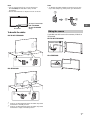
Attaching the Table-Top Stand
(Alternative) . . . . . . . . . . . . . . . . . . . . . . . . 6
Hiding the camera . . . . . . . . . . . . . . . . . . . . . 7
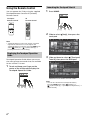
Using the Remote Control . . . . . . . . . . . . . 8
Displaying the Touchpad Operation Guide . 8
Launching the Touchpad Tutorial . . . . . . . . . 8
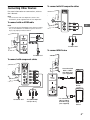
Connecting Other Devices. . . . . . . . . . . . . 9
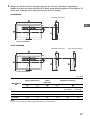
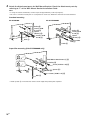
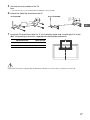
Installing the TV to the Wall . . . . . . . . . . .11
SU-WL500 (KD-79X9000B only). . . . . . . . . . 11
SU-WL450 (KD-65X9500B, KD-65/55X9000B
only) . . . . . . . . . . . . . . . . . . . . . . . . . . . . . . . . 14
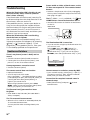
Troubleshooting . . . . . . . . . . . . . . . . . . . . 18
Troubles and Solutions . . . . . . . . . . . . . . . . 18
Specifications . . . . . . . . . . . . . . . . . . . . . . 19
• Before operating the TV, please read “Safety information”
(page 2).
• Instructions about “Installing the TV to the Wall” are included
within this TV’s instructions manual.
• Images and illustrations used in Quick Start Guide and this
manual are for reference only and may differ from actual
product appearance.
Location of the identification label
Labels for the Model No., Power Supply rating (in accordance with
applicable safety regulation) and Manufacturing date are located
on the rear of the TV.
Notice for customers in Thailand
This telecommunication equipment conforms to NTC technical
requirement.
Notes for Australia and New Zealand model
This product is ENERGY RATING qualified in the default mode.
ENERGY RATING is a programme designed to promote energy
efficient products and practices.
• When the TV is initially set up, it is designed to meet ENERGY
RATING requirements while maintaining optimum picture
quality.
• Changes to certain features, settings and functionalities of this
TV (e.g. TV Guide, Picture/Sound, Eco setting) can slightly
change the power consumption.
Depending upon such changed settings (e.g. Shop mode), the
power consumption may vary which possibly could exceed the
stated energy rating.
To reset the TV to ENERGY RATING qualified settings, complete
the initial set-up procedure in [Auto Start-up] under the settings
menu.
IMPORTANT INFORMATION
If a television is not positioned in a sufficiently stable location, it
can be potentially hazardous due to falling. Many injuries,
particularly to children, can be avoided by taking simple
precautions such as:
• Using cabinets or stands recommended by the manufacturer of
the television.
• Only using furniture that can safely support the television.
• Ensuring the television is not overhanging the edge of the
supporting furniture.
• Not placing the television on tall furniture (for example,
cupboards or bookcases) without anchoring both the furniture
and the television to a suitable support.
• Not standing the televisions on cloth or other materials placed
between the television and supporting furniture.
• Educating children about the dangers of climbing on furniture
to reach the television or its controls.
Safety information
WARNING
Batteries must not be exposed to excessive heat such as
sunshine, fire or the like.
Installation/Set-up
Install and use the TV set in accordance with the instructions
below in order to avoid any risk of fire, electrical shock or damage
and/or injuries.
Installation
• To avoid slipping and causing personal injury, do not step on
the TV protection bag when unpacking the TV set.
• The TV set should be installed near an easily accessible AC
power outlet (mains socket).
2GB