1
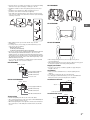
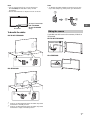
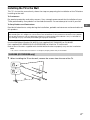
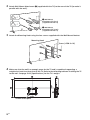
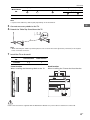
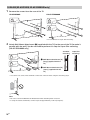
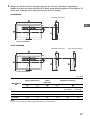
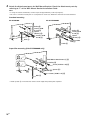
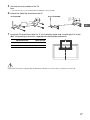
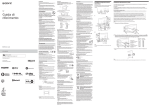
• Place the TV set on a stable, level surface to avoid it from falling down and cause personal injury or damage to the TV. • Install the TV where it cannot be pulled, pushed, or knocked over. • Install the TV so that the TV's Table-Top Stand does not protrudes out from the TV stand (not supplied). If the Table-Top Stand protrudes out from the TV stand, it may cause TV set to topple over, fall down, and cause personal injury or damage to the TV. KD-79X9000B KD-65X9500B • Only qualified service personnel should carry out wall installations. • For safety reasons, it is strongly recommended that you use Sony accessories, including: Wall-Mount Bracket SU-WL500 (KD-79X9000B) SU-WL450 (KD-65X9500B, KD-65/55X9000B) • Be sure to use the screws supplied with the Wall-Mount Bracket when attaching the Wall-Mount Bracket to the TV set. The supplied screws are designed as indicated by illustration when measured from the attaching surface of the Wall-Mount Bracket. The diameter and length of the screws differ depending on the Wall-Mount Bracket model. Use of screws other than those supplied may result in internal damage to the TV set or cause it to fall, etc. KD-65X9500B 8 mm - 12 mm GB KD-65/55X9000B • When transporting the TV set, do not subject it to jolts or excessive vibration. • When transporting the TV set for repairs or when moving, pack it using the original carton and packing material. Topple prevention • Be sure to use strong cord that is capable of supporting the weight of the TV. Screw (supplied with the Wall-Mount Bracket) Wall-Mount Bracket TV's rear cover Ventilation • Never cover the ventilation holes or insert anything in the cabinet. • Leave space around the TV set as shown below. • It is strongly recommended that you use a Sony Wall-Mount Bracket in order to provide adequate air-circulation. Installed on the wall KD-79/65/55X9000B 30 cm 8 mm - 12 mm 10 cm 10 cm Screw (supplied with the Wall-Mount Bracket) Wall-Mount Bracket Wall-Mount Attachment 10 cm Leave at least this space around the set. Installed with stand 30 cm Transporting • Before transporting the TV set, disconnect all cables. • Two or more people (four or more people for KD-79X9000B) are needed to transport a large TV set. • When transporting the TV set by hand, hold it as shown below. Do not put stress on the LCD panel and the frame around the screen. 10 cm 10 cm 6 cm Leave at least this space around the set. 3GB