1
KV-21FA210
Self-Diagnostic Screen Display
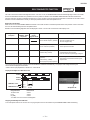
For errors with symptoms such as “power sometimes shuts off” or “screen sometimes goes out” that cannot be confirmed, it is possible to bring up past
occurrences of failure on the screen for confirmation.
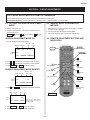
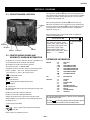
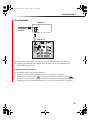
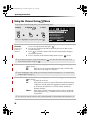
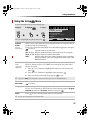
To Bring Up Screen Test
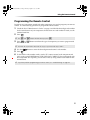
In standby mode, press buttons on the Remote Commander sequentially, in rapid succession, as shown below:
Display
Sound Volume -
Channel 5
Power ON
Note that this differs from entering the Service Mode (Sound Volume + ).
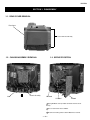
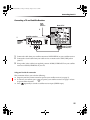
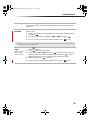
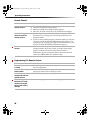
Self-Diagnostic Screen Display
SELF DIAGNOSTIC
2: 000
3: N/A
4: 000
5: 001
101: N/A
Numeral “0” means that no fault was detected.
Numeral “1” means a fault was detected one time only.
Handling of Self-Diagnostic Screen Display
Since the diagnostic results displayed on the screen are not automatically cleared, always check the self-diagnostic screen during repairs. When you
have completed the repairs, clear the result display to “0”.
Unless the result display is cleared to “0”, the self-diagnostic function will not be able to detect subsequent faults after completion of the repairs.
Clearing the Result Display
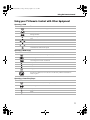
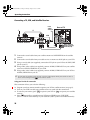
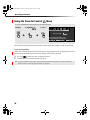
To clear the result display to “0”, press buttons on the Remote Commander sequentially when the diagnostic screen is displayed, as shown below:
Channel 8
ENTER
Quitting the Self-Diagnostic Screen
To quit the entire self-diagnostic screen, turn off the power switch on the Remote Commander or the main unit.
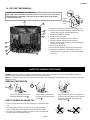
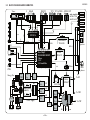
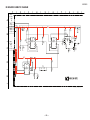
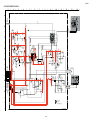
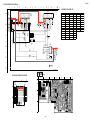
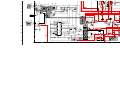
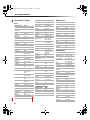
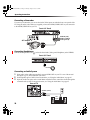
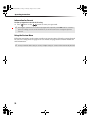
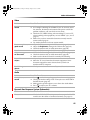
Self-Diagnostic Circuit
FROM
CV BOARD
IC1751 PIN 5
FROM
A BOARD
IC561
PIN 7
A BOARD
IC001
Y/CHROMA JUNGLE
51 IK-AKBIN
A BOARD
IC545
V. OUT
A BOARD
IC001
SYSTEM
IO-BDAT
REF 3
78 I-Prot
72 I-HLDWN
53
O-LED 79
A BOARD
IC002
MEMORY
5 BDA
DISPLAY
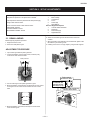
+B overcurrent (OCP)
Occurs when an overcurrent on the +B (135V) line is detected by pin 72 of IC001 (A Board). If the voltage of pin 72 of IC001 (A Board) is less than 1V
when V.SYNC is more than seven verticals in a period, the unit will automatically turn off.
I-Prot
Occurs when an absence of the vertical deflection pulse is detected by pin 78 of IC001 (A Board). Power supply will shut down when waveform interval
exceeds 2 seconds.
IK (AKB)
If the RGB levels* do not balance within 2 seconds after the power is turned on, this error will be detected by IC001 (A Board). TV will stay on, but
there will be no picture.
*(Refers to the RGB levels of the AKB detection Ref pulse that detects 1K).
—8—