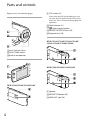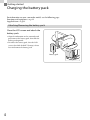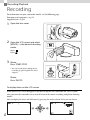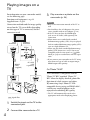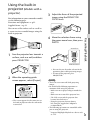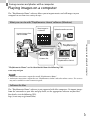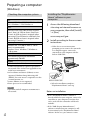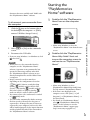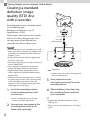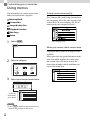
1
4-447-514-12(1) Digital HD Video Camera Recorder Operating Guide Table of contents Getting started Recording/Playback Saving movies and photos with a computer Saving images on an external media device Customizing your camcorder Please also refer to : Others/Index http://www.sony.net/SonyInfo/Support/ HDR-CX220/CX220E/CX230/CX230E/CX280/CX280E/CX290/CX290E/ PJ220/PJ220E/PJ230/PJ230E Read this first Before operating the unit, please read this manual thoroughly, and retain it for future reference. Owner’s Record The model and serial numbers are located on the bottom. Record the serial number in the space provided below. Refer to these numbers whenever you call upon your Sony dealer regarding this product. Model No. HDRSerial No. Model No. ACSerial No. WARNING To reduce the risk of fire or electric shock, 1) do not expose the unit to rain or moisture. 2) do not place objects filled with liquids, such as vases, on the apparatus. Do not expose the batteries to excessive heat such as sunshine, fire or the like. GB This symbol is intended to alert the user to the presence of uninsulated “dangerous voltage” within the product’s enclosure that may be of sufficient magnitude to constitute a risk of electric shock to persons. This symbol is intended to alert the user to the presence of important operating and maintenance (servicing) instructions in the literature accompanying the appliance. IMPORTANT SAFETY INSTRUCTIONS SAVE THESE INSTRUCTIONS. DANGER - TO REDUCE THE RISK OF FIRE OR ELECTRIC SHOCK, CAREFULLY FOLLOW THESE INSTRUCTIONS. Read these instructions. Keep these instructions. Heed all warnings. Follow all instructions. Do not use this apparatus near water. Clean only with dry cloth. Do not block any ventilation openings. Install in accordance with the manufacturer’s instructions. Do not install near any heat sources such as radiators, heat registers, stoves, or other apparatus (including amplifiers) that produce heat. Do not defeat the safety purpose of the polarized or grounding-type plug. A polarized plug has two blades with one wider than the other. A grounding type plug has two blades and a third grounding prong. The wide blade or the third prong are provided for your safety. If the provided plug does not fit into your outlet, consult an electrician for replacement of the obsolete outlet. Protect the power cord from being walked on or pinched particularly at plugs, convenience receptacles, and the point where they exit from the apparatus. Only use attachments/accessories specified by the manufacturer. Use only with the cart, stand, tripod, bracket, or table specified by the manufacturer, or sold with the apparatus. When a cart is used, use caution when moving the cart/apparatus combination to avoid injury from tip-over. Unplug this apparatus during lightning storms or when unused for long periods of time. Refer all servicing to qualified service personnel. Servicing is required when the apparatus has been damaged in any way, such as power-supply cord or plug is damaged, liquid has been spilled or objects have fallen into the apparatus, the apparatus has been exposed to rain or moisture, does not operate normally, or has been dropped. If the shape of the plug does not fit the power outlet, use an attachment plug adaptor of the proper configuration for the power outlet. GB Representative plug of power supply cord of countries/regions around the world. A Type (American Type) B Type BF Type B3 Type (British Type) (British Type) (British Type) C Type (CEE Type) SE Type (CEE Type) O Type (Ocean Type) The representative supply voltage and plug type are described in this chart. Depend on an area, Different type of plug and supply voltage are used. Attention: Power cord meeting demands from each country shall be used. For only the United States Use a supplied power cord. Europe Countries/regions Austria Belgium Czech Denmark Finland France Germany Greece Hungary Iceland Ireland Italy Luxemburg Netherlands Norway Poland Portugal Romania Russia Slovak Spain Sweden Switzerland UK Voltage Frequency (Hz) Plug type 230 230 220 230 230 230 230 220 220 230 230 220 230 230 230 220 230 220 220 220 127/230 230 230 240 50 50 50 50 50 50 50 50 50 50 50 50 50 50 50 50 50 50 50 50 50 50 50 50 C C C C C C C C C C C/BF C C C C C C C C C C C C BF Voltage Frequency (Hz) Plug type 220 200/220 230/240 127/230 100 220 240 220/230 230 110 50 50 50 50 50/60 60 50 60 50 60 A BF C C A C BF A/C BF A Asia Countries/regions China Hong Kong India Indonesia Japan Korea (rep) Malaysia Philippines Singapore Taiwan GB Countries/regions Voltage Frequency (Hz) Plug type 220 220 50 50 C/BF A/C Countries/regions Voltage Frequency (Hz) Plug type Australia New Zealand 240 230/240 50 50 O O Voltage Frequency (Hz) Plug type 120 120 60 60 A A Thailand Vietnam Oceania North America Countries/regions Canada USA Central America Countries/regions Voltage Frequency (Hz) Plug type 120/240 110 110/220 110 110 120 110 110 120/127 120/240 110/220 60 60 60 60 60 60 60 50 60 60 60 A A A/C A A A A A A A A Voltage Frequency (Hz) Plug type 220 127/220 220 120 220 120 50 60 50 60 60 60 C/BF/O A/C C A A/C A Countries/regions Voltage Frequency (Hz) Plug type Iran Iraq Israel Saudi Arabia Turkey UAE 220 220 230 127/220 220 240 50 50 50 50 50 50 C/BF C/BF C A/C/BF C C/BF Countries/regions Voltage Frequency (Hz) Plug type Algeria Congo (dem) Egypt Ethiopia Kenya Nigeria South Africa Tanzania Tunisia 127/220 220 220 220 240 230 220/230 230 220 50 50 50 50 50 50 50 50 50 C C C C C/BF C/BF C/BF C/BF C Bahamas Costa Rica Cuba Dominican (rep) El Salvador Guatemala Honduras Jamaica Mexico Nicaragua Panama South America Countries/regions Argentina Brazil Chile Colombia Peru Venezuela Middle East Africa GB CAUTION Battery pack If the battery pack is mishandled, the battery pack can burst, cause a fire or even chemical burns. Observe the following cautions. Do not disassemble. Do not crush and do not expose the battery pack to any shock or force such as hammering, dropping or stepping on it. Do not short circuit and do not allow metal objects to come into contact with the battery terminals. Do not expose to high temperature above 60°C (140°F) such as in direct sunlight or in a car parked in the sun. Do not incinerate or dispose of in fire. Do not handle damaged or leaking lithium ion batteries. Be sure to charge the battery pack using a genuine Sony battery charger or a device that can charge the battery pack. Keep the battery pack out of the reach of small children. Keep the battery pack dry. Replace only with the same or equivalent type recommended by Sony. Dispose of used battery packs promptly as described in the instructions. Replace the battery with the specified type only. Otherwise, fire or injury may result. AC Adaptor Do not use the AC Adaptor placed in a narrow space, such as between a wall and furniture. Use the nearby wall outlet (wall socket) when using the AC Adaptor. Disconnect the AC Adaptor from the wall outlet (wall socket) immediately if any malfunction occurs while using your camcorder. GB Even if your camcorder is turned off, AC power source (mains) is still supplied to it while connected to the wall outlet (wall socket) via the AC Adaptor. Note on the power cord (mains lead) The power cord (mains lead) is designed specifically for use with this camcorder only, and should not be used with other electrical equipment. For customers in the U.S.A. and CANADA RECYCLING LITHIUM-ION BATTERIES Lithium-Ion batteries are recyclable. You can help preserve our environment by returning your used rechargeable batteries to the collection and recycling location nearest you. For more information regarding recycling of rechargeable batteries, call toll free 1-800-822- 8837, or visit http://www.rbrc.org/ Caution: Do not handle damaged or leaking Lithium-Ion batteries. Battery pack This device complies with Part 15 of the FCC Rules. Operation is subject to the following two conditions: (1) This device may not cause harmful interference, and (2) this device must accept any interference received, including interference that may cause undesired operation. This Class B digital apparatus complies with Canadian ICES-003. For Customers in the U.S.A. UL is an internationally recognized safety organization. The UL Mark on the product means it has been UL Listed. If you have any questions about this product, you may call: Sony Customer Information Center 1-800-222-SONY (7669) The number below is for the FCC related matters only. Regulatory Information Declaration of Conformity Trade Name: SONY Model No.: HDR-CX220 Responsible Party: Sony Electronics Inc. Address: 16530 Via Esprillo, San Diego, CA 92127 U.S.A. Telephone No.: 858-942-2230 This device complies with Part 15 of the FCC Rules. Operation is subject to the following two conditions: (1) This device may not cause harmful interference, and (2) this device must accept any interference received, including interference that may cause undesired operation. Declaration of Conformity Trade Name: SONY Model No.: HDR-CX230 Responsible Party: Sony Electronics Inc. Address: 16530 Via Esprillo, San Diego, CA 92127 U.S.A. Telephone No.: 858-942-2230 This device complies with Part 15 of the FCC Rules. Operation is subject to the following two conditions: (1) This device may not cause harmful interference, and (2) this device must accept any interference received, including interference that may cause undesired operation. Declaration of Conformity Trade Name: SONY Model No.: HDR-PJ230 Responsible Party: Sony Electronics Inc. Address: 16530 Via Esprillo, San Diego, CA 92127 U.S.A. Telephone No.: 858-942-2230 This device complies with Part 15 of the FCC Rules. Operation is subject to the following two conditions: (1) This device may not cause harmful interference, and (2) this device must accept any interference received, including interference that may cause undesired operation. GB Declaration of Conformity Trade Name: SONY Model No.: HDR-CX290 Responsible Party: Sony Electronics Inc. Address: 16530 Via Esprillo, San Diego, CA 92127 U.S.A. Telephone No.: 858-942-2230 This device complies with Part 15 of the FCC Rules. Operation is subject to the following two conditions: (1) This device may not cause harmful interference, and (2) this device must accept any interference received, including interference that may cause undesired operation. CAUTION You are cautioned that any changes or modifications not expressly approved in this manual could void your authority to operate this equipment. Note This equipment has been tested and found to comply with the limits for a Class B digital device, pursuant to Part 15 of the FCC Rules. These limits are designed to provide reasonable protection against harmful interference in a residential installation. This equipment generates, uses, and can radiate radio frequency energy and, if not installed and used in accordance with the instructions, may cause harmful interference to radio communications. However, there is no guarantee that interference will not occur in a particular installation. If this equipment does cause harmful interference to radio or television reception, which can be determined by turning the equipment off and on, the user is encouraged to try to correct the interference by one or more of the following measures: GB Reorient or relocate the receiving antenna. Increase the separation between the equipment and receiver. Connect the equipment into an outlet on a circuit different from that to which the receiver is connected. Consult the dealer or an experienced radio/ TV technician for help. The supplied interface cable must be used with the equipment in order to comply with the limits for a digital device pursuant to Subpart B of Part 15 of FCC Rules. FOR CUSTOMERS IN EUROPE Notice for the customers in the countries applying EU Directives This product has been manufactured by or on behalf of Sony Corporation, 1-7-1 Konan Minato-ku Tokyo, 108-0075 Japan. Inquiries related to product compliance based on European Union legislation shall be addressed to the authorized representative, Sony Deutschland GmbH, Hedelfinger Strasse 61, 70327 Stuttgart, Germany. For any service or guarantee matters, please refer to the addresses provided in the separate service or guarantee documents. This product has been tested and found compliant with the limits set out in the EMC regulation for using connection cables shorter than 3 meters (9.8 feet). Attention The electromagnetic fields at the specific frequencies may influence the picture and sound of this unit. Notice If static electricity or electromagnetism causes data transfer to discontinue midway (fail), restart the application or disconnect and connect the communication cable (USB, etc.) again. Disposal of Old Electrical & Electronic Equipment (Applicable in the European Union and other European countries with separate collection systems) This symbol on the product or on its packaging indicates that this product shall not be treated as household waste. Instead it shall be handed over to the applicable collection point for the recycling of electrical and electronic equipment. By ensuring this product is disposed of correctly, you will help prevent potential negative consequences for the environment and human health, which could otherwise be caused by inappropriate waste handling of this product. The recycling of materials will help to conserve natural resources. For more detailed information about recycling of this product, please contact your local Civic Office, your household waste disposal service or the shop where you purchased the product. Disposal of waste batteries (applicable in the European Union and other European countries with separate collection systems) This symbol on the battery or on the packaging indicates that the battery provided with this product shall not be treated as household waste. On certain batteries this symbol might be used in combination with a chemical symbol. The chemical symbols for mercury (Hg) or lead (Pb) are added if the battery contains more than 0.0005% mercury or 0.004% lead. By ensuring these batteries are disposed of correctly, you will help prevent potentially negative consequences for the environment and human health which could otherwise be caused by inappropriate waste handling of the battery. The recycling of the materials will help to conserve natural resources. In case of products that for safety, performance or data integrity reasons require a permanent connection with an incorporated battery, this battery should be replaced by qualified service staff only. To ensure that the battery will be treated properly, hand over the product at end-oflife to the applicable collection point for the recycling of electrical and electronic equipment. For all other batteries, please view the section on how to remove the battery from the product safely. Hand the battery over to the applicable collection point for the recycling of waste batteries. For more detailed information about recycling of this product or battery, please contact your local Civic Office, your household waste disposal service or the shop where you purchased the product. Notice for customers in the United Kingdom A moulded plug complying with BS 1363 is fitted to this equipment for your safety and convenience. Should the fuse in the plug supplied need to be replaced, a fuse of the same rating as the supplied one and approved by ASTA or BSI to BS 1362, (i.e., marked with an or mark) must be used. If the plug supplied with this equipment has a detachable fuse cover, be sure to attach the fuse cover after you change the fuse. Never use the plug without the fuse cover. If you should lose the fuse cover, please contact your nearest Sony service station. GB For information on your camcorder model, see the following page: Functions and equipment p.12 Supplied items p.13 About language setting The on-screen displays in each local language are used for illustrating the operating procedures. Change the screen language before using the camcorder if necessary. [Setup] [ General Select Settings] [Language Setting] a desired language. removing the battery pack or AC Adaptor (models with an AC Adaptor) from the camcorder, or applying mechanical shock or vibration to the camcorder when the POWER/CHG (charge) lamp (p. 19) is lit or flashing green or the access lamp (p. 22) is lit or flashing When the camcorder is connected to other devices through a USB connection and the power of the camcorder is turned on, do not close the LCD panel. The image data that has been recorded may be lost. Use the camcorder in accordance with local regulations. LCD Panel On recording Notes on use GB 10 Before starting to record, test the recording function to make sure the image and sound are recorded without any problems. Compensation for the contents of recordings cannot be provided, even if recording or playback is not possible due to a malfunction of the camcorder, recording media, etc. TV color systems differ depending on the country/region. To view your recordings on a TV, you need a TV that supports the signal format for your camcorder. For details on the signal format, refer to “How to use this manual” (p. 12). Television programs, films, video tapes, and other materials may be copyrighted. Unauthorized recording of such materials may be contrary to the copyright laws. Do not do any of the following. If any of those are done, the recording media may be damaged, recorded images may be impossible to play back or may be lost, or other malfunctions could occur. ejecting the memory card when the access lamp (p. 22) is lit or flashing The LCD screen is manufactured using extremely high-precision technology, so over 99.99% of the pixels are operational for effective use. However, there may be some tiny black points and/or bright points (white, red, blue, or green in color) that appear constantly on the LCD screen. These points are normal results of the manufacturing process and do not affect the recording in any way. Black points White, red, blue or green points About this manual, illustrations and on-screen displays The example images used in this manual for illustration purposes are captured using a digital still camera, and therefore may appear different from images and screen indicators that actually appear on your camcorder. And, the illustrations of your camcorder and its screen indication are exaggerated or simplified for understandability. Design and specifications of your camcorder and accessories are subject to change without notice. In this manual, the internal memory (models with internal memory) of the camcorder and the memory card are called “recording media.” In this manual, the DVD disc recorded with high definition image quality (HD) is called AVCHD recording disc. Illustrations and screen images in this manual are based on HDR-PJ230E unless otherwise specified. and then press the center of the selector to complete the selection. Learning more about the camcorder (“Handycam” User Guide) The numbers in ( ) indicate the supplied quantity. “Handycam” User Guide is an on-line manual. Refer to it for in-depth instructions on the many functions of the camcorder. 1 2 3 Supplied Items Camcorder (1) HDMI cable (1) USB connection support cable (1) The USB connection support cable is designed for use with this camcorder only. Use this cable when the Built-in USB Cable of the camcorder is too short for connection. Access the Sony support page. http://www.sony.net/SonyInfo/ Support/ Rechargeable battery pack NP-FV30 (1) Select your country or region. “Operating Guide” (This manual) (1) Search for the model name of your camcorder within the support page. Only for HDR-CX280/CX280E/CX290/ CX290E/PJ220/PJ220E/PJ230/PJ230E Check the model name on the bottom of your camcorder. AC Adaptor (1) Power cord (Mains lead) (1) Selecting items on the LCD screen Move the multi-selector towards /// to select the desired item, Notes The “PlayMemories Home” software and “PlayMemories Home Help Guide” can be downloaded from the Sony website (p. 32). GB 11 How to use this manual In this manual, the differences in the specifications for each model are described together. If you find the description “Models with ...” like below, confirm in this chapter whether the description applies to your camcorder. (Models with a projector) (Models with the NTSC color system) To confirm the model name of your camcorder Model name (HDR-xxx) See the bottom of your camcorder. Differences in functions Model name HDR-CX220/ PJ220 HDR-CX220E/ PJ220E HDR-CX230/ PJ230 HDR-CX230E/ PJ230E HDR-CX280 GB 12 Recording media Internal memory + Memory card Memory card Signal format USB connection SteadyShot NTSC Input/Output Electronic PAL Output only Electronic NTSC Input/Output Electronic PAL Output only Electronic NTSC Input/Output Optical Output only Optical HDR-CX280E PAL HDR-CX290 NTSC Input/Output Optical HDR-CX290E PAL Output only Optical Differences in equipment Illustration used in this manual are based on HDR-PJ230E. Model name HDR-CX220/CX220E/CX230/CX230E/CX280/ CX280E/CX290/CX290E HDR-PJ220/PJ220E/PJ230/PJ230E Projector Differences in supplied items Model name HDR-CX220/CX220E/CX230/CX230E HDR-CX280/CX280E/CX290/CX290E/ PJ220/PJ220E/PJ230/PJ230E AC Adaptor Power Cord (Mains lead) Notes For the following items, the descriptions are explained with the model name. Safety Regulation (p. 2) Parts and controls (p. 16) Menu lists (p. 37) Specifications (p. 46) GB 13 Table of contents Read this first.. . . . . . . . . . . . . . . . . . . . . . . . . . . . . . . . . . . . . . . . . . . . . . . . . . . . . . . . . . . . . . . . . . . . . . . . . . . . . . . . . . . . . . . 2 IMPORTANT SAFETY INSTRUCTIONS.. . . . . . . . . . . . . . . . . . . . . . . . . . . . . . . . . . . . . . . . . . . . . . . . . . 3 Learning more about the camcorder (“Handycam” User Guide).. . . . . . . . . . . . . . 11 Selecting items on the LCD screen.. . . . . . . . . . . . . . . . . . . . . . . . . . . . . . . . . . . . . . . . . . . . . . . . . . 11 Supplied Items.. . . . . . . . . . . . . . . . . . . . . . . . . . . . . . . . . . . . . . . . . . . . . . . . . . . . . . . . . . . . . . . . . . . . . . . . . . 11 How to use this manual.. . . . . . . . . . . . . . . . . . . . . . . . . . . . . . . . . . . . . . . . . . . . . . . . . . . . . . . . . . . . . . . . . . . . . . . . . 12 Differences in functions.. . . . . . . . . . . . . . . . . . . . . . . . . . . . . . . . . . . . . . . . . . . . . . . . . . . . . . . . . . . . . . . 12 Differences in equipment.. . . . . . . . . . . . . . . . . . . . . . . . . . . . . . . . . . . . . . . . . . . . . . . . . . . . . . . . . . . . . 13 Differences in supplied items.. . . . . . . . . . . . . . . . . . . . . . . . . . . . . . . . . . . . . . . . . . . . . . . . . . . . . . . . 13 Parts and controls.. . . . . . . . . . . . . . . . . . . . . . . . . . . . . . . . . . . . . . . . . . . . . . . . . . . . . . . . . . . . . . . . . . . . . . . . . . . . . . . . 16 Getting started Charging the battery pack.. . . . . . . . . . . . . . . . . . . . . . . . . . . . . . . . . . . . . . . . . . . . . . . . . . . . . . . . . . . . . . . . . . . . . Attaching/Removing the battery pack.. . . . . . . . . . . . . . . . . . . . . . . . . . . . . . . . . . . . . . . . . . . . . Charging the battery using the AC Adaptor (Models with an AC Adaptor).. . . . . . . . . . . . . . . . . . . . . . . . . . . . . . . . . . . . . . . . . . . . . . . . . . . . . . . . . . . . . . . . . . . . . . . . . . . . . . . . . . Charging the battery using your computer.. . . . . . . . . . . . . . . . . . . . . . . . . . . . . . . . . . . . . . . Setting.. . . . . . . . . . . . . . . . . . . . . . . . . . . . . . . . . . . . . . . . . . . . . . . . . . . . . . . . . . . . . . . . . . . . . . . . . . . . . . . . . . . . . . . . . . . . . Preparing your camcorder.. . . . . . . . . . . . . . . . . . . . . . . . . . . . . . . . . . . . . . . . . . . . . . . . . . . . . . . . . . . . Changing the recording media (Models with internal memory).. . . . . . . . . . . . . . Inserting a memory card .. . . . . . . . . . . . . . . . . . . . . . . . . . . . . . . . . . . . . . . . . . . . . . . . . . . . . . . . . . . . . 18 18 19 19 21 21 21 22 Recording/Playback Recording.. . . . . . . . . . . . . . . . . . . . . . . . . . . . . . . . . . . . . . . . . . . . . . . . . . . . . . . . . . . . . . . . . . . . . . . . . . . . . . . . . . . . . . . . . . Zooming.. . . . . . . . . . . . . . . . . . . . . . . . . . . . . . . . . . . . . . . . . . . . . . . . . . . . . . . . . . . . . . . . . . . . . . . . . . . . . . . . . . Playback.. . . . . . . . . . . . . . . . . . . . . . . . . . . . . . . . . . . . . . . . . . . . . . . . . . . . . . . . . . . . . . . . . . . . . . . . . . . . . . . . . . . . . . . . . . . Playing images on a TV.. . . . . . . . . . . . . . . . . . . . . . . . . . . . . . . . . . . . . . . . . . . . . . . . . . . . . . . . . . . . . . . . . . . . . . . . . Using the built-in projector (Models with a projector).. . . . . . . . . . . . . . . . . . . . . . . . . . . . . . . . . . . 24 25 26 28 29 Saving movies and photos with a computer Playing images on a computer.. . . . . . . . . . . . . . . . . . . . . . . . . . . . . . . . . . . . . . . . . . . . . . . . . . . . . . . . . . . . . . . . What you can do with “PlayMemories Home” software (Windows).. . . . . . . . . . Software for Mac.. . . . . . . . . . . . . . . . . . . . . . . . . . . . . . . . . . . . . . . . . . . . . . . . . . . . . . . . . . . . . . . . . . . . . . . . Preparing a computer (Windows).. . . . . . . . . . . . . . . . . . . . . . . . . . . . . . . . . . . . . . . . . . . . . . . . . . . . . . . . . . . . Checking the computer system. . . . . . . . . . . . . . . . . . . . . . . . . . . . . . . . . . . . . . . . . . . . . . . . . . . . . . Installing the “PlayMemories Home” software in your computer.. . . . . . . . . . . . . Starting the “PlayMemories Home” software.. . . . . . . . . . . . . . . . . . . . . . . . . . . . . . . . . . . . . . . . . . . . . . . GB 14 31 31 31 32 32 32 33 Saving images on an external media device Creating a standard definition image quality (STD) disc with a recorder.. . . . . . . . . . . . . 34 Saving images on an external media device with high definition (HD) image quality (Models with an AC Adaptor).. . . . . . . . . . . . . . . . . . . . . . . . . . . . . . . . . . . . . . . . . . . . . . . . . . . . . . . . . . . . . . . . . . 35 Table of contents Customizing your camcorder Using menus.. . . . . . . . . . . . . . . . . . . . . . . . . . . . . . . . . . . . . . . . . . . . . . . . . . . . . . . . . . . . . . . . . . . . . . . . . . . . . . . . . . . . . . 36 Menu lists.. . . . . . . . . . . . . . . . . . . . . . . . . . . . . . . . . . . . . . . . . . . . . . . . . . . . . . . . . . . . . . . . . . . . . . . . . . . . . . . . . . . . . . . . . . 37 Others/Index Troubleshooting.. . . . . . . . . . . . . . . . . . . . . . . . . . . . . . . . . . . . . . . . . . . . . . . . . . . . . . . . . . . . . . . . . . . . . . . . . . . . . . . . . Self-diagnosis display/Warning indicators.. . . . . . . . . . . . . . . . . . . . . . . . . . . . . . . . . . . . . . . . . . . . . . . . . . About handling of your camcorder.. . . . . . . . . . . . . . . . . . . . . . . . . . . . . . . . . . . . . . . . . . . . . . . . . . . . . . . . . . Specifications.. . . . . . . . . . . . . . . . . . . . . . . . . . . . . . . . . . . . . . . . . . . . . . . . . . . . . . . . . . . . . . . . . . . . . . . . . . . . . . . . . . . . . Screen indicators.. . . . . . . . . . . . . . . . . . . . . . . . . . . . . . . . . . . . . . . . . . . . . . . . . . . . . . . . . . . . . . . . . . . . . . . . . . . . . . . . . Index.. . . . . . . . . . . . . . . . . . . . . . . . . . . . . . . . . . . . . . . . . . . . . . . . . . . . . . . . . . . . . . . . . . . . . . . . . . . . . . . . . . . . . . . . . . . . . . . . 40 41 42 46 49 51 GB 15 Parts and controls Figures in ( ) are reference pages. LCD screen (21) If you rotate the LCD panel 180 degrees, you can close the LCD panel with the LCD screen facing out. This is convenient during playback operations. Multi selector (11) (View Images) button PROJECTOR FOCUS lever (29) Projector lens (29) HDR-CX220/CX220E/CX230/CX230E/ CX280/CX280E/CX290/CX290E Lens (Carl Zeiss lens) LENS COVER switch Built-in microphones HDR-PJ220/PJ220E/PJ230/PJ230E HDR-PJ220/PJ220E/PJ230/PJ230E Speaker PROJECTOR button (29) HDMI OUT jack (28) GB 16 To fasten the grip belt Power zoom lever (25) PHOTO button (24) POWER/CHG (charge) lamp (19) Battery pack (18) START/STOP button (24) DC IN jack (19) Multi/Micro USB Terminal Supports Micro USB compatible devices. Grip belt Built-in USB Cable (19) Memory card access lamp (22) While the lamp is lit or flashing, the camcorder is reading or writing data. Tripod receptacle Attach a tripod (sold separately: the length of the screw must be less than 5.5 mm (7/32 in.)). Depending on the specifications of the tripod, your camcorder may not attach in the proper direction. Memory card slot (22) BATT (battery) release lever (18) GB 17 Getting started Charging the battery pack For information on your camcorder model, see the following page: Functions and equipment p.12 Supplied items p.13 Attaching/Removing the battery pack Close the LCD screen and attach the battery pack. Align the indentation on the camcorder and projection on the battery pack, then slide the battery pack upwards. To remove the battery pack, close the LCD screen, then slide the BATT (battery) release lever and remove the battery pack. Battery pack GB 18 Charging the battery using the AC Adaptor (Models with an AC Adaptor) Connect the AC Adaptor () and the power cord (mains lead) () to your camcorder and the wall outlet (wall socket). The POWER/CHG (charge) lamp turns orange. The POWER/CHG (charge) lamp turns off when the battery pack is fully charged. DC plug To the wall outlet (wall socket) Getting started Align the mark on the DC plug with that on the DC IN jack POWER/CHG (charge) lamp DC IN jack Charging the battery using your computer Connect the camcorder to a running computer using the Built-in USB Cable. The POWER/CHG (charge) lamp turns orange. The POWER/CHG (charge) lamp turns off when the battery is fully charged. Use the USB connection support cable when the Built-in USB Cable is too short for connection. Built-in USB Cable To the wall outlet (wall socket) GB 19 To charge the battery using an AC-UD10 USB charger/AC Adaptor (sold separately) You can charge the battery by connecting the Built-in USB Cable to a wall outlet (wall socket) using an AC-UD10 USB charger/AC Adaptor (sold separately). You cannot use a Sony CPAH2R, CP-AL, or AC-UP100 portable power supply device (sold separately) to charge the camcorder. Notes In the default setting, the power turns off automatically if you leave your camcorder without any operation for about 2 minutes, to save battery power ([Power Save], p. 39). Charging time Approximate time (min.) required when you fully charge a fully discharged NP-FV30 battery pack (supplied). When using the AC Adaptor (models with an AC Adaptor): 115 min. When using your computer connected with the Built-in USB Cable*: 150 min. The charging times shown above are measured when charging the camcorder at a room temperature of 25 °C (77 °F). It is recommended that you charge the battery in a temperature range of 10 °C to 30 °C (50 °F to 86 °F). * The charging times are measured without using the USB connection support cable. GB 20 Setting For information on your camcorder model, see the following page: Functions and equipment p.12 Supplied items p.13 Preparing your camcorder 1 2 Getting started Open the LCD screen of your camcorder and turn the power on. To turn off the power, close the LCD screen. Select the desired language, the geographical area, and the time using the multi-selector. To turn off the beep sound Select [Setup] [ General Settings] [Beep] [Off]. Notes The recording date and time are recorded automatically on the recording media. They are not displayed during recording. However, you can check them as [Data Code] during playback. To display them, select [Setup] [ Playback Settings] [Data Code] [Date/Time]. Changing the recording media (Models with internal memory) In the default setting, movies and photos are recorded on the internal memory. You can change the recording media to a memory card. [Setup] [ Media Settings] [Media Select] the desired medium. Select GB 21 Inserting a memory card Open the cover, and insert the memory card until it clicks. Access lamp To eject the memory card, lightly push the memory card in once. Insert the card with the notched corner in the direction as illustrated. Notes To ensure stable operation of the memory card, it is recommended to format the memory card with your camcorder before the first use (p. 38). Formatting the memory card will erase all the data stored on it and the data will be irrecoverable. Save your important data on your PC, etc. Confirm the direction of the memory card. If you forcibly insert the memory card in the wrong direction, the memory card, memory card slot, or image data may be damaged. When inserting or ejecting the memory card, be careful so that the memory card does not pop out and drop. Types of memory card you can use with your camcorder SD Speed Class “Memory Stick PRO Duo” media (Mark2) “Memory Stick PRO-HG Duo” media “Memory Stick XC-HG Duo” media SD memory card SDHC memory card SDXC memory card GB 22 — Capacity (operation verified) Described in this manual Up to 32 GB “Memory Stick PRO Duo” media Up to 64 GB Class 4 or faster Up to 64 GB SD card Operation with all memory cards is not assured. Notes A MultiMediaCard cannot be used with this camcorder. Movies recorded on “Memory Stick XC-HG Duo” media and SDXC memory cards cannot be imported to or played back on computers or AV devices not supporting the exFAT* file system by connecting the camcorder to these devices with the USB cable. Confirm in advance that the connecting equipment is supporting the exFAT system. If you connect an equipment not supporting the exFAT system and the format screen appears, do not perform the format. All the data recorded will be lost. * The exFAT is a file system that is used for the “Memory Stick XC-HG Duo” media and SDXC memory cards. Getting started GB 23 Recording/Playback Recording For information on your camcorder model, see the following page: Functions and equipment p.12 Supplied items p.13 1 Open the lens cover. 2 Open the LCD screen and select [MODE] the desired shooting mode. Movie: Photo: 3 Movie: Press START/STOP. You can record photos during movie recording by pressing PHOTO (Dual Capture). Photo: Press PHOTO. To display items on the LCD screen Items on the LCD screen disappear if you do not operate the camcorder for a few seconds after you turn the camcorder on or switch between the movie recording and photo shooting modes. You can display the icons and indicators by pressing the multi-selector if they are not shown. STBY STBY 2 h 25 m 00:00:00 14 h 48 m 60i >9999 16:9 L 8.9M MODE GB 24 AUTO Notes The following states will be indicated if data is still being written onto the recording media after recording has finished. During this time, do not apply shock or vibration to the camcorder, or remove the battery or AC Adaptor. Access lamp (p. 22) is lit or flashing The media icon in the upper right of the LCD screen is flashing Zooming W (Wide angle): Wider range of view T (Telephoto): Close view In the default setting, you can magnify images up to the following: 27 times optical zoom (models with electronic SteadyShot) 50 times extended zoom (models with optical SteadyShot) Move the power zoom lever slightly for a slower zoom. Move it further for a faster zoom. Recording/Playback Move the power zoom lever to magnify or reduce the size of the image. To magnify images further (Extended Zoom) (Models with electronic SteadyShot) Set [ SteadyShot] to [Standard] or [Off] (p. 37). You can magnify images up to 32 times the original size by extending the wide angle. To select the suitable setting automatically for the recording situation (Intelligent Auto) Select [On] at the subject and record it. on the recording screen of movies or photos, then point your camcorder GB 25 Playback For information on your camcorder model, see the following page: Functions and equipment p.12 Supplied items p.13 You can search for recorded images by date and time of recording (Event View). 1 Open the LCD screen and press the button on the camcorder to enter the playback mode. 2 Select / to move the desired event to the center () and then select it (). 3 You can enter the playback mode by on the LCD screen. selecting MENU The camcorder displays recorded images as an event automatically, based on the date and time. 1 1 2013 Highlight 1 1 2013 26 00:00:00 1 19 Select the appropriate buttons on the LCD screen for various playback operations. Volume / Previous/Next Delete / Fast-reverse/fast-forward Context / Play/Pause Stop GB 12 The camcorder plays from the selected image to the last image in the event. 1 18 2013 4 1-2 2013 Select the image. Start/stop slide show Some buttons described above may not appear, depending on the image being played back. As you repeat selecting / during playback, movies are played as fast as about 5 times about 10 times about 30 times about 60 times. / during pause to play movies slowly. Select [Slideshow Set] when is selected with the Switch Image Type To repeat Slideshow, select button. Notes To prevent your image data from being lost, save all your recorded images on external media periodically. (p. 35) In the default setting, a protected demonstration movie is pre-recorded (HDR-PJ230/PJ230E). You may not be able to play back with other devices images that were recorded on your camcorder normally. Also, you may not be able to play back images recorded on other devices with your camcorder. Standard definition image quality (STD) movies recorded on SD memory cards cannot be played on AV equipment of other manufacturers. To delete images Select on the playback screen of movies or photos. Recording/Playback To play back images with other devices GB 27 Playing images on a TV For information on your camcorder model, see the following page: Functions and equipment p.12 Supplied items p.13 Connection methods and the image quality viewed on the TV screen differ depending on what type of TV is connected, and the connectors used. 3 High definition Standard definition Yellow White Red HDMI Cable (supplied) AV Cable (sold separately) Play a movie or a photo on the camcorder (p. 26). Notes Refer to the instruction manuals of the TV as well. You should use the AC Adaptor as the power source (models with an AC Adaptor) (p. 19). If the TV does not have the HDMI input jack, use an AV Cable (sold separately) for connection. When movies are recorded with standard definition image quality (STD), they are played back in standard definition image quality (STD) even on a high definition TV. When you play back standard definition image quality (STD) movies on a 4:3 TV that is not Wide compatible with the 16:9 signal, set [ Mode] to [4:3] to record movies with 4:3 aspect ratio. If you connect your camcorder to the TV using more than one type of cable to output images, HDMI output takes priority. On “Photo TV HD” This camcorder is compatible with the “Photo TV HD” standard. “Photo TV HD” allows for highly-detailed, photo-like depiction of subtle textures and colors. By connecting Sony’s Photo TV HDcompatible devices using an HDMI cable*, a whole new world of photos can be enjoyed in breathtaking HD quality. * The TV will automatically switch to the Signal flow GB 28 1 Switch the input on the TV to the connected jack. 2 Connect the camcorder to a TV. appropriate mode when displaying photos. Using the built-in projector (Models with a projector) For information on your camcorder model, see the following page: Functions and equipment p.12 Supplied items p.13 3 Adjust the focus of the projected image using the PROJECTOR FOCUS lever. 4 Move the selection frame using the power zoom lever, then press PHOTO. You can use a flat surface such as a wall as a screen to view recorded images using the built-in projector. 1 Face the projector lens towards a surface, such as a wall, and then press PROJECTOR. Recording/Playback Zoom lever PHOTO button 2 When the operating guide screen appears, select [Project]. This screen appears the first time you use the built-in projector after the camcorder is turned on. You can also use the multi-selector for the operations above while projecting images. To turn off the projector, press PROJECTOR. Notes The LCD screen turns off while projecting images. Be careful of the following operations or situations while using the projector. Make sure not to project images towards the eyes. Make sure not to touch the projector lens. The LCD screen and the projector lens become hot while in use. Using the projector shortens battery life (using the supplied AC Adaptor is recommended). The following operations are unavailable while you are using the projector. Output of Highlight Playback to a device such as a TV GB 29 Operation GB 30 of the camcorder with the LCD screen closed Several other functions When the projected images contain a lot of black, faint color unevenness may appear. This is caused by light reflection in the projector lens and is not a malfunction. Saving movies and photos with a computer Playing images on a computer The “PlayMemories Home” software allows you to import movies and still images to your computer to use them in a variety of ways. What you can do with “PlayMemories Home” software (Windows) View images in a calendar Upload to online services Import images from the camcorder Saving movies and photos with a computer Create a disc Share images in “PlayMemories Online” “PlayMemories Home” can be downloaded from the following URL. www.sony.net/pm Notes An Internet connection is required to install “PlayMemories Home.” An Internet connection is required to use “PlayMemories Online” and other online services. The services may not be available in some countries/regions. Software for Mac The “PlayMemories Home” software is not supported with Mac computers. To import images from the camcorder to your Mac and play them, use the appropriate software on your Mac. For details, visit the following URL. http://www.sony.co.jp/imsoft/Mac/ GB 31 Preparing a computer (Windows) Installing the “PlayMemories Home” software in your computer Checking the computer system OS*1 Microsoft Windows XP SP3*2/Windows Vista SP2*3/Windows 7 SP1/Windows 8 CPU*4 Intel Core Duo 1.66 GHz or faster, or Intel Core 2 Duo 1.66 GHz or faster (Intel Core 2 Duo 2.26 GHz or faster is required when processing FX or FH movies, and Intel Core 2 Duo 2.40 GHz or faster is required when processing PS movies.) Memory Windows XP: 512 MB or more (1 GB or more is recommended) Windows Vista/ Windows 7/Windows 8: 1 GB or more 1 Access the following download site using an Internet browser on your computer, then click [Install] [Run]. www.sony.net/pm 2 Install according to the on-screen instructions. Hard disk Disk volume required for installation: Approximately 500 MB When the on-screen instructions prompting you to connect the camcorder to a computer appear, connect the camcorder to your computer with the built-in USB Cable. Display Minimum 1,024 × 768 dots *1Standard installation is required. Operation is not assured if the OS has been upgraded or in a multi-boot environment. *264-bit editions and Starter (Edition) are not supported. Windows Image Mastering API (IMAPI) Ver.2.0 or newer is required to use disc creation function, etc. *3Starter (Edition) is not supported. *4Faster processor is recommended. Built-in USB Cable When the installation completes, “PlayMemories Home” starts up. Notes Operation with all computer environments is not assured. Notes on installation GB 32 If the “PlayMemories Home” software is already installed on your computer, connect the camcorder to your computer. Functions that can be used with this camcorder will then be available. If the “PMB (Picture Motion Browser)” software is installed on your computer, it will be overwritten by the “PlayMemories Home” software. In this case, you cannot use some functions that were available with “PMB” with this “PlayMemories Home” software. To disconnect your camcorder from the computer Starting the “PlayMemories Home” software 1 Double-click the “PlayMemories Home” icon on the computer screen. 1 Click the icon at the bottom right of the desktop of the computer [Safely remove USB Mass Storage Device]. [Yes] on the camcorder 3 Disconnect the USB cable. If you are using Windows 7 or Windows 8, click , then click . Notes When you access the camcorder from the computer, use the “PlayMemories Home” software. Operation is not guaranteed if you operate the data using software other than the “PlayMemories Home” software or you directly manipulate files and the folders from a computer. Images cannot be saved to some discs depending on the configuration selected in REC Mode]. Movies recorded in [60p [ ](models with the NTSC color Quality ](models with the system) / [50p Quality ] PAL color system) or [Highest Quality mode can only be saved to a Blu-ray disc. You cannot create a disc with movies recorded MP4] mode. in [ The camcorder automatically divides an image file that exceeds 2 GB and saves the parts as separate files. All image files may be shown as separate files on a computer, however, the files will be handled properly by the import function and the playback function of the camcorder or the “PlayMemories Home” software. 2 Saving movies and photos with a computer 2 Select screen. When using Windows 8, select the “PlayMemories Home” icon from the start screen. Double-click the “PlayMemories Home Help Guide” short-cut icon on the computer screen to see how to use “PlayMemories Home.” When using Windows 8, select [PlayMemories Home Help Guide] from the help menu of “PlayMemories Home.” If the icon is not displayed on the computer screen, click [Start] [All Programs] [PlayMemories Home] the desired item. For details on “PlayMemories Home,” select (“PlayMemories Home Help Guide”) on the software or visit the “PlayMemories Home” support page (http://www.sony.co.jp/pmh-se/). GB 33 Saving images on an external media device Creating a standard definition image quality (STD) disc with a recorder For information on your camcorder model, see the following page: Functions and equipment p.12 Supplied items p.13 Connect your camcorder to a disc recorder with an AV Cable (sold separately). You can copy images played back on your camcorder on a disc or video cassette. Notes You should connect your camcorder to the wall outlet (wall socket) using the AC Adaptor when performing this operation (models with an AC Adaptor) (p. 19). Refer to the instruction manual supplied with the device connected. You cannot copy images to recorders connected with an HDMI cable. Since copying is performed via analog data transfer, the image quality may deteriorate. High definition image quality (HD) movies will be copied with standard definition image quality (STD). When you connect a monaural device, connect the yellow plug of an AV Cable (sold separately) to the video input jack, and the white (left channel) or the red (right channel) plug to the audio input jack on the device. 1 Insert the recording medium in the recording device (a disc recorder, etc.). 2 GB 34 If your recording device has an input selector, set it to the input mode. Connect your camcorder to the recording device with an AV Cable (sold separately). AV Cable (sold separately) Red White Yellow Signal flow Connect your camcorder to the input jacks of the recording device. 3 Start playback on your camcorder, and record it on the recording device. 4 When dubbing is finished, stop the recording device, and then your camcorder. Copying date and time information: [Data Code] (p. 38) Using 4:3 screen size display device: [TV Type] (p. 38) Saving images on an external media device with high definition (HD) image quality (Models with an 1 AC Adaptor) Connect your camcorder and the external media device using the USB Adaptor Cable (sold separately). For information on your camcorder model, see the following page: Functions and equipment p.12 Supplied items p.13 USB Adaptor Cable VMC-UAM2 (sold separately) You can connect your camcorder and the external media device, and then play back images stored on the external media device. You can connect your computer and the external media device and import images to your computer using the “PlayMemories Home” software (p. 33). Notes For this operation, you need the USB Adaptor Cable VMC-UAM2 (sold separately). Connect the AC Adaptor and the power cord (mains lead) to the DC IN jack of your camcorder and the wall outlet (wall socket). Refer to the instruction manual supplied with the external media device. 2 Saving images on an external media device You can save movies and photos on an external media device (USB storage devices), such as an external hard disk drive. The following functions will be available after you have saved your images on an external media device. Select [Copy.] on the camcorder screen. Movies and photos that are stored on the recording media, and that have not yet been saved on to external media device can be saved on the connected media device at this time. This operation is available only when there are newly recorded images in your camcorder. To disconnect the external media device, while the camcorder is in the select playback standby mode (either Event View or Event Index is displayed). GB 35 Customizing your camcorder Using menus The camcorder has various menu items under each of 6 menu categories. Shooting Mode Camera/Mic Image Quality/Size To find a menu item quickly The [Camera/Mic] and [Setup] menus have sub-categories. Select the sub-category icon so that the LCD screen displays the list of menus in the sub-category selected. Playback Function Edit/Copy Setup 1 Select . Sub-category icons When you cannot select a menu item 2 Select a category. MENU 3 Shooting Mode Camera/Mic Image Quality/Size Playback Function Edit/Copy Setup Select your desired menu item. Shooting Mode Movie STBY Photo Edit/Copy Scrolls the menu items up or down GB 36 Delete Protect Copy Direct Copy Notes to finish setting the menu or to Select return to the previous menu screen. Grayed out menu items or settings are not available. When you select the grayed out menu item, your camcorder displays the reason why you cannot select the menu item or the instruction of under which condition you can set the menu item. Menu lists Shooting Mode Movie........................................... Records movies. Photo............................................ Shoots photos. Camera/Mic Customizing your camcorder Manual Settings White Balance.................. Adjusts the color balance to the recording environment. Exposure............................ Adjusts the brightness of movies and photos. If you select [Manual], adjust / . the brightness (exposure) using to adjust Focus.................................. Adjusts the focus manually. If you select [Manual], select to adjust the focus for a distant the focus for a nearby subject and subject. Low Lux.............................. Records bright color images in the dim. Camera Settings Scene Selection.............. Selects an appropriate recording setting according to the type of scene, such as night view or beach. Fader........................... Fades scenes in or out. Self-Timer.................. Sets the self-timer when your camcorder is in photo recording mode. Tele Macro........................ Focuses on the subject with its background blurred. SteadyShot............... Sets the SteadyShot function when recording movies. SteadyShot*1........... Sets the SteadyShot function when shooting photos. Digital Zoom.................... Sets the maximum zoom level of the digital zoom. Auto Back Light............... Adjusts the exposure for backlit subjects automatically. Face Face Detection................ Automatically detects faces. Smile Shutter................... Automatically takes a shot whenever a smile is detected. Smile Sensitivity............. Sets the smile detection sensitivity for the Smile Shutter function. Microphone Blt-in Zoom Mic.............. Records movies with vivid sound appropriate to the zoom position. Wind Noise Reduct........ Reduces the wind noise recorded from the built-in microphone. Micref Level...................... Sets the microphone level for recording. Shooting Assist My Button......................... Assigns functions to My Buttons. Grid Line............................ Displays grid lines as a guide to make sure the subject is horizontal or vertical. Display Setting................ Sets the duration that icons or indicators are displayed on the LCD screen. Image Quality/Size REC Mode........................... Sets the mode to record movies. Frame Rate......................... Sets the frame rate to record movies. / / Setting..... Sets the image quality for recording movies. Wide Mode......................... Sets the horizontal to vertical ratio when recording movies with standard definition image quality (STD). GB 37 x.v.Color............................... Records a wider range of colors. Set this item when you watch images with a TV which is compliant with x.v.Color. Image Size.......................... Sets the photo size. Playback Function Event View.................................. Starts playing images from the Event View display. Highlight Movie....................... Starts playing Highlight Playback scenes or Highlight Scenarios saved with standard definition image quality (STD). Scenario................................ Starts playing the scenarios that were saved by Highlight Playback. Edit/Copy Delete.......................................... Deletes movies or photos. Protect......................................... Protects movies or photos to avoid deleting. Copy*2. ........................................ Copies images. Direct Copy................................ Copies images stored in the camcorder to some type of external media device. Setup Media Settings Media Select*2. ............... Selects the type of recording media (p. 21). Media Info......................... Displays information on the recording media. Format................................ Deletes and formats all data on the recording media. Repair Img. DB F.............. Repairs the image database file on the recording media (p. 42). File Number...................... Sets how to assign the file number to photos. Playback Settings Data Code......................... Displays information that was recorded automatically at the time of recording. Volume............................... Adjusts the volume of playback sound. Download Music*3......... Downloads your favorite music files from the computer to your camcorder (while the camcorder is connected to the computer) that can be played with the Highlight Playback scenes. Empty Music*3. ............... Deletes all music files. Connection TV Type.............................. Converts the signal depending on the TV connected (p. 28). HDMI Resolution............ Selects the output image resolution when connecting your camcorder to a TV with the HDMI cable. CTRL FOR HDMI.............. Sets whether or not the TV’s Remote Commander is to be used when the camcorder is connected to a “BRAVIA” Sync compatible TV with the HDMI cable. USB Connect.................... Select this item when no instructions appear on the LCD screen when you connect your camcorder to an external device via USB. USB Connect Setting.... Sets the connection mode when the camcorder is connected to a computer or a USB device. USB LUN Setting............. Sets the camcorder to improve the compatibility of a USB connection by restricting some USB functions. GB 38 General Settings Beep.................................... Sets whether the camcorder sounds operation beeps or not. LCD Brightness . ............. Adjusts the brightness of the LCD screen. Language Setting.......... Sets the display language (p. 10). Battery Info....................... Displays the approximate remaining battery time. Power Save....................... Sets the LCD screen and the power so that they turn off automatically. Initialize............................. Initializes all the settings to the default settings. Demo Mode..................... Sets playback of the demonstration movie about the functions of the camcorder. Clock Settings Date & Time Setting...... Sets the date and time. Area Setting..................... Adjusts for a time difference without stopping the clock (p. 21). *1 HDR-CX280/CX280E/CX290/CX290E *2 HDR-CX230/CX230E/CX290/CX290E/PJ230/PJ230E *3 HDR-CX220/CX230/CX280/CX290/PJ220/PJ230 Customizing your camcorder GB 39 Others/Index Troubleshooting For information on your camcorder model, see the following page: Functions and equipment p.12 Supplied items p.13 If you run into any problems using your camcorder, follow the steps below. Check the list (p. 40 to 42), and inspect your camcorder. Disconnect the power source, attach the power source again after about 1 minute, and turn the camcorder on. Select [Setup] [ General Settings] [Initialize]. If you select [Initialize], all settings, including the clock setting, are reset. Contact your Sony dealer or local authorized Sony service facility. GB 40 You may need to initialize or change the current internal memory (models with internal memory) of your camcorder depending on the problem. If you do so, the data stored on the internal memory will be deleted. Be sure to save the data on the internal memory on other media (backup) before sending your camcorder for repair. We will not compensate you for any loss of internal memory data. During repair, we may check a minimum amount of data stored on the internal memory in order to investigate the problem. However, your Sony dealer will neither copy nor retain your data. See the “Handycam” User Guide (p. 11) for details on the symptoms of your camcorder, and “PlayMemories Home Help Guide” (p. 33) on connecting your camcorder to a computer. The power does not turn on. Attach a charged battery pack to the camcorder (p. 18). The plug of the AC Adaptor (models with an AC Adaptor) has been disconnected from the wall outlet (wall socket). Connect it to the wall outlet (wall socket) (p. 19). The camcorder does not operate even when the power is set to on. It takes a few seconds for your camcorder to be ready to shoot after the power is turned on. This is not a malfunction. Disconnect the AC Adaptor (models with an AC Adaptor) from the wall outlet (wall socket) or remove the battery pack, then reconnect it after about 1 minute. Your camcorder gets warm. Your camcorder may become warm during operation. This is not a malfunction. The power abruptly turns off. Use the AC Adaptor (models with an AC Adaptor) (p. 19). In the default setting, the camcorder turns itself off when no operations are performed for about 2 minutes ([Power Save]) (p. 39), or turn on the power again. Charge the battery pack (p. 18). Pressing START/STOP or PHOTO does not record images. The playback screen is displayed. Stop the playback, and select [Shooting Mode] [ Movie] or [ Photo]. Your camcorder is recording the image you have just shot on the recording media. You cannot make new recording during this period. The recording media is full. Delete unnecessary images (p. 27). Total number of movie scenes or photos exceeds the recordable capacity of your camcorder. Delete unnecessary images (p. 27). “PlayMemories Home” cannot be installed. An Internet connection is required to install “PlayMemories Home.” Check the computer environment or installation procedure required to install “PlayMemories Home.” “PlayMemories Home” does not work correctly. Quit “PlayMemories Home” and restart your computer. The camcorder is not recognized by the computer. For information on your camcorder model, see the following page: Functions and equipment p.12 Supplied items p.13 If indicators appear on the LCD screen, check the following. If the problem persists even after you have tried to fix a couple of times, contact your Sony dealer or local authorized Sony service facility. In this case, when you contact them, give them all the numbers of the error code beginning with C or E. You may hear a melody when some warning indicators appear on the screen. C:04: The battery pack is not an “InfoLITHIUM” battery pack (V series). Use an “InfoLITHIUM” battery pack (V series) (p. 18). Connect the DC plug of the AC Adaptor (models with an AC Adaptor) to the DC IN jack of your camcorder securely (p. 19). Others/Index Disconnect all USB devices from the USB jack of your computer except the keyboard, mouse, and your camcorder. Disconnect the Built-in USB Cable from the computer, and restart the computer, then connect the computer and your camcorder again in the correct order. When both the Built-in USB Cable and the USB jack of the camcorder are connected to the external devices at the same time, disconnect the one that is not connected to a computer. Self-diagnosis display/Warning indicators C:06: The battery pack temperature is high. Change the battery pack or place it in a cool place. C:13: / C:32: Remove the power source. Reconnect it and operate your camcorder again. E:: Follow the steps from on page 40. The battery pack is nearly used up. GB 41 About handling of your camcorder The battery pack temperature is high. Change the battery pack or place it in a cool place. No memory card is inserted (p. 22). When the indicator flashes, there are not enough free spaces for recording images. Delete unnecessary images (p. 27), or format the memory card after storing the images on other media (p. 38). The image data base file may be damaged. Check the data base file by selecting [Setup] [ Media Settings] [Repair Img. DB F.] the recording medium (models with internal memory). The memory card is damaged. Format the memory card with your camcorder (p. 38). Incompatible memory card is inserted (p. 22). The memory card is write-protected. Access to the memory card was restricted on another device. For information on your camcorder model, see the following page: Functions and equipment p.12 Supplied items p.13 On use and care The camcorder is not dustproofed, dripproofed or waterproofed. Do not hold the camcorder by the following parts, and also do not hold the camcorder by the jack covers. LCD screen Battery pack Built-in USB Cable The camcorder is unsteady, so camera-shake easily occurs. Hold the camcorder steady with both hands and record the image. However, note that the camera-shake warning indicator does not disappear. The recording medium is full. Photos cannot be recorded during processing. Wait for a while, then record. GB 42 Do not aim the camcorder at the sun. Doing so might cause your camcorder to malfunction. Take images of the sun only in low light conditions, such as at dusk. Do not use or store the camcorder and accessories in the following locations: Anywhere extremely hot, cold or humid. Never leave them exposed to temperatures above 60 C (140 °F), such as under direct sunlight, near heaters or in a car parked in the sun. They may malfunction or become deformed. Near strong magnetic fields or mechanical vibration. The camcorder may malfunction. Near strong radio waves or radiation. The camcorder may not be able to record properly. Near When not using your camcorder for a long time To keep your camcorder in optimum state for a long time, turn it on and let it run by recording and playing back images about once a month. Use up the battery pack completely before storing it. Note on the camcorder/battery pack temperature When the temperature of the camcorder or battery pack becomes extremely high or extremely low, you may not be able to record or play back on the camcorder, due to the protection features of the camcorder being activated in such situations. In this case, an indicator appears on the LCD screen. Others/Index tuner devices such as TVs or radio. Noise may occur. On a sandy beach or anywhere dusty. If sand or dust gets in your camcorder, it may malfunction. Sometimes this malfunction cannot be repaired. Near windows or outdoors, where the LCD screen, or the lens may be exposed to direct sunlight. This damages the LCD screen. For DC or AC operation, use the accessories recommended in these operating instructions. Do not let your camcorder get wet, for example, from rain or sea water. If your camcorder gets wet, it may malfunction. Sometimes this malfunction cannot be repaired. If any solid object or liquid gets inside the casing, unplug your camcorder and have it checked by a Sony dealer before operating it any further. Avoid rough handling, disassembling, modifying, physical shock, or impact such as hammering, dropping or stepping on the product. Be particularly careful with the lens. Keep the LCD screen closed when you are not using your camcorder. Do not operate your camcorder with it wrapped in an object such as a towel. When disconnecting the power cord (mains lead), pull it by the plug and not the cord (models with an AC Adaptor). Do not damage the power cord (mains lead) such as by placing anything heavy on it (models with an AC Adaptor). Do not use a deformed or damaged battery pack. Keep metal contacts clean. If the battery electrolytic liquid has leaked: Consult your local authorized Sony service facility. Wash off any liquid that may have contacted your skin. If any liquid gets in your eyes, wash with plenty of water and consult a doctor. Notes on charging through the USB cable Charging may not be possible with all computers. If you connect the camcorder to a laptop computer that is not connected to a power source, the battery of the laptop computer will continue to use up its charge. Do not leave the camcorder connected to a computer in this manner. Charging with a personally assembled computer, with a converted computer, or through a USB hub are not guaranteed. The camcorder may not function correctly depending on the USB device which is used with the computer. GB 43 When the camcorder is connected to a computer or accessories Do not try to format the recording media of the camcorder with a computer. If you do so, your camcorder may not operate correctly. When connecting the camcorder to another device with communication cables, be sure to insert the connector plug in the correct way. Pushing the plug forcibly into the terminal will damage the terminal and may result in a malfunction of the camcorder. When the camcorder is connected to other devices through a USB connection and the power of the camcorder is turned on, do not close the LCD panel. The image data that has been recorded may be lost. Notes on optional accessories LCD screen To clean the casing and the projector lens (Models with a projector) We recommend using genuine Sony accessories. Genuine Sony accessories may not be available in some countries/regions. On handling the LCD screen If you leave fingerprints, hand cream, etc. on the LCD screen, the coating of the LCD screen will come off easily. Wipe those off as soon as possible. If you wipe the LCD screen strongly with a tissue, etc., the coating of the LCD screen may be scratched. If the LCD screen becomes dirty with fingerprints or dust, it is recommended that you gently remove those from the screen then clean it with a soft cloth, etc. 44 Wipe the casing and the lens gently with a soft cloth such as a cleaning cloth or eyeglass cleaning cloth. If the casing and the projector lens is very dirty, clean the camcorder casing and the lens with a soft cloth lightly moistened with water, and then wipe the casing and the projector lens with a dry soft cloth. Avoid the following so as not to deform the casing, damage the finish or scratch the lens: Using chemicals such as thinner, benzine, alcohol, chemical cloths, insect repellent, insecticide and sunscreen Handling the camcorder with the above substances on your hands Leaving the camcorder in contact with rubber or vinyl objects for a long period of time About care and storage of the lens GB Do not apply excessive pressure on the LCD screen, as it may cause uneven color and other damage. If your camcorder is used in a cold place, a residual image may appear on the LCD screen. This is not a malfunction. While using your camcorder, the back of the LCD screen may heat up. This is not a malfunction. Wipe the surface of the lens clean with a soft cloth in the following instances: When there are fingerprints on the lens surface In hot or humid locations When the lens is exposed to salty air such as at the seaside Store in a well-ventilated location subject to little dirt or dust. To prevent mold, periodically clean and store the lens as described above. On charging the pre-installed rechargeable battery Even if you delete all movies and still images, or perform [Format] (p. 38), data on the internal memory may not be completely erased. It is recommended that [Setup] [ Media you select Settings] [Format] [Empty] to prevent the recovery of your data. Others/Index Your camcorder has a pre-installed rechargeable battery to retain the date, time, and other settings even when the LCD screen is closed. The pre-installed rechargeable battery is always charged while your camcorder is connected to the wall outlet (wall socket) via the AC Adaptor (models with an AC Adaptor) or while the battery pack is attached. The rechargeable battery will be fully discharged in about 3 months if you do not use your camcorder at all. Charge the pre-installed rechargeable battery before you start using your camcorder. However, even if the pre-installed rechargeable battery is not charged, the camcorder operation other than date recording will not be affected. Note on disposal/transfer the ownership of the camcorder (Models with internal memory) How to charge the pre-installed rechargeable battery Connect your camcorder to a wall outlet (wall socket) using the AC Adaptor (models with an AC Adaptor) or attach the fully charged battery pack, and leave it with the LCD screen closed for more than 24 hours. GB 45 Specifications System GB 46 Signal format: NTSC color, EIA standards (HDR-CX220/ CX230/CX280/CX290/PJ220/PJ230) PAL color, CCIR standards (HDR-CX220E/ CX230E/CX280E/CX290E/PJ220E/PJ230E) HD TV Movie recording format: AVCHD (AVCHD format Ver.2.0 compatible): Video: MPEG-4 AVC/H.264 Audio: Dolby Digital 2ch Dolby Digital Stereo Creator*1 MPEG-2 PS: Video: MPEG-2 (Video) Audio: Dolby Digital 2ch Dolby Digital Stereo Creator*1 MP4: Video: MPEG-4 AVC/H.264 Audio: MPEG-4 AAC-LC 2ch *1 Manufactured under license from Dolby Laboratories. Photo file format: DCF Ver.2.0 Compatible Exif Ver.2.3 Compatible MPF Baseline Compatible Recording media (Movie/Photo): Internal memory HDR-CX230/CX230E/CX290/CX290E/ PJ230/PJ230E: 8GB “Memory Stick PRO Duo” media SD card (Class 4 or faster) The capacity that a user can use HDR-CX230/CX230E/CX290/CX290E: Approx. 7.75 GB*6 HDR-PJ230/PJ230E: Approx. 7.75 GB*2 *6 1 GB equals 1 billion bytes, a portion of which is used for system management and/or application files. *2 1 GB equals 1 billion bytes, a portion of which is used for system management and/or application files. Only preinstalled demonstration movie may be deleted. Image device: 3.1 mm (1/5.8 type) CMOS Sensor Recording pixels (photo, 16:9): Max. 8.9 mega (3 984 2 240) pixels*3 Gross: Approx. 2 390 000 pixels Effective (movie, 16:9)*4: Approx. 2 150 000 pixels (HDR-CX220/ CX220E/CX230/CX230E/PJ220/PJ220E/ PJ230/PJ230E) Approx. 2 290 000 pixels (HDR-CX280/ CX280E/CX290/CX290E) Effective (photo, 16:9): Approx. 2 290 000 pixels Effective (photo, 4:3): Approx. 1 710 000 pixels Lens: Carl Zeiss Vario-Tessar Lens HDR-CX220/CX220E/CX230/CX230E/ PJ220/PJ220E/PJ230/PJ230E: 27× (Optical)*5, 32× (Extended, while recording movies)*4, 320× (Digital) HDR-CX280/CX280E/CX290/CX290E: 27× (Optical)*4, 50× (Extended, while recording movies)*5, 320× (Digital) F1.9 ~ F4.0 Focal length: f= 2.1 mm ~ 57.0 mm (3/32 in. ~ 2 1/4 in.) When converted to a 35 mm still camera For movies*4: 29.8 mm ~ 953.6 mm (1 3/16 in. ~ 37 5/8 in.) (16:9) (HDR-CX220/CX220E/CX230/ CX230E/PJ220/PJ220E/PJ230/PJ230E) 29.8 mm ~ 804 mm (1 3/16 in. ~ 31 3/4 in.) (16:9) (HDR-CX280/CX280E/CX290/ CX290E) For photos: 29.8 mm ~ 804 mm (1 3/16 in. ~ 31 3/4 in.) (16:9) Color temperature: [Auto], [One Push], [Indoor], [Outdoor] Minimum illumination: 6 lx (lux) (in default setting, shutter speed 1/30 second (HDR-CX220/CX230/CX280/ CX290/PJ220/PJ230) or 1/25 second (HDRCX220E/CX230E/CX280E/CX290E/PJ220E/ PJ230E)) 3 lx (lux) ([Low Lux] is set to [On], shutter speed 1/30 second (HDR-CX220/CX230/ CX280/CX290/PJ220/PJ230) or 1/25 second (HDR-CX220E/CX230E/CX280E/CX290E/ PJ220E/PJ230E)) *3 The unique image processing system of Sony’s BIONZ allows still image resolution equivalent to the sizes described. 4 * [ SteadyShot] is set to [Standard] or [Off]. 5 * [ SteadyShot] is set to [Active]. Input/Output connectors HDMI OUT jack: HDMI micro connector USB jack: Type A (Built-in USB) Multi/Micro USB Terminal* * Supports Micro USB compatible devices. USB connection is only for output (HDRCX220E/CX230E/CX280E/CX290E/PJ220E/ PJ230E). LCD screen Picture: 6.7 cm (2.7 type, aspect ratio 16:9) Total number of pixels: 230 400 (960 240) Projector (HDR-PJ220/PJ220E/PJ230/ PJ230E) Projection type: DLP Light source: LED (R/G/B) Focus: Manual Throw Distance: 0.5 m (1.6 feet) or over Contrast ratio: 1500:1 Resolution (output): nHD (640 360) Continuous projection time (when using the supplied battery pack): Approx. 50 min. General AC Adaptor AC-L200C/AC-L200D (HDRCX280/CX280E/CX290/CX290E/PJ220/ PJ220E/PJ230/PJ230E) Power requirements: AC 100 V - 240 V, 50 Hz/60 Hz Current consumption: 0.35 A - 0.18 A Power consumption: 18 W Output voltage: DC 8.4 V Output current: 1.7 A Operating temperature: 0 C to 40 C (32 °F to 104 °F) Storage temperature: ‒20 C to +60 C (‒4 °F to +140 °F) Dimensions (approx.): 48 mm 29 mm 81 mm (1 15/16 in. 1 3/16 in. 3 1/4 in.) (w/h/d) excluding the projecting parts Mass (approx.): 150 g (5.3 oz) excluding the power cord (mains lead) Others/Index Power requirements: DC 6.8 V/7.2 V (battery pack) DC 8.4 V (AC Adaptor (HDR-CX280/ CX280E/CX290/CX290E/PJ220/PJ220E/ PJ230/PJ230E)) USB Charging: DC 5 V 500 mA/1.5 A Average power consumption: During camera recording using LCD screen at normal brightness: HDR-CX220/CX220E/CX230/CX230E HD: 2.1 W MP4: 1.9 W STD: 2.0 W HDR-CX280/CX280E/CX290/CX290E/ PJ220/PJ220E/PJ230/PJ230E HD: 2.2 W MP4: 2.0 W STD: 2.1 W Operating temperature: 0 C to 40 C (32 °F to 104 °F) Storage temperature: ‒20 C to +60 C (‒4 °F to +140 °F) Dimensions (approx.): HDR-CX220/CX220E/CX230/CX230E/ CX280/CX280E/CX290/CX290E: 52.5 mm 57 mm 117 mm (2 1/8 in. 2 1/4 in. 4 5/8 in.) (w/h/d) including the projecting parts 52.5 mm 57 mm 125 mm (2 1/8 in. 2 1/4 in. 5 in.) (w/h/d) including the projecting parts, and the supplied rechargeable battery pack attached HDR-PJ220/PJ220E/PJ230/PJ230E: 58 mm 57 mm 117 mm (2 3/8 in. 2 1/4 in. 4 5/8 in.) (w/h/d) including the projecting parts 58 mm 57 mm 125 mm (2 3/8 in. 2 1/4 in. 5 in.) (w/h/d) including the projecting parts, and the supplied rechargeable battery pack attached Mass (approx.) HDR-CX220/CX220E/CX230/CX230E: 178 g (6.3 oz) main unit only 222 g (7.8 oz) including the supplied rechargeable battery pack HDR-CX280/CX280E/CX290/CX290E: 180 g (6.3 oz) main unit only 224 g (7.9 oz) including the supplied rechargeable battery pack HDR-PJ220/PJ220E/PJ230/PJ230E: 210 g (7.4 oz) main unit only 254 g (9.0 oz) including the supplied rechargeable battery pack Rechargeable battery pack NP-FV30 Maximum output voltage: DC 8.4 V Output voltage: DC 7.2 V Maximum charge voltage: DC 8.4 V Maximum charge current: 2.12 A Capacity Typical: 3.6 Wh (500 mAh) Minimum: 3.6 Wh (500 mAh) Type: Li-ion Design and specifications of your camcorder and accessories are subject to change without notice. GB 47 Expected running times for the supplied battery pack (in minutes) These tables show the approximate available running times when you use a fully charged battery pack. HDR-CX220/CX220E/CX230/CX230E Recording media Continuous recording time Typical recording time Playing time HDR-CX230/CX230E HDRCX220/ CX220E Internal memory Memory card 95 95 45 45 145 145 On trademarks HDR-CX280/CX280E/CX290/CX290E/PJ220/ PJ220E/PJ230/PJ230E Recording media Continuous recording time Typical recording time Playing time GB 48 HDRCX280/ HDR-CX290/CX290E/PJ230/ CX280E/ PJ230E PJ220/ PJ220E Internal memory Memory card 90 90 45 45 135 135 Each recording time is measured when the camcorder is recording high definition image REC Mode] set quality (HD) movies with [ ]. to [Standard Typical recording time shows the time when you repeat recording start/stop, switching the movie or photo mode, and zooming. When using a Sony memory card. Times measured when using the camcorder at 25 C (77 °F). 10 C to 30 C (50 °F to 86 °F) is recommended. The recording and playback time will be shorter, depending on the conditions under which you use your camcorder, such as when use your camcorder in low temperatures. The maximum recording time of movies and number of photos that can be recorded, are displayed on the screen (p.50). The recordable time may vary depending on REC the recording and subject conditions, [ Mode]. “Handycam” and are registered trademarks of Sony Corporation. “AVCHD,” “AVCHD Progressive,” “AVCHD” logotype and “AVCHD Progressive” logotype are trademarks of Panasonic Corporation and Sony Corporation. “Memory Stick,” “ ,” “Memory Stick Duo,” “ ,” “Memory Stick PRO Duo,” “ ,” “Memory Stick PRO-HG Duo,” “ ,” “Memory Stick XC-HG Duo,” “ ,” “MagicGate,” “ ,” “MagicGate Memory Stick” and “MagicGate Memory Stick Duo” are trademarks or registered trademarks of Sony Corporation. “InfoLITHIUM” is a trademark of Sony Corporation. “x.v.Color” and “x.v.Colour” are trademarks of Sony Corporation. “BIONZ” is a trademark of Sony Corporation. “BRAVIA” is a trademark of Sony Corporation. Blu-ray Disc and Blu-ray are trademarks of the Blu-ray Disc Association. Dolby and the double-D symbol are trademarks of Dolby Laboratories. The terms HDMI and HDMI High-Definition Multimedia Interface, and the HDMI Logo are trademarks or registered trademarks of HDMI Licensing LLC in the United States and other countries. Microsoft, Windows, Windows Vista, and DirectX are either registered trademarks or trademarks of Microsoft Corporation in the United States and/or other countries. Mac and Mac OS are registered trademarks of Apple Inc. in the U.S. and other countries. Intel, Intel Core, and Pentium are trademarks or registered trademarks of Intel Corporation or its subsidiaries in the United States and other countries. Screen indicators “ ” and “PlayStation” are registered trademarks of Sony Computer Entertainment Inc. SDXC logo is a trademark of SD-3C, LLC. MultiMediaCard is a trademark of MultiMediaCard Association. Facebook and the “f ” logo are trademarks or registered trademarks of Facebook, Inc. YouTube and the YouTube logo are trademarks or registered trademarks of Google Inc. The following indicators appear when you change the settings. Center Left All other product names mentioned herein may be the trademarks or registered trademarks of their respective companies. Furthermore, and are not mentioned in each case in this manual. Right Bottom Left Add further enjoyment with your PlayStation 3 by downloading the application for PlayStation 3 from PlayStation Store (where available.) Indicator Meaning MENU button (36) Self-timer recording (37) Others/Index Wide Mode (37) Fader (37) [Face Detection] set to [Off] (37) [Smile Shutter] set to [Off] (37) Manual focus (37) Scene Selection (37) The application for PlayStation 3 requires PlayStation Network account and application download. Accessible in areas where the PlayStation Store is available. White Balance (37) SteadyShot off (37) Tele Macro (37) Destination (39) Intelligent Auto (face detection/scene detection/ camera-shake detection) (25) Center Indicator Meaning Slideshow Set Warning (41) Playback mode (26) GB 49 Right Indicator 60i 720 60min 0:00:00 00min 9999 8.9M 100/112 Meaning Recording image quality (HD/MP4/STD), frame rate (60p/50p/60i/50i), recording mode (PS/FX/ FH/HQ/LP) and movie size (37) Remaining battery Recording/playback/ editing media (21) Counter (hour:minute: second) Estimated remaining recording time Approximate number of recordable photos and photo size (38) Playback folder Current playing movie or photo/Number of total recorded movies or photos Connection to the external media device (34) Bottom Indicator 101-0005 GB 50 Meaning [Micref Level] low (37) [Wind Noise Reduct.] (37) Blt-in Zoom Mic (37) Low Lux (37) Exposure (37) Intelligent Auto (25) Data file name Protect (38) Indicators and their positions are approximate and may differ from what you actually see. Some indicators may not appear, depending on your camcorder model. Index A Attaching/Removing the battery pack...............................................18 AVCHD recording disc...............11 B Battery pack..................................18 Beep...............................................21 Built-in USB Cable......................19 C Care...............................................42 Charging the battery pack..........18 Charging the battery pack using your computer..............................19 Charging the battery using the AC adaptor...................................19 Computer.....................................32 Creating discs...............................34 Install.............................................32 Intelligent Auto............................25 L Language.......................................10 LCD screen...................................24 M Mac................................................31 Media select..................................21 Memory card................................22 “Memory Stick PRO-HG Duo” media.............................................22 “Memory Stick PRO Duo” media (Mark2).........................................22 “Memory Stick XC-HG Duo” media.............................................22 Menu lists.....................................37 Menus............................................36 N Notes on handling of your camcorder.....................................42 E Event View....................................26 Extended Zoom...........................25 External media device.................35 F Full charge....................................20 G Grip belt........................................17 Z Zoom.............................................25 P R Recording.....................................24 Recording and playback time....48 Recording media.........................21 Repair............................................40 H S Saving images on an external media device................................35 Screen indicators.........................49 SD card..........................................22 Self-diagnosis display..................41 Setting...........................................21 Specifications...............................46 Starting PlayMemories Home....33 Supplied Items..............................11 Initialize........................................40 Initial setup...................................21 W Warning indicators......................41 Wind noise...................................37 Windows.......................................32 Parts and controls........................16 Playback........................................26 PlayMemories Home..... 11, 31, 32 PlayMemories Home Help Guide.......................................11, 33 Projector.......................................29 “Handycam” User Guide............11 HDMI Cable.................................28 How to operate the multi-selector...............................11 How to use this manual..............12 I U USB................................................19 USB Adaptor Cable.....................35 USB connection support cable...............................................11 Others/Index D Data Code.....................................21 Date/Time.....................................21 Display items on the LCD screen............................................24 Dual Capture................................24 T Tripod...........................................17 Troubleshooting...........................40 TV..................................................28 You will find the menu lists on pages 37 to 39. GB 51 GB Additional information on this product and answers to frequently asked questions can be found at our Customer Support Website. http://www.sony.net/ 2013 Sony Corporation Printed in China