1
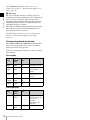
PROFESSIONAL VIDEO MONITOR
BVM-E170
OPERATION MANUAL [English]
1st Edition (Revised 2)
Before operating the unit, please read this manual
thoroughly and retain it for future reference.
Important Safety Instructions
•
•
•
•
•
•
•
•
•
•
•
•
•
•
Read these instructions.
Keep these instructions.
Heed all warnings.
Follow all instructions.
Do not use this apparatus near water.
Clean only with dry cloth.
Do not block any ventilation openings.
Install in accordance with the manufacturer's
instructions.
Do not install near any heat sources such as radiators,
heat registers, stoves, or other apparatus (including
amplifiers) that produce heat.
Do not defeat the safety purpose of the polarized or
grounding-type plug. A polarized plug has two blades
with one wider than the other. A grounding-type plug
has two blades and a third grounding prong. The wide
blade or the third prong are provided for your safety. If
the provided plug does not fit into your outlet, consult an
electrician for replacement of the obsolete outlet.
Protect the power cord from being walked on or pinched
particularly at plugs, convenience receptacles, and the
point where they exit from the apparatus.
Only use attachments/accessories specified by the
manufacturer.
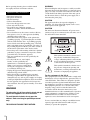
Use only with the cart, stand, tripod,
bracket, or table specified by the
manufacturer, or sold with the apparatus.
When a cart is used, use caution when
moving the cart/apparatus combination
to avoid injury from tip-over.
Unplug this apparatus during lightning storms or when
unused for long periods of time.
Refer all servicing to qualified service personnel.
Servicing is required when the apparatus has been
damaged in any way, such as power-supply cord or plug
is damaged, liquid has been spilled or objects have fallen
into the apparatus, the apparatus has been exposed to
rain or moisture, does not operate normally, or has been
dropped.
WARNING
To reduce the risk of fire or electric shock, do not
expose this apparatus to rain or moisture.
To avoid electrical shock, do not open the
cabinet. Refer servicing to qualified personnel
only.
THIS APPARATUS MUST BE EARTHED.
2
WARNING
When installing the unit, incorporate a readily accessible
disconnect device in the fixed wiring, or connect the power
plug to an easily accessible socket-outlet near the unit. If
a fault should occur during operation of the unit, operate
the disconnect device to switch the power supply off, or
disconnect the power plug.
CAUTION
The apparatus shall not be exposed to dripping or
splashing. No objects filled with liquids, such as vases,
shall be placed on the apparatus.
CAUTION
The unit is not disconnected from the AC power source
(mains) as long as it is connected to the wall outlet, even if
the unit itself has been turned off.
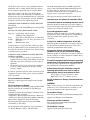
This symbol is intended to alert the user to
the presence of uninsulated “dangerous
voltage” within the product’s enclosure that
may be of sufficient magnitude to constitute
a risk of electric shock to persons.
This symbol is intended to alert the user to
the presence of important operating and
maintenance (servicing) instructions in the
literature accompanying the appliance.
For the customers in the U.S.A.
This equipment has been tested and found to comply with
the limits for a Class A digital device, pursuant to Part 15
of the FCC Rules. These limits are designed to provide
reasonable protection against harmful interference when
the equipment is operated in a commercial environment.
This equipment generates, uses, and can radiate radio
frequency energy and, if not installed and used in
accordance with the instruction manual, may cause
harmful interference to radio communications. Operation
of this equipment in a residential area is likely to cause
harmful interference in which case the user will be
required to correct the interference at his own expense.
You are cautioned that any changes or modifications not
expressly approved in this manual could void your
authority to operate this equipment.
All interface cables used to connect peripherals must be
shielded in order to comply with the limits for a digital
device pursuant to Subpart B of Part 15 of FCC Rules.
This device complies with Part 15 of the FCC Rules.
Operation is subject to the following two conditions: (1)
this device may not cause harmful interference, and (2) this
device must accept any interference received, including
interference that may cause undesired operation.
WARNING: THIS WARNING IS APPLICABLE FOR
USA ONLY.
If used in USA, use the UL LISTED power cord specified
below.
DO NOT USE ANY OTHER POWER CORD.
Plug Cap
Cord
Length
Rating
Parallel blade with ground pin
(NEMA 5-15P Configuration)
Type SVT or SJT, three 16 or 18 AWG wires
Minimum 1.5 m (4 ft .11in.), Less than 2.5 m
(8 ft .3 in.)
Minimum 10A, 125V
Using this unit at a voltage other than 120V may require
the use of a different line cord or attachment plug, or both.
To reduce the risk of fire or electric shock, refer servicing
to qualified service personnel.
WARNING: THIS WARNING IS APPLICABLE FOR
OTHER COUNTRIES.
1. Use the approved Power Cord (3-core mains lead) /
Appliance Connector / Plug with earthing-contacts that
conforms to the safety regulations of each country if
applicable.
2. Use the Power Cord (3-core mains lead) / Appliance
Connector / Plug conforming to the proper ratings
(Voltage, Ampere).
If you have questions on the use of the above Power Cord
/ Appliance Connector / Plug, please consult a qualified
service personnel.
For the customers in Canada
This Class A digital apparatus complies with Canadian
ICES-003.
For the customers in Europe
This product with the CE marking complies with the EMC
Directive issued by the Commission of the European
Community.
Compliance with this directive implies conformity to the
following European standards:
• EN55103-1 : Electromagnetic Interference (Emission)
• EN55103-2 : Electromagnetic Susceptibility (Immunity)
This product is intended for use in the following
Electromagnetic Environment: E4 (controlled EMC
environment, ex. TV studio).
The manufacturer of this product is Sony Corporation, 17-1 Konan, Minato-ku, Tokyo, 108-0075 Japan.
The Authorized Representative for EMC and product
safety is Sony Deutschland GmbH, Hedelfinger Strasse
61, 70327 Stuttgart, Germany. For any service or
guarantee matters please refer to the addresses given in
separate service or guarantee documents.
This apparatus shall not be used in the residential area.
Attention-when the product is installed in Rack:
1.Prevention against overloading of branch circuit
When this product is installed in a rack and is supplied
power from an outlet on the rack, please make sure that the
rack does not overload the supply circuit.
2.Providing protective earth
When this product is installed in a rack and is supplied
power from an outlet on the rack, please confirm that the
outlet is provided with a suitable protective earth
connection.
3.Internal air ambient temperature of the rack
When this product is installed in a rack, please make sure
that the internal air ambient temperature of the rack is
within the specified limit of this product.
4.Prevention against achieving hazardous
condition due to uneven mechanical loading
When this product is installed in a rack, please make sure
that the rack does not achieve hazardous condition due to
uneven mechanical loading.
5.Install the equipment while taking the operating
temperature of the equipment into consideration
For the operating temperature of the equipment, refer to
the specifications of the Operation Manual.
6.When performing the installation, keep the
following space away from walls in order to
obtain proper exhaust and radiation of heat.
Lower, Upper: 4.4 cm (13/4 inches) or more
Right, Left: 1.0 cm (13/32 inches) or more
For the customers in Europe, Australia and New
Zealand
WARNING
This is a Class A product. In a domestic environment, this
product may cause radio interference in which case the
user may be required to take adequate measures.
For kundene i Norge
Dette utstyret kan kobles til et IT-strømfordelingssystem.
Apparatet må tilkoples jordet stikkontakt
Suomessa asuville asiakkaille
Laite on liitettävä suojamaadoituskoskettimilla
varustettuun pistorasiaan
För kunderna i Sverige
Apparaten skall anslutas till jordat uttag
3
AVERTISSEMENT
Afin de réduire les risques d’incendie ou
d’électrocution, ne pas exposer cet appareil à la
pluie ou à l’humidité.
Afin d’écarter tout risque d’électrocution, garder
le coffret fermé. Ne confier l’entretien de
l’appareil qu’à un personnel qualifié.
CET APPAREIL DOIT ÊTRE RELIÉ À LA TERRE.
AVERTISSEMENT
Lors de l’installation de l’appareil, incorporer un dispositif
de coupure dans le câblage fixe ou brancher la fiche
d’alimentation dans une prise murale facilement
accessible proche de l’appareil. En cas de problème lors du
fonctionnement de l’appareil, enclencher le dispositif de
coupure d’alimentation ou débrancher la fiche
d’alimentation.
ATTENTION
Eviter d’exposer l’appareil à un égouttement ou à des
éclaboussures. Ne placer aucun objet rempli de liquide,
comme un vase, sur l’appareil.
ATTENTION
Cet appareil n’est pas déconnecté de la source
d’alimentation secteur tant qu’il est raccordé à la prise
murale, même si l’appareil lui-même a été mis hors
tension.
Pour les clients au Canada
Cet appareil numérique de la classe A est conforme à la
norme NMB-003 du Canada.
Pour les clients en Europe
Ce produit portant la marque CE est conforme à la
Directive sur la compatibilité électromagnétique (EMC)
émise par la Commission de la Communauté européenne.
La conformité à cette directive implique la conformité aux
normes européennes suivantes:
• EN55103-1: Interférences électromagnétiques
(émission)
• EN55103-2: Sensibilité électromagnétique (immunité)
Ce produit est prévu pour être utilisé dans l’environnement
électromagnétique suivant: E4 (environnement EMC
contrôlé, ex. studio de télévision).
Le fabricant de ce produit est Sony Corporation, 1-7-1
Konan, Minato-ku, Tokyo, 108-0075 Japon.
Le représentant autorisé pour EMC et la sécurité des
produits est Sony Deutschland GmbH, Hedelfinger Strasse
61, 70327 Stuttgart, Allemagne. Pour toute question
concernant le service ou la garantie, veuillez consulter les
adresses indiquées dans les documents de service ou de
garantie séparés.
Ne pas utiliser cet appareil dans une zone résidentielle.
4
AVERTISSEMENT
1. Utilisez un cordon d’alimentation (câble secteur à 3
fils)/fiche femelle/fiche mâle avec des contacts de mise
à la terre conformes à la réglementation de sécurité
locale applicable.
2. Utilisez un cordon d’alimentation (câble secteur à 3
fils)/fiche femelle/fiche mâle avec des caractéristiques
nominales (tension, ampérage) appropriées.
Pour toute question sur l’utilisation du cordon
d’alimentation/fiche femelle/fiche mâle ci-dessus,
consultez un technicien du service après-vente qualifié.
Pour les clients en Europe, Australie et NouvelleZélande
AVERTISSEMENT
Il s’agit d’un produit de Classe A. Dans un environnement
domestique, cet appareil peut provoquer des interférences
radio, dans ce cas l’utilisateur peut être amené à prendre
des mesures appropriées.
WARNUNG
Um die Gefahr von Bränden oder elektrischen
Schlägen zu verringern, darf dieses Gerät nicht
Regen oder Feuchtigkeit ausgesetzt werden.
Um einen elektrischen Schlag zu vermeiden, darf
das Gehäuse nicht geöffnet werden. Überlassen
Sie Wartungsarbeiten stets nur qualifiziertem
Fachpersonal.
DIESES GERÄT MUSS GEERDET WERDEN.
WARNUNG
Beim Einbau des Geräts ist daher im Festkabel ein leicht
zugänglicher Unterbrecher einzufügen, oder der
Netzstecker muss mit einer in der Nähe des Geräts
befindlichen, leicht zugänglichen Wandsteckdose
verbunden werden. Wenn während des Betriebs eine
Funktionsstörung auftritt, ist der Unterbrecher zu betätigen
bzw. der Netzstecker abzuziehen, damit die
Stromversorgung zum Gerät unterbrochen wird.
VORSICHT
Das Gerät ist nicht tropf- und spritzwassergeschützt. Es
dürfen keine mit Flüssigkeiten gefüllten Gegenstände, z.
B. Vasen, darauf abgestellt werden.
VORSICHT
Solange das Netzkabel an eine Netzsteckdose
angeschlossen ist, bleibt das Gerät auch im
ausgeschalteten Zustand mit dem Strommetz verbunden.
Für Kunden in Europa
Dieses Produkt besitzt die CE-Kennzeichnung und erfüllt
die EMV-Richtlinie der EG-Kommission.
Angewandte Normen:
• EN55103-1: Elektromagnetische Verträglichkeit
(Störaussendung)
• EN55103-2: Elektromagnetische Verträglichkeit
(Störfestigkeit)
Für die folgende elektromagnetische Umgebung: E4
(kontrollierter EMV-Bereich, z.B. Fernsehstudio).
Der Hersteller dieses Produkts ist Sony Corporation, 1-7-1
Konan, Minato-ku, Tokyo, 108-0075 Japan.
Der autorisierte Repräsentant für EMV und
Produktsicherheit ist Sony Deutschland GmbH,
Hedelfinger Strasse 61, 70327 Stuttgart, Deutschland. Bei
jeglichen Angelegenheiten in Bezug auf Kundendienst
oder Garantie wenden Sie sich bitte an die in den separaten
Kundendienst- oder Garantiedokumenten aufgeführten
Anschriften.
Dieser Apparat darf nicht im Wohnbereich verwendet
werden.
WARNUNG
1. Verwenden Sie ein geprüftes Netzkabel (3-adriges
Stromkabel)/einen geprüften Geräteanschluss/einen
geprüften Stecker mit Schutzkontakten entsprechend
den Sicherheitsvorschriften, die im betreffenden Land
gelten.
2. Verwenden Sie ein Netzkabel (3-adriges Stromkabel)/
einen Geräteanschluss/einen Stecker mit den geeigneten
Anschlusswerten (Volt, Ampere).
Wenn Sie Fragen zur Verwendung von Netzkabel/
Geräteanschluss/Stecker haben, wenden Sie sich bitte an
qualifiziertes Kundendienstpersonal.
Für Kunden in Europa, Australien und
Neuseeland
WARNUNG
Dies ist eine Einrichtung, welche die Funk-Entstörung
nach Klasse A besitzt. Diese Einrichtung kann im
Wohnbereich Funkstörungen verursachen; in diesem Fall
kann vom Betreiber verlangt werden, angemessene
Maßnahmen durchzuführen und dafür aufzukommen.
5
Table of Contents
Chapter 1 Overview
Precautions ........................................................ 8
On Safety..............................................................8
On Installation ......................................................8
Handling the Screen .............................................8
On Burn-in ...........................................................8
On a Long Period of Use......................................9
Handling and Maintenance of the Screen ............9
On Dew Condensation .........................................9
On Repacking.......................................................9
Disposal of the Unit .............................................9
On Fan Error ........................................................9
Functions Supported in Software Version 1.1
and 1.2 ................................................ 10
Features............................................................ 12
Options ............................................................. 15
Input/Output Connectors and Input
Adaptors ............................................. 16
Location and Function of Parts...................... 17
Front Panel .........................................................17
Rear Panel ..........................................................19
Chapter 2 Preparations
Environments of the Installation Location .... 21
Installing an Input Adaptor ............................. 21
Mounting the Unit in a Rack ........................... 23
Connections..................................................... 23
Connecting the Controller (BKM-16R) .............24
Connecting the Multiple Units with the LAN....24
Turning on the Power...................................... 25
Connecting to Power ..........................................25
Turning on the Monitor......................................26
Settings ............................................................ 26
Selecting the Area ..............................................26
Setting for the LAN to Connect the Multiple
Units...................................................28
Selecting the Monitor (Designation of the
Monitor or Group ID Number) ..........28
Assigning the Input Signal to the Channel.........29
Setting the Display Mode of the Picture ............29
Adjusting .......................................................... 30
Chroma/Phase Adjustment.................................30
Color Temperature (White Balance)
Adjustment.........................................31
6
Table of Contents
Brightness/Contrast Adjustment ........................31
Chapter 3 Menu
Basic Menu Operations ...................................33
Menu Operation Buttons ....................................33
Displaying the Menu ..........................................34
Setting or Adjusting in the Menu Operation ......34
Entering the Channel Number............................36
Aborting Menu Operation ..................................36
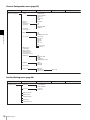
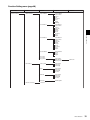
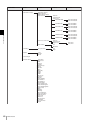
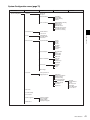
Menu Structure .................................................37
Adjustment Menu .............................................44
Overview ............................................................44
Menu Function and Operation ...........................44
Channel Configuration Menu ..........................50
Overview ............................................................50
Menu Function and Operation ...........................50
Auxiliary Setting Menu ....................................58
Overview ............................................................58
Menu Function and Operation ...........................58
Function Setting Menu ....................................60
Overview ............................................................60
Menu Function and Operation ...........................60
System Configuration Menu ...........................72
Overview ............................................................72
Menu Function and Operation ...........................72
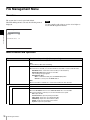
File Management Menu....................................78
Overview ............................................................78
Menu Function and Operation ...........................78
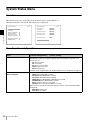
System Status Menu ........................................80
Overview ............................................................80
Menu Function and Operation ...........................80
Controller Menu................................................82
Overview ............................................................82
Menu Function and Operation ...........................82
Key Protect Menu .............................................87
Overview ............................................................87
Menu Function and Operation ...........................87
Chapter 4 Operations
Selecting Display Mode ...................................88
Setting the Display of Native Scan Mode.......89
Selecting the Native Scan/Scan Mode ...........90
Displaying Two Signals on One Screen
(Picture&Picture) ................................91
Magnifying the Picture (Pixel Zoom).............. 92
Capturing the Picture of the HD Signal
(HD Frame Capture) ........................... 93
Displaying the Area Marker or Aspect
Marker ................................................. 94
Displaying the Audio Level Meter .................. 95
Displaying the Time Code ...............................96
Switching the Display of the 3D Video
Signal .................................................. 97
Copying the Setting or Adjustment Value to
Another Monitor .................................98
Displaying the Monitor Status Page............... 99
Assigning a Function to a Function
Button ............................................... 101
Assigning a Function to a Function Button ..... 101
Displaying the Assigned Functions
Collectively...................................... 101
Upgrading the Monitor and Controller.........102
Saving the Upgrade Data in a “Memory Stick
PRO”................................................ 102
Upgrading the Monitor .................................... 103
Upgrading the Controller ................................. 104
Appendixes
Specifications................................................. 105
Input Signals and Adjustable/Setting
Items.................................................. 108
Available Signal Systems.............................. 110
Available Signal Formats .............................. 112
Aperture Modification Frequency................. 120
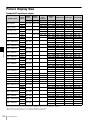
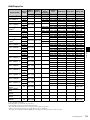
Picture Display Size....................................... 122
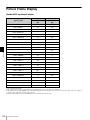
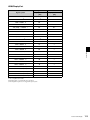
Picture Frame Display ................................... 124
Scan Mode Image........................................... 126
Troubleshooting............................................. 128
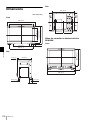
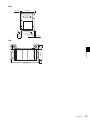
Dimensions.....................................................130
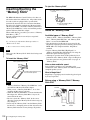
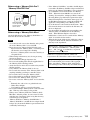
Inserting/Ejecting the “Memory Stick” ........ 132
Notes on “Memory Stick”................................ 132
Menu Index
134
Table of Contents
7
Chapter 1 Overview
Overview
Precautions
On Safety
• Operate the unit only with a power source as specified
in the “Specifications” section.
• A nameplate indicating operating voltage, power
consumption, etc., is located on the rear panel.
• Should any solid object or liquid fall into the cabinet,
unplug the unit and have it checked by qualified
personnel before operating it any further.
• Do not drop or place heavy objects on the power cord.
If the power cord is damaged, turn off the power
immediately. It is dangerous to use the unit with a
damaged power cord.
• Unplug the unit from the wall outlet if it is not to be used
for several days or more.
• Disconnect the power cord from the AC outlet by
grasping the plug, not by pulling the cord.
• The socket-outlet shall be installed near the equipment
and shall be easily accessible.
On Installation
• Allow adequate air circulation to prevent internal heat
build-up.
Do not place the unit on surfaces (rugs, blankets, etc.) or
near materials (curtains, draperies) that may block the
ventilation holes.
• Do not install the unit in a location near heat sources
such as radiators or air ducts, or in a place subject to
direct sunlight, excessive dust, mechanical vibration or
shock.
8
Precautions
Chapter
1
Handling the Screen
• The panel fitted to this unit is manufactured with high
precision technology, giving a functioning pixel ratio of
at least 99.99%. Thus a very small proportion of pixels
may be “stuck”, either always off (black), always on
(red, green, or blue), or flashing. In addition, over a long
period of use, because of the physical characteristics of
the panel, such “stuck” pixels may appear
spontaneously. These problems are not a malfunction.
• Do not leave the screen facing the sun as it can damage
the screen. Take care when you place the unit by a
window.
• Do not push or scratch the monitor’s screen. Do not
place a heavy object on the monitor’s screen. This may
cause the screen to lose uniformity.
• The screen and the cabinet become warm during
operation. This is not a malfunction.
On Burn-in
Due to the characteristics of the material used in the
OLED panel for its high-precision images, permanent
burn-in may occur if still images are displayed in the same
position on the screen continuously, or repeatedly over
extended periods.
Images that may cause burn-in
• Masked images with aspect ratios other than 16:9
• Color bars or images that remain static for a long time
• Character or message displays that indicate settings or
the operating state
• On-screen displays such as center markers or area
markers
Screen saver
This product has a built-in screen saver function to reduce
burn-in. When an almost still image is displayed for more
than 10 minutes, the screen saver starts automatically and
the brightness of the screen decreases.
On a Long Period of Use
Due to an OLED’s panel structure and characteristics of
materials in its design, displaying static images for
extended periods, or using the unit repeatedly in a high
temperature/high humidity environments may cause image
smearing, burn-in, areas of which brightness is
permanently changed, lines, or a decrease in overall
brightness.
In particular, continued display of an image smaller than
the monitor screen, such as in a different aspect ratio, may
shorten the life of the unit.
Avoid displaying a still image for an extended period, or
using the unit repeatedly in a high temperature/high
humidity environment such an airtight room, or around the
outlet of an air conditioner.
To prevent any of the above issues, we recommend
reducing brightness slightly, and to turn off the power
whenever the unit is not in use.
Handling and Maintenance of the
Screen
The surface of the screen is specially coated to reduce
image reflection. Make sure to observe the following
points as improper maintenance procedures may impair the
screen’s performance. In addition, the screen is vulnerable
to damage. Do not scratch or knock against it using a hard
object.
• Be sure to disconnect the AC power cord from the AC
outlet before performing maintenance.
• The surface of the screen is specially coated. Do not
attach adhesive objects, such as stickers, on it.
• The surface of the screen is specially coated. Do not
touch the screen directly.
• Wipe the screen surface gently with the supplied
cleaning cloth or a soft dry cloth to remove dirt.
• Stubborn stains may be removed with the supplied
cleaning cloth, or a soft cloth slightly dampened with a
mild detergent solution.
• The screen may become scratched if the cleaning cloth is
dusty.
• Never use strong solvents such as alcohol, benzene,
thinner, acidic or alkaline detergent, detergent with
abrasives, or chemical wipe as these may damage the
screen.
• Use a blower to remove dust from the screen surface.
Chapter 1 Overview
To reduce the risk of burn-in
• Turn off the character and marker displays
Press the MENU button to turn off the character displays.
To turn off the character or marker displays of the
connected equipment, operate the connected equipment
accordingly. For details, refer to the operation manual of
the connected equipment.
• Turn off the power when not in use
Turn off the power if the viewfinder is not to be used for
a prolonged period of time.
On Dew Condensation
If the viewfinder is moved suddenly from a cold place to a
warm place, or used in a room with high humidity, water
droplets may form on the interior of the product. This
phenomenon is known as dew condensation.
This product does not come with a feature that warns users
of dew condensation. If water droplets are found on the
casing, turn off the power, and wait until the condensation
disappears before using.
On Repacking
Do not throw away the carton and packing materials. They
make an ideal container which to transport the unit.
Disposal of the Unit
Do not dispose of the unit with general waste.
Do not include the monitor with household waste.
When you dispose of the monitor, you must obey the law
in the relative area or country.
On Fan Error
The fan for cooling the unit is built in. When the fan stops
and the OPERATE lamp flashes in red, the OVER RANGE
lamp flashes in amber, and the ECO lamp lights in magenta
on the front panel for fan error indication, turn off the
power and contact an authorized Sony dealer.
If you have any questions about this unit, please contact
your Sony service representative.
Precautions
9
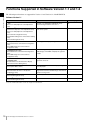
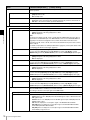
Functions Supported in Software Version 1.1 and 1.2
The following new functions are supported for Version 1.1 and Version 1.2 of the BVM-E170.
Chapter 1 Overview
Software Version 1.1
Menu
Supported function
Reference page
• Auto
Automatic color temperature adjustment can be
performed using the built-in color sensor.
47
(in the Color Temp Adj menu of the Adjustment
menu)
• Copy From1)
Data in this monitor, in another monitor or in a “Memory 45, 48, 57, 62, 78
(in the Picture Adj menu of the Adjustment menu)
Stick” can be copied.
(in the Color Temp Adj menu of the Adjustment
menu)
(in the Channel Configuration menu)
(in the Marker Setting menu of the Function Setting
menu)
(in the File Management menu)
• DisplayPort
The settings for the DisplayPort signal are available.
51, 56
(in the Format menu of the Channel Configuration
menu)
(in the RGB Range menu of the Channel
Configuration menu)
• HDMI/DisplayPort Auto
(in the Matrix menu of the Channel Configuration
menu)
(in the RGB Range menu of the Channel
Configuration menu)
• HDMI/DP YCbCr
• HDMI/DP RGB
Matrix switching (Matrix) and quantization range setting 53, 56
(RGB Range) for the HDMI or DisplayPort signal are
available.
The upper and lower limits of the HDMI or DisplayPort
signal level can be set.
64, 65
The information of the HDMI and DisplayPort signals
can be displayed.
81
The zebra pattern can be displayed on the portion of
image that exceeds the allowable range of the internal
signal processing circuit.
75
(in the On Screen Set menu of the System
Configuration menu)
• Save To1)
Stores the system data to a “Memory Stick”.
78
Deletes a file in the “Memory Stick”.
79
(in Input Detection of the Gamut Error Display
menu of the Function Setting menu)
• HDMI/DP Status
(in the System Status menu)
• Over Range
(in the File Management menu)
• Delete1)
(in the File Management menu)
1) Use the controller with software version 1.6 or higher to use this function.
10
Functions Supported in Software Version 1.1 and 1.2
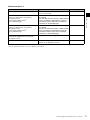
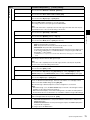
Software Version 1.2
Supported function
Reference page
• ECO lamp
Indicates the power consumption status of the monitor
by the color of the lamp.
18
• ASC CDL
• The ASC CDL data for the Color Profile setting can 54, 58, 100
be selected.
• The ASC CDL data files stored in a “Memory Stick”
can be loaded into or deleted from the monitor.
• Information related to ASC CDL are displayed
collectively on the STATUS page.
(in the Color Profile menu of the Channel
Configuration menu)
(in the Auxiliary Setting menu)2)
(on the STATUS page)
• User LUT
(in the Color Profile menu of the Channel
Configuration menu)
(in the Auxiliary Setting menu)3)
(on the STATUS page)
• The User LUT data for the Color Profile setting can 55, 59, 100
be selected.
• The User LUT data files stored in a “Memory Stick”
can be loaded into or deleted from the monitor.
• Information related to User LUT are displayed
collectively on the STATUS page.
• DisplayPort Upgrade
• DisplayPort data can be upgraded.
77, 102
The functions assigned to the function buttons on the
controller can be displayed collectively.
33, 101
Chapter 1 Overview
Menu
(in the Monitor Upgrade menu of the System
Configuration menu)
• ENTER button on the controller2)
2) Use the controller with software version 1.7 or higher to use this function.
3) Use the controller with software version 1.6 or higher to use this function.
Functions Supported in Software Version 1.1 and 1.2
11
Features
Chapter 1 Overview
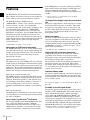
The BVM-E170 is 16.5-inch Professional Video Monitor.
This is suitable for television stations or video production
houses, where precise image reproduction is required.
The BVM-E170 features OLED panel and
“TRIMASTER1)”, which is a new technology developed
for three elements, “accurate color reproduction”,
“precision imaging” and “quality picture consistency,” that
are in demand for professional use. “TRIMASTER”
decreases the viewing difference that occurs due to the
individuality of each panel. Also, the BVM-E170 realizes
the high picture quality and high-trust required for the
master monitor by the color management system with its
wide color gamut device, high-resolution/precise gradation
display, highly accurate signal processing and panel
correction function.
1) TRIMASTER is a trademark of Sony Corporation.
Advantages of OLED panel technology
The OLED panel makes use of an organic material, which
emits light when an electric current is applied. Being selfemitting, the strength of luminescence can be controlled by
the amount of electric current. This brings about the
following three features:
Quick motion picture response:
The luminescent state of the OLED panel can be changed
instantaneously by changing the current flow in the organic
material. This enables a quick motion picture response and
production of images with minimal blurring and ghosting.
Furthermore, performance for shooting on location is not
influenced by changes in environmental temperature.
High contrast and wide dynamic range:
The OLED panel does not emit light when black signal is
applied to the monitor, enabling a pure black screen to be
displayed. Furthermore, thanks to a wide dynamic range
the panel impressively displays brilliance and clarity of
various sparkling images, such as stars in a night sky
twinkling, night illuminations winking or glass glittering,
etc.
Rich color reproduction:
An OLED panel’s self-luminescence also allows for great
color reproduction across the entire spectrum in practically
any shade or brightness.
Sony’s Super Top Emission2) OLED panel
The 16.5 type full HD (1920 × 1080) OLED panel features
Sony’s Super Top Emission structure. Unlike the
conventional bottom emission structure of TFT, Sony’s
OLED panel can reproduce a crisper image due to high
brightness. Furthermore, a unique microcavity structure
12
Features
makes RGB primary colors purer and deeper by utilizing
light resonance effects that magnify optimum light wave
lengths and diminish undesired light wave lengths.
The panel’s 10-bit driver enables smooth gradation of color
shading.
2) “Super Top Emission” is a trademark that represents the OLED
technology of Sony Corporation.
12-bit precision display engine for professional
use
The panel is equipped with a unique signal process engine
developed for the professional use monitor. This engine
incorporates 12-bit output accuracy at each process, and
provides a high-quality I/P conversion algorithm, scaling
processing, panel driving and a highly accurate color
management system.
Multi color space
The Sony’s unique OLED panel with a wide color gamut
and color management system which uses the unique 3D
LUT (Look Up Table) reproduces the color space that
complies with the broadcast standard ITU-R BT.709, EBU
and SMPTE-C accurately. A wider color space3) allows
digital cinema reproductions.
3) The RGB chromaticity of SMPTE RP 431-2 is not covered in full.
High-quality I/P conversion processing
A high-quality picture near the original one, in which
jagged lines and conversion errors are decreased by
detecting the feature of the picture inside the subdivided
block and processing properly, is reproduced.
The signal delay is decreased by judging the animation or
still picture from the past video signal. Film cadence
processing, which converts the signal composed of 2-2·23·2-3-3-2 pull down to the I/P signal closely following the
original, is also selectable.
Interlace display mode
The interlace signal is displayed as the interlace picture by
inserting the black line without I/P conversion processing.
A picture faithful to the original signal and with the same
feel as a CRT is gained.
For setting the display, see “Selecting Display Mode” on
page 88.
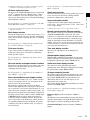
Available to a multi signal format
The monitor supports various input signals such as 720 ×
576/50i to 1920 × 1080/50P, 60P, digital cinema (D-Cine)
2048 × 1080/24P and variable computer signals up to
1920 × 1080. The 3G/HD/SD-SDI inputs, HDMI4) and
DisplayPort5) (HDCP correspondence) inputs, and four
option ports are equipped for the standard interface. If you
install optional input adaptors, the monitor expands inputs
of 3G-SDI, HD-SDI or SD-SDI, and supports Dual-link
HD-SDI, RGB, YPbPr, Y/C, and composite signal inputs.
4) HDMI, the HDMI logo and High-Definition Multimedia Interface are
trademarks or registered trademarks of HDMI Licensing, LLC.
For the operation, see “Selecting the Native Scan/Scan
Mode” on page 90.
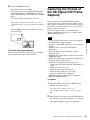
HD frame capture function
The frame of the 3G/HD-SDI input signal is captured and
saved6) as a picture file in the “Memory Stick”. This is
used to confirm the color tone and picture angle of the
current scene and recorded scene by using the multi display
(Picture&Picture) function.
Gamut error function
The signal outside the specified range (gamut error) caused
by the conversion of the format or during CG/CM
production is displayed in a zebra pattern.
For the operation, see “Capturing the Picture of the HD
Signal (HD Frame Capture)” on page 93.
6) As the frame of the input signal is captured, the data and marker set by the
monitor is not reflected.
Multi display function
Two kinds of input signals are output on the monitor. You
can select from side by side, wipe, butterfly and blending
mode. This is useful for adjusting the color or comparing
two pictures.
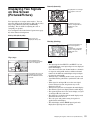
For the operation, see “Displaying Two Signals on One
Screen (Picture&Picture)” on page 91.
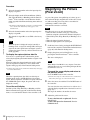
Pixel zoom function
As part of the picture is magnified up to 8 times without
scaling processing, this is convenient for confirming a
minute part of the signal.
Aspect selectable function
A squeezed and recorded signal is displayed with the
correct angle. You can select from 4:3, 16:9, 1.896:1 and
2.39:17) aspect modes.
7) When the aspect ratio is set to 2.39:1, the resolution is reduced.
Remote control function (Ethernet control)
The controller controls up to 32 monitors by the Ethernet
(10BASE-T/100BASE-TX) connection. Up to four
controllers are connected to one monitor in single mode.
You can control individual monitors or monitor groups
simply by entering the monitor ID number or group ID
number. You can also execute the same operation on all
connected monitors, or put all connected monitors into the
same setup and adjustment state.
Time code display function
The time code superimposed on the SDI signal is
displayed.
For the operation, see “Magnifying the Picture (Pixel
Zoom)” on page 92.
Closed caption display function
EIA/CEA-608 or EIA/CEA-708 standard closed caption
signals superimposed on the SDI signals are displayed by
installing the optional input adaptor (BKM-244CC).
Safe area marker and aspect marker functions
The monitor is equipped with two area markers and center
marker as the safe area marker and aspect marker for
confirming the picture angle.
Audio level meter display function
The audio level of the embedded audio signals
superimposed on the SDI signal is displayed by installing
the optional input adaptor (BKM-250TG).
For the operation, see “Displaying the Area Marker or
Aspect Marker” on page 94.
3D signal analyzing function
The monitor supports the following display modes of the
3D signal analyzing function if you install the optional
input adaptor (BKM-250TG). For this function, twodimensional (2D) view is used. The signals are not
displayed in stereoscopic view.
The available display modes differ depending on the serial
number of the BKM-250TG.
Scan selection/Native scan display function
You can select from under scan (–3%), normal scan (0%)
and over scan (mask of the 5% over scan portion in the
normal scan) for the picture display.
The monitor is equipped with a native scan display
function which maps the pixel of the signal to the panel in
one-to-one mode. You can select the mode from ×1, ×2 or
Aspect Correction to display a signal in native mode. An
SD signal of non-square pixels (the number of H pixels of
the signal system is 720 or 1440) or a 640 × 480 SD signal
of HDMI/DisplayPort video is displayed correctly by
scaling processing of doubling for the V direction and
correct aspect ratio for the H direction, and the picture is
also optimized and displayed by modifying the aperture
coefficient value, filter coefficient value, etc. in Aspect
Correction mode.
Chapter 1 Overview
5) DisplayPort, DisplayPort logo and VESA are trademarks or registered
trademarks of Video Electronics Standards Association.
For the operation, see “Switching the Display of the 3D
Video Signal” on page 97.
Difference display (with serial number 7300001 or
higher):
The difference between the luminance signal of the left (L)
3D video signal and that of the right (R) signal is displayed.
This display is useful for checking parallax amount.
Checkerboard display (with serial number 7100001 or
higher):
Features
13
The left (L) and right (R) 3D video signals are displayed in
a checkerboard pattern on the screen. This display is useful
for comparing the luminance or color settings of
neighboring L and R images.
Chapter 1 Overview
L/R switching display (with serial number 7100001 or
higher):
The dual-stream left (L) and right (R) 3D video signals are
alternately displayed on the screen. This display is useful
for comparing the color or brightness of the L and R
signals, as a black frame is not inserted when the two
signals are switched.
Horopter check display (with serial number 7100001 or
higher):
Either left (L) or right (R) 3D video signals, or both L and
R signals are displayed in monochrome mode. This display
is useful for checking a subtle depth of a subject located in
the boundary plane of the screen, that is, whether it is near
or far from the screen surface.
Horizontal flip display (with serial number 7100001 or
higher):
The input 3D video signals whose left (L) or right (R)
signal has been inverted horizontally by a half-mirror type
3D rig are displayed as non-inverted images.
Note
The horizontal flip display function of this monitor inverts
the input signals to display them. Since the internal sync is
applied to any signal delayed by the inversion, there is a
time lag between input and the displayed image.
Screen saver
When a nearly still image is displayed continuously for 10
minutes or more, the screen saver starts automatically to
reduce the brightness of the screen to prevent burn-in.
Variable picture adjustment functions
Auto chroma, phase and matrix adjustment functions are
equipped.
ASC CDL and User LUT functions
The ASC CDL (American Society of Cinematographers
Color Decision List) function and the User LUT (User
Look-up Table) function allow you to change color
representation of the monitor during production of digital
cinemas, recorded television shows, and commercials.
You can view the camera images being shot on the set, with
the color representation applied, using the ASC CDL
function. You can also reproduce a pseudo image that is
printed on film, using the User LUT function.
These functions facilitate the decision process of creative
color representation or improve the workflow between onlocation and post-production work.
14
Features
These functions are supported with software version 1.1 or
higher, and require special third-party software. For
details, contact your Sony representative.
Other features
• The color temperature is selectable from D65, D93, D61,
D55, D-Cine and User.
• Built-in test pattern for 100% white signal, 20% gray
signal, 0% black signal, PLUGE (Picture Line Up
Generation Equipment) signal, color-bar signal, 5 step
gray scale signal and ramp signal.
• Chroma Up function that increases the chroma setting by
12 dB.
• Blue only function and RGB cut off function to monitor
signal noise.
• A parallel remote of the contact point control connector
is equipped.
Options
For external control
In this manual, the BKM-16R is referred to as the
controller.
For installation
BKM-39H Controller Attachment Stand
Used to join a BKM-16R and the BVM-E170.
SMF-700 Monitor Interface Cable
Used to connect the BVM-E170 to the BKM-16R.
Input adaptors
The input connector panel is composed by installing the
optional input adaptor into the input option port on the rear
panel of the monitor. Up to four adaptors can be installed
to the monitor.
The input signal type for each connector of the adaptor is
set with the Channel Configuration menu, in accordance
with the configuration of the connector panel.
Note
BKM-244CC HD/SD-SDI Closed Caption
Adaptor
Includes a decoder for serial digital component signals.
EIA/CEA-608 or EIA/CEA-708 standard closed caption
signals superimposed on the SDI signals are decoded and
displayed. Input/output connectors for two serial digital
channels and output connector for one monitor channel are
equipped.
Chapter 1 Overview
BKM-16R Monitor Control Unit
The BKM-16R is a controller of the BVM-E170 and you
can control multiple monitors from one controller.
BKM-243HS HD/D1-SDI Input Adaptor
Includes a decoder for serial digital component signals.
Input/output connectors for two serial digital channels and
output connector for one monitor channel are equipped.
BKM-250TG 3G/HD/SD-SDI Input Adaptor
Includes a decoder for serial digital component signals.
Time code and audio level of the embedded audio signals
superimposed on the SDI signals are displayed. 3D signal
analyzing function is also supported. Input/output
connectors for two serial digital channels and output
connector for two monitor channels are equipped.
Notes
• The signal from the MONITOR OUT connector of the
BKM-220D, BKM-243HS, BKM-244C and BKM250TG does not satisfy the ON-LINE signal
specifications.
• An input adaptor with a specified serial number may be
required for your intended use. For the serial numbers of
the input adaptors available for this unit, see “Installing
an Input Adaptor” (page 21).
When installing the adaptor, be sure to perform the
necessary input signal setup with the Channel
Configuration menu. If the setup is not performed, the
adaptors may not function correctly.
For information about the Channel Configuration menu,
see page 50.
For details of each input adaptor, refer to the operating
instructions of each model.
BKM-220D SDI 4:2:2 Input Adaptor
Includes a decoder for serial digital signals (525/625
component). Input/output connectors for two serial digital
channels and output connector for one monitor channel are
equipped.
BKM-227W NTSC/PAL Input Adaptor
Includes a decoder for NTSC/PAL/PAL-M/SECAM
signals. Input/output connectors for each one composite
signal channel and Y/C signal channel are equipped.
BKM-229X Analog Component Input Adaptor
Includes a decoder for analog component signals and
analog RGB signals. Input connector for one channel is
equipped.
Options
15
Input/Output Connectors and Input Adaptors
Chapter 1 Overview
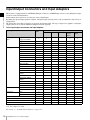
This monitor is equipped with two 3G/HD/SD-SDI input connectors, an HDMI input connector, and a DisplayPort input
connector for the standard interface.
In this manual, these connectors are referred to as the standard input.
By adding the optional input expansion adaptors, the input/output connector panel can be assembled in a wide variety of
configurations.
The signals that each connector supports are given in the following table. The type of signal to be applied to each input/
output connector is set with the Channel Configuration menu (page 50) .
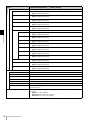
List of input/output connectors and input adaptors
Input signal
Serial digital
input
Standard
input
Single-link SD-SDI
Component 525/625
a
Single-link HD-SDI
a
Input adaptor
BKM-220D
BKM-227W
BKM-229X
a
Dual-link HD-SDI
Single-link 3G-SDI
Analog input
BKM250TG
a
a
a
a
a (2)
a
a
a
Composite NTSC
a
Composite PAL
a
Composite PAL-M
a
Composite SECAM
a
Y/C NTSC
a
Y/C PAL
a
Y/C PAL-M
a
Y/C SECAM
a
YPbPr 525i/625i
a
RGB 525i/625i
a
YPbPr/RGB 1080/24PsF
a
YPbPr/RGB 1080/24P
a
YPbPr/RGB 1080/50i
(25PsF)
a
YPbPr/RGB 1080/25P
a
YPbPr/RGB 1080/60i
(30PsF)
a
YPbPr/RGB 1080/30P
a
YPbPr/RGB 720/50P
a
a
YPbPr/RGB 720/60P
HDMI
Video
a
Computer
a
DisplayPort
Video
a
Computer
a
Number of digital inputs
2
2
–
–
2
2
Number of analog inputs
–
–
1
1
–
–
Number of HDMI inputs
1
–
–
–
–
–
Number of DisplayPort input
1
–
–
–
–
–
a: Signal can be reproduced.
a(2): Two adaptors are used.
For details, see “Available Signal Formats” on page 112.
16
BKM243HS/
244CC
Input/Output Connectors and Input Adaptors
Location and Function of Parts
Front Panel
Chapter 1 Overview
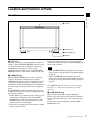
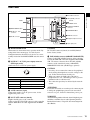
1 Tally lamp
2 OPERATE lamp
3 OVER RANGE lamp
4 ECO lamp
a Tally lamp
With factory settings, the tally lamp lights when pins No. 8
and No. 9 of the PARALLEL REMOTE connector on the
rear panel are shorted. By changing the setting in the
Parallel Remote menu (page 73) of the System
Configuration menu, different pins on the PARALLEL
REMOTE connector can be used to control the tally lamp.
b OPERATE lamp
When the MAIN POWER switch (on the rear panel) is
turned on, internal data initialization starts and the
OPERATE lamp flashes in red for a while. When the signal
is output, the lamp flashes in green to indicate that data
initialization continues. When initialization is finished and
the monitor enters its operation mode, the lamp lights in
green.
The OPERATE lamp is lit in red when the monitor is in
standby mode. The monitor will be in standby mode under
the following conditions:
• Standby Mode is set to On in the Power menu (page 74)
of the System Configuration menu and the MAIN
POWER switch (on the rear panel) is turned on. (The
OPERATE lamp will flash for initialization after the
switch is turned on, then will light.)
• The monitor is changed from operation mode to standby
mode by external control.
Lights in green when the monitor is put into operation
mode from standby mode by pressing the MONITOR I/1
switch of the controller.
Notes
• When the OPERATE lamp is flashing in red, the monitor
cannot be put into operation mode. Wait until the lamp is
steadily lit.
• When the OPERATE lamp is flashing in green, the
monitor is not in full operation mode and images cannot
be displayed correctly. Wait until the lamp is steadily lit
in green.
The OPERATE lamp may indicate an error or warning.
For details, see “Error/warning display by the lamp”
(page 18).
c OVER RANGE lamp
Lights in amber when ABL (Automatic Brightness
Limiter) starts. Also lights in amber when the signal level
has exceeded the dynamic range of the signal processing
circuit.
Decrease the contrast or brightness when the OVER
RANGE lamp is lit.
Location and Function of Parts
17
The OVER RANGE lamp may indicate an error or
warning. For details, see “Error/warning display by the
lamp” (page 18).
Chapter 1 Overview
d ECO lamp
The color of the lamp changes according to the power
consumption status of the monitor. The color changes from
green to yellow to magenta in order of greater power
consumption. Decreasing the luminance of the screen by
adjusting brightness/contrast is recommended when the
lamp lights in yellow or magenta.
The lamp starts flashing rapidly approximately one minute
before the screen saver is activated. Flashing slows in
green when the screen saver starts.
The ECO lamp may indicate an error or warning. For
details, see “Error/warning display by the lamp”
(page 18).
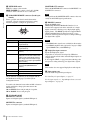
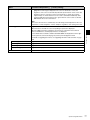
Error/warning display by the lamp
The OVER RANGE lamp, OPERATE lamp and/or ECO
lamp on the front panel may show an error or warning
while the monitor is being operated.
If the error or warning is shown, please contact your Sony
representative.
Error display
ECO
lamp
OVER
RANGE
lamp
OPERATE
lamp
Symptoms
Lights in
yellow
Lights in
amber
Flashes in
red
The power in the
panel part is unusual.
Lights in
yellow
Flashes in
amber
Flashes in
red
The temperature in
the panel part is
unusual.
Flashes in
yellow
Lights in
amber
Flashes in
red
The ambient
temperature sensor is
unusual.
Lights in
magenta
Flashes in
amber
Flashes in
red
Fan error.
Flashes in
magenta
Lights in
amber
Flashes in
red
Device error.
OPERATE
lamp
Symptoms
Warning display
ECO
lamp
OVER
RANGE
lamp
Flashes in
amber
–
–
–
Lights in
amber
–: Status except for error display.
18
Location and Function of Parts
–
The luminance is
reduced to protect the
panel from an
increase of
temperature in the
panel part.
Over range
Rear Panel
4 DC 5V OUT connector
Handle
Handle
6 NETWORK switch
7 PARALLEL REMOTE
connector
1 MAIN POWER switch
Chapter 1 Overview
5 LAN (10/100) connector
8 STANDARD PORT
2 DC IN 24 V - 28 V
connector
9 HDMI IN connector
3 AC IN connector
q; DisplayPort input connector
qa Input option ports
a MAIN POWER switch
When turned on, the monitor enters operation mode. By
setting in the Power menu (page 74) of the System
Configuration menu, the monitor can also be set to enter
standby mode when the MAIN POWER switch is turned
on.
b DC IN 24 V - 28 V (DC power input) connector
(XLR 3-pin, male)
Connect the 24 V to 28 V DC power supply.
1
2
3
Pin number
Function
1
– (GND)
2
+ (24 V to 28 V DC)
3
NC
c AC IN connector (3-pin)
Connects the monitor to an AC power source, via the
supplied AC power cord.
d DC 5V OUT connector (female)
Supplies the DC power to the controller.
Connect to the DC 5V/12V IN connector of the controller
with the SMF-700 or the cable supplied with the BKM39H.
CAUTION
DC 5V OUT connector (female) is non LPS (Limited
Power Source) circuit.
e LAN (10/100) connector (10BASE-T/100BASE-TX)
Connect to the LAN (10/100) connector of the controller
by using the SMF-700 or the cable supplied with the BKM39H. Or connect to the network or the LAN (10/100)
connector of the controller by using a 10BASE-T/
100BASE-TX LAN cable (shielded-type, optional).
CAUTION
• For safety, do not connect the connector for peripheral
device wiring that might have excessive voltage to this
port. Follow the instructions for this port.
• When you connect the LAN cable of the unit to
peripheral device, use a shielded-type cable to prevent
malfunction due to radiation noise.
• The connection speed may be affected by the network
system.
ATTENTION
Par mesure de sécurité, ne raccordez pas le connecteur pour
le câblage de périphériques pouvant avoir une tension
excessive à ce port. Suivez les instructions pour ce port.
VORSICHT
Aus Sicherheitsgründen nicht mit einem PeripheriegerätAnschluss verbinden, der zu starke Spannung für diese
Buchse haben könnte. Folgen Sie den Anweisungen für
diese Buchse.
Location and Function of Parts
19
f NETWORK switch
LAN: To connect to the network.
PEER TO PEER: To connect to the LAN (10/100)
connector of the controller in 1 to 1 connection.
Chapter 1 Overview
g PARALLEL REMOTE connector (D-sub 9-pin,
female)
Forms a parallel switch and controls the monitor
externally. The pin assignment and factory setting
function assigned to each pin are given below.
5
9
1
6
Pin number
Function
1
Sets input signal channel 1 (numeric
keypad function).
2
Sets input signal channel 2 (numeric
keypad function).
3
Selects sync signal (SYNC button
function).
4
Selects whether monochrome image is
displayed or the monitor switches the
display mode automatically between
color image and monochrome image
depending on the input signal (MONO
button function).
5
Marker (set in the Marker Setting
menu) On/Off (MARKER button
function).
6, 7
Not connected
8
Tally lamp On/Off
9
Ground
All pin function assignments can be changed with the
Parallel Remote menu (page 73) of the System
Configuration menu.
To switch each function between On and Off or between
enable and disable, change pin connections in the
following way.
On or enabled: Short each pin and pin 9 together.
Off or disabled: Leave each pin open.
h STANDARD PORT
SDI INPUT 1 connector
Inputs serial digital signals (standard SDI input 1).
SDI INPUT 2 connector
Inputs serial digital signals (standard SDI input 2).
20
Location and Function of Parts
MONITOR OUT connector
This is the MONITOR OUT connector for SDI INPUT 1 or
SDI INPUT 2 connector.
Note
The signal from this MONITOR OUT connector does not
satisfy the ON-LINE signal specifications.
i HDMI IN connector
Inputs the HDMI signal.
HDMI (High-Definition Multimedia Interface) is an
interface that supports both video and audio on a single
digital connection, allowing you to display high quality
digital picture. The HDMI specification supports HDCP
(High-bandwidth Digital Content Protection), a copy
protection technology that incorporates coding technology
for digital video signals.
Notes
• The HDMI audio signal is not available for this monitor.
• Use HDMI compliant cable (optional), Category 2 (High
Speed HDMI Cable), with HDMI logo.
j DisplayPort input connector
Inputs the DisplayPort signal.
DisplayPort is an interface developed by VESA that
supports transfer of both video and audio digital signals on
a single cable.
It also supports HDCP, a copy protection technology that
incorporates coding technology for digital video signals.
Note
This monitor does not support DisplayPort audio signals.
k Input option ports
Used to install the optional input adaptors.
For installing the input adaptor, see page 21.
For the input signals, see “Input/Output Connectors and
Input Adaptors” on page 16.
Preparations
Chapter
2
Installing an Input
Adaptor
Illumination environments
Each input adaptor can be installed in any input option
port on the rear panel.
The apparent color reproduction on the monitor is greatly
affected by ambient light or glare.
Chapter 2 Preparations
Environments of the
Installation Location
Caution
Viewing angle
The ideal viewing angle is within 5 degrees (up/down/left/
right) off the center of the monitor screen when the
operator views the entire monitor screen. Keep the
viewing angle within 15 degrees off the center of the
monitor screen.
When you install the following input adaptors to this
equipment, use those with the serial numbers given below.
• BKM-220D with serial number 2100001 or higher
This equipment may not meet the requirements of the
electromagnetic interference standard if designated
input adaptors are not installed.
• BKM-227W with serial number 2100001 or higher
This equipment may not work correctly or you may not
be satisfied with their performance if designated input
adaptors are not installed.
• BKM-229X with serial number 2200001 or higher
This equipment may not work correctly or you may not
be satisfied with their performance if designated input
adaptors are not installed.
• BKM-243HS with serial number 2108355 or higher
This equipment may not meet the requirements of the
electromagnetic interference standard or work
correctly, or you may not be satisfied with the
performance if designated input adaptors are not
installed.
• BKM-250TG with serial number 7300001 or higher
To enable all five display modes of the 3D signal
analyzing function, use the input adaptor with serial
number 7300001 or higher.
Caution
To reduce the risk of electric shock, turn off the MAIN
POWER switch of the monitor and disconnect the AC
power cord before installing or removing adaptors.
Environments of the Installation Location / Installing an Input Adaptor
21
1
Loosen two screws and remove the cover of an input
option port on the rear panel of the monitor.
Make sure the MAIN
POWER switch is turned
off, and disconnect the AC
power cord.
Cover of an input
option port
243HS or BKM-244CC adaptors are used, install the input
adaptors in OPTION 1 and 2 option ports, or OPTION 3
and 4 option ports. The BKM-243HS or BKM-244CC
cannot be used with the BKM-250TG for Dual-link
operation.
Chapter 2 Preparations
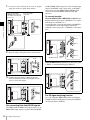
To connect the cable
When the BKM-243HS or BKM-244CC adaptors are
used, install the Link A signal to OPTION 1 or 3, and the
Link B signal to OPTION 2 or 4.
Connect the cable to the same input number (both INPUT 1
or both INPUT 2) of the input adaptors installed in
OPTION 1 and 2 option ports, or OPTION 3 and 4 option
ports.
Example of Dual-link cable connection
INPUT 1
INPUT 2
2
INPUT 1
Insert the adaptor facing the board as shown below.
Board
OPTION 3 and 4
OPTION 1
and 2
INPUT 2
When the BKM-250TG is used, install the Link A signal
to INPUT 1, and the Link B signal to INPUT 2.
INPUT 1
3
Push the adaptor in until it is firmly fit into the
connector inside the monitor, then tighten the two
screws to secure the adaptor.
INPUT 2
For 3D signal analyzing function
Use a 3D-compatible BKM-250TG (with serial number
7300001 or higher) and input the left 3D signal to INPUT 1
and the right signal to INPUT 2.
For connecting Dual-link HD-SDI signals
Two BKM-243HS or BKM-244CC input adaptors or one
BKM-250TG input adaptor is required. When the BKM-
22
Installing an Input Adaptor
Mounting the Unit in a
Rack
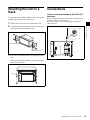
To mount the unit in an EIA standard 19-inch rack, use the
supplied rack mount brackets and screws.
Remove the four feet from the bottom of the unit.
2
Attach the rack mount brackets to each side of the unit
with the rack mount attachment screws.
Note on connecting the cable to the DC 5V OUT
connector
Be sure to plug the male connector of the cable into the DC
5V OUT connector of the monitor.
Insert the connector so as to fit the shape of the DC 5V
OUT connector.
Plug the male
connector into
the monitor.
Chapter 2 Preparations
1
Connections
Rack mount bracket
Rack mount
attachment screws
3
Screw the rack mount brackets to the rack to mount the
unit.
Use the commercially available screws that match the
size of the rack’s holes.
Rack
Mounting the Unit in a Rack / Connections
23
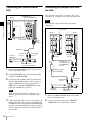
Connecting the Controller (BKM16R)
Monitor
NETWORK switch
t Set to PEER TO PEER.
Connecting the Multiple Units with
the LAN
The controller controls up to 32 monitors. Up to four
controllers are connected to one monitor in single mode.
Note
Chapter 2 Preparations
The controller cannot control monitors in another
subnetwork.
NETWORK switch
tSet to LAN.
Monitor
Monitor
LAN (10/100) connector
DC 5V
OUT
connector
SMF-700, etc.
Controller
(BKM-16R)
DC 5V/12V IN
connector
LAN (10/100)
connector
LAN (10/100)
connector
Switching hub
(recommended: with
AUTO MDI/MDI-X
function)
NETWORK switch
tSet to PEER TO PEER.
1
Turn off the MAIN POWER switch of the monitor
before connecting the units.
2
Set the NETWORK switches of the monitor and the
controller to PEER TO PEER.
3
Connect the LAN (10/100) connector of the monitor
and the LAN (10/100) connector of the controller by
using the SMF-700 or the cable supplied with the
BKM-39H, or a 10BASE-T/100BASE-TX straight
LAN cable (shielded-type, optional).
AC adaptor (supplied
with the BKM-16R)
DC 5V/12V IN
connector
Controller
(BKM-16R)
Note
When an optional LAN cable is connected, use a
shielded-type cable to prevent a malfunction due to
noises.
4
24
Connect the DC 5V OUT connector of the monitor and
the DC 5V/12V IN connector of the controller by using
the SMF-700 or the cable supplied with the BKM-39H.
Or connect the output cable of the AC adaptor supplied
with the controller to the DC 5V/12V IN connector of
the controller.
Connections
LAN (10/100)
connector
LAN (10/100)
connector
NETWORK switch
tSet to LAN.
1
Turn off the MAIN POWER switch of the monitor
before connecting the units.
2
Connect to the network by using a 10BASE-T/
100BASE-TX cable (shielded-type, optional).
Notes
• When an optional LAN cable is connected, use a
shielded-type cable to prevent a malfunction due to
noises.
• We recommend to use an optional switching hub
with auto selection function (AUTO MDI/MDI-X)
of a straight/cross cable.
3
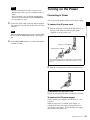
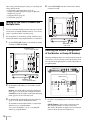
Connecting to Power
You can operate the monitor with AC or DC power supply.
To connect the AC power cord
1
Note
Plug the AC power cord into the AC IN connector on
the rear panel. Then, attach the AC plug holder
(supplied) to the AC power cord.
When the multiple units are connected, set for the LAN
before setting the NETWORK switch to LAN (page
28).
4
Chapter 2 Preparations
Connect the output cable on the AC adaptor supplied
with controller to the DC 5V/12V IN connector of the
controller.
Turning on the Power
Set the NETWORK switches of each monitor and the
controller to LAN.
AC power cord (supplied)
AC plug holder (supplied)
Attach the AC plug holder to the AC power cord, and connect
the cord to the AC IN connector so that the cord does not come
loose.
2
Slide the AC plug holder over the cord until it locks.
To disconnect the AC power cord
Pull out the AC plug holder while pressing the lock levers.
To connect the DC power supply
Connect the DC power supply to the DC IN 24 V - 28 V
connector.
When the AC power cord and DC power supply are
connected, the AC power supply is given preference to
over the DC power supply. To use the DC power supply,
disconnect the AC power cord.
Turning on the Power
25
Turning on the Monitor
Press the MAIN POWER switch on the rear panel to turn
on the power.
When you turn on the monitor for the first time after
purchasing it, the Select Area screen is displayed. Select
the area where you intend to use this monitor.
For selecting the area, see page 26.
Settings
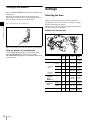
Selecting the Area
Chapter 2 Preparations
When you turn on the monitor for the first time after
purchasing it, select the area where you intend to use this
monitor from among the options.
When the area is selected, the menu item settings suitable
for the selected area are applied.
Default value for each area
3
5
4
The warm-up time is more than 30 minutes, approximately.
3
When the monitor is in standby mode
As the OPERATE lamp lights in red in standby mode,
press the MONITOR I/1 switch of the controller.
The OPERATE lamp lights in green and the monitor enters
operation mode.
2Latin America
PAL&PAL-N
Area
NTSC&PALM Area
Color
Temp
Setup
Level
Component
Level
Color
Profile
D65
7.5%
Betacam
ITU-R
BT.709
Argentina
D65
0%
SMPTE/
EBU-N10
ITU-R
BT.709
Paraguay
D65
0%
SMPTE/
EBU-N10
ITU-R
BT.709
Uruguay
D65
0%
SMPTE/
EBU-N10
ITU-R
BT.709
Other Area
D65
7.5%
Betacam
ITU-R
BT.709
D65
0%
SMPTE/
EBU-N10
ITU-R
BT.709
NTSC Area
D65
7.5%
Betacam
ITU-R
BT.709
PAL Area
D65
0%
SMPTE/
EBU-N10
ITU-R
BT.709
D93
0%
SMPTE/
EBU-N10
ITU-R
BT.709
3Africa
Australasia
Europe
Middle-East
4Asia Except
Japan
5Japan
Settings
2
3
1North America
26
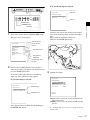
1
If 4 Asia Except Japan is selected:
Select Area
Asia Except Japan
NTSC Area
PAL Area
NTSC area
B
B
PAL area
ENTER button
UP/DOWN buttons
1
Customers who will use this monitor in the shaded
areas shown in the map below should select NTSC
Area.
Other customers should select PAL Area.
Then press the ENTER (Ent) button.
Turn on the monitor with the MAIN POWER switch.
The Select Area screen appears.
1 North America
2 Latin America
Select Area
North America
Latin America
Africa
Australasia
Europe
Middle-East
Asia Except Japan
Japan
Chapter 2 Preparations
Ent button
B
B
B
B
B
B
B
B
3 Africa
Australia/New Zealand
Europe/Russia
Middle East
4 Asia Except Japan
5 Japan
2
Press the UP or DOWN button of the controller to
select the area where you intend to use the monitor and
press the ENTER (Ent) button.
3
Confirm the settings.
If you select either Latin America or Asia Except
Japan, one of the following screens appears.
Select Area
If 2 Latin America is selected:
Select Area
PAL&PAL-N area
XXXXXXXXXX
Color Temp:
Setup Level:
Component Level:
Color Profile:
xx
xx
xx
xx
Latin America
PAL & PAL-N Area
B
NTSC & PAL-M Area B
NTSC&PAL-M area
Cancel
Confirm
Cancel: Select to cancel the setting and return to the
Select Area screen.
Confirm: Select to save the setting and end selecting
the area.
Select PAL & PAL-N or NTSC & PAL-M and press
the ENTER (Ent) button.
See “Default value for each area” on page 26 on the
setting value.
Settings
27
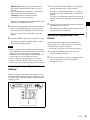
After saving and reflecting the setting, you can change the
setting with the menu.
• Color Temp (color temperature) (page 53)
• Setup Level (NTSC Setup Level: page 55, Betacam
Setup Level: page 55)
• Component Level (page 55)
• Color Profile (page 53)
4
Set the NETWORK switches of the monitor and the
controller to LAN.
NETWORK switch
tSet to LAN.
Setting for the LAN to Connect the
Multiple Units
Chapter 2 Preparations
You can control the multiple monitors using the controller
connected via each LAN (10/100) connector. You can also
control a specific monitor or monitor group.
Set an IP address to the monitors and the controller and a
monitor ID number and group ID number to each monitor.
1
Set the NETWORK switches of each monitor and the
controller to PEER TO PEER.
NETWORK switch
t Set to PEER TO PEER.
NETWORK switch
tSet to LAN.
Selecting the Monitor (Designation
of the Monitor or Group ID Number)
When the multiple monitors are connected by the network
connections, you can remotely connect the monitors from
the controller by designating the set monitor ID number or
group ID number.
Display window
NETWORK switch
tSet to PEER TO PEER.
2
Lamp
Set the different IP address to each monitor and the
controller.
3
2
Monitor: Set the IP address in the Network Setting
menu (page 72) of the System Configuration menu.
Controller: Set the IP address in the Network Setting
menu (page 82) of the Controller menu.
3
Set Monitor ID and Group ID in the Network menu
(page 72) of the System Configuration menu.
Set the different monitor ID number to each monitor
and if necessary, group ID number.
You can use the numbers 1 to 99 as a monitor ID
number or group ID number.
28
Settings
1
1
2
3
Press the corresponding button to select the connection
mode.
SINGLE button: Selects single connection mode.
The designated monitor is connected remotely.
The monitor ID number is displayed on all connected
monitors when the button is held pressed.
GROUP button: Selects group connection mode.
The monitor of the designated group is connected
remotely.
The group ID number is displayed on all connected
monitors when the button is held pressed.
ALL button: Selects all connection mode.
All monitors are connected remotely.
The lamp corresponding the pressed button flashes and
lights after recognizing the monitor.
3
To assign to a channel number from 1 to 9, press the
appropriate one-digit channel number on the numeric
keypad.
To assign to a channel number from 10 to 30, press the
0 button, then press the appropriate two-digit channel
number.
2
Select the monitor ID number for the single connection
mode or group ID number for the group connection
mode by pressing the UP/DOWN or numeric button.
Up to 99 is entered as the monitor ID or group ID
number.
Press the ENTER or Ent button to confirm the setting.
The monitor ID number, group ID number or ALL is
displayed in the display window.
Notes
• When the monitor with no assigned monitor ID number
or group ID number is selected, the setting is not changed
and the previous connection status is maintained.
• When there are monitors with the same ID number, the
monitor with the lower IP address is selected.
• Even if a different monitor ID number is set to the
monitors, when the same IP address is set to another
monitor, the monitor cannot be connected to the network.
Select the channel (CH1 to CH30) to be assigned by
pressing the numeric button of the controller.
Set the input signal for the selected channel in Channel
Configuration menu (page 50).
The required setting is different due to the input signal
or picture quality to be displayed.
Setting the Display Mode of the
Picture
Chapter 2 Preparations
2
1
Set the display mode condition of the input signal to
display on the screen. The setting items are following.
• Setting Matrix (transmission matrix)
• Selecting the color profile (color space and gamma)
1
Set Matrix in the Matrix menu (page 53) of the
Channel Configuration menu.
2
Select the color profile (color space and gamma) in the
Color Profile menu (page 53) of the Channel
Configuration menu.
Assigning the Input Signal to the
Channel
When you assign the input signal to the channel, you can
select the channel and change the input signal by pressing
the numeric button. The input signal is assigned to one of
channels 1 to 30.
1
Settings
29
Chroma/Phase Adjustment
Automatic adjustment (with auto chroma/phase/matrix
function) is required for each signal format, signal system
and matrix to display the composite or Y/C signal from the
BKM-227W, or the analog component or analog RGB
signal from the BKM-229X.
As you can automatically adjust the chroma, phase, matrix
and also 100% (white) and 0% (black) levels of the monitor
to the same as those of the reference signal by performing
30
Adjusting
Input the reference color-bar signal to the monitor.
2
Select Auto in the Picture Adj menu of the Adjustment
menu and perform the automatic adjustment of the
chroma, phase and matrix in Auto Adjust (page 44).
Manual adjustment
The following is the example of the method to perform the
manual adjustment of the chroma and phase.
1
Input the multi format color-bar signal or SMPTE
color-bar signal to the monitor.
2
Set the BLUE ONLY button to on.
Red and green signals are cut, and only the blue signal
is displayed as a monochrome picture.
The following is the example of the adjustment when the
multi format color-bar signal is used.
3
Select the Manual Adjust menu (page 45) in the Picture
Adj menu of the Adjustment menu.
4
Adjust the levels with the CHROMA or PHASE knob
of the controller while tracking so that the brightness of
bars “a” (75% White, Cyan, Magenta and Blue parts)
and “b” (75% White part) (in the following illustration)
are the same.
For the composite and Y/C signals
Adjust the levels with the CHROMA and PHASE
knob.
For the component signal
Adjust the levels with the CHROMA knob.
b (75% White)
a (Blue)
1 Chroma/phase adjustment
You can save the adjustment value in Preset1 to
Preset5 and Preset (D-Cine). The data of Preset1 to
Preset5 or Preset (D-Cine) is set to the channel in the
Picture Preset menu (page 53) of the Channel
Configuration menu.
Adjust the picture automatically with the auto chroma/
phase/matrix function for every signal format and
signal system to display the composite signal or Y/C
signal from the BKM-227W, or analog component
signal or analog RGB signal from the BKM-229X. If
the picture is not adjusted, the picture may not be
displayed correctly.
2 Color Temperature (white balance) adjustment
You can adjust the data set to the channel in the Color
Temp menu (page 53) of the Channel Configuration
menu.
You can adjust D93, D65, D61, D55, D-Cine or User1
to User5 except for the XYZ format signal and D-Cine
XYZ or User XYZ1 to User XYZ5 for the XYZ format
signal.
3 Brightness/Contrast adjustment
You can save the adjustment value in Preset1 to
Preset5 and Preset (D-Cine). The data of Preset1 to
Preset5 or Preset (D-Cine) is set to the channel in the
Picture Preset menu (page 53) of the Channel
Configuration menu.
1
a (Magenta)
Chapter 2 Preparations
About monitor adjustment
The monitor is used as a measuring instrument and is
required to faithfully reproduce the input signal. To
measure the signal accurately, the monitor must be
calibrated correctly using a reference signal.
To calibrate, adjust the following items in sequence.
Automatic adjustment (recommended)
a (Cyan)
Before adjusting
The monitor must be warmed up sufficiently.
To perform stable color reproduction, turn on the power of
the monitor, display the white signal and leave it in this
state for more than 30 minutes.
a (75% White)
Adjusting
the automatic adjustment, the automatic adjustment is also
effective for the RGB signal.
Perform the manual adjustment of chroma and phase to
adjust them further after automatic adjustment or to adjust
the digital signal from the standard input, BKM-220D,
BKM-243HS, BKM-244CC or BKM-250TG.
5
Press the ENTER or Ent button.
6
The adjusted data is confirmed.
6
Set the BLUE ONLY button to off.
Press the ENTER or Ent button.
The adjusted data are confirmed.
Brightness/Contrast Adjustment
Note
As an image on a color video monitor is seen differently
according to the ambient light (environmental brightness),
adjust the brightness (black level) according to the ambient
light and the black level of the image to be reproduced and
adjust the contrast (white level) according to the ambient
light.
Adjust the brightness/contrast with an external reference
signal of a multi format color-bar signal or SMPTE colorbar signal.
Color Temperature (White Balance)
Adjustment
1
This monitor is equipped with manual and automatic color
temperature adjustments.
The automatic color temperature adjustments can be
performed using the built-in color sensor or a specified
color temperature probe.
Special software is required for the automatic adjustment
using the specified probe. For details, contact your Sony
representative.
Input the multi format color-bar signal or SMPTE
color-bar signal to the monitor.
The following are explained as the example when the
multi format color-bar signal is used for adjustment.
2
Select the Manual Adjust menu (page 45) in the Picture
Adj menu of the Adjustment menu.
3
Adjust the –2%, 0% and +2% ranges or the 0%, +2%
and +4% ranges of the PLUGE signal section of the
color-bar with the BRIGHT knob.
HD signal
Adjust so that the –2% and 0% ranges are seen as equal
and the +2% and 0% ranges are more distinctive.
Automatic adjustment (using the built-in
color sensor)
1
Chapter 2 Preparations
You can access manual adjustment without opening the
Adjustment menu. To access it, press the MANUAL button
located below the CHROMA or PHASE knob of the
controller. If manual adjustment is accessed by this
method, the adjusted value is common to all channels and
valid only when the lamp of the MANUAL button is lit. To
turn off the lamp of the MANUAL button, press the button
again.
SD signal
Adjust so that the 0% and +2% ranges are seen as equal
and the +2% and +4% ranges are more distinctive.
Select the Auto Adjust menu (page 47) in the Color
Temp Adj menu of the Adjustment menu.
Manual adjustment
1
Select the Manual menu (page 46) in the Color Temp
Adj menu of the Adjustment menu then select the
Manual Adjust menu.
2
Adjust the color in gain side with the PHASE,
CHROMA, BRIGHT or CONTRAST knob.
3
Press the UP or DOWN button and adjust the color in
bias side with the PHASE, CHROMA, BRIGHT or
CONTRAST knob.
HD
SD
+4%
0%
+2%
-2%
0%
4
Press the UP or DOWN button.
5
Repeat steps 2 to 4 until the desired color is obtained,
because the gain and bias adjustments may affect each
other.
4
Adjust so that the luminance of the 100% white signal
of the color-bar is set to the desired value with the
CONTRAST knob.
Adjusting
31
We recommend adjusting the luminance to 100 [cd/
m2] when Preset1 to Preset5 is selected in the Picture
Preset menu of the Channel Configuration menu and to
48 [cd/m2] when Preset (D-Cine) is selected in the
Picture Preset menu of the Channel Configuration
menu.
Chapter 2 Preparations
32
5
As the brightness and contrast adjustments affect each
other, repeat the adjustments of step 3 and 4.
6
Press the ENTER or Ent button.
Note
You can access manual adjustment without opening the
Adjustment menu. To access it, press the MANUAL button
located below the BRIGHT or CONTRAST knob of the
controller. If manual adjustment is accessed by this
method, the adjusted value is common to all channels and
valid only when the lamp of the MANUAL button is lit. To
turn off the lamp of the MANUAL button, press the button
again.
Adjusting
Menu
Chapter
3
Basic Menu Operations
Chapter 3 Menu
Menu Operation Buttons
The menu is operated using the menu operation buttons on
the controller (BKM-16R, optional).
Controller (BKM-16R)
1 UP/DOWN buttons
2 MENU button
3 ENTER button
4 PHASE knob
REMOTE
UP
MENU
PHASE
CHROMA
BRIGHT
CONTRAST
INPUT
SINGLE
1
2
3
Del
4
5
6
0
7
8
9
Ent
GROUP
DOWN
ENTER
MANUAL
MANUAL
MANUAL
MANUAL
ALL
SINGLE
GROUP
ALL
5 Numeric buttons
6 Ent button
7 Del button
The functions of the menu operation buttons are described
below.
Button
Function
1 UP button
Moves the cursor upward. In setting
mode, increases the setting or adjustment
value.
Button
Function
4 PHASE knob
By turning this knob clockwise, the cursor
moves downward. In setting mode,
increases the setting or adjustment value
(has the same function as UP button).
By turning this knob counterclockwise, the
cursor moves upward. In setting mode,
decreases the setting or adjustment value
(has the same function as DOWN button).
5 Numeric
buttons
Enters the numerical values.
6 Ent button
Changes an item or displays the
information on the input signal, etc. In
setting mode, confirms the adjustment or
setting value.
7 Del button
Deletes the values and characters
entered.
1 DOWN button Moves the cursor downward. In setting
mode, decreases the setting or
adjustment value.
2 MENU button Displays the menu. Goes back to the
menu of the upper level. (On the main
menu, goes back to the normal picture.)
3 ENTER
button
Changes an item or displays the
information on the functions assigned to
function buttons. In setting mode,
confirms the adjustment or setting value.
Basic Menu Operations
33
The level 1 of the selected menu is displayed.
The current settings are displayed in place of the x
marks on the illustrations of the menu screen.
Displaying the Menu
Press the MENU button.
The main menu is displayed on the screen.
iChannel Configuration
CH01
Format
B
Input Port:
xxxxx
Input No:
xxxxx
Screen Aspect
B
Sync Mode:
xxx
MENU
Adjustment
B
Channel Configuration B
Auxiliary Setting
B
Function Setting
B
System ConfigurationB
File Management
B
System Status
B
Controller
B
Key Protect:
Color Temp:
Picture Preset:
Matrix
Color Profile
Chapter 3 Menu
4
For the items on the menu, see “Menu Structure” on page
37.
Notes
• The menu disappears automatically if not operated for
about one minute.
• Menu items displayed in gray cannot be selected.
• This menu is not displayed when Pixel Zoom is set to on.
Setting or Adjusting in the Menu
Operation
xxx
xxxxx
Repeat steps 2 and 3 until the desired menu is
displayed.
For more information about setting and adjustments,
see below.
Display example
iChannel Configuration
CH01
Format
B
Input Port:
xxxxx
Input No:
xxxxx
Screen Aspect
B
Sync Mode:
xxx
Color Temp:
Picture Preset:
Matrix
Color Profile
B
B
1/3
v
V
xxx
xxxxx
Indicates that
this item has
sub-list. You
can go to the
lower level.
Press the MENU button.
Using the UP or DOWN button or PHASE knob, select
the desired item. (Example: select the Channel
Configuration menu by pressing the DOWN button.)
MENU
Adjustment
B
Channel Configuration B
Auxiliary Setting
B
Function Setting
B
System ConfigurationB
File Management
B
System Status
B
Controller
B
Key Protect:
3
34
xxx
Press the ENTER or Ent button.
Basic Menu Operations
iChannel Configuration
CH01
Marker Preset:
xxxxx
H Shift Offset:
xxx
Channel Name
B
NTSC Setup Level::
xx
Component Level:
xxxxx
Betacam Setup Level:: xxx
RGB Range:
B
1080I/PsF
B
Film Cadence::
xxx
Indicates that
the menu
continues onto
next page.
Chooses the
setting value.
The main menu is displayed.
2
v
V
xxx
When you select one item on the main menu, the level 1
menu of the selected item appears.
1
B
B
1/3
2/3
v
V
Indicates that
the menu is
continued from
previous page.
Enters
numerical
values.
Choosing the setting value
The method for selecting the value is different due to the
menu item.
• Selecting in setting mode
• Selecting from the setting list
When selecting in setting mode
1
The cursor moves to the setting value and the monitor
enters in setting mode.
Using the UP or DOWN button or PHASE knob, select
the desired item and press the ENTER or Ent button.
Display example
The cursor moves to the setting value and the monitor
enters in setting mode.
iChannel Configuration
CH01
Marker Preset
xxxxx
H Shift Offset:
xxx
Channel Name
B
NTSC Setup Level::
xx
Component Level:
xxxxx
Betacam Setup Level:: xxx
RGB Range:
B
1080I/PsF
B
Film Cadence::
xxx
Display example
iChannel Configuration
CH01
Format
B
Input Port:
xxxxx
Input No:
xxxxx
Screen Aspect
B
Sync Mode:
xxx
B
B
v
V
Cursor
Set: ENTER Cancel: MENU
xxx
xxxxx
2
Set: ENTER Cancel: MENU
2
Using the UP or DOWN button or PHASE knob, select
the setting value.
3
Press the ENTER or Ent button.
3
When selecting from the setting list
Using the UP or DOWN button or PHASE knob, select
the desired item in the setting list.
Select the value in one of the following three ways:
• Enter the value directly using the numeric buttons
and press the ENTER or Ent button. (only the item
whose the value of setting range is over 0)
• Select the value using the UP or DOWN button.
• Select the value using the PHASE knob.
The setting is confirmed and the cursor returns to the
item.
1
v
V
Chapter 3 Menu
Color Temp:
Picture Preset:
Matrix
Color Profile
1/3
2/3
Press the ENTER or Ent button.
The setting is confirmed and the cursor returns to the
item.
Entering characters
1
Using the UP or DOWN button or PHASE knob, select
New Name or the existing name.
Display example
iiiParallel Remote
1 Pin
CH:
--Under Scan
Over Scan
Native Scan
16 : 9
H Delay
V Delay
External Sync
Comb
2
1/5
The “---“ means that one or more characters can be
entered in sequence after the existing name.
v
V
01
Press the ENTER or Ent button.
The setting is confirmed and the display returns to the
menu of the upper level.
2
Press the ENTER or Ent button.
3
Using the UP or DOWN button or PHASE knob, select
the characters that you wish to enter.
Display example
iiChannel Name
CH01
PROG___
EDIT___
CAM___
VTR___
PREV___
New Name
Entering numerical values
1
Using the UP or DOWN button or PHASE knob, select
the desired item and press the ENTER or Ent button.
Basic Menu Operations
35
When you press the UP button or turn the PHASE knob
clockwise, the characters and symbols appear in the
sequence shown below.
Capital letters (A t B t ....... t Y t Z) t Lowercase letters (a t b t ....... t y t z) t Numbers (0
t 1 t ....... t 8 t 9) t Marks t Capital
letters...
When you press the DOWN button or turn the PHASE
knob counterclockwise, the characters and symbols
appear in the reverse sequence described above.
The usable symbols are limited depending on the
menu.
“(space)” is not used as a first character of a sentence.
Chapter 3 Menu
4
Press the ENTER or Ent button.
The selected character is entered.
Display example
iiChannel Name
CH01
PROG___
EDIT___
CAM___
VTR___
PREV___
New Name
C
5
Repeat steps 3 and 4 until all the characters are entered,
then press the ENTER or Ent button.
The selected characters are confirmed and the display
returns to the menu of the upper level.
To correct the entered character
Press the Del button. The character on the left side of the
cursor is deleted.
Entering the Channel Number
When selecting a one-digit number, press the button of the
channel number.
When selecting a two-digit number, first press the 0 button,
then press a two-digit channel number.
Channel numbers 91 to 97 assignment
The signal systems to which the internal signal is displayed
are assigned to channel numbers 91 to 97. The internal
signal of the last signal system is displayed.
091: PLUGE signal
092: 20% gray signal
093: 100% white signal
36
Basic Menu Operations
094: Five-step gray scale signal
095: Ramp signal
096: color-bar signal
097: 0% black signal
To cancel the internal signal, select one from the channel
numbers 1 to 30.
Note
You cannot select channel numbers 91 to 97 in the
following cases:
• When the XYZ signal, or the computer signal of HDMI/
DisplayPort is input
• When Side by Side is set to On
• When Wipe is set to On
• When Butterfly is set to On
• When Blending is set to On
• When Pixel Zoom is set to on
Aborting Menu Operation
Press the MENU button. The menu of the upper level is
displayed.
When the MENU button is pressed in setting mode or
during adjustment, the menu returns to the previous setting.
The menu disappears automatically if not operated for
about one minute.
Menu Structure
For details of each menu, see the page in parentheses.
Adjustment menu (page 44)
Main menu
Adjustment
Level 1
Picture Adj
Level 2
Auto
Color Temp Adj
Level 4
Auto Adjust
Color Bar
Restore Factory Data
Status
Input Port
Format
Matrix
Preset Value
Other Monitor
Memory Stick
Manual
Manual Adjust
Original Value
Signal
Contrast/Bright Hold
Auto
Auto Adjust
Target Color Temp
x
y
Target Luminance
Contrast/Bright Hold
Copy From
Preset Value
Other Monitor
Memory Stick
Chapter 3 Menu
Manual Adjust
Copy From
Level 3
Monitor ID
Monitor ID
Restore Factory Data
Position Adj
H Shift
V Shift
Menu Structure
37
Channel Configuration menu (page 50)
Main menu
Level 1
Level 2
Channel Configuration
Format
3G/HD/SD-SDI
Dual Link HD-SDI
Composite
YC
Component
HDMI
DisplayPort
Input Port
Input No
Screen Aspect
Sync Mode
Level 3
Level 4
HD
SD
DC 2048 × 1080
HDMI Auto
Color Temp
Picture Preset
Chapter 3 Menu
Matrix
HD
SD
HDMI/DisplayPort Auto
Color Profile
Color Profile
Color Space
Gamma
ASC CDL
File
User LUT
File
Color Space
Gamma
Marker Preset
H Shift Offset
Channel Name
NTSC Setup Level
Component Level
Betacam Setup Level
RGB Range
1080I/PsF
HD
DC 2048 × 1080
HDMI
DisplayPort
HDMI/DisplayPort Auto
24PsF
25PsF/50I
30PsF/60I
Film Cadence
Copy From
Other CH
Other Monitor
Memory Stick
Monitor ID
Level 3
Auxiliary Setting menu (page 58)
Main menu
Level 1
Level 2
Auxiliary Setting
ASC CDL
Load ASC CDL
Delete ASC CDL
User LUT
Load LUT
Delete LUT
Native Scan Mode
Aperture Value
NTSC Comb Filter
Filter Switch
Peak White Control
38
Menu Structure
Level 4
Function Setting menu (page 60)
Main menu
Function Setting
Level 1
Marker Setting
Level 2
Aspect Marker
Aspect Mode
Aspect
Line
Thickness
Color
Bright
Blanking
Area Marker 1
Area Marker 1
Aspect Mode
Aspect
Area Size
Width
Height
Mode
Thickness
Color
Bright
Area Marker 2
Area Marker 2
Aspect Mode
Aspect
Area Size
Width
Height
Mode
Thickness
Color
Bright
Center Marker
Center Marker
Mode
Color
Bright
Pixel Zoom Setting
Preset Value
Other Monitor
Memory Stick
Side by Side
Line Display
Line Color
Line Bright
Wipe
Line Display
Line Color
Line Bright
Position
Butterfly
Line Display
Line Color
Line Bright
Position
Blending
Blending Ratio
Level 4
Chapter 3 Menu
Aspect Marker
H Position
V Position
Copy From
P&P Setting
Level 3
Monitor ID
Line Color
Menu Structure
39
Main menu
Level 1
Gamut Error Display
Level 2
Gamut Error Display
OSD Notification
OSD Notification Reset
Input Detection
Chapter 3 Menu
Post-Process Detection
Upper Limit Y/Cb/Cr
Lower Limit Y/Cb/Cr
Upper Limit G/B/R
Lower Limit G/B/R
SDI YCbCr 12bit
Upper Limit Y/Cb/Cr
Lower Limit Y/Cb/Cr
SDI RGB 12bit
Upper Limit G/B/R
Lower Limit G/B/R
HDMI/DP YCbCr
Upper Limit Y/Cb/Cr
Lower Limit Y/Cb/Cr
HDMI/DP RGB
Upper Limit G/B/R
Lower Limit G/B/R
Detection
Pixel Threshold
Signal Level
3D Setting
Horopter Check
Left
Right
Capture
Load
Rename
Delete
Scan Mode
Native Scan
16:9
H Delay
V Delay
External Sync
Comb
Aperture
Mono
Blue Only
R Off
G Off
B Off
Chroma Up
Interlace
Marker
Aspect Marker
Area Marker 1
Area Marker 2
Center Marker
Aspect Marker-Line
Aspect Blanking-Half
Aspect Blanking-Black
Side by Side
Wipe
Butterfly
Blending
Error Notify Clear
Audio Level Meter
ALM Hold Reset
Time Code
Difference
Checkerboard
L/R Switch
Horopter Check
Flip H
Level 4
SDI RGB 10bit
Line
Modulation
Function Switch
Menu Structure
Detection
Pixel Threshold
Signal Level
SDI YCbCr 10bit
Zebra Pattern
Internal Signal
40
Level 3
Upper Limit
Lower Limit
System Configuration menu (page 72)
Main menu
System Configuration
Level 1
Network
Level 2
Monitor ID
Group ID
Network Setting
Protocol Setting
Level 3
Level 4
IP Address
Subnet Mask
Default Gateway
Address
SDCP/SDAP Community
SDCP Port No
SDAP Port No
SDAP Broadcast
SDAP Broadcast Period
Acceptable IP Address
Reset Protocol Setting
Parallel Remote
1 Pin - 8 Pin
Power
Standby Mode
Power On Status
Default CH
On Screen Set
Input Information
Format
Position
CH No
Position
CH Name
Position
Scan Mode
Position
Closed Caption
Closed Caption
Type
Service 708
Service 608
OSD Level
Audio Level Meter
Audio CH
Position
Transparency
Peak Hold
Time Code
VITC/LTC
Position
Level
Chapter 3 Menu
Parallel Remote
Over Range
Password
Change Password
Apply Password
Adjustment
Channel Configuration
Auxiliary Setting
Function Setting
System Configuration
Individual Item
File Management
Controller
Key Protect
Network
Parallel Remote
Power
On Screen Set
Date/Time
Scan Mode Skip
Screen Saver
Date/Time
Scan Mode Skip
Screen Saver
Monitor Upgrade
Software Upgrade
Kernel Upgrade
FPGA Upgrade
DisplayPort Upgrade
Maintenance
Menu Structure
41
File Management menu (page 78)
Main menu
Level 1
Level 2
File Management
Save To
Memory Stick
Copy From
Other Monitor
Memory Stick
Delete
Memory Stick
Data Maintenance
Back Up System Data
Restore System Data
Level 3
Level 4
Monitor ID
System Status menu (page 80)
Chapter 3 Menu
Main menu
Level 1
System Status
CH Status
Port Status Option1-Option4
Menu Structure
Model Name
Serial No
SDI Payload ID Status
Payload ID
Video Standard
Sampling Structure
Bit Depth
Picture Rate
Scanning Method
Link Number
Current Status
Format
I/PsF/P
HDMI/DP Status
Pixel Encoding
Color Depth
Matrix
RGB Range
Model Name
Serial No
Software Version
Operation Time
Panel On Time
Network Switch
Controller Status
42
Level 2
Model Name
Serial No
Software Version
Network Switch
Level 3
Level 4
Controller menu (page 82) / Key Protect menu (page 87)
Main menu
Level 1
Level 2
Level 3
Controller
Network
Network Setting
IP Address
Subnet Mask
Default Gateway
Address
SNMP Setting
Contact
Name
Location
Trap
Level 4
Mode
Trap Address Setting
Trap Address Status
Reset Mode/Address
Authentication
Community
Protocol Setting
Chapter 3 Menu
Function Key
SDCP/SDAP Community
SDCP Port No
SDAP Port No
SDAP Broadcast
SDAP Broadcast Period
Reset Protocol Setting
F1 - F16
Monitor ID Display
Controller Upgrade
Software Upgrade
Kernel Upgrade
Key Protect
Menu Structure
43
Adjustment Menu
Overview
Adjusts the picture, color temperature, etc.
When Adjustment is selected, the following menu is
displayed.
iAdjustment
Chapter 3 Menu
Picture Adj
Color Temp Adj
B
B
Position Adj
B
Note
This menu is not selectable in the following cases:
• When Side by Side is set to On
• When Wipe is set to On
• When Butterfly is set to On
• When Blending is set to On
Menu Function and Operation
Menu
Function and operation ([
]: factory setting)
Picture Adj
Adjusts the chroma, phase, matrix and signal level automatically and contrast, brightness,
chroma and phase to set the preset value to picture adjustment preset data.
When the item is selected, the picture adjustment preset data to be set is displayed.
To change the picture adjustment preset data to be adjusted, you can select from Preset1,
Preset2, Preset3, Preset4, Preset5 and Preset (D-Cine) in the Picture Preset menu of the
Channel Configuration menu (page 50).
Auto
Sets the automatic adjustment of chroma, phase, matrix and signal level.
When the item is selected, the selected preset data is displayed.
You can select this item when the composite or Y/C signal from the BKM-227W, or the analog
component or analog RGB signal from the BKM-229X is displayed.
Note
This menu is not selectable when the internal signal or captured frame is displayed.
Auto Adjust
Starts automatic adjustment. (It may take some time until the automatic adjustment is
completed.)
An external color-bar signal for the reference is necessary for automatic adjustment (page
45).
The chroma data is reset to the default setting [1000].
The phase data is reset to the default setting [000].
Note
When the analog component signal or analog RGB signal is input, adjust the picture position
in the Position Adj menu (page 49) to perform the automatic adjustment in the Auto Adjust
menu. When the picture position does not fit, the adjustment will not be performed correctly
and this may cause a malfunction.
To cancel adjustment
Press the MENU button.
44
Adjustment Menu
Picture Adj
Menu
Function and operation ([
]: factory setting)
Sets the color-bar signal to input.
[Full Field 8]: 100% full-field 8-color bars (white, yellow, cyan, green, magenta, red, blue
and black)
SMPTE: SMPTE standard color bars
EIA: EIA standard color bars (effective for 480/60i and 575/50i signals only)
Multi Format: Color bars standardized by SMPTE RP219/ARIB STD-B28
Restore Factory Data
Resets the automatic adjustment data of chroma, phase, matrix and signal level to the default
setting.
You cannot select this when the setting is the default value.
The following message appears.
Restore factory data?
OK: To reset the data, press the ENTER (Ent) button.
Cancel: To cancel, press the MENU button.
Status
Displays the status of the automatic adjustment data of the chroma, phase, matrix and signal
level to be adjusted.
Not Adjusted: Displays when the data is not adjusted.
Adjusted: Displays when the data is adjusted.
Input Port
Displays the input option port number of the automatic adjustment data to be adjusted.
Format
Displays the signal format and signal system of the automatic adjustment data to be adjusted.
Matrix
Displays the matrix of the automatic adjustment data to be adjusted.
Manual Adjust
Chapter 3 Menu
Color Bar
Adjusts values by turning the PHASE, CHROMA, BRIGHT, and/or CONTRAST knobs. After
adjustment, press the ENTER (Ent) button to confirm the adjusted values.
Phase: –150 to +150 [000]
Chroma: 0000 to 2000 [1000]
Bright: –500 to +500 [000]
Contrast: 0000 to 2500 [1000] (for Preset1 to Preset5), [0480] (for Preset (D-Cine))
To display no characters on the screen while adjusting manually
Set the CHAR OFF button to on. The characters disappear. To display characters, set the
CHAR OFF button to off.
To reset the setting to the default
Press the corresponding MANUAL button. The adjusted value is reset to the default.
To cancel adjustment
Press the MENU button. The adjustment data is cleared.
To confirm adjustment
Press the ENTER (Ent) button.
Note
During adjustment, the screen saver is activated automatically if the operating conditions are
met, regardless of the setting of the screen saver function.
Copy From
Copies picture adjustment preset data.
Notes
• Automatic adjustment data is not copied.
• Use the controller with software version 1.6 or higher to use the Copy From function.
Preset Value
Copies other data in this monitor.
When the item is selected, you can select from Preset1, Preset2, Preset3, Preset4, Preset5
or Preset (D-Cine).
Other Monitor
Monitor ID
Copies data from another monitor.
Enter the ID number of the source monitor.
When the NETWORK switch is set to PEER TO PEER, this is not selectable.
When the ID number is entered, you can select from Preset1, Preset2, Preset3, Preset4,
Preset5 or Preset (D-Cine).
Memory Stick
Copies data in the “Memory Stick”.
When the item is selected, the file names in the source “Memory Stick” are displayed.
When the file is selected, you can select from Preset1, Preset2, Preset3, Preset4, Preset5
or Preset (D-Cine).
Adjustment Menu
45
Menu
Function and operation ([
Color Temp Adj
Adjusts the color temperature.
]: factory setting)
When the item is selected, the color temperature data to be adjusted is displayed.
Except for the XYZ format signal
When D93, D65, D61, D55 or D-Cine data is changed, they are displayed as D93*, D65*,
D61*, D55* or D-Cine*.
To change the color temperature data to be adjusted, select D93, D65, D61, D55, D-Cine,
User1, User2, User3, User4 or User5 in the Color Temp menu of the Channel Configuration
menu.
For the XYZ format signal
When D-Cine XYZ data is changed, it is displayed as D-Cine XYZ*.
To change the color temperature data to be adjusted, select D-Cine XYZ, User XYZ1, User
XYZ2, User XYZ3, User XYZ4 or User XYZ5 in the Color Temp menu (page 53) of the
Channel Configuration menu.
Manual
Adjusts the color temperature manually.
Chapter 3 Menu
When the item is selected, the color temperature data to be set is displayed.
Except for the XYZ format signal
When D93, D65, D61, D55 or D-Cine data is changed, they are displayed as D93*, D65*,
D61*, D55* or D-Cine*.
For the XYZ format signal
When D-Cine XYZ data is changed, it is displayed as D-Cine XYZ*.
When Contrast/Bright Hold is set to Off, the color temperature data are displayed. The
contrast data is displayed as the picture preset data Preset1 to Preset5 or Preset (D-Cine) set
in the Picture Preset menu of the Channel Configuration menu. To change the type of the
picture preset data, select from Preset1 to Preset5 or Preset (D-Cine) in the Picture Preset
menu (page 53) of the Channel Configuration menu.
Manual Adjust
Adjusts the color temperature using the PHASE, CHROMA, PHASE and/or CONTRAST
knobs.
When the item is selected, the color temperature adjustment display appears, and the Red,
Green and/or Blue color temperature data to be adjusted are displayed to allow gain or bias
adjustment. Select gain or bias adjustment, using the UP/DOWN buttons.
The adjustable items and relevant knobs are as follows:
To adjust Red (red): BRIGHT knob
To adjust Green (green): CHROMA knob
To adjust Blue (blue): PHASE knob
To adjust brightness (Red, Green and Blue together): CONTRAST knob
To hide the characters on the monitor during manual adjustment
Set the CHAR OFF button of the controller to on. As the characters on the display are
hidden, it becomes easy to adjust the picture. To display the characters, set the CHAR OFF
button to off.
To reset Red, Green and Blue to the value before adjustment
During Red, Green and Blue adjustment, you can press the corresponding MANUAL button
to reset to the value before adjustment.
Pressing the MANUAL button of CONTRAST resets all Red, Green and Blue to the values
before adjustment.
Note
You cannot reset the setting after you press the ENTER (Ent) button, even if you press the
MANUAL button.
To cancel adjustment
Press the MENU button. The adjustment data is cleared and the setting returns to the
previous value.
To confirm adjustment
Press the ENTER (Ent) button.
Note
During adjustment, the screen saver is activated automatically if the operating conditions are
met, regardless of the setting of the screen saver function.
46
Adjustment Menu
Color Temp Adj
Menu
Function and operation ([
Original Value
]: factory setting)
Sets the initial value.
Except for the XYZ format signal
You can select from D93, D65, D61, D55, D-Cine, User1, User2, User3, User4 or User5.
When D93, D65, D61, D55 or D-Cine data is changed, they are displayed as D93*, D65*,
D61*, D55* or D-Cine*.
For the XYZ format signal
You can select from D-Cine XYZ, User XYZ1, User XYZ2, User XYZ3, User XYZ4 or User
XYZ5.
When D-Cine XYZ data is changed, it is displayed as D-Cine XYZ*.
Signal
Sets the white signal to be used for adjustment.
[Internal]: Select when an internal signal is used. The signal is automatically switched
in synchronization with the gain and bias adjustments.
External: Select when an external input signal is used. Supply a signal to be used when
adjusting gain and bias.
Contrast/Bright Hold
Auto
Sets the contrast and brightness to the adjusted value or the center value.
Off: Sets contrast and brightness to the center values during and after color temperature
adjustment.
[On]: Retains the adjusted contrast and brightness values during and after color
temperature adjustment.
Chapter 3 Menu
Note
If Internal is selected for the XYZ format signal, the Calibration White signal is displayed.
Adjusts the color temperature automatically using the built-in color sensor.
When this item is selected, the color temperature data to be adjusted is displayed.
Except for the XYZ format signal
When D93, D65, D61, D55 or D-Cine data is changed, they are displayed as D93*, D65*,
D61*, D55* or D-Cine*.
For the XYZ format signal
When D-Cine XYZ data is changed, it is displayed as D-Cine XYZ*.
When Contrast/Bright Hold is set to Off, the color temperature data are displayed. The
contrast data is displayed as the picture preset data Preset1 to Preset5 or Preset (D-Cine) set
in the Picture Preset menu of the Channel Configuration menu. To change the type of the
picture preset data, select from Preset1 to Preset5 or Preset (D-Cine) in the Picture Preset
menu (page 53) of the Channel Configuration menu.
Auto Adjust
Starts adjustment.
When Auto Adjust is selected, not only the target color temperature but also other color
temperature data are adjusted.
Before automatic adjustment, select the value to use for the adjustment in following
sequence.
When you use the previously adjusted values for adjustment, select Auto Adjust in step 3 to
start adjustment without performing step 1 and step 2.
1 Select the color temperature to be used in Target Color Temp.
When Any is selected, enter the values of the CIE color system x and y coordinates.
2 Select Target Luminance and enter the value of the luminance (cd/m2) when the
100% white signal is input.
3 Select Auto Adjust.
The cursor appears and flashes at the bottom left of the screen.
(It may take some time until the automatic adjustment is completed.)
To cancel/stop the adjustment
Press the MENU button.
Target Color Temp
Sets the adjustment value to be used from D93, D65, D61, D55, D-Cine or Any.
Note
Target Color Temp cannot be selected when the XYZ format signal is input. It is fixed to
Calibration White.
x
Enters the CIE color system x coordinate.
Set to 0.265 to 0.350.
y
Enters the CIE color system y coordinate.
Set to 0.270 to 0.360.
Adjustment Menu
47
Color Temp Adj
Menu
Function and operation ([
Target Luminance
]: factory setting)
(cd/m2
Enters the luminance
) when the 100% white signal is input with the contrast and
brightness set to the center.
The following adjustable range is available, depending on the setting in the Picture Preset
menu.
Preset 1 to 5: 40 to 150 [100]
Preset (D-Cine): 20 to 72 [48]
Note
The calibrated luminance does not guarantee an absolute value and may be different from
the luminance detected by the probe.
Contrast/Bright Hold
Chapter 3 Menu
Copy From
Sets the contrast and brightness to the adjusted value or the center value.
The contrast value is fixed to 1000, and the brightness value is fixed to 000 during the
automatic adjustment.
Off: The contrast and brightness values are retained at the center value even after color
temperature adjustment.
[On]: The contrast and brightness values are returned to the previous values before
color temperature adjustment.
Copies the other color temperature.
Note
Use the controller with software version 1.6 or higher to use the Copy From function.
Preset Value
Copies other data in this monitor.
Except for the XYZ format signal
When the item is selected, you can select from D93, D65, D61, D55, D-Cine, User1, User2,
User3, User4 or User5.
D93: Copies the color temperature of D93.
D65: Copies the color temperature of D65.
D61: Copies the color temperature of D61.
D55: Copies the color temperature of D56.
D-Cine: Copies the color temperature of D-Cine.
User1 to 5: Copies the color temperature of User1 to 5.
When D93, D65, D61, D55 or D-Cine data is changed, they are displayed as D93*, D65*,
D61*, D55* or D-Cine*.
For the XYZ format signal
When the item is selected, you can select from D-Cine XYZ, User XYZ1, User XYZ2, User
XYZ3, User XYZ4 or User XYZ5.
D-Cine XYZ: Copies the color temperature of D-Cine XYZ.
User XYZ1 to 5: Copies the color temperature of User XYZ1 to 5.
When D-Cine XYZ data is changed, it is displayed as D-Cine XYZ*.
Other Monitor
Monitor ID
Copies data from another monitor.
Enter the ID number of the source monitor.
When the NETWORK switch is set to PEER TO PEER, this is not selectable.
Except for the XYZ format signal
When the ID number is entered, you can select from D93, D65, D61, D55, D-Cine, User1,
User2, User3, User4 or User5.
D93: Copies the color temperature of D93.
D65: Copies the color temperature of D65.
D61: Copies the color temperature of D61.
D55: Copies the color temperature of D55.
D-Cine: Copies the color temperature of D-Cine.
User1 to 5: Copies the color temperature of User1 to 5.
When D93, D65, D61, D55 or D-Cine data is changed, they are displayed as D93*, D65*,
D61*, D55* or D-Cine*.
For the XYZ format signal
When the ID number is entered, you can select from D-Cine XYZ, User XYZ1, User XYZ2,
User XYZ3, User XYZ4 or User XYZ5.
D-Cine XYZ: Copies the color temperature of D-Cine XYZ.
User XYZ1 to 5: Copies the color temperature of User XYZ1 to 5.
When D-Cine XYZ data is changed, it is displayed as D-Cine XYZ*.
48
Adjustment Menu
Color Temp Adj
Menu
Function and operation ([
Memory Stick
]: factory setting)
Copies data in the “Memory Stick”.
When the item is selected, the file names in the source “Memory Stick” are displayed.
Except for the XYZ format signal
When the file is selected, you can select from D93, D65, D61, D55, D-Cine, User1, User2,
User3, User4 or User5.
D93: Copies the color temperature of D93.
D65: Copies the color temperature of D65.
D61: Copies the color temperature of D61.
D55: Copies the color temperature of D55.
D-Cine: Copies the color temperature of D-Cine.
User1 to 5: Copies the color temperature of User1 to 5.
When D93, D65, D61, D55 or D-Cine data is changed, they are displayed as D93*, D65*,
D61*, D55* or D-Cine*.
Restore Factory Data
Position Adj
Resets the color temperature to the default setting.
You cannot select this when the setting is the default value.
The following message appears to confirm the data reset operation.
Restore factory data?
OK: To reset the data, press the ENTER (Ent) button.
Cancel: To cancel, press the MENU button.
Chapter 3 Menu
For the XYZ format signal
When the file is selected, you can select from D-Cine XYZ, User XYZ1, User XYZ2, User
XYZ3, User XYZ4 or User XYZ5.
D-Cine XYZ: Copies the color temperature of D-Cine XYZ.
User XYZ1 to 5: Copies the color temperature of User XYZ1 to 5.
When D-Cine XYZ data is changed, it is displayed as D-Cine XYZ*.
Adjusts the position of the picture when the analog signal is input.
When the item is selected, the signal system to be set is displayed.
You can select the item when the composite or Y/C signal from the BKM-227W, or the analog
component or analog component RGB signal from the BKM-229X is displayed.
To hide the characters on the monitor during adjustment
Set the CHAR OFF button of the controller to on. As the characters on the display are
hidden, it becomes easy to adjust the picture. To display the characters, set the CHAR OFF
button to off.
Note
This menu is not selectable when the internal signal or captured frame is displayed.
H Shift
Adjusts the horizontal position of the picture.
As the setting increases, the picture moves to the right, and as the setting decreases, the
picture moves to the left. [000]
Set in the H Shift Offset menu (page 55) of the Channel Configuration menu when the
difference of the horizontal position is necessary to adjust for different input signals of the
same signal system, etc.
V Shift
Adjusts the vertical position of the picture.
As the setting increases, the picture moves up, and as the setting decreases, the picture
moves down. [000]
Adjustment Menu
49
Channel Configuration Menu
Overview
This menu is used for pertaining data to the input signals.
When Channel Configuration is selected, the following menus are displayed.
iChannel Configuration
CH01
Format
B
Input Port:
xxxxx
Input No:
xxxxx
Screen Aspect
B
Sync Mode:
xxx
Chapter 3 Menu
Color Temp:
Picture Preset:
Matrix
Color Profile
B
B
xxx
xxxxx
1/3
v
V
iChannel Configuration
CH01
Marker Preset:
xxxxx
H Shift Offset:
xxx
Channel Name
B
NTSC Setup Level::
xx
Component Level:
xxxxx
Betacam Setup Level:: xxx
RGB Range:
B
1080I/PsF
B
Film Cadence::
xxx
The current channel is displayed. Perform the input setting
for the selected channel.
Before setting
Set the input signal for each channel. A channel number (1
to 30) is entered with the numeric buttons (page 36).
2/3
v
V
iChannel Configuration
CH01
Copy From
B
3/3
v
V
Note
This menu is not selectable in the following cases:
• When Side by Side is set to On
• When Wipe is set to On
• When Butterfly is set to On
• When Blending is set to On
Menu Function and Operation
Menu
Function and operation ([
Format
Sets the input signal type.
]: factory setting)
Note
The default setting is 3G/HD/SD-SDI Auto.
3G/HD/SD-SDI
Sets the serial digital signal format (Single-link 3G-SDI, HD-SDI or SD-SDI).
3G/HD/SD-SDI Auto: Changes the format automatically according to the Sampling
Structure, Bit Depth, Picture and transport scanning method information for Payload ID
of SMPTE-352M standard superimposed on the input signals.
Note
You can confirm the Payload ID information and the signal format status of the current
monitor in “SDI Payload ID Status” (page 81) of the System Status menu or using the
Status button on the controller.
For details on the display using the Status button, see “Displaying the Monitor Status
Page” (page 99).
3G-SDI: Sets the signal format.
4:2:2 YCbCr 10bit
4:4:4 YCbCr 10bit
4:4:4 RGB 10bit
4:4:4 YCbCr 12bit
4:4:4 RGB 12bit
4:4:4 XYZ 12bit
HD/SD-SDI Auto: Changes the format automatically according to the format of the input
signal.
SD-SDI
50
Channel Configuration Menu
Function and operation ([
Format
]: factory setting)
Dual Link HD-SDI
Sets the Dual-link HD-SDI signal format when two BKM-243HS or BKM-244CC are installed
in the OPTION 1 and 2 or OPTION 3 and 4 option ports or BKM-250TG is installed.
4:2:2 YCbCr 10bit
4:4:4 YCbCr 10bit
4:4:4 RGB 10bit
4:4:4 YCbCr 12bit
4:4:4 RGB 12bit
4:4:4 XYZ 12bit
Composite
Sets the composite signal format when BKM-227W is installed.
Auto: Changes automatically according to the format of the input signal.
It will take a few seconds to detect the format of an input signal. It is recommended that
a particular format be selected if it is determined.
NTSC
PAL
PAL-M
SECAM
YC
Sets the Y/C signal format when BKM-227W is installed.
Auto: Changes automatically according to the format of the input signal.
It will take a few seconds to detect the format of an input signal. It is recommended that
a particular format be selected if it is determined.
NTSC
PAL
PAL-M
SECAM
Component
Sets the analog component signal format or analog RGB signal format when BKM-229X is
installed.
You can select from YPbPr or RGB.
HDMI
Sets the HDMI signal format.
In this manual, the 800 × 600, 1024 × 768, 1280 × 960, 1280 × 1024 and 1400 × 1050 signals
are referred to as the HDMI computer signals.
Chapter 3 Menu
Menu
For the signal format to be displayed, see page 118.
DisplayPort
Sets the DisplayPort signal format.
In this manual, the 800 × 600, 1024 × 768, 1280 × 960, 1280 × 1024 and 1400 × 1050 signals
are referred to as the DisplayPort computer signals.
For the signal format to be displayed, see page 118.
Channel Configuration Menu
51
Menu
Function and operation ([
]: factory setting)
Input Port
Enters the input port number.
You can select from [Standard], Option1 to Option4, Option1&2 or Option3&4.
Chapter 3 Menu
Standard
When using the standard SDI input of the monitor
• When Format is set to 3G/HD/SD-SDI Auto or 4:2:2 YCbCr 10bit, 4:4:4 YCbCr 10bit,
4:4:4 RGB 10bit, 4:4:4 YCbCr 12bit, 4:4:4 RGB 12bit or 4:4:4 XYZ 12bit of 3G-SDI
• When Format is set to HD/SD-SDI Auto
• When Format is set to SD-SDI
Option1 to Option4
When the signal is input from the input adaptor installed to the option port
• When the BKM-250TG is installed and Format is set to 3G/HD/SD-SDI Auto or 4:2:2
YCbCr 10bit, 4:4:4 YCbCr 10bit, 4:4:4 RGB 10bit, 4:4:4 YCbCr 12bit, 4:4:4 RGB 12bit or
4:4:4 XYZ 12bit of 3G-SDI
• When the BKM-243HS, BKM-244CC or BKM-250TG is installed and Format is set to HD/
SD-SDI Auto
• When the BKM-220D, BKM-243HS, BKM-244CC or BKM-250TG is installed and Format
is set to SD-SDI
• When the BKM-227W is installed and Format is set to Composite Auto, Composite
NTSC, Composite PAL, Composite PAL-M, Composite SECAM, YC Auto, YC NTSC, YC
PAL, YC PAL-M or YC SECAM
• When the BKM-229X is installed and Format is set to Component YPbPr or Component
RGB
Option1&2, Option3&4
• When two BKM-243HS or BKM-244CC are installed in the OPTION 1 and 2 or OPTION
3 and 4 option ports and Format is set to 4:2:2 YCbCr 10bit, 4:4:4 YCbCr 10bit, 4:4:4
RGB 10bit, 4:4:4 YCbCr 12bit, 4:4:4 RGB 12bit or 4:4:4 XYZ 12bit of Dual Link HD-SDI
Note
When the setting of Format and the installed adaptor do not match, the setting value may not
be changed. Set the Format correctly according to the installed adaptor.
Input No
Enters the input connector number if there are two inputs with the same type of input
connectors.
You can select from [Input 1] or Input 2 in the following cases:
• When the standard SDI input is selected (when Input Port is set to Standard)
• When the BKM-250TG is installed and Format is set to 3G/HD/SD-SDI Auto or 4:2:2
YCbCr 10bit, 4:4:4 YCbCr 10bit, 4:4:4 RGB 10bit, 4:4:4 YCbCr 12bit, 4:4:4 RGB 12bit or
4:4:4 XYZ 12bit of 3G-SDI
• When the BKM-243HS, BKM-244CC or BKM-250TG is installed and Format is set to HD/
SD-SDI Auto
• When the BKM-220D, BKM-243HS, BKM-244CC or BKM-250TG is installed and Format
is set to SD-SDI
• When two BKM-243HS or BKM-244CC are installed in the OPTION 1 and 2 or OPTION
3 and 4 option slots and Format is set to 4:2:2 YCbCr 10bit, 4:4:4 YCbCr 10bit, 4:4:4
RGB 10bit, 4:4:4 YCbCr 12bit, 4:4:4 RGB 12bit or 4:4:4 XYZ 12bit of Dual Link HD-SDI
Note
When the setting of Format or Input Port and the installed adaptor do not match, the setting
value may not be changed. Set Format or Input Port correctly according to the installed
adaptor.
Screen Aspect
HD
Sets the aspect ratio of the HD signal.
You can select from [16:9] or 2.39:1.
SD
Sets the aspect ratio of the SD signal.
You can select from [16:9] or 4:3.
DC 2048 × 1080
Sets the aspect ratio of the digital cinema signal (2048 × 1080).
You can select from [1.896:1] or 2.39:1.
HDMI Auto
Sets the manual or automatic setting for the aspect ratio of the HDMI signal.
Off: Select to set the aspect ratio manually with the controller, etc.
[On]: Select to set the aspect ratio automatically according to the input signal. The
aspect ratio is not set with the controller, etc.
Sync Mode
52
Selects the aspect ratio.
Channel Configuration Menu
Sets the sync signal when the analog component signal or analog RGB signal is input.
You can select when Format is set to Component YPbPr or Component RGB.
[Internal]: Select when an internal sync signal is used.
External: Select when an external sync signal is used.
Menu
Function and operation ([
Color Temp
Sets the color temperature.
]: factory setting)
Except for the XYZ format signal
You can select from D93, D65, D61, D55, D-Cine, User1 to User5.
When D-Cine is selected, the color temperature is set to x=0.314 and y=0.351 in the CIE
chromaticity coordinate.
When D93, D65, D61, D55 or D-Cine data is changed, they are displayed as D93*, D65*,
D61*, D55* or D-Cine*.
For the XYZ format signal
You can select from D-Cine XYZ or User XYZ1 to User XYZ5.
When D-Cine XYZ data is changed, it is displayed as D-Cine XYZ*.
Picture Preset
Sets the picture adjustment preset.
Select from Preset1 to Preset5 or Preset (D-Cine).
Matrix
Sets Matrix data (transmission matrix) depending on the input signal format.
Three transmission matrix data are preset.
For the type of the input signal, see “Available Signal Formats” (page 112).
HD
Sets Matrix of the HD signal.
You can select from [ITU-R BT.709], ITU-R BT.601 or SMPTE 240M.
SD
Sets Matrix of the SD signal.
You can select from ITU-R BT.709, [ITU-R BT.601], SMPTE 240M.
HDMI/DisplayPort Auto
Sets the manual or automatic setting for the transmission matrix of the HDMI or DisplayPort
signal.
Off: Select to use Matrix set in the HD or SD menu.
[On]: Select to set Matrix automatically according to the input signal.
Color Profile
Color Profile
Chapter 3 Menu
Matrix data
ITU-R BT.709: Select when the signal of the ITU-R BT.709 standards format is input.
ITU-R BT.601: Select when the signal of the ITU-R BT.601 standards format is input.
SMPTE 240M: Select when the signal of the SMPTE 240M standards format is input.
The Matrix data can be selected for the HD or SD input signal, respectively.
As the BVM-E170 is equipped with a wider color space OLED panel, the signal can be
displayed with the color space and gamma selected in the Color Profile menu.
Sets the color profile (color space and gamma) to be used.
There are six Color Profile data items in which the color space and gamma have been preset
and user channel data item in which Color Space (color space) and Gamma (gamma) can be
selected for each individual channel.
Preset data: BVM SMPTE-C, BVM EBU, ITU-R BT.709, D-Cine, E170 Native, SGAMUT/S-LOG
Selectable data: User CHXX (the currently selected channel number is displayed)
Color Profile
Color Space
Gamma
BVM SMPTE-C
SMPTE-C
CRT BVM
BVM EBU
EBU
CRT BVM
ITU-R BT.709
ITU-R BT.709
2.4
D-Cine
D-Cine
2.6
E170 Native
E170 Native
2.2
S-GAMUT/S-LOG
S-GAMUT
S-LOG Standard
User CHXX
Select above six
types in Color Space
menu (page 54)
Select above six types in
Gamma menu (page 54)
Channel Configuration Menu
53
Color Profile
Menu
Function and operation ([
]: factory setting)
Notes
• When setting CRT BVM gamma data for User CHXX, first select SMPTE-C or EBU in
the Color Space menu.
• The Gamma setting is fixed at 2.6 when an XYZ format signal is input.
• Set the Color Space menu to D-Cine when an XYZ format signal is input.
Color Profile data
BVM SMPTE-C: Displays with the color space and gamma of BVM SMPTE-C phosphor
CRT.
BVM EBU: Displays with the color space and gamma of BVM EBU phosphor CRT.
ITU-R BT.709: Displays with the color space of three primary color chromaticity points
provided by ITU-R BT.709 and gamma 2.4.
Chapter 3 Menu
D-Cine1): Displays with the color space of three primary color chromaticity points
provided by SMPTE RP 431-2.
E170 Native: Displays with the color space of the BVM-E170 individual three primary
color chromaticity points. This is the widest color space setting of the signal reproduced
by the BVM-E170.
S-GAMUT/S-LOG: Displays with the color space of the transmission gamma S-LOG and
the wide color space mode S-GAMUT, which is available for the output signal of F23 or
F35 Digital Cinematography Camera.
User CHXX: Select when the color space and gamma are to be set individually
depending on the currently selected channel.
1) Three primary color chromaticity points provided by SMPTE RP 431-2 are not covered in full.
Color Space
Select the color space when User CHXX is selected in the Color Profile menu.
SMPTE-C: Color space of three primary color chromaticity points provided by the
SMPTE-C standard
EBU: Color space of three primary color chromaticity points provided by the EBU
standard
ITU-R BT.709: Color space of three primary color chromaticity points provided by the
ITU-R BT.709 standard
D-Cine2): Color space of three primary color chromaticity points provided by SMPTE RP
431-2
E170 Native: Color space of the BVM-E170 individual three primary color chromaticity
points
2) Three primary color chromaticity points provided by SMPTE RP 431-2 are not covered in full.
Gamma
Select the gamma when User CHXX is selected in the Color Profile menu.
CRT BVM: Gamma curve of the BVM-D or BVM-A series
2.2: Gamma curve 2.2
2.4: Monitor gamma provided by ITU-R BT.1886
2.6: Gamma curve 2.6
S-LOG Standard: Log gamma available with the F23 or F35 Digital Cinematography
Camera
Select to run 100% output level of the camera with the 100% level of the monitor for
confirmation.
S-LOG Full: Log gamma available with the F23 or F35 Digital Cinematography Camera
Select to fit the full dynamic range of the camera in the 100% level of the monitor for
confirmation.
Notes
• The Gamma setting is fixed at 2.6 when an XYZ format signal is input.
• The factory preset black luminance of the CRT BVM setting in the Gamma menu is the
same as the factory preset value for a BVM-D or BVM-A series monitor.
• Adjust the brightness (black level) according to the ambient light and the black level of the
image to be reproduced. Adjust the contrast (white level) according to the ambient light.
ASC CDL
Sets whether or not to apply the ASC CDL data for the Color Profile setting.
[Not Applied]: The ASC CDL data is not applied.
Applied: The ASC CDL data is applied.
Note
When the ASC CDL data selected with the File menu is deleted using Delete ASC CDL (page
58) in the ASC CDL menu of the Auxiliary Setting menu, the setting for this item is
automatically switched from Applied to Not Applied.
54
Channel Configuration Menu
Menu
Function and operation ([
Color Profile
Selects the ASC CDL data.
You can select from among [Internal Memory 1], Internal Memory 2, Internal Memory 3,
Internal Memory 4 and Internal Memory 5.
File
]: factory setting)
Notes
• When an ASC CDL data file is loaded using Load ASC CDL (page 58) in the ASC CDL
menu of the Auxiliary Setting menu, the file name is displayed instead of Internal Memory 1
to Internal Memory 5.
• When the ASC CDL data is modified, an “*” is displayed at the end of Internal Memory 1 to
Internal Memory 5 or the file name (Example: Internal Memory 1*).
User LUT
Sets whether or not to apply the User LUT data for the Color Profile setting.
[Not Applied]: The User LUT data is not applied.
Applied: The User LUT data is applied.
File
Selects the User LUT data.
When the item is selected, the LUT data loaded using Load LUT (page 59) in the User LUT
menu of the Auxiliary Setting menu are displayed. Select a file name from among the
displayed ones. [-- (no setting) ]
Color Space
Displays the Color Space setting specified in the loaded LUT data file.
Gamma
Displays the Gamma setting specified in the loaded LUT data file.
Marker Preset
Chapter 3 Menu
Notes
• This item is disabled when there is no User LUT data to be applied.
• When the User LUT data selected with the File menu is deleted using Delete LUT (page
59) in the User LUT menu of the Auxiliary Setting menu, the setting for this item is
automatically switched from Applied to Not Applied.
Sets the marker preset data.
You can select from Marker1 to Marker5. [Marker1]
For setting the marker, see the Marker Setting menu (page 60) of the Function Setting menu.
H Shift Offset
Sets the horizontal picture position when the analog signal is input.
You can select when Format is set to Composite Auto, Composite NTSC, Composite PAL,
Composite PAL-M, Composite SECAM, YC Auto, YC NTSC, YC PAL, YC PAL-M, YC
SECAM, Component YPbPr or Component RGB.
Set to –100 to +1001). [000]
1) When the setting value is out of range, the display of the setting value is changed but the horizontal position
of the picture is not changed.
To hide the characters on the monitor during adjustment
Set the CHAR OFF button of the controller to on. As the characters on the display are
hidden, it becomes easy to adjust the picture. To display the characters, set the CHAR OFF
button to off.
Channel Name
Sets a channel name.
When the item is selected, you can select a preset name, or enter a new one.
PROG: Program signal
EDIT: Signal from an editor
CAM: Camera signal
VTR: Signal from a VTR
PREV: Preview monitor
New Name: Enter a new name. (Up to 20 characters can be entered.)
NTSC Setup Level
Sets the NTSC setup level.
You can select when Format is set to Composite Auto, Composite NTSC, YC Auto or YC
NTSC.
You can select from 0% or 7.5%.
Component Level
Sets the component level of the analog component 480/60i signal.
You can select when Format is set to Component YPbPr.
You can select from SMPTE/EBU-N10 or Betacam.
Betacam Setup Level
Sets the Betacam setup level when Component Level is set to Betacam.
You can select from 0% or 7.5%.
Channel Configuration Menu
55
Menu
Function and operation ([
]: factory setting)
RGB Range
Sets the quantization range of the 4:4:4 RGB SDI, HDMI or DisplayPort input signal.
Chapter 3 Menu
HD
Sets the quantization range when a 4:4:4 RGB SDI signal is input and the signal system is
1920 × 1080 or 1280 × 720.
Full: 0 (black level) to 1023 (10bit)/4095 (12bit) (white level)
[Limit]: 64(10bit)/256 (12bit) (black level) to 940 (10bit)/3760 (12bit) (white level)
DC 2048 × 1080
Sets the quantization range when a 4:4:4 RGB SDI signal is input and the signal system is
2048 × 1080.
[Full]: 0 (black level) to 1023 (10bit)/4095 (12bit) (white level)
Limit: 64 (10bit)/256 (12bit) (black level) to 940 (10bit)/3760 (12bit) (white level)
HDMI
Sets the display mode for the HDMI signal.
Full: 0 (black) to 255 (8bit)/1023 (10bit)/4095 (12bit) (white level)
[Limit]: 16 (8bit)/64 (10bit)/256 (12bit) (black level) to 235 (8bit)/940 (10bit)/3760 (12bit)
(white level)
DisplayPort
Sets the display mode for the DisplayPort signal.
[Full]: 0 (black level) to 63 (6bit)/255 (8bit)/1023 (10bit)/4095 (12bit) (white level)
Limit: 4 (6bit)/16 (8bit)/64 (10bit)/256 (12bit) (black level) to 58 (6bit)/235(8bit)/940
(10bit)/3760 (12bit) (white level)
HDMI/DisplayPort Auto
Sets the manual or automatic setting for the quantization range of the HDMI or DisplayPort
signal.
Off: Select to use the quantization range set in the HDMI or DisplayPort menu.
[On]: Select to set the quantization range automatically according to the input signal.
1080I/PsF
When the 1080i/PsF signal is input, select the display mode.
You can select when Format is set to 3G/HD/SD-SDI Auto, HD/SD-SDI Auto, 4:2:2 YCbCr
10bit, 4:4:4 YCbCr 10bit, 4:4:4 RGB 10bit, 4:4:4 YCbCr 12bit, 4:4:4 RGB 12bit, 4:4:4 XYZ
12bit, Component YPbPr or Component RGB.
When 1080I is selected, the I/P conversion signal is displayed. When 1080PsF is selected,
the progressive conversion (PsF to P) signal is displayed.
When the 1080PsF signal is input and 1080I is selected, the display delay is shortened. The
signal converted from PsF to P is not displayed and the I/P conversion signal is displayed.
When Format is set to 3G/HD/SD-SDI Auto and Payload ID data are superimposed on the
SDI signal, 1080i/PsF processing is performed based on the Payload ID data, regardless of
the setting value.
24PsF
Sets the display mode for the 1080/24PsF signal.
You can select from 1080I or [1080PsF].
25PsF/50I
Sets the display mode for the 1080/25PsF, 50i signal.
You can select from [1080I] or 1080PsF.
30PsF/60I
Sets the display mode for the 1080/30PsF, 60i signal.
You can select from [1080I] or 1080PsF.
Film Cadence
Sets the film cadence mode.
The progressive conversion signal is displayed according to the setting.
[Off]: The progressive conversion signal is not displayed in film cadence mode.
2-2: The progressive conversion signal is displayed when the interlace signal of 2-2 pulldown processing is input
2-3: The progressive conversion signal is displayed when the interlace signal of 2-3 pulldown processing is input
2-3-3-2: The progressive conversion signal is displayed when the interlace signal of 2-33-2 pull-down processing is input
Notes
• When the 50i interlace signal is input, the mode is automatically set to 2-2, even when 2-3
or 2-3-3-2 is selected.
• The signal is not displayed in film cadence mode when 1080i interlace signal is input and
1080PsF is selected in the 1080I/PsF menu. Set to 1080I.
• As the signal is displayed in film cadence mode by cadence sequence detection based on
the pattern of the input signal, the signal may not be displayed correctly, because of the
pattern of the input signal.
• The signal is not displayed in the film cadence mode when Side by Side, Wipe, Butterfly or
Blending is set to On.
56
Channel Configuration Menu
Menu
Function and operation ([
]: factory setting)
Copy From
Copies signal setting data from other channel.
Note
Use the controller with software version 1.6 or higher to use the Copy From function.
Other CH
Other Monitor
Monitor ID
Copies other data in this monitor.
When the item is selected, you can designate the channel to be copied.
Copies data from other monitor.
Enters the ID number of the source monitor.
When the NETWORK switch is set to PEER TO PEER, this is not selectable.
When the item is selected, you can designate the source monitor.
When the ID number is entered, you can designate the channel to be copied.
Memory Stick
Copies data in the “Memory Stick”.
When the item is selected, the file names in the source “Memory Stick” are displayed.
When the file is selected, you can enter the channel number in the selected file.
Chapter 3 Menu
Channel Configuration Menu
57
Auxiliary Setting Menu
Overview
This menu is used for setting the monitor condition such as the aperture modification and decode mode.
When Auxiliary Setting is selected, the following menu is displayed.
iAuxiliary Setting
ASC CDL
User LUT
B
B
Chapter 3 Menu
Native Scan Mode:
Aperture Value:
NTSC Comb Filter:
Filter Switch:
Peak White Control:
xxx
xxx
xxx
xxx
xxx
Menu Function and Operation
Menu
Function and operation ([
ASC CDL
Sets or deletes the ASC CDL data.
Load ASC CDL
]: factory setting)
Loads ASC CDL data files from a “Memory Stick”.
You can select from among ASC CDL 1, ASC CDL 2, ASC CDL 3, ASC CDL 4 and ASC
CDL 5.
If no data file has been loaded to ASC CDL 1 to ASC CDL 5, Internal Memory X is displayed
for the corresponding item. If an ASC CDL data file has been loaded, the file name is
displayed.
To load, select ASC CDL 1 to ASC CDL 5. The message “Load from Memory Stick” and the
list of ASC CDL data files stored in the “Memory Stick” are displayed. Select a file name from
the list.
Notes
• Use the controller with software version 1.7 or higher to load the ASC CDL data files from
the “Memory Stick”.
• For details on the format of ASC CDL data files, contact your Sony representative.
Delete ASC CDL
Deletes the ASC CDL data files loaded to ASC CDL 1 to ASC CDL 5 of the ASC CDL menu.
When this item is selected, each of ASC CDL 1 to ASC CDL 5 to which an ASC CDL data file
has been loaded is displayed with the loaded file name, as well as All.
Notes
• Delete ASC CDL is disabled when no data file is loaded to ASC CDL 1 to ASC CDL 5 or if
no Internal Memory X data is modified.
• Internal Memory X cannot be selected if its data is not modified.
To delete a specified ASC CDL data file
Select the ASC CDL data you wish to delete.
To delete all ASC CDL data files
Select All.
The following message appears.
Delete this data?
OK: To delete the files, press the ENTER (Ent) button.
Cancel: To cancel, press the MENU button.
58
Auxiliary Setting Menu
Menu
User LUT
Load LUT
Function and operation ([
]: factory setting)
Sets or deletes the User LUT data.
Loads a LUT data files from a “Memory Stick”.
You can select from among User LUT 1, User LUT 2, User LUT 3, User LUT 4 and User
LUT 5.
When an LUT data file has been loaded, the file name is displayed for the corresponding
item: User LUT 1 to User LUT 5.
To load, select User LUT 1 to User LUT 5. The message “Load from Memory Stick” and the
list of LUT data files stored in the “Memory Stick” are displayed. Select a file name from the
list.
Notes
• Use the controller with software version 1.6 or higher to load the LUT data files from the
“Memory Stick”.
• Special third-party software is required for using an LUT data file. For details, contact your
Sony representative.
Delete LUT
Note
Delete LUT is disabled if no LUT data file is loaded to User LUT 1 to User LUT 5.
To delete a specified User LUT data file
Select the User LUT data you wish to delete.
Chapter 3 Menu
Deletes the LUT data files loaded to User LUT 1 to User LUT 5 of the User LUT menu.
When this item is selected, each of User LUT 1 to User LUT 5 to which an LUT data file has
been loaded is displayed with the loaded file name, as well as All.
To delete all User LUT data files
Select All.
The following message appears.
Delete this data?
OK: To delete the files, press the ENTER (Ent) button.
Cancel: To cancel, press the MENU button.
Native Scan Mode
Sets the native scan mode.
[Aspect Correction]: Displaying an SD signal of non-square pixels (the number of H
pixels of the signal system is 720 or 1440) or a 640 × 480 SD signal of HDMI/DisplayPort
video by scaling processing of doubling for the V direction and correct aspect ratio for the
H direction and also optimizing and displaying a picture by modifying the aperture
coefficient value, filter coefficient value, etc.
×1: Input signal display without conversion
×2: Input signal display doubled
For selecting Aspect Correction, ×1 or ×2, see “Picture Display Size” on page 122.
Notes
• When an HD signal or the computer signal of HDMI/DisplayPort is input, the signal is
displayed in ×1 mode, even if the mode is set to Aspect Correction or ×2.
• When an SD signal from the BKM-229X is input and the number of the H pixels of the
signal system is 1440, the signal is displayed in ×2 mode, even if the mode is set to ×1.
• When you select Aspect Correction and set Native Scan to On for SD signal input, Aperture
is set to On (factory setting).
Aperture Value
Sets the aperture modification value.
Sets to 000 to 200.
[090] (when the signal is displayed in Aspect Correction mode of the native display), [100]
(when the signal is displayed in mode other than Aspect Correction of the native display)
NTSC Comb Filter
Sets the type of NTSC comb filter.
When the BKM-227W is installed, you can select the item.
You can select from [3Lines] or 3D.
3Lines: Y/C separation using line correlation (3 lines)
3D: Adaptive Y/C separation using frame correlation for judged still images, while using
line correction (2 lines) for judged motion pictures
Filter Switch
Sets whether or not to turn on the Y/C separation filter ([Off] or On) when the picture is set to
monochrome mode.
When the BKM-227W is installed, you can select the item.
Peak White Control
When the brightness or contrast is increased, using the brightness or contrast adjustment,
the picture may be clipped, because of the dynamic range of the circuit. Sets whether or not
to control the signal gain automatically according to the setting value of the brightness or
contrast, to prevent such clipping (Off or [On]).
Auxiliary Setting Menu
59
Function Setting Menu
Overview
This menu is used to set the function related to the picture display.
When Function Setting is selected, the following menu is displayed.
iFunction Setting
Chapter 3 Menu
Marker Setting
B
P&P Setting
Pixel Zoom Setting
Gamut Error Display
3D Setting
Capture
Internal Signal
B
B
B
B
B
B
Function Switch
B
Menu Function and Operation
Menu
Function and operation ([
]: factory setting)
Marker Setting
Sets whether or not to display the marker when the MARKER button is pressed, and the
display mode.
When the item is selected, the marker preset data to be set is displayed.
To change the marker preset data to be adjusted, you can select from Marker1, Marker2,
Marker3, Marker4 and Marker5 in the Marker Preset menu (page 55) of the Channel
Configuration menu.
To hide the characters on the monitor during setting
Set the CHAR OFF button of the controller to on. As the characters on the display are
hidden, it becomes easy to adjust the picture. To display the characters, set the CHAR OFF
button to off.
Aspect Marker
60
Sets the aspect marker display.
Aspect Marker
Sets whether or not to display the aspect marker when the MARKER button is pressed ([Off]
or On).
Aspect Mode
Sets the aspect ratio of the aspect marker.
You can select from [16:9], 15:9, 14:9, 13:9, 4:3, 2.39:1, 2.35:1, 1.85:1, 1.66:1, 1.896:1 or
Variable.
Aspect
Sets the aspect ratio of the aspect marker when Variable is selected in Aspect Mode.
Set to 1.00:1 to 3.00:1. [1.78]:1
Line
Sets whether or not to display the line of the aspect marker (Off or [On]).
Thickness
Sets the thickness of the aspect marker.
Set to 1 to 5 (dots). [2]
Color
Sets the color of the aspect marker.
You can select from [White] (white), Red (red), Green (green), Blue (blue), Yellow (yellow),
Cyan (cyan) or Magenta (magenta).
Function Setting Menu
Marker Setting
Menu
Function and operation ([
]: factory setting)
Bright
Sets the luminance of the aspect marker.
You can select from High (bright) or [Low] (dark).
Blanking
Sets the blanking outside the area of the aspect marker.
[Off]: Blanking is released.
Black: Blanking
Half: Half blanking
Area Marker 1
Area Marker 1
Sets the area marker 1.
Sets whether or not to display the area marker 1 when the MARKER button is pressed (Off or
[On])1).
1) Area Marker 2: ([Off], On)
Aspect Mode
Sets the aspect ratio of the area marker 1.
You can select from [16:9], 15:9, 14:9, 13:9, 4:3, 2.39:1, 2.35:1, 1.85:1, 1.66:1, 1.896:1 or
Variable.
Aspect
Sets the aspect ratio of the area marker 1 when Variable is selected in Aspect Mode.
Set to 1.00:1 to 3.00:1. [1.78]:1
Area Size
Sets the size of the area marker 1.
You can select from [80%], 88%, 90%, 93%, Variable (%) or Variable (dot).
Width
Sets the width of the area marker 1 when Area Size is set to Variable (%) or Variable (dot).
Chapter 3 Menu
Note
When Variable (dot) is selected in Area Size, the size of the area marker 1 is set in pixel unit
of the input signal and the Aspect Mode setting becomes invalid.
When Variable (%) is selected
Set to 050 to 100 (%). [080]
When Variable (dot) is selected
Set to 0360 to 2048 (dot). [0512]
Height
Sets the height of the area marker 1 when Area Size is set to Variable (%) or Variable (dot).
When Variable (%) is selected
Set to 050 to 100 (%). [080]
When Variable (dot) is selected
Set to 0240 to 1080 (dot). [0384]
Mode
Sets the shape of the area marker 1.
You can select from [Shape A], Shape B or Shape C.
Shape A
Shape B
Shape C
Note
The size of the area is as follows depending on the Aspect Mode and 16:9 On/Off setting.
Example: Area Size 80%, Aspect Mode 16:9 or 4:3
With 16:9
80%
80%
Aspect Mode 16:9
Aspect Mode 4:3
Function Setting Menu
61
Menu
Function and operation ([
Marker Setting
With 4:3
]: factory setting)
80%
80%
Aspect Mode 16:9
Aspect Mode 4:3
Chapter 3 Menu
Thickness
Sets the thickness of the area marker 1.
Set to 1 to 5 (dots). [2]
Color
Sets the color of the area marker 1.
You can select from [White] (white), Red (red), Green (green), Blue (blue), Yellow (yellow),
Cyan (cyan) or Magenta (magenta).
Bright
Sets the luminance of the area marker 1.
You can select from High (bright) or [Low] (dark).
Area Marker 2
Sets the area marker 2.
The set items are the same as for Area Marker 1 (page 61).
Center Marker
Sets the center marker.
Center Marker
Sets whether or not to display the center marker ([Off] or On).
Mode
Sets the display mode of the center marker.
You can select from [Short] (short) or Long (long).
Color
Sets the color of the center marker.
You can select from [White] (white), Red (red), Green (green), Blue (blue), Yellow (yellow),
Cyan (cyan) or Magenta (magenta).
Bright
Sets the luminance of the center marker.
You can select from High (bright) or [Low] (dark).
H Position
Sets the horizontal position of the marker.
Set to –65 (leftward) to +65 (rightward). [00]
V Position
Sets the vertical position of the marker.
Set to –35 (downward) to +35 (upward). [00]
Copy From
Copies the other marker preset data.
Note
Use the controller with software version 1.6 or higher to use the Copy From function.
Preset Value
Copies other data in this monitor.
When the item is selected, you can select from Marker1, Marker2, Marker3, Marker4 or
Marker5.
Other Monitor
Monitor ID
Copies data from another monitor.
Enter the ID number of the source monitor.
When the NETWORK switch is set to PEER TO PEER, this is not selectable.
When the ID number is entered, you can select from Marker1, Marker2, Marker3, Marker4
or Marker5.
Memory Stick
Copies data in the “Memory Stick”.
When the item is selected, the file names in the source “Memory Stick” are displayed.
When the file is selected, you can select from Marker1, Marker2, Marker3, Marker4 or
Marker5.
P&P Setting
Side by Side
Line Display
62
Function Setting Menu
Sets the multi display setting.
Sets the side by side display.
Sets display mode of the boundary line.
[Off]: Not displayed.
On: Always displayed.
P&P Setting
Menu
Function and operation ([
]: factory setting)
Line Color
Sets the boundary line color of two pictures.
You can select from [White] (white), Red (red), Green (green), Blue (blue), Yellow (yellow),
Cyan (cyan), Magenta (magenta) or Black (black).
Line Bright
Sets the luminance of the boundary line.
You can select from High (bright) or [Low] (dark).
Line Display
Sets display mode of the boundary line.
[Auto]: Appears when the position of the boundary line is set and disappears after a
while.
On: Always displayed.
Off: Not displayed.
Line Color
Sets the boundary line color.
You can select from [White] (white), Red (red), Green (green), Blue (blue), Yellow (yellow),
Cyan (cyan) or Magenta (magenta) or Black (black).
Line Bright
Sets the luminance of the boundary line.
You can select from High (bright) or [Low] (dark).
Position
Sets the position of the boundary line.
Set to –100 (leftward) to +100 (rightward). [000]
Wipe
Sets the wipe display.
Chapter 3 Menu
Butterfly
Sets the butterfly display.
Line Display
Sets display mode of the boundary line.
Off: Not displayed.
[On]: Always displayed.
Line Color
Sets the boundary line color.
You can select from [White] (white), Red (red), Green (green), Blue (blue), Yellow (yellow),
Cyan (cyan) or Magenta (magenta) or Black (black).
Line Bright
Sets the luminance of the boundary line.
You can select from High (bright) or [Low] (dark).
Position
Sets the position of the boundary line.
Set to –100 to +100. [000]
Blending
Blending Ratio
Pixel Zoom Setting
Line Color
Gamut Error Display
Sets the blending display.
Sets the blending ratio when two images are mixed.
Set to 000 (Signal A disappears.) to 100% (Signal B disappears). [050]
Sets the pixel zoom.
Sets the boundary line color.
You can select from [White] (white), Red (red), Green (green), Blue (blue), Yellow (yellow),
Cyan (cyan) or Magenta (magenta) or Black (black).
Sets the gamut error display.
A zebra pattern is superimposed on the portion where an error is detected.
Notes
• The gamut error display function is effective when the input signal is 3G/HD/SD SDI, HDMI,
or DisplayPort (and the quantization range for the signal is Limit). It is effective regardless
of the signal format, when Gamma is set to S-LOG Standard or S-LOG Full in the Color
Profile menu.
• The gamut error display function does not work in the following cases:
- When the input signal has no sync signal
- When the internal signal is displayed
- When H Delay/V Delay is set to On
- When Side by Side, Wipe, Butterfly or Blending is set to On
• In under scan mode, each one line of the upper and lower lines of the video signal is also
detected for gamut error display.
• The time code display, the closed caption display when the BKM-244CC is installed, and
the embedded audio level display when the BKM-250TG is installed are also detected for
gamut error display.
• In over scan mode, 5% mask portion is also detected for gamut error display. However, the
zebra pattern is not displayed on 5% mask portion.
Gamut Error Display
Sets whether or not to display the gamut error ([Off] or On).
Function Setting Menu
63
Menu
Function and operation ([
Gamut Error Display
]: factory setting)
OSD Notification
Sets whether or not to display the message of an error notification on the screen when the
error is detected ([Off] or On).
OSD Notification Reset
Sets the method to reset the error detection mode.
[Auto]: Resets automatically after detecting the error.
Manual: Resets manually.
To reset the error detection, select Error Notify Clear (page 70) in the Function Switch
menu of the Function Setting menu or set Error Notify Clear to on by pressing the Error
Notify Clear button1) of the controller.
1) Error Notify Clear is assigned to a function button of the controller in the Function Key menu (page
83) of the Controller menu.
Input Detection
Chapter 3 Menu
64
Sets the error detection of the input signal.
Detection
Sets whether or not to detect the error of the input signal (Off or [On]).
Pixel Threshold
Sets the pixel number of the gamut error in the frame to notify the gamut error detection.
When the pixel number of the error is over the set pixel number, the detection is notified.
Set to 00000 to 65535. [00000]
Signal Level
Sets the upper and lower lines of every signal to detect the gamut error.
SDI YCbCr 10bit
Upper Limit (upper limit)
Y: 0000 to 1023 [0983]
Cb: 0000 to 1023 [1004]
Cr: 0000 to 1023 [1004]
Lower Limit (lower limit)
Y: 0000 to 1023 [0020]
Pb: 0000 to 1023 [0019]
Pr: 0000 to 1023 [0019]
SDI RGB 10bit
Upper Limit (upper limit)
G: 0000 to 1023 [0983]
B: 0000 to 1023 [0983]
R: 0000 to 1023 [0983]
Lower Limit (lower limit)
G: 0000 to 1023 [0020]
B: 0000 to 1023 [0020]
R: 0000 to 1023 [0020]
SDI YCbCr 12bit
Upper Limit (upper limit)
Y: 0000 to 4095 [3935]
Cb: 0000 to 4095 [4019]
Cr: 0000 to 4095 [4019]
Lower Limit (lower limit)
Y: 0000 to 4095 [0080]
Cb: 0000 to 4095 [0077]
Cr: 0000 to 4095 [0077]
SDI RGB 12bit
Upper Limit (upper limit)
G: 0000 to 4095 [3935]
B: 0000 to 4095 [3935]
R: 0000 to 4095 [3935]
Lower Limit (lower limit)
G: 0000 to 4095 [0080]
B: 0000 to 4095 [0080]
R: 0000 to 4095 [0080]
HDMI/DP YCbCr
Upper Limit (upper limit)
Y: 0000 to 4095 [3935] (12bit conversion value)
Cb: 0000 to 4095 [4019] (12bit conversion value)
Cr: 0000 to 4095 [4019] (12bit conversion value)
Lower Limit (lower limit)
Y: 0000 to 4095 [0080] (12bit conversion value)
Cb: 0000 to 4095 [0077] (12bit conversion value)
Cr: 0000 to 4095 [0077] (12bit conversion value)
Function Setting Menu
Function and operation ([
Gamut Error Display
Menu
HDMI/DP RGB
Post-Process Detection
]: factory setting)
Upper Limit (upper limit)
G: 0000 to 4095 [3935] (12bit conversion value)
B: 0000 to 4095 [3935] (12bit conversion value)
R: 0000 to 4095 [3935] (12bit conversion value)
Lower Limit (lower limit)
G: 0000 to 4095 [0080] (12bit conversion value)
B: 0000 to 4095 [0080] (12bit conversion value)
R: 0000 to 4095 [0080] (12bit conversion value)
Sets the error detection setting for the signal after YCbCr is converted to RGB.
Sets whether or not to detect the error of the input signal ([Off] or On).
Pixel Threshold
Sets the pixel number of the gamut error in the frame to notify the gamut error detection.
When the pixel number of the error is over the set pixel number, the detection is notified.
Set to 00000 to 65535. [00000]
Signal Level
Sets the upper and lower lines of the signal level.
The signal level to be set is black level 256 and white level 3760 in 12bit conversion value.
Upper Limit: 0000 to 4095 [3761]
Lower Limit: 0000 to 4095 [0255]
Zebra Pattern
Sets the zebra pattern displayed by the gamut error detection.
Line
Sets the direction of the pattern.
[Diagonal Type1]: Right descending
Diagonal Type2: Left descending
Modulation
Sets the amplitude of the pattern display.
Set to 1 to 50. [16]
3D Setting
Horopter Check
Sets the mode of Horopter Check of the 3D signal analyzing function.
This item can be selected when the BKM-250TG is installed, and is available for dual-stream
HD-SDI signal input.
Changes the display mode of the left and right 3D video signals.
Left
Selects the display mode of the left signal.
[Normal]: Normal picture
Black: Displays a black signal (the video signal is not displayed).
Mono: Displays the video signal in monochrome mode.
Red: Displays only the red component of the video signal.
Blue: Displays only the blue component of the video signal.
Right
Selects the display mode of the right signal.
[Normal]: Normal picture
Black: Displays a black signal (the video signal is not displayed).
Mono: Displays the video signal in monochrome mode.
Red: Displays only the red component of the video signal.
Blue: Displays only the blue component of the video signal.
Capture
Chapter 3 Menu
Detection
Captures the still picture for the standard of the color evaluation (HD Frame Capture).
Note
Use the controller with software version 1.6 or higher to use the HD Frame Capture function.
Load
Loads the captured picture from the “Memory Stick”.
When the item is selected, you can select the file name to be loaded.
Rename
Changes a file name of the captured picture in the “Memory Stick”.
When the item is selected, the file names are displayed.
When the file name is selected, you can change the file name (1 to 20 characters).
Existing file name: Enter the existing file name.
New Name: Enter a new file name.
Note
The “.” must not be used as the first character.
Function Setting Menu
65
Menu
Function and operation ([
Capture
Deletes the file of the captured picture in the “Memory Stick”.
Delete
]: factory setting)
When the item is selected, the file names in the “Memory Stick” are displayed.
When the file name is selected, the following message appears.
Delete this file?
OK: To delete the data, press the ENTER (Ent) button.
Cancel: To cancel, press the MENU button.
Internal Signal
Selects the internal signal display.
You can select from PLUGE, Gray (20% gray signal), White (100% white signal), 5 step (5
step gray scale signal), Ramp, Color Bars or Black (0% black signal).
To cancel the internal signal, select one from the channel numbers 1 to 30 with the numeric
buttons of the controller.
Note
Internal Signal is not set in the following cases:
• When the XYZ signal, or the HDMI/DisplayPort computer signal is input
• When Side by Side, Wipe, Butterfly or Blending is set to On
Chapter 3 Menu
Function Switch
Scan Mode
Sets the function to be assigned to the function button of the controller in the menu.
Sets the scan mode of the picture.
[Normal Scan]: Normal scan
Under Scan: 3% under scan
Over Scan: Mask of 5% over scan portion in the normal scan
Note
The scan mode is not selectable in the following cases:
• When Native Scan is set to On
• When the input signal has no sync signal
• When the internal signal is displayed
• When Side by Side, Wipe, Butterfly or Blending is set to On
Native Scan
Sets whether or not to display the native scan ([Off] or On).
Note
The native scan is not selectable in the following cases:
• When the input signal has no sync signal
• When Side by Side is set to On
• When Pixel Zoom is set to on
• When the HDMI/DisplayPort computer signal is input (The native scan is displayed
regardless of the setting.)
• When a digital cinema signal (2048 × 1080) is input and the internal signal is displayed
(Native Scan is set to Off and the normal scan is displayed regardless of the setting.)
• When the signal system is the SD signal of 720 × 576 or 1440 × 576, Native Scan Mode is
set to Aspect Correction × 2 and the internal signal is displayed (Native Scan is set to Off
and the normal scan is displayed regardless of the setting.)
16:9
Sets whether or not to display the aspect in 16:9 or 1.896:1 (digital cinema signal) (Off or
[On]).
Notes
• The aspect ratio is not selectable in the following cases:
– When Native Scan Mode is set to ×1 or ×2 and Native Scan is set to On
– When the input signal has no sync signal
• The aspect ratio may be fixed to 16:9 due to the signal format.
For details, see “Available Signal Formats” on page 112.
H Delay
Sets whether or not to display in H delay ([Off] or On).
When the 720/24, 25, 30P signal is input, the display position is changed with the PHASE
knob.
Notes
• The picture is not displayed in H delay in the following cases:
– When the input signal has no sync signal
– When the internal signal is displayed
– When Format of the Channel Configuration menu is set to HDMI or DisplayPort
– When Side by Side, Wipe, Butterfly or Blending is set to On
– When the captured frame is displayed
• The 3D signal analyzing function may not be performed correctly when H Delay is On.
66
Function Setting Menu
Function Switch
Menu
V Delay
Function and operation ([
]: factory setting)
Sets whether or not to display in V delay ([Off] or On).
Note
The picture is not displayed in V delay in the following cases:
• When the input signal has no sync signal
• When the internal signal is displayed
• When Format of the Channel Configuration menu is set to HDMI or DisplayPort
• When Side by Side, Wipe, Butterfly or Blending is set to On
• When the captured frame is displayed
External Sync
Sets whether or not to select external sync mode ([Off] or On) when the analog component
signal or analog RGB signal format is input.
When On is selected, the signal to be displayed is synchronized with the sync signal input to
the SYNC connector (External Sync).
When Off is selected, the signal to be displayed is synchronized with the sync signal included
in the signals being monitored (Internal Sync).
Comb
Sets whether or not to use the comb filter (Off or [On]).
When Off is selected, the trap · band-pass filter (Trap/BPF) is selected.
You can select the type of comb filter in NTSC Comb Filter menu (page 59) of the Auxiliary
Setting menu.
Chapter 3 Menu
Notes
• When Component is set to YPbPr or RGB in Format of the Channel Configuration menu,
you can set the external sync.
• The external sync is not set in the following cases:
– When the internal signal is displayed
– When the captured frame is displayed
Notes
• When Composite is set to Auto, NTSC, PAL or PAL-M in Format of the Channel
Configuration menu, you can set the comb filter.
• The comb filter is not set in the following cases:
– When the internal signal is displayed
– When the captured frame is displayed
Aperture
Sets whether or not to function the aperture modification (Off or On).
[Off] (when the signal is displayed in Aspect Correction mode of the native display), [On]
(when the signal is displayed in mode other than Aspect Correction of the native display)
Note
When the HDMI/DisplayPort computer signal is input, the aperture modification does not
function.
Mono
Sets whether or not to display in monochrome mode ([Off] or On).
Blue Only
Sets whether or not to display only the blue signal as a monochrome picture after cutting the
red and green signals ([Off] or On).
R Off
Sets whether or not to cut the red signal ([Off] or On).
G Off
Sets whether or not to cut the green signal ([Off] or On).
B Off
Sets whether or not to cut the blue signal ([Off] or On).
Chroma Up
Sets whether or not to increase the chroma value by 12 dB ([Off] or On).
Note
The chroma value is not increased in the following cases:
• When the signal to be displayed is RGB or XYZ
• When the composite signal is automatically displayed in monochrome depending on the
color discrimination of the input adaptor
• When the internal signal is displayed
Interlace
Sets whether or not to display in interlace mode ([Off] or On).
Notes
• Set Native Scan to On for the interlace display.
• The picture is not displayed in interlace mode in the following cases:
– When Side by Side, Wipe, Butterfly or Blending is set to On
– When Pixel Zoom is set to on
For details of this menu, see “Selecting Display Mode” on page 88.
Function Setting Menu
67
Menu
Function and operation ([
Function Switch
Sets whether or not to display all markers ([Off] or On).
Marker
]: factory setting)
Notes
• The marker is not displayed in the following cases:
– When the input signal has no sync signal
– When the internal signal is displayed
– When the HDMI/DisplayPort computer signal is input
– When H Delay/V Delay is set to On
– When Side by Side, Wipe, Butterfly or Blending is set to On
– When Pixel Zoom is set to on
• The marker may be displayed in an incorrect position when External Sync is On.
Aspect Marker
Sets whether or not to display the aspect marker ([Off] or On).
Chapter 3 Menu
Notes
• The aspect marker is not displayed in the following cases:
– When the input signal has no sync signal
– When the internal signal is displayed
– When the HDMI/DisplayPort computer signal is input
– When H Delay/V Delay is set to On
– When Side by Side, Wipe, Butterfly or Blending is set to On
– When Pixel Zoom is set to on
• The aspect marker may be displayed in an incorrect position when External Sync is On.
Area Marker 1
Sets whether or not to display the area marker 1 ([Off] or On).
Notes
• The area marker 1 is not displayed in the following cases:
– When the input signal has no sync signal
– When the internal signal is displayed
– When the HDMI/DisplayPort computer signal is input
– When H Delay/V Delay is set to On
– When Side by Side, Wipe, Butterfly or Blending is set to On
– When Pixel Zoom is set to on
• The area marker 1 may be displayed in an incorrect position when External Sync is On.
Area Marker 2
Sets whether or not to display the area marker 2 ([Off] or On).
Notes
• The area marker 2 is not displayed in the following cases:
– When the input signal has no sync signal
– When the internal signal is displayed
– When the HDMI/DisplayPort computer signal is input
– When H Delay/V Delay is set to On
– When Side by Side, Wipe, Butterfly or Blending is set to On
– When Pixel Zoom is set to on
• The area marker 2 may be displayed in an incorrect position when External Sync is On.
Center Marker
Sets whether or not to display the center marker ([Off] or On).
Notes
• The center marker is not displayed in the following cases:
– When the input signal has no sync signal
– When the internal signal is displayed
– When the HDMI/DisplayPort computer signal is input
– When H Delay/V Delay is set to On
– When Side by Side, Wipe, Butterfly or Blending is set to On
– When Pixel Zoom is set to on
• The center marker may be displayed in an incorrect position when External Sync is On.
68
Function Setting Menu
Menu
Function and operation ([
Function Switch
Sets whether or not to display the line of the aspect marker ([Off] or On).
Aspect Marker-Line
]: factory setting)
Notes
• The line of the aspect marker is not displayed in the following cases:
– When the input signal has no sync signal
– When the internal signal is displayed
– When the HDMI/DisplayPort computer signal is input
– When H Delay/V Delay is set to On
– When Side by Side, Wipe, Butterfly or Blending is set to On
– When Pixel Zoom is set to on
• The line of the aspect marker may be displayed in an incorrect position when External Sync
is On.
Aspect Blanking-Half
Sets whether or not to set the Aspect Blanking (the blanking outside the area of the aspect
marker) to half blanking ([Off] or On).
Aspect Blanking-Black
Chapter 3 Menu
Notes
• The Aspect Blanking is not set to half blanking in the following cases:
– When the input signal has no sync signal
– When the internal signal is displayed
– When the HDMI/DisplayPort computer signal is input
– When H Delay/V Delay is set to On
– When Side by Side, Wipe, Butterfly or Blending is set to On
– When Pixel Zoom is set to on
• The Aspect Blanking may be displayed in an incorrect position when External Sync is On.
Sets whether or not to set the blanking level of the Aspect Blanking (the blanking outside the
area of the aspect marker) to 0% black level ([Off] or On).
Notes
• The Aspect Blanking is not set to 0% black level in the following cases:
– When the input signal has no sync signal
– When the internal signal is displayed
– When the HDMI/DisplayPort computer signal is input
– When H Delay/V Delay is set to On
– When Side by Side, Wipe, Butterfly or Blending is set to On
– When Pixel Zoom is set to on
• The Aspect Blanking may be displayed in an incorrect position when External Sync is On.
Side by Side
Sets whether or not to display in the side by side display ([Off] or On).
Note
The side by side display is not set in the following cases:
• When the internal signal is displayed
• When Pixel Zoom is set to on
Wipe
Sets whether or not to display in the wipe display ([Off] or On).
Note
The wipe display is not set in the following cases:
• When the internal signal is displayed
• When Pixel Zoom is set to on
Butterfly
Sets whether or not to display in the butterfly display ([Off] or On).
Note
The butterfly display is not set in the following cases:
• When the internal signal is displayed
• When Pixel Zoom is set to on
Blending
Sets whether or not to display in the blending display ([Off] or On).
Note
The blending display is not set in the following cases:
• When the internal signal is displayed
• When Pixel Zoom is set to on
Function Setting Menu
69
Menu
Function and operation ([
Function Switch
When the item is selected, the notification of the gamut error detection (OSD Notification) is
cleared.
Error Notify Clear
]: factory setting)
Note
The Error Notify Clear is not selected in the following cases:
• When Gamut Error Display is set to Off in the Gamut Error Display menu of the Function
Setting menu.
• When OSD Notification Reset is set to Auto in the Gamut Error Display menu of the
Function Setting menu.
Audio Level Meter
Sets whether or not to display the audio level meter ([Off] or On).
Note
When the option port number in which the BKM-250TG is installed is not selected in Input
Port of the Channel Configuration menu, the audio level meter cannot be displayed.
ALM Hold Reset
When the item is selected, the peak hold of the audio level meter is canceled.
Chapter 3 Menu
Note
The ALM Hold Reset is not selected in the following cases:
• When the option slot number in which the BKM-250TG is installed is not selected in Input
Port of the Channel Configuration menu
• When Audio Level Meter is set to Off
• When Peak Hold is set to Off or Auto in the Audio Level Meter menu of the On Screen Set
menu of the System Configuration menu
Time Code
Sets whether or not to display the time code ([Off] or On).
Difference
Sets whether or not to display the difference between the luminance of the left 3D video
signal and that of the right signal ([Off] or On).
This item is available for dual-stream HD-SDI signals.
Notes
• The Difference display cannot be set in the following cases:
– When the option port number in which the BKM-250TG is installed is not selected in
Input Port of the Channel Configuration menu
– When dual-link display is used
– When the internal signal is displayed
– When a captured frame is displayed
– When Side by Side, Wipe, Butterfly or Blending is set to On
• The Difference display may not be performed correctly when H Delay is set to On.
• If saving is performed in HD Frame Capture, this function is deactivated and the normal
display is restored.
Checkerboard
Sets whether or not to display the left and right 3D video signals in a checkerboard pattern
([Off] or On).
This item is available for dual-stream HD-SDI signals.
Notes
• The Checkerboard display cannot be set in the following cases:
– When the option port number in which the BKM-250TG is installed is not selected in
Input Port of the Channel Configuration menu
– When dual-link display is used
– When the internal signal is displayed
– When a captured frame is displayed
– When Side by Side, Wipe, Butterfly or Blending is set to On
• The Checkerboard display may not be performed correctly when H Delay is set to On.
• If saving is performed in HD Frame Capture, this function is deactivated and the normal
display is restored.
70
Function Setting Menu
Menu
Function and operation ([
Function Switch
Sets whether or not to display either the left and right 3D video signals on the screen by
switching them alternately ([Off] or On).
This item is available for dual-stream HD-SDI signals.
L/R Switch
]: factory setting)
Notes
• The L/R Switch display cannot be set in the following cases:
– When the option port number in which the BKM-250TG is installed is not selected in
Input Port of the Channel Configuration menu
– When dual-link display is used
– When the internal signal is displayed
– When a captured frame is displayed
– When Side by Side, Wipe, Butterfly or Blending is set to On
• The L/R Switch display may not be performed correctly when H Delay is set to On.
• If saving is performed in HD Frame Capture, this function is deactivated and the normal
display is restored.
Horopter Check
Notes
• The Horopter Check display cannot be set in the following cases:
– When the option port number in which the BKM-250TG is installed is not selected in
Input Port of the Channel Configuration menu
– When dual-link display is used
– When the internal signal is displayed
– When a captured frame is displayed
– When Side by Side, Wipe, Butterfly or Blending is set to On
• The Horopter Check display may not be performed correctly when H Delay is set to On.
• If saving is performed in HD Frame Capture, this function is deactivated and the normal
display is restored.
Flip H
Chapter 3 Menu
Sets whether or not to display the left and right 3D video signals in various modes ([Off] or
On).
This item is available for dual-stream HD-SDI signals.
Sets whether or not to invert the 3D video signals horizontally to be displayed ([Off] or On).
This item is available for dual-stream HD-SDI signals.
Notes
• The Flip H display cannot be set in the following cases:
– When the option port number in which the BKM-250TG is installed is not selected in
Input Port of the Channel Configuration menu
– When dual-link display is used
– When the internal signal is displayed
– When a captured frame is displayed
– When Side by Side, Wipe, Butterfly or Blending is set to On
• The Flip H display may not be performed correctly when H Delay is set to On.
Function Setting Menu
71
System Configuration Menu
Overview
This menu is used to set the system such as the network, parallel remote control function, etc.
When System Configuration is selected, the following menu is displayed.
iSystem Configuration
Chapter 3 Menu
Network
Parallel Remote
Power
On Screen Set
Password
Date/Time
Scan Mode Skip:
Screen Saver:
Monitor Upgrade
Maintenance
B
B
B
B
B
B
B
B
xxx
xxx
Menu Function and Operation
Menu
Function and operation ([
]: factory setting)
Network
Sets the remote control function of the network.
Monitor ID
Enter a monitor ID number.
Set to 01 to 99. [01]
Group ID
Enter a group ID number.
Set to 01 to 99. [01]
Network Setting
Sets the IP address, subnet mask and default gateway.
For the setting value, consult the network administrator.
IP Address
Sets the IP address. [192.168.000.001]
Note
When the NETWORK switch is set to PEER TO PEER, the IP address is set to “192.168.0.1”
regardless of the display.
When the NETWORK switch is set to LAN, the IP address is set to the displayed one.
Subnet Mask
Sets the subnet mask. [255.255.255.000]
Note
When the NETWORK switch is set to PEER TO PEER, the subnet mask is set to
“255.255.255.000” regardless of the display.
When the NETWORK switch is set to LAN, the subnet mask is set to the displayed one.
Default Gateway
Sets whether or not to set the default gateway ([Off] or On).
Address
Sets the address of the default gateway. [---.---.---.--- (no setting)]
Cancel
Cancels the changed or confirmed setting.
Confirm
Saves the changed or confirmed setting.
Protocol Setting
SDCP/SDAP Community
Sets the required items for communications such as the port number.
For the setting value, consult the network administrator.
Sets the SDCP/SDAP community name.
When the item is selected, you can enter the community name (four characters).
SONY: SONY is entered as a community name.
New Name: Enter a new name.
72
System Configuration Menu
Network
Menu
Function and operation ([
]: factory setting)
SDCP Port No
Sets the SDCP port number.
Set to 53434 to 53534. [53484]
SDAP Port No
Sets the SDAP port number.
Set to 53812 to 53912. [53862]
SDAP Broadcast
Sets whether or not to issue the SDAP (Disable or [Enable]).
SDAP Broadcast Period
Sets the period (seconds) to issue the SDAP.
Set to 05 to 30. [15]
Acceptable IP Address
Sets the IP address to connect.
When the item is selected, you can set IP1 to IP4.
Cancel: Cancels the changed or confirmed setting.
Confirm: Saves the changed or confirmed setting.
Reset Protocol Setting
Resets the protocol setting.
Parallel Remote
Sets the parallel remote function.
Parallel Remote
Selects whether or not to use the parallel remote functions. ([Off] or On)
1 Pin to 8 Pin
Assigns the function to each pin of the PARALLEL REMOTE connector when Parallel Remote
is set to On.
The default assignment of functions is as follows:
1 Pin: [CH01]
2 Pin: [CH02]
3 Pin: [External Sync]
4 Pin: [Mono]
5 Pin: [Marker]
6 Pin: [unused]
7 Pin: [unused]
8 Pin: [Tally]
Chapter 3 Menu
When the item is selected, the following message appears.
Are you sure?
OK: To reset data, press the ENTER (Ent) button.
Cancel: To cancel, press the MENU button.
You can change the assignment to the following functions for pins 1 to 8.
The functions shown with item name only are the same as those assigned to the function
buttons on the controller.
For details on these functions, see “Function Key” (page 83) of the Controller menu.
Parallel Remote (1/5)
CH01 to 30: Selects a channel number. Enter the desired channel number with the
numeric buttons.
----: Unused
Under Scan,1) Over Scan,1) Native Scan, 16:9, H Delay, V Delay, External Sync,
Comb
1) The scan mode is set to Normal Scan when Under Scan or Over Scan is off.
Parallel Remote (2/5)
Aperture, Mono, Blue Only, R Off, G Off, B Off, Chroma Up, Interlace
Tally: The function to turn on the tally lamp
Power Off: The monitor power function
Parallel Remote (3/5)
Marker, Aspect Marker, Area Marker 1, Area Marker 2, Center Marker, Aspect
Marker-Line, Aspect Blanking-Half, Aspect Blanking-Black
Parallel Remote (4/5)
Side by Side, Wipe, Butterfly, Blending, Error Notify Clear, Audio Level Meter, ALM
Hold Reset, Time Code
Parallel Remote (5/5)
Difference, Checkerboard, L/R Switch, Horopter Check, Flip H
For the pin assignment, see “PARALLEL REMOTE connector” in Location and Function of
Parts on page 20.
System Configuration Menu
73
Menu
Function and operation ([
]: factory setting)
Power
Sets the status of the monitor when the main power is turned on or the power is turned on by
remote operation.
Standby Mode
Sets the status when the MAIN POWER switch is turned on.
[Off]: Operation mode
On: Standby mode
Power On Status
Sets the input channel when the power is turned on.
[Last]: Sets to the channel that was selected at the time the power was last turned off.
CH: Sets to the channel number specified in Default CH.
Default CH
On Screen Set
Input Information
Format
Selects the channel (01 to 30) when the Power On Status is set to CH. [01]
Sets the items for the screen display.
Sets the display of the input information.
Sets the display mode of the signal system.
[Auto]: Disappears after being displayed for a while.
Off: Not displayed.
Chapter 3 Menu
Note
The picture rate display is 23.98, 29.97 or 59.94 (example 1080/59.94P) when the signal is
input from the standard SDI input or the BKM-250TG, Format is set to 3G/HD/SD-SDI Auto
(page 50) in the Channel Configuration menu, and the Picture Rate information for the
Payload ID is 23.98, 29.97 or 59.94, even if the monitor determines the picture rate as 24 Hz,
30 Hz or 60 Hz.
For details on Payload ID, see “SDI Payload ID Status” (page 81) of the System Status menu
or “Displaying the Monitor Status Page” (page 99).
Position
Sets the display position for the signal system.
You can select from Top Left (top left), Top Center (top center), Top Right (top right),
[Bottom Left] (bottom left), Bottom Center (bottom center) or Bottom Right (bottom right).
CH No
Sets the display mode of the channel number.
[Auto]: Disappears after being displayed for a while.
Off: Not displayed.
Position
Sets the display position for the channel number.
You can select from Top Left (top left), Top Center (top center), [Top Right] (top right),
Bottom Left (bottom left), Bottom Center (bottom center) or Bottom Right (bottom right).
CH Name
Sets the display mode of the channel name.
[Auto]: Disappears after being displayed for a while.
Off: Not displayed.
Position
Sets the display position for the channel name.
You can select from [Top Left] (top left), Top Center (top center), Top Right (top right),
Bottom Left (bottom left), Bottom Center (bottom center) or Bottom Right (bottom right).
Scan Mode
Sets the display mode of the scan mode.
[Auto]: Disappears after being displayed for a while.
Off: Not displayed.
Position
Sets the display position for the scan mode.
You can select from Top Left (top left), Top Center (top center), Top Right (top right),
Bottom Left (bottom left), Bottom Center (bottom center) or [Bottom Right] (bottom right).
Closed Caption
74
Sets the items for the closed caption display.
When the BKM-244CC is installed, you can select the item.
The setting is effective for the input signal of the BKM-244CC.
Closed Caption
Sets whether or not to display closed caption signal ([Off] or On).
Type
Sets the closed caption type.
[Auto1]: Select to set to 608(VBI) when the SD-SDI signal is input or 708 when the HDSDI signal is input.
Auto2: Select to set to 608(VBI) when the SD-SDI signal is input or 608(708) when the
HD-SDI signal is input.
708: Select to display the closed caption signal of the EIA/CEA-708 standards.
608 (708): Select to display the closed caption signal of the EIA/CEA-608 standards
transmitted by EIA/CEA-708 standards.
608 (VBI): Select to display the closed caption signal of the EIA/CEA-608 standards
transmitted by using the line 21.
System Configuration Menu
On Screen Set
Menu
Function and operation ([
]: factory setting)
Service 708
Sets Service when Type is set to 708.
You can select from Service1 to Service6. [Service1]
Service 608
Sets Service when Type is set to 608 (VBI) or 608 (708).
You can select from CC1 to CC4 or Text1 to Text4. [CC1]
OSD Level
Sets the luminance of the letter.
You can select from High (bright), or [Low] (dark).
Audio Level Meter
Sets the audio level meter.
When the BKM-250TG is installed, you can select the item.
The setting is effective for the input signal of the BKM-250TG.
Note
As the audio level meter is superimposed on the video signal, the audio level meter may be
cut partially because of the scan mode setting of the monitor.
Sets the audio channel.
You can select from [CH1-CH8] or CH9-CH16.
Position
Sets the display position of the audio level meter.
You can select from [Bottom] (bottom) or Top (top).
Transparency
Sets the transparency of the background of the audio level meter.
You can select from Black (black) or [Half] (translucence).
Peak Hold
Sets the peak hold mode of the audio level meter.
[Off]: The peak hold does not function.
Auto: The peak hold is automatically released after about 1 second.
Manual Reset: The peak hold is released manually.
To release the peak hold, select ALM Hold Reset (page 70) in the Function Switch menu
of the Function Setting menu or set ALM Hold Reset to on by pressing the ALM Hold
Reset button1) of the controller.
Chapter 3 Menu
Audio CH
1)ALM Hold Reset is assigned to the controller in the Function Key menu (page 83) of the Controller
menu.
Time Code
Sets the time code.
The setting is effective when the SDI signal is input.
Note
As the time code is superimposed on the video signal, the time code may be cut partially
because of the scan mode setting of the monitor.
VITC/LTC
Sets the type of the time code.
You can select from [VITC] or LTC.
Position
Sets the display position of the time code.
You can select from Top Left (top left), [Top Center] (top center), Top Right (top right),
Bottom Left (bottom left), Bottom Center (bottom center) or Bottom Right (bottom right).
Level
Sets the luminance of the time code.
You can select High (bright) or [Low] (dark).
Over Range
When a portion of the signal exceeds the dynamic range of the internal signal processing
circuit, it is determined as Over Range. This menu sets whether or not to display a zebra
pattern on the detected Over Range portion ([Off], On).
When Over Range is detected, adjust the contrast or brightness to a lower level.
Notes
• When Over Range occurs, the OVER RANGE lamp on the front of the unit lights in amber
regardless of the setting of this menu (page 17).
• When Gamut Error Display of the Function Setting menu is set to On, the zebra pattern in
the area where the error was detected is also included as a detection target of Over Range.
Password
Change Password
Sets the password for the menu.
Enter a four-digit number for the password. [9999]
Changes the password.
Enter New Password: Enter a new password with the numeric buttons and press the
ENTER (Ent) button.
Re-Enter Password: Enter the new password again and press the ENTER (Ent) button.
The password is registered.
To change it, press the MENU button.
System Configuration Menu
75
Password
Menu
Function and operation ([
Apply Password
Yes: Apply the password.
[No]: Not apply the password.
Channel Configuration
Yes: Apply the password.
[No]: Not apply the password.
Auxiliary Setting
Yes: Apply the password.
[No]: Not apply the password.
Function Setting
Yes: Apply the password.
[No]: Not apply the password.
System Configuration
Yes: Apply the password.
[No]: Not apply the password.
Sets whether or not to apply the password to the System Configuration menu.
Chapter 3 Menu
Network
Yes: Apply the password.
[No]: Not apply the password.
Parallel Remote
Yes: Apply the password.
[No]: Not apply the password.
Power
Yes: Apply the password.
[No]: Not apply the password.
On Screen Set
Yes: Apply the password.
[No]: Not apply the password.
Date/Time
Yes: Apply the password.
[No]: Not apply the password.
Scan Mode Skip
Yes: Apply the password.
[No]: Not apply the password.
Screen Saver
Yes: Apply the password.
[No]: Not apply the password.
File Management
Yes: Apply the password.
[No]: Not apply the password.
Controller
Yes: Apply the password.
[No]: Not apply the password.
Key Protect
Yes: Apply the password.
[No]: Not apply the password.
Date/Time
When the item is selected, you can set or change the date and time.
Year
Sets the year.
Month
Sets the month.
Day
Sets the day.
Hour
Sets the hour (in 24-hour display).
Minute
Sets the minute.
Cancel
Cancels the setting.
Confirm
Executes the setting.
Second is set to 0.
Scan Mode Skip
76
Sets whether or not to apply the password to each menu (Yes or [No]).
Adjustment
Individual Item
System Configuration Menu
]: factory setting)
Sets the scan mode to be skipped when the SCAN button is pressed in the single mode
connection.
[None]: No scan is skipped.
Under Scan: The under scan is skipped.
Over Scan: The over scan is skipped.
Menu
Function and operation ([
]: factory setting)
Screen Saver
Sets the screen saver function.
[On]: When a still image is displayed on the screen for 10 minutes or more, the
brightness of the screen is automatically reduced to prevent burn-in of the screen. The
brightness returns to normal if you input a moving image or operate the controller.
Approximately one minute before the screen saver is activated, the ECO lamp starts
flashing rapidly. Then the flashing slows in green when the screen saver is activated.
Off: Disables the screen saver function.
Note
The screen saver function is automatically set to On during manual adjustment of the color
temperature, contrast, brightness, chroma, and phase, regardless of the setting of this item.
Monitor Upgrade
Upgrades the monitor.
When the item is selected, the screen for inputting the password is displayed.
After the 4-digit password is entered, the current versions of Software Version, Kernel
Version, FPGA Version, and DisplayPort Version are displayed.
For the FPGA Version, FPGA1 , FPGA2 and FPGA CORE are displayed from left to right.
For details on upgrading the monitor, see “Upgrading the Monitor and Controller” on page
102.
Software Upgrade
Upgrades the software for the monitor.
Kernel Upgrade
Upgrades the kernel of the monitor.
FPGA Upgrade
Upgrades the FPGA data of the monitor.
DisplayPort Upgrade
Upgrades the DisplayPort data of the monitor.
Maintenance
Chapter 3 Menu
For the password, see Password (page 75) of the System Configuration menu.
The menu for the Sony service representative is displayed.
System Configuration Menu
77
File Management Menu
Overview
The system data is saved, copied and deleted.
When File Management is selected, the following menu is
displayed.
Note
Use the controller with software version 1.6 or higher to
use the File Management function.
iFile Management
Chapter 3 Menu
Save To
Copy From
Delete
B
B
B
Data Maintenance
B
Menu Function and Operation
Menu
Function and operation ([
]: factory setting)
Save To
Saves the data in the “Memory Stick”.
Note
Use the “Memory Stick” after formatting.
Memory Stick
Saves the data in the “Memory Stick”.
When the item is selected, you can select the file to save data, or create a new file name.
New Name: Enter a new name of the new file (1 to 20 characters).
Existed file name: Select the file to save data.
The following message appears.
Overwrite this file?
OK: To overwrite the data, press the ENTER (Ent) button.
Cancel: To cancel, press the MENU button.
Note
When a new name is entered, the “.” must not be used as the first character.
Copy From
Other Monitor
Monitor ID
Copies the data.
Selects the data of other monitor.
Enter the ID number of the source monitor.
When the NETWORK switch is set to PEER TO PEER, this is not selectable.
When the ID number is entered, you can select the data to be copied.
All: Copies all data.
Picture Preset: Copies the picture preset data.
Color Temp: Copies the color temperature data.
CH Memory: Copies the channel memory data.
Marker: Copies the preset data of the marker.
System: Copies the system data.
78
File Management Menu
Menu
Function and operation ([
Copy From
Selects the data in the source “Memory Stick”.
Memory Stick
]: factory setting)
When the item is selected, the file names in the “Memory Stick” are displayed.
When the item is selected, you can select the data to be copied.
All: Copies all data.
Picture Preset: Copies the picture preset data.
Color Temp: Copies the color temperature data.
CH Memory: Copies the channel memory data.
Marker: Copies the preset data of the marker.
System: Copies the system data.
Delete
Memory Stick
Deletes the file in the “Memory Stick”.
Deletes the file in the “Memory Stick”.
When the item is selected, the file names in the “Memory Stick” are displayed.
Data Maintenance
Does maintenance the system data.
Back Up System Data
Writes the data to the “Memory Stick” as the backup data.
The “In progress x” is displayed and “x” flashes during data writing. (It may take some time
to write the data.)
Restore System Data
Reads the data from the “Memory Stick”.
Chapter 3 Menu
When the file is selected, the following message appears.
Delete this file?
OK: To delete the data, press the ENTER (Ent) button.
Cancel: To cancel, press the MENU button.
When the item is selected, the following message appears.
All data will be restored
and monitor will restart
Are you sure?
OK: To continue, press the ENTER (Ent) button.
Reads the data from the “Memory Stick” and automatically restarts the monitor.
Cancel: To cancel, press the MENU button.
Returns to the Data Maintenance menu.
File Management Menu
79
System Status Menu
Overview
This menu is used to view general data about the monitor status, current channel, etc.
When System Status is selected, the following menus are displayed.
iSystem Status
1/2
Chapter 3 Menu
CH Status
B
Port Status
Option1 HD/SD-SDI
Option2 SD-SDI
Option3 Composite
Option4 Component
B
B
B
B
v
V
iSystem Status
Model Name:
Serial No:
Software Version:
SDI Payload ID Status B
HDMI/DP Status
B
2/2
B xxxxx
B xxxxx
xxxxx
Operation Time:
Panel On Time:
xxxxx
xxxxx
Network Switch:
xxx
Controller Status
v
V
B
Menu Function and Operation
Menu
Function and operation ([
]: factory setting)
CH Status
Displays the information on the used channels.
The information of the internal signal assigned to the channel number is displayed on the
channels 91 to 97.
CH: Channel number
Por: Port number
Inp: Input connector number
Format: Input signal format
Name: Channel name
For details on the assigned signal, see “Channel numbers 91 to 97 assignment” on page 36.
Port Status
Option1 to Option4
Displays the type of input adaptor installed in Option1 to Option4.
SD-SDI: When BKM-220D is installed
Composite: When BKM-227W is installed
Component: When BKM-229X is installed
HD/SD-SDI: When BKM-243HS or BKM-244CC is installed
3G/HD/SD-SDI: When BKM-250TG is installed
Empty: When the adaptor is not installed
Unknown: When non-supported adaptor is installed
When the item is selected, the model name and serial number of the installed input adaptor
are displayed.
Model Name: Model name
Serial No: Serial number
80
System Status Menu
Function and operation ([
]: factory setting)
SDI Payload ID Status
Displays the information of the Payload ID data superimposed on the SDI signal and current
signal status of the monitor.
When the option port number in which the BKM-250TG is installed is selected in Input Port of
the Channel Configuration menu, the following is displayed.
OptionX/InputX: Input port and input connector of the displayed information
Standard or Option1 to 4 is displayed as an input port, and Input1 or Input2 is displayed
as an input connector.
Payload ID: XX XX XX XX (4-byte data for Payload ID of the SMPTE-352M standard)
Displays the 4-byte data in hexadecimal in sequence of Byte 1, Byte 2, Byte 3 and
Byte 4.
When the Payload ID information is not set, only Current Status is displayed and “---” is
displayed for other items. When the following information is not decoded, Unknown is
displayed.
Video Standard: Decode display of Byte 1_Bit 6-0 (SD-SDI/HD-SDI/3G-SDI/Dual
Link HD-SDI, etc.)
Sampling Structure: Decode display of Byte 3_Bit 3-0 (4:2:2 Y/Cb/Cr / 4:4:4 Y/Cb/
Cr / 4:4:4 G/B/R, etc.)
Bit Depth: Decode display of Byte 4_Bit 1-0 (8bit/10bit/12bit)
Picture Rate: Decode display of Byte 2_Bit 3-0 (23.98/24/25/29.97/30/50/59.94/60)
Scanning Method: Decode display of Byte 2_Bit 7/decode display of Byte 2_Bit 6
(Interlace/Progressive, Progressive/Progressive, etc.)
Link Number: Decode display of Byte 4_Bit 7-6 (Single/Link_1 / Link_2 / Link_3 /
Link_4)
Current Status: Current status of the monitor
Format: Displayed as “Video Standard + Sampling Structure + Bit Depth”
Video Standard: 3G/DL/HD/SD
Sampling Structure: 422 YCbCr/444 YCbCr/ 444 RGB/444 XYZ
Bit Depth: 10/12
I/PsF/P: Interlace/PsF/Progressive
Chapter 3 Menu
Menu
You can confirm the same information using the Status button on the controller. For details,
see “Displaying the Monitor Status Page” (page 99).
HDMI/DP Status
Displays the signal information of the HDMI or DisplayPort signal.
Pixel Encoding: RGB 4:4:4/YCbCr 4:4:4/YCbCr 4:2:2
Color Depth: 8bit/10bit/12bit (HDMI signal), or 6bit/8bit/10bit/12bit (DisplayPort signal)
Matrix: ITU-R BT.601/ITU-R BT.709
RGB Range: Limit/Full
Notes
• When HDMI/DisplayPort Auto is set to On in the Matrix menu of the Channel Configuration
menu, the Matrix status is displayed.
• When HDMI/DisplayPort Auto is set to On in the RGB Range menu of the Channel
Configuration menu, the RGB Range status is displayed.
You can confirm the same information using the Status button on the controller. For details,
see “Displaying the Monitor Status Page” (page 99).
Model Name
Displays the model name of the monitor.
Serial No
Displays the serial number of the monitor.
Software Version
Displays software version of the monitor.
Operation Time
Displays operation time (hours, in total) of the monitor.
Panel On Time
Displays brighten time (hours, in total) of the panel.
Network Switch
Displays the NETWORK switch setting.
Controller Status
Displays information on the controller.
Model Name
Displays the model name.
Serial No
Displays the serial number.
Software Version
Displays software version.
Network Switch
Displays the NETWORK switch setting.
System Status Menu
81
Controller Menu
Overview
This menu is for the network setting and assigning the function to the function button of the controller.
When Controller is selected, the following menu is displayed.
iController
Network
Function Key
Monitor ID Display:
B
B
Controller Upgrade
B
xxx
Chapter 3 Menu
Menu Function and Operation
Menu
Function and operation ([
Network
Sets the remote control function of the network.
For the setting value, consult the network administrator.
Network Setting
IP Address
]: factory setting)
Sets the IP address, subnet mask and default gateway.
Sets the IP address. [192.168.000.100]
Note
When the NETWORK switch is set to PEER TO PEER, the IP address is set to
“192.168.0.100” regardless of the display.
When the NETWORK switch is set to LAN, the IP address is set to the displayed one.
Subnet Mask
Sets the subnet mask. [255.255.255.000]
Note
When the NETWORK switch is set to PEER TO PEER, the subnet mask is set to
“255:255:255:000” regardless of the display.
When the NETWORK switch is set to LAN, the subnet mask is set to the displayed one.
Default Gateway
Sets whether or not to set the default gateway ([Off] or On).
Address
Sets the address of the default gateway. [---.---.---.--- (no setting)]
Cancel
Cancels the changed or confirmed setting.
Confirm
Saves the changed or confirmed setting.
SNMP Setting
Contact
Sets SNMP.
For the setting value, consult the network administrator.
Sets the information of the administrator.
When the item is selected, you can enter a new name.
New Name: Enter a new name (up to 20 characters).
Name
Sets the information for the administration (device ID).
When the item is selected, you can enter a new name.
New Name: Enter a new name (up to 20 characters).
82
Controller Menu
Network
Menu
Function and operation ([
Location
]: factory setting)
Sets the location information.
When the item is selected, you can enter a new name.
New Name: Enter a new name (up to 20 characters).
Trap
Sets the address to send the information.
Mode
Sets the settings to send information manually or automatically ([Manual] or Auto).
This item cannot be selected when the monitor is controlled with BKM-15R or BVM-A14F5.
Trap Address Setting
Sets the IP address to send the information. [000.000.000.000]
When Mode is set to Manual or the monitor is controlled with BKM-15R or BVM-A14F5, you
can select this item.
When the item is selected, you can set the IP address of Trap1 to Trap4.
When the monitor is controlled with BKM-15R or BVM-A14F5, you can set only the IP
address of Trap1 and Trap2.
Cancel: Cancels the changed or confirmed setting.
Confirm: Saves the changed or confirmed setting.
Displays the IP address to send the information.
When Mode is set to Auto, you can select this item.
This item cannot be selected when the monitor is controlled with BKM-15R or BVM-A14F5.
When the item is selected, the IP address of Trap1 to Trap4 is displayed.
Reset Mode/Address
Resets the settings to send information manually or automatically and the IP address to the
factory setting.
This item cannot be selected when the monitor is controlled with BKM-15R or BVM-A14F5.
Chapter 3 Menu
Trap Address Status
When the item is selected, the following message appears.
Are you sure?
OK: To reset the data, press the ENTER (Ent) button.
Cancel: To cancel, press the MENU button.
Authentication
Community
Sets whether or not to issue the authentication ([Disable] or Enable).
This item cannot be selected when the monitor is controlled with BKM-15R or BVM-A14F5.
Sets the community name.
This item cannot be selected when the monitor is controlled with BKM-15R or BVM-A14F5.
When the item is selected, you can enter the community name (up to 20 characters).
public: Initially, public is entered automatically. Enter any character after it.
New Name: Enter a community name.
Protocol Setting
SDCP/SDAP Community
Sets the required items for communications such as the port number.
This item cannot be selected when the monitor is controlled with BKM-15R or BVM-A14F5.
For the setting value, consult the network administrator.
Sets the SDCP/SDAP community name.
When the item is selected, you can enter the community name (four characters).
SONY: SONY is entered as a community name.
New Name: Enter a new name.
SDCP Port No
Sets the SDCP port number.
Set to 53434 to 53534. [53484]
SDAP Port No
Sets the SDAP port number.
Set to 53812 to 53912. [53862]
SDAP Broadcast
Sets whether or not to issue the SDAP (Disable or [Enable]).
SDAP Broadcast Period
Sets the period (seconds) to issue the SDAP.
Set to 05 to 30. [30]
Reset Protocol Setting
Resets the protocol setting.
When the item is selected, the following message appears.
Are you sure?
OK: To reset data, press the ENTER (Ent) button.
Cancel: To cancel, press the MENU button.
Function Key
Assigns the function to the function buttons of the controller.
This item cannot be selected when the monitor is controlled with BKM-15R or BVM-A14F5.
For details on the function assignment, see “Assigning a Function to a Function Button” (page
101).
Controller Menu
83
Menu
Function and operation ([
Function Key
The following functions are assigned.
Scan Mode: Changes the scan mode of the picture.
Native Scan: Displays the picture in native scan mode.
16:9: Changes the aspect ratio to 16:9 or 1.896:1 (digital cinema signal), and when set to
Off, the aspect ratio changes to 4:3 or 2.39:1.
The aspect ratio of some signals is fixed to 16:9 depending on the signal format. For
details, see “Available Signal Systems” on page 110.
H Delay: The picture moves horizontally and a horizontal sync signal appears.
• Brightness of the picture increases automatically, and it makes it easy to check the
sync part.
• When V DELAY button is set to on in H delay mode, a pulse cross picture is displayed.
V Delay: The picture moves vertically and a vertical sync signal appears approximately
in the center of the screen.
• Brightness of the picture increases automatically, and it makes it easy to check the
sync part.
• When H DELAY button is set to on in V delay mode, a pulse cross picture is displayed.
External Sync: Sets whether or not to set to the external sync mode when the analog
component signal or analog RGB signal is input. When the button is set to on, the signal
to be displayed is synchronized with the sync signal input to the EXT SYNC connector
(External Sync). When set to off, the signal to be displayed is synchronized with the sync
signal included in the signals being monitored (Internal Sync).
F1 to F16
]: factory setting)
Chapter 3 Menu
Note
When the button is set to off (Internal Sync), a sync signal is added on the Y signal to
monitor the analog component signal and on the G signal to monitor the analog RGB
signal.
Comb: The comb filter is turned on.
When the button is set to off, the trap·band-pass filter is selected.
When the displayed signal is NTSC, PAL or PAL-M, this functions.
You can select the kind of the comb filter in the NTSC Comb Filter menu (page 59) of the
Auxiliary Setting menu.
Char Off: The characters on the monitor screen hide during manual adjustment.
Color Temp: You can access directly the Manual Adjust menu of the Color Temp Adj
menu.
Status: Various status information regarding the monitor are displayed on a single page.
For details on the display, see “Displaying the Monitor Status Page” (page 99).
Note
Use the controller with software version 1.6 or higher to assign Status to a function
button of the controller.
Aperture: When the function is set to on, the frequency response can be modified. The
degree of modification is set in the Aperture Value menu (page 59) of the Auxiliary
Setting menu.
For information about the aperture modification frequency for each signal system, see
“Aperture Modification Frequency” on page 120.
Mono: When the button is set to on, a monochrome picture is displayed. When the
button is set to off, the monitor switches automatically between color and monochrome
mode, depending on the color discrimination of the input adaptor.
Blue Only: Red and green signals are cut, and only the blue signal is displayed as a
monochrome picture. It makes it easy to adjust chroma and phase, and to check VTR
noise.
R Off: R (red) signals are cut respectively.
G Off: G (green) signals are cut respectively.
B Off: B (blue) signals are cut respectively.
Chroma Up: The chroma setting increases by 12 dB.
Interlace: Displays in the interlace mode.
Pixel Zoom: The part of the picture is magnified up to 8 times.
Capture Load: Displays the menu to load the captured picture from the “Memory Stick”.
Marker: All markers are displayed on the screen.
Aspect Marker: An aspect marker is displayed on the screen.
84
Controller Menu
Function Key
Menu
Function and operation ([
]: factory setting)
Area Marker1: An area marker 1 is displayed on the screen.
Area Marker2: An area marker 2 is displayed on the screen.
Center Marker: The center marker is displayed on the screen.
Aspect Marker-Line: The line of the aspect marker is displayed on the screen.
Aspect Blanking-Half: Aspect Blanking is set to half blanking.
Aspect Blanking-Black: The blanking level of Aspect Blanking is set to 0% black level.
Note
Use the controller with software version 1.6 or higher to assign Center Marker, Aspect
Marker-Line, Aspect Blanking-Half or Aspect Blanking-Black to a function button of the
controller.
Note
Use the controller with software version 1.4 or higher to assign Audio Level Meter, ALM
Hold Reset or Time Code to a function button of the controller.
Chapter 3 Menu
Side by Side: The screen is displayed in the side by side display mode.
Wipe: The screen is displayed in the wipe display mode.
Butterfly: The screen is displayed in the butterfly display mode.
Blending: The screen is displayed in the blending display mode.
Error Notify Clear: Clears the notification detected in the gamut error detection. (OSD
Notification)
Audio Level Meter: The audio level meter is displayed.
ALM Hold Reset: The peak hold of the audio level meter is canceled.
Time Code: The time code is displayed.
Difference: The difference between the luminance of the left 3D video signal and that of
the right signal is displayed.
Note
Use the controller with software version 1.6 or higher to assign Difference to a function
button of the controller.
Checkerboard: The left and right 3D video signals are displayed in a checkerboard
pattern.
L/R Switch: The left and right 3D video signals are displayed alternately by switching.
Note
Use the controller with software version 1.5 or higher to assign Checkerboard or L/R
Switch to a function button of the controller.
Horopter Check: The left and right 3D video signals are displayed in the mode selected
in Horopter Check (page 65) in the 3D Setting menu of the Function Setting menu.
Flip H: The 3D video signals are inverted horizontally and displayed.
Note
Use the controller with software version 1.6 or higher to assign Horopter Check or Flip H
to a function button of the controller.
Black Frame Insertion: The signal is displayed in black frame insertion mode (only for
BVM-L and PVM-L series).
Black Detail Mode: The signal is displayed in black detail mode (only for BVM-L and
PVM-L series).
Note
Use the controller with software version 1.3 or higher to assign Black Detail Mode to a
function button of the controller.
Degauss: The CRT is degaussed (only for BVM-A series).
Monitor ID Display
Sets display mode of the display window.
[On]: Always displayed.
Auto: Displayed during operating by the remote connection and disappears
automatically after operation.
Off: Not displayed.
Controller Menu
85
Menu
Function and operation ([
Controller Upgrade
Upgrades the controller.
]: factory setting)
When the item is selected, the screen for inputting the password is displayed.
After the 4-digit password is entered, the current versions of Software Version and Kernel
Version are displayed.
For the password, see Password (page 75) of the System Configuration menu.
For details on upgrading the controller, see “Upgrading the Monitor and Controller” on page
102.
Software Upgrade
Upgrades the software for the controller.
Kernel Upgrade
Upgrades the kernel of the controller.
Chapter 3 Menu
86
Controller Menu
Key Protect Menu
Overview
This menu is used to lock the data so that the setting is not changed by an unauthorized user.
MENU
Key Protect:
Chapter 3 Menu
Adjustment
B
Channel Configuration B
Auxiliary Setting
B
Function Setting
B
System ConfigurationB
File Management
B
System Status
B
Controller
B
Off
Menu Function and Operation
Menu
Function and operation ([
]: factory setting)
Key Protect
Sets the key protection.
On: The button on the controller (except the menu operation buttons and monitor
selection buttons) and the parallel remote do not function and other settings are not
changeable.
[Off]: Release the lock.
Key Protect Menu
87
Operations
Chapter
2
Selecting Display Mode
Chapter 4 Operations
This monitor applies high-contrast to the picture and
reproduces accurate color by displaying the interlace
signal in progressive mode by the I/P conversion or the
PsF·progressive signal in progressive mode without the
I/P conversion.
You can select interlace display mode according to the
input signal or the object to evaluate the picture.
Set Interlace to On in the Function Switch menu (page
66) of the Function Setting menu, or pressing the
Interlace button2) on the controller.
iiFunction Switch
Aperture:
Mono:
Blue Only:
R Off:
G Off:
B Off:
Chroma Up:
Interlace:
2/5
v
V
xxx
xxx
xxx
xxx
xxx
xxx
xxx
xxx
Interlace display mode: The picture is displayed in
interlace mode without I/P conversion processing. The
picture near the original quality of the input signal is
monitored.
Notes
• When a 1080/241) P (PsF) or 1080/25P (PsF) input
signal is displayed in progressive mode, the frame rate
for display is 721) Hz or 75 Hz to obtain flickerless
display.
• When the input signal is 1080/241) PsF or 1080/25PsF
and 1080I is set in the 1080I/PsF menu of the Channel
Configuration menu, the frame rate for display is 481)
Hz or 50 Hz.
• The luminance is reduced owing to the principle of
operation in the interlace display mode. However, on
this monitor the normal luminance is set by increasing
the value of gain. For this reason, in the interlace display
mode, the range of the contrast adjustment is different
from the normal level, and the luminance may be
reduced according to the setting of the contrast.
• The picture is not displayed in interlace mode in the
following cases:
– When Side by Side, Wipe, Butterfly or Blending is
set to On
– When Pixel Zoom is set to on
1
88
4
For selecting the interlace display mode, set Native
Scan (page 66) to On in the Function Setting menu or
by pressing the NATIVE SCAN button of the
controller.
Selecting Display Mode
For the input signal to display in frame mode and
interlace mode, see “Picture Frame Display” on
page 124.
1) Also compatible with a frame rate of 1/1.001.
2) Interlace is assigned to a function button of the controller in the Function
Key menu (page 83) of the Controller menu.
Setting the Display of
Native Scan Mode
About the native scan mode
For details, see “Picture Display Size” on page 122.
Set the native scan mode in the Native Scan Mode menu
(page 59) of the Auxiliary Setting menu.
Note
The native scan is not selectable in the following cases:
• When the input signal has no sync signal
• When Side by Side is set to On
• When Pixel Zoom is set to on
• When the HDMI/DisplayPort computer signal is input
(The native scan is displayed regardless of the setting.)
• When a digital cinema signal (2048 × 1080) is input and
the internal signal is displayed (Native Scan is set to Off
and the normal scan is displayed regardless of the
setting.)
• When the signal system is the SD signal of 720 × 576 or
1440 × 576, Native Scan Mode is set to Aspect
Correction or ×2 and the internal signal displayed
(Native Scan is set to Off and the normal scan is
displayed regardless of the setting.)
Displayed by sliding the picture
with the PHASE knob of the
controller.
Note
The set position is held even when the system is changed to
another input signal system.
Display of the input signal system 576/50i
or 576/50P
When the input signal system is the SD signal of 720 × 576
or 1440 × 576 and Native Scan Mode is set to ×2 or Aspect
Correction, you can display no display area of the upper
and lower sides over the V size (1080) by sliding the
picture with the UP/DOWN button of the controller.
And when the input signal is same as above and Native
Scan Mode is set to Aspect Correction and the aspect ratio
is 16:9, you can display no display area of the left and right
sides over the H size (1920) by sliding the picture with the
PHASE knob of the controller. You can restore the display
position to the center by pressing the MANUAL button of
PHASE of the controller.
Displayed the whole picture
of the H direction by sliding
the picture with the PHASE
knob of the controller.
DOWN button
Displayed the whole
picture of the V direction
by sliding the picture with
the UP/DOWN button of
the controller.
DOWN button
Display of the input signal system 2048 ×
1080
When the input signal system is 2048 × 1080 and the native
scan mode is selected, you can display no display area of
the left and right sides over the H size (1920) by sliding the
picture with the PHASE knob of the controller. You can
restore the display position to the center by pressing the
MANUAL button of PHASE of the controller.
UP button
Chapter 4 Operations
You can set the picture display type for the native scan
mode according to the input signal.
You can select ×1 or ×2, which differ in picture display
size, to map the pixels of the signal to the panel in one-toone mode, or Aspect Correction. An SD signal of nonsquare pixels (the number of H pixels of the signal system
is 720 or 1440) or a 640 × 480 SD signal of HDMI/
DisplayPort video is displayed correctly by scaling
processing of doubling for the V direction and correct
aspect ratio for the H direction, and the picture is also
optimized and displayed by modifying the aperture
coefficient value, filter coefficient value, etc. in Aspect
Correction mode.
UP button
Note
The set position is held even when the system is changed to
another input signal system.
Setting the Display of Native Scan Mode
89
Over Scan: Over mode
Selecting the Native
Scan/Scan Mode
You can select scan mode from a native scan, under scan
(–3%), normal scan (0%) and over scan (mask of 5% over
scan portion in the normal scan picture).
You can set scan mode with the NATIVE SCAN button or
SCAN button of the controller, or in the Function Switch
menu of the Function Setting menu.
Setting with the NATIVE SCAN button or
SCAN button of the controller
To set to the native scan mode
Set the NATIVE SCAN button to on. (The LED on the
button lights.)
Chapter 4 Operations
To select the scan mode
1
Set the NATIVE SCAN button to off. (The LED on
the button is turned off.)
2
Press the SCAN button to select the scan mode.
Scan mode is changed to normal, under and over scan
mode by each press of the button.
Setting in the menu
Set Scan Mode or Native Scan in the Function Switch
menu (page 66) of the Function Setting menu.
iiFunction Switch
Scan Mode:
Native Scan:
16:9:
H Delay:
V Delay:
External Sync::
Comb:
1/5
v
V
xxx
xxx
xxx
xxx
xxx
xxx
xxx
To set to the native scan mode
Set Native Scan to On.
To select the scan mode
1
Set Native Scan to Off.
2
Select Scan Mode, then select scan mode from the
following.
Normal Scan: Normal mode
Under Scan: Under mode
90
Selecting the Native Scan/Scan Mode
Note
The scan mode is not selectable in the following cases:
• When Native Scan is set to On
• When the internal signal is displayed
• When Side by Side, Wipe, Butterfly or Blending is set to
On
Butterfly (butterfly)
Displaying Two Signals
on One Screen
(Picture&Picture)
The right picture is a left-right
reversal picture of the left
picture.
Two input signals are output on the monitor. You can
select the display mode from Side by Side (side by side),
Wipe (wipe), Butterfly (butterfly) and Blending
(blending). This is useful for adjusting the color or
comparing two pictures.
You can input the file loaded in the Capture menu (page
65) of the Function Setting menu.
The display range of the
picture is changed with the
PHASE knob of the
controller.
Signal A
Side by Side (side by side)
Signal B
Two pictures are
displayed side by side.
Blending (blending)
Signal B
Signal A and Signal B
Wipe (wipe)
Left and right pictures
connected at the boundary
position are displayed.
The boundary line of the left
and right area is changed
with the PHASE knob of the
controller.
Signal A
Chapter 4 Operations
Signal A
A picture that superimposes
signal A and signal B is
displayed.
The mixed ratio of two input
signals is changed with the
PHASE knob of the
controller.
Signal B
Notes
• The input signals from INPUT 1 and INPUT 2 of one
standard SDI input or one input adaptor are not displayed
in the multi display.
• You cannot select the same channel number as channels
for signal A and signal B. And set a different channel
number of the different standard input or input adaptor
for signal A and signal B.
• When the wipe or blending mode is used, signal A and
signal B should be genlocked to synchronize with each
other.
• When signal A and signal B are not the same signal
format and signal system, the pictures may not be
displayed correctly.
• The input of signal A is not changed in the multi display.
• The internal signal is not displayed in the multi display.
• The captured picture data is not used to display as signal
A and signal B at the same time.
• The signals are not displayed in the multi display mode
when Pixel Zoom is set to on.
• The color space and gamma setting for signal A is
applied in the multi display.
• The multi display with an HDMI input signal and a
DisplayPort input signal is not possible.
Displaying Two Signals on One Screen (Picture&Picture)
91
Procedure
1
Select the channel number and set the input signal to
display as signal A.
2
Select the display mode of Picture&Picture (Side by
Side, Wipe, Butterfly or Blending) with the function
button1) of the controller or in the Function Switch
menu (page 66) of the Function Setting menu and set it
to On.
1) Each function of Picture&Picture is assigned to each function button
of the controller in the Function Key menu (page 83) of the
Controller menu.
3
Select the channel number and set the input signal to
display as signal B.
The channel for signal B is set to CH01 at the factory
setting.
Note
Chapter 4 Operations
When the picture is displayed in wipe, butterfly or
blending mode, set signal A and signal B to the input
signal of the same signal format and signal system to
compare the picture correctly, and set to the native scan
mode (page 66).
Magnifying the Picture
(Pixel Zoom)
As part of the picture is magnified up to 8 times (up to 4
times when the display magnification of the native scan is
×2) without scaling processing, this is convenient for
confirming a minute of the signal.
This functions in native scan mode.
Note
Pixel Zoom is not set to on in the following cases:
• When the menu, monitor status page, or list of the
functions assigned to the function buttons is displayed
• When Side by Side, Wipe, Butterfly or Blending is set to
On
• When the internal signal is displayed
• When the input signal has no sync signal
1
Set Native Scan to On by pressing the NATIVE SCAN
button of the controller or in the Function Switch menu
(page 66) of the Function Setting menu.
2
Display the picture and set Pixel Zoom to on by
pressing the Pixel Zoom button1) of the controller.
To display the captured picture data file
You can use a captured picture other than the picture
selected by designating the channel number as signal A and
signal B.
Instead of setting the channel number in step1 or step3,
press the Capture Load button2) or select Load in the
Capture menu (page 65) of the Function Setting menu.
The cursor is displayed.
Note
When Native Scan Mode is set to Aspect Correction
and Pixel Zoom is set to on for SD signal input, Native
Scan Mode is set to ×2.
2) Capture Load is assigned to the controller in the Function Key menu (page
83) of the Controller menu.
To cancel the cursor display and return to
the previous screen
Press the MENU button of the controller.
Note
When the captured picture data file is used in wipe or
blending mode, input a 3G/HD-SDI signal for another
signal. When a signal not available for capture other than
the 3G/HD-SDI signal is input, the picture will not be
displayed correctly.
1) Pixel Zoom is assigned to a function button of the controller in the
Function Key menu (page 83) of the Controller menu.
3
Select the cursor size with the UP or DOWN button of
the controller.
You can select the cursor size from 1 to 8 (from 1 to 4
when the display magnification of the native scan is ×2
(page 59)).
The larger the number, the smaller the cursor.
To end the multi display
Set Side by Side, Wipe, Butterfly or Blending to Off in
Function Switch menu (page 66) of the Function Setting
menu, or set each function button of the controller to off.
4
Adjust the position of the cursor.
To move the leftward or rightward: Turn the
PHASE knob.
To move the upward or downward: Turn the
CHROMA knob.
92
Magnifying the Picture (Pixel Zoom)
5
Press the ENTER (Ent) button.
Part inside the cursor is magnified.
You can move the position of the magnified picture
with the PHASE knob or CHROMA knob. You can
change the magnification ratio with the UP or DOWN
button.
You can also change the boundary line color.
For details on changing the boundary line color, see
“Pixel Zoom Setting” (page 63) of the Function Setting
menu.
Press the MENU button of the controller to return to
the cursor display.
Capturing the Picture of
the HD Signal (HD Frame
Capture)
The frame picture of the 3G/HD-SDI input signal is
captured and saved as a picture file in the “Memory Stick”.
This is used to confirm the color tone and picture angle of
the current scene and recorded scene, or as the reference
picture to adjust the monitor.
To save the captured frame, we recommend using
“Memory Stick PRO (High-Speed)” or “Memory Stick
PRO Duo (High-Speed)”.
Notes
Chapter 4 Operations
To end the pixel zoom operation
When the cursor is displayed or the picture is magnified,
press the Pixel Zoom button of the controller.
• Use the controller with software version 1.6 or higher to
use the HD Frame Capture function.
• The file is saved in TIFF. The file size is a maximum of
13 MB.
• The picture file is captured or loaded without
deterioration.
• The saved file may not be opened due to the PC
application used.
• The HD Frame Capture function is effective only for the
3G/HD-SDI signal.
• The interlace input signal is captured in each frame (first
field (F=0) and second field (F=1)).
• The frame is not captured in the following cases:
– When Side by Side, Wipe, Butterfly or Blending is set
to On
– When Pixel Zoom is set to on
– When the internal signal is displayed
– When the input signal has no sync signal
– When the captured frame is displayed
• The HD Frame Capture function is not available on
BKM-15R and BVM-A14F5.
To capture
1
Insert the “Memory Stick” into the Memory Stick
insertion slot of the controller.
For details on the “Memory Stick”, see
“Inserting/Ejecting the “Memory Stick”” on page
132.
2
Display the picture and press the CAPTURE button of
the controller at the point on the picture to be captured.
The captured still picture appears on the display.
Capturing the Picture of the HD Signal (HD Frame Capture)
93
Displaying the Area
Marker or Aspect Marker
CAPTURE
Save: ENTER Cancel: MENU
To hide characters on the monitor, set the CHAR OFF
button to on. As the characters are hidden, it becomes
easy to confirm the still picture. To display the
characters, set the CHAR OFF button to off.
3
Press the ENTER (Ent) button.
Chapter 4 Operations
The display of the captured still picture is cleared and
saving in the “Memory Stick” of the captured frame
starts.
The “In progress x” is displayed and “x” flashes
during data saving. (It may take some time to write the
data.)
The file of the captured frame is automatically named
and the file name is displayed on the screen during file
saving.
Note
The monitor is not operated until the saving is
completed.
To load the captured frame
Press the Capture Load button1) of the controller or select
Load in the Capture menu (page 65) of the Function Setting
menu, and then the file name.
To cancel the captured frame display, select any one of
channel numbers 1 to 30.
1) Capture Load is assigned to a function button of the controller in the
Function Key menu (page 83) of the Controller menu.
The monitor is equipped with two area markers and center
marker as the safe area marker and aspect marker for
confirming the picture angle.
1
Input the signal.
2
Select the channel.
3
Set the marker preset data (Marker1 to Marker5) to
display in the Marker Preset menu (page 55) of the
Channel Configuration menu.
4
Set the marker to display in the Marker Setting menu
(page 60) of the Function Setting menu for the preset
data set in step 3.
5
Select the marker mode (Marker, Aspect Marker, Area
Marker 1, Area Marker 2, Center Marker, Aspect
Marker-Line, Aspect Blanking-Half or Aspect
Blanking-Black) with the function button1) of the
controller or in the Function Switch menu (page 66) of
the Function Setting menu and set it to On.
1) Each function of the marker is assigned to the function button of the
controller in the Function Key menu (page 83) of the Controller
menu.
When the MARKER button is set to on
All the markers that are set to On in the Marker Setting
menu of the Function Setting menu are displayed.
The MARKER button lights.
To display the aspect marker
Set the button of the marker mode that you wish to
display (Aspect Marker, Aspect Marker-Line, Aspect
Blanking-Half or Aspect Blanking-Black) to on.
The MARKER, Aspect Marker and the pressed button
light.
To display the area marker 1, area maker 2 or
center marker
Set the button of the maker that you wish to display
(Area Marker 1, Area Marker 2 or Center Marker) to
on.
The MARKER and the pressed button light.
To cancel the marker display
Set the MARKER button to off.
Note
Use the controller with software version 1.6 or higher
to assign Center Marker, Aspect Marker-Line, Aspect
94
Displaying the Area Marker or Aspect Marker
Blanking-Half or Aspect Blanking-Black to a function
button of the controller.
Displaying the Audio
Level Meter
The audio level of the embedded audio signals
superimposed on the SDI signals is displayed by installing
the optional input adaptor (BKM-250TG).
Note
As the audio level meter is superimposed on the video
signal, the audio level meter may be invisible partially
because of the scan mode setting of the monitor.
Input the SDI signal.
2
Select the channel.
3
Set the audio level meter in the Audio Level Meter
menu (page 75) of the On Screen Set menu of the
System Configuration menu.
To set the audio channel
Set in the Audio CH menu.
CH1-CH8: Selects when the channel 1 to 8 is selected.
CH9-CH16: Selects when the channel 9 to 16 is
selected.
Chapter 4 Operations
1
To set the display position
Set in the Position menu.
Bottom: Displays at the bottom of the window.
Top: Displays at the top of the window.
To set the transparency of the background
Set in the Transparency menu.
Black: Sets the background in black.
Half: Sets the background in translucence.
To set the peak hold
Set in the Peak Hold menu.
Off: The peak hold does not function.
Auto: The peak hold is automatically canceled after
about 1 second.
Manual Reset: The peak hold is canceled manually.
To cancel the peak hold, select ALM Hold Reset (page
70) in the Function Switch menu of the Function
Setting menu or set ALM Hold Reset to on by pressing
the ALM Hold Reset button1) of the controller.
4
Set Audio Level Meter (page 70) to On in the Function
Switch menu of the Function Setting menu or by
pressing the Audio Level Meter button1) of the
controller.
The audio level meter is displayed.
Displaying the Audio Level Meter
95
Audio level
Audio level
(dB)
OVER
0
-10
Displaying the Time Code
The time code superimposed on the SDI signals is
displayed.
Note
-20
-30
-60
1 2 3 4
5 6 7 8
Channel number
The level meters of eight channels including the
selected channel are displayed.
As the time code is superimposed on the video signal, the
time code may be invisible partially because of the scan
mode setting of the monitor.
1
Input the SDI signal.
2
Select the channel.
3
Set the time code in the Time Code menu (page 75) of
the On Screen Set menu of the System Configuration
menu.
Chapter 4 Operations
To set the type of the time code
Set in the VITC/LTC menu.
VITC: Sets to VITC.
LTC: Sets to LTC.
1) Audio Level Meter and ALM Hold Reset are assigned to the function
buttons of the controller in the Function Key menu (page 83) of the
Controller menu.
To cancel the display of the audio level meter
Set Audio Level Meter (page 70) to Off in the Function
Switch menu of the Function Setting menu or by pressing
the Audio Level Meter button of the controller.
To set the display position for the time code
Set in the Position menu.
Top Left: To display it at top left on the screen
Top Center: To display at top center on the screen
Top Right: To display at top right on the screen
Bottom Left: To display at bottom left on the screen
Bottom Center: To display at bottom center on the
screen
Bottom Right: To display at bottom right on the
screen
Note
Use the controller with software version 1.4 or higher to
assign Audio Level Meter or ALM Hold Reset function to
a function button of the controller.
To set the luminance of the time code
Set in the Level menu.
High: To make the time code display bright
Low: To make the time code display dark
4
Set Time Code (page 70) to On in the Function Switch
menu of the Function Setting menu or by pressing the
Time Code button1) of the controller.
The time code is displayed.
1) Time Code is assigned to a function button of the controller in the
Function Key menu (page 83) of the Controller menu.
To cancel the time code display
Set Time Code (page 70) to Off in the Function Switch
menu of the Function Setting menu or by pressing the Time
Code button of the controller.
Note
Use the controller with software version 1.4 or higher to
assign Time Code function to a function button of the
controller.
96
Displaying the Time Code
Switching the Display of
the 3D Video Signal
When the optional BKM-250TG input adaptor is installed,
the left (L) and right (R) 3D video signals in dual-stream
HD-SDI format can be compared on the screen (3D signal
analyzing function).
For this function, two-dimensional (2D) view is used. The
signals are not displayed in stereoscopic view.
The following five display modes are available:
For details on the installation of the input adaptor (BKM250TG), see “Installing an Input Adaptor” on page 21.
Checkerboard display
Left signal (L)
Right signal (R)
Normal: Normal picture
Black: Displays a black signal only (the video signal is not
displayed).
Mono: Displays the video signal in monochrome mode.
Red: Displays only the red component of the video signal.
Blue: Displays only the blue component of the video
signal.
Flip H display
The input 3D video signals whose left (L) or right (R)
signal has been inverted horizontally by a half-mirror type
3D rig are displayed as non-inverted images.
Procedure
1
Input 3D video signals.
2
Set the desired display mode of the 3D signal
analyzing function (Difference, Checkerboard, L/R
Switch, Horopter Check or Flip H) to On by pressing
the function button1) of the controller or in the
Function Switch menu (page 66) of the Function
Setting menu.
If the desired display mode of the 3D signal analyzing
function has been assigned to a pin of the PARALLEL
REMOTE connector, set Parallel Remote (page 73) in
the System Configuration menu to On.
Chapter 4 Operations
Difference display
The difference between the luminance signal of the left (L)
signal and that of the right (R) signal is displayed.
A gray portion indicates that the luminance level of the two
signals is the same. When the luminance level of the two
signals is not the same, a monochrome image is displayed
according to the difference in the luminance. This function
is useful for checking the amount of parallax.
modes listed below. Set Right for the right signal, and Left
for the left signal.
1) Difference, Checkerboard, L/R Switch, Horopter Check or Flip H is
assigned to a function button of the controller in the Function Key
menu (page 83) of the Controller menu.
Checkerboard display
The left (L) and right (R) signals are displayed in a
checkerboard pattern on the same screen for comparing the
brightness or colors of the L and R signals.
L/R Switch display
The left (L) and right (R) signals are switched alternately
on the screen for comparing the brightness or colors of the
L and R signals.
Horopter Check display
The display mode for the left (L) and right (R) 3D video
signals can be switched for easy checking of the two
signals. Set Horopter Check (page 65) in the 3D Setting
menu of the Function Setting menu to one of the display
To stop execution of the 3D signal analyzing
function
Set Difference, Checkerboard, L/R Switch, Horopter
Check or Flip H to Off in the Function Switch menu (page
66) of the Function Setting menu. Or set the corresponding
function button of the controller to off.
The Difference, Checkerboard, L/R Switch or Horopter
Check display is returned to the normal display and the
currently selected left or right signal is displayed.
The Flip H display is returned to the normal display
without inversion.
Notes
• To use the 3D signal analyzing function, use an optional
BKM-250TG input adaptor.
The available display modes of the 3D signal analyzing
function differ depending on the serial number of the
BKM-250TG as follows:
With serial number 7100001 or higher:
– Checkerboard
– L/R Switch
– Horopter Check
– Flip H
Switching the Display of the 3D Video Signal
97
•
•
•
•
•
Chapter 4 Operations
•
•
With serial number 7300001 or higher:
– Difference
– Four other display modes
To assign Checkerboard or L/R Switch to a function
button of the controller, use the controller with software
version 1.5 or higher. To assign Difference, Horopter
Check or Flip H to a function button of the controller, use
the controller with software version 1.6 or higher
If you change the channel when the 3D signal analyzing
function is On, it is switched to Off.
If you display the Picture&Picture image when the 3D
signal analyzing function is On, it is switched to Off.
If the input signal system is changed when the 3D signal
analyzing function is On, the 3D video image may not be
displayed correctly.
The 3D signal analyzing function cannot be set to On in
the following cases:
– When the option port number in which the BKM250TG is installed is not selected in Input Port of the
Channel Configuration menu
– When dual-link display is used
– When the internal signal is displayed
– When a captured frame is displayed
– When Side by Side, Wipe, Butterfly or Blending is set
to On
The display of the 3D signal analyzing function may not
be performed correctly when H Delay is set to On.
If saving is performed in HD Frame Capture when a 3D
signal analyzing function other than Flip H is in use, the
function is deactivated and the normal display is
restored.
Copying the Setting or
Adjustment Value to
Another Monitor
You can save the setting or adjustment value in the
“Memory Stick” and copy it to another monitor.
1
Insert the “Memory Stick” into the Memory Stick
insertion slot of the controller.
For details on the “Memory Stick”, see
“Inserting/Ejecting the “Memory Stick”” on page
132.
2
Select Memory Stick in the Save To menu (page 78) of
the File Management menu, and then select New Name
or the existing file name.
When you select New Name, the display to create a
new name appears.
Display example
iiiFile Management
Save to Memory Stick
New Name
File1
File2
File3
Enter a new name (1 to 20 characters).
When the existing file name is selected, the display to
confirm a file name appears.
Display example
iiiiFile Management
Save to Memory Stick
FileX
Overwrite this file?
OK: ENTER Cancel: MENU
98
Copying the Setting or Adjustment Value to Another Monitor
3
Press the ENTER (Ent) button.
The data is saved in the “Memory Stick”.
Notes
• Use the controller with software version 1.6 or higher for
data saving, copying and deleting using the “Memory
Stick”.
• Data saving, copying and deleting using the “Memory
Stick” is not available on BKM-15R or BVM-A14F5.
• Data copying from the BVM-A, PVM-L or BVM-L
series monitor is not available.
Displaying the Monitor
Status Page
When Status has been assigned to a function button of the
controller, various information, such as the setting status,
display mode, and input signal information of the currently
displayed video signal, are displayed on the monitor status
pages.
For how to assign a function to a function button, see
“Assigning a Function to a Function Button” (page 101).
Notes
1
Press the Status button on the controller to set it to On.
Page 1/4 of STATUS display is displayed.
2
Select the STATUS page you wish to view using the
UP/DOWN button on the controller.
Chapter 4 Operations
• To assign Status to a function button of the controller,
use the controller with software version 1.6 or higher.
• Pixel Zoom is not set to on when the monitor status page
is displayed.
You can select the page from among 1/4, 2/4, 3/4 and
4/4.
For the contents of each page, see below.
To cancel the display of the STATUS page
Press the Status button on the controller again.
Page 1/4
Information on the setting status of the input signal and the
display mode is displayed.
STATUS (Input / Display Mode)
1/4
v
V
CH:
Detected Signal:
Format:
Input Por t:
RGB Range:
1080I/PsF:
01 "PROG1"
1080/60I
4:4:4 RGB 10bit
Option1/Input1
Limited
1080I
Scan Mode:
Aspect Mode:
Interlace Display:
Native Aspect Correct
16:9
ON
CH: Displays the currently selected channel number and
channel name.
Detected Signal: Displays the signal system whose format
is detected.
Format: Displays Format set in the Channel
Configuration menu.
Displaying the Monitor Status Page
99
Input Port: Displays Input Port and Input No. set in the
Channel Configuration menu.
RGB Range: Displays RGB Range set in the Channel
Configuration menu.
1080I/PsF: Displays 1080I/PsF set in the Channel
Configuration menu.
Scan Mode: Displays the selected scan mode.
Aspect Mode: Displays the selected aspect ratio.
Interlace Display: Displays On/Off of the interlace
display.
Page 2/4
Information on the picture adjustments is displayed.
STATUS (Picture Configuration)
CH01
Color Profile :
BVM EBU
Color Space:
EBU
Gamma:
CRT BVM
Color Temp:
User1
Chapter 4 Operations
Picture Preset:
Chroma:
Bright:
Contrast:
Matrix:
2/4
v
V
Preset1
1000
000
1000
ITU-R BT.709
Color Profile: Displays Color Profile set in the Channel
Configuration menu.
Color Space: Displays Color Space set in Color Profile
Gamma: Displays Gamma set in Color Profile
Color Temp: Displays Color Temp set in the Channel
Configuration menu.
Picture Preset: Displays Picture Preset set in the Channel
Configuration menu.
Chroma: Displays the Chroma value of the selected
Picture Preset.
Bright: Displays the Bright value of the selected Picture
Preset.
Contrast: Displays the Contrast value of the selected
Picture Preset.
Matrix: Displays Matrix set in the Channel Configuration
menu.
Page 3/4
Information on the ASC CDL and User LUT is displayed.
STATUS (ASC CDL, User LUT)
CH01
ASC CDL :
Applied
File:
project 23
Slope (R/G/B):
0.123 0.000
Offset (R/G/B):
- 0.456 0.000
Power (R/G/B):
0.000 0.000
Saturation:
0.000
Applied
User LUT:
File:
Slog2Film
Color Space:
D-Cine
Gamma:
2.6
100
Displaying the Monitor Status Page
3/4
v
V
0.000
0.000
0.000
ASC CDL: Displays whether the ASC CDL data is applied
to the Color Profile setting or not.
File: Displays the file name of the specified ASC CDL
data.
Slope (R/G/B): The slope values of the ASC CDL data
are displayed, in order of R, G, and B, starting from the
left.
Offset (R/G/B): The offset values of the ASC CDL data
are displayed, in order of R, G, and B, starting from the
left.
Power (R/G/B): The power values of the ASC CDL data
are displayed, in order of R, G, and B, starting from the
left.
Saturation: The saturation values of the ASC CDL data
are displayed, in order of R, G, and B, starting from the
left.
User LUT: Displays whether the User LUT data is applied
to the Color Profile setting or not.
File: Displays the file name of the specified User LUT
data.
Color Space: The color space specified in the User LUT
data file is displayed.
Gamma: The gamma specified in the User LUT data file
is displayed.
Page 4/4
When the SDI signal is input
The same information as that of SDI Payload ID Status in
the System Status menu is displayed.
STATUS (SDI Payload ID)
4/4 vV
Option1/Input1
Payload ID
B1 B2 B3 B4
Video Standard:
HD-SDI
Sampling Structure: 4:2:2 Y/Cb/Cr
Bit Depth:
10bit
Picture Rate:
59.94
Scanning
: Method Interlace/Interlace
Link Number:
Single/Link_1
Current Status
Format:
HD 422 YCbCr 10
I/PsF/P:
Interlace
OptionX/InputX: Input port and input connector of the
displayed information
Standard or Option1 to 4 is displayed as an input port, and
Input1 or Input2 is displayed as an input connector.
Payload ID: Displays the 4-byte data for Payload ID of the
SMPTE-352M standard in hexadecimal in sequence of
Byte 1, Byte 2, Byte 3 and Byte 4.
When the Payload ID information is not set, only Current
Status is displayed, and “---” is displayed for other items.
When the following information is not decoded, Unknown
is displayed.
Video Standard: Decode display of Byte 1_Bit 6-0
Sampling Structure: Decode display of Byte 3_Bit 3-0
Bit Depth: Decode display of Byte 4_Bit 1-0
Picture Rate: Decode display of Byte 2_Bit 3-0
Scanning Method: Decode display of Byte 2_Bit 7 /
Byte 2_Bit 6
Link Number: Decode display of Byte 4_Bit 7-6
Current Status: Displays the current status of the monitor.
Format: Displayed as “Video Standard + Sampling
Structure + Bit Depth”.
Video Standard: 3G / DL / HD / SD
Sampling Structure: 422 YCbCr / 444 YCbCr / 444
RGB / 444 XYZ
Bit Depth: 10 / 12
I/PsF/P: Interlace / PsF / Progressive
Assigning a Function to a
Function Button
You can assign a function other than the factory preset on
the function button of the controller. The functions
assigned to the function buttons can be displayed
collectively.
When the HDMI/DisplayPort signal is input
The same information as that of HDMI/DP Status in the
System Status menu is displayed.
Assigning a Function to a Function
Button
HDMI signal
1
Select the Function Key menu in the Controller menu.
2
Select F1 to F16 button, and then the function assigned
on each button.
4/4
v
V
YCbCr 4:4:4
12bit
ITU-R BT.601
---
DisplayPort signal
STATUS (DisplayPort)
CH01
Pixel Encoding:
Color Depth:
Matrix:
RGB Range:
4/4
v
V
YCbCr 4:4:4
10bit
ITU-R BT.601
---
Assignable functions
Scan Mode, Native Scan, 16:9, H Delay, V Delay, External
Sync, Comb, Char Off, Color Temp, Status, Aperture,
Mono, Blue Only, R Off, G Off, B Off, Chroma Up,
Interlace, Pixel Zoom, Capture Load, Marker, Aspect
Marker, Area Marker 1, Area Marker 2, Center Marker,
Aspect Marker-Line, Aspect Blanking-Half, Aspect
Blanking-Black, Side by Side, Wipe, Butterfly, Blending,
Error Notify Clear, Audio Level Meter, ALM Hold Reset,
Time Code, Difference, Checkerboard, L/R Switch,
Horopter Check, Flip H, Black Frame Insertion, Black
Detail Mode, Degauss
Chapter 4 Operations
STATUS (HDMI)
CH01
Pixel Encoding:
Color Depth:
Matrix:
RGB Range:
For details on the assigned function, see “Function Key”
(page 83) in the Controller menu.
Displaying the Assigned Functions
Collectively
Pixel Encoding: RGB 4:4:4 / YCbCr 4:4:4 / YCbCr 4:2:2
Color Depth: 8bit / 10bit / 12bit (HDMI signal), or
6bit/8bit/10bit/12bit (DisplayPort signal)
Matrix1): ITU-R BT.601 / ITU-R BT.709
RGB Range2): Limit / Full
1) It is displayed when HDMI/DisplayPort Auto is set to On in the Matrix
menu of the Channel Configuration menu.
2) It is displayed when HDMI/DisplayPort Auto is set to On in the RGB
Range menu of the Channel Configuration menu.
When no menu is displayed on the screen, press the
ENTER button on the controller. The functions assigned to
function buttons F1 to F8 are displayed on the screen.
F1: Time Code
F2: Checkerboard
F3: L/R Switch
F4: Horopter
F5: Flip H
F6: Marker
F7: Status
F8: Interlace
Assigning a Function to a Function Button
101
Press the ENTER button again to display the functions
assigned to function buttons F9 to F16.
F9: 16:9
F10: Native Scan
F11: Capture Load
F12: Side by Side
F13: Wipe
F14: Butterfly
F15: Blending
F16: Pixel Zoom
If you press the ENTER button once again, the collective
display will disappear.
Chapter 4 Operations
The following functions are displayed as an abbreviation.
Aspect Marker-Line:
A-Marker Line
Aspect Blanking-Half: A-Blank Half
Aspect Blanking-Black: A-Blank Black
Error Notify Clear:
Error Clear
Black Frame Insertion: Black Frame
Black Detail Mode:
Black Detail
Audio Level Meter:
ALM
ALM Hold Reset:
ALM Hold Rst
Horopter Check:
Horopter
Notes
• Use the controller with software version 1.7 or higher to
display the functions assigned to the function buttons
collectively.
• Pixel Zoom is not set to on when the list of the functions
assigned to the function buttons is displayed.
• The UP/DOWN buttons and the PHASE knob on the
controller are disabled when the list of the functions
assigned to the function buttons is displayed.
Upgrading the Monitor
and Controller
You can upgrade the monitor and the controller with the
data saved in a “Memory Stick”.
You can upgrade the following data:
Monitor:
Software program
Kernel
FPGA data
DisplayPort data
Controller: Software program
Kernel
Notes
• Use the controller with software version 1.7 or higher to
upgrade the monitor.
• Upgrading of the software for the controller is available
for version 1.11 or later of the software for the controller,
and upgrading of the controller kernel is available for
version 1.2 or later.
• Use a “Memory Stick PRO” for upgrading.
If a “Memory Stick” other than “Memory Stick PRO” is
used, the upgrading may not be executed correctly.
• To initialize the “Memory Stick PRO”, use a machine
and application corresponding to “Memory Stick PRO”.
If Windows Explorer is used for initialization, the
upgrading may not be executed correctly.
• When the unit is upgraded, use the AC power supply for
the monitor.
To get the upgrade data
Contact your Sony representative.
Saving the Upgrade Data in a
“Memory Stick PRO”
Save the upgrade data (MSSONY folder) in a “Memory
Stick PRO”.
Save the whole MSSONY folder directly in the root
directory of the Memory Stick drive.
To confirm saving the data correctly
Double-click on the file including checksum.bat in the file
name.
• MSSONY/MONITOR/BVM_E/UPDATES/SOFT/BVM
_E170/checksum_soft.bat
• MSSONY/MONITOR/BVM_E/UPDATES/KERNEL/B
VM_E170/checksum_kernel.bat
• MSSONY/MONITOR/BVM_E/UPDATES/FPGA/BVM
_E170/checksum_fpga.bat
• MSSONY/MONITOR/BVM_E/UPDATES/DP/BVM_E
170/checksum_dp.bat
102
Upgrading the Monitor and Controller
• MSSONY/MONITOR/BVM_L/UPDATES/SOFT/BKM
_16R/checksum_soft.bat
• MSSONY/MONITOR/BVM_L/UPDATES/KERNEL/B
KM_16R/checksum_kernel.bat
For the password, see Password (page 75) of the
System Configuration menu.
4
Display example
To confirm the upgrade data of the kernel of the monitor,
double-click:
MSSONY/MONITOR/BVM_E/UPDATES/KERNEL/B
VM_E170/checksum_kernel.bat
Select the item to upgrade from among Software
Upgrade, Kernel Upgrade, FPGA Upgrade, and
DisplayPort Upgrade.
After about 10 seconds, the old and new software
versions, kernel version or DisplayPort version, and
the message to confirm that you wish to execute the
upgrade are displayed.
When FPGA Upgrade is selected, the old and new
versions of FPGA1, FPGA2, FPGA CORE, starting
from the left, and a confirmation message are
displayed.
When the data are saved correctly
E:\MSSONY\MONITOR\BVM_E\UPDATES\KERNEL\BVM_E170>check_data\\checksum -c check_da
ta\\checksum_table -f vxWorks_rom.bin -f version
*********************************
*
*
*
check 2 files Ok
*
*
*
*
Success
*
*
*
*********************************
Display example
Monitor software will be upgraded and monitor will
restart.
Are you sure?
E:\MSSONY\MONITOR\BVM_E\UPDATES\KERNEL\BVM_E170>pause
...
Upgrading starts.
The “In progress x” is displayed and “x” flashes
during upgrading. The “x” indication may stop
flashing during upgrading, but the data are being
upgraded correctly.
Upgrading takes about 8 minutes for the software
program, about 2 minutes for the kernel, about 3
minutes for FPGA data, and about 2 minutes for
DisplayPort data.
“Success” is displayed.
When the data are not saved correctly
E:\MSSONY\MONITOR\BVM_E\UPDATES\KERNEL\BVM_E170>check_data\\checksum -c check_da
ta\\checksum_table -f vxWorks_rom.bin -f version
"vxWorks_rom.bin" check : Error!!!
*********************************
*
*
*
1 file error
*
*
*
*
Error
*
*
*
*********************************
Notes
• Do not remove the “Memory Stick PRO” from the
Memory Stick insertion slot during upgrading or
disconnect the LAN cable between the monitor and
controller.
• Do not turn off the power of the monitor and
controller during upgrading.
E:\MSSONY\MONITOR\BVM_E\UPDATES\KERNEL\BVM_E170>pause
...
“Error” is displayed.
Upgrading the Monitor
1
Insert the “Memory Stick PRO” into the Memory Stick
insertion slot of the controller.
2
Select the Monitor Upgrade menu in the System
Configuration menu (page 77).
3
Enter the 4-digit password.
Confirm the data version and press the ENTER (Ent)
button.
Chapter 4 Operations
5
After completion of upgrading, the display on the
screen disappears, and the system is restarted. After
restarting, the previous screen is displayed.
6
Select the Monitor Upgrade menu in the System
Configuration menu and confirm that the version of the
selected item has been upgraded.
When the upgrade sequence does not move forward
correctly, the message such as “Procedure failure” is
displayed in red. If this error message is displayed, contact
your Sony representative.
The Monitor Upgrade screen is displayed, and the
current version is indicated.
Upgrading the Monitor and Controller
103
When version 1.2 or later of the
software for the controller is upgraded
Upgrading the Controller
1
Insert the “Memory Stick PRO” into the Memory Stick
insertion slot of the controller.
2
Select the Controller Upgrade menu in the Controller
menu (page 86).
3
Enter the 4-digit password.
When the upgrading starts, the indicator lights as
turning clockwise in the display window of the
controller. The indicator may stop during upgrading,
but the data are being upgraded correctly.
Upgrading takes about 2 minutes for the software
program and about 2 minutes for the kernel.
After upgrading, all indicators light for about 1 second.
The Controller Upgrade screen is displayed, and the
current version is indicated.
REMOTE
SINGLE
For the password, see Password (page 75) of the
System Configuration menu.
GROUP
4
Select the item to upgrade from Software Upgrade or
Kernel Upgrade.
ALL
Chapter 4 Operations
After about 10 seconds, the old and new software
versions or kernel version, and the message to confirm
that you wish to execute the upgrade are displayed.
SINGLE
Display example
Controller software will be upgraded and controller
will restart.
Are you sure?
5
ALL
Notes
• Do not remove the “Memory Stick PRO” from the
Memory Stick insertion slot during upgrading or
disconnect the LAN cable between the monitor and
controller.
• Do not turn off the power of the monitor and
controller during upgrading.
Confirm the data version and press the ENTER (Ent)
button.
Upgrading starts.
When a version earlier than 1.2 of the
software for the controller is upgraded
After completion of upgrading, the system is restarted.
The network between the monitor and controller is
reconnected, and you can operate the controller.
When upgrading starts, the dot (indicator) lights as
moving from left to right in the display window of the
controller. The dot may stop during upgrading, but the
data are being upgraded correctly.
When the upgrade sequence does not move forward
correctly, the error message “Err” is displayed in the
display window. If this error message is displayed,
contact your Sony representative.
REMOTE
SINGLE
GROUP
ALL
SINGLE
104
GROUP
GROUP
Upgrading the Monitor and Controller
ALL
6
Exit the Controller Upgrade menu, select the
Controller Upgrade menu again, and confirm that the
version of the selected item has been upgraded.
Appendixes
Specifications
Picture performance
3) Chromaticity point of SMPTE RP 431-2 is not
covered in full.
4) The BVM-E170 individual chromaticity points.
The widest color space setting of the signal
reproduced by the BVM-E170
2) D-Cine: x=0.314 y=0.351
y
R
0.681
0.319
G
0.189
0.724
B
0.141
0.051
(Typical)
5) For displaying the color gamut of the wide color
space mode S-GAMUT, which is available for the
F23 or F35 Digital Cinematography Camera
1) 48 Hz, 60 Hz and 72 Hz are also compatible with a
frame rate of 1/1.001.
Viewing angle (Panel specification)
89º/89º/89º/89º (typical)
(up/down/left/right, contrast > 10:1)
Normal scan
0% scan
Native scan
Mapping the pixels of the signal to the
panel to one-to-one mode, or
displaying an SD signal of nonsquare pixels (the number of H
pixels of the signal system is 720 or
1440) or a 640 × 480 SD signal of
HDMI/DisplayPort video by scaling
processing of doubling for the V
direction and correct aspect ratio for
the H direction and also optimizing
and displaying a picture by
modifying the aperture coefficient
value, filter coefficient value, etc.
Under scan
3% under scan
Over scan
Mask of 5% over scan portion in the
normal scan
Color temperature
D55, D61, D65, D93, D-Cine2), (Setting
possible in other color temperature)
x
Appendixes
Panel
OLED panel
Picture size (diagonal)
419.7 mm (16 1/2 inches)
Effective picture size (H × V)
365.8 × 205.7 mm
(14 1/2 × 8 1/8 inches)
Resolution (H × V)
1920 × 1080 pixels (Full HD)
Aspect
16:9
Pixel efficiency 99.99%
Panel drive
RGB 10-bit
Panel frame rate 48 Hz, 50 Hz, 60 Hz, 72 Hz, 75 Hz1)
See “Picture Frame Display” (page 124).
Standard luminance
100 cd/m2 (Preset1 to Preset5)
48 cd/m2 (Preset (D-Cine))
(100% white signal input)
Color space (color gamut)
ITU-R BT.709, EBU, SMPTE-C,
D-Cine3), E170 Native4),
S-GAMUT5)
Warm-up time Approx. 30 minutes
Input
SDI
BNC (×2)
Input impedance: 75 ohms unbalanced
Signal format
See “Available Signal Systems”
(page 110) and “Available Signal
Formats” (page 112).
Sampling frequency
3G-SDI:
Y/Cb/Cr (4:2:2)
148.5MHz/74.25MHz/74.25MHz
Y/Cb/Cr (4:4:4)
148.5MHz/148.5MHz/148.5MHz
G/B/R (4:4:4)
148.5MHz/148.5MHz/148.5MHz
HD-SDI:
Y/Cb/Cr (4:2:2)
74.25MHz/37.125MHz/37.125MHz
SD-SDI:
Y/Cb/Cr (4:2:2)
13.5MHz/6.75MHz/6.75MHz
Specifications
105
Quantization
3G-SDI: 10 bit/sample, 12 bit/sample
HD-SDI: 10 bit/sample
SD-SDI: 10 bit/sample
HDMI
HDMI (×1)
HDCP correspondence, Deep Color
correspondence
Signal format
See “HDMI/DisplayPort” (page 118)
of “Available Signal Formats”.
DisplayPort
DisplayPort connector (×1)
HDCP correspondence, 18/24/30bpp
(bits per pixel) correspondence
Signal format
See “HDMI/DisplayPort” (page 118)
of “Available Signal Formats”.
Option port
Four (4) ports
Signal format
See “Available Signal Systems”
(page 110) and “Available Signal
Formats” (page 112).
Parallel remote D-sub 9-pin (female) (×1)
Serial remote (LAN)
Ethernet (10BASE-T/100BASE-TX),
RJ-45 (×1)
Appendixes
Output
SDI
BNC (×1) (monitor output)
Output signal amplitude:
800 mVp-p±10%
Output impedance: 75 ohms unbalanced
Transmission distance
3G-SDI: 70 m max.6)
HD-SDI: 100 m max.6)
SD-SDI: 200 m max.7)
Note
The signal from the monitor output
connector does not satisfy the ON-LINE
signal specifications.
6) When using the 5C-FB coaxial cable made by
Fujikura Ltd. or equivalent
7) When using the 5C-2V coaxial cable made by
Fujikura Ltd. or equivalent
DC 5V OUT
Circle 4-pin (female) (×1)
General
Power requirements
100 V to 240 V AC,
1.2 A to 0.7 A, 50/60 Hz
24 V to 28 V DC,
4.5 A to 3.9 A
Power consumption
Approx. 110 W (AC power supply)/
approx. 100 W (DC power supply)
(maximum)
106
Specifications
Approx. 60 W (AC power supply)/
approx. 60 W (DC power supply)
(average power consumption in the
default status)
Inrush current (1) Maximum possible inrush current at
initial switch-on (Voltage changes
caused by manual switching):
55 A peak, 15 A r.m.s. (240V AC)
(2) Inrush current after a mains
interruption of five seconds (Voltage
changes caused at zero-crossing):
36 A peak, 7 A r.m.s. (240V AC)
Operating temperature
0 °C to 35 °C (32 °F to 95 °F)
Recommended: 20 °C to 30 °C (68 °F to
86 °F)
Operating humidity
0% to 90% (no condensation)
Storage/transport temperature
–20 °C to +60 °C (–4 °F to +140 °F)
Storage/transport humidity
0% to 90%
Operating/storage/transport pressure
700 hPa to 1060 hPa
Mass
Approx. 8.6 kg (18 lb 15 oz)
Supplied accessories
AC power cord (1)
AC plug holder (1)
Rack mount bracket (Left, right, each 1)
Rack mount attachment screws (4)
Operation Manual (Japanese, English,
each 1)
CD-ROM (1)
Using the CD-ROM Manual (1)
Optional accessories
BKM-16R Monitor Control Unit
BKM-39H Controller Attachment Stand
SMF-700 Monitor Interface Cable
BKM-220D SDI 4:2:2 Input Adaptor
(with serial number 2100001 or
higher)
BKM-227W NTSC/PAL Input Adaptor
(with serial number 2100001 or
higher)
BKM-229X Analog Component Input
Adaptor (with serial number 2200001
or higher)
BKM-243HS HD/D1-SDI Input Adaptor
(with serial number 2108355 or
higher)
BKM-244CC HD/SD-SDI Closed
Caption Adaptor
BKM-250TG 3G/HD/SD-SDI Input
Adaptor (with serial number 7300001
or higher)
Note
An input adaptor with a specified serial
number may be required for your
intended use.
For the serial numbers of the input
adaptors available for this unit, see
“Installing an Input Adaptor” (page 21).
Design and specifications are subject to change without
notice.
\
Appendixes
Notes
• Always make a test recording, and verify that it was
recorded successfully.
SONY WILL NOT BE LIABLE FOR DAMAGES
OF ANY KIND INCLUDING, BUT NOT
LIMITED TO, COMPENSATION OR
REIMBURSEMENT ON ACCOUNT OF
FAILURE OF THIS UNIT OR ITS RECORDING
MEDIA, EXTERNAL STORAGE SYSTEMS OR
ANY OTHER MEDIA OR STORAGE SYSTEMS
TO RECORD CONTENT OF ANY TYPE.
• Always verify that the unit is operating properly
before use. SONY WILL NOT BE LIABLE FOR
DAMAGES OF ANY KIND INCLUDING, BUT
NOT LIMITED TO, COMPENSATION OR
REIMBURSEMENT ON ACCOUNT OF THE
LOSS OF PRESENT OR PROSPECTIVE
PROFITS DUE TO FAILURE OF THIS UNIT,
EITHER DURING THE WARRANTY PERIOD
OR AFTER EXPIRATION OF THE
WARRANTY, OR FOR ANY OTHER REASON
WHATSOEVER.
Specifications
107
Input Signals and Adjustable/Setting Items
Input signal
Analog
Item
Composite
Y/C
Component
(YPbPr)
RGB
D1
SD
HD
SD
HD
HDMI/
DisplayPort
3G/HD
YCbCr YCbCr
RGB
XYZ
CONTRAST
a
a
a
a
a
a
a
a
a
a
a
BRIGHT
a
a
a
a
a
a
a
a
a
a
a
CHROMA
a
a
a
a
×
×
a
a
×
×
a 7)
×
×
×
×
×
×
×
×
×
a
a
a
a
×
×
×
×
×
a
×
×
×
×
×
×
×
×
×
×
×
×
×
×
×
×
×
a
×
×
×
×
×
×
×
×
a
a
(NTSC)
(NTSC)
Picture Auto Adjust
a
a
Component Level
×
×
PHASE
(480i)
a
a
(NTSC)
(NTSC)
Betacam Setup Level
×
×
Position Adj
a
a
a
a
a
a
×
×
×
×
×
Gamut Error Display
×
×
×
×
×
×
a
a
a 1)
×
a 1)
Scan Mode
a
a
a
a
a
a
a
a
a
a
a 8)
Native Scan
(×1, ×2) 2)
a
a
a
a
a
a
a
a
a
a
a
Native Scan
(Aspect Correction)
a
a
a
×
a
×
a
×
×
×
a 6) 9)
16 : 9
a
a
a
a
a
a
a
a 3)
a 4)
a 4)
a 5) 9) 10)
NTSC Setup Level
(480i)
Appendixes
H Delay
a
a
a
a
a
a
a
a
a
a
×
V Delay
a
a
a
a
a
a
a
a
a
a
×
External Sync
×
×
a
a
a
a
×
×
×
×
×
Comb
a
×
×
×
×
×
×
×
×
×
×
Char Off
a
a
a
a
a
a
a
a
a
a
a
Color Temp
a
a
a
a
a
a
a
a
a
a
a
Status
a
a
a
a
a
a
a
a
a
a
a
Aperture 11)
a
a
a
a
a
a
a
a
a
a
a
Mono
a
a
a
a
a
a
a
a
a
a
a
Blue Only
a
a
a
a
a
a
a
a
a
a
a
R Off
a
a
a
a
a
a
a
a
a
a
a
G Off
a
a
a
a
a
a
a
a
a
a
a
B Off
a
a
a
a
a
a
a
a
a
a
a
Chroma Up
a
a
a
a
×
×
a
a
×
×
a 7)
a
Interlace
Pixel Zoom
108
SDI
See “Picture Frame Display” on page 124.
a
a
a
a
a
a
a
a
a
a
Capture
×
×
×
×
×
×
×
a
a
a
×
Capture Load
a
a
a
a
a
a
a
a
a
a
a
Marker
a
a
a
a
a
a
a
a
a
a
a 9)
Input Signals and Adjustable/Setting Items
Input signal
Analog
Item
Composite
Y/C
SDI
Component
(YPbPr)
RGB
D1
SD
HD
SD
HD
HDMI/
DisplayPort
3G/HD
YCbCr YCbCr
RGB
XYZ
a
a
a
a
a
a
a
a
a
a
a 9)
Area Marker 1
a
a
a
a
a
a
a
a
a
a
a 9)
Area Marker 2
a
a
a
a
a
a
a
a
a
a
a 9)
Center Marker
a
a
a
a
a
a
a
a
a
a
a 9)
Aspect Marker-Line
a
a
a
a
a
a
a
a
a
a
a 9)
Aspect Blanking-Half
a
a
a
a
a
a
a
a
a
a
a 9)
Aspect BlankingBlack
a
a
a
a
a
a
a
a
a
a
a 9)
Side by Side
a
a
a
a
a
a
a
a
a
a
a
Wipe
a
a
a
a
a
a
a
a
a
a
a
Butterfly
a
a
a
a
a
a
a
a
a
a
a
Blending
a
a
a
a
a
a
a
a
a
a
a
Error Notify Clear
×
×
×
×
×
×
a
a
a 1)
×
a 1)
Audio Level Meter 12)
×
×
×
×
×
×
a
a
a
×
×
×
×
×
×
×
×
a
a
a
×
×
×
×
×
×
×
×
a
a
ALM Hold Reset
12)
Time Code
a
×
×
15)
×
×
×
×
×
×
×
×
×
×
a
Checkerboard 13)
×
×
×
×
×
×
×
a 15)
×
×
×
L/R Switch 13)
×
×
×
×
×
×
×
a 15)
×
×
×
15)
×
×
×
×
×
×
Difference
14)
Horopter Check
13)
Flip H 13)
×
×
×
×
×
×
×
a
×
×
×
×
×
×
×
a 15)
Appendixes
Aspect Marker
a: Adjustable/can be set
×: Not adjustable/cannot be set
1) Does not function when the RGB signal with the quantization range set to Full is selected. It functions, however, if Gamma is set to S-LOG Standard or SLOG Full in the Color Profile menu.
2) Fixed to ×1 when the HD signal or the computer signal of HDMI/DisplayPort is input and ×2 when the SD signal is input from BKM-229X.
3) Fixed to 16:9 with 720P input signal.
4) Becomes 1.896:1 with 2048 × 1080 input signal.
5) Excludes 640 × 480/60*P. Fixed to 16:9 with 1280 × 720/50P, 60*P. (* Also compatible with 1/1.001.)
6) In effect with SD format
7) Functions when the YCbCr signal is input.
8) Fixed to Native Scan (×1) when the computer signal of HDMI/DisplayPort is input.
9) Does not function when the computer signal of HDMI/DisplayPort is input.
10) Functions when the HDMI Auto menu (page 52) of the Screen Aspect menu is set to Off.
11) For the operable input signal, see “Aperture Modification Frequency” (page 120).
12) Sets when the SDI signal is input from BKM-250TG.
13) Enabled when the SDI signal is input from a BKM-250TG with serial number 7100001 or higher.
14) Enabled when the SDI signal is input from a BKM-250TG with serial number 7300001 or higher.
15) Compatible with the dual-stream HD-SDI signal.
Input Signals and Adjustable/Setting Items
109
Available Signal Systems
Standard SDI input/Input adaptor
Appendixes
110
Signal system
Total lines
per frame
Active lines
per frame
Frame rate Scanning
(Hz)
format
Aspect
ratio
Standard
Display on the
monitor
720×576/50i
625
576
25
2:1 Interlace
16:9/4:3
Rec.ITU-R
BT.601
575/50I
1440×576/50i 1)
625
576
25
2:1 Interlace
16:9/4:3
720×487/59.94i
525
487
30/1.001
2:1 Interlace
16:9/4:3
1440×487/59.94i 1)
525
487
30/1.001
2:1 Interlace
16:9/4:3
1920×1080/24PsF
1125
1080
24
Progressive
1920×1080/
23.98PsF
1125
1080
24/1.001
Progressive
1920×1080/25PsF
1125
1080
25
Progressive
1920×1080/30PsF
1125
1080
30
Progressive
1920×1080/
29.97PsF
1125
1080
30/1.001
Progressive
1920×1080/24P
1125
1080
24
Progressive
1920×1080/23.98P
1125
1080
24/1.001
Progressive
1920×1080/25P
1125
1080
25
Progressive
1920×1080/30P
1125
1080
30
Progressive
1920×1080/29.97P
1125
1080
30/1.001
Progressive
1920×1080/50i
1125
1080
25
2:1 Interlace
1920×1080/60i
1125
1080
30
2:1 Interlace
1920×1080/59.94i
1125
1080
30/1.001
2:1 Interlace
1920×1080/50P
1125
1080
50
Progressive
1920×1080/60P
1125
1080
60
Progressive
1920×1080/59.94P
1125
1080
60/1.001
Progressive
1280×720/24P
750
720
24
Progressive
Available Signal Systems
16:9
575/50I
Rec.ITU-R
BT.601
480/60I
SMPTE-274M
2.39:1
16:9
SMPTE-274M
2.39:1
16:9
SMPTE-274M
2.39:1
16:9
SMPTE-274M
2.39:1
16:9
SMPTE-274M
2.39:1
16:9
SMPTE-274M
2.39:1
16:9
SMPTE-274M
2.39:1
16:9
SMPTE-274M
2.39:1
16:9
SMPTE-274M
2.39:1
16:9
SMPTE-274M
2.39:1
16:9
SMPTE-274M
2.39:1
16:9
SMPTE-274M
2.39:1
16:9
SMPTE-274M
2.39:1
16:9
SMPTE-274M
2.39:1
16:9
SMPTE-274M
2.39:1
16:9
1080/24PsF
1080/24PsF
1080/23.98PsF 2)
1080/25PsF
1080/30PsF
1080/30PsF
1080/29.97PsF 2)
1080/24P
1080/24P
1080/23.98P 2)
1080/25P
1080/30P
1080/30P
1080/29.97P 2)
1080/50I
1080/60I
1080/60I
1080/59.94I 2)
1080/50P
1080/60P
SMPTE-274M
1080/60P
1080/59.94P 2)
SMPTE-296M
720/24P
2.39:1
16:9
480/60I
480/59.94I 2)
Signal system
Total lines
per frame
Active lines
per frame
Frame rate Scanning
(Hz)
format
Aspect
ratio
Standard
Display on the
monitor
1280×720/23.98P
750
720
24/1.001
Progressive
16:9
SMPTE-296M
720/24P
720/23.98P 2)
1280×720/25P
750
720
25
Progressive
16:9
SMPTE-296M
720/25P
1280×720/30P
750
720
30
Progressive
16:9
SMPTE-296M
720/30P
1280×720/29.97P
750
720
30/1.001
Progressive
16:9
SMPTE-296M
720/30P
720/29.97P 2)
1280×720/50P
750
720
50
Progressive
16:9
SMPTE-296M
720/50P
1280×720/60P
750
720
60
Progressive
16:9
SMPTE-296M
720/60P
1280×720/59.94P
750
720
60/1.001
Progressive
16:9
SMPTE-296M
720/60P
720/59.94P 2)
2048×1080/24PsF
1125
1080
24
Progressive
1.896:1
SMPTE-2048
SMPTE-428
2.39:1
1.896:1
2048×1080/
23.98PsF
1125
2048×1080/24P
1125
1080
24/1.001
Progressive
SMPTE-2048
SMPTE-428
2.39:1
1080
24
Progressive
1.896:1
SMPTE-2048
SMPTE-428
2.39:1
2048×1080/23.98P
1125
1080
24/1.001
Progressive
SMPTE-2048
SMPTE-428
2.39:1
2048×1080/25PsF
1125
1080
25
Progressive
1.896:1
SMPTE-2048
SMPTE-428
2.39:1
2048×1080/25P
1125
1080
25
Progressive
1.896:1
SMPTE-2048
SMPTE-428
2.39:1
2048×1080/30PsF
1125
1080
30
Progressive
1.896:1
SMPTE-2048
SMPTE-428
2.39:1
1.896:1
2048×1080/
29.97PsF
1125
2048×1080/30P
1125
1080
30/1.001
Progressive
SMPTE-2048
SMPTE-428
2.39:1
1080
30
Progressive
1.896:1
SMPTE-2048
SMPTE-428
2.39:1
1.896:1
2048×1080/29.97P
1125
1080
30/1.001
Progressive
2.39:1
SMPTE-2048
SMPTE-428
2048 × 1080/
24PsF
2048×1080/
23.98PsF 2)
2048 × 1080/
24P
2048×1080/
24P
2048 × 1080/
23.98P 2)
Appendixes
1.896:1
2048 × 1080/
24PsF
2048 × 1080/
25PsF
2048 × 1080/
25P
2048 × 1080/
30PsF
2048 × 1080/
30PsF
2048 × 1080/
29.97PsF 2)
2048 × 1080/
30P
2048 × 1080/
30P
2048 × 1080/
29.97P 2)
1) The analog component signal or analog RGB signal from BKM-229X is processed in 720 dots × 2 (1440 dots).
2) Displayed when a signal is input from the standard SDI input or the BKM-250TG, Format is set to 3G/HD/SD-SDI Auto (page 50) in the Channel
Configuration menu, and the Picture Rate information for the Payload ID superimposed on the input signal is 23.98, 29.97, or 59.94.
• For details on the available signal system for the HDMI/DisplayPort input signal, see “HDMI/DisplayPort” (page 118) of “Available Signal Formats”.
Available Signal Systems
111
Available Signal Formats
Standard SDI input/Input adaptor
Matrix Sygnal
data
system
setting
area
Signal format
Standard BKMSDI
220D
input
BKM227W
BKM229X
BKMBKM243HS/ 250TG
244CC
Standard
Analog Composite
Setup
level
0
487/59.94i
×
×
a
×
×
×
576/50i
×
×
a
×
×
×
PAL-M
487/59.94i
×
×
a
×
×
×
SECAM
576/50i
×
×
a
×
×
×
487/59.94i
×
×
a
×
×
×
576/50i
×
×
a
×
×
×
PAL-M
487/59.94i
×
×
a
×
×
×
SECAM
576/50i
×
×
a
×
×
×
1080/601) i
×
×
×
a
×
×
1080/50i
×
×
×
a
×
×
1080/241)
PsF
×
×
×
a
×
×
1080/25PsF
×
×
×
a
×
×
1080/301)
×
×
×
a
×
×
1080/241) P
×
×
×
a
×
×
1080/25P
×
×
×
a
×
×
1)
×
×
×
a
×
×
1) P
720/60
×
×
×
a
×
×
720/50P
×
×
×
a
×
×
SD
576/50i
×
×
×
a
×
×
SD
487/59.94i
×
×
×
a
×
×
NTSC
7.5
PAL
SD
SMPTE-170M
Rec.ITU-R
BT.470
Analog Y/C
NTSC
Setup
level
0
7.5
PAL
SD
Appendixes
Analog Component
HD
PsF
1080/30 P
SMPTE/EBU N10
Component
0
level
Betacam
7.5
112
Available Signal Formats
SMPTE-274M
SMPTE-296M
EBU N10
Matrix Sygnal
data
system
setting
area
Signal format
Standard BKMSDI
220D
input
BKM227W
BKM229X
BKMBKM243HS/ 250TG
244CC
Standard
Analog RGB
1080/601) i
×
×
×
a
×
×
1080/50i
×
×
×
a
×
×
1080/24
PsF
×
×
×
a
×
×
1080/25PsF
×
×
×
a
×
×
1080/30
PsF
×
×
×
a
×
×
1080/241) P
×
×
×
a
×
×
1080/25P
×
×
×
a
×
×
1)
SMPTE-274M
1)
−
1080/301)
×
×
×
a
×
×
1)
720/60 P
×
×
×
a
×
×
720/50P
×
×
×
a
×
×
487/59.94i
×
×
×
a
×
×
576/50i
×
×
×
a
×
×
720 × 487/
59.94i
a
a
×
×
a
a
720 × 576/50i
a
a
×
×
a
a
a
×
×
×
a
a
SMPTE-292M
×
×
×
×
a(2)
a
SMPTE-372M
a
×
×
×
a
a
SMPTE-292M
×
×
×
×
a(2)
a
SMPTE-372M
a
×
×
×
a
a
SMPTE-292M
×
×
×
×
a(2)
a
SMPTE-372M
P
SMPTE-296M
EBU N10
SD-SDI
Singlelink
4:2:2
4:2:2
YCbCr
SD
YCbCr
SMPTE-259M
Appendixes
Singlelink
HD-SDI
Singlelink
4:2:2
YCbCr 10bit HD
YCbCr 10bit HD
Dual-link 4:4:4
RGB2) 10bit
4:2:2
−
YCbCr 10bit HD
YCbCr 10bit HD
Dual-link 4:4:4
RGB2) 10bit
4:2:2
−
−
YCbCr 10bit HD
YCbCr 10bit HD
Dual-link 4:4:4
1920 × 1080/
25PsF
YCbCr 12bit HD
RGB2) 12bit
Singlelink
1920 × 1080/
241) PsF
YCbCr 12bit HD
RGB2) 12bit
Singlelink
−
RGB2) 10bit
−
YCbCr 12bit HD
RGB2) 12bit
1920 × 1080/
301) PsF
−
Available Signal Formats
113
Matrix Sygnal
data
system
setting
area
Signal format
Singlelink
4:2:2
YCbCr 10bit HD
YCbCr 10bit HD
Dual-link 4:4:4
RGB2) 10bit
4:2:2
YCbCr 10bit HD
RGB2) 10bit
Singlelink
4:2:2
−
YCbCr 10bit HD
RGB2) 10bit
Appendixes
Singlelink
4:2:2
−
YCbCr 10bit HD
RGB2) 10bit
Singlelink
4:2:2
−
YCbCr 10bit HD
RGB2) 10bit
114
−
1920 × 1080/
601) i
YCbCr 12bit HD
RGB2) 12bit
a
×
×
×
a
a
SMPTE-292M
×
×
×
×
a(2)
a
SMPTE-372M
a
×
×
×
a
a
SMPTE-292M
×
×
×
×
a(2)
a
SMPTE-372M
a
×
×
×
a
a
SMPTE-292M
×
×
×
×
a(2)
a
SMPTE-372M
a
×
×
×
a
a
SMPTE-292M
×
×
×
×
a(2)
a
SMPTE-372M
a
×
×
×
a
a
SMPTE-292M
×
×
×
×
a(2)
a
−
SMPTE-372M
Dual-link 4:2:2
YCbCr 10bit HD
1920 × 1080/
50P
×
×
×
×
a(2)
a
Dual-link 4:2:2
YCbCr 10bit HD
1920 × 1080/
601) P
×
×
×
×
a(2)
a
Singlelink
4:2:2
YCbCr 10bit HD
1280 × 720/
241) P
a
×
×
×
a
a
Singlelink
4:2:2
YCbCr 10bit HD
1280 × 720/
25P
a
×
×
×
a
a
Singlelink
4:2:2
YCbCr 10bit HD
1280 × 720/
301) P
a
×
×
×
a
a
Singlelink
4:2:2
YCbCr 10bit HD
1280 × 720/
50P
a
×
×
×
a
a
Singlelink
4:2:2
YCbCr 10bit HD
1280 × 720/
601) P
a
×
×
×
a
a
Available Signal Formats
Standard
−
YCbCr 10bit HD
Dual-link 4:4:4
1920 × 1080/
50i
YCbCr 12bit HD
RGB2) 12bit
BKMBKM243HS/ 250TG
244CC
−
YCbCr 10bit HD
Dual-link 4:4:4
1920 × 1080/
301) P
YCbCr 12bit HD
RGB2) 12bit
BKM229X
−
YCbCr 10bit HD
Dual-link 4:4:4
1920 × 1080/
25P
YCbCr 12bit HD
RGB2) 12bit
BKM227W
−
YCbCr 10bit HD
Dual-link 4:4:4
1920 × 1080/
241) P
YCbCr 12bit HD
RGB2) 12bit
Singlelink
−
Standard BKMSDI
220D
input
SMPTE-292M
Matrix Sygnal
data
system
setting
area
Signal format
Dual-link 4:4:4
RGB2)
XYZ
Dual-link 4:4:4
RGB2)
XYZ
Dual-link 4:4:4
RGB2)
XYZ
Dual-link 4:4:4
RGB2)
XYZ
Dual-link 4:4:4
RGB2)
Dual-link 4:4:4
RGB2)
XYZ
12bit
12bit
10bit
12bit
12bit
10bit
12bit
12bit
10bit
12bit
12bit
10bit
12bit
12bit
10bit
12bit
12bit
−
−
−
−
−
−
−
−
−
−
−
−
−
−
−
−
−
−
BKM227W
BKM229X
BKMBKM243HS/ 250TG
244CC
2048 × 1080/
241) PsF
×
×
×
×
a(2)
a
2048 × 1080/
241) P
×
×
×
×
a(2)
a
2048 × 1080/
25PsF
×
×
×
×
a(2)
a
Standard
SMPTE-372M
2048 × 1080/
25P
×
×
×
×
a(2)
a
2048 × 1080/
301) PsF
×
×
×
×
a(2)
a
2048 × 1080/
301) P
×
×
×
×
a(2)
a
Available Signal Formats
Appendixes
XYZ
10bit
Standard BKMSDI
220D
input
115
Matrix Sygnal
data
system
setting
area
Signal format
Standard BKMSDI
220D
input
BKM227W
BKM229X
BKMBKM243HS/ 250TG
244CC
Standard
3G-SDI
4:4:4
YCbCr 10bit HD
4:4:4
RGB2) 10bit
4:4:4
YCbCr 12bit HD
4:4:4
RGB2) 12bit
4:4:4
YCbCr 10bit HD
4:4:4
RGB2) 10bit
4:4:4
YCbCr 12bit HD
4:4:4
RGB2) 12bit
4:4:4
YCbCr 10bit HD
4:4:4
RGB2) 10bit
4:4:4
YCbCr 12bit HD
4:4:4
RGB2) 12bit
4:4:4
YCbCr 10bit HD
4:4:4
RGB2) 10bit
4:4:4
YCbCr 12bit HD
4:4:4
RGB2) 12bit
4:4:4
YCbCr 10bit HD
4:4:4
RGB2) 10bit
4:4:4
YCbCr 12bit HD
4:4:4
RGB2) 12bit
4:4:4
YCbCr 10bit HD
4:4:4
RGB2) 10bit
4:4:4
YCbCr 12bit HD
4:4:4
RGB2) 12bit
4:4:4
YCbCr 10bit HD
4:4:4
RGB2) 10bit
4:4:4
YCbCr 12bit HD
4:4:4
RGB2) 12bit
4:4:4
YCbCr 10bit HD
4:4:4
RGB2) 10bit
4:4:4
YCbCr 12bit HD
4:4:4
RGB2) 12bit
Singlelink
4:2:2
Singlelink
Singlelink
Singlelink
Singlelink
Singlelink
Appendixes
Singlelink
Singlelink
Singlelink
Singlelink
Singlelink
116
−
1920 × 1080/
241) PsF
a
×
×
×
×
a
SMPTE-425AB
1920 × 1080/
25PsF
a
×
×
×
×
a
SMPTE-425AB
1920 × 1080/
301) PsF
a
×
×
×
×
a
SMPTE-425AB
1920 × 1080/
241) P
a
×
×
×
×
a
SMPTE-425AB
1920 × 1080/
25P
a
×
×
×
×
a
SMPTE-425AB
1920 × 1080/
301) P
a
×
×
×
×
a
SMPTE-425AB
1920 × 1080/
50i
a
×
×
×
×
a
SMPTE-425AB
1920 × 1080/
601) i
a
×
×
×
×
a
SMPTE-425AB
YCbCr 10bit HD
1920 × 1080/
50P
a
×
×
×
×
a
SMPTE-425AB
4:2:2
YCbCr 10bit HD
1920 × 1080/
601) P
a
×
×
×
×
a
SMPTE-425AB
4:4:4
YCbCr 10bit HD
RGB2) 10bit
1280 × 720/
241) P
a
×
×
×
×
a
4:4:4
SMPTE-425AB
Available Signal Formats
−
−
−
−
−
−
−
−
−
−
−
−
−
−
−
−
Matrix Sygnal
data
system
setting
area
Signal format
Singlelink
4:4:4
YCbCr 10bit HD
4:4:4
RGB2) 10bit
Singlelink
4:4:4
YCbCr 10bit HD
4:4:4
RGB2)
Singlelink
4:4:4
YCbCr 10bit HD
4:4:4
RGB
Singlelink
4:4:4
YCbCr 10bit HD
4:4:4
4:4:4
Singlelink
4:4:4
4:4:4
4:4:4
Singlelink
4:4:4
4:4:4
4:4:4
Singlelink
4:4:4
4:4:4
Singlelink
4:4:4
4:4:4
4:4:4
Singlelink
4:4:4
4:4:4
4:4:4
Singlelink
4:4:4
4:4:4
2)
RGB
RGB2)
XYZ
RGB2)
XYZ
RGB2)
XYZ
RGB2)
XYZ
RGB2)
XYZ
RGB2)
XYZ
10bit
10bit
BKM227W
BKM229X
BKMBKM243HS/ 250TG
244CC
Standard
1280 × 720/
25P
a
×
×
×
×
a
SMPTE-425AB
1280 × 720/
301) P
a
×
×
×
×
a
SMPTE-425AB
1280 × 720/
50P
a
×
×
×
×
a
SMPTE-425AB
1280 × 720/
601) P
a
×
×
×
×
a
SMPTE-425AB
−
2048 × 1080/
241) PsF
a
×
×
×
×
a
SMPTE-425AB
−
2048 × 1080/
241) P
a
×
×
×
×
a
SMPTE-425AB
−
2048 × 1080/
25PsF
a
×
×
×
×
a
SMPTE-425AB
−
2048 × 1080/
25P
a
×
×
×
×
a
SMPTE-425AB
−
2048 × 1080/
301) PsF
a
×
×
×
×
a
SMPTE-425AB
−
2048 × 1080/
301) P
a
×
×
×
×
a
SMPTE-425AB
−
−
−
−
10bit
12bit
12bit
10bit
12bit
12bit
10bit
12bit
12bit
10bit
12bit
Appendixes
4:4:4
2)
10bit
Standard BKMSDI
220D
input
12bit
10bit
12bit
12bit
10bit
12bit
12bit
a: Signal can be reproduced.
×: Signal cannot be reproduced.
a (2): Two adaptors are used.
1) Also compatible with 1/1.001.
2) The quantization level of the 4:4:4 RGB input signal is set in the RGB Range menu (page 56).
Available Signal Formats
117
HDMI/DisplayPort
Signal format
Matrix
data
setting
area
SD
HD
Signal system
Interface
sampling
frequency
[MHz]
Aspect
ratio
640 × 480/601) P
25.2001)
4:3
720 × 480/601) P
27.0271)
4:3/16:9
1280 × 720/601) P
74.2501)
16:9
1920 × 1080/601) i
74.2501)
3)
SD
HD
SD
Appendixes
6/8/10/12bit2) 5) 6)
RGB 4:4:4
YCbCr 4:4:4 6/8/10/12bit2) 5) 6)
YCbCr 4:2:2 12bit
HD
27.0271)
4:3/16:9
720 × 576/50P
27.000
4:3/16:9
1280 × 720/50P
74.250
16:9
1920 × 1080/50i
74.250
(1440)3)
720
576/50i7)
×
1920 × 1080/601) P
148.5001)
1920 × 1080/50P
148.500
1920 × 1080/241) P
74.2501)
1920 × 1080/25P
74.250
1920 × 1080/301) P
74.2501)
2048 ×1080/241) P
74.2501)
2048 × 1080/25P
74.250
2048 × 1080/301) P
74.2501)
2048 × 1080/601) P
148.5001)
2048 × 1080/50P
148.500
2048 × 1080/481) P
148.5001)
600/60P4)
Available Signal Formats
16:9
CEA-861
CEA-861
CEA-861
2.39:1
4:3/16:9
CEA-861
16:9
CEA-861
2.39:1
16:9
CEA-861
2.39:1
16:9
CEA-861
2.39:1
16:9
CEA-861
2.39:1
16:9
CEA-861
2.39:1
1.896:1
2.39:1
1.896:1
2.39:1
1.896:1
2.39:1
1.896:1
2.39:1
1.896:1
2.39:1
1.896:1
2.39:1
40.000
4:3
1024 × 768/60P4)
65.000
4:3
1280 × 960/60P4)
108.000
4:3
4)
108.000
5:4
1400 × 1050/60P4)
121.750
4:3
1280 × 1024/60P
118
27.000
CEA-861
2.39:1
720 (1440) ×
480/601) i7)
800 ×
−
16:9
Standard
VESA
1) Also compatible with 1/1.001.
2) RGB/YCbCr format and 6/8/10/12bit are selected automatically according to the input signal.
3) Pixel Repetition = 2 (transmit the same pixel twice)
4) In this manual, the 800 × 600, 1024 × 768, 1280 × 960, 1280 × 1024 and 1400 × 1050 signals are referred to as the HDMI/DisplayPort computer signals.
5) The HDMI signal does not support the RGB/YCbCr 4:4:4 6bit signal.
6) The DisplayPort signal does not support the RGB/YCbCr 4:4:4 12bit signal.
7) The DisplayPort signal does not support this signal system.
• The quantization level of the HDMI/DisplayPort input signal is set in the RGB Range menu (page 56).
• The aspect ratio of the HDMI input signal is manually set when the HDMI Auto menu (page 52) of the Screen Aspect menu is set to Off.
Appendixes
Available Signal Formats
119
Aperture Modification Frequency
Serial digital input
Signal system
SD-SDI
3G/HD-SDI
Analog input
Composite
(Y/C)
Component (YPbPr)
RGB
HDMI/DisplayPort input
Component (YCbCr)
RGB
Standard SDI input/Input adaptor
576/50i
5 MHz
5 MHz
5 MHz
487/59.94i
5 MHz
5 MHz
5 MHz
1080/24 PsF
25 MHz
25 MHz
1080/241) P
25 MHz
25 MHz
1080/50i (25PsF)
25 MHz
25 MHz
1080/25P
25 MHz
25 MHz
25 MHz
25 MHz
1080/301) P
25 MHz
25 MHz
720/241) P
25 MHz
720/25P
25 MHz
1)
1080/601)
i
(301)
720/301)
PsF)
25 MHz
P
720/50P
Appendixes
720/601)
P
25 MHz
25 MHz
25 MHz
25 MHz
2048×1080/241) PsF
25 MHz
2048×1080/241) P
25 MHz
2048×1080/25PsF
25 MHz
2048×1080/25P
25 MHz
2048×1080/301) PsF
25 MHz
2048×1080/301) P
25 MHz
1080/50P
50 MHz
1080/601)
50 MHz
P
HDMI/DisplayPort
640×480/601) P
10 MHz
720×480/601) P
10 MHz
1280×720/601) P
25 MHz
1)
1920×1080/60 i
25 MHz
720 (1440)2) ×
480/601) i3)
5 MHz
720×576/50P
10 MHz
1280×720/50P
25 MHz
1920×1080/50i
25 MHz
720 (1440)2) ×576/50i3)
5 MHz
1920×1080/601) P
50 MHz
1920×1080/50P
50 MHz
1920×1080/241)
120
P
Aperture Modification Frequency
25 MHz
Serial digital input
Signal system
SD-SDI
3G/HD-SDI
Analog input
Composite
(Y/C)
Component (YPbPr)
RGB
1920×1080/25P
1920×1080/301)
HDMI/DisplayPort input
Component (YCbCr)
RGB
25 MHz
P
25 MHz
2048×1080/241) P
25 MHz
2048×1080/25P
25 MHz
2048×1080/301) P
25 MHz
2048×1080/601) P
50 MHz
2048×1080/50P
50 MHz
1)
2048×1080/48 P
50 MHz
1) Also compatible with 1/1.001
2) Pixel Repetition = 2 (transmit the same pixel twice)
3) The DisplayPort signal does not support this signal system.
Blank column: The signal cannot be input or the aperture modification does not operate for that signal even if it is input.
Appendixes
Aperture Modification Frequency
121
Picture Display Size
Standard SDI input/Input adaptor
Signal system
720 × 576/50i
1440 × 576/50i2)
720 × 487/59.94i
1440 × 487/59.94i2)
1920 × 1080/241)PsF
1920 × 1080/25PsF
1920 × 1080/301)PsF
1920 × 1080/241)P
Appendixes
1920 × 1080/25P
1920 × 1080/301)P
1920 × 1080/50i
1920 × 1080/601)i
1920 × 1080/50P
1920 × 1080/601)P
1280 × 720/241)P
1280 × 720/25P
1280 × 720/301)P
1280 × 720/50P
1280 × 720/601)P
2048 × 1080/241)PsF
2048 × 1080/241)P
2048 × 1080/25PsF
2048 × 1080/25P
2048 × 1080/301)PsF
2048 × 1080/301)P
Aspect
ratio
4:3
16:9
4:3
16:9
4:3
16:9
4:3
16:9
16:9
2.39:1
16:9
2.39:1
16:9
2.39:1
16:9
2.39:1
16:9
2.39:1
16:9
2.39:1
16:9
2.39:1
16:9
2.39:1
16:9
2.39:1
16:9
2.39:1
16:9
16:9
16:9
16:9
16:9
1.896:1
2.39:1
1.896:1
2.39:1
1.896:1
2.39:1
1.896:1
2.39:1
1.896:1
2.39:1
1.896:1
2.39:1
Native
Scan ×1
Native
Scan ×2
(H) × (V)
(H) × (V)
720 × 576 1440 × 1152
1440 × 1152
720 × 487 1440 × 974
1440 × 974
Native Scan
Aspect
Correction
(H) × (V)
1575 × 1152
2100 × 1152
1575 × 1152
2100 × 1152
1302 × 974
1736 × 974
1302 × 974
1736 × 974
1920 × 1080
1920 × 1080
1920 × 1080
1920 × 1080
1920 × 1080
1920 × 1080
1920 × 1080
1920 × 1080
1920 × 1080
1920 × 1080
1280 × 720
1280 × 720
1280 × 720
1280 × 720
1280 × 720
2048 × 1080
2048 × 1080
2048 × 1080
2048 × 1080
2048 × 1080
2048 × 1080
Normal
Scan
Under Scan
Over Scan
Side by Side
(H) × (V)
1477 × 1080
1920 × 1053
1477 × 1080
1920 × 1053
1443 × 1080
1920 × 1077
1443 × 1080
1920 × 1077
1920 × 1080
1920 × 803
1920 × 1080
1920 × 803
1920 × 1080
1920 × 803
1920 × 1080
1920 × 803
1920 × 1080
1920 × 803
1920 × 1080
1920 × 803
1920 × 1080
1920 × 803
1920 × 1080
1920 × 803
1920 × 1080
1920 × 803
1920 × 1080
1920 × 803
1920 × 1080
1920 × 1080
1920 × 1080
1920 × 1080
1920 × 1080
1920 × 1013
1920 × 803
1920 × 1013
1920 × 803
1920 × 1013
1920 × 803
1920 × 1013
1920 × 803
1920 × 1013
1920 × 803
1920 × 1013
1920 × 803
(H) × (V)
1432 × 1048
1862 × 1022
1432 × 1048
1862 × 1022
1400 × 1048
1862 × 1045
1400 × 1048
1862 × 1045
1862 × 1048
1862 × 779
1862 × 1048
1862 × 779
1862 × 1048
1862 × 779
1862 × 1048
1862 × 779
1862 × 1048
1862 × 779
1862 × 1048
1862 × 779
1862 × 1048
1862 × 779
1862 × 1048
1862 × 779
1862 × 1048
1862 × 779
1862 × 1048
1862 × 779
1862 × 1048
1862 × 1048
1862 × 1048
1862 × 1048
1862 × 1048
1862 × 982
1862 × 779
1862 × 982
1862 × 779
1862 × 982
1862 × 779
1862 × 982
1862 × 779
1862 × 982
1862 × 779
1862 × 982
1862 × 779
(H) × (V)
1407 × 1029
1829 × 1003
1407 × 1029
1829 × 1003
1374 × 1029
1829 × 1026
1374 × 1029
1829 × 1026
1829 × 1029
1829 × 765
1829 × 1029
1829 × 765
1829 × 1029
1829 × 765
1829 × 1029
1829 × 765
1829 × 1029
1829 × 765
1829 × 1029
1829 × 765
1829 × 1029
1829 × 765
1829 × 1029
1829 × 765
1829 × 1029
1829 × 765
1829 × 1029
1829 × 765
1829 × 1029
1829 × 1029
1829 × 1029
1829 × 1029
1829 × 1029
1829 × 965
1829 × 765
1829 × 965
1829 × 765
1829 × 965
1829 × 765
1829 × 965
1829 × 765
1829 × 965
1829 × 765
1829 × 965
1829 × 765
(H) × (V)
960 × 702
960 × 527
960 × 702
960 × 527
960 × 718
960 × 539
960 × 718
960 × 539
960 × 540
960 × 402
960 × 540
960 × 402
960 × 540
960 × 402
960 × 540
960 × 402
960 × 540
960 × 402
960 × 540
960 × 402
960 × 540
960 × 402
960 × 540
960 × 402
960 × 540
960 × 402
960 × 540
960 × 402
960 × 540
960 × 540
960 × 540
960 × 540
960 × 540
960 × 506
960 × 402
960 × 506
960 × 402
960 × 506
960 × 402
960 × 506
960 × 402
960 × 506
960 × 402
960 × 506
960 × 402
1) Also compatible with 1/1.001
2) The analog component signal or analog RGB signal from BKM-229X is processed in 720 dots × 2 (1440 dots).
· Over Scan: The area size where 5% over scan portion in the normal scan is masked.
· Native Scan Aspect Correction: The area over the H size (1920) is not displayed.
122
Picture Display Size
HDMI/DisplayPort
Signal system
640 × 480/601)P
720 × 480/601)P
1280 × 720/601)P
1920 × 1080/601)i
720(1440)2) ×
480/601)i3)
720 × 576/50P
1280 × 720/50P
1920 × 1080/50i
720(1440)2) ×
576/50i3)
1920 × 1080/601)P
1920 × 1080/50P
1920 × 1080/241)P
1920 × 1080/301)P
2048 × 1080/241) P
2048 × 1080/25P
2048 × 1080/301) P
2048 × 1080/601) P
2048 × 1080/50P
2048 × 1080/481) P
800 × 600/60P
(SVGA)
1024 × 768/60P
(XGA)
1280 × 960/60P
(SXGA)
1280 × 1024/60P
(SXGA)
1400 × 1050/60P
(SXGA+)
4:3
4:3
16:9
16:9
16:9
2.39:1
4:3
16:9
4:3
16:9
16:9
16:9
2.39:1
4:3
16:9
16:9
2.39:1
16:9
2.39:1
16:9
2.39:1
16:9
2.39:1
16:9
2.39:1
1.896:1
2.39:1
1.896:1
2.39:1
1.896:1
2.39:1
1.896:1
2.39:1
1.896:1
2.39:1
1.896:1
2.39:1
Native Scan
Normal
Aspect
Scan
Correction
(H) × (V) (H) × (V)
(H) × (V)
(H) × (V)
640 × 480 1280 × 960 1280 × 960 1440 × 1080
1280 × 960 1440 × 1080
720 × 480 1440 × 960
1707 × 960 1920 × 1080
1280 × 720
1920 × 1080
1920 × 1080
1920 × 1080
1920 × 803
1280 × 960 1440 × 1080
720 × 480 1440 × 960
1707 × 960 1920 × 1080
1536 × 1152 1440 × 1080
720 × 576 1440 × 1152
2048 × 1152 1920 × 1080
1280 × 720
1920 × 1080
1920 × 1080
1920 × 1080
1920 × 803
1536 × 1152 1440 × 1080
720 × 576 1440 × 1152
2048 × 1152 1920 × 1080
1920 × 1080
1920 × 1080
1920 × 803
1920 × 1080
1920 × 1080
1920 × 803
1920 × 1080
1920 × 1080
1920 × 803
1920 × 1080
1920 × 1080
1920 × 803
1920 × 1080
1920 × 1080
1920 × 803
1920 × 1013
2048 × 1080
1920 × 803
Native
Scan ×1
Native
Scan ×2
2048 × 1080
2048 × 1080
2048 × 1080
2048 × 1080
2048 × 1080
Under Scan
Over Scan
Side by Side
(H) × (V)
1397 × 1048
1397 × 1048
1862 × 1048
1862 × 1048
1862 × 1048
1862 × 779
1397 × 1048
1862 × 1048
1397 × 1048
1862 × 1048
1862 × 1048
1862 × 1048
1862 × 779
1397 × 1048
1862 × 1048
1862 × 1048
1862 × 779
1862 × 1048
1862 × 779
1862 × 1048
1862 × 779
1862 × 1048
1862 × 779
1862 × 1048
1862 × 779
1862 × 982
(H) × (V)
1371 × 1029
1371 × 1029
1829 × 1029
1829 × 1029
1829 × 1029
1829 × 765
1371 × 1029
1829 × 1029
1371 × 1029
1829 × 1029
1829 × 1029
1829 × 1029
1829 × 765
1371 × 1029
1829 × 1029
1829 × 1029
1829 × 765
1829 × 1029
1829 × 765
1829 × 1029
1829 × 765
1829 × 1029
1829 × 765
1829 × 1029
1829 × 765
1829 × 965
(H) × (V)
960 × 720
960 × 720
960 × 540
960 × 540
960 × 540
960 × 402
960 × 720
960 × 540
960 × 720
960 × 540
960 × 540
960 × 540
960 × 402
960 × 720
960 × 540
960 × 540
960 × 402
960 × 540
960 × 402
960 × 540
960 × 402
960 × 540
960 × 402
960 × 540
960 × 402
960 × 506
1862 × 779
1829 × 765
960 × 402
1920 × 1013
1862 × 982
1829 × 965
960 × 506
1920 × 803
1862 × 779
1829 × 765
960 × 402
1920 × 1013
1862 × 982
1829 × 965
960 × 506
1920 × 803
1862 × 779
1829 × 765
960 × 402
1920 × 1013
1862 × 982
1829 × 965
960 × 506
1920 × 803
1862 × 779
1829 × 765
960 × 402
1920 × 1013
1862 × 982
1829 × 965
960 × 506
1920 × 803
1862 × 779
1829 × 765
960 × 402
1920 × 1013
1862 × 982
1829 × 965
960 × 506
1920 × 803
1862 × 779
1829 × 765
960 × 402
4:3
800 × 600
960 × 720
4:3
1024 × 768
960 × 720
4:3
1280 × 960
960 × 720
5:4
1280 × 1024
960 × 768
4:3
1400 × 1050
960 × 720
Appendixes
1920 × 1080/25P
Aspect
ratio
1) Also compatible with 1/1.001
2) Pixel Repetition = 2 (transmit the same pixel twice)
3) The DisplayPort signal does not support this signal system.
· Over Scan: The area size where 5% over scan portion in the normal scan is masked.
· Native Scan Aspect Correction: The area over the H size (1920) is not displayed.
· The aspect ratio is manually set when the HDMI Auto menu (page 52) of the Screen Aspect menu is set to Off.
Picture Display Size
123
Picture Frame Display
Standard SDI input/Input adaptor
Progressive
Interlace
Signal system
Display frame rate
[Hz]
Display frame rate
[Hz]
720 × 576/50i
50
50
50
50
59.94
59.94
59.94
59.94
1920 × 1080/241) PsF
721)
481) 3)
1920 × 1080/25PsF
75
503)
1920 × 1080/301) PsF
601)
601) 3)
1920 × 1080/241) P
721)
×
1920 × 1080/25P
75
×
1920 × 1080/301) P
601)
×
1920 × 1080/50i
50
504)
1920 × 1080/601) i
601)
601) 4)
1920 × 1080/50P
50
×
1920 × 1080/601) P
601)
×
1280 × 720/241) P
50
×
1280 × 720/25P
50
×
50
×
50
×
601)
×
2048 × 1080/241) PsF
721)
481) 3)
2048 × 1080/25PsF
75
503)
2048 × 1080/301) PsF
601)
601) 3)
2048 × 1080/241) P
721)
×
2048 × 1080/25P
75
×
2048 × 1080/301) P
601)
×
1440 × 576/50i
2)
720 × 487/59.94i
1440 × 487/59.94i
Appendixes
1280 ×
2)
720/301) P
1280 × 720/50P
1280 ×
720/601) P
1) Also compatible with 1/1.001.
2) The analog component signal or analog RGB signal from BKM-229X is processed in 720 dots × 2 (1440 dots).
3) When 1080I is selected in the 1080I/PsF menu of the Channel Configuration menu, the input signal is regarded as an interlace signal, and it can be displayed
in interlace mode if the interlace display mode is selected.
4) Functions when 1080I is selected in the 1080I/PsF menu of the Channel Configuration menu.
124
Picture Frame Display
HDMI/DisplayPort
Interlace
Signal system
Display frame rate
[Hz]
Display frame rate
[Hz]
640 × 480/601) P
601)
×
720 × 480/60 P
60
1)
×
1280 × 720/601) P
601)
×
1920 × 1080/601) i
601)
601)
720 (1440)2) × 480/601) i3)
601)
601)
720 × 576/50P
50
×
1280 × 720/50P
50
×
1920 × 1080/50i
50
50
(1440)2)
50
50
1920 × 1080/601) P
601)
×
1920 × 1080/50P
50
×
1920 × 1080/241) P
721)
×
1920 × 1080/25P
75
×
1920 × 1080/301) P
601)
×
2048 × 1080/241) P
721)
×
2048 × 1080/25P
75
×
P
601)
×
2048 × 1080/601) P
601)
×
2048 × 1080/50P
75
×
2048 × 1080/481) P
481)
×
800 × 600/60P (SVGA)
60
×
1024 × 768/60P (XGA)
60
×
1280 × 960/60P (SXGA)
60
×
1280 × 1024/60P (SXGA)
60
×
1400 × 1050/60P (SXGA+)
60
×
1)
720
2048 ×
×
576/50i3)
1080/301)
Appendixes
Progressive
1) Also compatible with 1/1.001.
2) Pixel Repetition = 2 (transmit the same pixel twice)
3) The DisplayPort signal does not support this signal system.
Picture Frame Display
125
Scan Mode Image
Example: Scan images of available signal
systems when a signal is input from the standard
SDI input or optional input adaptor installed
• For details of the picture display size, see “Picture
Display Size” (page 122).
• For setting of the Native Scan Mode menu, see Native
Scan Mode (page 59) of the Auxiliary Setting menu.
• For setting of Aspect, see the Screen Aspect menu (page
52) of the Channel Configuration menu.
Scan mode
Input signal system and scan
mode image
Native Scan
Mode: ×2
720 × 487
1440 × 487
720 × 576
1440 × 576
Panel size
Displayed by
sliding the
picture with the
UP/DOWN
button of the
controller.
1080
1920
Scan mode
Appendixes
Input signal system and scan
mode image
Native Scan
Native Scan
Mode: ×1
1920 × 1080
Native Scan
Mode: Aspect
Correction
Aspect: 16:9
Displayed by sliding the
picture with the PHASE
knob of the controller.
1280 × 720
720 × 576
720 × 487
Scan Mode Image
720 × 487
1440 × 487
720 × 576
1440 × 576
2048 × 1080
126
Native Scan
Mode: Aspect
Correction
Aspect: 4:3
720 × 487
1440 × 487
720 × 576
1440 × 576
Displayed the
whole picture
of the V
direction by
sliding the
picture with
the UP/
DOWN
button of the
controller.
Displayed the whole picture
of the H direction by sliding
the picture with the PHASE
knob of the controller.
Scan mode
Input signal system and scan
mode image
Normal Scan
Aspect: 16:9
(1.896:11) )
1) When a 2048 ×
1080 signal is input
Scan mode
Input signal system and scan
mode image
Aspect: 2.39:1
2048 × 1080
1920 × 1080
1920 × 1080
1280 × 720
2048 × 1080
720 × 576
720 × 487
1440 × 576
1440 × 487
5% mask portion
Aspect: 4:3
Aspect: 2.39:1
1920 × 1080
2048 × 1080
720 × 576
720 × 487
1440 × 576
1440 × 487
5% mask portion
Aspect: 4:3
720 × 576
720 × 487
1440 × 576
1440 × 487
Under Scan
2) When a 2048 ×
1080 signal is input
Appendixes
Aspect: 16:9
(1.896:12) )
1920 × 1080
1280 × 720
2048 × 1080
720 × 576
720 × 487
1440 × 576
1440 × 487
Aspect: 2.39:1
1920 × 1080
2048 × 1080
Aspect: 4:3
720 × 576
720 × 487
1440 × 576
1440 × 487
Over Scan
Aspect: 16:9
(1.896:13) )
3) When a 2048 ×
1080 signal is input
1920 × 1080
1280 × 720
2048 × 1080
720 × 576
720 × 487
1440 × 576
1440 × 487
5% mask portion
Scan Mode Image
127
Troubleshooting
This section may help you isolate the cause of a problem and as a result, eliminate the need to contact your Sony service
representative.
Symptom
Assumed causes
Remedy
The picture that you wish to
display is not displayed.
The setting of the Channel
Configuration menu does not
correspond to the input signal.
See the System Status menu (page 80) to confirm
the setting.
When the setting is different from the input signal,
set in the Channel Configuration menu (page 50).
The color is not displayed
correctly.
The color temperature is not set
correctly.
Set the color temperature in the Color Temp menu
(page 53) of the Channel Configuration menu.
The setting of the color profile or the
matrix is not correct.
Set in the Color Profile menu (page 53) or Matrix
menu (page 53) of the Channel Configuration
menu.
The input signals of INPUT 1 and
INPUT 2 of one standard SDI input or
one input adaptor are selected.
Install one or more adaptor and use the signals
from the standard SDI input and the input adaptor
for signal A and signal B. Install two or more
adaptors and use the different input adaptor for
signal A and signal B.
The reference signal is not input (No
Sync status).
Input the reference signal.
The internal signal is selected as
signal A.
The internal signal is selected as
signal B.
The internal signal is not displayed in the multi
display.
The signals are not displayed in
the multi display.
Appendixes
The HDMI input signal is selected as The multi display with an HDMI signal and a
signal A, and the DisplayPort signal is DisplayPort signal is not possible.
selected as signal B.
The phase of signal B in the multi
display slips.
The signal is not genlocked.
Genlock signal A and signal B to use the wipe
mode and blending mode.
The signal input from BKM-227W
or BKM-229X is not displayed
correctly.
The auto chroma/phase/matrix
adjustment has not been performed.
Carry out the auto chroma/phase/matrix adjustment
to display the signal input from BKM-227W or BKM229X.
The pixel zoom does not function. The native scan mode is not selected. Set to the native scan mode (page 90).
The marker is not displayed.
The signal is not displayed in
interlace mode.
The display is set in the multi display
or the pixel zoom display.
Set Side by Side, Wipe, Butterfly or Blending to Off
in the Function Switch menu (page 66) of the
Function Setting menu. Set the Pixel Zoom button
to off.
The computer signal of HDMI/
DisplayPort signal is displayed.
The marker is not displayed when the computer
signal of HDMI/DisplayPort is input.
The internal signal is displayed.
The marker is not displayed when the internal
signal is input.
The signal is displayed in H delay
mode or V delay mode.
The marker is not displayed in H delay mode or V
delay mode.
The interlace signal is not input.
Input the interlace signal.
The signal is set to 1080PsF in 1080I/ Set to 1080I.
PsF (page 56) of the Channel
Configuration menu.
The native scan mode is not selected. Set to the native scan mode (page 90).
The setting is different from the
setting in the menu.
128
Troubleshooting
The setting has been changed with
the function button of the controller
after setting in the menu.
The last setting becomes effective.
Symptom
Assumed causes
Remedy
The function button of the
controller does not function.
The setting has been changed in the
menu after setting with the function
button.
The last setting becomes effective.
The function of the function button Another function has been assigned to See the Function Key menu (page 83) of the
of the controller is different from
the button.
Controller menu to confirm the function assigned to
that of the panel display.
the function button.
The Gamut Error message does
not go off.
A gamut error is detected.
OSD Notification Reset is set to
Manual and the detected error
information is remained.
The zebra pattern does not go off. A gamut error is detected.
The picture is not displayed on the You have switched from a computer
monitor when you have connected that is in power save mode to another.
two or more computers via the
DisplayPort connector through a
switch box or other device and
switch the input signal from one
computer to another.
Set Gamut Error Display to Off in the Gamut Error
Display menu of the Function Setting menu (page
63).
Set Over Range to Off in the On Screen Set menu
of the System Configuration menu (page 75).
Note
If the OVER RANGE lamp lights, adjust the contrast
or brightness to a lower level (page 17).
Appendixes
An Over Range error is detected.
The zebra pattern is set to be
displayed in the Over Range portion,
and the detected Over Range
information is retained.
• Set Gamut Error Display to Off in the Gamut Error
Display menu of the Function Setting menu (page
63).
• Set OSD Notification Reset to Auto in the Gamut
Error Display menu of the Function Setting menu
(page 64).
• Press the function button that the Error Notify
Clear function is assigned in the Function Key
menu of the Controller menu (page 85).
• Set the pin of the PARALLEL REMOTE
connector that the Error Notify Clear function is
assigned in the Parallel Remote menu of the
System Configuration menu to On (page 73).
• Select Error Notify Clear in the Function Switch
menu of the Function Setting menu (page 70).
Do not switch from a computer in power save mode
to another.
If the picture is not displayed after switching, turn
the monitor off then back on again or switch back to
the computer in power save mode and bring in out
of power save mode.
Troubleshooting
129
Rear
Dimensions
352 (13 7/8)
Unit: mm (inches)
Front
436 (17 1/4)
244 (9 5/8)
282.4 (11 1/8)
266.4 (10 1/2)
205.7 (8 1/8)
365.8 (14 1/2)
59.95 (2 3/8)
131 (5 1/4)
134.6 (5 3/8)
When the controller is attached with the
BKM-39H
Front
368 (14 1/2)
215 (8 1/2)
438 (17 1/4)
443 (17 1/2)
23.3 (15/16)
14.7 (19/32)
40 (1 5/8)
130
Dimensions
325.2 (12 7/8)
17 (11/16)
266.4 (10 1/2)
Appendixes
Side
Side
17 (11/16)
62.3
(2 1/2)
215 (8 1/2)
8.7 (11/32)
4.4 (3/16)
62.3
(2 1/2)
Top
40
(1 5/8)
175 (7)
Appendixes
Dimensions
131
To eject the “Memory Stick”
Inserting/Ejecting the
“Memory Stick”
The BKM-16R Monitor Control Unit has a slot that can
take both standard size and Duo size. All products with a
slot such as this are equipped with a system which
automatically measures the size of an inserted medium.
For this reason, both the standard-size “Memory Stick”/
“Memory Stick PRO” and smaller “Memory Stick Duo”/
“Memory Stick PRO Duo” can be used with this product
without a Memory Stick Duo adaptor.
When an M2 adaptor is attached, you can use a “Memory
Stick Micro” (“M2”)1).
Proceed as illustrated to insert and eject an optional
“Memory Stick”.
See each menu for information about operations on
“Memory Stick” data.
1) “M2” is an abbreviation for “Memory Stick Micro”.
Note
Appendixes
Do not eject the “Memory Stick” while data is being saved
or loaded.
To insert the “Memory Stick”
Memory Stick insertion slot
1 Confirm that the access lamp does
not flash.
2 Press the “Memory Stick”,
and it is ejected.
Notes on “Memory Stick”
Available types of “Memory Stick”
• “Memory Stick”, “Memory Stick PRO”, “Memory Stick
Duo”, “Memory Stick PRO Duo” and “Memory Stick
Micro” are used for the BKM-16R.
• The data displayed on this unit is not protected by the
MagicGate copyright protection technology because the
BKM-16R is not compliant with the “MagicGate”
standard.
• Prepare “Memory Stick PRO (High-Speed)” or
“Memory Stick PRO Duo (High-Speed)” for using the
HD frame capture function (page 93).
• Although an operation check of this product has been
performed with a “Memory Stick” of up to 8 GB, please
note that operation is not guaranteed for every type of
“Memory Stick”.
Note on data read/write speed
Data read/write speed may vary depending on the
combination of the “Memory Stick” and “Memory Stick”
compliant product you use.
Insert the “Memory Stick” facing
the arrow mark upward.
Notes
• “Memory Stick Duo”/“Memory Stick PRO Duo” can be
used without a Memory Stick Duo adaptor.
• When you use a “Memory Stick Micro”, do so after
attaching the M2 adaptor (optional).
• When the “Memory Stick Micro” is inserted without the
M2 adaptor, the “Memory Stick Micro” may not be
removed from the unit.
• Be sure to insert the “Memory Stick” in the correct
direction. Forcing the “Memory Stick” in the wrong way
may damage it.
• Insert only the “Memory Stick” into the Memory Stick
insertion slot. Attempting to insert other objects into the
Memory Stick insertion slot may damage the product.
132
Inserting/Ejecting the “Memory Stick”
What is MagicGate?
MagicGate is copyright protection technology developed
by Sony Corporation.
Before using a “Memory Stick”/“Memory
Stick PRO”
Terminal
Write-protect tab
Labeling position
Rear
Front
Before using a “Memory Stick Duo”/
“Memory Stick PRO Duo”
Terminal
Write-protect tab
Use an object with
a pointed end to
set the switch.
Rear
Front
Before using a “Memory Stick Micro”
Attach the M2 adaptor to the “Memory Stick Micro” to
insert into the slot of the controller.
Notes
“Memory Stick”, “Memory Stick PRO”, “Memory Stick
Duo”, “Memory Stick PRO Duo”, “Memory Stick
Micro”, “M2” and
are trademarks or registered
trademarks of Sony Corporation.
Windows is a registered trademark of Microsoft
Corporation in the United States and/or other countries.
Appendixes
• You cannot record or erase data when the write-protect
tab on the “Memory Stick” is set to LOCK.
• Image data may be damaged in the following cases:
– If you remove the “Memory Stick,” or turn the power
off when the access lamp is lit or flashing
– If you use a “Memory Stick” near static electricity or
a magnetic field
• When writing in the memory area, do not put strong
pressure on the pen.
• We recommend backing up important data.
• Do not attach anything other than the supplied label to
the “Memory Stick” labeling position.
• Attach the label so that it does not stick out beyond the
labeling position.
• Carry and store the “Memory Stick” in its case.
• Do not touch the connector of the “Memory Stick” with
anything, including your finger or metallic objects.
• Do not strike, bend, or drop the “Memory Stick.”
• Do not disassemble or modify the “Memory Stick.”
• Do not allow the “Memory Stick” to get wet.
• Do not use or store the “Memory Stick” in a location that
is:
– Extremely hot, such as in a car parked in the sun
– Under direct sunlight
– Very humid or subject to corrosive substances
• Do not insert multiple “Memory Stick” cards at the same
time. This may cause damage to the product.
• When you use “Memory Stick Duo”/“Memory Stick
PRO Duo” with this product, be sure to insert it in the
right direction. Inserting it in the wrong direction may
cause damages to the product.
• “Memory Stick Duo”/“Memory Stick PRO Duo”/
“Memory Stick Micro” and M2 duo size adaptor should
be kept away from small children to prevent them from
accidentally swallowing it.
• If the “Memory Stick Micro” attached to the M2 adaptor
is attached to the Memory Stick Duo adaptor and inserted
in the slot, the “Memory Stick Micro” may not function.
• Up to 1000 files can be memorized in one “Memory
Stick”. When more than 1000 files are created, the
warning “Too many files” is displayed. Delete an unused
file using Delete (page 66) in the Capture menu of the
Function Setting menu, or the Delete menu (page 79) of
the File Management menu, or using the machine and
application corresponding to the “Memory Stick”.
• Up to 20 characters can be used for the file name. When
more than 20 characters are used for the file name, the
file is not displayed.
• Use the machine and application corresponding to the
“Memory Stick” for initialization of the “Memory
Stick”. When Windows Explorer is used for
initialization, a format error is caused and the “Memory
Stick” is not usable for the monitor.
• When the data in the folder for the application software
is copied or edited with the function of Windows, the
data may not be reproduced.
It is against the copyright law to use any audio or picture
you recorded without prior consent of the copyright
holder. Accordingly, “Memory Stick” with content
protected image or data can be only used within the law.
Inserting/Ejecting the “Memory Stick”
133
Menu Index
The menu index shows the principal menu items provided
with this monitor in alphabetical sequence. For your
reference, each menu item is followed by the page of this
Number
A
Menu Item
Page
Main menu
1 Pin to 8 Pin
73
System Configuration menu
1080I/PsF
56
Channel Configuration menu
16:9
66
Function Setting menu
3D Setting
65
Function Setting menu
Adjustment
44
Adjustment menu
ALM Hold Reset
70
Function Setting menu
Aperture
67
Function Setting menu
Aperture Value
59
Auxiliary Setting menu
Apply Password
76
System Configuration menu
Area Marker 1
61
Function Setting menu
68
Function Setting menu
62
Function Setting menu
68
Function Setting menu
Area Marker 2
Appendixes
ASC CDL
54
Channel Configuration menu
58
Auxiliary Setting menu
Aspect Blanking-Black
69
Function Setting menu
Aspect Blanking-Half
69
Function Setting menu
Aspect Marker
60
Function Setting menu
68
Function Setting menu
Aspect Marker-Line
69
Function Setting menu
Audio CH
75
System Configuration menu
Audio Level Meter
70
Function Setting menu
75
System Configuration menu
44
Adjustment menu
47
Adjustment menu
Auto
Auto Adjust
B
134
Menu Index
manual on which the item is explained and the main menu
that the item belongs to.
44
Adjustment menu
47
Adjustment menu
Auxiliary Setting
58
Auxiliary Setting menu
B Off
67
Function Setting menu
Back Up System Data
79
File Management menu
Betacam Setup Level
55
Channel Configuration menu
Black Detail Mode
85
Controller menu
Black Frame Insertion
85
Controller menu
Blending
63
Function Setting menu
69
Function Setting menu
Blue Only
67
Function Setting menu
Butterfly
63
Function Setting menu
69
Function Setting menu
C
Menu Item
Page
Main menu
Capture
65
Function Setting menu
Center Marker
62
Function Setting menu
68
Function Setting menu
CH Name
74
System Configuration menu
CH No
74
System Configuration menu
CH Status
80
System Status menu
Change Password
75
System Configuration menu
Channel Configuration
50
Channel Configuration menu
Channel Name
55
Channel Configuration menu
Checkerboard
70
Function Setting menu
Chroma Up
67
Function Setting menu
Closed Caption
74
System Configuration menu
Color Bar
45
Adjustment menu
Color Profile
53
Channel Configuration menu
53
Channel Configuration menu
Color Space
Channel Configuration menu
Channel Configuration menu
Color Temp
53
Channel Configuration menu
Color Temp Adj
46
Adjustment menu
Comb
67
Function Setting menu
Component Level
55
Channel Configuration menu
Contrast/Bright Hold
47
Adjustment menu
48
Adjustment menu
Controller
82
Controller menu
Controller Status
81
System Status menu
Controller Upgrade
86
Controller menu
Copy From
45
Adjustment menu
48
Adjustment menu
57
Channel Configuration menu
62
Function Setting menu
78
File Management menu
Data Maintenance
79
File Management menu
Date/Time
76
System Configuration menu
Default CH
74
System Configuration menu
Delete
66
Function Setting menu
79
File Management menu
Delete ASC CDL
58
Auxiliary Setting menu
Delete LUT
59
Auxiliary Setting menu
Detection
64
Function Setting menu
65
Function Setting menu
Difference
70
Function Setting menu
DisplayPort
51
Channel Configuration menu
56
Channel Configuration menu
77
System Configuration menu
DisplayPort Upgrade
Appendixes
D
54
55
Menu Index
135
E
F
G
Menu Item
Page
Main menu
Error Notify Clear
70
Function Setting menu
External Sync
67
Function Setting menu
F1 to F16
84
Controller menu
File
55
Channel Configuration menu
55
Channel Configuration menu
File Management
78
File Management menu
Film Cadence
56
Input Configuration menu
Filter Switch
59
Auxiliary Setting menu
Flip H
71
Function Setting menu
Format
50
Channel Configuration menu
74
System Configuration menu
FPGA Upgrade
77
System Configuration menu
Function Key
83
Controller menu
Function Setting
60
Function Setting menu
Function Switch
66
Function Setting menu
G Off
67
Function Setting menu
Gamma
54
Channel Configuration menu
55
Channel Configuration menu
63
Function Setting menu
Gamut Error Display
Appendixes
H
I
K
Group ID
72
System Configuration menu
H Delay
66
Function Setting menu
H Position
62
Function Setting menu
H Shift
49
Adjustment menu
H Shift Offset
55
Channel Configuration menu
HDMI Auto
52
Channel Configuration menu
HDMI/DisplayPort Auto
53
Channel Configuration menu
56
Channel Configuration menu
HDMI/DP Status
81
System Status menu
Horopter Check
65
Function Setting menu
71
Function Setting menu
Input Detection
64
Function Setting menu
Input Information
74
System Configuration menu
Input No
52
Channel Configuration menu
Input Port
52
Channel Configuration menu
Interlace
67
Function Setting menu
Internal Signal
66
Function Setting menu
Kernel Upgrade
77
System Configuration menu
86
Controller menu
87
Key Protect menu
Line Color
63
Function Setting menu
Load
65
Function Setting menu
Load ASC CDL
58
Auxiliary Setting menu
Load LUT
59
Auxiliary Setting menu
L/R Switch
71
Function Setting menu
Key Protect
L
136
Menu Index
M
N
Menu Item
Page
Main menu
Maintenance
77
System Configuration menu
Manual
46
Adjustment menu
Manual Adjust
45
Adjustment menu
46
Adjustment menu
Marker
68
Function Setting menu
Marker Setting
60
Function Setting menu
Marker Preset
55
Channel Configuration menu
Matrix
53
Channel Configuration menu
Model Name
81
System Status menu
Monitor ID
72
System Configuration menu
Monitor ID Display
85
Controller menu
Monitor Upgrade
77
System Configuration menu
Mono
67
Function Setting menu
Native Scan
66
Function Setting menu
Native Scan Mode
59
Auxiliary Setting menu
Network
System Configuration menu
Controller menu
72
System Configuration menu
82
Controller menu
Network Switch
81
System Status menu
NTSC Comb Filter
59
Auxiliary Setting menu
NTSC Setup Level
55
Channel Configuration menu
On Screen Set
74
System Configuration menu
Network Setting
O
P
Operation Time
81
System Status menu
Original Value
47
Adjustment menu
OSD Level
75
System Configuration menu
OSD Notification
64
Function Setting menu
OSD Notification Reset
64
Function Setting menu
Over Range
75
System Configuration menu
P&P Setting
62
Function Setting menu
Panel On Time
81
System Status menu
Parallel Remote
73
System Configuration menu
Password
75
System Configuration menu
Peak Hold
75
System Configuration menu
Peak White Control
59
Auxiliary Setting menu
Picture Adj
44
Adjustment menu
Picture Preset
53
Channel Configuration menu
Pixel Threshold
64
Function Setting menu
65
Function Setting menu
Pixel Zoom Setting
63
Function Setting menu
Port Status Option 1 to Option 4
80
System Status menu
Position Adj
49
Adjustment menu
Post-Process Detection
65
Function Setting menu
Power
74
System Configuration menu
Power On Status
74
System Configuration menu
Appendixes
72
82
Menu Index
137
R
Menu Item
Page
Main menu
Preset Value
45
Adjustment menu
48
Adjustment menu
Protocol Setting
72
System Configuration menu
83
Controller menu
R Off
67
Function Setting menu
Restore System Data
79
File Management menu
Rename
65
Function Setting menu
Restore Factory Data
S
Appendixes
T
U
V
138
Menu Index
45
Adjustment menu
49
Adjustment menu
RGB Range
56
Channel Configuration menu
Save To
78
File Management menu
Scan Mode
66
Function Setting menu
74
System Configuration menu
Scan Mode Skip
76
System Configuration menu
Screen Aspect
52
Channel Configuration menu
Screen Saver
77
System Configuration menu
SDI Payload ID Status
81
System Status menu
Serial No
81
System Status menu
Service 608
75
System Configuration menu
Service 708
75
System Configuration menu
Side by Side
62
Function Setting menu
69
Function Setting menu
Signal
47
Adjustment menu
Signal Level
64
Function Setting menu
65
Function Setting menu
SNMP Setting
82
Controller menu
Software Upgrade
77
System Configuration menu
86
Controller menu
Software Version
81
System Status menu
Standby Mode
74
System Configuration menu
Status
45
Adjustment menu
Sync Mode
52
Channel Configuration menu
System Configuration
72
System Configuration menu
System Status
80
System Status menu
Target Color Temp
47
Adjustment menu
Target Luminance
48
Adjustment menu
Time Code
70
Function Setting menu
75
System Configuration menu
Transparency
75
System Configuration menu
Type
74
System Configuration menu
User LUT
55
Channel Configuration menu
59
Auxiliary Setting menu
V Delay
67
Function Setting menu
V Position
62
Function Setting menu
V Shift
49
Adjustment menu
W
Menu Item
Page
Main menu
VITC/LTC
75
System Configuration menu
Wipe
63
Function Setting menu
69
Function Setting menu
X
x
47
Adjustment menu
Y
y
47
Adjustment menu
Z
Zebra Pattern
65
Function Setting menu
Appendixes
Menu Index
139
The material contained in this manual consists of information
that is the property of Sony Corporation and is intended solely
for use by the purchasers of the equipment described in this
manual.
Sony Corporation expressly prohibits the duplication of any
portion of this manual or the use thereof for any purpose other
than the operation or maintenance of the equipment described
in this manual without the express written permission of Sony
Corporation.
Sony Corporation
BVM-E170 (WW)
4-291-626-13(1)
Printed in Japan
2012.03 08
© 2011