1
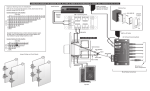
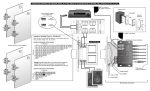
6. Follow the appropriate row and column to determine selector switch settings.
7. Set the selector switch to the correct X setting as determined.
CONSIDERATIONS
1. Make sure that your amplifier has adequate wattage for the number of speakers.
Watts per channel divided by the number of pairs should equal or exceed the individual speaker’s minimum wattage requirements.
2. It is recommended to use an UltraMatch™ volume control for each room.
3. Every jumper setting must be set on the same setting throughout the system.
4. A minimum speaker load of 4 ohms can be connected to the output of each
UltraMatch™ volume control.
Impedance Matching Charts For UltraMatch™
4 Ohm Pairs
Impedance Matching For 4 Ohm Amplifiers
8 Ohm Pairs
0
1
2
3
4
5
6
7
8
0
1X
2X
4X
4X
8X
8X
8X
8X
1
1X
2X
4X
4X
8X
8X
8X
8X
2
1X
2X
4X
4X
8X
8X
8X
8X
3
2X
4X
4X
8X
8X
8X
8X
4
2X
4X
4X
8X
8X
8X
8X
5
4X
4X
8X
8X
8X
8X
6
4X
4X
8X
8X
8X
8X
7
4X
8X
8X
8X
8X
8
4X
8X
8X
8X
8X
9
8X
8X
8X
8X
10
8X
8X
8X
8X
11
8X
8X
8X
12 13 14 15 16
8X 8X 8X 8X 8X
8X 8X 8X
8X
Example: The table to the right
shows an 8 ohm minimum impedance amplifier with 1 pair of 4 ohm
speakers and 3 pair of 8 ohm
speakers. The chart indicates the
jumper setting should be set at 8X.
4 Ohm Pairs
Impedance Matching For 8 Ohm Amplifiers
8 Ohm Pairs
0
1
2
3
4
0
2X
4X
8X
8X
1
1X
4X
8X
8X
2 3 4 5 6 7 8
2X 4X 4X 8X 8X 8X 8X
4X 8X 8X 8X 8X
8X 8X 8X
8X
3