1
900-12007001/Iss1.0
Page 4.6
FS900/925 MK II Operators Manual
FS 900 MK II Installation, System Set-Up and Test
should be left around the control unit for proper ventilation.
The FS 900/925 power supply is affixed to a bulkhead with four screws. The location
of the unit should be within 4.5 m/15 ft of the control unit (this is the length of
interconnect cables), and at a place that allows operation of the power switch and easy
reading of the current and voltage meters. The on/off switch and the meters may be
removed from the power supply box and remotely mounted next to the control unit if so
desired.
Optional equipment for interface to the control unit may be mounted in any convenient
location provided the user supplied interconnect cables are of sufficient length and the
required power is available.
4.2.2 Power Considerations
The display unit, generally, will require 110 VAC or 220 VAC. Depending on the
capabilities of the unit chosen, it may automatically detect the supply voltage or the
unit may have to be ordered for the correct voltage.
The FS 900 MK II processor will operate from either 110 VAC or 220 VAC. Voltage
selection is automatic and there are no jumpers or switches to set.
The power supply can be operated with either 110 VAC or 220 VAC. Selection of the
supply voltage is done by moving the jumpers on the screw terminal strip located
behind the voltage meter inside the power supply. Details on selecting the jumper
location are presented below in the section describing the connection of the FS
900/925 power supply (section 4.2.4.1).
4.2.3 Connecting a Display Unit
Either a RGB monitor or a VGA monitor may be connected to the FS 900 MK II
processor.
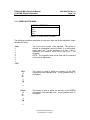
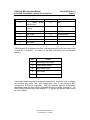
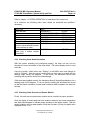
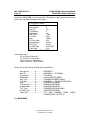
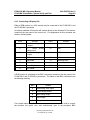
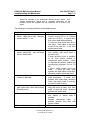
An industry standard VGA monitor will connect directly to the miniature D-15 connector
located on the rear panel of the control unit. Pin assignments for this connector are
shown in following table.
PIN #
SIGNAL
PIN #
1
R - Red analog video
output
9
Kongsberg Simrad Mesotech Ltd.
Port Coquitlam, BC - Canada
SIGNAL
N/C