1
RUGGEDCOM RS900G
Chapter 3
Installation Guide
Communication Ports
Communication Ports
The RS900G can be equipped with various types of communication ports to enhance its abilities and
performance. To determine which ports are equipped on the device, refer to the factory data file available through
ROS . For more information on how to access the factory data file, refer to the ROS User Guide for the RS900G.
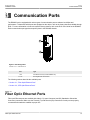
Each communication port type has a specific place in the RS900G chassis.
2
1
Figure 8: Port Assignment
1. Ports 1 to 8
2. Ports 9 to 10
Port
Type
1 to 8
Fast Ethernet Ports (10/100/1000Base-TX)
9 to 10
Dual Gigabit SFP Transceivers
The following sections describe the available ports:
• Section 3.1, “Fiber Optic Ethernet Ports”
• Section 3.2, “SFP Optic Ethernet Ports”
Section 3.1
Fiber Optic Ethernet Ports
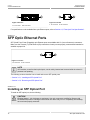
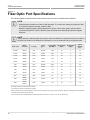
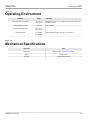
Fiber optic Ethernet ports are available with either LC (Lucent Connector) and SC (Standard or Subscriber
Connector) connectors. Make sure the Transmit (Tx) and Receive (Rx) connections of each port are properly
connected and matched to establish a proper link.
Fiber Optic Ethernet Ports
13