1
Serial Communications
Command
Description
Picture Adjust Commands (Calibration -> Input Image menu)
(CLR=[-50...+50])
Sets a value for color
PC / Control
(CON=[-50...+50])
Sets a value for contrast
(SHP=[-50...+50])
Sets a value for sharpness
(TNT=[-50...+50])
Sets a value for tint
HDMI Out
To Sec. Display
HDMI 7
5
HDMI 6
HDMI 8
HDMI Out
Audio Only
Ethernet
HDMI Out
To Pri. Display
4
9
3
8
1
2
7
Image Preset Commands
6
2 Receive Data
(to ctrl. system)
to Automation/
Control System
or PC
3 Transmit Data
(from ctrl. system)
5 Ground
(none of the other pins are used)
R
All commands must be followed by a carriage return character.
Description
A
Command
(MMP=2) or (KEY=50)
Loads “Custom 1” image preset
(MMP=3) or (KEY=51)
Loads “Custom 2” image preset
(MMP=1) or (KEY=49)
Loads “ISF Day” image preset
(MMP=0) or (KEY=48)
Loads “ISF Night” image preset
(TDM?)
Returns the 3D mode setting
(TDM=[0...4])
Sets the 3D mode setting
(0 = Auto, 1 = Off (2D), 2 = Side-by-Side, 3 = Top-and-Bottom, 4 = Frame Packing)
3D Mode Commands
Turns projector off
(PWR=1) or (KEY=1)
Turns projector on
IN
Power On/Off Commands
(PWR=0) or (KEY=2)
Screen Commands
(SCN?)
Returns the screen setting
(SCN=0) or (KEY=38)
Sets the screen to Screen 1
(SCN=1) or (KEY=39)
Sets the screen to Screen 2
(INS=0) or (KEY=13)
Selects the Composite 1 video input
(IDN?)
Returns display device name
(INS=1) or (KEY=24)
Selects the Composite 2 video input
(IIR?)
Returns input resolution
(INS=2) or (KEY=25)
Selects the Composite 3 video input
(MDL?)
Returns product model name
(INS=7) or (KEY=19)
Selects the HDMI 1 input
(IOR?)
Returns output resolution
(INS=8) or (KEY=20)
Selects the HDMI 2 input
(RMN=[0...65535])
Sets the remote code
(INS=9) or (KEY=21)
Selects the HDMI 3 input
(RMN?)
Returns the remote code
(INS=10) or (KEY=22)
Selects the HDMI 4 input
(ISN?)
(INS=11) or (KEY=81)
Selects the HDMI 5 input
(IFV?)
(INS=12) or (KEY=82)
Selects the HDMI 6 input
(INS=13) or (KEY=83)
Selects the HDMI 7 input
(INS=14) or (KEY=84)
Selects the HDMI 8 input
(INS=15) or (KEY=85)
Selects the DisplayPort input
(INS=4) or (KEY=17)
Selects the RGB HD 1 input
(INS=5) or (KEY=18)
Selects the RGB HD 2 input
(INS=6) or (KEY=23)
Selects the SCART input
(ASP=1) or (KEY=9)
Selects the 16:9 aspect ratio
(KEY=6)
Down-Arrow (
(ASP=0) or (KEY=10)
Selects the 4:3 aspect ratio
(KEY=4)
ENTER key
(ASP=4) or (KEY=44)
Selects the Cinema aspect ratio
(KEY=52)
EXIT key
(ASP=2) or (KEY=11)
Selects the Letterbox aspect ratio
(KEY=7)
Left-Arrow (
(ASP=6) or (KEY=46)
Selects the Native aspect ratio
(KEY=3)
MENU
(ASP=3) or (KEY=12)
Selects the VirtualWide aspect ratio
(KEY=8)
Right-Arrow (
(ASP=5) or (KEY=45)
Selects the Virtual Cinema aspect ratio
(KEY=5)
Up-Arrow (
(ASP=7) or (KEY=86)
Selects the Auto Cinema aspect ratio
EL
Miscellaneous Commands
PR
PR
Aspect Ratio Commands
IM
Selects the Component input
IM
(INS=3) or (KEY=14)
EL
Input Selection Commands
Y
The following is a partial list of
supported serial commands. For a
complete list, refer to the LightStyle™
LS-12HBd Installation/Operation
Manual.
RS-232
R
IR
HDMI 5
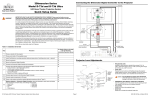
Configure the RS-232 controller or PC
serial port as follows: no parity, 8 data
bits, 1 stop bit and no flow control. Set
the baud rate to 19200.
Sec. Display Control
Sets a value for brightness
A
Pri. Display Control
(BRT=[-50...+50])
IN
Connect your control system or PC to
the RS-232 input of the Dimension
Digital Controller as shown in the
diagram at right.
Y
Note
(T[1...3][1...7]=[0...1])
Returns Dimension Digital Controller serial number
Returns firmware version number
12-volt trigger configuration:
[1...3] = Trigger number
[1...7] = Aspect ratio (1 = 16:9, 2 = 4:3, 3 = Letterbox, 4 = VirtualWide, 5 = Cinema,
6 = Virtual Cinema, 7 = Native)
[0...1] = On/off (0 = Cancel previous assignment, 1 = assign)
Example: (T15=1)[CR] assigns Trigger 1 to Cinema aspect ratio.
The following serial commands are used to emulate buttons on the remote control or Dimension Digital Controller front panel.
Each button has its own serial command, so effectively it is as if you were using the IR remote.
These commands provide active OSD responses just like IR remote commands.
) key
) key
) key
) key
© Copyright 2013 Runco International. All rights are reserved.
Trademarks and registered trademarks used in this document are the property of their respective owners.
LS-12HBd Projection System Quick Setup Guide
Page 4
020-1252-00 Rev. A (September 2013)