1
CAUTION To prevent electrostatic damage to electronic components, ground yourself by
touching an unpainted part of the printer frame before handling and installing the
printhead.
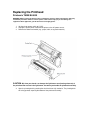
5. Touch an unpainted part of the printer frame before touching the printhead.
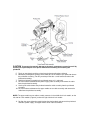
6. Behind the pivoting deck, gently pull the lower tabs of the retainer clips upward to release
the printhead assembly. (You only need to pull the tabs a small amount to release the
printhead assembly.)
7. Hold the printhead assembly by the printhead cover as it is released.
8. Push the release tab down on the power supply cable assembly and remove the cable
from the printhead assembly.
9. Use the pull-tab to remove the printhead controller cable assembly from the printhead
assembly.
10. Push the release tab down on the upper media sensor cable assembly and remove the
cable from the printhead assembly.
NOTE: The upper media sensor cable assembly connects in the middle for 4 inch models, on the
left side for 6 inch models (Figure 8), and on the right side for 8 inch models.
11. Position the new printhead assembly below the pivoting deck and connect the printhead
controller, power supply, and upper media sensor cable assemblies.