1
ELAN
HOME
SPP
SYSTEMS
INSTALLATION MANUAL
SS/SC4 Connection
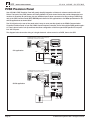
Use the SS/SC4 RJ-45 connector to integrate an ELAN SS1 System Station or VIA!SC-4 System Controller to an
S Series Multi-Room Controller in order to facilitate integration of RS-232 controlled systems such as security,
lighting, or HVAC. Use an ELAN C4545 RJ-45 Interconnect Cable for this purpose. It is necessary to flip the DIP
switch on the rear of the SPP labeled SS/SC4 and NO SS/SC4 to the SS/SC4 (upper) position when connecting
to a VIA!SC-4 or SS1. Place the switch in the lower position (NO SS/SC4) when not connecting to a VIA!SC-4 or
SS1.
When connecting multiple SPPs and a VIA!SC-4 or SS1, connect the VIA!SC-4 or SS1 to SPP #1 and set the DIP
switch on each SPP to the SS/SC4 position.
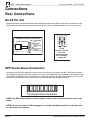
SS/SC4 RJ-45
Connector
SS/SC4 Switch
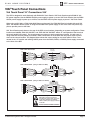
SS/SC4 Connections (SS1/SC4 to SPP)
SS1
SPP
SS/SC4
VIA!NET
ELAN
C45P
SS/SC4
SS/SC4
or
NO SS/SC4
SPP
VIA!SC4
VIA!NET
ELAN
C45P
SS/SC4
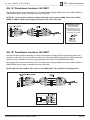
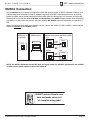
NOTE: The SS/SC4 Connector on the SPP does not supply power for VIA!SC-4 applications. Use a PWR1
16 VDC external power supply to power the VIA!SC-4.
VIA!NET
EXT IR
TO SENSE INPUTS
1
2
SS/SC4
3
USE STEREO 3.5mm PLUGS ONLY
4
5
6
1
2
3
4
5
6
7
8
ZONE
ZONE
1
5
TRIGGERS
ZONE
2
ZONE
POWER
ZONE
3
ZONE
+
6
ZONE
--
16VDC / 10A
4
7
ZONE
8
16VDC / 4A
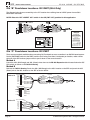
ELAN Precision Panels save
time and make sense out
of complex wiring jobs!
16VDC/1.5A
© ELAN Home Systems 2007 • All rights reserved.
Page 19