1
white paper
Overview: Designed for Simplicity
Extron IP Intercom is an easy-to-use two-way communication system that facilitates
room-to-help desk and room-to-room communications. IPI stations are designed for
ease of use and ease of integration.
Extron IPI stations feature simple, intuitive controls and operate with a single button push to talk. One button models and four button models are available for communication
with one or four locations.
IPI stations transmit voice data over the network, but do not require special network
control. IP Intercom does not require QoS - Quality of Service that would necessitate
extensive IT setup or network hardware upgrades. The point-to-point, room-to-help desk
voice bandwidth requirement is low and has minimal impact on network traffic. This
application relies on industry standard networking best practices of assuring enough
over capacity to permit the network to run smoothly.
In this document, we will review some best practices for set up and configuration
of the Extron IP Intercom. These guidelines will help in providing a successful
IP Intercom deployment.
IP Intercom Hardware Stations
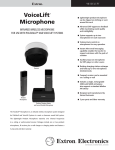
There are two types of Extron IP Intercom hardware stations: the integrated IPI 100
Series and the stand-alone IPI 200 Series.
The IPI 100 Series
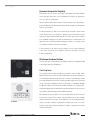
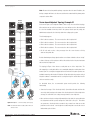
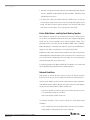
The one-button and four-button IPI 100 Series IPI stations require an MLC 226 IP
MediaLink Controller for operation. The Extron MLC 226 IP is an enhanced control panel
IPI 101 AAP
for controlling A/V equipment in any classroom or conference room. With large, backlit
power and input buttons and a volume control knob, the MLC 226 IP acts as an extended
remote control panel, simplifying control of the A/V system. For installation flexibility,
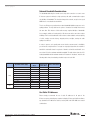
IPI 100 Series stations can be mounted in an MLC 226 IP AAP or in a separate AAP Architectural Adapter Plate mounting frame and positioned anywhere in the classroom,
up to 100 feet (30 meters) away from the MediaLink Controller.
Once installed, the intercom station connects to the MLC 226 IP via the intercom port
located on the rear panel of the controller. This port provides power, control, and audio
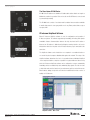
IPI 104 AAP
transport between the two products. The IPI 100 Series uses the existing MLC 226 IP
network connection, resulting in a substantial cost savings since there is no need to
install a second network cable drop. Only one IP address is required for A/V system
control and IP Intercom.
Extron Electronics – IP Intercom Best Installation Practices 12/06/07
Revision 2.0