1
αlpha-CON 550
Instruction Manual
5.3 Temperature Settings
Automatic Temperature Compensation (ATC):
The conductivity value of a sample is affected by temperature. Use ATC feature of
the monitor to compensate for conductivity changes when the temperature of the
sample or process liquid fluctuates. Connect a separate temperature probe
(Pt100/pt1000) to the monitor if an integrated conductivity/Temperature probe is not
available.
Manual Temperature Compensation (MTC):
Set the monitor to MTC (disable ATC) when the temperature of sample or process
liquid is constant and a temperature probe is not available. If you disable ATC, the
monitor allows you to set your process temperature (P.ºC) and calibration
temperature (C.ºC). This allows calibration at a different temperature other than the
process temperature. Example: Setting calibration temperature of 25°C lets you
calibrate using standard solutions at 25°C, even if your process temperature is
different from 25°C.
1
SETUP
HOLD
SETUP
SETUP
ENT
°C
SETUP
HOLD
HOLD
ENT
°C
SETUP
SETUP
HOLD
HOLD
SETUP
ENT
°F
HOLD
ENT
°C
°C
ATC
ATC
6
3
2
5
SETUP
ENT
HOLD
HOLD
1
4
3
2
ENT
7
SETUP
ENT
ENT
HOLD
°C
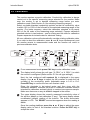
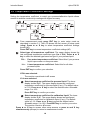
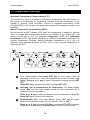
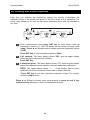
From measurement mode press ENT key to enter setup mode as
described in section 5.1. The LCD shows the first screen of setup mode
(rAng). Press ▲ or ▼ key to select Temperature settings screen (SET
ºCF).
Press ENT key to access temperature settings (SET ºCF).
2
Selecting unit of measurement for temperature: The upper display
shows ‘Unit’ and the lower display shows the last configured unit of
measurement for temperature.
Press ▲ or ▼ key to select the desired units for temperature (ºC or ºF).
Press ENT key to confirm your selection.
3
Enable/disable ATC: The lower display shows ‘AtC’ and the upper
display shows the last configured ATC selection (‘On’ or ‘OFF’).
Press ▲ or ▼ key to enable (ATC On) or disable (ATC OFF) automatic
temperature compensation. Press ENT key to confirm your selection.
19