1
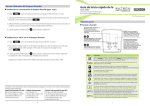
n Ion Calibration (Ion 700 Only)
The available ION calibration values are 0.10, 1.0, 10.0, 100.0, and 1000 parts per million (ppm).
Choose a minimum of 2 consecutive values for calibration and prepare the corresponding ion
calibration solutions. For best results always begin with your lowest standard value, followed by
the next lowest standard.
1. Connect the ISE and press
as needed to select ppm. Note: The primary reading will show
“- - - -” without a stored ion calibration. The secondary value is the corresponding mV reading
of the ISE.
2. Dip the ISE into your lowest standard solution value and stir. Press
reading is stable.
when the secondary
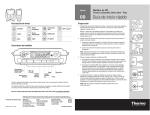
Quick Guide
Bench 700 Series
pH/mV/Ion/Conductivity/TDS/Dissolved Oxygen/ºC/ºF
Part of Thermo Fisher Scientific
GETTING STARTED
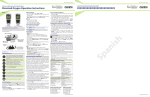
n Keypad Functions
Keys
3. Press
or
to match the primary display to your corresponding ion calibration
value (0.10, 1.0, 10, etc).
4. Press
to accept or
standard value.
to abort. The primary display will show the next highest calibration
Toggles between measurement and calibration modes.
In SETUP mode, returns user to the measurement mode.
5. Rinse the ISE then dip into the corresponding calibration standard and stir.
MI (Memory Insert) stores values into memory.
Increase value. Scroll up in SETUP mode.
6. Press
to accept or
to cancel. The mV/decade slope value will be displayed briefly if the
calibration is successful. “SLP Err” indicates calibration for the current point was not successful.
7. Revert to step 3 to calibrate additional points or press
mode at any time.
Functions
Powers the meter on and off. Upon power on, the meter
automatically begins in the mode that was last used. Calibration
and memory values are retained even if meter is unplugged.
Toggle between available measurement modes; pH/Temp,
mV/Temp, or ppm/mV (Ion 700 only).
Also used to switch from pH to Temp during pH calibration
mode. Press and hold for 5 seconds to enter SETUP mode.
MR (Memory Recall) recalls values from memory
Decrease value. Scroll down in SETUP mode.
as needed to return to measurement
Freezes measured reading. Press again to resume live reading.
Confirms calibration values in CAL mode.
Confirms selections in SETUP mode.
View recalled values in memory mode.
STORING AND RECALLING DATA
The 700 series meters can retain up to 100 points into memory for later retrieval.
1. In the measurement mode, press
to insert the measured value into memory.
The stored memory location value (StO) is briefly displayed.
2. To recall data from memory, press
. The location of the most recent stored data is displayed
first. Press
or
to select the location of the desired data, then press
to accept.
3. Press
to return to the stored data location. Press
to return to measurement mode.
For more information on our products, please contact our channel partner or visit our websites listed below:
Eutech Instruments Pte Ltd
Blk 55, Ayer Rajah Crescent,
#04-16/24, Singapore 139949
[email protected]
www.eutechinst.com
Oakton Instruments
625 E Bunker Ct,
Vernon Hills, IL 60061, USA
[email protected]
www.4oakton.com
4
Eutech Instruments Europe B.V.
P.O. Box 254, 3860 AG Nijkerk,
The Netherlands Wallerstraat 125K,
3862 CN Nijkerk, The Netherlands
[email protected]
www.eutechinst.com
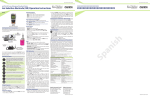
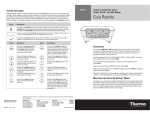
n LCD Annunciators
Setup
mode
Measurement
mode
Calibration
mode
Memory mode or
when data is stored
into memory
Measured
value is held
Measured
value is stable
Current
measurement
unit / mode
of operation
During setup,
select auto hold
ON, ready ON or
Ready OFF
Automatic
temperature
compensation
is active
Error or invalid
key pressed
Prompts user
to select buffer
Electrode error
when appears
with ERR
Primary
reading
1
Secondary
reading
During pH CAL,
secondary reading is
the auto recognized pH
buffer standard value