1
Table of Contents
Chapter 1.
Introduction....................................................................................5
1.1.
1.2.
1.3.
About CUA-854 ......................................................................................................5
Key Features ..........................................................................................................5
Package Included ...................................................................................................5
Chapter 2.
Chapter 3.
Connect your antenna...................................................................6
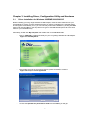
Installing Driver, Configuration Utility and Hardware.................7
3.1.
3.2.
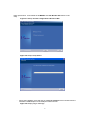
Driver Installation for Windows 98SE/ME/2000/2003/XP.......................................7
Driver Installation for Windows Vista ................................................................... 10
Chapter 4.
Using the Configuration Utility for 98SE/ME/2000/2003/XP .....14
4.1.
4.2.
4.3.
4.3.1.
4.3.2.
4.3.3.
4.3.4.
4.3.5.
4.3.6.
Overview.............................................................................................................. 14
Access the Configuration Utility........................................................................... 14
Getting to Know the Utility ................................................................................... 16
Profile.................................................................................................................. 16
Link Status ......................................................................................................... 27
Site Survey ......................................................................................................... 28
Statistics ............................................................................................................. 30
Advanced............................................................................................................ 31
About .................................................................................................................. 33
Chapter 5.
Troubleshooting ..........................................................................34
2