1
2. How to use Geosat
2C
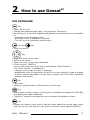
THE KEYBOARD
Key
♦
♦
♦
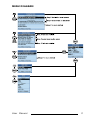
Power On the unit.
Change the displayed page (Map, Trip Computer, Directions).
By pressing for 1 second to display the Brightness and Contrast menu it is possible
to:
− Activate the fast brightness shift.
- Move the cursor to change the intensity.
- Turn Off the unit (press and hold the key).
Key and
♦
Key
Zoom out and in.
Key
♦
♦
♦
♦
Move the arrow on the map.
Select menu items.
Select the keys on the virtual keyboard.
"Enter function" [ENTER]:
Press in the center the cursor key to activate the "Enter function".
The "Enter function" is available to:
- change or entry data in menu or submenu
- activate the menu (in Map Mode, from GPS or cursor position) to add or change
a Mark, receive information on the chart, activate the A-B function (distance
between two points).
Key
♦
♦
Quit menu.
Return to original position (GPS position) on the map.
Key
♦
♦
Find a place, a town, a Mark, a point given its latitude and longitude (LAT/LON)
and display the latest researches.
Press for 1 second to activate the menu to adjust the speaker volume.
Key
♦
Display the menus: press once to see the menu about the current page, press
twice to see the main menu to set up the unit and to select special functions.
User Manual
27