1
File Manager Physical Overview
The File Manager is 2u in height and is ready to mount in any standard 19inch NEMA or EIA rack. This section explains the following:
•
Front View of the File Manager
•
Rear View of the File Manager
Front View of the File Manager
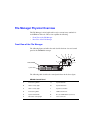
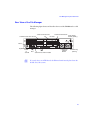
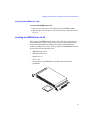
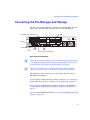
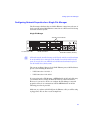
The following figure and table show and describe the front view and control
panel of the SR2400 file manager.
B
C
D
E
F
G
H
A
I
DVD/CD-ROM
L
System disk
K
J
The following table describes the control panel shown in the above figure.
l
SR2400 Control Panel
A
Power/Sleep button
G
System ID LED
B
NIC 2 activity light
H
System ID button
C
NIC 1 activity light
I
System reset button
D
Power/Sleep LED
J
USB 2.0 Connector
E
System status LED
K
Recessed NMI button (need tool)
F
Hard drive activity light
L
Video connector