1
Welcome
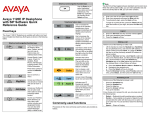
Table 1: Menu items accessed through context-sensitive soft keys (Part 2 of 6)
Item
More…
Function
Press the More… context-sensitive soft
key to select a new menu list of contextsensitive soft keys (three menu lists are
available).
When you press the More… contextsensitive soft key, a different selection of
context-sensitive soft keys appears.
•
If you press the More… contextsensitive soft key once from the first
menu list, you access the following
context-sensitive soft keys:
[CallFwd] [DND] [Retrve] [More…]
•
If you press the More… contextsensitive soft key from the first menu
list twice, you access the following
context-sensitive soft keys:
[ScrnSvr] [Presnce] [Prefs]
[More…]
•
If you press the More… contextsensitive soft key from the first menu
list three times, you return to the first
menu list with the following contextsensitive soft keys.
[Redial] [abc] [Msgs] [More…]
When you press the More… context-sensitive soft key for the first time,
the following context-sensitive soft keys appear on the menu list.