1
Features
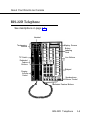
To Set a Reminder
1. Press the programmed Reminder Set button, or press
the programmed Feature button and dial 81. The light
next to the Reminder Set flashes.
2. Press the DSS or inside Auto Dial button for the
extension.
3. Dial a four-digit time from 0100 to 1259.
4. Dial 2 (A) for AM or 7 (P) for PM.
The light goes on next to the Reminder Set button.
If the station associated with the DSS button or inside Auto Dial
button has a Reminder Set button programmed, that light goes on
also. If the station has no Reminder Set button programmed, the
Reminder Set light goes off.
5. Repeat Steps 2 through 4 for each additional
telephone.
6. Press the Reminder Set button.
The light next to the Reminder Set button goes out.
4-50
Reminder Service