1
233758_4.book Page 46 Wednesday, March 27, 2002 5:32 AM
Using features to troubleshoot
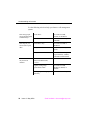
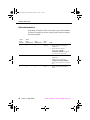
You hear a tone and see a display. The following table
describes what the tone and display indicate and how to
respond.
display
tone
frequency
Invalid
intercept
440 Hz
alternating
620 Hz
pattern
(seconds)
status of extension
next step
.25 on
invalid
cancel and try again
idle and ringing
(working properly)
release the call
.25 on
repeated
Verified
confirmation
none
ringback
combined
440 Hz +
480 Hz
1 s on
3 s off
repeated
idle automatic or
release link
(working properly)
release the call
none
dial tone
combined
350 Hz +
440 Hz
continuous
idle (working properly)
release the call
Bridged
none
bridged onto active call
(working properly)
release the call
Out of
Service
reorder
trouble condition
cancel;
report an
out-of-service
condition
combined
480 Hz +
620 Hz
.25 on
.25 off
repeated
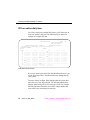
Facility Busy Indication
You can use Facility Busy Indication to display the idle or busy
condition of phones, trunks, or paging zones.
To use this feature you need to add facility busy indication
buttons to your phone. Label the facility busy buttons as “Busy”
followed by the number or name of the facility being monitored.
If the green light associated with the Facility Busy Indication
button stays lit for a long time, the facility may have a problem.
46
Issue 4 May 2002
Send feedback: [email protected]