1
To cancel Call Forwarding:
• Press the Call Forward button or dial the Call Forward cancel code *03. You will hear a 3-beep
confirmation tone.
Call Pickup (to answer a ringing telephone within your predetermined programmed Pickup Group).
To pickup a call:
• Dial the Call Pickup code *11. If you encounter a busy tone, the call has been answered or the
caller hung up.
Directed Call Pickup (allows you to answer any ringing telephone if administered)
: Dial the Directed Call Pickup code *10 and the extension of the ringing telephone.
Personal Settings/ Options
To access the personal Options application:
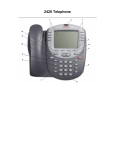
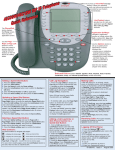
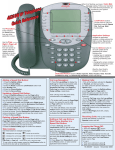
• (Press the Options softkey from the Home screen.
• To select an option, press the Feature button for the desired option
• To return to the Home screen, press the Exit button.
Contrast Option (increase or decrease the contrast of screen)
• Press the Contrast button
• Use the arrow keys to adjust the level of contrast.
• Press the Done softkey to return to the Options screen.
Personal Ring Option
There are 8 different ringing pattern options
• Press Personal Ringing button.
• To hear a ring pattern, Press the button to the left or right of any numbered pattern. Continue
through the pattern choices until the desired pattern is heard.
• Save the chosen pattern by pressing the Save softkey, or to restore the previous setting without
changing, press the Cancel softkey
Visual Ring Option (activates the red lamp above the display area to flash when your telephone rings).
• Press the Visual feature button.
• Press the yes/no softkey to indicate whether you want Visual Ring enabled.
• Press the Save softkey.
Feature Button Labeling (To label/re-label feature buttons on your telephone)
• Press Options
• Press the Right Page button > and press the line/feature button next to “Feature Button Labeling”
• Press the Line/Feature button next to “re-label Feature Buttons”
• Press the button you wish to label
• Enter the label using the keypad i.e. the 2 key contains A, B, C, and 2. Press 2 once for the A,
twice for the B, three times displays the C and pressing it a fourth time displays the 2. Use the
Symbol softkey to add a space, comma, apostrophe, dash, etc.
• Press Save to save your entry
• Press Phone/Exit to exit labeling.
3