1
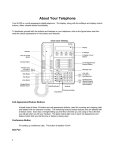
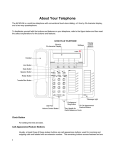
24 Call appearances/
feature buttons (on right)
These 24 buttons on the right of the voice terminal can be
used either for incoming or outgoing calls (call
appearances) and are labeled with an extension number or
for accessing features (feature buttons) and are labeled
with a feature name. Each has a red light telling you this is
the line you are using or this is the line you will get when
you lift your handset. The green status light next to each
call appearance and feature button tells you the line or
feature is being used.
Transfer button
For transferring a call to another voice terminal.
Volume control button
For adjusting the volume of the following:
•
The speakerphone or speaker when a call is in progress
using the 2-way speakerphone or 1-way speaker
•
The handset receiver level while a call is in progress
using the handset
•
The tone ringer when the speaker is off and either the
handset is inactive or the tone ringer is active
Note: When the speaker is active, the ringer volume is
automatically reduced to a low setting. The volume is
restored when the speaker is turned off.
Remember: The Volume control button on your voice
terminal does not control the volume level of adjunct
equipment.
The 801A Expansion Module
The 801A Expansion Module is an optional adjunct device which can be connected to
the 8434DX voice terminal in order to extend the number of call appearance and
feature buttons available on the voice terminal.
Note: An 8434DX voice terminal with attached 801A expansion module can only be
used with a DEFINITY G3V3.3 or later release.
The expansion module has 24 buttons arranged in two columns.
•
Each of the top 18 buttons has a red and green light next to it. These buttons can
be used for call appearances or features.
•
Each of the bottom six buttons has a single green status light next to it. These
buttons can be used for features only.
For information on connecting the expansion module to the 8434DX voice terminal,
see the 801A Expansion Module Instruction Manual shipped with the expansion
module.
5