1
5. Remote Control
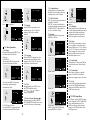
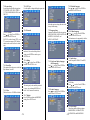
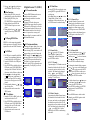
Panel Button Functions
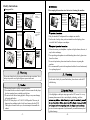
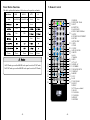
This table explains the functions of the buttons on the panel in each mode:
Panel Button
①
Mode
DVD
DVB-T
ATV
AV
Mode/DVB-T
Mode/DVD
Mode
Mode
③
VOL-
VOL-
1
2
3
④
VOL+
VOL+
4
②
Search
⑤
Menu
Menu
19
20
21
5
⑥
6
22
⑦
7
23
24
25
⑧
Power
Power
Power
Power
Power
1.In DVD mode, press and hold MODE on the panel to switch to DVB-T mode.
2.In DVB-T mode, press and hold MODE on the panel to switch to DVD mode.
-5-
8
9
10
26
27
28
29
30
31
32
33
34
35
11
12
13
14
15
16
17
18
-6-
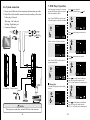
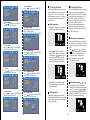
1.POWER
2. DVD/DVB-T Shift
3.EJECT
4.SUBTITLE
5.LANGUAGE
6.DVD/CARD/USB Shift
7.SETUP
8.UP / DOWN/LEFT/RIGHT
9.ENTER
10.TITLE/PBC
11.REV
12.FWD
13.STOP
14.PLAY/PAUSE
15.MUTE
16.A-B
17.RADIO
18.EPG
19.TV / AV
20.DISPLAY
21.NUMBER
22.SEARCH/GOTO
23.REPEAT
24.MENU
25.P. P
26.L/R
27.FAV/ZOOM
28.NEXT
29.PREV
30.TTX( not available)
31.SLOW
32.VOLUME+
33.VOLUME34.PRLIST
35.RETURN