1
3.1. MOUNTING PROCEDURES
3.1.1. Mounting the ATN PS-15 to a
HeadMount
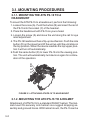
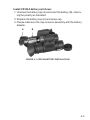
To mount the ATN PS-15 to a headmount, perform the following:
1. Loosen the screw (A). Push the button (B) and insert the rail of
the PS-15 into the socket (C) of the headset.
2. Place the headmount with PS-15 on your a head.
3. Loosen the screw (A) and move the unit along the rail for eye
relief adjustment.
4. The PS-15 headmount has a flip-up mechanism. Push the side
button (D) on the mount and lift the unit up until the unit stops in
the top position. When the device reaches the top/upper position it will turn off automatically.
5.Push the same button (D) to lower PS-15 into the viewing position. The unit will automatically turn back on again for continuation of the operation.
D
B
A
C
Figure 3-1. Attaching ATN PS-15 to Head Mount
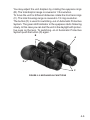
3.1.2. Mounting the ATN PS-15 to a helmet
Attachment of ATN PS-15 to a standard PASGT helmet. The Helmet mount fits securely onto helmet via a rugged strapping assembly and grooved hooks. With helmet mount, the PS-15 can be
3-2