1
XL-SV22BK
LET0088-001A
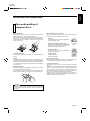
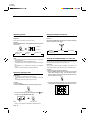
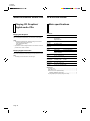
OVERVIEW OF CONTROLS
The following is an explanation of the the basic function of controls
on the front panel of the Player and the remote control. The function
of some controls may be restricted in actual use depending on the
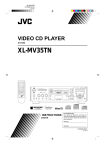
XL-SV22
VIDEO CD PLAYER
KEY CONTROL
2
1
STANDBY
/
on-going operations. The remote control has nine (9) unique function
buttons in addition to those on the player.
DOWN
OPEN/CL
NORMAL
UP
STANDBY/ON
KARAOKE
NORMAL
12
16
3
PBC OFF
SURROUND
4
20
1 BIT P•E•M D•D•CONVERTER
MPX
5
6
MIC 1
RET
MIC 2
PREV
DIGITAL ECHO
7
SELEC
VIDEO INTRO
MIC VOLUME
14
BOOK DIGEST
22
MIN
MAX
MIN
PHONES
MAX
KEY CONTROL
MIN
MAX
13
8
VIDEO CD
9
15
NTSC/PAL COMPATIBILITY
10
23
11
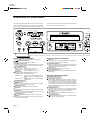
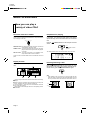
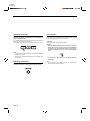
Left front panel of the Player
(Controls marked (R) have equivalents on the remote control.)
1
/ STANDBY/ON button (R)
Switches between power ON and STANDBY.
2 STANDBY indicator (Red)
Lights when the power cord is connected and the power is turned
off. The STANDBY indicator is not lit when the player is turned on.
3 KEY CONTROL buttons
Transposes the music key.
DOWN button: used to flatten by a half tone. (R)
NORMAL button: returns to original key tone.
UP # button:
used to sharpen by a half tone. (R)
4 MODE switch
Switches the KARAOKE/NORMAL/PBC OFF mode.
KARAOKE mode: one track playing mode.
NORMAL mode:
continuous plural tracks playing mode. Required also for the Playback Control (PBC)
function.
PBC OFF mode: inhibits the Playback Control (PBC) function
of the video CD.
5 SURROUND button (R)
Changes the sound mode.
6 MPX button (R)
Activates the multiplex function, which switches to NORMAL
(stereo), L-ch monaural and R-ch monaural.
7 DIGITAL ECHO knob
Adjusts the degree of the echo effect for the microphone.
8 MIC knobs
Adjusts volume of the microphone corresponding to MIC number.
9 PHONES jack
Used for connecting stereo headphones. The volume is set to a
predetermined level and is not adjustable.
10 KEY CONTROL jack
Used for connecting a microphone with key control function.
11 MIC jacks
Used for connecting microphones. The jacks correspond to MIC
volume knobs located above.
Page 4
21
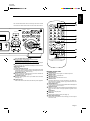
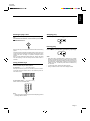
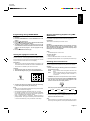
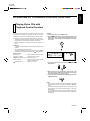
Center front panel of the Player
12
13
14
15
DISC tray
Used to load a disc. To insert/remove a disc, press the 0 OPEN/
CLOSE button located at the right of the tray.
VIDEO INTRO button (R)
Applies to video CDs only. The introductory five (5) seconds of
tracks on a video CD are displayed on the television screen in order
to present the contents of the video CD.
Display window
Shows information about the status of operation.
BOOK DIGEST button (R)
Displays video segments you marked with the Bookmark function.
(See page 12.)
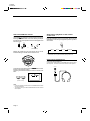
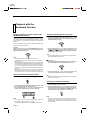
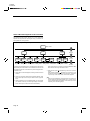
Right front panel of the Player
16
17
18
19
20
0 OPEN/CLOSE button (R)
Used to open and close disc tray.
Number keys (1 to 10) (R)
Used to specify a track number for playing, changing, or programming. To operate numbers above ten (10), press the +10 button
once. The number keys (1 to 10) are then assigned the numbers
11 to 20 instead of 1 to 10. The maximum key number assignment
is 99. In PBC function operation, the number keys are additionally
utilized for the selection of menu items. See page 15 “Operation of
Playback Control function”.
PROGRAM button (R)
Any desired sequence of tracks can be programmed with the
number keys and the +10 button. The program button cannot be
used while the Playback Control function is activated.
+10 button (R)
Used to shift the numbers assigned to the number keys to 11 or
higher (maximum 99).
RETURN button (R)
Utilized for operation with the PBC function. This button is used to
return to a menu screen during play.