1
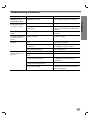
Troubleshooting (Continued)
Severe hum or noise is
heard.
Radio stations cannot
be tuned in.
No sound from DIGITAL
AUDIO IN (OPTICAL).
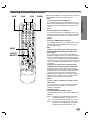
The remote control
does not work properly.
Correction
Cause
Symptom
The plugs and jacks are dirty.
Wipe them with a cloth slightly moistened with alcohol.
The disc is dirty.
Clean the disc.
The speakers and components are
connected poorly.
Connect the speakers and components
securely.
The DVD+VCR is located too close to
the TV.
Move your TV away from the audio components.
The antenna is positioned or connected
poorly.
Connect the antenna securely.
Adjust the antennas and connect an
external antenna if necessary.
The signal strength of the stations is too
weak (when tuning in with automatic
tuning).
Tune in the station manually.
No stations have been preset or preset
stations have been cleared (when
tuning by scanning preset stations).
Preset the stations (page 37).
DVD+VCR source is not set to DIGITAL
AUDIO IN (OPTICAL).
Select OPTICAL by pressing AUX.
The remote control is not pointed at the
remote sensor of the DVD+VCR.
Point the remote control at the remote
sensor of the DVD+VCR.
The remote control is too far from the
DVD+VCR.
Operate the remote control within 23 ft
(7 m).
There is an obstacle in the path of the
remote control and the DVD+VCR.
Remove the obstacle.
The batteries in the remote control are
exhausted.
Replace the batteries with new ones.
This remote control uses same buttons
for VCR and DVD (ex. PLAY).
When using a VCR, first press the VCR
button. When using a DVD, first press
the DVD button.
Moisture Condensation
Moisture condensation can occur:
In locations where moisture condensation may occur:
• When the DVD+VCR is moved from a cold place to a
warm place.
• Keep the DVD+VCR plugged into an AC power outlet
with POWER On. This will help prevent condensation.
• Under extremely humid conditions.
• When condensation has occurred, wait a few hours
for the DVD+VCR to dry before using it.
40